"7e6fc58c410f2894"{"id":"23302","slug":"ivy-studio-procedural-vine-generation","title":"Ivy Studio - Procedural vine generation","category":"Particles \u0026 Effects","engine":"Original Unity version: 2019.4.22","assetVersion":"Original Unity version: 2019.4.22","engineVersion":"Asset Version:1.1.5","tag":"Particles","accent":"cyan","visual":"city","summary":"Ivy Studio generates ivy and climbing plants from scene colliders, letting vegetation grow, spread, and adapt in editor or at runtime. It also includes deterministic regrowth, runtime optimization, and controls for performance-focused scenes.","platform":"Unity","publishedAt":"2026-04-09T16:36:05.000Z","updatedAt":"2026-04-19T15:35:30.000Z","sourceNotes":[],"fileContents":[],"compatibility":["Unity","Original Unity version: 2019.4.22","Asset Version: 1.1.5"],"featuredImage":{"alt":"Ivy Studio - Procedural vine generation","src":"https://3dcghub.com/wp-content/uploads/2026/04/71218b76f564_730d570b-4d57-4921-9252-b86bc3e27d82_1280x720_stretch.webp"},"hasDownloadLink":true,"downloads":0,"terms":[{"taxonomy":"category","slug":"particles-and-effects","name":"Particles \u0026 Effects"},{"taxonomy":"post_tag","slug":"environment","name":"Environment"},{"taxonomy":"post_tag","slug":"tools","name":"Tools"},{"taxonomy":"post_tag","slug":"unity","name":"Unity"}],"galleryImages":[{"src":"https://3dcghub.com/wp-content/uploads/2026/04/b63b62e39b3a_7eec6759-e6af-4d1c-b8c6-580b477fad3c_scaled.webp","alt":"Ivy Studio - Procedural vine generation"},{"src":"https://3dcghub.com/wp-content/uploads/2026/04/450b39069eeb_2dae9c5a-50b5-4f12-b828-5d88690e71e4_scaled.webp","alt":"Ivy Studio - Procedural vine generation"},{"src":"https://3dcghub.com/wp-content/uploads/2026/04/bff3b2891ac9_fe7cc7eb-58a7-4364-8794-b7375f724b39_scaled.webp","alt":"Ivy Studio - Procedural vine generation"},{"src":"https://3dcghub.com/wp-content/uploads/2026/04/aa9955f1f390_ff282eea-2b3d-4300-aa19-ea2fc4955905_scaled.webp","alt":"Ivy Studio - Procedural vine generation"},{"src":"https://3dcghub.com/wp-content/uploads/2026/04/6a6555ce51c9_4212c895-1dbf-4a15-ad4f-5335a0b37701_scaled.webp","alt":"Ivy Studio - Procedural vine generation"},{"src":"https://3dcghub.com/wp-content/uploads/2026/04/a5b392d1833b_71e531de-83ca-4c3d-bdcd-fc65ffaa0d51_scaled.webp","alt":"Ivy Studio - Procedural vine generation"},{"src":"https://3dcghub.com/wp-content/uploads/2026/04/edf542360134_e7cdc106-52ea-4173-8677-c3a955f07f91_scaled.webp","alt":"Ivy Studio - Procedural vine generation"},{"src":"https://3dcghub.com/wp-content/uploads/2026/04/c991d6b2b895_9ba25ddb-7d8a-49be-81d3-c43268d0ad64_scaled.webp","alt":"Ivy Studio - Procedural vine generation"},{"src":"https://3dcghub.com/wp-content/uploads/2026/04/7dbff6989c79_28bc4825-be88-4251-93e5-673ced260bc6_scaled.webp","alt":"Ivy Studio - Procedural vine generation"},{"src":"https://3dcghub.com/wp-content/uploads/2026/04/a3d37176bd09_262e410f-d15f-4d38-befa-7020a368648f_scaled.webp","alt":"Ivy Studio - Procedural vine generation"}],"accessPanel":{"kind":"resource","title":"Access this resource","eyebrow":"Free Download","message":"Log in or create a free account to start your download.","fileName":"Ivy Studio - Procedural vine generation v1.1.5.7z","safetyNote":"All resources are 100% manually reviewed to eliminate all risks.","actionLabel":"Download Free","resourceType":"Resource archive"},"contentHtml":"\u003ch2\u003eGrowth starts from the scene itself\u003c/h2\u003e\n\u003cp\u003eIvy Studio generates ivy and climbing plants by using colliders in the scene as the surface they grow across. That makes the setup feel tied to the actual environment instead of relying on a static placement workflow. The system focuses on realistic, environment-adaptive vegetation and can be used to create optimized ivy at runtime.\u003c/p\u003e\n\u003cp\u003eThe workflow works in two directions. Ivy can be created in the editor, then grown later in the game, or generated directly during runtime. There is also a deterministic ungrow option, which recreates the same ivy exactly as it was placed in the editor without needing to save it directly into the scene. That keeps the scene file smaller while still preserving the planted result.\u003c/p\u003e \u003ch2\u003eEditor placement and runtime growth\u003c/h2\u003e\n\u003cp\u003eThe package supports ivy creation and manipulation in the editor, which is useful when setting up walls, ruins, ledges, or any surface that needs climbing vegetation. Once the ivy is in place, it can also grow on the fly during runtime. That makes the asset suitable for scenes that need vegetation to appear as part of gameplay or as a staged environmental effect.\u003c/p\u003e\n\u003cp\u003eThe runtime side is not limited to a simple spawn action. Ivy can grow gradually at runtime, and the system is complete from a scripting side. The shader side of that gradual growth is still in progress, with shadowing issues while the ivy is growing, and that part is currently limited to the Standard Pipeline.\u003c/p\u003e\n\u003cp\u003eFor projects that need a lighter scene file, the ungrow option is one of the more practical pieces of the workflow. It removes all ivy from the scene and can regrow it for edit-time use or game start, while keeping the scene size down.\u003c/p\u003e \u003ch2\u003eControlling spread, shape, and plant behavior\u003c/h2\u003e\n\u003cp\u003eIvy Studio uses plant behavior rules for generation, so the growth is not just a random mesh placement pass. Gravity and curvature modifiers are available to control how the ivy spreads, which gives the growth process a more directed shape when working on overhangs, vertical walls, or winding surfaces.\u003c/p\u003e\n\u003cp\u003eLeaf and flower changes can be applied directly with any prefab. That makes it possible to swap the visible plant details without rebuilding the whole system. The branch structure also has multiple presentation options: flat mesh branches are available for maximum performance, while full 3D branches are available for stronger systems.\u003c/p\u003e\n\u003cp\u003eDeterministic planting is another important control. It allows the exact same ivy branches to be recreated when the ivy is generated again, which is useful when a scene needs consistent results between editor placement and later regeneration.\u003c/p\u003e \u003ch2\u003ePerformance tools for larger scenes\u003c/h2\u003e\n\u003cp\u003eA strong part of Ivy Studio is the amount of attention given to performance. The system supports extreme optimization of the ivy mesh, with both per-stroke and global modes available for runtime use. It also includes an ivy generator limit per area drawing, so multiple grow managers can be used with one manager per area.\u003c/p\u003e\n\u003cp\u003eTo help divide the workload, the package includes a grid-based system with automated grid creation. That grid approach is meant to split the ivy for performance and works alongside the limited-area planting per manager setup. A level of detail system is also included, cutting off the ivy at distance when the grid system and limited-area planting are being used.\u003c/p\u003e\n\u003cp\u003eThe asset also supports models with more than 64K vertices. For scenes that need to move beyond the procedural setup, ivy meshes can be exported and turned into prefabs.\u003c/p\u003e \u003ch2\u003eRendering details and pipeline notes\u003c/h2\u003e\n\u003cp\u003eShaders include wind support for all pipelines, which helps the vegetation respond with motion across supported rendering setups. That keeps the ivy from looking static when the scene calls for environmental movement.\u003c/p\u003e\n\u003cp\u003eThe gradual growth feature is more limited at the moment. The shader side is still being finalized, and the growth effect currently has shadowing issues while it is happening. For now, that part is Standard Pipeline only. The rest of the system still centers on practical generation, runtime use, and scene management rather than a purely decorative setup.\u003c/p\u003e\n\u003cp\u003eA step-by-step URP tutorial playlist is also included in the material, which suggests the workflow has been documented for users who want to follow the generation process in a more guided way.\u003c/p\u003e \u003ch2\u003eWhere it fits best\u003c/h2\u003e\n\u003cp\u003eIvy Studio is most useful in environments where climbing vegetation needs to follow the actual shape of the level: building facades, broken structures, walls, and other collider-defined surfaces. It also suits projects that need ivy to be created in the editor and then regenerated or grown at runtime without storing a heavy scene setup.\u003c/p\u003e\n\u003cp\u003eThe package is a practical fit for scenes that need controlled spread, low scene size, and regeneration consistency. The combination of collider-based growth, deterministic planting, mesh optimization, and grid-based management makes it especially relevant for environment work that has to stay organized as it scales.\u003c/p\u003e\n\u003cp\u003eFor teams working on vegetation-heavy scenes, the most useful parts are the ones that keep the ivy controllable after placement: regrowth, area limits, mesh export, and runtime optimization. Those are the features that make the system suitable for production scenes that need both visual coverage and technical restraint.\u003c/p\u003e\n\n\u003ch2\u003eExplore Similar Assets\u003c/h2\u003e\n\u003cul\u003e\n\u003cli\u003e\u003ca href=\"https://3dcghub.com/opencv-for-unity/\" title=\"OpenCV for Unity\"\u003eOpenCV for Unity\u003c/a\u003e\u003c/li\u003e\n\u003cli\u003e\u003ca href=\"https://3dcghub.com/exporter-for-unreal-to-for-unity-2026/\" title=\"Exporter for Unreal to/for Unity 2026\"\u003eExporter for Unreal to/for Unity 2026\u003c/a\u003e\u003c/li\u003e\n\u003cli\u003e\u003ca href=\"https://3dcghub.com/dialogue-system-for-unity/\" title=\"Dialogue System for Unity\"\u003eDialogue System for Unity\u003c/a\u003e\u003c/li\u003e\n\u003cli\u003e\u003ca href=\"https://3dcghub.com/ambient-sounds-interactive-soundscapes-for-unity-6/\" title=\"Ambient Sounds – Interactive Soundscapes for Unity 6\"\u003eAmbient Sounds – Interactive Soundscapes for Unity 6\u003c/a\u003e\u003c/li\u003e\n\u003cli\u003e\u003ca href=\"https://3dcghub.com/pegasus-flythroughs-for-unity-6/\" title=\"Pegasus – Flythroughs for Unity 6\"\u003ePegasus – Flythroughs for Unity 6\u003c/a\u003e\u003c/li\u003e\n\u003c/ul\u003e","contentTextLength":5557,"navigation":{"current":3522,"total":3618,"previous":{"id":"23314","slug":"kws-water-system-hdrp-rendering","title":"KWS Water System (HDRP Rendering)","category":"Particles \u0026 Effects","platform":"Unity","updatedAt":"2026-04-19T15:35:30.000Z"},"next":{"id":"23352","slug":"portal-effect-hdrp","title":"Portal Effect: HDRP","category":"Particles \u0026 Effects","platform":"Unity","updatedAt":"2026-04-19T15:35:29.000Z"}},"relatedResources":[{"id":"23345","slug":"mudbun-volumetric-vfx-modeling","title":"MudBun: Volumetric VFX \u0026 Modeling","category":"Particles \u0026 Effects","engine":"Original Unity version: 2019.4.15","assetVersion":"Original Unity version: 2019.4.15","engineVersion":"Asset Version:1.6.52","tag":"Particles","accent":"cyan","visual":"animation","summary":"MudBun focuses on localized volumetric effects that need real-time mesh generation, surface distortion, and flexible shaping. It also reaches into volumetric modeling, with meshing modes, auto-rigging, and export options that fit into Unity workflows.","platform":"Unity","publishedAt":"2026-04-09T16:44:14.000Z","updatedAt":"2026-04-19T15:35:29.000Z","sourceNotes":[],"fileContents":[],"compatibility":["Unity","Original Unity version: 2019.4.15","Asset Version: 1.6.52"],"featuredImage":{"alt":"MudBun: Volumetric VFX \u0026 Modeling","src":"https://3dcghub.com/wp-content/uploads/2026/04/2854ec81944f_9c045921-5f8b-4126-aa34-cdef8b35be29_1280x720_stretch.webp"},"hasDownloadLink":true,"downloads":1},{"id":"15225","slug":"crazy-ivy-realistic-ivy-generator-vine-plugin-grow-procedural-plants-in-editor","title":"Crazy Ivy Realistic Ivy Generator Vine Plugin - Grow Procedural Plants in Editor","category":"Procedural Systems","engine":"5.0 - 5.4","assetVersion":"Engine version: 5.0 - 5.4","engineVersion":"4.27","tag":"Procedural Systems","accent":"blue","visual":"animation","summary":"Crazy Ivy is a powerful procedural tool designed to grow realistic ivy directly within your editor. By automatically detecting static meshes, this plugin allows for the creation of unique, optimized vegetation systems.","platform":"Unreal Engine","publishedAt":"2026-03-12T08:22:47.000Z","updatedAt":"2026-04-19T15:44:52.000Z","sourceNotes":[],"fileContents":[],"compatibility":["Unreal Engine","Engine version: 5.0 - 5.4"],"featuredImage":{"alt":"Crazy Ivy Realistic Ivy Generator Vine Plugin - Grow Procedural Plants in Editor","src":"https://3dcghub.com/wp-content/uploads/2026/03/82ad95ba-cc8c-422c-b4cc-dff51937564d.webp"},"hasDownloadLink":true,"downloads":1},{"id":"23250","slug":"ethereal-urp-2021-volumetric-lighting-fog","title":"Ethereal URP 2021 - Volumetric Lighting \u0026 Fog","category":"Particles \u0026 Effects","engine":"Original Unity version: 2019.4.22","assetVersion":"Original Unity version: 2019.4.22","engineVersion":"Asset Version:1.7.0b","tag":"Particles","accent":"cyan","visual":"luts","summary":"Ethereal URP 2021 focuses on atmosphere: fog, volumetric lighting, and the look of illuminated particles suspended in the air. It also includes extra demos, Atrium and Forest scenes, and a bonus URP foliage shader with wind and subsurface scattering.","platform":"Unity","publishedAt":"2026-04-09T16:06:05.000Z","updatedAt":"2026-04-19T15:36:48.000Z","sourceNotes":[],"fileContents":[],"compatibility":["Unity","Original Unity version: 2019.4.22","Asset Version: 1.7.0b"],"featuredImage":{"alt":"Ethereal URP 2021 - Volumetric Lighting \u0026 Fog","src":"https://3dcghub.com/wp-content/uploads/2026/04/ce7bbed84197_c2124dbb-d237-443a-bb2d-1bcb7d8a3368_1280x720_stretch.webp"},"hasDownloadLink":true,"downloads":1}]}
Particles
Ivy Studio - Procedural vine generation
Ivy Studio generates ivy and climbing plants from scene colliders, letting vegetation grow, spread, and adapt in editor or at runtime. It also includes deterministic regrowth, runtime optimization, and controls for performance-focused scenes.
Ivy Studio generates ivy and climbing plants by using colliders in the scene as the surface they grow across. That makes the setup feel tied to the actual environment instead of relying on a static placement workflow. The system focuses on realistic, environment-adaptive vegetation and can be used to create optimized ivy at runtime.
The workflow works in two directions. Ivy can be created in the editor, then grown later in the game, or generated directly during runtime. There is also a deterministic ungrow option, which recreates the same ivy exactly as it was placed in the editor without needing to save it directly into the scene. That keeps the scene file smaller while still preserving the planted result.
Editor placement and runtime growth
The package supports ivy creation and manipulation in the editor, which is useful when setting up walls, ruins, ledges, or any surface that needs climbing vegetation. Once the ivy is in place, it can also grow on the fly during runtime. That makes the asset suitable for scenes that need vegetation to appear as part of gameplay or as a staged environmental effect.
The runtime side is not limited to a simple spawn action. Ivy can grow gradually at runtime, and the system is complete from a scripting side. The shader side of that gradual growth is still in progress, with shadowing issues while the ivy is growing, and that part is currently limited to the Standard Pipeline.
For projects that need a lighter scene file, the ungrow option is one of the more practical pieces of the workflow. It removes all ivy from the scene and can regrow it for edit-time use or game start, while keeping the scene size down.
Controlling spread, shape, and plant behavior
Ivy Studio uses plant behavior rules for generation, so the growth is not just a random mesh placement pass. Gravity and curvature modifiers are available to control how the ivy spreads, which gives the growth process a more directed shape when working on overhangs, vertical walls, or winding surfaces.
Leaf and flower changes can be applied directly with any prefab. That makes it possible to swap the visible plant details without rebuilding the whole system. The branch structure also has multiple presentation options: flat mesh branches are available for maximum performance, while full 3D branches are available for stronger systems.
Deterministic planting is another important control. It allows the exact same ivy branches to be recreated when the ivy is generated again, which is useful when a scene needs consistent results between editor placement and later regeneration.
Performance tools for larger scenes
A strong part of Ivy Studio is the amount of attention given to performance. The system supports extreme optimization of the ivy mesh, with both per-stroke and global modes available for runtime use. It also includes an ivy generator limit per area drawing, so multiple grow managers can be used with one manager per area.
To help divide the workload, the package includes a grid-based system with automated grid creation. That grid approach is meant to split the ivy for performance and works alongside the limited-area planting per manager setup. A level of detail system is also included, cutting off the ivy at distance when the grid system and limited-area planting are being used.
The asset also supports models with more than 64K vertices. For scenes that need to move beyond the procedural setup, ivy meshes can be exported and turned into prefabs.
Rendering details and pipeline notes
Shaders include wind support for all pipelines, which helps the vegetation respond with motion across supported rendering setups. That keeps the ivy from looking static when the scene calls for environmental movement.
The gradual growth feature is more limited at the moment. The shader side is still being finalized, and the growth effect currently has shadowing issues while it is happening. For now, that part is Standard Pipeline only. The rest of the system still centers on practical generation, runtime use, and scene management rather than a purely decorative setup.
A step-by-step URP tutorial playlist is also included in the material, which suggests the workflow has been documented for users who want to follow the generation process in a more guided way.
Where it fits best
Ivy Studio is most useful in environments where climbing vegetation needs to follow the actual shape of the level: building facades, broken structures, walls, and other collider-defined surfaces. It also suits projects that need ivy to be created in the editor and then regenerated or grown at runtime without storing a heavy scene setup.
The package is a practical fit for scenes that need controlled spread, low scene size, and regeneration consistency. The combination of collider-based growth, deterministic planting, mesh optimization, and grid-based management makes it especially relevant for environment work that has to stay organized as it scales.
For teams working on vegetation-heavy scenes, the most useful parts are the ones that keep the ivy controllable after placement: regrowth, area limits, mesh export, and runtime optimization. Those are the features that make the system suitable for production scenes that need both visual coverage and technical restraint.
 Particles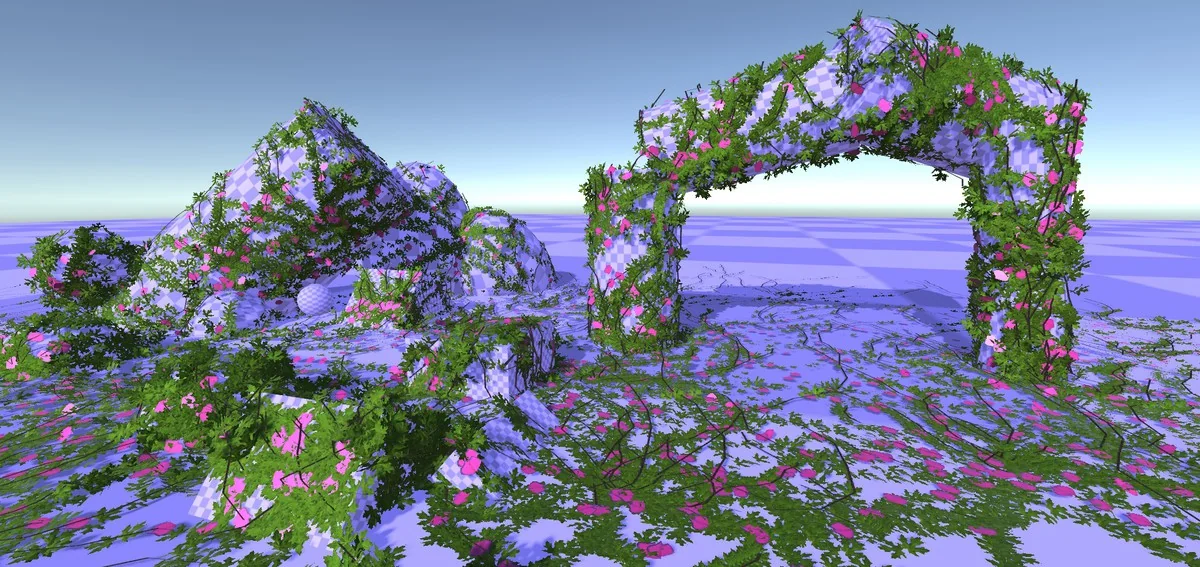
 Particles
 Procedural Systems
 Particles