"7b46a695175d8694"{"id":"1001481","slug":"input-keys-icon-pack-v2","title":"Input Keys Icon Pack V2","category":"Icons","engine":"4.27+,5.0+","assetVersion":"","engineVersion":"Engine Version: 4.27+,5.0+","tag":"Icons","accent":"blue","visual":"mech","summary":"Display game controls seamlessly with Input Keys Icon Pack V2, offering 456 icons, Blueprint functions, and rich text decorators for Unreal Engine.","platform":"Unreal Engine","publishedAt":"2026-10-08T09:00:56.971Z","updatedAt":"2026-10-08T09:00:56.971Z","sourceNotes":[],"fileContents":[],"compatibility":["Unreal Engine","Engine Version: 4.27+,5.0+"],"featuredImage":{"alt":"Input Keys Icon Pack V2","src":"/wp-content/uploads/published/2026/10/f771480323e7-df9913ff-88fa-42ed-ae49-f6a81c7ab9a5-0ba8f25674.webp"},"hasDownloadLink":true,"downloads":0,"terms":[{"taxonomy":"category","slug":"icons","name":"Icons"}],"galleryImages":[{"src":"/wp-content/uploads/published/2026/10/70bacce2d6a7-470610fc-1664-4b28-84e2-811a075e6bbd-e2890fc0d0.webp","alt":"Input Keys Icon Pack V2"},{"src":"/wp-content/uploads/published/2026/10/780c27b5e7cb-e961e343-b0b8-45f6-993b-80172922e9e8-ed97278b7d.webp","alt":"Input Keys Icon Pack V2"},{"src":"/wp-content/uploads/published/2026/10/41b54154f383-7adec30d-d77c-424a-bc9c-05a7bf4570f3-f084d3628c.webp","alt":"Input Keys Icon Pack V2"},{"src":"/wp-content/uploads/published/2026/10/fa4d67cea1eb-f4f3b91a-6932-478a-8f5b-8883ee315677-e79d9a5f54.webp","alt":"Input Keys Icon Pack V2"},{"src":"/wp-content/uploads/published/2026/10/cecf17eee5c2-665a55d8-aed3-4c02-a67b-ecefabb641a9-0e051330ad.webp","alt":"Input Keys Icon Pack V2"},{"src":"/wp-content/uploads/published/2026/10/b96323e038e6-bb833d15-0fa1-45a2-b852-bd235617de45-a840f4af4c.webp","alt":"Input Keys Icon Pack V2"},{"src":"/wp-content/uploads/published/2026/10/1de78d9fdd5c-c9e433ad-0a55-475a-bebc-1537d31051dd-68de19eb09.webp","alt":"Input Keys Icon Pack V2"},{"src":"/wp-content/uploads/published/2026/10/07150fd5269a-dc320803-6582-45f3-b999-fb1a6401b8bc-9cde0f099c.webp","alt":"Input Keys Icon Pack V2"},{"src":"/wp-content/uploads/published/2026/10/e7f9c80bc592-d378ea42-c44b-4acf-b61a-bc1b2458f4cb-b8f5330492.webp","alt":"Input Keys Icon Pack V2"},{"src":"/wp-content/uploads/published/2026/10/ddb3d58cbc3a-383c6b15-555f-4e9a-98ff-b8f24224e164-4da5d92a86.webp","alt":"Input Keys Icon Pack V2"}],"accessPanel":{"kind":"resource","title":"Download this resource","eyebrow":"Free Download","message":"Log in or create a free account to start your download.","fileName":"Content.7z","safetyNote":"Resources are manually reviewed before listing to improve quality and reduce obvious risks.","actionLabel":"Download Free","resourceType":"Resource archive"},"contentHtml":"\u003ch2\u003eGuiding Player Prompts and In-Game Actions\u003c/h2\u003e\u003cp\u003eCommunicating control schemes cleanly to a player requires consistent, recognizable iconography for every possible action. When a gameplay sequence asks a player to interact with an object, navigate an inventory screen, or complete a fast-paced quick-time event, the user interface must present the exact hardware button mapped to that function. Handling these prompts manually across multiple peripheral layouts often results in mismatched graphic sizing or incomplete control coverage.\u003c/p\u003e\u003cp\u003eInput Keys Icon Pack V2 addresses the challenge of building clear user interface prompts inside Unreal Engine. By collecting buttons across keyboard, mouse, and gamepad hardware into an organized asset group, it allows developers to present control bindings directly inside dialogue boxes, tutorial prompts, and action hints without having to assemble custom icons for individual devices.\u003c/p\u003e\u003ch2\u003e456 Input Keys and Controller Button Assets\u003c/h2\u003e\u003cp\u003eThe collection supplies 456 icons that cover the full spectrum of supported Unreal Engine input actions. Rather than restricting projects to standard alphanumeric keys, the set accounts for standard keyboard keys, mouse clicks and movements, and console controller buttons. This release also incorporates dark theme variants and includes VR icons, expanding beyond earlier revisions that only catered to standard light aesthetics or non-VR hardware setups.\u003c/p\u003e\u003cp\u003eGamepad coverage ensures that developers working on multi-platform projects or console titles can switch control iconography smoothly when players switch from a keyboard and mouse to an external controller. Because every button prompt mirrors the core inputs recognized by Unreal Engine, interface designers can reliably map the entire input matrix to match player hardware configurations.\u003c/p\u003e\u003ch2\u003eTexture Resolutions and Rich Text Decorator Blueprints\u003c/h2\u003e\u003cp\u003eVisual presentation in UI design demands assets that scale appropriately across different widget layouts, split-screen interfaces, and prompt dialogs. The icons in this collection are formatted in standard texture sizes suited for on-screen readouts:\u003c/p\u003e\u003cul\u003e\u003cli\u003e128x128 for standard square keys and circular controller face buttons\u003c/li\u003e\u003cli\u003e128x256 for elongated inputs such as modifier keys or rectangular mouse buttons\u003c/li\u003e\u003cli\u003e128x512 for wide inputs, spacebars, or specialized layout controls\u003c/li\u003e\u003c/ul\u003e\u003cp\u003eTo eliminate the friction of hand-placing static image widgets alongside typography, the package provides 6 decorator blueprints designed specifically for Unreal Engine rich text blocks. These decorators interpret text markup tags and embed the corresponding button texture inline with standard dialogue or instructions, preventing misaligned text baselines or awkward layout spacing in narrative boxes.\u003c/p\u003e\u003ch2\u003eQuerying Textures with the Blueprint Function Library\u003c/h2\u003e\u003cp\u003eHardcoding texture references into individual UI widgets quickly becomes unmanageable as a project scales. Dynamic mapping requires a system where the interface can query an input mapping directly from player settings and pull the corresponding visual asset instantly.\u003c/p\u003e\u003cp\u003eThe included Blueprint function library provides a dedicated search function that takes a specific key identifier and returns its matching texture asset. When building dynamic tutorial widgets, a menu can look up the user's active keybinding, run it through the function library, and immediately retrieve the proper icon to display. This capability automates UI updates, ensuring that if a player remaps an action or swaps controllers mid-game, the on-screen prompt refreshes without requiring custom Blueprint switch nodes for every possible key.\u003c/p\u003e\u003ch2\u003eCustom C++ Decorators for In-Line Icon Sizing\u003c/h2\u003e\u003cp\u003eWhile standard rich text decorators handle basic embedded images, adjusting graphic scale on the fly often requires underlying code extensions. The system supports custom decorator handling through two standalone C++ files that grant developers direct control over icon dimensions inside text strings.\u003c/p\u003e\u003cp\u003eImplementing the custom decorator requires three direct steps:\u003c/p\u003e\u003cul\u003e\u003cli\u003eAdd the two C++ files into your Unreal Engine project source directory.\u003c/li\u003e\u003cli\u003eDerive a new Blueprint class directly from the compiled C++ decorator class.\u003c/li\u003e\u003cli\u003eAssign the resulting class inside your rich text widget style data to begin adjusting icon scale inline.\u003c/li\u003e\u003c/ul\u003e\u003cp\u003eBy subclassing the C++ implementation, interface designers gain the ability to alter button heights and widths directly via rich text tags, matching the visual balance of varying font sizes across localized languages or display scaling settings.\u003c/p\u003e\u003ch2\u003eIntegrating Prompts in Tutorials and Interactive Cutscenes\u003c/h2\u003e\u003cp\u003eVisual prompts are central to teaching gameplay mechanics early in a production. Whether paired with structured tutorial sequences or contextualized during action set-pieces, clear key imagery prevents player confusion. Systems that display interactive keys during cutscenes rely heavily on immediate, readable icons popping up to indicate sudden controller prompts or narrative decisions.\u003c/p\u003e\u003cp\u003eInput Keys Icon Pack V2 slots directly into systems running tutorial frameworks or cinematic prompt mechanics like interactive cutscenes. With unified resolutions, comprehensive controller and keyboard coverage, rich text Blueprint decorators, and straightforward key-to-texture search logic, the package provides the complete visual layer needed to keep gameplay prompts legible across any stage of production.\u003c/p\u003e\n\n\u003ch2\u003eExplore Similar Assets\u003c/h2\u003e\n\u003cul\u003e\n\u003cli\u003e\u003ca href=\"https://3dcghub.com/pro-icon-pack-survival/\" title=\"Pro Icon Pack: Survival\"\u003ePro Icon Pack: Survival\u003c/a\u003e\u003c/li\u003e\n\u003cli\u003e\u003ca href=\"https://3dcghub.com/clean-flat-gui-elements/\" title=\"Clean Flat GUI Elements\"\u003eClean Flat GUI Elements\u003c/a\u003e\u003c/li\u003e\n\u003cli\u003e\u003ca href=\"https://3dcghub.com/craft-resources-icons/\" title=\"Craft Resources Icons\"\u003eCraft Resources Icons\u003c/a\u003e\u003c/li\u003e\n\u003cli\u003e\u003ca href=\"https://3dcghub.com/hyper-mesh-to-icon-creator-v4/\" title=\"Hyper Mesh to Icon Creator v4\"\u003eHyper Mesh to Icon Creator v4\u003c/a\u003e\u003c/li\u003e\n\u003cli\u003e\u003ca href=\"https://3dcghub.com/250-sci-fi-flat-icons/\" title=\"250 Sci-fi Flat Icons\"\u003e250 Sci-fi Flat Icons\u003c/a\u003e\u003c/li\u003e\n\u003c/ul\u003e","contentTextLength":5525,"navigation":{"current":66,"total":3481,"previous":{"id":"1001482","slug":"insanepistolaction-animset","title":"InsanePistolAction AnimSet","category":"Combat","platform":"Unreal Engine","updatedAt":"2026-10-08T09:04:10.630Z"},"next":{"id":"1001480","slug":"industrial-factory-factory-warehouse-industrial-factory-modular-factory","title":"Industrial Factory (Factory, Warehouse, Industrial Factory, Modular Factory)","category":"Industrial","platform":"Unreal Engine","updatedAt":"2026-10-08T08:48:14.024Z"}},"relatedResources":[{"id":"1000928","slug":"pro-icon-pack-survival","title":"Pro Icon Pack: Survival","category":"Icons","engine":"4.26+,5.0+","assetVersion":"","engineVersion":"Engine Version: 4.26+,5.0+","tag":"Icons","accent":"blue","visual":"mech","summary":"Survival-themed UI icons for inventories, HUDs, and main menu screens. Use them as a flexible base to build or extend your own icon set.","platform":"Unreal Engine","publishedAt":"2026-08-09T15:24:13.690Z","updatedAt":"2026-08-09T15:24:13.690Z","sourceNotes":[],"fileContents":[],"compatibility":["Unreal Engine","Engine Version: 4.26+,5.0+"],"featuredImage":{"alt":"Pro Icon Pack: Survival","src":"/wp-content/uploads/published/2026/08/7e0743a954f7-6d6e5f76-7b2b-4777-843b-53d39752210c-4cedfa33f3.webp"},"hasDownloadLink":true,"downloads":1},{"id":"15412","slug":"clean-flat-gui-elements","title":"Clean Flat GUI Elements","category":"Icons","engine":"4.26+,5.0+","assetVersion":"Engine version: 4.26+,5.0+","engineVersion":"4.24","tag":"Icons","accent":"blue","visual":"city","summary":"Enhance your project with Clean Flat GUI Elements, featuring over 4,000 vector icons and 6,000 shapes. This high-quality pack includes PNG and PSD files for versatile game development.","platform":"Unreal Engine","publishedAt":"2026-03-12T08:57:23.000Z","updatedAt":"2026-04-19T15:44:47.000Z","sourceNotes":[],"fileContents":[],"compatibility":["Unreal Engine","Engine version: 4.26+,5.0+"],"featuredImage":{"alt":"Clean Flat GUI Elements","src":"https://3dcghub.com/wp-content/uploads/2026/03/7ad47f28-2bf8-4982-b7cc-3fa30329a6f0.webp"},"hasDownloadLink":true,"downloads":0},{"id":"1001224","slug":"craft-resources-icons","title":"Craft Resources Icons","category":"Icons","engine":"5.0+","assetVersion":"","engineVersion":"Engine Version: 5.0+","tag":"Icons","accent":"blue","visual":"mech","summary":"Explore 216 hand-drawn Craft Resources Icons by Rexard, featuring transparent backgrounds and compatibility with the Fantasy Icons Megapack.","platform":"Unreal Engine","publishedAt":"2026-09-19T09:18:22.427Z","updatedAt":"2026-09-19T09:18:22.427Z","sourceNotes":[],"fileContents":[],"compatibility":["Unreal Engine","Engine Version: 5.0+"],"featuredImage":{"alt":"Craft Resources Icons","src":"/wp-content/uploads/published/2026/09/bb26f64810d9-a436993e-fd7d-400b-986e-b87a11c432bb-92dda09f71.webp"},"hasDownloadLink":true,"downloads":0}]}
Icons
Input Keys Icon Pack V2
Display game controls seamlessly with Input Keys Icon Pack V2, offering 456 icons, Blueprint functions, and rich text decorators for Unreal Engine.
Category:Unreal Engine,IconsPlatform: Unreal EngineEngine Version: 4.27+,5.0+Published: Oct 8, 2026
Icons
Resource overview
Guiding Player Prompts and In-Game Actions
Communicating control schemes cleanly to a player requires consistent, recognizable iconography for every possible action. When a gameplay sequence asks a player to interact with an object, navigate an inventory screen, or complete a fast-paced quick-time event, the user interface must present the exact hardware button mapped to that function. Handling these prompts manually across multiple peripheral layouts often results in mismatched graphic sizing or incomplete control coverage.
Input Keys Icon Pack V2 addresses the challenge of building clear user interface prompts inside Unreal Engine. By collecting buttons across keyboard, mouse, and gamepad hardware into an organized asset group, it allows developers to present control bindings directly inside dialogue boxes, tutorial prompts, and action hints without having to assemble custom icons for individual devices.
456 Input Keys and Controller Button Assets
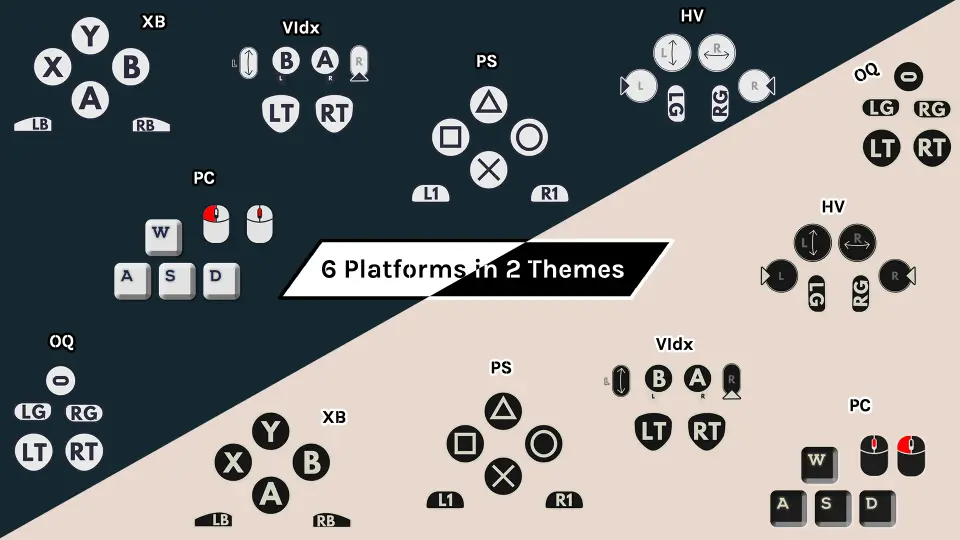
The collection supplies 456 icons that cover the full spectrum of supported Unreal Engine input actions. Rather than restricting projects to standard alphanumeric keys, the set accounts for standard keyboard keys, mouse clicks and movements, and console controller buttons. This release also incorporates dark theme variants and includes VR icons, expanding beyond earlier revisions that only catered to standard light aesthetics or non-VR hardware setups.
Gamepad coverage ensures that developers working on multi-platform projects or console titles can switch control iconography smoothly when players switch from a keyboard and mouse to an external controller. Because every button prompt mirrors the core inputs recognized by Unreal Engine, interface designers can reliably map the entire input matrix to match player hardware configurations.
Texture Resolutions and Rich Text Decorator Blueprints
Visual presentation in UI design demands assets that scale appropriately across different widget layouts, split-screen interfaces, and prompt dialogs. The icons in this collection are formatted in standard texture sizes suited for on-screen readouts:
128x128 for standard square keys and circular controller face buttons
128x256 for elongated inputs such as modifier keys or rectangular mouse buttons
128x512 for wide inputs, spacebars, or specialized layout controls
To eliminate the friction of hand-placing static image widgets alongside typography, the package provides 6 decorator blueprints designed specifically for Unreal Engine rich text blocks. These decorators interpret text markup tags and embed the corresponding button texture inline with standard dialogue or instructions, preventing misaligned text baselines or awkward layout spacing in narrative boxes.
Querying Textures with the Blueprint Function Library
Hardcoding texture references into individual UI widgets quickly becomes unmanageable as a project scales. Dynamic mapping requires a system where the interface can query an input mapping directly from player settings and pull the corresponding visual asset instantly.
The included Blueprint function library provides a dedicated search function that takes a specific key identifier and returns its matching texture asset. When building dynamic tutorial widgets, a menu can look up the user's active keybinding, run it through the function library, and immediately retrieve the proper icon to display. This capability automates UI updates, ensuring that if a player remaps an action or swaps controllers mid-game, the on-screen prompt refreshes without requiring custom Blueprint switch nodes for every possible key.
Custom C++ Decorators for In-Line Icon Sizing
While standard rich text decorators handle basic embedded images, adjusting graphic scale on the fly often requires underlying code extensions. The system supports custom decorator handling through two standalone C++ files that grant developers direct control over icon dimensions inside text strings.
Implementing the custom decorator requires three direct steps:
Add the two C++ files into your Unreal Engine project source directory.
Derive a new Blueprint class directly from the compiled C++ decorator class.
Assign the resulting class inside your rich text widget style data to begin adjusting icon scale inline.
By subclassing the C++ implementation, interface designers gain the ability to alter button heights and widths directly via rich text tags, matching the visual balance of varying font sizes across localized languages or display scaling settings.
Integrating Prompts in Tutorials and Interactive Cutscenes
Visual prompts are central to teaching gameplay mechanics early in a production. Whether paired with structured tutorial sequences or contextualized during action set-pieces, clear key imagery prevents player confusion. Systems that display interactive keys during cutscenes rely heavily on immediate, readable icons popping up to indicate sudden controller prompts or narrative decisions.
Input Keys Icon Pack V2 slots directly into systems running tutorial frameworks or cinematic prompt mechanics like interactive cutscenes. With unified resolutions, comprehensive controller and keyboard coverage, rich text Blueprint decorators, and straightforward key-to-texture search logic, the package provides the complete visual layer needed to keep gameplay prompts legible across any stage of production.
 Icons
Icons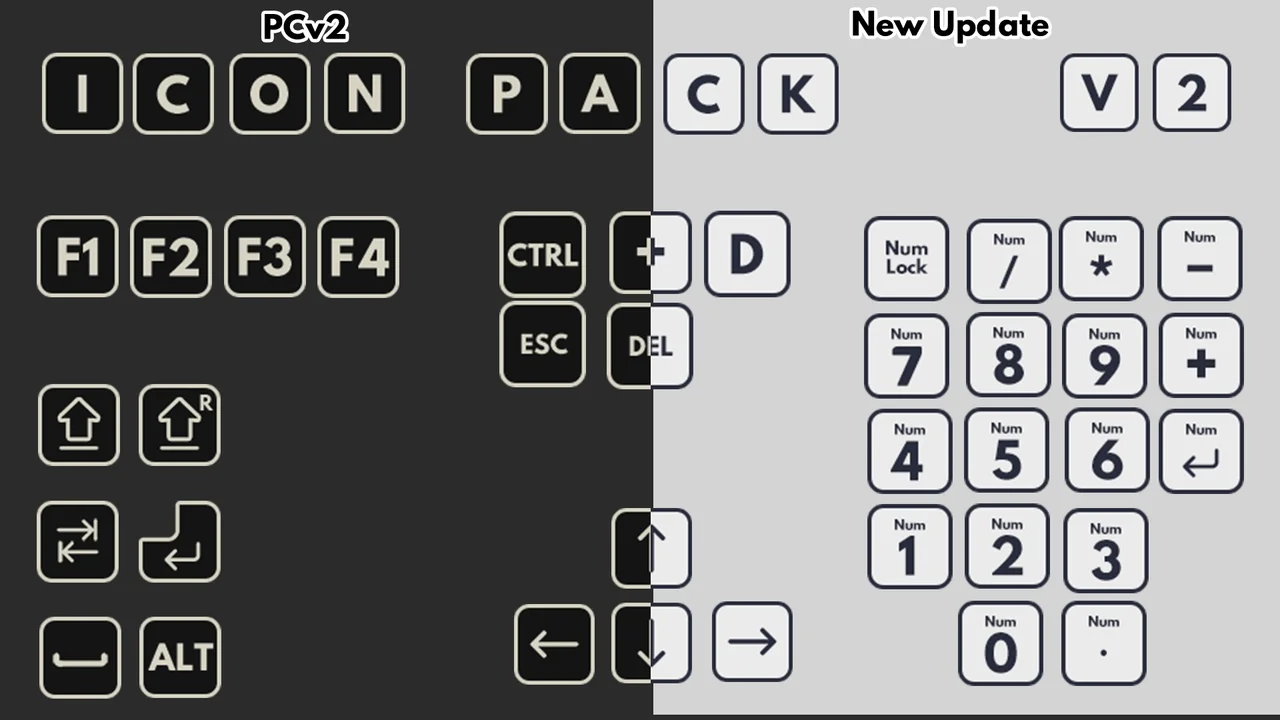
 Icons
Icons Icons
Icons Icons
Icons