"6f9bd6df1f44a86f"{"id":"1001224","slug":"craft-resources-icons","title":"Craft Resources Icons","category":"Icons","engine":"5.0+","assetVersion":"","engineVersion":"Engine Version: 5.0+","tag":"Icons","accent":"blue","visual":"mech","summary":"Explore 216 hand-drawn Craft Resources Icons by Rexard, featuring transparent backgrounds and compatibility with the Fantasy Icons Megapack.","platform":"Unreal Engine","indexPolicy":"index","publishedAt":"2026-09-19T09:18:22.427Z","updatedAt":"2026-09-19T09:18:22.427Z","sourceNotes":[],"fileContents":[],"compatibility":["Unreal Engine","Engine Version: 5.0+"],"featuredImage":{"alt":"Craft Resources Icons","src":"/wp-content/uploads/published/2026/09/bb26f64810d9-a436993e-fd7d-400b-986e-b87a11c432bb-92dda09f71.webp"},"hasDownloadLink":true,"downloads":0,"terms":[{"taxonomy":"category","slug":"icons","name":"Icons"}],"galleryImages":[{"src":"/wp-content/uploads/published/2026/09/89b9b4740882-b6351929-c255-4684-be65-f3125b7bbbaf-0c3aba4420.webp","alt":"Craft Resources Icons"}],"accessPanel":{"kind":"resource","title":"Download this resource","eyebrow":"Free Download","message":"Log in or create a free account to start your download.","fileName":"Content.7z","safetyNote":"Resources are manually reviewed before listing to improve quality and reduce obvious risks.","actionLabel":"Download Free","resourceType":"Resource archive"},"contentHtml":"\u003ch2\u003eIntegrating Transparent Craft Resources Icons into Unreal Engine UI\u003c/h2\u003e\n\u003cp\u003eImplementing 2D interface assets into Unreal Engine widget hierarchies requires clean alpha separation and versatile layering. The Craft Resources Icons set provides 216 distinct icons designed with transparent backgrounds, allowing immediate placement across varied user interface surfaces without the need to trim borders or manually mask out backdrop artifacts.\u003c/p\u003e\n\u003cp\u003eIn standard Slate and Unreal Motion Graphics (UMG) pipelines, these assets drop directly into image brushes, border wrappers, and custom button styles. Because each icon isolates the subject against an empty alpha channel, UI designers can drop them over stone-carved inventory slots, parchment skill sheets, metal-trimmed recipe panels, or dynamic tooltip popups. The absence of a baked-in square frame gives full authority to the game’s UI styling, preventing visual clashes between the asset's boundary and the underlying HUD design.\u003c/p\u003e \u003ch2\u003eVisual Execution Across 216 Hand Drawn Fantasy Assets\u003c/h2\u003e\n\u003cp\u003eThe visual direction of this collection relies on a detailed, hand-drawn art style calibrated specifically for fantasy settings. Hand-rendered item art establishes immediate material presence, giving items such as woods, metals, fabrics, and alchemical reagents a tactile quality that sharp, purely geometric vector assets often lack.\u003c/p\u003e\n\u003cp\u003eMaintaining a cohesive visual language across an entire game economy is notoriously difficult when sourcing individual art pieces. With 216 icons sharing a unified hand-painted treatment, production teams avoid the jarring aesthetic shifts that occur when mixing disparate icon packs. The rendering highlights lighting accents, edge definition, and rich color values tailored to readability at both small inventory grid dimensions and larger inspection screens.\u003c/p\u003e \u003ch2\u003eStructuring Crafting Trees and Resource Progression\u003c/h2\u003e\n\u003cp\u003eComplex crafting loops in fantasy games demand clear visual distinction across tiers of raw ingredients, intermediate components, and refined materials. A crafting system fails when players cannot distinguish copper from bronze, or basic timber from enchanted wood at a glance. The extensive volume of 216 craft resource items delivers the visual range needed to support deep progression architectures.\u003c/p\u003e\n\u003cp\u003eGame systems can divide this inventory into clear production paths:\u003c/p\u003e\n\u003cul\u003e \u003cli\u003ePrimary gathering items representing raw, unprocessed natural materials.\u003c/li\u003e \u003cli\u003eSmelted, cured, or refined intermediates used to transition basic harvests into functional crafting stock.\u003c/li\u003e \u003cli\u003eSpecialized reagents, catalysts, and alchemical additions designated for higher-tier recipe modifications.\u003c/li\u003e \u003cli\u003eFinished mechanical or structural components ready for weapon assembly, armor forging, or base construction.\u003c/li\u003e\n\u003c/ul\u003e\n\u003cp\u003eDeploying distinct hand-drawn illustrations across these tiers prevents inventory fatigue and maintains clarity throughout crafting trees, recipe books, and vendor interaction screens.\u003c/p\u003e \u003ch2\u003eCompatibility with the Fantasy Icons Megapack Ecosystem\u003c/h2\u003e\n\u003cp\u003eCreated by Rexard, this set operates in direct continuity with the broader Fantasy Icons Megapack ecosystem. Game productions expanding beyond baseline crafting into expansive equipment trees, magic grimoires, status effects, and consumable systems require cross-category coherence. The Craft Resources Icons maintain the same stroke weights, lighting angles, and saturation levels established in Rexard's neighboring packs.\u003c/p\u003e\n\u003cp\u003eThis cross-pack compatibility prevents visual fragmentation. When a player transitions from viewing an equipped magical blade to the raw materials needed to temper it, the interface retains a continuous artistic voice. Studios leveraging the Fantasy Icons Megapack can integrate these 216 resource icons as a direct, seamless extension of their active item database without commissioning supplementary bridging art.\u003c/p\u003e \u003ch2\u003eProduction Reliability within the Unreal Engine Permanent Collection\u003c/h2\u003e\n\u003cp\u003eSelected as part of the Unreal Engine Sponsored Content for August 2019, the Craft Resources Icons pack holds a position in the permanent collection. This status makes it an accessible, stable component of the Unreal Engine developer toolkit, well-suited for long-term production pipelines from rapid initial greybox prototyping to commercial gold masters.\u003c/p\u003e\n\u003cp\u003eBecause the icons operate as straightforward, high-quality 2D elements independent of complex engine-specific blueprint scripts or proprietary shaders, their production readiness extends effortlessly across project updates. Teams can implement them into clean GUI data tables, bind them to resource structures, and deploy them across mobile, desktop, or console interfaces with minimal overhead.\u003c/p\u003e\n\n\u003ch2\u003eExplore Similar Assets\u003c/h2\u003e\n\u003cul\u003e\n\u003cli\u003eHyper Mesh to Icon Creator v4\u003c/li\u003e\n\u003cli\u003e\u003ca href=\"https://3dcghub.com/250-sci-fi-flat-icons/\" rel=\"noopener noreferrer\"\u003e250 Sci-fi Flat Icons\u003c/a\u003e\u003c/li\u003e\n\u003cli\u003e\u003ca href=\"https://3dcghub.com/pro-icon-pack-survival/\" rel=\"noopener noreferrer\"\u003ePro Icon Pack: Survival\u003c/a\u003e\u003c/li\u003e\n\u003cli\u003e\u003ca href=\"https://3dcghub.com/clean-flat-gui-elements/\" rel=\"noopener noreferrer\"\u003eClean Flat GUI Elements\u003c/a\u003e\u003c/li\u003e\n\u003cli\u003e\u003ca href=\"https://3dcghub.com/rpg-craft-resources/\" rel=\"noopener noreferrer\"\u003eRPG Craft Resources\u003c/a\u003e\u003c/li\u003e\n\u003c/ul\u003e","contentTextLength":4786,"navigation":{"current":1122,"total":4218,"previous":{"id":"1001225","slug":"asc-teuthisan","title":"ASC Teuthisan","category":"Action-Adventure","platform":"Unreal Engine","updatedAt":"2026-09-21T03:17:46.654Z"},"next":{"id":"1001223","slug":"the-vagrant-background-construction-pack-02","title":"The Vagrant: Background Construction Pack 02","category":"Environments","platform":"Unreal Engine","updatedAt":"2026-09-19T09:17:07.755Z"}},"relatedResources":[{"id":"15384","slug":"250-sci-fi-flat-icons","title":"250 Sci-fi Flat Icons","category":"Icons","engine":"5.0+","assetVersion":"Engine version: 5.0+","engineVersion":"5.0","tag":"Icons","accent":"blue","visual":"luts","summary":"Enhance your game's interface with the 250 Sci-fi Flat Icons pack. Designed for PC and mobile platforms, these 512x512 assets cover everything from combat to necromancy.","platform":"Unreal Engine","indexPolicy":"noindex","publishedAt":"2026-03-12T08:55:10.000Z","updatedAt":"2026-04-19T15:44:47.000Z","sourceNotes":[],"fileContents":[],"compatibility":["Unreal Engine","Engine version: 5.0+"],"featuredImage":{"alt":"250 Sci-fi Flat Icons","src":"https://3dcghub.com/wp-content/uploads/2026/03/d586d80c-2703-4c47-85e7-6731d088a943.webp"},"hasDownloadLink":true,"downloads":0},{"id":"1001481","slug":"input-keys-icon-pack-v2","title":"Input Keys Icon Pack V2","category":"Icons","engine":"4.27+,5.0+","assetVersion":"","engineVersion":"Engine Version: 4.27+,5.0+","tag":"Icons","accent":"blue","visual":"mech","summary":"Display game controls seamlessly with Input Keys Icon Pack V2, offering 456 icons, Blueprint functions, and rich text decorators for Unreal Engine.","platform":"Unreal Engine","indexPolicy":"index","publishedAt":"2026-10-08T09:00:56.971Z","updatedAt":"2026-10-08T09:00:56.971Z","sourceNotes":[],"fileContents":[],"compatibility":["Unreal Engine","Engine Version: 4.27+,5.0+"],"featuredImage":{"alt":"Input Keys Icon Pack V2","src":"/wp-content/uploads/published/2026/10/f771480323e7-df9913ff-88fa-42ed-ae49-f6a81c7ab9a5-0ba8f25674.webp"},"hasDownloadLink":true,"downloads":1},{"id":"1000928","slug":"pro-icon-pack-survival","title":"Pro Icon Pack: Survival","category":"Icons","engine":"4.26+,5.0+","assetVersion":"","engineVersion":"Engine Version: 4.26+,5.0+","tag":"Icons","accent":"blue","visual":"mech","summary":"Survival-themed UI icons for inventories, HUDs, and main menu screens. Use them as a flexible base to build or extend your own icon set.","platform":"Unreal Engine","indexPolicy":"index","publishedAt":"2026-08-09T15:24:13.690Z","updatedAt":"2026-08-09T15:24:13.690Z","sourceNotes":[],"fileContents":[],"compatibility":["Unreal Engine","Engine Version: 4.26+,5.0+"],"featuredImage":{"alt":"Pro Icon Pack: Survival","src":"/wp-content/uploads/published/2026/08/7e0743a954f7-6d6e5f76-7b2b-4777-843b-53d39752210c-4cedfa33f3.webp"},"hasDownloadLink":true,"downloads":1}]}
Icons
Craft Resources Icons
Explore 216 hand-drawn Craft Resources Icons by Rexard, featuring transparent backgrounds and compatibility with the Fantasy Icons Megapack.
Integrating Transparent Craft Resources Icons into Unreal Engine UI
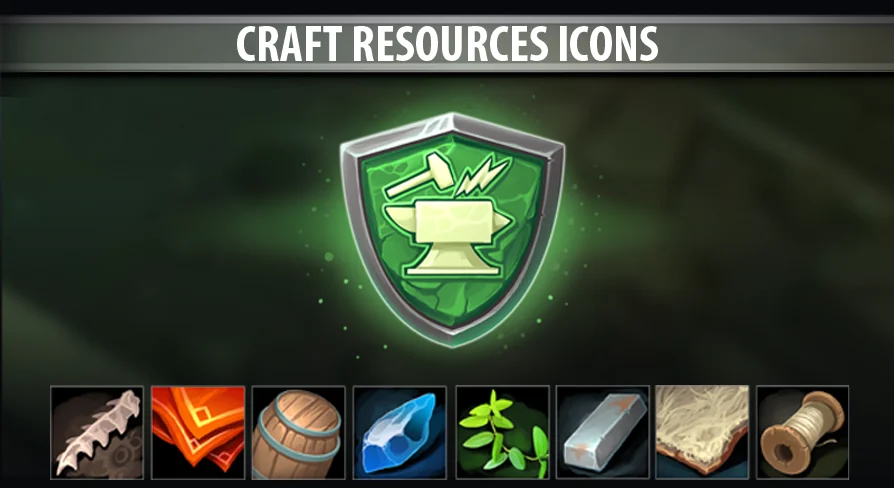
Implementing 2D interface assets into Unreal Engine widget hierarchies requires clean alpha separation and versatile layering. The Craft Resources Icons set provides 216 distinct icons designed with transparent backgrounds, allowing immediate placement across varied user interface surfaces without the need to trim borders or manually mask out backdrop artifacts.
In standard Slate and Unreal Motion Graphics (UMG) pipelines, these assets drop directly into image brushes, border wrappers, and custom button styles. Because each icon isolates the subject against an empty alpha channel, UI designers can drop them over stone-carved inventory slots, parchment skill sheets, metal-trimmed recipe panels, or dynamic tooltip popups. The absence of a baked-in square frame gives full authority to the game’s UI styling, preventing visual clashes between the asset's boundary and the underlying HUD design.
Visual Execution Across 216 Hand Drawn Fantasy Assets
The visual direction of this collection relies on a detailed, hand-drawn art style calibrated specifically for fantasy settings. Hand-rendered item art establishes immediate material presence, giving items such as woods, metals, fabrics, and alchemical reagents a tactile quality that sharp, purely geometric vector assets often lack.
Maintaining a cohesive visual language across an entire game economy is notoriously difficult when sourcing individual art pieces. With 216 icons sharing a unified hand-painted treatment, production teams avoid the jarring aesthetic shifts that occur when mixing disparate icon packs. The rendering highlights lighting accents, edge definition, and rich color values tailored to readability at both small inventory grid dimensions and larger inspection screens.
Structuring Crafting Trees and Resource Progression
Complex crafting loops in fantasy games demand clear visual distinction across tiers of raw ingredients, intermediate components, and refined materials. A crafting system fails when players cannot distinguish copper from bronze, or basic timber from enchanted wood at a glance. The extensive volume of 216 craft resource items delivers the visual range needed to support deep progression architectures.
Game systems can divide this inventory into clear production paths:
Smelted, cured, or refined intermediates used to transition basic harvests into functional crafting stock.
Specialized reagents, catalysts, and alchemical additions designated for higher-tier recipe modifications.
Finished mechanical or structural components ready for weapon assembly, armor forging, or base construction.
Deploying distinct hand-drawn illustrations across these tiers prevents inventory fatigue and maintains clarity throughout crafting trees, recipe books, and vendor interaction screens.
Compatibility with the Fantasy Icons Megapack Ecosystem
Created by Rexard, this set operates in direct continuity with the broader Fantasy Icons Megapack ecosystem. Game productions expanding beyond baseline crafting into expansive equipment trees, magic grimoires, status effects, and consumable systems require cross-category coherence. The Craft Resources Icons maintain the same stroke weights, lighting angles, and saturation levels established in Rexard's neighboring packs.
This cross-pack compatibility prevents visual fragmentation. When a player transitions from viewing an equipped magical blade to the raw materials needed to temper it, the interface retains a continuous artistic voice. Studios leveraging the Fantasy Icons Megapack can integrate these 216 resource icons as a direct, seamless extension of their active item database without commissioning supplementary bridging art.
Production Reliability within the Unreal Engine Permanent Collection
Selected as part of the Unreal Engine Sponsored Content for August 2019, the Craft Resources Icons pack holds a position in the permanent collection. This status makes it an accessible, stable component of the Unreal Engine developer toolkit, well-suited for long-term production pipelines from rapid initial greybox prototyping to commercial gold masters.
Because the icons operate as straightforward, high-quality 2D elements independent of complex engine-specific blueprint scripts or proprietary shaders, their production readiness extends effortlessly across project updates. Teams can implement them into clean GUI data tables, bind them to resource structures, and deploy them across mobile, desktop, or console interfaces with minimal overhead.
 Icons
Icons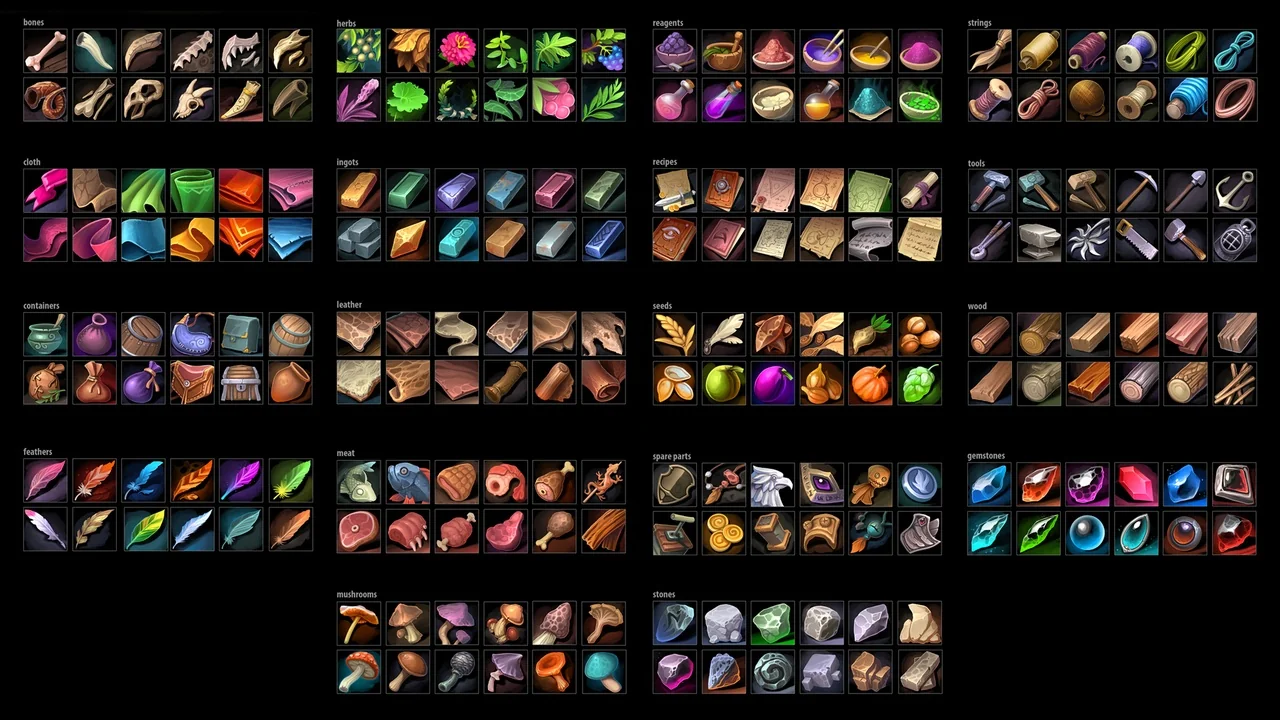
 Icons
Icons Icons
Icons Icons
Icons