"322fe79650c29655"{"id":"15423","slug":"hyper-mesh-to-icon-creator-v4","title":"Hyper Mesh to Icon Creator v4","category":"Icons","engine":"5.3+","assetVersion":"Engine version: 5.3+","engineVersion":"5.3","tag":"Icons","accent":"violet","visual":"mech","summary":"Transform your 3D models into professional 2D inventory icons with Hyper Mesh to Icon Creator v4. This local, fast tool eliminates the need for external software like Photoshop.","platform":"Unreal Engine","publishedAt":"2026-03-12T08:59:30.000Z","updatedAt":"2026-04-19T15:44:47.000Z","sourceNotes":[],"fileContents":[],"compatibility":["Unreal Engine","Engine version: 5.3+"],"featuredImage":{"alt":"Hyper Mesh to Icon Creator v4","src":"https://3dcghub.com/wp-content/uploads/2026/03/039f2623-933b-49aa-8be1-20241fe7049c.webp"},"hasDownloadLink":true,"pageviews":8,"galleryImages":[{"src":"https://3dcghub.com/wp-content/uploads/2026/03/aa09a5b8247a_c7124a26-2486-4ba9-a793-6a582fb0e2ef.webp","alt":"Hyper Mesh to Icon Creator v4"},{"src":"https://3dcghub.com/wp-content/uploads/2026/03/0cec9258d915_12096b70-0f76-4bab-9cee-79cc93dfd60e.webp","alt":"Hyper Mesh to Icon Creator v4"},{"src":"https://3dcghub.com/wp-content/uploads/2026/03/0b281ab9ec44_c5fb6433-d760-4268-9ea6-db634b6fa1de.webp","alt":"Hyper Mesh to Icon Creator v4"},{"src":"https://3dcghub.com/wp-content/uploads/2026/03/5c51ac24f7b5_c93c2723-4237-4c38-b977-a873e44ceac1.webp","alt":"Hyper Mesh to Icon Creator v4"},{"src":"https://3dcghub.com/wp-content/uploads/2026/03/4a9405f31699_6da6d828-f0a0-4061-8299-4b153a9e9a6a.webp","alt":"Hyper Mesh to Icon Creator v4"},{"src":"https://3dcghub.com/wp-content/uploads/2026/03/02201df753a2_b602958b-eb0b-4053-bd31-2b8693181381.webp","alt":"Hyper Mesh to Icon Creator v4"},{"src":"https://3dcghub.com/wp-content/uploads/2026/03/feee374f5c82_3c5b4f19-304b-44eb-9f94-ae39e15f63c4.webp","alt":"Hyper Mesh to Icon Creator v4"},{"src":"https://3dcghub.com/wp-content/uploads/2026/03/9f9e1fe3c0dd_a25169d9-fe25-46ba-ab91-8480847f43d4.webp","alt":"Hyper Mesh to Icon Creator v4"}],"accessPanel":{"kind":"free-resource","title":"Access this resource","eyebrow":"Free protected download","message":"Sign in or create an account to continue to the protected download through the managed storage service.","fileName":"Hyper Mesh to Icon Creator V2.7z","safetyNote":"All resources are 100% manually reviewed to eliminate all risks.","actionLabel":"Download Free","resourceType":"Resource archive","sourceShortcode":"cryptomus_free"},"contentHtml":"\u003ch2\u003eStreamlined Icon Creation for Modern Games\u003c/h2\u003e\n\u003cp\u003eHyper Mesh to Icon Creator v4 provides a streamlined solution for converting 3D meshes into clean inventory icons. This tool is essential for any game featuring inventory systems, vendors, or complex user interfaces. Consequently, it allows creators to generate high-quality assets without leaving their development environment.\u003c/p\u003e\n\u003cp\u003eThe system is designed for maximum speed and efficiency. Because it is fully local, you do not need to use Photoshop or wait for external render queues. This level of efficiency helps developers maintain focus on their core project tasks without interruptions.\u003c/p\u003e\n\n\u003ch2\u003eVersatile Customization and Features\u003c/h2\u003e\n\u003cp\u003eYou can generate icon textures from both static and skeletal meshes. Furthermore, the tool includes robust settings for lighting, backgrounds, rotation, and transparency. These features ensure that every icon matches your game's specific aesthetic requirements perfectly.\u003c/p\u003e\n\u003cp\u003eHyper Mesh to Icon Creator v4 includes several quality-of-life features to improve your workflow. For instance, you can save and load your current configurations to speed up future generation processes. Additionally, a built-in Datatable allows you to configure exactly which items appear in the generator.\u003c/p\u003e\n\n\u003ch3\u003eOptimized Development Workflow\u003c/h3\u003e\n\u003cp\u003eThe developer integrated shortcuts to toggle between different meshes quickly. This modular approach makes the system flexible enough for projects ranging from simple prototypes to professional-grade games. Moreover, it is designed to work in combination with other flagship systems within the same ecosystem.\u003c/p\u003e\n\u003cp\u003eEvery module in this ecosystem is built on a foundation of over 50,000 hours of real-world Unreal Engine development. Therefore, users benefit from reliable design principles that prioritize flexibility, maintainability, and performance. The creator focuses on providing professional-quality systems that help indie creators and hobbyists succeed.\u003c/p\u003e\n\n\u003ch2\u003eScalable and Reliable Blueprints\u003c/h2\u003e\n\u003cp\u003eThe Blueprints are clear and well-organized. This organization ensures the system scales effectively as your project grows in complexity. Furthermore, the modular design allows for seamless integration with other compatible frameworks. This makes it a reliable choice for long-term development cycles.\u003c/p\u003e\n\u003cp\u003eFor teams considering it, Hyper Mesh to Icon Creator v4 is a powerful utility for modern game development. It simplifies the UI creation process while maintaining professional-quality results. By using this tool, developers can build the games they dream about with significantly more efficiency.\u003c/p\u003e\n\n\u003ch2\u003eRelated Resources Worth Checking\u003c/h2\u003e\n\u003cul\u003e\n\u003cli\u003e\u003ca href=\"https://3dcghub.com/rodinbridge-unreal-engine-add-on/\" title=\"RodinBridge – Unreal Engine Add-on\"\u003eRodinBridge – Unreal Engine Add-on\u003c/a\u003e\u003c/li\u003e\n\u003cli\u003e\u003ca href=\"https://3dcghub.com/extile-plus-ultimate-non-tiling-material-toolkit-for-unreal-engine-environments/\" title=\"EXTILE PLUS -Ultimate Non-Tiling Material Toolkit for Unreal Engine Environments\"\u003eEXTILE PLUS -Ultimate Non-Tiling Material Toolkit for Unreal Engine Environments\u003c/a\u003e\u003c/li\u003e\n\u003cli\u003e\u003ca href=\"https://3dcghub.com/ultimate-template-unrealengine-2d-dialogue-inventory-system-save/\" title=\"ULTIMATE Template UnrealEngine || 2D + Dialogue + Inventory system + Save | |\"\u003eULTIMATE Template UnrealEngine || 2D + Dialogue + Inventory system + Save | |\u003c/a\u003e\u003c/li\u003e\n\u003cli\u003e\u003ca href=\"https://3dcghub.com/altermesh-geometry-nodes-in-unreal/\" title=\"AlterMesh – Geometry Nodes in Unreal\"\u003eAlterMesh – Geometry Nodes in Unreal\u003c/a\u003e\u003c/li\u003e\n\u003cli\u003e\u003ca href=\"https://3dcghub.com/zxing-for-unreal/\" title=\"ZXing For Unreal\"\u003eZXing For Unreal\u003c/a\u003e\u003c/li\u003e\n\u003c/ul\u003e\n\n\u003ch2\u003eAsset Gallery\u003c/h2\u003e","contentTextLength":2881,"navigation":{"current":2147,"total":2724,"previous":{"id":"15434","slug":"cyberpunk-rpg-ui","title":"Cyberpunk RPG UI","category":"UI Kits / HUDs","platform":"Unreal Engine","updatedAt":"2026-04-19T15:44:47.000Z"},"next":{"id":"15412","slug":"clean-flat-gui-elements","title":"Clean Flat GUI Elements","category":"Icons","platform":"Unreal Engine","updatedAt":"2026-04-19T15:44:47.000Z"}},"relatedResources":[{"id":"27142","slug":"hyper-menu-and-gamepad-system-v4-commonui","title":"Hyper Menu and Gamepad System v4 [CommonUI]","category":"UI Kits / HUDs","engine":"5.5+","assetVersion":"Engine version: 5.5+","engineVersion":"Asset Version:V3","tag":"UI Kits / HUDs","accent":"blue","visual":"animation","summary":"Hyper Menu and Gamepad System v4 [CommonUI] brings tabbed menus, tooltips, sliders, and input remapping into a modular Unreal Engine setup. It supports keyboard, mouse, and controllers while keeping the interface ready for multiplayer-aware projects.","platform":"Unreal Engine","publishedAt":"2026-04-21T13:27:07.000Z","updatedAt":"2026-04-21T13:27:09.000Z","sourceNotes":[],"fileContents":[],"compatibility":["Unreal Engine","Engine version: 5.5+","Asset Version: V3"],"featuredImage":{"alt":"Hyper Menu and Gamepad System v4 [CommonUI]","src":"https://3dcghub.com/wp-content/uploads/2026/04/7967d49c9361_9612d524-2cf6-46d8-9c70-ae880375b311.webp"},"hasDownloadLink":true,"pageviews":21},{"id":"28545","slug":"acf-u-ascent-combat-framework-ultimate-v4-c-complete-action-rpg-creator","title":"(ACF U) Ascent Combat Framework Ultimate V4- C++ Complete Action RPG Creator","category":"Game Mechanics","engine":"5.7","assetVersion":"Engine version: 5.7","engineVersion":"Asset Version:4.2.4","tag":"Game Mechanics","accent":"teal","visual":"luts","summary":"Ascent Combat Framework Ultimate brings combat, progression, UI, questing, dialogue, riding, and world systems into one extendable C++ framework for Unreal. It pairs production-oriented architecture with a ready-to-go sample project and broad Blueprint supp...","platform":"Unreal Engine","publishedAt":"2026-05-17T12:50:27.000Z","updatedAt":"2026-05-17T12:50:28.000Z","sourceNotes":[],"fileContents":[],"compatibility":["Unreal Engine","Engine version: 5.7","Asset Version: 4.2.4"],"featuredImage":{"alt":"(ACF U) Ascent Combat Framework Ultimate V4- C++ Complete Action RPG Creator","src":"https://3dcghub.com/wp-content/uploads/2026/05/db863b590c9f_97457578-1381-47fc-a623-73e693c9ec32.webp"},"hasDownloadLink":true,"pageviews":19},{"id":"14147","slug":"make-modular-skeletal-mesh","title":"Make Modular Skeletal Mesh","category":"Engine Tools","engine":"5.3 - 5.4","assetVersion":"Engine version: 5.3 - 5.4","engineVersion":"5.3","tag":"Engine Tools","accent":"violet","visual":"mech","summary":"Enhance your asset creation process with the Make Modular Skeletal Mesh subsystem. This tool enables developers to modify and combine skeletal mesh parts directly within the UE editor.","platform":"Unreal Engine","publishedAt":"2026-03-11T16:00:04.000Z","updatedAt":"2026-04-19T15:45:52.000Z","sourceNotes":[],"fileContents":[],"compatibility":["Unreal Engine","Engine version: 5.3 - 5.4"],"featuredImage":{"alt":"Make Modular Skeletal Mesh","src":"https://3dcghub.com/wp-content/uploads/2026/03/8090ef9f-f5d3-428e-940c-ad1f4ed77720.webp"},"hasDownloadLink":true,"pageviews":5}]}
Icons
Hyper Mesh to Icon Creator v4
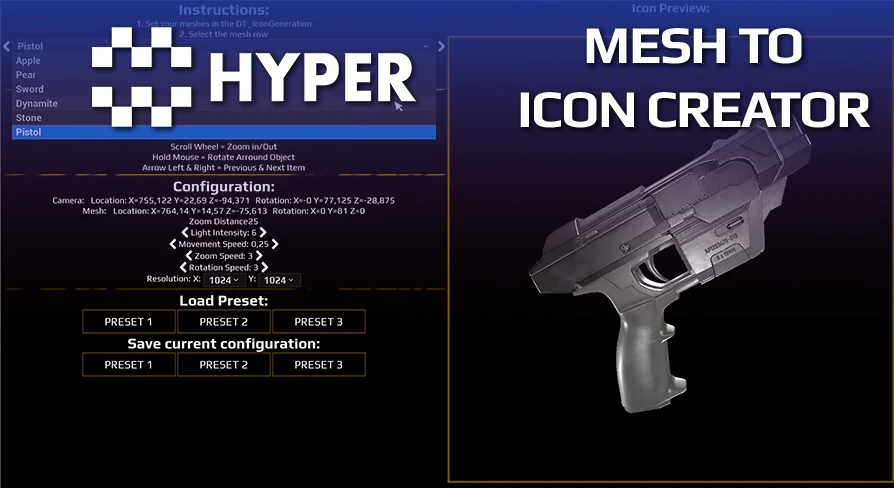
Transform your 3D models into professional 2D inventory icons with Hyper Mesh to Icon Creator v4. This local, fast tool eliminates the need for external software like Photoshop.
Hyper Mesh to Icon Creator v4 provides a streamlined solution for converting 3D meshes into clean inventory icons. This tool is essential for any game featuring inventory systems, vendors, or complex user interfaces. Consequently, it allows creators to generate high-quality assets without leaving their development environment.
The system is designed for maximum speed and efficiency. Because it is fully local, you do not need to use Photoshop or wait for external render queues. This level of efficiency helps developers maintain focus on their core project tasks without interruptions.
Versatile Customization and Features
You can generate icon textures from both static and skeletal meshes. Furthermore, the tool includes robust settings for lighting, backgrounds, rotation, and transparency. These features ensure that every icon matches your game's specific aesthetic requirements perfectly.
Hyper Mesh to Icon Creator v4 includes several quality-of-life features to improve your workflow. For instance, you can save and load your current configurations to speed up future generation processes. Additionally, a built-in Datatable allows you to configure exactly which items appear in the generator.
Optimized Development Workflow
The developer integrated shortcuts to toggle between different meshes quickly. This modular approach makes the system flexible enough for projects ranging from simple prototypes to professional-grade games. Moreover, it is designed to work in combination with other flagship systems within the same ecosystem.
Every module in this ecosystem is built on a foundation of over 50,000 hours of real-world Unreal Engine development. Therefore, users benefit from reliable design principles that prioritize flexibility, maintainability, and performance. The creator focuses on providing professional-quality systems that help indie creators and hobbyists succeed.
Scalable and Reliable Blueprints
The Blueprints are clear and well-organized. This organization ensures the system scales effectively as your project grows in complexity. Furthermore, the modular design allows for seamless integration with other compatible frameworks. This makes it a reliable choice for long-term development cycles.
For teams considering it, Hyper Mesh to Icon Creator v4 is a powerful utility for modern game development. It simplifies the UI creation process while maintaining professional-quality results. By using this tool, developers can build the games they dream about with significantly more efficiency.
 Icons
Icons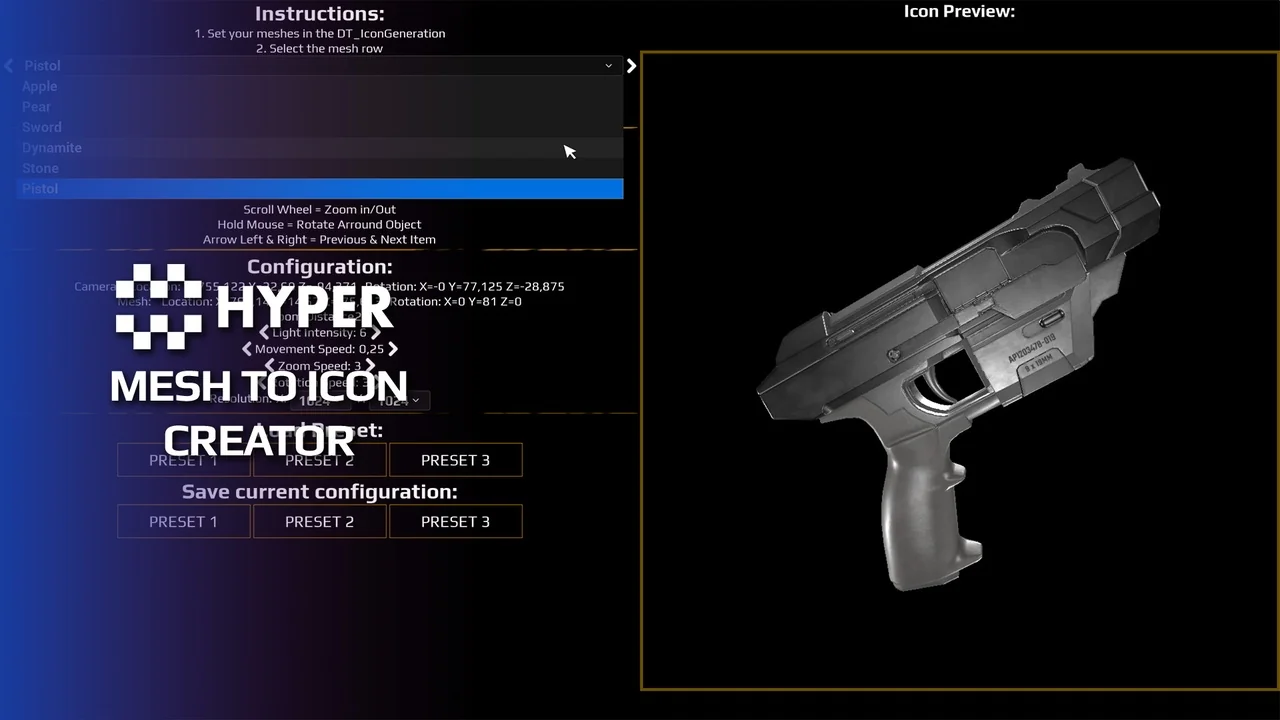
![Hyper Menu and Gamepad System v4 [CommonUI]](https://3dcghub.com/wp-content/uploads/2026/04/7967d49c9361_9612d524-2cf6-46d8-9c70-ae880375b311.webp) UI Kits / HUDs
UI Kits / HUDs Game Mechanics
 Engine Tools