"7e6fc58c410f2894"{"id":"23819","slug":"hq-realistic-explosions","title":"HQ Realistic explosions","category":"Fire \u0026 Explosions","engine":"Original Unity version: 2019.2.6","assetVersion":"Original Unity version: 2019.2.6","engineVersion":"Asset Version:2.1.0","tag":"Fire \u0026 Explosions","accent":"cyan","visual":"city","summary":"HQ Realistic Explosions focuses on quick prefab-based use in Unity, with 26 explosion effects and 4 custom shaders included. The pack mixes fully 3D explosions with single-sprite effects and supports built-in render by default, plus URP and HDRP workflows t...","platform":"Unity","publishedAt":"2026-04-11T17:17:17.000Z","updatedAt":"2026-04-19T15:35:09.000Z","sourceNotes":[],"fileContents":[],"compatibility":["Unity","Original Unity version: 2019.2.6","Asset Version: 2.1.0"],"featuredImage":{"alt":"HQ Realistic explosions","src":"https://3dcghub.com/wp-content/uploads/2026/04/d902ce101420_008c10aa-75a9-423a-9923-f10d8fa96cc9_1280x720_stretch.webp"},"hasDownloadLink":true,"downloads":2,"terms":[{"taxonomy":"category","slug":"unity-vfx-particles-fire-explosions","name":"Fire \u0026 Explosions"},{"taxonomy":"post_tag","slug":"materials","name":"Materials"},{"taxonomy":"post_tag","slug":"unity","name":"Unity"},{"taxonomy":"post_tag","slug":"vfx","name":"VFX"}],"galleryImages":[{"src":"https://3dcghub.com/wp-content/uploads/2026/04/edf0fea45860_60d51d8b-3c1c-404e-a926-0335b4192960_scaled.webp","alt":"HQ Realistic explosions"},{"src":"https://3dcghub.com/wp-content/uploads/2026/04/318d6b632014_1e120626-f462-4384-84b8-4a7154106a16_scaled.webp","alt":"HQ Realistic explosions"},{"src":"https://3dcghub.com/wp-content/uploads/2026/04/dc3ef0e51914_2ad4afe9-beb5-49b3-a37e-f0861a2ec8f1_scaled.webp","alt":"HQ Realistic explosions"},{"src":"https://3dcghub.com/wp-content/uploads/2026/04/e7ff147d4dea_1d44a020-a395-4858-98c5-e7ff147b45a2_scaled.webp","alt":"HQ Realistic explosions"},{"src":"https://3dcghub.com/wp-content/uploads/2026/04/0c578d530566_2f65b7aa-95d0-45f3-9105-e62f376c303c_scaled.webp","alt":"HQ Realistic explosions"},{"src":"https://3dcghub.com/wp-content/uploads/2026/04/1bde231c9444_18262d56-0e36-4cd5-83b7-46834da45c58_scaled.webp","alt":"HQ Realistic explosions"},{"src":"https://3dcghub.com/wp-content/uploads/2026/04/a341bbb66a64_7bfb69a6-9977-463e-bc45-95b3327334c9_scaled.webp","alt":"HQ Realistic explosions"},{"src":"https://3dcghub.com/wp-content/uploads/2026/04/0a879f5974b3_d627d606-1be2-450e-a740-f17886ad9e14_scaled.webp","alt":"HQ Realistic explosions"},{"src":"https://3dcghub.com/wp-content/uploads/2026/04/08ae09a22fe7_aeda69d8-7054-4ea2-94f6-bb7815b540cf_scaled.webp","alt":"HQ Realistic explosions"},{"src":"https://3dcghub.com/wp-content/uploads/2026/04/7c10ca71b0e1_cc7e122f-a388-4e2b-a9df-8645b9e067fd_scaled.webp","alt":"HQ Realistic explosions"}],"accessPanel":{"kind":"resource","title":"Access this resource","eyebrow":"Free Download","message":"Log in or create a free account to start your download.","fileName":"HQ Realistic explosions v2.1.0 (09 Nov 2024).7z","safetyNote":"All resources are 100% manually reviewed to eliminate all risks.","actionLabel":"Download Free","resourceType":"Resource archive"},"contentHtml":"\u003ch2\u003eDrop the prefabs in and start testing\u003c/h2\u003e \u003cp\u003eHQ Realistic Explosions keeps the setup straightforward: the effects are made to be taken and dropped as prefabs into a game. That makes the pack easy to try in a scene without extra assembly work, which is useful when an explosion needs to be placed, adjusted, and checked quickly inside gameplay.\u003c/p\u003e \u003cp\u003eThe package contains 26 different explosions and 4 custom shaders. Some of the explosions are fully 3D, while others use a single sprite. That mix gives the asset a range of visual styles without changing the core workflow, since the same prefab-based approach applies across the set.\u003c/p\u003e \u003ch2\u003eWhat comes through in the effect set\u003c/h2\u003e \u003cp\u003eThe explosion collection is centered on realistic fire-and-blast visuals rather than broad environmental effects. The listed theme includes explosions, smoke, bombs, detonation, hit effects, mine effects, and nuclear-bomb style visuals. Those tags point to a resource meant for scenes where the blast itself is the focus: combat moments, impact reactions, or large destructive events.\u003c/p\u003e \u003cp\u003eAll explosion animations are rendered at a resolution from 2048 to 4096 px. The images can be reduced in size, so the pack leaves room for adjusting the visual footprint when a project does not need the full source resolution on every effect.\u003c/p\u003e \u003cp\u003eAnother detail that stands out is the split between 3D and sprite-based effects. That matters in practical use because some scenes may need the depth and volume of a 3D blast, while others only need a compact effect that can be placed quickly and kept visually simple.\u003c/p\u003e \u003ch2\u003eRendering paths and Unity versions\u003c/h2\u003e \u003cp\u003eThe pack supports built-in render by default. HDRP and URP are also supported, with a free package mentioned for Unity 2021 or below. From Unity 2022 and Unity 6+, URP and HDRP are the default path. Shader Graph is required and is installed together with the asset, and the rendering setup can be changed to built-in render if needed.\u003c/p\u003e \u003cp\u003eCompatibility is listed for Unity 2019.2.6, 2020.3.18, and 2022.3.12. The render pipeline compatibility shown for 2020.3.18f1 and 2022.3.12f1 includes HDRP, URP, and Built-in. That gives the pack a clear place in projects that stay on older built-in workflows as well as projects using current pipeline setups.\u003c/p\u003e \u003cp\u003eThe promo media uses the Bloom post process from the Volume component. That is a useful detail for anyone comparing the appearance of the effects in motion, since the bloom contribution is part of how the visuals are presented.\u003c/p\u003e \u003ch2\u003eWhere the pack fits in a project\u003c/h2\u003e \u003cp\u003eBecause the pack supports PC, consoles, mobiles, web, and VR, it reaches a wide set of project types. The same applies to scene usage: a blast can sit in a fast action sequence, a destruction event, a weapon impact, or a stylized combat moment without requiring a different effect system from scratch.\u003c/p\u003e \u003cp\u003eThe included visual types make it especially relevant for games that need direct, readable feedback on impact. The combination of smoke, fire, and detonation visuals suits moments where the player needs to see that an explosion has happened immediately, whether the effect is small and contained or larger and more dramatic.\u003c/p\u003e \u003cp\u003eThe tag set also points to military and sci-fi adjacent use cases. Explosion, war, mine, bomb, nuclear bomb, boom, and hit all fit the same basic purpose: fast visual responses to destructive events. That keeps the package focused on a specific visual category rather than a general particle library.\u003c/p\u003e \u003ch2\u003eWhat stands out for day-to-day use\u003c/h2\u003e \u003cp\u003eThe most practical part of HQ Realistic Explosions is how much of the workflow is already organized. Prefabs can be dropped into a game, the effect set already includes both 3D and sprite-based explosions, and the shader setup is included. Those details reduce the amount of setup needed before a team can place the effects in a scene and see how they read in motion.\u003c/p\u003e \u003cp\u003eThe resolution range is high enough to keep the effects detailed, and the ability to reduce image size offers some room for adjustment depending on the target scene or platform. That is especially relevant for projects that need the same visual family to hold together across multiple devices or display contexts.\u003c/p\u003e \u003cp\u003eSupport for built-in render by default, plus URP and HDRP coverage, makes the pack easier to slot into different Unity workflows. The version compatibility is also clearly stated, which helps narrow down where the effects sit in a project pipeline.\u003c/p\u003e \u003ch3\u003ePractical takeaway\u003c/h3\u003e \u003cp\u003eHQ Realistic Explosions is a focused Unity explosion pack for projects that need ready-to-place blast effects with a mix of 3D and sprite-based visuals, shader-backed rendering, and support across common Unity pipelines and target platforms. It is best suited to scenes that need realistic fire-and-explosion responses without building the effect system from the ground up.\u003c/p\u003e\n\n\u003ch2\u003eContinue Browsing Similar Packs\u003c/h2\u003e\n\u003cul\u003e\n\u003cli\u003e\u003ca href=\"https://3dcghub.com/toolkit-for-unity-physics-2026/\" title=\"Toolkit for Unity Physics 2026\"\u003eToolkit for Unity Physics 2026\u003c/a\u003e\u003c/li\u003e\n\u003cli\u003e\u003ca href=\"https://3dcghub.com/opencv-for-unity/\" title=\"OpenCV for Unity\"\u003eOpenCV for Unity\u003c/a\u003e\u003c/li\u003e\n\u003cli\u003e\u003ca href=\"https://3dcghub.com/exporter-for-unreal-to-for-unity-2026/\" title=\"Exporter for Unreal to/for Unity 2026\"\u003eExporter for Unreal to/for Unity 2026\u003c/a\u003e\u003c/li\u003e\n\u003cli\u003e\u003ca href=\"https://3dcghub.com/dialogue-system-for-unity/\" title=\"Dialogue System for Unity\"\u003eDialogue System for Unity\u003c/a\u003e\u003c/li\u003e\n\u003cli\u003e\u003ca href=\"https://3dcghub.com/ambient-sounds-interactive-soundscapes-for-unity-6/\" title=\"Ambient Sounds – Interactive Soundscapes for Unity 6\"\u003eAmbient Sounds – Interactive Soundscapes for Unity 6\u003c/a\u003e\u003c/li\u003e\n\u003c/ul\u003e\n\n\u003ch2\u003eAsset Gallery\u003c/h2\u003e","contentTextLength":5014,"navigation":{"current":3576,"total":3618,"previous":{"id":"23829","slug":"ians-fire-pack","title":"Ian's Fire Pack","category":"Fire \u0026 Explosions","platform":"Unity","updatedAt":"2026-04-19T15:35:09.000Z"},"next":{"id":"23869","slug":"portals-package-2","title":"Portals package 2","category":"Particles","platform":"Unity","updatedAt":"2026-04-19T15:35:08.000Z"}},"relatedResources":[{"id":"23748","slug":"confetti-fx","title":"Confetti FX","category":"Particles","engine":"Original Unity version: 5.5.0","assetVersion":"Original Unity version: 5.5.0","engineVersion":"Asset Version:1.2","tag":"Particles","accent":"cyan","visual":"character","summary":"Confetti FX packages 40 festive prefabs as shuriken particle systems, with Cartoony and Realistic styles available from the start. It includes directional explosion, spherical explosion, and fountain emitters, plus easy scaling for different celebration mom...","platform":"Unity","publishedAt":"2026-04-11T17:02:17.000Z","updatedAt":"2026-04-19T15:35:11.000Z","sourceNotes":[],"fileContents":[],"compatibility":["Unity","Original Unity version: 5.5.0","Asset Version: 1.2"],"featuredImage":{"alt":"Confetti FX","src":"https://3dcghub.com/wp-content/uploads/2026/04/f98f9eb49c01_e90db8fa-4cfe-4714-9b38-e7eeaa185f16_1280x720_stretch.webp"},"hasDownloadLink":true,"downloads":1},{"id":"23806","slug":"fire-smoke-dynamic-nature","title":"Fire \u0026 Smoke - Dynamic Nature","category":"Fire \u0026 Explosions","engine":"Original Unity version: 2021.2.0","assetVersion":"Original Unity version: 2021.2.0","engineVersion":"Asset Version:1.2.5","tag":"Fire \u0026 Explosions","accent":"cyan","visual":"audio","summary":"Fire \u0026 Smoke - Dynamic Nature gathers smoke, fire, and explosion prefabs with shader setups that respond to wind speed, direction, shiver, and gust. It also includes HD RP, URP, and Built-in support across a wide range of Unity versions.","platform":"Unity","publishedAt":"2026-04-11T17:15:31.000Z","updatedAt":"2026-04-19T15:35:10.000Z","sourceNotes":[],"fileContents":[],"compatibility":["Unity","Original Unity version: 2021.2.0","Asset Version: 1.2.5"],"featuredImage":{"alt":"Fire \u0026 Smoke - Dynamic Nature","src":"https://3dcghub.com/wp-content/uploads/2026/04/2c373a3ad14b_d6362422-3d33-4654-98d9-8f78f5d6274b_1280x720_stretch.webp"},"hasDownloadLink":true,"downloads":3},{"id":"23829","slug":"ians-fire-pack","title":"Ian's Fire Pack","category":"Fire \u0026 Explosions","engine":"Original Unity version: 5.1.0","assetVersion":"Original Unity version: 5.1.0","engineVersion":"Asset Version:2.3","tag":"Fire \u0026 Explosions","accent":"cyan","visual":"mech","summary":"Ian's Fire Pack brings together 29 fire prefabs that move from small candle light to larger scene damage like burning trees and building fires. It also includes lighting, audio, props, decals, textures, shaders, and models so the fire effects can sit direct...","platform":"Unity","publishedAt":"2026-04-11T17:26:30.000Z","updatedAt":"2026-04-19T15:35:09.000Z","sourceNotes":[],"fileContents":[],"compatibility":["Unity","Original Unity version: 5.1.0","Asset Version: 2.3"],"featuredImage":{"alt":"Ian's Fire Pack","src":"https://3dcghub.com/wp-content/uploads/2026/04/8dbe81b66924_fec37df0-abd6-43d9-9c51-3526fa7b7d3c_1280x720_stretch.webp"},"hasDownloadLink":true,"downloads":2}]}
Fire & Explosions
HQ Realistic explosions
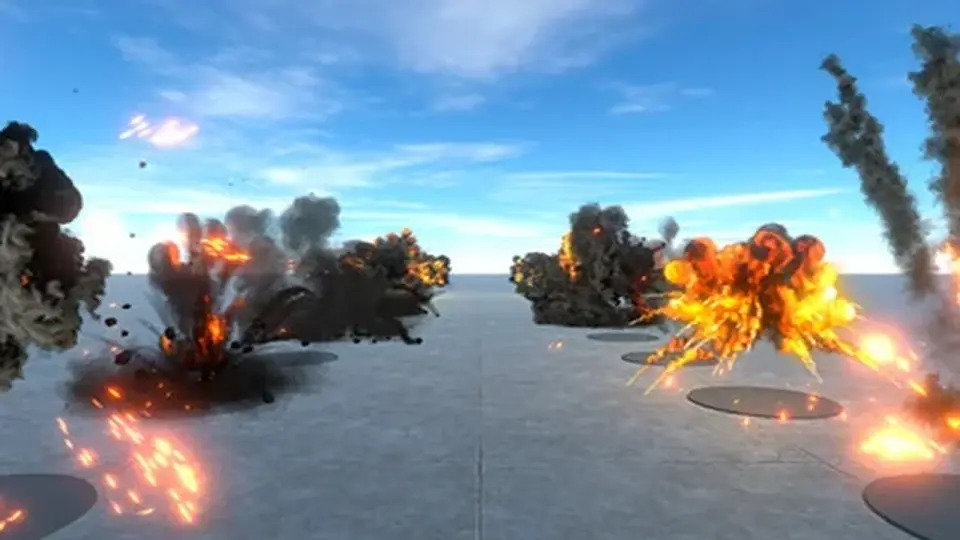
HQ Realistic Explosions focuses on quick prefab-based use in Unity, with 26 explosion effects and 4 custom shaders included. The pack mixes fully 3D explosions with single-sprite effects and supports built-in render by default, plus URP and HDRP workflows t...
HQ Realistic Explosions keeps the setup straightforward: the effects are made to be taken and dropped as prefabs into a game. That makes the pack easy to try in a scene without extra assembly work, which is useful when an explosion needs to be placed, adjusted, and checked quickly inside gameplay.
The package contains 26 different explosions and 4 custom shaders. Some of the explosions are fully 3D, while others use a single sprite. That mix gives the asset a range of visual styles without changing the core workflow, since the same prefab-based approach applies across the set.
What comes through in the effect set
The explosion collection is centered on realistic fire-and-blast visuals rather than broad environmental effects. The listed theme includes explosions, smoke, bombs, detonation, hit effects, mine effects, and nuclear-bomb style visuals. Those tags point to a resource meant for scenes where the blast itself is the focus: combat moments, impact reactions, or large destructive events.
All explosion animations are rendered at a resolution from 2048 to 4096 px. The images can be reduced in size, so the pack leaves room for adjusting the visual footprint when a project does not need the full source resolution on every effect.
Another detail that stands out is the split between 3D and sprite-based effects. That matters in practical use because some scenes may need the depth and volume of a 3D blast, while others only need a compact effect that can be placed quickly and kept visually simple.
Rendering paths and Unity versions
The pack supports built-in render by default. HDRP and URP are also supported, with a free package mentioned for Unity 2021 or below. From Unity 2022 and Unity 6+, URP and HDRP are the default path. Shader Graph is required and is installed together with the asset, and the rendering setup can be changed to built-in render if needed.
Compatibility is listed for Unity 2019.2.6, 2020.3.18, and 2022.3.12. The render pipeline compatibility shown for 2020.3.18f1 and 2022.3.12f1 includes HDRP, URP, and Built-in. That gives the pack a clear place in projects that stay on older built-in workflows as well as projects using current pipeline setups.
The promo media uses the Bloom post process from the Volume component. That is a useful detail for anyone comparing the appearance of the effects in motion, since the bloom contribution is part of how the visuals are presented.
Where the pack fits in a project
Because the pack supports PC, consoles, mobiles, web, and VR, it reaches a wide set of project types. The same applies to scene usage: a blast can sit in a fast action sequence, a destruction event, a weapon impact, or a stylized combat moment without requiring a different effect system from scratch.
The included visual types make it especially relevant for games that need direct, readable feedback on impact. The combination of smoke, fire, and detonation visuals suits moments where the player needs to see that an explosion has happened immediately, whether the effect is small and contained or larger and more dramatic.
The tag set also points to military and sci-fi adjacent use cases. Explosion, war, mine, bomb, nuclear bomb, boom, and hit all fit the same basic purpose: fast visual responses to destructive events. That keeps the package focused on a specific visual category rather than a general particle library.
What stands out for day-to-day use
The most practical part of HQ Realistic Explosions is how much of the workflow is already organized. Prefabs can be dropped into a game, the effect set already includes both 3D and sprite-based explosions, and the shader setup is included. Those details reduce the amount of setup needed before a team can place the effects in a scene and see how they read in motion.
The resolution range is high enough to keep the effects detailed, and the ability to reduce image size offers some room for adjustment depending on the target scene or platform. That is especially relevant for projects that need the same visual family to hold together across multiple devices or display contexts.
Support for built-in render by default, plus URP and HDRP coverage, makes the pack easier to slot into different Unity workflows. The version compatibility is also clearly stated, which helps narrow down where the effects sit in a project pipeline.
Practical takeaway
HQ Realistic Explosions is a focused Unity explosion pack for projects that need ready-to-place blast effects with a mix of 3D and sprite-based visuals, shader-backed rendering, and support across common Unity pipelines and target platforms. It is best suited to scenes that need realistic fire-and-explosion responses without building the effect system from the ground up.
 Fire & Explosions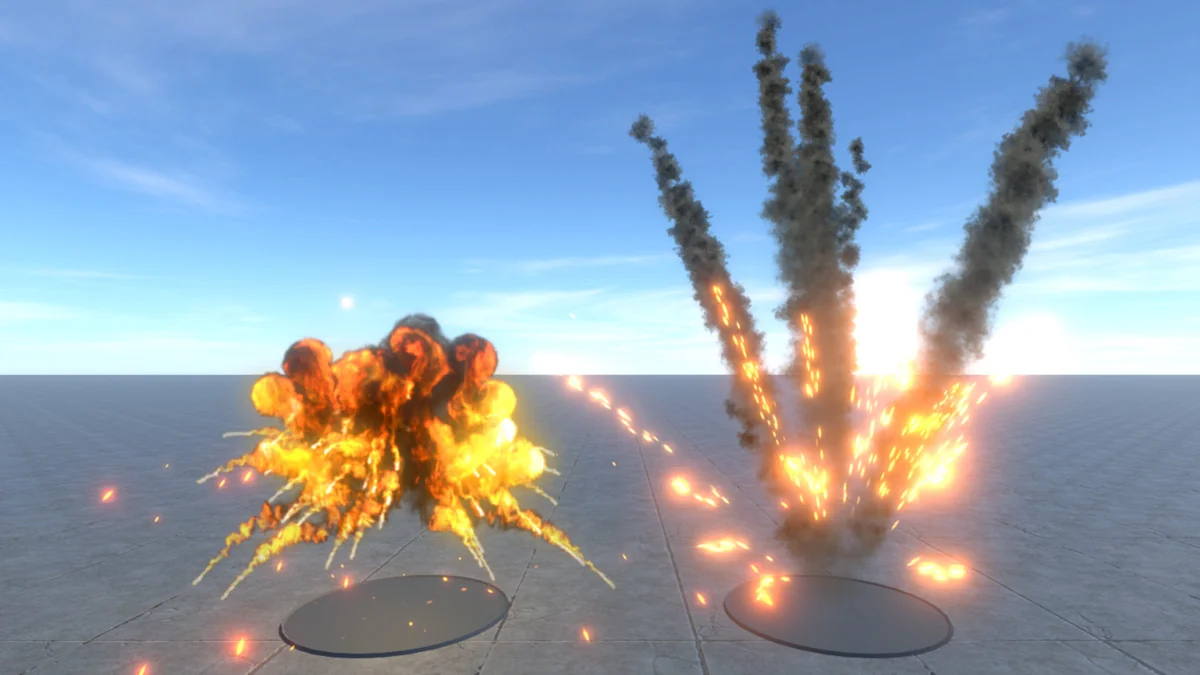
 Particles
 Fire & Explosions
 Fire & Explosions