"7aa4acc705f0d80b"{"id":"1001140","slug":"hdri-winter-mixed-8k","title":"HDRI Winter Mixed - 8k","category":"Nature \u0026 Plants","engine":"5.1+","assetVersion":"","engineVersion":"Engine Version: 5.1+","tag":"Nature \u0026 Plants","accent":"blue","visual":"mech","summary":"A comprehensive look at HDRI Winter Mixed - 8k, offering 50 32-bit winter panoramas, 11 example maps, and Sky Light cubemap integration in Unreal Engine 5.","platform":"Unreal Engine","publishedAt":"2026-09-09T05:02:23.276Z","updatedAt":"2026-09-09T05:02:23.276Z","sourceNotes":[],"fileContents":[],"compatibility":["Unreal Engine","Engine Version: 5.1+"],"featuredImage":{"alt":"HDRI Winter Mixed - 8k","src":"/wp-content/uploads/published/2026/09/0e32b6ed5713-4581d8b4-424b-4215-818f-69c398f55e18-908d127e5f.webp"},"hasDownloadLink":true,"downloads":1,"terms":[{"taxonomy":"category","slug":"nature-and-plants","name":"Nature \u0026 Plants"}],"galleryImages":[{"src":"/wp-content/uploads/published/2026/09/8e5af43fe8c0-ea2cc980-fbc4-4715-8717-adf5f7d3016f-d037223a0d.webp","alt":"HDRI Winter Mixed - 8k"},{"src":"/wp-content/uploads/published/2026/09/d4a21c7dbb91-62658804-6ed6-4657-93d2-a020755e4b89-3ee2c0d98b.webp","alt":"HDRI Winter Mixed - 8k"},{"src":"/wp-content/uploads/published/2026/09/5a604b1c4427-fb4796a2-4abc-4da7-829f-1dfc1c4adaaa-34e2d61a9a.webp","alt":"HDRI Winter Mixed - 8k"},{"src":"/wp-content/uploads/published/2026/09/e5184fed248a-2f6b08f7-4e3c-4e40-8dfe-a7b7e6f79dff-1e0727f352.webp","alt":"HDRI Winter Mixed - 8k"},{"src":"/wp-content/uploads/published/2026/09/2c22c8e6d61c-1ae932d9-7d4f-4e4e-8f5f-1b8d659c05f1-d5ab570ef2.webp","alt":"HDRI Winter Mixed - 8k"},{"src":"/wp-content/uploads/published/2026/09/cb8c620b9fae-067c9ba8-533b-4048-9d05-35c328d0cbb8-0e2aaad0ef.webp","alt":"HDRI Winter Mixed - 8k"},{"src":"/wp-content/uploads/published/2026/09/27e0452fc4a9-4ff652a1-f843-4e8f-8287-2b1987ce575e-8b1437effd.webp","alt":"HDRI Winter Mixed - 8k"},{"src":"/wp-content/uploads/published/2026/09/748d1b58b34b-b28401b6-4407-477b-b775-1cab0bf532cc-8e3a9163b0.webp","alt":"HDRI Winter Mixed - 8k"},{"src":"/wp-content/uploads/published/2026/09/ac24b93544ce-d2a8b86f-8dff-46a4-acf2-d477464f53b4-7b75666330.webp","alt":"HDRI Winter Mixed - 8k"},{"src":"/wp-content/uploads/published/2026/09/1097907c6a00-14942ca2-ad3d-409a-98df-5797a5ce3e7c-ba53794d76.webp","alt":"HDRI Winter Mixed - 8k"}],"accessPanel":{"kind":"resource","title":"Download this resource","eyebrow":"Free Download","message":"Log in or create a free account to start your download.","fileName":"HDRI Winter Mixed - 8k.7z","safetyNote":"Resources are manually reviewed before listing to improve quality and reduce obvious risks.","actionLabel":"Download Free","resourceType":"Resource archive"},"contentHtml":"\u003cp\u003eConstructing winter landscapes in real-time engines requires precise atmospheric control, where ground snow, frost, and ice directly catch the coloration of the surrounding sky. HDRI Winter Mixed - 8k supplies 50 distinct 360-degree spherical panoramas created specifically to handle both background visuals and environmental lighting for cold-weather environments. Built as 8k resolution, 32-bit HDR assets, these textures provide the dynamic range necessary to simulate crisp daylight reflections, overcast snowy hazes, and deep evening contrasts across virtual scenes.\u003c/p\u003e \u003ch2\u003eFifty 8k Equirectangular Panoramas for Snowy Environments\u003c/h2\u003e\n\u003cp\u003eThe collection provides 50 individual high-dynamic-range textures formatted as equirectangular panoramas. Each asset is rendered at 8k resolution with 32-bit color depth, preserving subtle light gradations across highlights and shadowed horizon lines. Rather than focusing on a single visual mood, the package gathers diverse environmental styles to suit varying visual targets. Creators working on clean, true-to-life winter vistas can utilize the photorealistic captures, while projects with stylized aesthetics can draw from digital painting variants.\u003c/p\u003e\n\u003cp\u003eTime of day plays a critical role in how winter terrain renders. A low sun creates long, cool blue shadows across fields of snow, while bright midday illumination produces harsh specular glints on ice. The pack encompasses distinct temporal phases, spanning bright daytime conditions to dark night and evening backdrops. Because these panoramas wrap around the entire scene in a continuous 360-degree spherical layout, they serve equally well as distant background plates, environmental skyboxes, or immersion domes in virtual reality setups.\u003c/p\u003e \u003ch2\u003eLighting Workflows with Sky Light and 32-Bit Cubemaps\u003c/h2\u003e\n\u003cp\u003eBeyond functioning as visible horizon elements, the panoramas operate as cubemaps to illuminate level geometry. In Unreal Engine 5, developers frequently rely on real-time atmospheric calculations, but static or specified cubemap lighting offers deliberate artistic control over ambient tints and bounce illumination. The HDR textures within this package can take over the primary environmental lighting through the engine Sky Light component.\u003c/p\u003e\n\u003cp\u003eTo implement this lighting pipeline:\u003c/p\u003e\n\u003cul\u003e\n\u003cli\u003eSelect the Sky Light actor present within the level viewport or World Outliner.\u003c/li\u003e\n\u003cli\u003eNavigate to the Details panel and disable the Real Time Capture setting.\u003c/li\u003e\n\u003cli\u003eChange the Source Type to accept a specified cubemap rather than dynamic scene sampling.\u003c/li\u003e\n\u003cli\u003eAssign any of the 50 winter HDR textures into the Cubemap slot.\u003c/li\u003e\n\u003c/ul\u003e\n\u003cp\u003eDisabling Real Time Capture and routing one of these 32-bit cubemaps directly into the Sky Light ensures that ambient scene illumination accurately mirrors the color temperature of the selected winter sky. Shaded snow crusts inherit natural skylight bounces, ice surfaces receive coherent specular highlights, and character models fit seamlessly against the background panorama without requiring heavy manual tinting.\u003c/p\u003e \u003ch2\u003ePreconfigured Scenes Across 11 Example Maps\u003c/h2\u003e\n\u003cp\u003eTesting textures across blank levels often consumes valuable setup time. To bypass manual scene assembly, the package includes 11 example maps designed to show the panoramas working in balanced environment settings. These levels arrive prebuilt with the necessary lighting elements, sky geometry, and scale considerations already configured.\u003c/p\u003e\n\u003cp\u003eUsing these demonstration levels simplifies asset evaluation. You can load one of the 11 included maps, open the material or actor holding the background panorama, and replace the existing HDR texture or cube map with any of the remaining 50 options. The lighting balance adapts out of the box, offering an instant comparison between day, evening, painterly, or photorealistic options without needing to recalibrate camera exposure or post-processing volumes from scratch.\u003c/p\u003e \u003ch2\u003eEnabling the HDRIBackdrop Plugin in UE5\u003c/h2\u003e\n\u003cp\u003eDisplaying 360-degree panoramas correctly in Unreal Engine 5 relies on Epic Games' built-in HDRIBackdrop system. This tool projects equirectangular textures onto an adjustable projection mesh that automatically handles ground flattening, horizon alignment, and camera-relative distance.\u003c/p\u003e\n\u003cp\u003eThe package requires this free plugin to be active within your project. Because the tool ships directly inside Unreal Engine 5, external installations are unnecessary. Activating it involves a few direct steps:\u003c/p\u003e\n\u003cul\u003e\n\u003cli\u003eOpen the project in Unreal Engine 5.\u003c/li\u003e\n\u003cli\u003eOpen the main menu bar, click on Edit, and select Plugins.\u003c/li\u003e\n\u003cli\u003eUse the search bar in the Plugins window to locate HDRIBackdrop.\u003c/li\u003e\n\u003cli\u003eCheck the Enable box next to the plugin listing.\u003c/li\u003e\n\u003cli\u003eRestart the editor when prompted to finalize plugin activation.\u003c/li\u003e\n\u003c/ul\u003e\n\u003cp\u003eOnce enabled, the HDRIBackdrop actor provides an ideal framework for the pack's 8k textures, projecting the spherical winter panoramas at correct spatial proportions behind mountains, snowdrifts, and architectural assets.\u003c/p\u003e \u003ch2\u003eProduction Alignment and Scene Types\u003c/h2\u003e\n\u003cp\u003eHDRI Winter Mixed - 8k fills a precise requirement for productions demanding immediate cold-weather exterior backdrops. The presence of both photorealistic natural skies and digitally painted renditions makes it adaptable across entertainment formats, whether staging naturalistic virtual production volumes, high-fidelity outdoor exploration levels, or stylized game worlds. By bridging 8k visual skyboxes with custom cubemap Sky Light capture, the pack functions as a cohesive background and illumination kit for any project set amid snow and ice.\u003c/p\u003e\n\n\u003ch2\u003eRelated Resources Worth Checking\u003c/h2\u003e\n\u003cul\u003e\n\u003cli\u003e\u003ca href=\"https://3dcghub.com/icy-snow-environment-asset-pack/\" title=\"Icy Snow Environment - Asset Pack\"\u003eIcy Snow Environment - Asset Pack\u003c/a\u003e\u003c/li\u003e\n\u003cli\u003e\u003ca href=\"https://3dcghub.com/hdri-into-the-clouds-panoramas/\" title=\"HDRI Into The Clouds Panoramas\"\u003eHDRI Into The Clouds Panoramas\u003c/a\u003e\u003c/li\u003e\n\u003cli\u003e\u003ca href=\"https://3dcghub.com/53-hdri-marvelous-sky-panoramas-8k/\" title=\"53 HDRI Marvelous Sky Panoramas - 8k\"\u003e53 HDRI Marvelous Sky Panoramas - 8k\u003c/a\u003e\u003c/li\u003e\n\u003cli\u003e\u003ca href=\"https://3dcghub.com/hdri-meadow-landscapes-panoramas/\" title=\"HDRI Meadow Landscapes Panoramas\"\u003eHDRI Meadow Landscapes Panoramas\u003c/a\u003e\u003c/li\u003e\n\u003cli\u003e\u003ca href=\"https://3dcghub.com/hdri-into-the-clouds-panoramas-2/\" title=\"HDRI Into The Clouds Panoramas\"\u003eHDRI Into The Clouds Panoramas\u003c/a\u003e\u003c/li\u003e\n\u003c/ul\u003e","contentTextLength":5665,"navigation":{"current":901,"total":3925,"previous":{"id":"1001141","slug":"industrial-area","title":"Industrial Area","category":"Industrial","platform":"Unreal Engine","updatedAt":"2026-09-09T05:16:35.247Z"},"next":{"id":"1001139","slug":"fruit-tree-v2","title":"Fruit Tree V2","category":"Nature \u0026 Plants","platform":"Unreal Engine","updatedAt":"2026-09-09T04:49:23.716Z"}},"relatedResources":[{"id":"1000535","slug":"icy-snow-environment-asset-pack","title":"Icy Snow Environment - Asset Pack","category":"Nature \u0026 Plants","engine":"5.4+","assetVersion":"","engineVersion":"Engine Version: 5.4+","tag":"Nature \u0026 Plants","accent":"blue","visual":"city","summary":"Photoscanned Nanite winter asset pack with tiled micro detail materials, 1M-poly average meshes, and path tracer-ready fallback settings for Unreal 5.4.","platform":"Unreal Engine","publishedAt":"2026-07-15T02:17:38.579Z","updatedAt":"2026-07-15T02:17:38.579Z","sourceNotes":[],"fileContents":[],"compatibility":["Unreal Engine","Engine Version: 5.4+"],"featuredImage":{"alt":"Icy Snow Environment - Asset Pack","src":"/wp-content/uploads/published/2026/07/43229206f53c-b4b60840-e842-4b8d-951e-04f0fd8f708c-80fb98fcd2.webp"},"hasDownloadLink":true,"downloads":2},{"id":"12224","slug":"hdri-into-the-clouds-panoramas","title":"HDRI Into The Clouds Panoramas","category":"Skies","engine":"5.1+","assetVersion":"Engine version: 5.1+","engineVersion":"5.1","tag":"Skies","accent":"blue","visual":"animation","summary":"Enhance your virtual environments with HDRI Into The Clouds Panoramas. This pack provides 46 high-resolution 32-bit textures designed for breathtaking aerial views and customized lighting setups.","platform":"Unreal Engine","publishedAt":"2026-03-06T17:03:46.000Z","updatedAt":"2026-04-19T15:48:02.000Z","sourceNotes":[],"fileContents":[],"compatibility":["Unreal Engine","Engine version: 5.1+"],"featuredImage":{"alt":"HDRI Into The Clouds Panoramas","src":"https://3dcghub.com/wp-content/uploads/2026/03/932b82e3-e314-46b7-8ef5-d37d88773fa8.webp"},"hasDownloadLink":true,"downloads":2},{"id":"12165","slug":"hdri-meadow-landscapes-panoramas","title":"HDRI Meadow Landscapes Panoramas","category":"Nature","engine":"5.2+","assetVersion":"Engine version: 5.2+","engineVersion":"5.2","tag":"Nature","accent":"blue","visual":"city","summary":"Enhance your digital environments with HDRI Meadow Landscapes Panoramas. This pack provides high-resolution 8k assets designed for performance and realism in Unreal Engine 5.","platform":"Unreal Engine","publishedAt":"2026-03-06T17:03:32.000Z","updatedAt":"2026-04-19T15:48:02.000Z","sourceNotes":[],"fileContents":[],"compatibility":["Unreal Engine","Engine version: 5.2+"],"featuredImage":{"alt":"HDRI Meadow Landscapes Panoramas","src":"https://3dcghub.com/wp-content/uploads/2026/03/0fc132a4-581c-45c4-a2b2-3d0546fa2629.webp"},"hasDownloadLink":true,"downloads":0}]}
Nature & Plants
HDRI Winter Mixed - 8k
A comprehensive look at HDRI Winter Mixed - 8k, offering 50 32-bit winter panoramas, 11 example maps, and Sky Light cubemap integration in Unreal Engine 5.
Constructing winter landscapes in real-time engines requires precise atmospheric control, where ground snow, frost, and ice directly catch the coloration of the surrounding sky. HDRI Winter Mixed - 8k supplies 50 distinct 360-degree spherical panoramas created specifically to handle both background visuals and environmental lighting for cold-weather environments. Built as 8k resolution, 32-bit HDR assets, these textures provide the dynamic range necessary to simulate crisp daylight reflections, overcast snowy hazes, and deep evening contrasts across virtual scenes.
Fifty 8k Equirectangular Panoramas for Snowy Environments
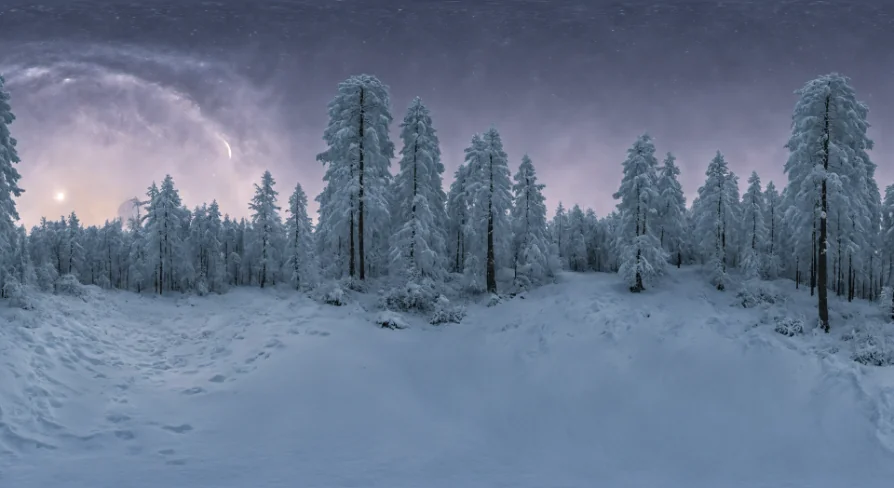
The collection provides 50 individual high-dynamic-range textures formatted as equirectangular panoramas. Each asset is rendered at 8k resolution with 32-bit color depth, preserving subtle light gradations across highlights and shadowed horizon lines. Rather than focusing on a single visual mood, the package gathers diverse environmental styles to suit varying visual targets. Creators working on clean, true-to-life winter vistas can utilize the photorealistic captures, while projects with stylized aesthetics can draw from digital painting variants.
Time of day plays a critical role in how winter terrain renders. A low sun creates long, cool blue shadows across fields of snow, while bright midday illumination produces harsh specular glints on ice. The pack encompasses distinct temporal phases, spanning bright daytime conditions to dark night and evening backdrops. Because these panoramas wrap around the entire scene in a continuous 360-degree spherical layout, they serve equally well as distant background plates, environmental skyboxes, or immersion domes in virtual reality setups.
Lighting Workflows with Sky Light and 32-Bit Cubemaps
Beyond functioning as visible horizon elements, the panoramas operate as cubemaps to illuminate level geometry. In Unreal Engine 5, developers frequently rely on real-time atmospheric calculations, but static or specified cubemap lighting offers deliberate artistic control over ambient tints and bounce illumination. The HDR textures within this package can take over the primary environmental lighting through the engine Sky Light component.
To implement this lighting pipeline:
Select the Sky Light actor present within the level viewport or World Outliner.
Navigate to the Details panel and disable the Real Time Capture setting.
Change the Source Type to accept a specified cubemap rather than dynamic scene sampling.
Assign any of the 50 winter HDR textures into the Cubemap slot.
Disabling Real Time Capture and routing one of these 32-bit cubemaps directly into the Sky Light ensures that ambient scene illumination accurately mirrors the color temperature of the selected winter sky. Shaded snow crusts inherit natural skylight bounces, ice surfaces receive coherent specular highlights, and character models fit seamlessly against the background panorama without requiring heavy manual tinting.
Preconfigured Scenes Across 11 Example Maps
Testing textures across blank levels often consumes valuable setup time. To bypass manual scene assembly, the package includes 11 example maps designed to show the panoramas working in balanced environment settings. These levels arrive prebuilt with the necessary lighting elements, sky geometry, and scale considerations already configured.
Using these demonstration levels simplifies asset evaluation. You can load one of the 11 included maps, open the material or actor holding the background panorama, and replace the existing HDR texture or cube map with any of the remaining 50 options. The lighting balance adapts out of the box, offering an instant comparison between day, evening, painterly, or photorealistic options without needing to recalibrate camera exposure or post-processing volumes from scratch.
Enabling the HDRIBackdrop Plugin in UE5
Displaying 360-degree panoramas correctly in Unreal Engine 5 relies on Epic Games' built-in HDRIBackdrop system. This tool projects equirectangular textures onto an adjustable projection mesh that automatically handles ground flattening, horizon alignment, and camera-relative distance.
The package requires this free plugin to be active within your project. Because the tool ships directly inside Unreal Engine 5, external installations are unnecessary. Activating it involves a few direct steps:
Open the project in Unreal Engine 5.
Open the main menu bar, click on Edit, and select Plugins.
Use the search bar in the Plugins window to locate HDRIBackdrop.
Check the Enable box next to the plugin listing.
Restart the editor when prompted to finalize plugin activation.
Once enabled, the HDRIBackdrop actor provides an ideal framework for the pack's 8k textures, projecting the spherical winter panoramas at correct spatial proportions behind mountains, snowdrifts, and architectural assets.
Production Alignment and Scene Types
HDRI Winter Mixed - 8k fills a precise requirement for productions demanding immediate cold-weather exterior backdrops. The presence of both photorealistic natural skies and digitally painted renditions makes it adaptable across entertainment formats, whether staging naturalistic virtual production volumes, high-fidelity outdoor exploration levels, or stylized game worlds. By bridging 8k visual skyboxes with custom cubemap Sky Light capture, the pack functions as a cohesive background and illumination kit for any project set amid snow and ice.
 Nature & Plants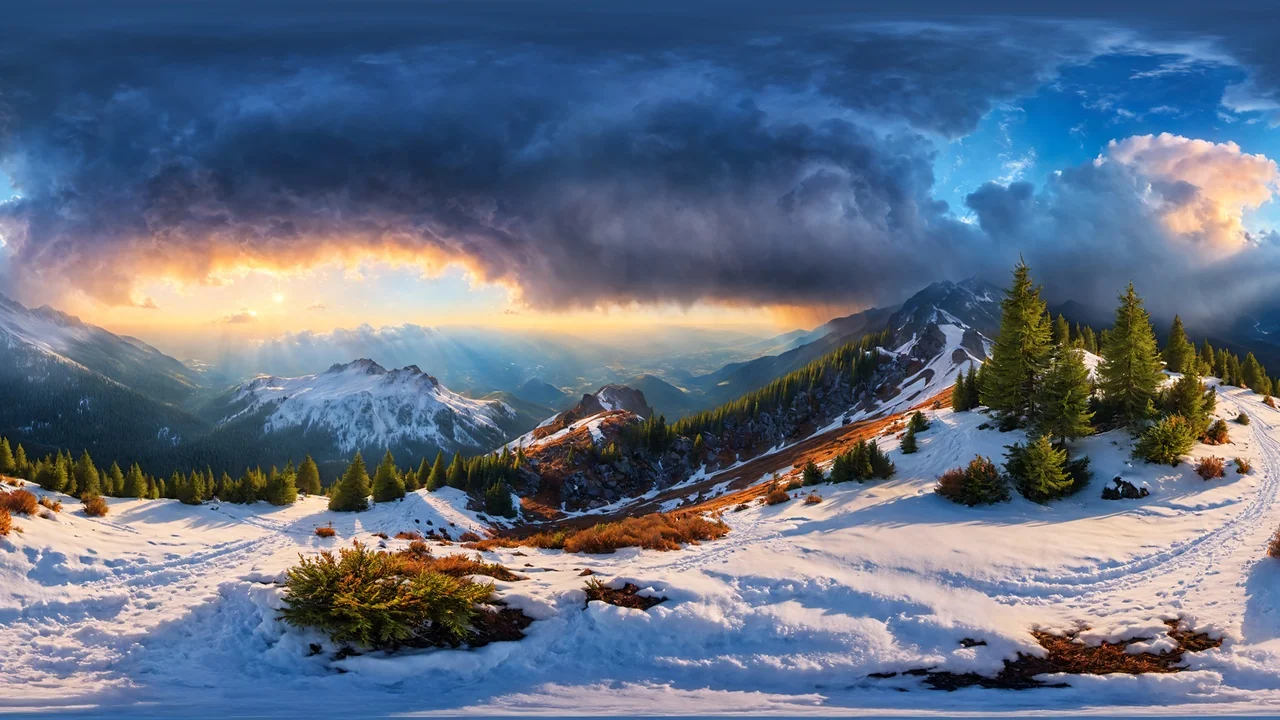
 Nature & Plants
 Skies
Skies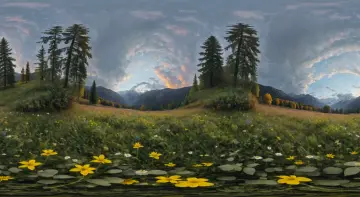 Nature