"7aa4acc705f0d80b"{"id":"1001141","slug":"industrial-area","title":"Industrial Area","category":"Industrial","engine":"5.1+","assetVersion":"","engineVersion":"Engine Version: 5.1+","tag":"Industrial","accent":"blue","visual":"mech","summary":"An analysis of Industrial Area, featuring game-ready photoscanned buildings, PBR props, and realistic abandoned level design for FPS environments.","platform":"Unreal Engine","publishedAt":"2026-09-09T05:16:35.247Z","updatedAt":"2026-09-09T05:16:35.247Z","sourceNotes":[],"fileContents":[],"compatibility":["Unreal Engine","Engine Version: 5.1+"],"featuredImage":{"alt":"Industrial Area","src":"/wp-content/uploads/published/2026/09/4071030deedb-8d212f00-4819-4fe6-90c9-a878bc44889b-62ceffabfc.webp"},"hasDownloadLink":true,"downloads":0,"terms":[{"taxonomy":"category","slug":"industrial-environments","name":"Industrial"}],"galleryImages":[{"src":"/wp-content/uploads/published/2026/09/9f7a336dc474-55a1fe3c-ee84-4b69-bce7-d0e7314d968b-da64efa393.webp","alt":"Industrial Area"},{"src":"/wp-content/uploads/published/2026/09/61193a6120bc-9d4ae250-6157-49d6-ae07-18ddaf589786-e0d845e083.webp","alt":"Industrial Area"},{"src":"/wp-content/uploads/published/2026/09/62cc6d7e7895-a15cb8e4-f1e5-4b72-9802-a0b02a3794bd-47791f0a17.webp","alt":"Industrial Area"},{"src":"/wp-content/uploads/published/2026/09/0c79d5309816-cc7d3800-63df-4f94-b0bf-5eb2bdb37968-224b637d00.webp","alt":"Industrial Area"},{"src":"/wp-content/uploads/published/2026/09/db43b736278a-1f86adb8-0dca-4c4e-b7c0-77b6c9e1a816-92678b2694.webp","alt":"Industrial Area"},{"src":"/wp-content/uploads/published/2026/09/10d1eed9c57d-6378bdc4-82d7-4ccf-aed1-b250235fae97-3e1ea221a4.webp","alt":"Industrial Area"},{"src":"/wp-content/uploads/published/2026/09/6c42b42f60db-a71b803f-98a3-4706-86a2-77ae939815c0-e879ebbe04.webp","alt":"Industrial Area"},{"src":"/wp-content/uploads/published/2026/09/032132449d4b-7f3a5243-7515-49c2-bf1e-56e11147d449-6e9d784eed.webp","alt":"Industrial Area"},{"src":"/wp-content/uploads/published/2026/09/40754220f10d-1424e715-c66b-4577-98b5-47015eb26586-223825b381.webp","alt":"Industrial Area"}],"accessPanel":{"kind":"resource","title":"Download this resource","eyebrow":"Free Download","message":"Log in or create a free account to start your download.","fileName":"Content.7z","safetyNote":"Resources are manually reviewed before listing to improve quality and reduce obvious risks.","actionLabel":"Download Free","resourceType":"Resource archive"},"contentHtml":"\u003ch2\u003eAssembling the Industrial Area in Level Staging\u003c/h2\u003e\n\u003cp\u003eDeploying an abandoned site within an interactive engine begins with establishing structural boundaries. Industrial Area centers on game-ready components structured to assemble a coherent, weathered zone. Because the structures represent an old, decaying industrial setting, scene assembly requires placing larger architectural masses before scattering context elements.\u003c/p\u003e\n\u003cp\u003eSetting up an environment of this type involves laying out structural footprints to establish primary paths of travel. Game-ready assembly relies on clean placement of large buildings to occlude sightlines, guide player movement, and establish focal points. Once the core architectural components occupy their positions, secondary props fill the negative spaces to communicate age, neglect, and disuse across the terrain.\u003c/p\u003e \u003ch2\u003ePhotoscanned Buildings and Props in Abandoned Scenarios\u003c/h2\u003e\n\u003cp\u003ePhotogrammetry forms the foundation of the structural and prop assets in this collection. By deriving visual data directly from real-world objects, photoscanned buildings capture natural surface imperfections, irregular aging, and organic erosion patterns that are difficult to replicate through traditional manual modeling. Abandoned industrial themes rely heavily on these visual traits, as time, weather, and physical stress alter concrete, steel, and masonry in complex ways.\u003c/p\u003e\n\u003cp\u003eThe collection balances macro-scale architecture with granular dressing assets:\u003c/p\u003e\n\u003cul\u003e\n\u003cli\u003ePhotoscanned buildings that provide recognizable silhouette variety, realistic scale, and structural aging typical of decommissioned facilities.\u003c/li\u003e\n\u003cli\u003ePhotoscanned props intended to dress floors, loading zones, and interior corners with real-world context items.\u003c/li\u003e\n\u003cli\u003eGame-ready optimization across both structures and props, maintaining scan fidelity while preserving interactive performance standards.\u003c/li\u003e\n\u003c/ul\u003e\n\u003cp\u003eUsing scanned assets for both the architectural shell and the surrounding debris creates uniform material density throughout the scene. This prevents visual dissonance where a high-detail prop sits against an overly clean or artificial wall surface. The shared capture methodology ensures that every surface reflects consistent historical wear.\u003c/p\u003e \u003ch2\u003eSurface Realism and PBR Material Response\u003c/h2\u003e\n\u003cp\u003eSurface realism in an abandoned facility depends on how light interacts with varied stages of structural decay. Industrial Area employs physically based rendering (PBR) across its buildings and props. PBR standards ensure that physical surface properties—such as roughness variations, specular reflections, and diffuse color values—react predictably under shifting lighting setups.\u003c/p\u003e\n\u003cp\u003eIn an industrial environment marked by abandonment, surface heterogeneity is extreme. Unfinished concrete, rusted metals, weathered paint, and accumulated grime each demand distinct reflectivity and light absorption behavior. The PBR framework ensures that whether an asset sits in hard direct sunlight outside a crumbling warehouse or rests in deep ambient shadow beneath an overhang, material contrast remains plausible and accurate.\u003c/p\u003e \u003ch2\u003eFirst-Person Spatial Design in Old Industrial Levels\u003c/h2\u003e\n\u003cp\u003eThe collection carries explicit design relevance for first-person shooter (FPS) applications and level design. In first-person navigation, assets face intense spatial scrutiny. The camera rests close to ground-level surfaces, walls, and doorway jambs, making texel density and edge authenticity crucial for player immersion.\u003c/p\u003e\n\u003cp\u003ePhotoscanned geometry excels under this close-up scrutiny because surface edges, chipped corners, and structural junctions retain the irregular silhouettes found in real-world demolition. From a mechanical gameplay perspective, the industrial buildings provide immediate hard cover, divide complex exterior fields into readable lanes, and support elevation shifts. Props function simultaneously as storytelling markers and ground-level obstacles, giving level designers the tools needed to direct player velocity, control engagement ranges, and define combat arenas.\u003c/p\u003e \u003ch2\u003ePort Integration and Production Readiness\u003c/h2\u003e\n\u003cp\u003eAsset deployment often extends beyond native engine environments. Industrial Area is structured to accommodate port workflows, enabling teams to transfer the assembled environment or isolated meshes across pipeline environments. Because the buildings and props are game-ready, their geometry and material structures bypass the need for destructive decimation or complete texture rebaking during transfer.\u003c/p\u003e\n\u003cp\u003eMaintaining realistic visual output during a port requires strict attention to PBR channel consistency. The scanned textures and geometric layouts present in the package preserve their relative proportions and shading traits when mapped into differing target render engines. This flexibility ensures that the abandoned industrial atmosphere remains stable whether deployed directly into a production level or adapted into an ongoing multi-platform project pipeline.\u003c/p\u003e\n\n\u003ch2\u003eContinue Browsing Similar Packs\u003c/h2\u003e\n\u003cul\u003e\n\u003cli\u003e\u003ca href=\"https://3dcghub.com/industrial-area-hangar/\" title=\"Industrial Area Hangar\"\u003eIndustrial Area Hangar\u003c/a\u003e\u003c/li\u003e\n\u003cli\u003e\u003ca href=\"https://3dcghub.com/quarry-environment-industrial-factory-area-quarry-factory-factory-area/\" title=\"Quarry Environment ( Industrial Factory Area , Quarry Factory , Factory area )\"\u003eQuarry Environment ( Industrial Factory Area , Quarry Factory , Factory area )\u003c/a\u003e\u003c/li\u003e\n\u003cli\u003e\u003ca href=\"https://3dcghub.com/industrial-zone-buildings/\" title=\"Industrial Zone - Buildings\"\u003eIndustrial Zone - Buildings\u003c/a\u003e\u003c/li\u003e\n\u003cli\u003e\u003ca href=\"https://3dcghub.com/abandoned-factory-factory-warehouse-industrial-factory-industrial-warehouse/\" title=\"Abandoned Factory (Factory, Warehouse, Industrial Factory, Industrial Warehouse)\"\u003eAbandoned Factory (Factory, Warehouse, Industrial Factory, Industrial Warehouse)\u003c/a\u003e\u003c/li\u003e\n\u003cli\u003e\u003ca href=\"https://3dcghub.com/modular-brutalist-levelscapes/\" title=\"Modular Brutalist Levelscapes\"\u003eModular Brutalist Levelscapes\u003c/a\u003e\u003c/li\u003e\n\u003c/ul\u003e","contentTextLength":5185,"navigation":{"current":900,"total":3925,"previous":{"id":"1001143","slug":"multiplayer-shooter-template-with-ai","title":"Multiplayer Shooter Template With AI","category":"Weapons \u0026 Combat","platform":"Unreal Engine","updatedAt":"2026-09-09T05:42:58.481Z"},"next":{"id":"1001140","slug":"hdri-winter-mixed-8k","title":"HDRI Winter Mixed - 8k","category":"Nature \u0026 Plants","platform":"Unreal Engine","updatedAt":"2026-09-09T05:02:23.276Z"}},"relatedResources":[{"id":"8623","slug":"industrial-area-hangar","title":"Industrial Area Hangar","category":"Industrial","engine":"4.26+,5.0+","assetVersion":"Engine version: 4.26+,5.0+","engineVersion":"4.10","tag":"Industrial","accent":"blue","visual":"city","summary":"Build realistic industrial zones with this comprehensive modular asset pack. It includes everything from massive hangars and drilling platforms to detailed props like containers and fuel tanks.","platform":"Unreal Engine","publishedAt":"2026-02-23T18:12:21.000Z","updatedAt":"2026-04-19T15:55:23.000Z","sourceNotes":[],"fileContents":[],"compatibility":["Unreal Engine","Engine version: 4.26+,5.0+"],"featuredImage":{"alt":"Industrial Area Hangar","src":"https://3dcghub.com/wp-content/uploads/2026/02/d3d2c2ad-3810-4cdf-9805-3c8bff091db3.webp"},"hasDownloadLink":true,"downloads":2},{"id":"8686","slug":"quarry-environment-industrial-factory-area-quarry-factory-factory-area","title":"Quarry Environment ( Industrial Factory Area , Quarry Factory , Factory area )","category":"Industrial","engine":"4.26+,5.0+","assetVersion":"Engine version: 4.26+,5.0+","engineVersion":"4.26","tag":"Industrial","accent":"blue","visual":"city","summary":"Build massive industrial landscapes with the Quarry Environment pack. This collection features high-quality assets and factory assemblies designed for seamless integration into games and cinematics.","platform":"Unreal Engine","publishedAt":"2026-02-23T18:33:26.000Z","updatedAt":"2026-04-19T15:55:22.000Z","sourceNotes":[],"fileContents":[],"compatibility":["Unreal Engine","Engine version: 4.26+,5.0+"],"featuredImage":{"alt":"Quarry Environment ( Industrial Factory Area , Quarry Factory , Factory area )","src":"https://3dcghub.com/wp-content/uploads/2026/02/ec0b2f1e-744c-4358-995a-f74e59284f6b.webp"},"hasDownloadLink":true,"downloads":1},{"id":"1001429","slug":"brooke-industrial-town","title":"Brooke Industrial Town","category":"Industrial","engine":"5.1+","assetVersion":"","engineVersion":"Engine Version: 5.1+","tag":"Industrial","accent":"blue","visual":"mech","summary":"Build industrial urban areas with Brooke Industrial Town, featuring over 450 assets, smart shaders, and a dedicated branching powerline tool.","platform":"Unreal Engine","publishedAt":"2026-10-07T06:06:41.396Z","updatedAt":"2026-10-07T06:06:41.396Z","sourceNotes":[],"fileContents":[],"compatibility":["Unreal Engine","Engine Version: 5.1+"],"featuredImage":{"alt":"Brooke Industrial Town","src":"/wp-content/uploads/published/2026/10/c5e08815c07f-528baf48-4b6a-4bcb-8023-65d43daf5565-0b7fef9a1a.webp"},"hasDownloadLink":true,"downloads":0}]}
Industrial
Industrial Area
An analysis of Industrial Area, featuring game-ready photoscanned buildings, PBR props, and realistic abandoned level design for FPS environments.
Deploying an abandoned site within an interactive engine begins with establishing structural boundaries. Industrial Area centers on game-ready components structured to assemble a coherent, weathered zone. Because the structures represent an old, decaying industrial setting, scene assembly requires placing larger architectural masses before scattering context elements.
Setting up an environment of this type involves laying out structural footprints to establish primary paths of travel. Game-ready assembly relies on clean placement of large buildings to occlude sightlines, guide player movement, and establish focal points. Once the core architectural components occupy their positions, secondary props fill the negative spaces to communicate age, neglect, and disuse across the terrain.
Photoscanned Buildings and Props in Abandoned Scenarios
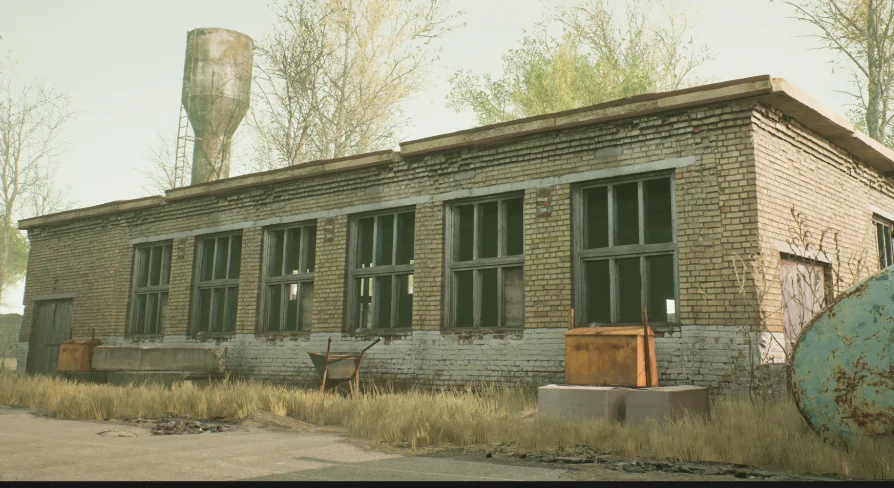
Photogrammetry forms the foundation of the structural and prop assets in this collection. By deriving visual data directly from real-world objects, photoscanned buildings capture natural surface imperfections, irregular aging, and organic erosion patterns that are difficult to replicate through traditional manual modeling. Abandoned industrial themes rely heavily on these visual traits, as time, weather, and physical stress alter concrete, steel, and masonry in complex ways.
The collection balances macro-scale architecture with granular dressing assets:
Photoscanned buildings that provide recognizable silhouette variety, realistic scale, and structural aging typical of decommissioned facilities.
Photoscanned props intended to dress floors, loading zones, and interior corners with real-world context items.
Game-ready optimization across both structures and props, maintaining scan fidelity while preserving interactive performance standards.
Using scanned assets for both the architectural shell and the surrounding debris creates uniform material density throughout the scene. This prevents visual dissonance where a high-detail prop sits against an overly clean or artificial wall surface. The shared capture methodology ensures that every surface reflects consistent historical wear.
Surface Realism and PBR Material Response
Surface realism in an abandoned facility depends on how light interacts with varied stages of structural decay. Industrial Area employs physically based rendering (PBR) across its buildings and props. PBR standards ensure that physical surface properties—such as roughness variations, specular reflections, and diffuse color values—react predictably under shifting lighting setups.
In an industrial environment marked by abandonment, surface heterogeneity is extreme. Unfinished concrete, rusted metals, weathered paint, and accumulated grime each demand distinct reflectivity and light absorption behavior. The PBR framework ensures that whether an asset sits in hard direct sunlight outside a crumbling warehouse or rests in deep ambient shadow beneath an overhang, material contrast remains plausible and accurate.
First-Person Spatial Design in Old Industrial Levels
The collection carries explicit design relevance for first-person shooter (FPS) applications and level design. In first-person navigation, assets face intense spatial scrutiny. The camera rests close to ground-level surfaces, walls, and doorway jambs, making texel density and edge authenticity crucial for player immersion.
Photoscanned geometry excels under this close-up scrutiny because surface edges, chipped corners, and structural junctions retain the irregular silhouettes found in real-world demolition. From a mechanical gameplay perspective, the industrial buildings provide immediate hard cover, divide complex exterior fields into readable lanes, and support elevation shifts. Props function simultaneously as storytelling markers and ground-level obstacles, giving level designers the tools needed to direct player velocity, control engagement ranges, and define combat arenas.
Port Integration and Production Readiness
Asset deployment often extends beyond native engine environments. Industrial Area is structured to accommodate port workflows, enabling teams to transfer the assembled environment or isolated meshes across pipeline environments. Because the buildings and props are game-ready, their geometry and material structures bypass the need for destructive decimation or complete texture rebaking during transfer.
Maintaining realistic visual output during a port requires strict attention to PBR channel consistency. The scanned textures and geometric layouts present in the package preserve their relative proportions and shading traits when mapped into differing target render engines. This flexibility ensures that the abandoned industrial atmosphere remains stable whether deployed directly into a production level or adapted into an ongoing multi-platform project pipeline.
 Industrial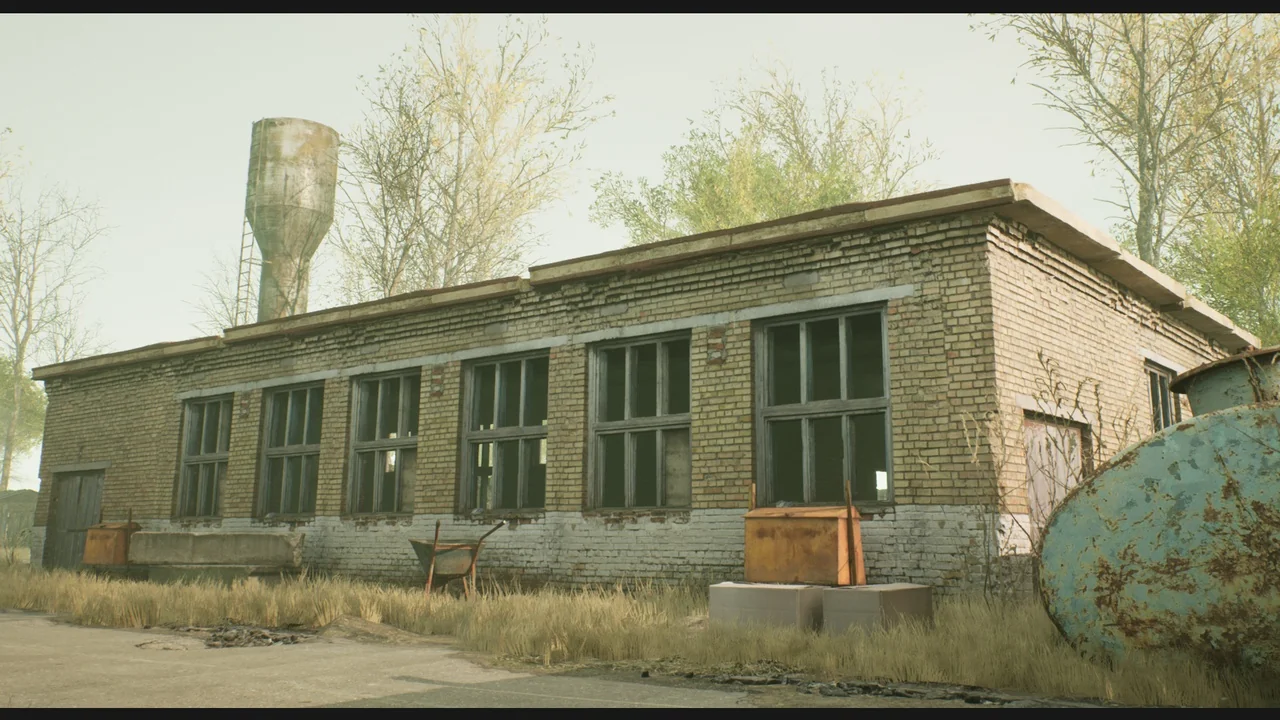
 Industrial
 Industrial
 Industrial