"a338a1d501976271"{"id":"1001391","slug":"frosted-glass","title":"Frosted Glass","category":"Building \u0026 Human-made","engine":"4.26+,5.0+","assetVersion":"","engineVersion":"Engine Version: 4.26+,5.0+","tag":"Building","accent":"blue","visual":"mech","summary":"Explore the dual surface and post process shader workflows in Frosted Glass, covering stencil setups, stained glass tinting, and Lumen reflection settings.","platform":"Unreal Engine","publishedAt":"2026-10-04T16:26:47.795Z","updatedAt":"2026-10-04T16:26:47.795Z","sourceNotes":[],"fileContents":[],"compatibility":["Unreal Engine","Engine Version: 4.26+,5.0+"],"featuredImage":{"alt":"Frosted Glass","src":"/wp-content/uploads/published/2026/10/753cf28ba697-e0b8a84b-1e7a-414b-acb7-81c1ac747c4a-73e82313a4.webp"},"hasDownloadLink":true,"downloads":0,"terms":[{"taxonomy":"category","slug":"building-and-human-made","name":"Building \u0026 Human-made"}],"galleryImages":[{"src":"/wp-content/uploads/published/2026/10/00d1bdc7288d-71a375dd-5b7b-4ecc-b395-5c6c1f562d14-3c784c7161.webp","alt":"Frosted Glass"},{"src":"/wp-content/uploads/published/2026/10/3b99cfa1e1bd-3bde796c-59ba-43c5-a7b3-397cec68e0e9-af500ce36d.webp","alt":"Frosted Glass"},{"src":"/wp-content/uploads/published/2026/10/c4e65449e7f2-850d26cb-77d6-4eec-acda-f2eb3316cd66-9d8a843814.webp","alt":"Frosted Glass"},{"src":"/wp-content/uploads/published/2026/10/d69fc3564861-c749abdf-b9c7-44ff-ad7c-57a1548766a7-b25f4bfa1b.webp","alt":"Frosted Glass"},{"src":"/wp-content/uploads/published/2026/10/1c52f9e45254-c22d56dc-fb00-48a4-8219-1b6f504e373a-281f43eaba.webp","alt":"Frosted Glass"}],"accessPanel":{"kind":"resource","title":"Download this resource","eyebrow":"Free Download","message":"Log in or create a free account to start your download.","fileName":"Content.7z","safetyNote":"Resources are manually reviewed before listing to improve quality and reduce obvious risks.","actionLabel":"Download Free","resourceType":"Resource archive"},"contentHtml":"\u003ch2\u003eTwo Methods for Simulating Frosted Glass Surfaces\u003c/h2\u003e\u003cp\u003eLight scattering through rough transparent surfaces presents distinct rendering hurdles in real-time graphics. Frosted Glass approaches this by offering two separate technical implementations: a traditional Surface Material and a camera-driven Post Process Material. Each architecture balances performance, coloration control, and translucency handling differently, allowing them to serve distinct roles or merge within the same environment.\u003c/p\u003e\u003cp\u003eThe Surface Material version evaluates directly on geometry. It gives artists per-surface control over diffuse color, which makes it well-suited for colored panels, decorative partitions, and stained glass window designs. It also retains independent per-surface reflection color. The trade-off with this approach lies in sorting: the Surface Material cannot render other translucent objects positioned behind the frosted pane. On mobile platforms, this material runs in a lower-quality profile to preserve rendering budgets.\u003c/p\u003e\u003cp\u003eThe Post Process Material shifts light scattering to screen space through scene-depth masking. Instead of per-surface diffuse values, diffuse coloration is driven per post process volume, while reflection color still functions on a per-surface basis. Its primary technical advantage is scene coherence: it renders translucent objects located behind the frosted glass without sorting dropouts. For mobile deployment, the post process implementation maintains full visual quality.\u003c/p\u003e\u003ch2\u003eSurface Material Workflow and Backface Culling Controls\u003c/h2\u003e\u003cp\u003eDeploying the surface variation requires applying one of the included frosted glass materials directly to target static or skeletal meshes. Once assigned, light dispersion and surface highlights appear immediately without extra volume configuration.\u003c/p\u003e\u003cp\u003eComplex models with interior faces or overlapping geometric shells can introduce self-overlapping shading artifacts. To counter this, the material instance includes a backface culling toggle. When activating backface culling inside the material instance parameters, the associated mesh must have Render CustomDepth Pass enabled in its actor details. This setting resolves self-intersection boundaries and clears up visual glitches along tight corners or layered panes.\u003c/p\u003e\u003cp\u003eBecause the surface method natively handles individual diffuse tinting per material slot, it provides the most direct route for architectural stained glass. Varied colored panes across an ornate frame can be shaded using independent material instances, each carrying custom diffuse and reflection tints without requiring dedicated scene volumes.\u003c/p\u003e\u003ch2\u003eConfiguring the Post Process Material and Stencil Passes\u003c/h2\u003e\u003cp\u003eThe post process method relies on custom depth buffers to isolate which screen pixels should receive frosted diffusion. Setting up this pipeline requires specific project-level and actor-level configurations:\u003c/p\u003e\u003cul\u003e\u003cli\u003eOpen Project Settings and navigate to the rendering options, setting Custom Depth-Stencil Pass to Enabled with Stencil.\u003c/li\u003e\u003cli\u003eAssign a regular transparent glass material to the target mesh to establish the initial refraction and specular response.\u003c/li\u003e\u003cli\u003eSelect the mesh in the viewport or blueprint, enable Render CustomDepth Pass, and enter a CustomDepth Stencil Value between 1 and 255.\u003c/li\u003e\u003cli\u003ePlace or select a Post Process Volume encompassing the camera view, locate the Post Process Materials array, and add an instance of the frosted glass post process material.\u003c/li\u003e\u003c/ul\u003e\u003cp\u003eOnce bound to the volume, the post process shader reads the stencil index written by the mesh, confining blur and transmitted light scattering strictly to geometry carrying that stencil value. Translucent elements situated behind the glass—such as water planes, particle emitters, or additional glass sheets—remain fully visible through the blur.\u003c/p\u003e\u003ch2\u003eCombining Material Types for Multi-Layered Frosted Effects\u003c/h2\u003e\u003cp\u003eRather than treating the surface and post process variants as mutually exclusive, scenes can combine both pipelines to solve difficult transparency layering. The included showcase level maps out these pairings, featuring visual test cases and placed notation cards detailing specific setup logic for each scenario.\u003c/p\u003e\u003cp\u003eA notable use case for combining both systems is multi-layered frosted glass. Stacking multiple surface-only shaders causes the rear layers to disappear due to translucency limitations. By pairing a surface material on the primary glass boundary with a stencil-based post process pass on secondary or interior sheets, scenes can simulate double-pane windows, display cases, or frosted office dividers that blur one another correctly. The workflow also maintains compatibility with Soft Outlines pipelines when blending stylized edge detection with textured glass diffusion.\u003c/p\u003e\u003ch2\u003eAddressing Unreal Engine 5 Lumen Reflections and Translucency\u003c/h2\u003e\u003cp\u003eWorking in Unreal Engine 5.0 introduces specific engine-level behaviors when handling translucent reflection passes. Lumen does not natively generate mirror-like sharp reflections on translucent glass surfaces in this version, often yielding overly soft or blurry specular highlights across frosted planes.\u003c/p\u003e\u003cp\u003eTo produce sharp, well-defined specular reflections on glass, disable Lumen translucency reflections globally through the console using the command \u003ccode\u003eR.Lumen.TranslucencyReflections.Enable 0\u003c/code\u003e. Once disabled, the engine falls back to environment cubemaps, yielding crisp highlights on top of the frosted transmission. If a project relies on static lighting and baked lightmaps, adjust the Global Illumination solution to Screen Space within Project Settings. This mirrors the lighting and reflection capture behavior of Unreal Engine 4, allowing captured reflection probes and precomputed lightmaps to display predictably across translucent objects.\u003c/p\u003e\u003cp\u003eFor projects running hardware raytracing, raytraced translucency supports simple frosted glass behavior where both reflected light and transmitted light are scattered simultaneously across the surface.\u003c/p\u003e\n\n\u003ch2\u003eContinue Browsing Similar Packs\u003c/h2\u003e\n\u003cul\u003e\n\u003cli\u003e\u003ca href=\"https://3dcghub.com/glass-mirrors-windows/\" title=\"Glass Mirrors Windows\"\u003eGlass Mirrors Windows\u003c/a\u003e\u003c/li\u003e\n\u003cli\u003e\u003ca href=\"https://3dcghub.com/ultraglass-shader/\" title=\"ULTRAGlass Shader\"\u003eULTRAGlass Shader\u003c/a\u003e\u003c/li\u003e\n\u003cli\u003e\u003ca href=\"https://3dcghub.com/roof-vol-51-hand-painted-textures/\" title=\"Roof Vol.51 - Hand Painted Textures\"\u003eRoof Vol.51 - Hand Painted Textures\u003c/a\u003e\u003c/li\u003e\n\u003cli\u003e\u003ca href=\"https://3dcghub.com/building-interior-cubemap-material-function/\" title=\"Building Interior Cubemap Material Function\"\u003eBuilding Interior Cubemap Material Function\u003c/a\u003e\u003c/li\u003e\n\u003cli\u003e\u003ca href=\"https://3dcghub.com/cellar-materials/\" title=\"Cellar Materials\"\u003eCellar Materials\u003c/a\u003e\u003c/li\u003e\n\u003c/ul\u003e","contentTextLength":6114,"navigation":{"current":10,"total":3338,"previous":{"id":"1001392","slug":"car-dealer-automotive-gallery","title":"CAR DEALER - Automotive Gallery","category":"Interior","platform":"Unreal Engine","updatedAt":"2026-10-04T17:15:41.330Z"},"next":{"id":"1001390","slug":"post-apocalyptic-nyc-environment-megapack-post-apocalyptic-nyc-environment","title":"Post Apocalyptic NYC Environment Megapack ( Post Apocalyptic NYC Environment )","category":"Environments","platform":"Unreal Engine","updatedAt":"2026-10-04T16:14:19.024Z"}},"relatedResources":[{"id":"1000833","slug":"glass-mirrors-windows","title":"Glass Mirrors Windows","category":"Buildings \u0026 Architecture","engine":"4.26+,5.0+","assetVersion":"","engineVersion":"Engine Version: 4.26+,5.0+","tag":"Buildings","accent":"blue","visual":"mech","summary":"A collection of 17 glass, mirror, and window materials for high-end games and architectural visualization, covering frosted, cracked, stained, and reflective su","platform":"Unreal Engine","publishedAt":"2026-08-03T13:08:49.613Z","updatedAt":"2026-08-03T13:08:49.613Z","sourceNotes":[],"fileContents":[],"compatibility":["Unreal Engine","Engine Version: 4.26+,5.0+"],"featuredImage":{"alt":"Glass Mirrors Windows","src":"/wp-content/uploads/published/2026/08/6e72e6f37488-c676653f-47a0-48c1-a49d-6d606982f755-0ce49077ed.webp"},"hasDownloadLink":true,"downloads":0},{"id":"12398","slug":"ultraglass-shader","title":"ULTRAGlass Shader","category":"Building \u0026 Human-made","engine":"4.26+,5.0+","assetVersion":"Engine version: 4.26+,5.0+","engineVersion":"4.20","tag":"Building","accent":"blue","visual":"luts","summary":"Enhance your 3D projects with the ULTRAGlass Shader, a versatile tool featuring 15 preset instances and deep customization options. This package includes high-quality meshes and materials designed for realistic or stylized environments.","platform":"Unreal Engine","publishedAt":"2026-03-07T12:23:40.000Z","updatedAt":"2026-04-19T15:47:57.000Z","sourceNotes":[],"fileContents":[],"compatibility":["Unreal Engine","Engine version: 4.26+,5.0+"],"featuredImage":{"alt":"ULTRAGlass Shader","src":"https://3dcghub.com/wp-content/uploads/2026/03/bb58420f-c600-4c61-9133-974b67ef1cd0.webp"},"hasDownloadLink":true,"downloads":0},{"id":"12364","slug":"roof-vol-51-hand-painted-textures","title":"Roof Vol.51 - Hand Painted Textures","category":"Building \u0026 Human-made","engine":"4.26+,5.0+","assetVersion":"Engine version: 4.26+,5.0+","engineVersion":"4.24","tag":"Building","accent":"blue","visual":"luts","summary":"Roof Vol.51 - Hand Painted Textures is a high-quality set of five unique, tileable textures. Designed for stylized and fantasy projects, these assets are mobile-ready and support PBR workflows.","platform":"Unreal Engine","publishedAt":"2026-03-07T12:20:05.000Z","updatedAt":"2026-04-19T15:47:58.000Z","sourceNotes":[],"fileContents":[],"compatibility":["Unreal Engine","Engine version: 4.26+,5.0+"],"featuredImage":{"alt":"Roof Vol.51 - Hand Painted Textures","src":"https://3dcghub.com/wp-content/uploads/2026/03/bcba476a-5b7d-4ba0-9b26-c5b561b3ed3f.webp"},"hasDownloadLink":true,"downloads":2}]}
Building
Frosted Glass
Explore the dual surface and post process shader workflows in Frosted Glass, covering stencil setups, stained glass tinting, and Lumen reflection settings.
Light scattering through rough transparent surfaces presents distinct rendering hurdles in real-time graphics. Frosted Glass approaches this by offering two separate technical implementations: a traditional Surface Material and a camera-driven Post Process Material. Each architecture balances performance, coloration control, and translucency handling differently, allowing them to serve distinct roles or merge within the same environment.
The Surface Material version evaluates directly on geometry. It gives artists per-surface control over diffuse color, which makes it well-suited for colored panels, decorative partitions, and stained glass window designs. It also retains independent per-surface reflection color. The trade-off with this approach lies in sorting: the Surface Material cannot render other translucent objects positioned behind the frosted pane. On mobile platforms, this material runs in a lower-quality profile to preserve rendering budgets.
The Post Process Material shifts light scattering to screen space through scene-depth masking. Instead of per-surface diffuse values, diffuse coloration is driven per post process volume, while reflection color still functions on a per-surface basis. Its primary technical advantage is scene coherence: it renders translucent objects located behind the frosted glass without sorting dropouts. For mobile deployment, the post process implementation maintains full visual quality.
Surface Material Workflow and Backface Culling Controls
Deploying the surface variation requires applying one of the included frosted glass materials directly to target static or skeletal meshes. Once assigned, light dispersion and surface highlights appear immediately without extra volume configuration.
Complex models with interior faces or overlapping geometric shells can introduce self-overlapping shading artifacts. To counter this, the material instance includes a backface culling toggle. When activating backface culling inside the material instance parameters, the associated mesh must have Render CustomDepth Pass enabled in its actor details. This setting resolves self-intersection boundaries and clears up visual glitches along tight corners or layered panes.
Because the surface method natively handles individual diffuse tinting per material slot, it provides the most direct route for architectural stained glass. Varied colored panes across an ornate frame can be shaded using independent material instances, each carrying custom diffuse and reflection tints without requiring dedicated scene volumes.
Configuring the Post Process Material and Stencil Passes
The post process method relies on custom depth buffers to isolate which screen pixels should receive frosted diffusion. Setting up this pipeline requires specific project-level and actor-level configurations:
Open Project Settings and navigate to the rendering options, setting Custom Depth-Stencil Pass to Enabled with Stencil.
Assign a regular transparent glass material to the target mesh to establish the initial refraction and specular response.
Select the mesh in the viewport or blueprint, enable Render CustomDepth Pass, and enter a CustomDepth Stencil Value between 1 and 255.
Place or select a Post Process Volume encompassing the camera view, locate the Post Process Materials array, and add an instance of the frosted glass post process material.
Once bound to the volume, the post process shader reads the stencil index written by the mesh, confining blur and transmitted light scattering strictly to geometry carrying that stencil value. Translucent elements situated behind the glass—such as water planes, particle emitters, or additional glass sheets—remain fully visible through the blur.
Combining Material Types for Multi-Layered Frosted Effects
Rather than treating the surface and post process variants as mutually exclusive, scenes can combine both pipelines to solve difficult transparency layering. The included showcase level maps out these pairings, featuring visual test cases and placed notation cards detailing specific setup logic for each scenario.
A notable use case for combining both systems is multi-layered frosted glass. Stacking multiple surface-only shaders causes the rear layers to disappear due to translucency limitations. By pairing a surface material on the primary glass boundary with a stencil-based post process pass on secondary or interior sheets, scenes can simulate double-pane windows, display cases, or frosted office dividers that blur one another correctly. The workflow also maintains compatibility with Soft Outlines pipelines when blending stylized edge detection with textured glass diffusion.
Addressing Unreal Engine 5 Lumen Reflections and Translucency
Working in Unreal Engine 5.0 introduces specific engine-level behaviors when handling translucent reflection passes. Lumen does not natively generate mirror-like sharp reflections on translucent glass surfaces in this version, often yielding overly soft or blurry specular highlights across frosted planes.
To produce sharp, well-defined specular reflections on glass, disable Lumen translucency reflections globally through the console using the command R.Lumen.TranslucencyReflections.Enable 0. Once disabled, the engine falls back to environment cubemaps, yielding crisp highlights on top of the frosted transmission. If a project relies on static lighting and baked lightmaps, adjust the Global Illumination solution to Screen Space within Project Settings. This mirrors the lighting and reflection capture behavior of Unreal Engine 4, allowing captured reflection probes and precomputed lightmaps to display predictably across translucent objects.
For projects running hardware raytracing, raytraced translucency supports simple frosted glass behavior where both reflected light and transmitted light are scattered simultaneously across the surface.
 Building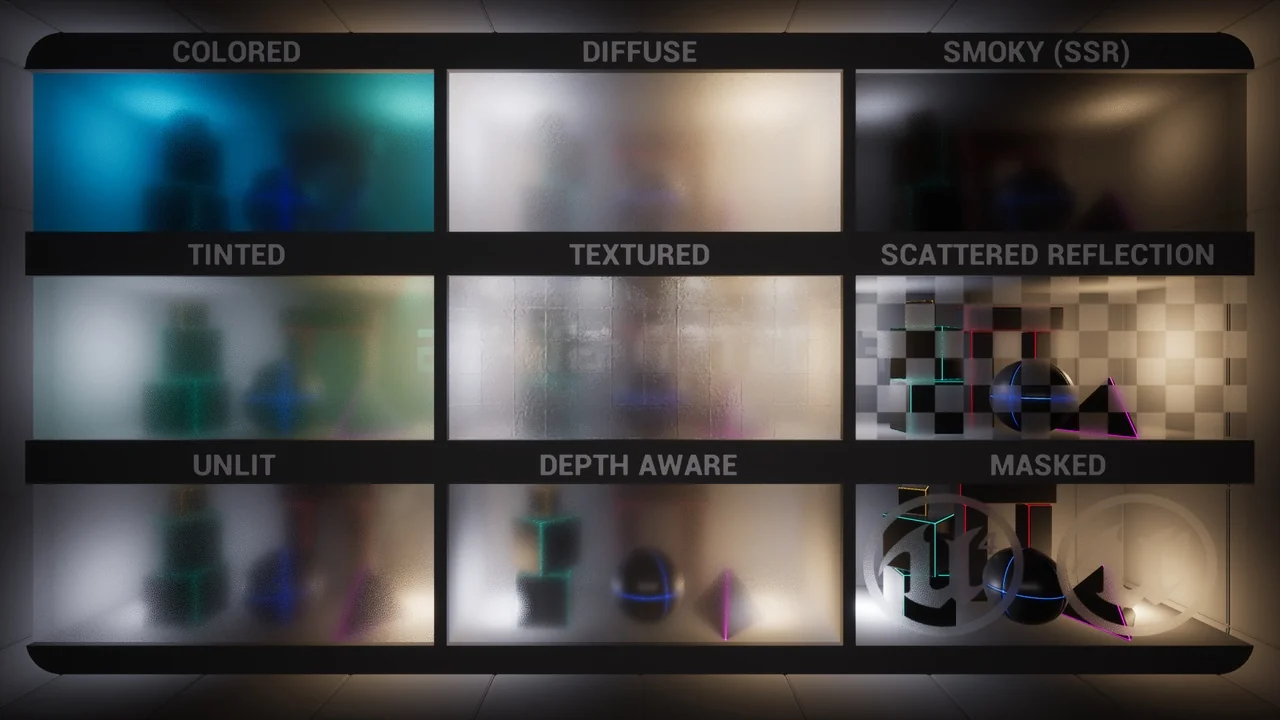
 Buildings
 Building
 Building