"95fdaf16012263fa"{"id":"1002338","slug":"parallax-occlusion-brick-materials-vol-1","title":"Parallax Occlusion Brick Materials Vol.1","category":"Building \u0026 Human-made","engine":"4.27,5.0+","assetVersion":"","engineVersion":"Engine Version: 4.27,5.0+","tag":"Building","accent":"blue","visual":"luts","summary":"Twelve 4K brick materials with parallax occlusion mapping for game and architectural projects, plus twelve non-POM Basic Materials and adjustable POM material c","platform":"Unreal Engine","indexPolicy":"index","publishedAt":"2026-11-06T06:44:03.448Z","updatedAt":"2026-11-06T06:44:03.448Z","sourceNotes":[],"fileContents":[],"compatibility":["Unreal Engine","Engine Version: 4.27,5.0+"],"featuredImage":{"alt":"Parallax Occlusion Brick Materials Vol.1","src":"/wp-content/uploads/published/2026/11/6db76f922f8f-10c2a472-1e45-455b-af8f-65fb062ad9a3-fb2191c2c1.webp"},"hasDownloadLink":true,"downloads":0,"terms":[{"taxonomy":"category","slug":"building-and-human-made","name":"Building \u0026 Human-made"}],"galleryImages":[{"src":"/wp-content/uploads/published/2026/11/01319d391633-ab731382-315f-47a2-ba80-dbc2bd47a514-b3e75596c4.webp","alt":"Parallax Occlusion Brick Materials Vol.1"},{"src":"/wp-content/uploads/published/2026/11/bc86ce0419ca-b10aa0fa-8b4d-48d4-9634-26c9ab72ce82-6c111340bc.webp","alt":"Parallax Occlusion Brick Materials Vol.1"},{"src":"/wp-content/uploads/published/2026/11/42675fd91da0-0b1bba5d-3131-44f5-848f-f40480eb5f6e-54d8cb722d.webp","alt":"Parallax Occlusion Brick Materials Vol.1"},{"src":"/wp-content/uploads/published/2026/11/0e6855a6b4b9-c41d6a40-34a8-4a9d-808c-4d8a4fc41a59-f5350f42b0.webp","alt":"Parallax Occlusion Brick Materials Vol.1"},{"src":"/wp-content/uploads/published/2026/11/95764e68c513-33904d97-cbfa-4ee9-9acf-1de894c22ede-363c1e2e60.webp","alt":"Parallax Occlusion Brick Materials Vol.1"},{"src":"/wp-content/uploads/published/2026/11/b1d2ee6f244b-8623ce3b-7182-4504-a01f-cdcaa374ea87-b38063137e.webp","alt":"Parallax Occlusion Brick Materials Vol.1"},{"src":"/wp-content/uploads/published/2026/11/f8ffdee84ca5-b367cd3d-488b-4cb3-ac03-f2ebc210b81b-5e77c6cbc2.webp","alt":"Parallax Occlusion Brick Materials Vol.1"},{"src":"/wp-content/uploads/published/2026/11/e21813ab2977-71b01028-2014-4e14-83d6-1fdfab3b5885-60b01b9ad9.webp","alt":"Parallax Occlusion Brick Materials Vol.1"},{"src":"/wp-content/uploads/published/2026/11/3901341715b9-7fa0c061-cbf8-41ef-b08d-e0fa499c0641-5224f55176.webp","alt":"Parallax Occlusion Brick Materials Vol.1"},{"src":"/wp-content/uploads/published/2026/11/5f72f38bcc34-8fd06d18-87ad-47ee-a293-f85ce84187ee-caeeb39dab.webp","alt":"Parallax Occlusion Brick Materials Vol.1"}],"accessPanel":{"kind":"resource","title":"Get this resource","eyebrow":"Free resource","message":"3DCGHUB is the service provider for this listing. Access is fulfilled through the official publisher channel.","fileName":"Parallax Occlusion Brick Materials Vol.1.7z","safetyNote":"Resources are manually reviewed before listing to improve quality and reduce obvious risks.","actionLabel":"Get this resource","resourceType":"Resource archive","versions":[]},"contentHtml":"\u003cp\u003eParallax Occlusion Brick Materials Vol.1 gathers 12 brick materials that use Parallax Occlusion Mapping at 4K resolution. All 12 brick materials also appear as Basic Materials without POM, again at 4K. That gives the package a POM set and a non-POM set with the same brick material count. The materials are made for use in game or architectural projects.\u003c/p\u003e \u003ch2\u003eVersion 1.1 and the 12-Material Brick Set\u003c/h2\u003e\n\u003cp\u003eVersion 1.1, dated 01/22/2019, added six materials to the pack and increased the resolution to 4K. The same update added support for UE4 4.15 and changed the map arrangement: roughness and height are combined in one map, and an ambient occlusion map is added. The maximum displayed resolution can be changed easily inside UE4, so the 4K texture resolution does not lock a project to a single display setting. The material count is 12, with each of those materials carrying a Basic Material counterpart.\u003c/p\u003e \u003ch2\u003eSix Adjustable Variables per POM Material Instance\u003c/h2\u003e\n\u003cp\u003eEach POM material instance carries six adjustable variables. They cover the brick material's tiling, its normal and roughness intensities, its height ratio, and the two step counts used by the POM setup.\u003c/p\u003e\n\u003cul\u003e\n\u003cli\u003eTexture Tiling, which controls seamless tiling of all materials.\u003c/li\u003e\n\u003cli\u003eNormal Intensity.\u003c/li\u003e\n\u003cli\u003eRoughness Intensity.\u003c/li\u003e\n\u003cli\u003ePOM Intensity, the height ratio that defines how deep the height map is in relation to its width and makes the material look deeper.\u003c/li\u003e\n\u003cli\u003eMin Steps, the step count used when looking downward at the material, where fewer steps are typically required.\u003c/li\u003e\n\u003cli\u003eMax Steps, the step count performed at glancing angles, where more steps are typically necessary.\u003c/li\u003e\n\u003c/ul\u003e\n\u003cp\u003eThe six settings are the adjustable variables inside each POM material instance. They sit alongside the brick material itself rather than replacing its fixed parts.\u003c/p\u003e \u003ch2\u003eTexture Tiling and Seamless Tiling\u003c/h2\u003e\n\u003cp\u003eTexture Tiling is the variable that handles seamless tiling for all materials. The control covers the full material set, so every brick material in the POM set has a tiling path for seamless repetition. The variable is part of each POM material instance, which places tiling among the instance-level changes rather than among the fixed parts of the package.\u003c/p\u003e\n\u003cp\u003eBecause the variable is exposed per POM material instance, tiling can be adjusted for the way a brick material is used. The seamless tiling behavior is tied to the Texture Tiling control, not to a separate brick material variant. That makes the control one of the first settings to check when a brick surface needs to repeat across a larger area.\u003c/p\u003e \u003ch2\u003ePOM Intensity and the Height Ratio\u003c/h2\u003e\n\u003cp\u003ePOM Intensity is not just a strength value; it is the height ratio. It sets how deep the height map is in relation to its width, and that relationship is what makes the material look deeper. A change to POM Intensity therefore changes the apparent depth of the brick material through the height ratio.\u003c/p\u003e\n\u003cp\u003eNormal Intensity and Roughness Intensity remain separate variables in the same POM material instance, so depth, normal response, and roughness response are adjusted through distinct controls. POM Intensity is the setting tied directly to the height ratio and the apparent depth of the brick surface.\u003c/p\u003e \u003ch2\u003eMin Steps and Max Steps at Different Viewing Angles\u003c/h2\u003e\n\u003cp\u003eMin Steps and Max Steps split the POM step count by viewing direction. Min Steps is the number of steps used when looking downward at the material; fewer steps are typically required in that case. Max Steps is the number performed at glancing angles; more steps are typically necessary there.\u003c/p\u003e\n\u003cp\u003eThe material instance exposes both values, so the downward and glancing cases can be set independently. The reason for two controls is the view angle: a downward look and a glancing look do not need the same step count. Min Steps handles the downward case, while Max Steps handles the glancing case.\u003c/p\u003e \u003ch2\u003eThe 4K Map Layout and UE4 4.15 Support\u003c/h2\u003e\n\u003cp\u003eVersion 1.1 increased the resolution to 4K and combined roughness and height in one map. It also added an ambient occlusion map. The 4K resolution applies to both the POM materials and the Basic Materials.\u003c/p\u003e\n\u003cp\u003eInside UE4, the max displayed resolution can be changed easily, which gives an engine-side control over the displayed resolution. Support for UE4 4.15 was added in the same version 1.1 update. These changes sit alongside the material instance variables rather than replacing them.\u003c/p\u003e \u003ch2\u003eBasic Materials Without the POM Treatment\u003c/h2\u003e\n\u003cp\u003eAll 12 materials are included as Basic Materials without POM at 4K. This is a parallel set, not a separate brick count: the same 12 materials appear with POM in the main set and without POM in the Basic set.\u003c/p\u003e\n\u003cp\u003eThe six adjustable variables described above belong to the POM material instances. The Basic Materials carry the brick materials without POM while retaining the 4K resolution. They provide a second version of each brick material for situations where the POM treatment is not needed.\u003c/p\u003e \u003ch2\u003eProject Fit and Urban Material Pack Compatibility\u003c/h2\u003e\n\u003cp\u003eThe package is intended for game and architectural projects. Its listed compatibility is the Urban Material Pack. The set is tagged Parallax, Realistic, Brick, and Occlusion.\u003c/p\u003e\n\u003cp\u003eAcross the package, the consistent elements are the 12 brick materials, the 4K resolution, and the split between POM and Basic Material versions. The POM instances provide the tiling, normal intensity, roughness intensity, height ratio, and step controls; the Basic Materials provide the same brick materials without POM. The package is set up to handle brick surfaces in both forms and to let the POM version be tuned through its material instance variables.\u003c/p\u003e\n\n\u003ch2\u003eMore From The Same Workflow\u003c/h2\u003e\n\u003cul\u003e\n\u003cli\u003e\u003ca href=\"https://3dcghub.com/roof-tiles-material-pack-vol-1/\" rel=\"noopener noreferrer\"\u003eRoof Tiles Material Pack Vol.1\u003c/a\u003e\u003c/li\u003e\n\u003cli\u003e\u003ca href=\"https://3dcghub.com/building-interior-cubemap-material-function/\" rel=\"noopener noreferrer\"\u003eBuilding Interior Cubemap Material Function\u003c/a\u003e\u003c/li\u003e\n\u003cli\u003e\u003ca href=\"https://3dcghub.com/stone-wall-bricks/\" rel=\"noopener noreferrer\"\u003eStone Wall Bricks\u003c/a\u003e\u003c/li\u003e\n\u003cli\u003e\u003ca href=\"https://3dcghub.com/cellar-materials/\" rel=\"noopener noreferrer\"\u003eCellar Materials\u003c/a\u003e\u003c/li\u003e\n\u003cli\u003e\u003ca href=\"https://3dcghub.com/realistic-moon/\" rel=\"noopener noreferrer\"\u003eRealistic Moon\u003c/a\u003e\u003c/li\u003e\n\u003c/ul\u003e","contentTextLength":5685,"navigation":{"current":30,"total":4291,"previous":{"id":"1002339","slug":"primitive-weapons-pack-low-po","title":"Primitive weapons pack low po","category":"Weapons \u0026 Combat","platform":"Unreal Engine","updatedAt":"2026-11-06T06:45:49.241Z"},"next":{"id":"1002337","slug":"open-world-helper","title":"Open World Helper","category":"Automations","platform":"Unreal Engine","updatedAt":"2026-11-06T06:42:47.191Z"}},"relatedResources":[{"id":"1001654","slug":"roof-tiles-material-pack-vol-1","title":"Roof Tiles Material Pack Vol.1","category":"Building \u0026 Human-made","engine":"4.26+,5.0+","assetVersion":"","engineVersion":"Engine Version: 4.26+,5.0+","tag":"Building","accent":"blue","visual":"luts","summary":"Roof Tiles Material Pack Vol.1 delivers 8 realistic, perfectly tileable 4K roof tile materials engineered for desktop game environments.","platform":"Unreal Engine","indexPolicy":"index","publishedAt":"2026-10-13T08:29:48.500Z","updatedAt":"2026-10-13T08:29:48.500Z","sourceNotes":[],"fileContents":[],"compatibility":["Unreal Engine","Engine Version: 4.26+,5.0+"],"featuredImage":{"alt":"Roof Tiles Material Pack Vol.1","src":"/wp-content/uploads/published/2026/10/c55fa0510ab7-6f27d1d8-5f6e-4985-9a1f-d7be9fdc895d-1930d7acf3.webp"},"hasDownloadLink":true,"downloads":0},{"id":"12279","slug":"building-interior-cubemap-material-function","title":"Building Interior Cubemap Material Function","category":"Building \u0026 Human-made","engine":"4.27,5.0+","assetVersion":"Engine version: 4.27,5.0+","engineVersion":"4.27","tag":"Building","accent":"blue","visual":"luts","summary":"Easily create realistic commercial office windows using this parallax-based material function. It automates interior randomization and nighttime lighting for efficient cityscape development.","platform":"Unreal Engine","indexPolicy":"index","publishedAt":"2026-03-07T12:07:33.000Z","updatedAt":"2026-04-19T15:48:00.000Z","sourceNotes":[],"fileContents":[],"compatibility":["Unreal Engine","Engine version: 4.27,5.0+"],"featuredImage":{"alt":"Building Interior Cubemap Material Function","src":"https://3dcghub.com/wp-content/uploads/2026/03/0476f170-5d1d-4d80-9bfd-4dd730fc539a.webp"},"hasDownloadLink":true,"downloads":1},{"id":"12375","slug":"stone-wall-bricks","title":"Stone Wall Bricks","category":"Building \u0026 Human-made","engine":"4.27,5.0+","assetVersion":"Engine version: 4.27,5.0+","engineVersion":"5.1","tag":"Building","accent":"blue","visual":"luts","summary":"Enhance your 3D environments with the Stone Wall Bricks pack. This collection features seven photoscanned materials including stonework, brickwork, and pebble surfaces for high-quality realism.","platform":"Unreal Engine","indexPolicy":"index","publishedAt":"2026-03-07T12:22:30.000Z","updatedAt":"2026-04-19T15:47:58.000Z","sourceNotes":[],"fileContents":[],"compatibility":["Unreal Engine","Engine version: 4.27,5.0+"],"featuredImage":{"alt":"Stone Wall Bricks","src":"https://3dcghub.com/wp-content/uploads/2026/03/b430682e-5bd8-4eb1-b383-bab9d3091d8f.webp"},"hasDownloadLink":true,"downloads":1}]}
Building
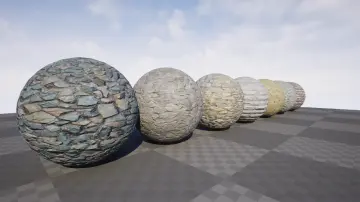
Parallax Occlusion Brick Materials Vol.1
Twelve 4K brick materials with parallax occlusion mapping for game and architectural projects, plus twelve non-POM Basic Materials and adjustable POM material c
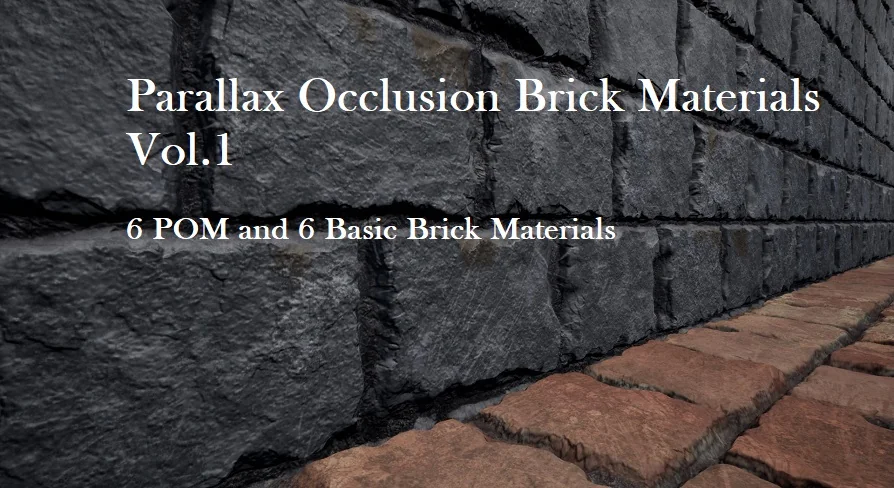
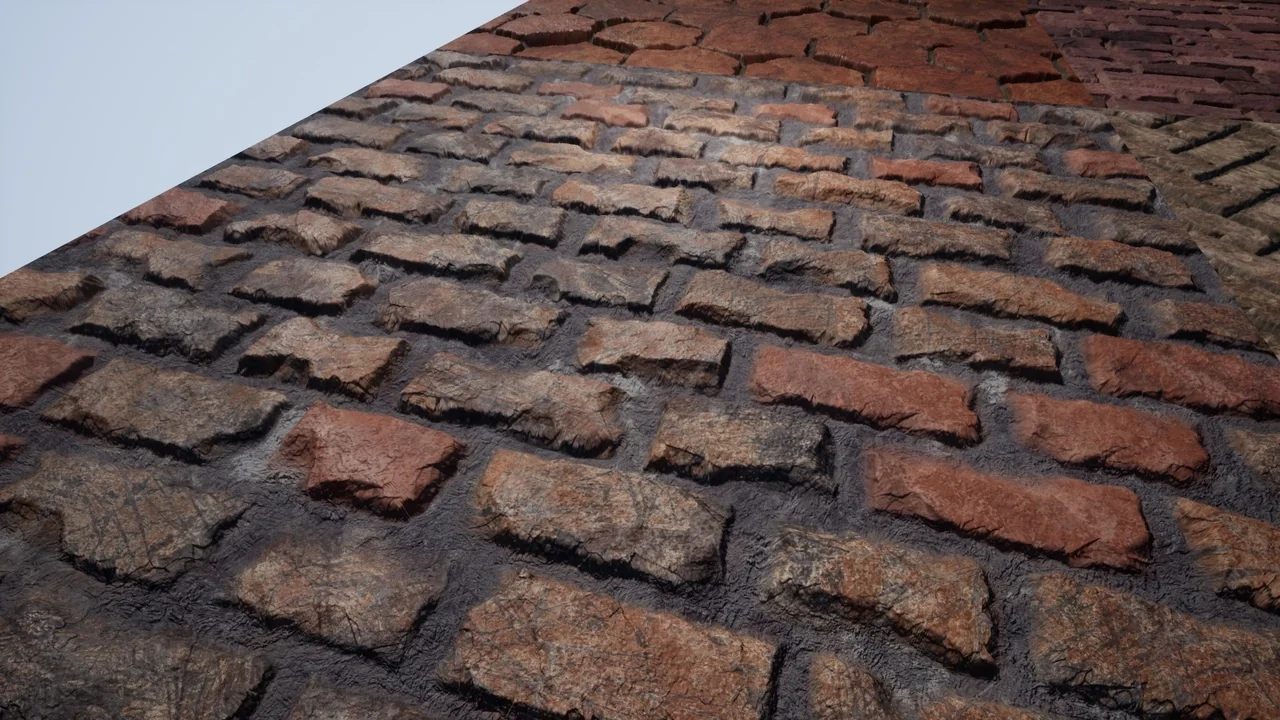
Parallax Occlusion Brick Materials Vol.1 gathers 12 brick materials that use Parallax Occlusion Mapping at 4K resolution. All 12 brick materials also appear as Basic Materials without POM, again at 4K. That gives the package a POM set and a non-POM set with the same brick material count. The materials are made for use in game or architectural projects.
Version 1.1 and the 12-Material Brick Set
Version 1.1, dated 01/22/2019, added six materials to the pack and increased the resolution to 4K. The same update added support for UE4 4.15 and changed the map arrangement: roughness and height are combined in one map, and an ambient occlusion map is added. The maximum displayed resolution can be changed easily inside UE4, so the 4K texture resolution does not lock a project to a single display setting. The material count is 12, with each of those materials carrying a Basic Material counterpart.
Six Adjustable Variables per POM Material Instance
Each POM material instance carries six adjustable variables. They cover the brick material's tiling, its normal and roughness intensities, its height ratio, and the two step counts used by the POM setup.
Texture Tiling, which controls seamless tiling of all materials.
Normal Intensity.
Roughness Intensity.
POM Intensity, the height ratio that defines how deep the height map is in relation to its width and makes the material look deeper.
Min Steps, the step count used when looking downward at the material, where fewer steps are typically required.
Max Steps, the step count performed at glancing angles, where more steps are typically necessary.
The six settings are the adjustable variables inside each POM material instance. They sit alongside the brick material itself rather than replacing its fixed parts.
Texture Tiling and Seamless Tiling
Texture Tiling is the variable that handles seamless tiling for all materials. The control covers the full material set, so every brick material in the POM set has a tiling path for seamless repetition. The variable is part of each POM material instance, which places tiling among the instance-level changes rather than among the fixed parts of the package.
Because the variable is exposed per POM material instance, tiling can be adjusted for the way a brick material is used. The seamless tiling behavior is tied to the Texture Tiling control, not to a separate brick material variant. That makes the control one of the first settings to check when a brick surface needs to repeat across a larger area.
POM Intensity and the Height Ratio
POM Intensity is not just a strength value; it is the height ratio. It sets how deep the height map is in relation to its width, and that relationship is what makes the material look deeper. A change to POM Intensity therefore changes the apparent depth of the brick material through the height ratio.
Normal Intensity and Roughness Intensity remain separate variables in the same POM material instance, so depth, normal response, and roughness response are adjusted through distinct controls. POM Intensity is the setting tied directly to the height ratio and the apparent depth of the brick surface.
Min Steps and Max Steps at Different Viewing Angles
Min Steps and Max Steps split the POM step count by viewing direction. Min Steps is the number of steps used when looking downward at the material; fewer steps are typically required in that case. Max Steps is the number performed at glancing angles; more steps are typically necessary there.
The material instance exposes both values, so the downward and glancing cases can be set independently. The reason for two controls is the view angle: a downward look and a glancing look do not need the same step count. Min Steps handles the downward case, while Max Steps handles the glancing case.
The 4K Map Layout and UE4 4.15 Support
Version 1.1 increased the resolution to 4K and combined roughness and height in one map. It also added an ambient occlusion map. The 4K resolution applies to both the POM materials and the Basic Materials.
Inside UE4, the max displayed resolution can be changed easily, which gives an engine-side control over the displayed resolution. Support for UE4 4.15 was added in the same version 1.1 update. These changes sit alongside the material instance variables rather than replacing them.
Basic Materials Without the POM Treatment
All 12 materials are included as Basic Materials without POM at 4K. This is a parallel set, not a separate brick count: the same 12 materials appear with POM in the main set and without POM in the Basic set.
The six adjustable variables described above belong to the POM material instances. The Basic Materials carry the brick materials without POM while retaining the 4K resolution. They provide a second version of each brick material for situations where the POM treatment is not needed.
Project Fit and Urban Material Pack Compatibility
The package is intended for game and architectural projects. Its listed compatibility is the Urban Material Pack. The set is tagged Parallax, Realistic, Brick, and Occlusion.
Across the package, the consistent elements are the 12 brick materials, the 4K resolution, and the split between POM and Basic Material versions. The POM instances provide the tiling, normal intensity, roughness intensity, height ratio, and step controls; the Basic Materials provide the same brick materials without POM. The package is set up to handle brick surfaces in both forms and to let the POM version be tuned through its material instance variables.
 Building
 Building
 Building
 Building