"d037b61901c110d2"{"id":"1002666","slug":"flying-fantasy-town","title":"Flying Fantasy Town","category":"Fantasy","engine":"5.0+","assetVersion":"","engineVersion":"Engine Version: 5.0+","tag":"Fantasy","accent":"blue","visual":"mech","summary":"Explore Flying Fantasy Town, featuring modular medieval structures, sky and land versatility, PBR materials, and engine post-process setup.","platform":"Unreal Engine","indexPolicy":"index","publishedAt":"2026-11-16T22:15:10.780Z","updatedAt":"2026-11-16T22:15:10.780Z","sourceNotes":[],"fileContents":[],"compatibility":["Unreal Engine","Engine Version: 5.0+"],"featuredImage":{"alt":"Flying Fantasy Town","src":"/wp-content/uploads/published/2026/11/9a5c52edb7d0-e85c8f82-aa9a-443e-9c1e-9492bebdb72f-f4ec3eb96a.webp"},"fileSizeBytes":5668762872,"hasDownloadLink":true,"downloads":0,"terms":[{"taxonomy":"category","slug":"fantasy","name":"Fantasy"}],"galleryImages":[{"src":"/wp-content/uploads/published/2026/11/ddac44422298-c1511b85-c54e-4881-af54-a771395e43d1-55e2d4452c.webp","alt":"Flying Fantasy Town"},{"src":"/wp-content/uploads/published/2026/11/c9cf99855a9c-b8c1ccdf-e060-464f-a340-c71fcba2fb02-221a1710ba.webp","alt":"Flying Fantasy Town"},{"src":"/wp-content/uploads/published/2026/11/99f516a8547f-91ab165f-bb95-4307-a42f-0280cae35d35-5946e8a957.webp","alt":"Flying Fantasy Town"},{"src":"/wp-content/uploads/published/2026/11/df0678849cbd-84c22c0e-aca6-4cc6-bd18-8dc4d24bf03e-9ad249c4d8.webp","alt":"Flying Fantasy Town"},{"src":"/wp-content/uploads/published/2026/11/95ae7d1ae95e-2d0245a9-19f6-47a2-bae8-ad374cfeba04-db6030ba2e.webp","alt":"Flying Fantasy Town"},{"src":"/wp-content/uploads/published/2026/11/b58b2eccfaa1-cc7850d9-8465-4a8b-916b-056428566397-c80c175578.webp","alt":"Flying Fantasy Town"},{"src":"/wp-content/uploads/published/2026/11/bebbb85520a9-ea01e99f-649e-4a1c-85ca-45adc2f5e690-d3e26cc66d.webp","alt":"Flying Fantasy Town"},{"src":"/wp-content/uploads/published/2026/11/4b74dc19a3cb-f6050744-4556-4c98-92fb-e25b648961fd-97f4f670ab.webp","alt":"Flying Fantasy Town"},{"src":"/wp-content/uploads/published/2026/11/738bec979a4e-1376411f-f3b8-4e5f-830a-8524526d397e-b99c358c67.webp","alt":"Flying Fantasy Town"},{"src":"/wp-content/uploads/published/2026/11/f394ff777ad3-01cdc93e-d0aa-4016-970b-0fe320d05fc7-5b06cf9524.webp","alt":"Flying Fantasy Town"}],"accessPanel":{"kind":"resource","title":"Get this resource","eyebrow":"Free resource","message":"Download this resource in your browser.","fileName":"Content.7z","safetyNote":"Resources are manually reviewed before listing to improve quality and reduce obvious risks.","actionLabel":"Get this resource","resourceType":"Resource archive","versions":[]},"contentHtml":"\u003ch2\u003eArchitectural Foundations in Flying Fantasy Town\u003c/h2\u003e\u003cp\u003eModular building components form the core of Flying Fantasy Town, allowing level designers to construct medieval and fantasy settlements with high structural flexibility. The asset collection is structured through a physically based rendering workflow, grounding traditional medieval architectural styles in realistic material responses. Weathered surfaces, structural timber, stone masonry, and pitched roofing elements interact naturally with dynamic lighting systems, preserving material fidelity whether viewed in broad daylight or under shadow.\u003c/p\u003e\u003cp\u003eRather than confining builders to rigid, pre-assembled structures, the framework relies on modular level design principles. Creators can place buildings along narrow streets or stack structures into vertical clusters. Because the stylistic framing supports both grounded fantasy kingdoms and aerial outposts, the exterior elements must read clearly at multiple scales. Rooflines, timber supports, and masonry blocks carry distinct physical contours that maintain visual cohesion across small roadside hamlets and expansive cityscapes alike.\u003c/p\u003e\u003ch2\u003eAdapting the Town for Skybound and Terrestrial Environments\u003c/h2\u003e\u003cp\u003eA central characteristic of Flying Fantasy Town is its dual utility across disparate level types. The assets function equally well when anchored directly to conventional terrain or arranged as floating bastions suspended high in the clouds. This dual nature requires careful attention to silhouette and exterior detail from every angle, including viewpoints from below that are rarely exposed in standard ground-based village packs.\u003c/p\u003e\u003cp\u003eWhen placed on rolling hills, coastal bluffs, or deep forest clearings, the town elements merge seamlessly with standard terrain work. Foundations can be seated into landscape geometry, allowing houses to nestle naturally into hillside paths, riverbanks, or fortified valleys. The structures convey a traditional medieval aesthetic suitable for historical scenarios or grounded low-fantasy campaigns.\u003c/p\u003e\u003cp\u003eWhen lifted into the sky, the buildings take on an entirely different architectural role. Floating islands, airship docks, and gravity-defying settlements demand that every facade withstand close inspection from three dimensions. Airborne levels expose the undersides, cantilevers, and overhangs of structures that would normally be obscured by grass or cobblestones. The models are balanced to ensure that silhouettes hold up cleanly against open atmospheric backdrops, making them suitable for floating fantasy hubs, nomadic sky communities, and aerial fortresses.\u003c/p\u003e\u003ch2\u003eMesh Separation and Window Placement in Flying Fantasy Town\u003c/h2\u003e\u003cp\u003eIterative updates to the package have expanded assembly control through mesh restructuring. Update 1.01 introduced three distinct house meshes constructed completely without built-in windows, supplemented by standalone window meshes. This mechanical change directly addresses repetitive facade patterns, a common limitation in modular architectural packages.\u003c/p\u003e\u003cp\u003eBy separating the structural walls from the fenestration, level designers gain total control over where openings appear on any given building facade. A single house shell can serve multiple roles across a neighborhood without visual duplication:\u003c/p\u003e\u003cul\u003e\u003cli\u003eOne wall can remain solid to suggest an interior hearth, reinforcement, or warehouse storage.\u003c/li\u003e\u003cli\u003eAnother side can feature closely grouped window meshes to represent well-lit living quarters or defensive lookout positions.\u003c/li\u003e\u003cli\u003eDifferent window placements can be matched to specific interior layouts, preventing incongruities between exterior openings and interior divisions.\u003c/li\u003e\u003c/ul\u003e\u003cp\u003eThis mesh division simplifies lighting and optimization passes. Artists can place lit window meshes only where interior light sources exist, leaving unlit or shuttered variants across background structures to save rendering overhead. The update also allows custom placement heights, giving level artists the freedom to stagger windows across multi-story buildings, tuck small openings beneath eaves, or align them with custom exterior walkways.\u003c/p\u003e\u003ch2\u003eAuto-Exposure Calibration and Post-Process Settings\u003c/h2\u003e\u003cp\u003eWorking with realistic PBR materials across both open skies and dense settlement interiors introduces distinct lighting challenges. Extreme contrast between bright, unobstructed atmospheric sunlight and deep building shadows can stress automated exposure systems. In engine versions 4.27 through 5.1, proper calibration within the Post-Process Volume is necessary to maintain visual consistency throughout the level.\u003c/p\u003e\u003cp\u003eIf the project auto-exposure is not working properly, navigate directly into the scene's active Post-Process Volume and remove the tick from the Min EV100 setting. When Min EV100 is clamped arbitrarily, the exposure meter cannot adjust downward far enough when moving into dark alleys, interior courtyards, or shadowed undercrofts beneath suspended buildings. This clamp frequently causes dark areas to crush completely to black or causes bright skies to overcompensate aggressively.\u003c/p\u003e\u003cp\u003eDisabling the fixed Min EV100 restriction restores the camera's ability to smoothly adapt across high-dynamic-range scenes. As a player or cinematic camera moves from an exposed cliffside platform into an enclosed medieval alleyway, the exposure metering curves operate without artificial floor constraints. This adjustment ensures that the realistic PBR material definitions remain readable in both direct sunlight and indirect ambient occlusion zones.\u003c/p\u003e\u003ch2\u003eLevel Construction Workflows in Engine Versions 4.27 to 5.1\u003c/h2\u003e\u003cp\u003eFlying Fantasy Town spans key development environments across Unreal Engine versions 4.27 through 5.1. This wide compatibility range accommodates legacy production pipelines established on earlier engine versions while supporting modern workflows in newer engine iterations.\u003c/p\u003e\u003cp\u003eFor teams building wide-open levels, the pack supports modular scattering and layout staging. Designers can draft the macro layout of a sky city or ground village using the primary house shells, establishing sightlines, thoroughfares, and focal points. Once the general urban flow is set, the separate window meshes and architectural variations allow for micro-level dress passes, breaking up structural monotony across repeated assets.\u003c/p\u003e\u003cp\u003eThe combination of realistic texturing, flexible modularity, and vertical adaptability positions Flying Fantasy Town as an efficient structural kit. Whether creating a secluded mountain village or a soaring metropolis anchored above the clouds, the package provides the essential architectural building blocks needed for disciplined environmental storytelling.\u003c/p\u003e\n\n\u003ch2\u003eExplore Similar Assets\u003c/h2\u003e\n\u003cul\u003e\n\u003cli\u003e\u003ca href=\"https://3dcghub.com/house-on-a-hill-house-houses-fantasy-house-stylized-house/\" rel=\"noopener noreferrer\"\u003eHouse On A Hill (House, Houses, Fantasy House, Stylized House)\u003c/a\u003e\u003c/li\u003e\n\u003cli\u003e\u003ca href=\"https://3dcghub.com/fantasy-medieval-kingdom-stylized-castle-town-village-dungeon-kingdom/\" rel=\"noopener noreferrer\"\u003eFantasy Medieval Kingdom (Stylized Castle, Town, Village, Dungeon, Kingdom)\u003c/a\u003e\u003c/li\u003e\n\u003cli\u003e\u003ca href=\"https://3dcghub.com/stylized-village-modular-stylized-fantasy-village-environment/\" rel=\"noopener noreferrer\"\u003eStylized Village - Modular Stylized Fantasy Village Environment\u003c/a\u003e\u003c/li\u003e\n\u003cli\u003e\u003ca href=\"https://3dcghub.com/modular-medieval-town-medieval-town-medieval-village-fantasy-town/\" rel=\"noopener noreferrer\"\u003eModular Medieval Town (Medieval Town, Medieval Village, Fantasy Town)\u003c/a\u003e\u003c/li\u003e\n\u003cli\u003e\u003ca href=\"https://3dcghub.com/modular-medieval-village-medieval-village-stylized-village-fantasy-village/\" rel=\"noopener noreferrer\"\u003eModular Medieval Village (Medieval Village, Stylized Village, Fantasy Village)\u003c/a\u003e\u003c/li\u003e\n\u003c/ul\u003e","contentTextLength":6992,"navigation":{"current":23,"total":4611,"previous":{"id":"1002667","slug":"forest-of-spikes","title":"Forest Of Spikes","category":"Fantasy","platform":"Unreal Engine","updatedAt":"2026-11-16T22:16:40.385Z"},"next":{"id":"1002665","slug":"fantasy-interior-environment-fantasy-interior-library-interior-fantasy-3d","title":"Fantasy Interior Environment ( Fantasy Interior Library Interior Fantasy 3D )","category":"Fantasy","platform":"Unreal Engine","updatedAt":"2026-11-16T22:12:55.177Z"}},"relatedResources":[{"id":"1002054","slug":"house-on-a-hill-house-houses-fantasy-house-stylized-house","title":"House On A Hill (House, Houses, Fantasy House, Stylized House)","category":"Towns \u0026 Villages","engine":"5.1+","assetVersion":"","engineVersion":"Engine Version: 5.1+","tag":"Towns \u0026 Villages","accent":"blue","visual":"mech","summary":"Explore the stylized House On A Hill environment, featuring custom foliage master materials, an ocean shader, cloud sky meshes, and painterly assets.","platform":"Unreal Engine","indexPolicy":"index","publishedAt":"2026-10-26T15:11:51.550Z","updatedAt":"2026-10-26T15:11:51.550Z","sourceNotes":[],"fileContents":[],"compatibility":["Unreal Engine","Engine Version: 5.1+"],"featuredImage":{"alt":"House On A Hill (House, Houses, Fantasy House, Stylized House)","src":"/wp-content/uploads/published/2026/10/d65827fec754-8ca013ea-7461-4817-a2c6-0e33fcafbb65-8bb25d340e.webp"},"fileSizeBytes":1565549185,"hasDownloadLink":true,"downloads":0},{"id":"1001086","slug":"fantasy-medieval-kingdom-stylized-castle-town-village-dungeon-kingdom","title":"Fantasy Medieval Kingdom (Stylized Castle, Town, Village, Dungeon, Kingdom)","category":"Fantasy","engine":"5.0+","assetVersion":"","engineVersion":"Engine Version: 5.0+","tag":"Fantasy","accent":"blue","visual":"mech","summary":"Fully playable 2x2 km stylized medieval open world with castle city, village, magic forest, dungeons, docks, underwater zones, modular buildings, and full inter","platform":"Unreal Engine","indexPolicy":"index","publishedAt":"2026-09-04T16:54:26.409Z","updatedAt":"2026-09-04T16:54:26.409Z","sourceNotes":[],"fileContents":[],"compatibility":["Unreal Engine","Engine Version: 5.0+"],"featuredImage":{"alt":"Fantasy Medieval Kingdom (Stylized Castle, Town, Village, Dungeon, Kingdom)","src":"/wp-content/uploads/published/2026/09/a67503d4b022-dd68fe93-0fdf-41df-bcd0-363d13ef92f5-d48693974f.webp"},"fileSizeBytes":2716630656,"hasDownloadLink":true,"downloads":7},{"id":"1002670","slug":"greenwood-fantasy-village","title":"Greenwood Fantasy Village","category":"Fantasy","engine":"5.0+","assetVersion":"","engineVersion":"Engine Version: 5.0+","tag":"Fantasy","accent":"blue","visual":"mech","summary":"Explore Greenwood Fantasy Village, a stylized lowpoly 3D environment pack featuring modular terrain, shared atlased textures, and over 100 props.","platform":"Unreal Engine","indexPolicy":"index","publishedAt":"2026-11-16T22:20:45.576Z","updatedAt":"2026-11-16T22:20:45.576Z","sourceNotes":[],"fileContents":[],"compatibility":["Unreal Engine","Engine Version: 5.0+"],"featuredImage":{"alt":"Greenwood Fantasy Village","src":"/wp-content/uploads/published/2026/11/d253a758f6ef-1b23f55f-5c41-4af9-851a-1fff5106a441-4fcf22acfe.webp"},"fileSizeBytes":1237319716,"hasDownloadLink":true,"downloads":0}]}
Resource screenshots
1 / 10
Fantasy
Flying Fantasy Town
Explore Flying Fantasy Town, featuring modular medieval structures, sky and land versatility, PBR materials, and engine post-process setup.
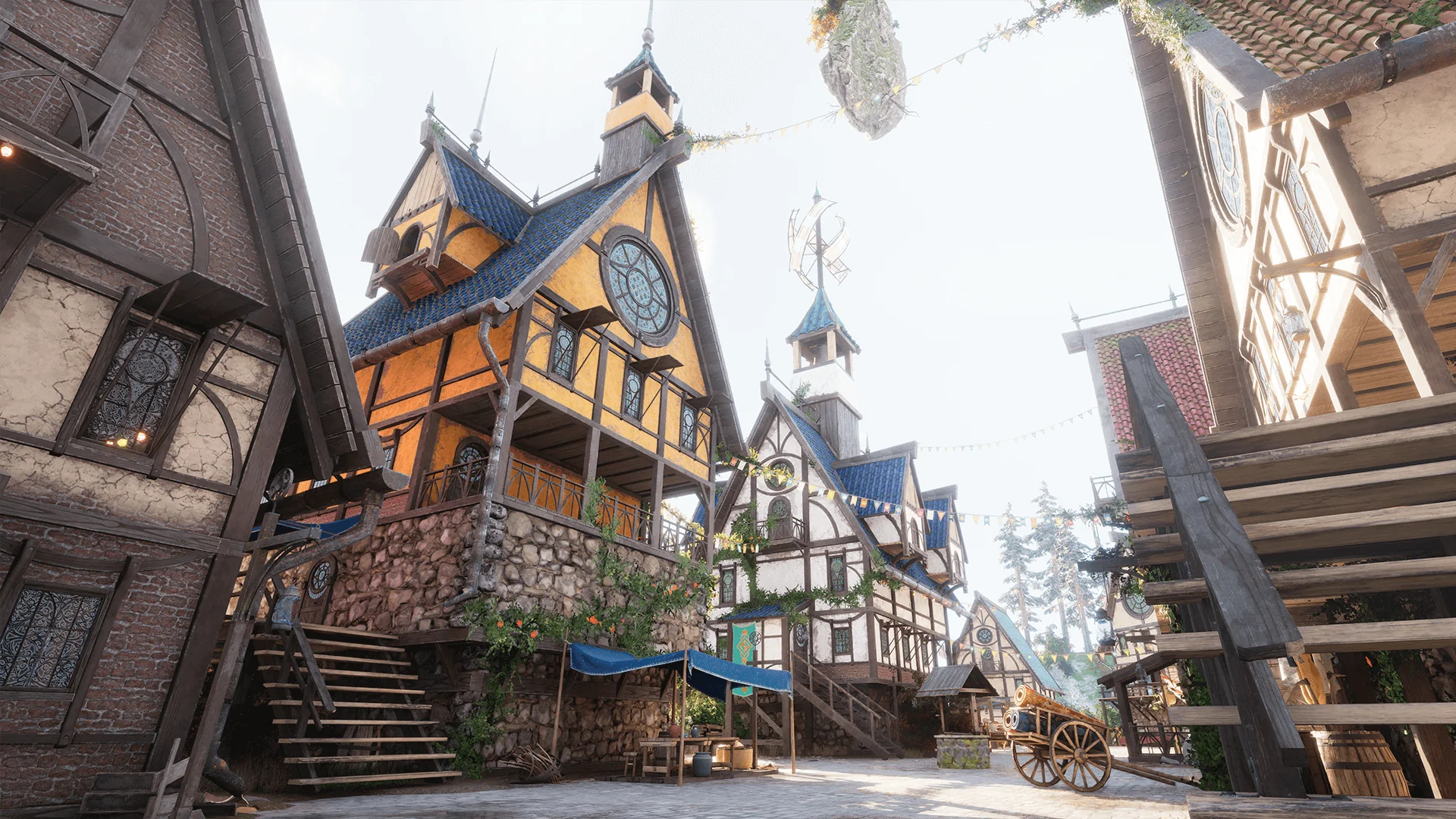
Modular building components form the core of Flying Fantasy Town, allowing level designers to construct medieval and fantasy settlements with high structural flexibility. The asset collection is structured through a physically based rendering workflow, grounding traditional medieval architectural styles in realistic material responses. Weathered surfaces, structural timber, stone masonry, and pitched roofing elements interact naturally with dynamic lighting systems, preserving material fidelity whether viewed in broad daylight or under shadow.
Rather than confining builders to rigid, pre-assembled structures, the framework relies on modular level design principles. Creators can place buildings along narrow streets or stack structures into vertical clusters. Because the stylistic framing supports both grounded fantasy kingdoms and aerial outposts, the exterior elements must read clearly at multiple scales. Rooflines, timber supports, and masonry blocks carry distinct physical contours that maintain visual cohesion across small roadside hamlets and expansive cityscapes alike.
Adapting the Town for Skybound and Terrestrial Environments
A central characteristic of Flying Fantasy Town is its dual utility across disparate level types. The assets function equally well when anchored directly to conventional terrain or arranged as floating bastions suspended high in the clouds. This dual nature requires careful attention to silhouette and exterior detail from every angle, including viewpoints from below that are rarely exposed in standard ground-based village packs.
When placed on rolling hills, coastal bluffs, or deep forest clearings, the town elements merge seamlessly with standard terrain work. Foundations can be seated into landscape geometry, allowing houses to nestle naturally into hillside paths, riverbanks, or fortified valleys. The structures convey a traditional medieval aesthetic suitable for historical scenarios or grounded low-fantasy campaigns.
When lifted into the sky, the buildings take on an entirely different architectural role. Floating islands, airship docks, and gravity-defying settlements demand that every facade withstand close inspection from three dimensions. Airborne levels expose the undersides, cantilevers, and overhangs of structures that would normally be obscured by grass or cobblestones. The models are balanced to ensure that silhouettes hold up cleanly against open atmospheric backdrops, making them suitable for floating fantasy hubs, nomadic sky communities, and aerial fortresses.
Mesh Separation and Window Placement in Flying Fantasy Town
Iterative updates to the package have expanded assembly control through mesh restructuring. Update 1.01 introduced three distinct house meshes constructed completely without built-in windows, supplemented by standalone window meshes. This mechanical change directly addresses repetitive facade patterns, a common limitation in modular architectural packages.
By separating the structural walls from the fenestration, level designers gain total control over where openings appear on any given building facade. A single house shell can serve multiple roles across a neighborhood without visual duplication:
One wall can remain solid to suggest an interior hearth, reinforcement, or warehouse storage.
Another side can feature closely grouped window meshes to represent well-lit living quarters or defensive lookout positions.
Different window placements can be matched to specific interior layouts, preventing incongruities between exterior openings and interior divisions.
This mesh division simplifies lighting and optimization passes. Artists can place lit window meshes only where interior light sources exist, leaving unlit or shuttered variants across background structures to save rendering overhead. The update also allows custom placement heights, giving level artists the freedom to stagger windows across multi-story buildings, tuck small openings beneath eaves, or align them with custom exterior walkways.
Auto-Exposure Calibration and Post-Process Settings
Working with realistic PBR materials across both open skies and dense settlement interiors introduces distinct lighting challenges. Extreme contrast between bright, unobstructed atmospheric sunlight and deep building shadows can stress automated exposure systems. In engine versions 4.27 through 5.1, proper calibration within the Post-Process Volume is necessary to maintain visual consistency throughout the level.
If the project auto-exposure is not working properly, navigate directly into the scene's active Post-Process Volume and remove the tick from the Min EV100 setting. When Min EV100 is clamped arbitrarily, the exposure meter cannot adjust downward far enough when moving into dark alleys, interior courtyards, or shadowed undercrofts beneath suspended buildings. This clamp frequently causes dark areas to crush completely to black or causes bright skies to overcompensate aggressively.
Disabling the fixed Min EV100 restriction restores the camera's ability to smoothly adapt across high-dynamic-range scenes. As a player or cinematic camera moves from an exposed cliffside platform into an enclosed medieval alleyway, the exposure metering curves operate without artificial floor constraints. This adjustment ensures that the realistic PBR material definitions remain readable in both direct sunlight and indirect ambient occlusion zones.
Level Construction Workflows in Engine Versions 4.27 to 5.1
Flying Fantasy Town spans key development environments across Unreal Engine versions 4.27 through 5.1. This wide compatibility range accommodates legacy production pipelines established on earlier engine versions while supporting modern workflows in newer engine iterations.
For teams building wide-open levels, the pack supports modular scattering and layout staging. Designers can draft the macro layout of a sky city or ground village using the primary house shells, establishing sightlines, thoroughfares, and focal points. Once the general urban flow is set, the separate window meshes and architectural variations allow for micro-level dress passes, breaking up structural monotony across repeated assets.
The combination of realistic texturing, flexible modularity, and vertical adaptability positions Flying Fantasy Town as an efficient structural kit. Whether creating a secluded mountain village or a soaring metropolis anchored above the clouds, the package provides the essential architectural building blocks needed for disciplined environmental storytelling.
 Towns & Villages
 Fantasy
 Fantasy