"7e6fc58c410f2894"{"id":"23069","slug":"decalery","title":"Decalery","category":"Level Design","engine":"Original Unity version: 2019.4.0","assetVersion":"Original Unity version: 2019.4.0","engineVersion":"Asset Version:1.101","tag":"Level Design","accent":"cyan","visual":"character","summary":"Decalery provides a technical solution for placing decals on any geometric shape within Unity, supporting advanced features like skinned mesh deformation and complex lightmap integration.","platform":"Unity","publishedAt":"2026-04-08T16:00:08.000Z","updatedAt":"2026-04-19T15:36:54.000Z","sourceNotes":[],"fileContents":[],"compatibility":["Unity","Original Unity version: 2019.4.0","Asset Version: 1.101"],"featuredImage":{"alt":"Decalery","src":"https://3dcghub.com/wp-content/uploads/2026/04/5ac6334effb1_3c9caf56-9757-4a03-93b0-43a82ad48e0b_1280x720_stretch.webp"},"hasDownloadLink":true,"downloads":2,"terms":[{"taxonomy":"category","slug":"level-design","name":"Level Design"},{"taxonomy":"post_tag","slug":"environment","name":"Environment"},{"taxonomy":"post_tag","slug":"textures","name":"Textures"},{"taxonomy":"post_tag","slug":"unity","name":"Unity"}],"galleryImages":[{"src":"https://3dcghub.com/wp-content/uploads/2026/04/2a01693be728_f46e8cad-f7a3-474e-b073-8dd4911b8cce_scaled.webp","alt":"Decalery"},{"src":"https://3dcghub.com/wp-content/uploads/2026/04/e3bc4ed03929_d2191803-d017-4b56-90e9-853d6ece2dd8_scaled.webp","alt":"Decalery"},{"src":"https://3dcghub.com/wp-content/uploads/2026/04/0a86f1d8a9db_4314a4ed-8a74-407d-a55b-8b5d6b496f39_scaled.webp","alt":"Decalery"},{"src":"https://3dcghub.com/wp-content/uploads/2026/04/a30f8d8b4a65_1cf31a26-7b77-4f45-b886-e6d6a13e5f53_scaled.webp","alt":"Decalery"},{"src":"https://3dcghub.com/wp-content/uploads/2026/04/1dbd8099c102_400eb8f8-d9c2-4ab3-bf68-d0c1068d7db8_scaled.webp","alt":"Decalery"}],"accessPanel":{"kind":"resource","title":"Access this resource","eyebrow":"Free Download","message":"Log in or create a free account to start your download.","fileName":"Decalery v1.101.rar","safetyNote":"All resources are 100% manually reviewed to eliminate all risks.","actionLabel":"Download Free","resourceType":"Resource archive"},"contentHtml":"\u003ch2\u003eGeometry-Based Decal Placement and Mesh Integration\u003c/h2\u003e\n\u003cp\u003eDecalery is designed to handle decals and receivers of any geometric shape, moving beyond simple box projections to allow for more complex mesh interactions. A central feature of the package is its ability to support deformable decals on skinned meshes, ensuring that decorative or environmental details remain correctly attached and aligned even as the underlying character or object moves and deforms. This capability is particularly relevant for projects requiring high-fidelity visual effects on animated entities.\u003c/p\u003e\n\u003cp\u003eTo maintain visual consistency and performance, the tool includes an experimental Optimize Topology option. This feature is intended to remove redundant polygons within generated decals, streamlining the resulting geometry without sacrificing the intended look. When creating mesh assets, the system also takes parent prefab names into account, which assists in keeping project hierarchies and asset libraries organized during large-scale development.\u003c/p\u003e\n\n\u003ch2\u003eLighting Compatibility and Render Pipeline Support\u003c/h2\u003e\n\u003cp\u003eThe package provides wide-ranging support for different lighting workflows and render pipelines. It is compatible with the Built-in render pipeline, Universal Render Pipeline (URP), and High Definition Render Pipeline (HDRP). Beyond standard Unity lightmaps, Decalery specifically integrates with Bakery lightmaps, including support for Spherical Harmonics (SH), MonoSH, and Volumes. This ensures that decals can be properly lit and lightmapped within high-end lighting setups.\u003c/p\u003e\n\u003cp\u003eTo address common visual artifacts in decal rendering, the included shaders are designed to mitigate issues like Z-fighting. This is critical for maintaining a clean visual output when decals are placed in close proximity to their receivers. The shaders are provided for all three major pipelines, ensuring that the visual behavior remains consistent regardless of the chosen rendering path.\u003c/p\u003e\n\n\u003ch2\u003eVertex Normal Manipulation and UV Projection\u003c/h2\u003e\n\u003cp\u003eOne of the more technical aspects of the tool is the control it offers over vertex normals. Developers can choose from several distinct behaviors to determine how the decal interacts with the lighting of the receiver mesh. The default behavior is to keep normals directly from the receivers. However, for more specific visual needs, the developer has included options to smooth normals within welded decal polygons or set a single average normal for the entire decal.\u003c/p\u003e\n\u003cp\u003eThe most advanced normal option, Project From Receivers, utilizes a ray-casting method to pick receiver normals at each source mesh vertex. The system then interpolates these results over the final decal mesh, which can lead to more accurate lighting transitions between the decal and the surface it sits on. Additionally, the system allows for the projection of multiple UV channels from either the source or the receiver, providing flexibility in how textures and masks are applied to the decal geometry.\u003c/p\u003e\n\n\u003ch2\u003eRuntime Spawning and Performance Optimization\u003c/h2\u003e\n\u003cp\u003eFor dynamic gameplay elements, Decalery includes techniques for runtime decal spawning. This includes specific support for trail-like decals, which are useful for creating effects such as skidmarks or persistent paths on a surface. The runtime API has been expanded to include a decal Handle system; when a decal is added via the AddDecal method, it returns a handle that can be used to specifically identify and remove that decal later through utility functions.\u003c/p\u003e\n\u003cp\u003ePerformance during runtime spawning is managed through several settings, including a GPU With Readback mode. This mode supports asynchronous readback, which is intended to improve performance by offloading certain tasks from the main thread. Developers can also utilize texture array support and texture atlasing options within the AddDecal arguments to further optimize how textures are handled at runtime. For broad clean-up tasks, the API includes functions like ClearDecalsForRootTransform, allowing for the efficient removal of all decals associated with a specific transform hierarchy.\u003c/p\u003e\n\n\u003ch2\u003eEditor Workflow and Asset Management\u003c/h2\u003e\n\u003cp\u003eThe editor experience in Decalery is built around a Live Preview system that remains active as a global state, meaning it does not reset when the user changes their selection in the scene. This is complemented by the ability to assign custom shortcuts to the Live Preview and Pick functions via the Unity Shortcut Manager. A basic decal creation menu is also available, allowing for the quick generation of quad decals directly from the menu bar.\u003c/p\u003e\n\u003cp\u003eRefinements to the editor tools include logic to prevent source decal meshes from being accidentally picked as receivers, and fixes for highlighting behavior when moving the cursor in the scene view. The system also supports texture arrays and provides an overall opacity slider for quick adjustments to decal visibility. These tools collectively aim to speed up the manual placement and adjustment of decals during the level design phase.\u003c/p\u003e\n\n\u003cp\u003eThe package is suitable for developers who need precise control over decal geometry and lighting, particularly in projects using skinned meshes or specialized lighting solutions like Bakery. With its combination of editor-time placement tools and a robust runtime API, it addresses both static environmental detailing and dynamic gameplay-driven visual effects.\u003c/p\u003e\n\n\u003ch2\u003eMore From The Same Workflow\u003c/h2\u003e\n\u003cul\u003e\n\u003cli\u003e\u003ca href=\"https://3dcghub.com/opencv-for-unity/\" title=\"OpenCV for Unity\"\u003eOpenCV for Unity\u003c/a\u003e\u003c/li\u003e\n\u003cli\u003e\u003ca href=\"https://3dcghub.com/exporter-for-unreal-to-for-unity-2026/\" title=\"Exporter for Unreal to/for Unity 2026\"\u003eExporter for Unreal to/for Unity 2026\u003c/a\u003e\u003c/li\u003e\n\u003cli\u003e\u003ca href=\"https://3dcghub.com/dialogue-system-for-unity/\" title=\"Dialogue System for Unity\"\u003eDialogue System for Unity\u003c/a\u003e\u003c/li\u003e\n\u003cli\u003e\u003ca href=\"https://3dcghub.com/ambient-sounds-interactive-soundscapes-for-unity-6/\" title=\"Ambient Sounds – Interactive Soundscapes for Unity 6\"\u003eAmbient Sounds – Interactive Soundscapes for Unity 6\u003c/a\u003e\u003c/li\u003e\n\u003cli\u003e\u003ca href=\"https://3dcghub.com/pegasus-flythroughs-for-unity-6/\" title=\"Pegasus – Flythroughs for Unity 6\"\u003ePegasus – Flythroughs for Unity 6\u003c/a\u003e\u003c/li\u003e\n\u003c/ul\u003e","contentTextLength":5586,"navigation":{"current":3496,"total":3618,"previous":{"id":"23074","slug":"giblion-2024-anime-npr-toon-framework","title":"GIBLION 2024: Anime-NPR-Toon Framework","category":"Level Design","platform":"Unity","updatedAt":"2026-04-19T15:36:54.000Z"},"next":{"id":"23060","slug":"bakery-gpu-lightmapper","title":"Bakery - GPU Lightmapper","category":"Level Design","platform":"Unity","updatedAt":"2026-04-19T15:36:54.000Z"}},"relatedResources":[{"id":"23087","slug":"particle-dynamic-magic-2-decal-spline-ai-particles-dynamics","title":"Particle Dynamic Magic 2: Decal, Spline, AI Particles \u0026 dynamics","category":"Level Design","engine":"Original Unity version: 4.3.4","assetVersion":"Original Unity version: 4.3.4","engineVersion":"Asset Version:2.5.3","tag":"Level Design","accent":"cyan","visual":"luts","summary":"Particle Dynamic Magic 2 offers a comprehensive system for controlling particles and game objects in Unity through splines, environmental sensing AI, and dynamic decals.","platform":"Unity","publishedAt":"2026-04-08T16:09:12.000Z","updatedAt":"2026-04-19T15:36:53.000Z","sourceNotes":[],"fileContents":[],"compatibility":["Unity","Original Unity version: 4.3.4","Asset Version: 2.5.3"],"featuredImage":{"alt":"Particle Dynamic Magic 2: Decal, Spline, AI Particles \u0026 dynamics","src":"https://3dcghub.com/wp-content/uploads/2026/04/093988d650ed_c115d4a1-63f2-4188-bd46-00cd62d501eb_1280x720_stretch.webp"},"hasDownloadLink":true,"downloads":1},{"id":"23074","slug":"giblion-2024-anime-npr-toon-framework","title":"GIBLION 2024: Anime-NPR-Toon Framework","category":"Level Design","engine":"Original Unity version: 2022.3.18","assetVersion":"Original Unity version: 2022.3.18","engineVersion":"Asset Version:2.0.5","tag":"Level Design","accent":"cyan","visual":"animation","summary":"GIBLION 2024 provides a comprehensive suite of tools for generating anime-style environments within Unity's Universal Render Pipeline, utilizing both shader-level effects and procedural foliage systems.","platform":"Unity","publishedAt":"2026-04-08T16:03:06.000Z","updatedAt":"2026-04-19T15:36:54.000Z","sourceNotes":[],"fileContents":[],"compatibility":["Unity","Original Unity version: 2022.3.18","Asset Version: 2.0.5"],"featuredImage":{"alt":"GIBLION 2024: Anime-NPR-Toon Framework","src":"https://3dcghub.com/wp-content/uploads/2026/04/617b6924ca33_b5c41ddc-03c0-4892-be52-e53d0381bdc9_1280x720_stretch.webp"},"hasDownloadLink":true,"downloads":0},{"id":"23060","slug":"bakery-gpu-lightmapper","title":"Bakery - GPU Lightmapper","category":"Level Design","engine":"Original Unity version: 2018.4.0","assetVersion":"Original Unity version: 2018.4.0","engineVersion":"Asset Version:1.9501","tag":"Level Design","accent":"cyan","visual":"audio","summary":"Designed as a high-performance alternative to Enlighten and Progressive, Bakery utilizes GPU ray-tracing to produce physically correct baked lighting for Unity projects.","platform":"Unity","publishedAt":"2026-04-08T15:58:10.000Z","updatedAt":"2026-04-19T15:36:54.000Z","sourceNotes":[],"fileContents":[],"compatibility":["Unity","Original Unity version: 2018.4.0","Asset Version: 1.9501"],"featuredImage":{"alt":"Bakery - GPU Lightmapper","src":"https://3dcghub.com/wp-content/uploads/2026/04/0f1a4e2df268_5c53345b-8e25-47c7-8a9d-654769582e06_1280x720_stretch.webp"},"hasDownloadLink":true,"downloads":1}]}
Level Design
Decalery
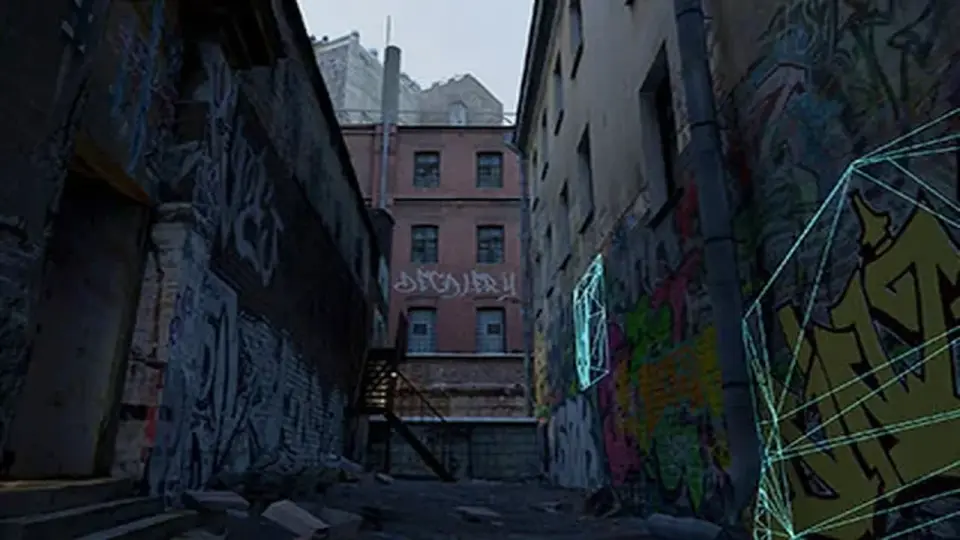
Decalery provides a technical solution for placing decals on any geometric shape within Unity, supporting advanced features like skinned mesh deformation and complex lightmap integration.
Geometry-Based Decal Placement and Mesh Integration
Decalery is designed to handle decals and receivers of any geometric shape, moving beyond simple box projections to allow for more complex mesh interactions. A central feature of the package is its ability to support deformable decals on skinned meshes, ensuring that decorative or environmental details remain correctly attached and aligned even as the underlying character or object moves and deforms. This capability is particularly relevant for projects requiring high-fidelity visual effects on animated entities.
To maintain visual consistency and performance, the tool includes an experimental Optimize Topology option. This feature is intended to remove redundant polygons within generated decals, streamlining the resulting geometry without sacrificing the intended look. When creating mesh assets, the system also takes parent prefab names into account, which assists in keeping project hierarchies and asset libraries organized during large-scale development.
Lighting Compatibility and Render Pipeline Support
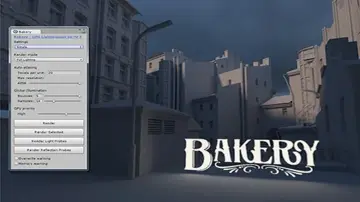
The package provides wide-ranging support for different lighting workflows and render pipelines. It is compatible with the Built-in render pipeline, Universal Render Pipeline (URP), and High Definition Render Pipeline (HDRP). Beyond standard Unity lightmaps, Decalery specifically integrates with Bakery lightmaps, including support for Spherical Harmonics (SH), MonoSH, and Volumes. This ensures that decals can be properly lit and lightmapped within high-end lighting setups.
To address common visual artifacts in decal rendering, the included shaders are designed to mitigate issues like Z-fighting. This is critical for maintaining a clean visual output when decals are placed in close proximity to their receivers. The shaders are provided for all three major pipelines, ensuring that the visual behavior remains consistent regardless of the chosen rendering path.
Vertex Normal Manipulation and UV Projection
One of the more technical aspects of the tool is the control it offers over vertex normals. Developers can choose from several distinct behaviors to determine how the decal interacts with the lighting of the receiver mesh. The default behavior is to keep normals directly from the receivers. However, for more specific visual needs, the developer has included options to smooth normals within welded decal polygons or set a single average normal for the entire decal.
The most advanced normal option, Project From Receivers, utilizes a ray-casting method to pick receiver normals at each source mesh vertex. The system then interpolates these results over the final decal mesh, which can lead to more accurate lighting transitions between the decal and the surface it sits on. Additionally, the system allows for the projection of multiple UV channels from either the source or the receiver, providing flexibility in how textures and masks are applied to the decal geometry.
Runtime Spawning and Performance Optimization
For dynamic gameplay elements, Decalery includes techniques for runtime decal spawning. This includes specific support for trail-like decals, which are useful for creating effects such as skidmarks or persistent paths on a surface. The runtime API has been expanded to include a decal Handle system; when a decal is added via the AddDecal method, it returns a handle that can be used to specifically identify and remove that decal later through utility functions.
Performance during runtime spawning is managed through several settings, including a GPU With Readback mode. This mode supports asynchronous readback, which is intended to improve performance by offloading certain tasks from the main thread. Developers can also utilize texture array support and texture atlasing options within the AddDecal arguments to further optimize how textures are handled at runtime. For broad clean-up tasks, the API includes functions like ClearDecalsForRootTransform, allowing for the efficient removal of all decals associated with a specific transform hierarchy.
Editor Workflow and Asset Management
The editor experience in Decalery is built around a Live Preview system that remains active as a global state, meaning it does not reset when the user changes their selection in the scene. This is complemented by the ability to assign custom shortcuts to the Live Preview and Pick functions via the Unity Shortcut Manager. A basic decal creation menu is also available, allowing for the quick generation of quad decals directly from the menu bar.
Refinements to the editor tools include logic to prevent source decal meshes from being accidentally picked as receivers, and fixes for highlighting behavior when moving the cursor in the scene view. The system also supports texture arrays and provides an overall opacity slider for quick adjustments to decal visibility. These tools collectively aim to speed up the manual placement and adjustment of decals during the level design phase.
The package is suitable for developers who need precise control over decal geometry and lighting, particularly in projects using skinned meshes or specialized lighting solutions like Bakery. With its combination of editor-time placement tools and a robust runtime API, it addresses both static environmental detailing and dynamic gameplay-driven visual effects.
 Level Design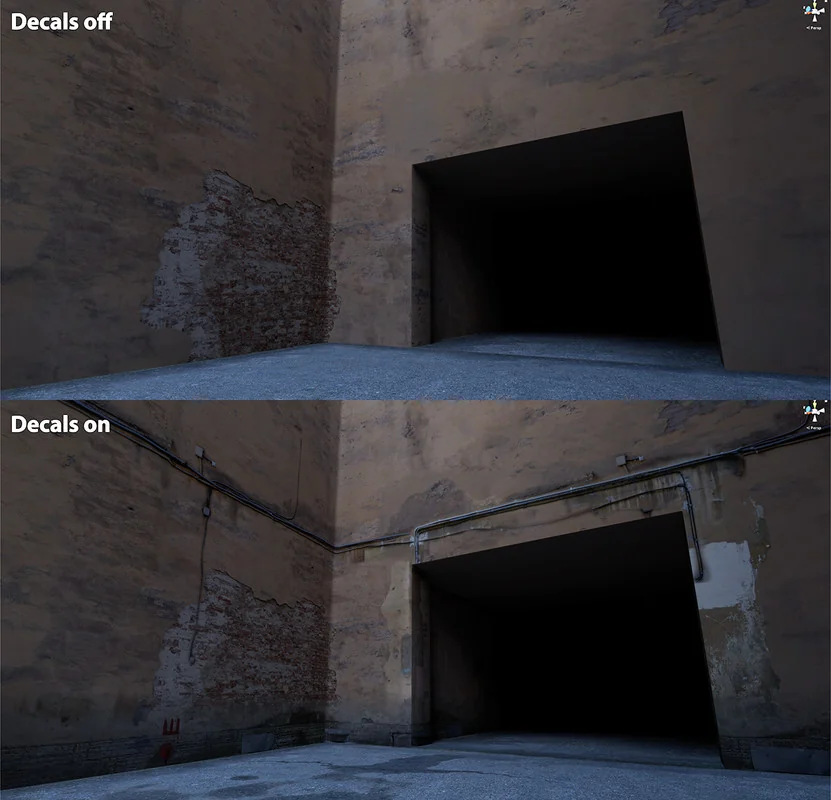
 Level Design
 Level Design
 Level Design