"a7cfa646d0d8ae55"{"id":"23139","slug":"broccoli-tree-creator","title":"Broccoli Tree Creator","category":"Modeling","engine":"Original Unity version: 2021.3.45","assetVersion":"Original Unity version: 2021.3.45","engineVersion":"Asset Version:1.10.8 - 1.10.9","tag":"Modeling","accent":"cyan","visual":"animation","summary":"Broccoli Tree Creator offers a procedural approach to building vegetation in Unity, allowing developers to manipulate everything from trunk curvature to sprout alignment through a node-based interface.","platform":"Unity","publishedAt":"2026-04-08T16:17:51.000Z","updatedAt":"2026-04-19T15:36:52.000Z","sourceNotes":[],"fileContents":[],"compatibility":["Unity","Original Unity version: 2021.3.45","Asset Version: 1.10.8 - 1.10.9"],"featuredImage":{"alt":"Broccoli Tree Creator","src":"https://3dcghub.com/wp-content/uploads/2026/04/b7d54815e9f4_1f3ee035-80bf-4a79-b160-74e75897be34_1280x720_stretch.webp"},"hasDownloadLink":true,"downloads":0,"terms":[{"taxonomy":"category","slug":"modeling-tools-unity-2","name":"Modeling"},{"taxonomy":"post_tag","slug":"game-systems","name":"Game Systems"},{"taxonomy":"post_tag","slug":"tools","name":"Tools"},{"taxonomy":"post_tag","slug":"unity","name":"Unity"}],"galleryImages":[{"src":"https://3dcghub.com/wp-content/uploads/2026/04/1d9c0f592065_712d30e1-5463-4a1a-9485-f7e506767a11_scaled.webp","alt":"Broccoli Tree Creator"},{"src":"https://3dcghub.com/wp-content/uploads/2026/04/b29aa3b5f1b8_40020ad7-8b99-42a5-a854-c1bf83f8f0f3_scaled.webp","alt":"Broccoli Tree Creator"},{"src":"https://3dcghub.com/wp-content/uploads/2026/04/bef92de595c0_351910b4-1885-4ff1-9fcd-342332a39c40_scaled.webp","alt":"Broccoli Tree Creator"},{"src":"https://3dcghub.com/wp-content/uploads/2026/04/68ab2adbf950_5d37c72d-bc60-4265-b7d8-b709ee648109_scaled.webp","alt":"Broccoli Tree Creator"},{"src":"https://3dcghub.com/wp-content/uploads/2026/04/115c07227145_60b8bbdb-b925-4662-85bd-69007f503e0e_scaled.webp","alt":"Broccoli Tree Creator"},{"src":"https://3dcghub.com/wp-content/uploads/2026/04/47652bac95da_3fb7d982-683d-46b8-be83-2fd35a33698b_scaled.webp","alt":"Broccoli Tree Creator"},{"src":"https://3dcghub.com/wp-content/uploads/2026/04/62a8359b4785_7e14d10a-3ec8-4ce2-bb59-9affbfd72a71_scaled.webp","alt":"Broccoli Tree Creator"},{"src":"https://3dcghub.com/wp-content/uploads/2026/04/e44d4a393afa_c5a31c60-3f4a-4a3c-afe2-ef4ff970498e_scaled.webp","alt":"Broccoli Tree Creator"},{"src":"https://3dcghub.com/wp-content/uploads/2026/04/8e65db5f48c0_084651ae-3424-433d-ab1a-24572ef4b634_scaled.webp","alt":"Broccoli Tree Creator"},{"src":"https://3dcghub.com/wp-content/uploads/2026/04/3e3d6a2f7f40_8afef460-d591-41e6-b33f-d03e6b959347_scaled.webp","alt":"Broccoli Tree Creator"}],"accessPanel":{"kind":"resource","title":"Access this resource","eyebrow":"Free Download","message":"Log in or create a free account to start your download.","fileName":"Broccoli Tree Creator v1.10.8 - 1.10.9.7z","safetyNote":"All resources are 100% manually reviewed to eliminate all risks.","actionLabel":"Download Free","resourceType":"Resource archive"},"contentHtml":"\u003ch2\u003eNode-Based Generation and Structural Hierarchy\u003c/h2\u003e\n\u003cp\u003eBroccoli Tree Creator functions as a procedural vegetation system for Unity, prioritizing customization through a node-based architecture. This approach allows developers to define the visual style of trees and vegetation either in real-time or through the creation of Prefabs. By utilizing a node hierarchy, the system generates complex structures including trunks, branches, roots, and leaves. This hierarchy is central to the tool's randomization capabilities, ensuring that while assets follow a specific logic, they maintain enough variation to appear natural within a project.\u003c/p\u003e\n\u003cp\u003eThe system provides granular control over the fundamental shape of the tree. Developers can manage mesh resolution and fine-tune technical details such as UV mapping and texture areas. This flexibility ensures that the resulting assets can be adjusted to fit the specific aesthetic requirements of a game or simulation, whether the goal is hyper-realism or a more stylized appearance.\u003c/p\u003e\n\n\u003ch2\u003ePrecision Branch and Sprout Control\u003c/h2\u003e\n\u003cp\u003eFor artists requiring specific silhouettes, the tool includes fully editable branches controlled via bezier curve tools. This allow for manual shaping of the tree's skeleton, which can then be further refined using various modifiers. These modifiers include parameters for length, girth, and branch sparseness, alongside more complex distortions like twirl and Perlin noise. Branch bending can also be adjusted to simulate the effects of gravity or environmental growth patterns.\u003c/p\u003e\n\u003cp\u003eSprout management is handled through dedicated sprout groups. These groups define how leaves or smaller twigs are distributed along the branches. Developers can adjust the alignment, scale, and bending of these sprouts, as well as apply displacement noise. The system supports multiple sprout meshing modes to accommodate different performance and visual needs, including plane, cross, tricross, planeX, grid, billboard, and custom mesh modes. To ensure lighting remains consistent across these meshes, the tool includes specific processing modes for normals, giving creators control over how light interacts with foliage surfaces.\u003c/p\u003e\n\n\u003ch2\u003eEnvironmental Dynamics and Material Integration\u003c/h2\u003e\n\u003cp\u003eVegetation created with the tool is designed to react to the Unity environment. It supports the WindZone component in directional mode, allowing trees to exhibit movement consistent with the scene's wind settings. Wind properties can be fine-tuned specifically for sprout groups, managing how different parts of the tree react to atmospheric forces. The system also includes a global scaling feature, which is used to adapt the final tree model to the specific proportions of a game world.\u003c/p\u003e\n\u003cp\u003eMaterial and shader support is extensive, with built-in compatibility for SpeedTree 7 and SpeedTree 8 shaders. This includes support for HDRP and URP pipelines, provided the specific SRP version in use includes those shaders. Beyond these defaults, the tool allows for the use of custom shaders and materials on both branches and sprouts. Mapping options and custom shapes for branches further expand the visual possibilities for unique vegetation types.\u003c/p\u003e\n\n\u003ch2\u003eOptimization and Pipeline Integration\u003c/h2\u003e\n\u003cp\u003eTo maintain performance in dense environments, the tool includes several optimization features. Prefab generation comes with customizable LOD (Level of Detail) groups and billboard assets, which are essential for rendering large forests without excessive overhead. The system also facilitates the creation of texture atlases, consolidating multiple textures to reduce draw calls. For those working with large-scale environments, the tool supports the Unity Terrain System for tree instancing.\u003c/p\u003e\n\u003cp\u003eThe extension is designed for a collaborative or iterative workflow through its persistence system. This allows developers to save, load, and share their tree pipelines. For those who need to get started quickly, a catalog of pre-made tree pipelines is included, providing ready-to-use assets and templates that can be modified. Additionally, a runtime API is available for loading pipelines and generating trees dynamically during gameplay.\u003c/p\u003e\n\n\u003ch2\u003eTechnical Workflow and Compatibility\u003c/h2\u003e\n\u003cp\u003eThe tool is compatible with The Visual Engine and includes commented source code for developers who need to understand or extend its functionality. Documentation is provided to guide users through the various nodes and modifiers. As an extension currently in development, the system is built to integrate with modern Unity workflows, supporting original Unity versions starting from 2021.3.45. The package includes a wide array of assets, totaling 880 items within the unitypackage format, covering the necessary components for modeling, texturing, and implementing procedural vegetation.\u003c/p\u003e\n\n\u003ch2\u003eMore From The Same Workflow\u003c/h2\u003e\n\u003cul\u003e\n\u003cli\u003e\u003ca href=\"https://3dcghub.com/opencv-for-unity/\" title=\"OpenCV for Unity\"\u003eOpenCV for Unity\u003c/a\u003e\u003c/li\u003e\n\u003cli\u003e\u003ca href=\"https://3dcghub.com/exporter-for-unreal-to-for-unity-2026/\" title=\"Exporter for Unreal to/for Unity 2026\"\u003eExporter for Unreal to/for Unity 2026\u003c/a\u003e\u003c/li\u003e\n\u003cli\u003e\u003ca href=\"https://3dcghub.com/dialogue-system-for-unity/\" title=\"Dialogue System for Unity\"\u003eDialogue System for Unity\u003c/a\u003e\u003c/li\u003e\n\u003cli\u003e\u003ca href=\"https://3dcghub.com/ambient-sounds-interactive-soundscapes-for-unity-6/\" title=\"Ambient Sounds – Interactive Soundscapes for Unity 6\"\u003eAmbient Sounds – Interactive Soundscapes for Unity 6\u003c/a\u003e\u003c/li\u003e\n\u003cli\u003e\u003ca href=\"https://3dcghub.com/pegasus-flythroughs-for-unity-6/\" title=\"Pegasus – Flythroughs for Unity 6\"\u003ePegasus – Flythroughs for Unity 6\u003c/a\u003e\u003c/li\u003e\n\u003c/ul\u003e","contentTextLength":4989,"navigation":{"current":3049,"total":3167,"previous":{"id":"23087","slug":"particle-dynamic-magic-2-decal-spline-ai-particles-dynamics","title":"Particle Dynamic Magic 2: Decal, Spline, AI Particles \u0026 dynamics","category":"Level Design","platform":"Unity","updatedAt":"2026-04-19T15:36:53.000Z"},"next":{"id":"23126","slug":"i2-localization","title":"I2 Localization","category":"Localization","platform":"Unity","updatedAt":"2026-04-19T15:36:52.000Z"}},"relatedResources":[{"id":"23170","slug":"runtime-asset-database","title":"Runtime Asset Database","category":"Modeling","engine":"Original Unity version: 2021.3.45","assetVersion":"Original Unity version: 2021.3.45","engineVersion":"Asset Version:1.5.1","tag":"Modeling","accent":"cyan","visual":"animation","summary":"The Runtime Asset Database replicates the core prefab and asset management concepts of the Unity Editor within a live application. It provides developers with a robust API for runtime save/load systems, supporting addressables and external importers.","platform":"Unity","publishedAt":"2026-04-08T16:29:43.000Z","updatedAt":"2026-04-19T15:36:50.000Z","sourceNotes":[],"fileContents":[],"compatibility":["Unity","Original Unity version: 2021.3.45","Asset Version: 1.5.1"],"featuredImage":{"alt":"Runtime Asset Database","src":"https://3dcghub.com/wp-content/uploads/2026/04/79635060c431_4f04c992-b4fb-41d6-b77b-8039f1361a30_1280x720_stretch.webp"},"hasDownloadLink":true,"downloads":0},{"id":"22612","slug":"behavior-designer-behavior-trees-for-everyone","title":"Behavior Designer - Behavior Trees for Everyone","category":"Behavior AI","engine":"Original Unity version: 2019.4.0","assetVersion":"Original Unity version: 2019.4.0","engineVersion":"Asset Version:1.7.12","tag":"Behavior AI","accent":"cyan","visual":"city","summary":"Behavior Designer provides a mature behavior tree framework for Unity projects, combining a visual editor with a high-performance runtime. It enables developers to create complex AI logic through a data-oriented design that prioritizes stability across mobi...","platform":"Unity","publishedAt":"2026-04-06T13:27:20.000Z","updatedAt":"2026-04-19T15:37:09.000Z","sourceNotes":[],"fileContents":[],"compatibility":["Unity","Original Unity version: 2019.4.0","Asset Version: 1.7.12"],"featuredImage":{"alt":"Behavior Designer - Behavior Trees for Everyone","src":"https://3dcghub.com/wp-content/uploads/2026/04/b1de0425a478_c4058bef-eb5c-41f4-82c4-ee4f3818ddd6_1280x720_stretch.webp"},"hasDownloadLink":true,"downloads":5},{"id":"23155","slug":"dynamic-mesh-cutter","title":"Dynamic Mesh Cutter","category":"Modeling","engine":"Original Unity version: 2020.3.33","assetVersion":"Original Unity version: 2020.3.33","engineVersion":"Asset Version:1.2.6","tag":"Modeling","accent":"cyan","visual":"mech","summary":"Dynamic Mesh Cutter provides a high-performance algorithm for splitting meshes at runtime via plane intersection, offering specific support for skinned meshes and ragdoll systems.","platform":"Unity","publishedAt":"2026-04-08T16:26:55.000Z","updatedAt":"2026-04-19T15:36:51.000Z","sourceNotes":[],"fileContents":[],"compatibility":["Unity","Original Unity version: 2020.3.33","Asset Version: 1.2.6"],"featuredImage":{"alt":"Dynamic Mesh Cutter","src":"https://3dcghub.com/wp-content/uploads/2026/04/f6b77f6f765a_22d1dac9-2265-4174-ab84-6cdce0e5a378_1280x720_stretch.webp"},"hasDownloadLink":true,"downloads":2}]}
Modeling
Broccoli Tree Creator
Broccoli Tree Creator offers a procedural approach to building vegetation in Unity, allowing developers to manipulate everything from trunk curvature to sprout alignment through a node-based interface.
Broccoli Tree Creator functions as a procedural vegetation system for Unity, prioritizing customization through a node-based architecture. This approach allows developers to define the visual style of trees and vegetation either in real-time or through the creation of Prefabs. By utilizing a node hierarchy, the system generates complex structures including trunks, branches, roots, and leaves. This hierarchy is central to the tool's randomization capabilities, ensuring that while assets follow a specific logic, they maintain enough variation to appear natural within a project.
The system provides granular control over the fundamental shape of the tree. Developers can manage mesh resolution and fine-tune technical details such as UV mapping and texture areas. This flexibility ensures that the resulting assets can be adjusted to fit the specific aesthetic requirements of a game or simulation, whether the goal is hyper-realism or a more stylized appearance.
Precision Branch and Sprout Control
For artists requiring specific silhouettes, the tool includes fully editable branches controlled via bezier curve tools. This allow for manual shaping of the tree's skeleton, which can then be further refined using various modifiers. These modifiers include parameters for length, girth, and branch sparseness, alongside more complex distortions like twirl and Perlin noise. Branch bending can also be adjusted to simulate the effects of gravity or environmental growth patterns.
Sprout management is handled through dedicated sprout groups. These groups define how leaves or smaller twigs are distributed along the branches. Developers can adjust the alignment, scale, and bending of these sprouts, as well as apply displacement noise. The system supports multiple sprout meshing modes to accommodate different performance and visual needs, including plane, cross, tricross, planeX, grid, billboard, and custom mesh modes. To ensure lighting remains consistent across these meshes, the tool includes specific processing modes for normals, giving creators control over how light interacts with foliage surfaces.
Environmental Dynamics and Material Integration
Vegetation created with the tool is designed to react to the Unity environment. It supports the WindZone component in directional mode, allowing trees to exhibit movement consistent with the scene's wind settings. Wind properties can be fine-tuned specifically for sprout groups, managing how different parts of the tree react to atmospheric forces. The system also includes a global scaling feature, which is used to adapt the final tree model to the specific proportions of a game world.
Material and shader support is extensive, with built-in compatibility for SpeedTree 7 and SpeedTree 8 shaders. This includes support for HDRP and URP pipelines, provided the specific SRP version in use includes those shaders. Beyond these defaults, the tool allows for the use of custom shaders and materials on both branches and sprouts. Mapping options and custom shapes for branches further expand the visual possibilities for unique vegetation types.
Optimization and Pipeline Integration
To maintain performance in dense environments, the tool includes several optimization features. Prefab generation comes with customizable LOD (Level of Detail) groups and billboard assets, which are essential for rendering large forests without excessive overhead. The system also facilitates the creation of texture atlases, consolidating multiple textures to reduce draw calls. For those working with large-scale environments, the tool supports the Unity Terrain System for tree instancing.
The extension is designed for a collaborative or iterative workflow through its persistence system. This allows developers to save, load, and share their tree pipelines. For those who need to get started quickly, a catalog of pre-made tree pipelines is included, providing ready-to-use assets and templates that can be modified. Additionally, a runtime API is available for loading pipelines and generating trees dynamically during gameplay.
Technical Workflow and Compatibility
The tool is compatible with The Visual Engine and includes commented source code for developers who need to understand or extend its functionality. Documentation is provided to guide users through the various nodes and modifiers. As an extension currently in development, the system is built to integrate with modern Unity workflows, supporting original Unity versions starting from 2021.3.45. The package includes a wide array of assets, totaling 880 items within the unitypackage format, covering the necessary components for modeling, texturing, and implementing procedural vegetation.
 Modeling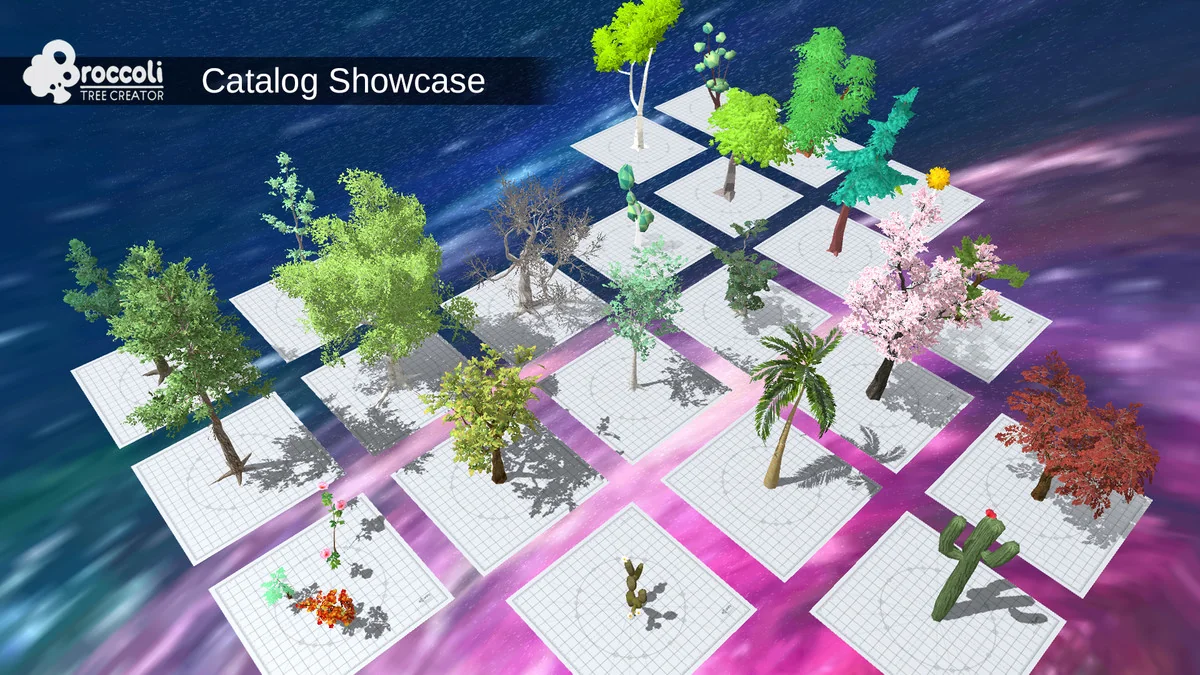
 Modeling
 Behavior AI
 Modeling