Optimizing Unreal Engine Material Workflows
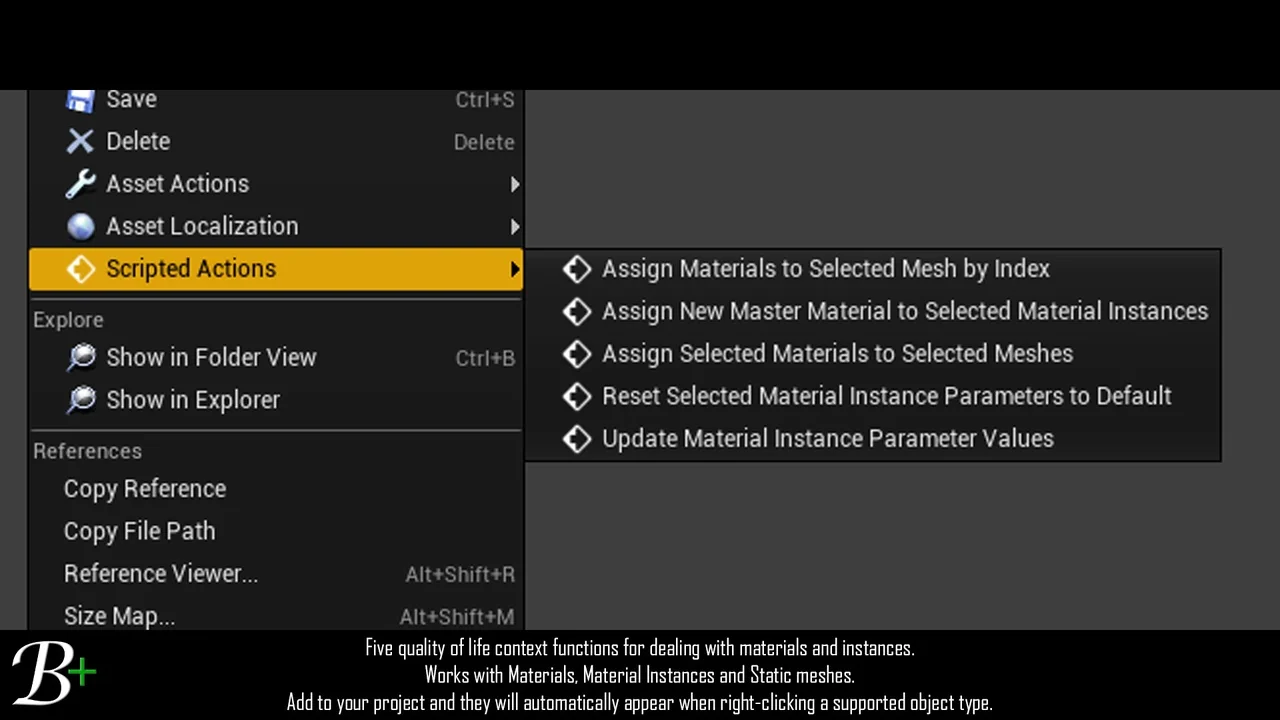
Blutility Plus – Material and Instance Options is an essential asset designed for Unreal Engine developers. It focuses on removing the tedious parts of the development pipeline. For instance, managing hundreds of material instances can often become overwhelming. This tool provides five quality-of-life improvements that the developer uses daily to maintain efficiency. Consequently, it is perfect for projects where design switches require massive updates to textures or parameters.
The asset is lightweight and non-intrusive. It consists of a single blueprint that you can store anywhere in your project. Furthermore, the documentation folder can be deleted once you are familiar with the tool. To use the functions, you simply right-click on your assets to access the scripted actions. This streamlined approach ensures that your project remains clean while gaining powerful automation features.
Assigning Materials by Index
One of the primary features is the ability to assign materials to a selected mesh by index. To use this, you must select one or more master materials or material instances along with your static meshes. The function then assigns these materials based on your selection order. Specifically, it uses an integer array called “IndexOverride” to determine the target material index. This array is easily accessible and can be set within a window prompt.
Additionally, the tool offers flexibility during the assignment process. If a material slot does not exist on a mesh, the system will trigger a warning. This warning identifies which materials failed to apply and to which static mesh. However, the function will continue to run for the remaining valid selections. This allows for diverse combinations and selections without stopping the workflow.
Managing Master Materials and Instances
Changing the master material for a large group of instances is often a manual chore. Blutility Plus – Material and Instance Options simplifies this through a dedicated function. By selecting multiple material instances, you can change their master material simultaneously. You simply select the new master material in the window prompt provided by the tool. This is particularly useful when a design switch necessitates a different base logic for your assets.
Moreover, the tool includes a feature to assign selected materials to selected meshes more broadly. Similar to the index-based assignment, it relies on selection order to determine the material slot index. This ensures that the materials are placed exactly where intended across multiple static meshes. If a slot is missing, the system provides a warning but continues processing the rest of the batch.
Batch Parameter Updates and Resets
Updating material instance parameters is another area where this tool excels. It supports the modification of scalar, vector, and texture material parameters. This is highly beneficial when you need to modify a group of instances with the same value but lack a global controller. You can define these overrides inside the “BP_BlutilityPlus_MaterialOptions” blueprint or through the window prompt for repeat use.
Finally, the tool provides a function to reset all selected material instance parameters to their default values. This is a powerful feature that works exclusively with material instances. Because it resets all parameters at once, the creator recommends using it with caution. Nevertheless, it remains a vital utility for quickly cleaning up instances after experimentation or design changes.
Conclusion
In summary, Blutility Plus – Material and Instance Options provides a robust set of tools for Unreal Engine developers. It automates the assignment of materials, the updating of parameters, and the management of master materials. By integrating these scripted actions into your right-click menu, you can save significant time on repetitive tasks. Whether you are fixing incorrect master materials or updating detail maps across a project, this asset offers a professional and lightweight solution.
Screenshots & Gallery