"ee989f9ed9d4794c"{"id":"1001721","slug":"biotech-toxic","title":"Biotech - Toxic","category":"Characters \u0026 Creatures","engine":"4.26+,5.0+","assetVersion":"","engineVersion":"Engine Version: 4.26+,5.0+","tag":"Characters","accent":"blue","visual":"character","summary":"Explore Biotech - Toxic, a modular sci-fi character for Unreal Engine featuring mask-driven materials, dual emissive channels, and full UE4 rigging.","platform":"Unreal Engine","publishedAt":"2026-10-19T16:18:32.190Z","updatedAt":"2026-10-19T16:18:32.190Z","sourceNotes":[],"fileContents":[],"compatibility":["Unreal Engine","Engine Version: 4.26+,5.0+"],"featuredImage":{"alt":"Biotech - Toxic","src":"/wp-content/uploads/published/2026/10/f1eef831ddd5-3f442017-27c0-4dff-b3a4-9f0dc6b6c3c7-14f08bb4cd.webp"},"hasDownloadLink":true,"downloads":0,"terms":[{"taxonomy":"category","slug":"characters-and-creatures","name":"Characters \u0026 Creatures"}],"galleryImages":[{"src":"/wp-content/uploads/published/2026/10/5f4694431ecc-55dd2a67-5ed2-4579-a74b-a6769b37009a-b78e7dca58.webp","alt":"Biotech - Toxic"},{"src":"/wp-content/uploads/published/2026/10/fac73582623c-fd2e0b84-a9db-463f-a5d1-c1d1bcb69ac4-10ed5f06f5.webp","alt":"Biotech - Toxic"},{"src":"/wp-content/uploads/published/2026/10/5210fd864358-02b4394e-3fc2-46ab-b25b-66f296e8d373-963bd8c7ec.webp","alt":"Biotech - Toxic"},{"src":"/wp-content/uploads/published/2026/10/534d79b9cfc0-871b1b6a-47b7-4f2e-bb22-a4989845d59b-ac10927296.webp","alt":"Biotech - Toxic"},{"src":"/wp-content/uploads/published/2026/10/03eb58b30e25-3619cce8-61ff-4a05-a416-c6d09bd065af-90235f4d48.webp","alt":"Biotech - Toxic"},{"src":"/wp-content/uploads/published/2026/10/0ff2325397bc-03cff513-4e81-490a-9e78-abdd9a7a7f64-7fc96e22d9.webp","alt":"Biotech - Toxic"},{"src":"/wp-content/uploads/published/2026/10/9dbb888df382-9bf3b77e-14bd-4214-a810-266f856d7738-4fcb5aed29.webp","alt":"Biotech - Toxic"},{"src":"/wp-content/uploads/published/2026/10/17f4934416b2-ad2d4526-af89-40ac-8d4a-938b80aba881-72721db38b.webp","alt":"Biotech - Toxic"}],"accessPanel":{"kind":"resource","title":"Download this resource","eyebrow":"Free Download","message":"Log in or create a free account to start your download.","fileName":"Content.7z","safetyNote":"Resources are manually reviewed before listing to improve quality and reduce obvious risks.","actionLabel":"Download Free","resourceType":"Resource archive"},"contentHtml":"\u003ch2\u003eInitial Setup and Overview Map Implementation\u003c/h2\u003e\u003cp\u003eGetting Biotech - Toxic into an active project starts directly in its included overview map. Instead of requiring manual skeletal mesh retargeting, input mapping, or game mode reassignment before testing, the package deploys with a configured Character Blueprint and a paired Game Mode Blueprint. Dropping into the overview map and pressing play provides immediate verification of the character's movement systems, skeletal mesh transforms, and default animation states.\u003c/p\u003e\u003cp\u003eThis pre-configured framework bypasses the setup hurdles commonly encountered when integrating modular sci-fi models into Unreal Engine. The blueprint setup binds essential motion and utility logic right away, giving technical directors and developers an active sandbox to evaluate mesh deformations, root motion alignment, and collision volumes in a single step.\u003c/p\u003e\u003ch2\u003eEvaluating the Character Blueprint Controls: [W][A][S][D], [Space], [Shift], and [F]\u003c/h2\u003e\u003cp\u003eDirect interaction with the Biotech - Toxic model is handled through an integrated control scheme mapped within the Character Blueprint. Once the overview level begins execution, standard locomotion can be verified immediately through directional input, vertical translation, and specific function toggles.\u003c/p\u003e\u003cp\u003eThe test inputs are wired directly to the blueprint's movement components:\u003c/p\u003e\u003cul\u003e\u003cli\u003e\u003cstrong\u003e[W], [A], [S], [D]:\u003c/strong\u003e Direct directional locomotion, handling forward, backward, and lateral strafing sweeps.\u003c/li\u003e\u003cli\u003e\u003cstrong\u003e[Space]:\u003c/strong\u003e Jump input to inspect airborne silhouettes, jump-start blend transitions, and landing physics responses.\u003c/li\u003e\u003cli\u003e\u003cstrong\u003e[Shift]:\u003c/strong\u003e Sprint acceleration modifier to test high-speed locomotion animations and foot-planting accuracy.\u003c/li\u003e\u003cli\u003e\u003cstrong\u003e[F]:\u003c/strong\u003e Dedicated interactive or functional action input assigned inside the Character Blueprint for system testing.\u003c/li\u003e\u003c/ul\u003e\u003cp\u003eHaving these specific input bindings active right out of the box simplifies debugging. Movement profiles can be evaluated without first rebuilding project-level project input settings or remapping engine-level axis curves.\u003c/p\u003e\u003ch2\u003eRigging to the Default UE4 Mannequin Hierarchy\u003c/h2\u003e\u003cp\u003eBiotech - Toxic is structured directly upon the default UE4 mannequin skeleton. Because the bone hierarchy, joint orientations, and naming conventions conform completely to this standard, the humanoid character can use any animations built for the standard mannequin ecosystem without running through intermediate retargeting steps.\u003c/p\u003e\u003cp\u003eThe package includes basic UE4 mannequin animations natively, allowing the model to walk, run, jump, and idle the moment it enters the viewport. For expanded production scenarios—such as populating enemy patrol paths, setting up specialized combat movesets, or integrating third-party marketplace animation packs—the mesh accepts existing asset store animations directly. This architectural decision makes the character equally functional as an active player character, an agile robotic adversary, an android guard, or an inanimate decorative sci-fi prop placed into a futuristic environment.\u003c/p\u003e\u003cp\u003eBeyond that, the asset shares pipeline logic and compatibility with Biotech - Hornet, allowing teams building multi-unit sci-fi environments to maintain shared animation trees, shared logic graphs, and uniform skeletal assets across both character variants.\u003c/p\u003e\u003ch2\u003eDedicated FPS Hands and First-Person Rigging\u003c/h2\u003e\u003cp\u003eFirst-person action games present distinct skeletal requirements compared to third-person setups. Full-body meshes often cast unwanted interior shadows or exhibit awkward geometry clipping when drawn right against the first-person camera plane. Biotech - Toxic addresses this by including a separate mesh for FPS Hands.\u003c/p\u003e\u003cp\u003eThese dedicated hands are rigged specifically to the default FPS hands skeleton. By utilizing this standardized bone layout, the first-person mesh can interface cleanly with marketplace first-person weapon systems, gun-handling reload cycles, aiming states, and equipment animations. Shooter projects gain the flexibility to run full third-person representations of Biotech - Toxic for external views or multiplayer instances while swapping to the dedicated FPS hands when rendering high-detail weapon interactions from the cockpit or view-camera perspective.\u003c/p\u003e\u003ch2\u003eMask Textures and Emissive Visor Lighting in Biotech - Toxic\u003c/h2\u003e\u003cp\u003eVisual customization is managed through a layered shading framework focused on a single core material and five distinct material instances. The base material does not lock surface properties into flattened, unchangeable diffuse textures; instead, it utilizes mask textures that segregate specific zones of the robotic suit.\u003c/p\u003e\u003cp\u003eThrough these mask channels, individual geometric regions can be modified directly within material instance parameters:\u003c/p\u003e\u003cul\u003e\u003cli\u003e\u003cstrong\u003eColor:\u003c/strong\u003e Target specific armor plates, chassis sections, or mechanical under-layers to establish unique faction or team identities.\u003c/li\u003e\u003cli\u003e\u003cstrong\u003eRoughness:\u003c/strong\u003e Alter surfaces from matte, weathered mechanical framing to glossy, polished composite plating.\u003c/li\u003e\u003cli\u003e\u003cstrong\u003eMetalness:\u003c/strong\u003e Adjust non-conductive synthetic materials against bare, raw metallic alloys.\u003c/li\u003e\u003c/ul\u003e\u003cp\u003eIllumination across the chassis is split into two completely separate emissive masks: one assigned to the Visor and another assigned to the Main lights. Separating these lighting zones allows developers to dial in distinct colors and color intensities across different parts of the head and torso. A project can drive a piercing, high-intensity color across the helmet visor while keeping subtle, low-intensity running lights along the mechanical torso joints, or dynamically strobe the emissive values in engine during active combat states.\u003c/p\u003e\u003ch2\u003eProduction Roles Across Sci-Fi Scenarios\u003c/h2\u003e\u003cp\u003eBecause the technical foundation pairs an open mask-based shading system with standard skeletal hierarchies, Biotech - Toxic adapts cleanly across diverse project roles. Its realistic, robotic proportions suit high-fidelity space stations, alien installations, and industrial corridors. When used as a primary character or an android adversary, the five provided material instances supply ready-made color palettes that differentiate squad leaders from grunt combatants or security units.\u003c/p\u003e\u003cp\u003eWhen placed in background settings, static or idling variations serve as decorative factory droids, maintenance androids, or stationary set pieces, eliminating the need to create separate prop assets. The combination of pre-wired Character and Game Mode Blueprints, standard UE4 mannequin compatibility, dedicated first-person hand geometry, and segregated emissive lighting channels gives technical artists and gameplay developers an efficient asset configured for rapid deployment across Unreal Engine pipelines.\u003c/p\u003e\n\n\u003ch2\u003eRelated Resources Worth Checking\u003c/h2\u003e\n\u003cul\u003e\n\u003cli\u003e\u003ca href=\"https://3dcghub.com/custom-status-effect-system/\" title=\"Custom Status Effect System\"\u003eCustom Status Effect System\u003c/a\u003e\u003c/li\u003e\n\u003cli\u003e\u003ca href=\"https://3dcghub.com/sci-fi-space-soldier-female/\" title=\"Sci Fi Space Soldier Female\"\u003eSci Fi Space Soldier Female\u003c/a\u003e\u003c/li\u003e\n\u003cli\u003e\u003ca href=\"https://3dcghub.com/dismemberment-gore-system/\" title=\"Dismemberment Gore System\"\u003eDismemberment Gore System\u003c/a\u003e\u003c/li\u003e\n\u003cli\u003e\u003ca href=\"https://3dcghub.com/light-warrior/\" title=\"Light Warrior\"\u003eLight Warrior\u003c/a\u003e\u003c/li\u003e\n\u003cli\u003e\u003ca href=\"https://3dcghub.com/fighter-drone/\" title=\"Fighter Drone\"\u003eFighter Drone\u003c/a\u003e\u003c/li\u003e\n\u003c/ul\u003e","contentTextLength":6728,"navigation":{"current":4,"total":3660,"previous":{"id":"1001722","slug":"blood","title":"Blood","category":"Damage \u0026 Grunge","platform":"Unreal Engine","updatedAt":"2026-10-19T16:20:31.409Z"},"next":{"id":"1001720","slug":"bike-shop-environment-stores-bike-shop","title":"Bike Shop Environment ( Stores Bike Shop )","category":"Interior","platform":"Unreal Engine","updatedAt":"2026-10-19T15:54:09.701Z"}},"relatedResources":[{"id":"2108","slug":"custom-status-effect-system","title":"Custom Status Effect System","category":"Characters \u0026 Creatures","engine":"5.1+","assetVersion":"Engine version: 5.1+","engineVersion":"5.1","tag":"Characters","accent":"blue","visual":"character","summary":"Enhance your game with a flexible Custom Status Effect System. Add stackable Fire, Frost, and Toxic effects to any mesh with this easy-to-use Blueprint tool.","platform":"Unreal Engine","publishedAt":"2026-02-07T07:24:35.000Z","updatedAt":"2026-04-19T15:58:06.000Z","sourceNotes":[],"fileContents":[],"compatibility":["Unreal Engine","Engine version: 5.1+"],"featuredImage":{"alt":"Custom Status Effect System","src":"https://3dcghub.com/wp-content/uploads/2026/02/c35be459-f2f7-4ed3-b510-ddbb0c83702c.webp"},"hasDownloadLink":true,"downloads":1},{"id":"1001659","slug":"sci-fi-space-soldier-female","title":"Sci Fi Space Soldier Female","category":"Characters \u0026 Creatures","engine":"4.16+,5.0+","assetVersion":"","engineVersion":"Engine Version: 4.16+,5.0+","tag":"Characters","accent":"blue","visual":"character","summary":"Sci Fi Space Soldier Female features 2 model versions, 2 LOD levels at 29K and 10K triangles, Epic skeleton rigging, and customizable multi-tone materials.","platform":"Unreal Engine","publishedAt":"2026-10-13T14:48:21.104Z","updatedAt":"2026-10-13T14:48:21.104Z","sourceNotes":[],"fileContents":[],"compatibility":["Unreal Engine","Engine Version: 4.16+,5.0+"],"featuredImage":{"alt":"Sci Fi Space Soldier Female","src":"/wp-content/uploads/published/2026/10/c9df1964c209-c1a5eaa9-4d71-4521-b647-674811bda59b-9cb1722b78.webp"},"hasDownloadLink":true,"downloads":0},{"id":"1001629","slug":"dismemberment-gore-system","title":"Dismemberment Gore System","category":"Characters \u0026 Creatures","engine":"4.21+,5.0+","assetVersion":"","engineVersion":"Engine Version: 4.21+,5.0+","tag":"Characters","accent":"blue","visual":"character","summary":"Explore the Dismemberment Gore System for Unreal Engine, featuring 77 dismemberable parts, dynamic blood masks, shotgun combat, and smart character materials.","platform":"Unreal Engine","publishedAt":"2026-10-13T02:05:54.650Z","updatedAt":"2026-10-13T02:05:54.650Z","sourceNotes":[],"fileContents":[],"compatibility":["Unreal Engine","Engine Version: 4.21+,5.0+"],"featuredImage":{"alt":"Dismemberment Gore System","src":"/wp-content/uploads/published/2026/10/c7e10e24aab5-8c26cff9-1b19-4229-96e3-29b786b2faff-41aebea87f.webp"},"hasDownloadLink":true,"downloads":0}]}
Characters
Biotech - Toxic
Explore Biotech - Toxic, a modular sci-fi character for Unreal Engine featuring mask-driven materials, dual emissive channels, and full UE4 rigging.
Getting Biotech - Toxic into an active project starts directly in its included overview map. Instead of requiring manual skeletal mesh retargeting, input mapping, or game mode reassignment before testing, the package deploys with a configured Character Blueprint and a paired Game Mode Blueprint. Dropping into the overview map and pressing play provides immediate verification of the character's movement systems, skeletal mesh transforms, and default animation states.
This pre-configured framework bypasses the setup hurdles commonly encountered when integrating modular sci-fi models into Unreal Engine. The blueprint setup binds essential motion and utility logic right away, giving technical directors and developers an active sandbox to evaluate mesh deformations, root motion alignment, and collision volumes in a single step.
Evaluating the Character Blueprint Controls: [W][A][S][D], [Space], [Shift], and [F]
Direct interaction with the Biotech - Toxic model is handled through an integrated control scheme mapped within the Character Blueprint. Once the overview level begins execution, standard locomotion can be verified immediately through directional input, vertical translation, and specific function toggles.
The test inputs are wired directly to the blueprint's movement components:
[W], [A], [S], [D]: Direct directional locomotion, handling forward, backward, and lateral strafing sweeps.
[Space]: Jump input to inspect airborne silhouettes, jump-start blend transitions, and landing physics responses.
[Shift]: Sprint acceleration modifier to test high-speed locomotion animations and foot-planting accuracy.
[F]: Dedicated interactive or functional action input assigned inside the Character Blueprint for system testing.
Having these specific input bindings active right out of the box simplifies debugging. Movement profiles can be evaluated without first rebuilding project-level project input settings or remapping engine-level axis curves.
Rigging to the Default UE4 Mannequin Hierarchy
Biotech - Toxic is structured directly upon the default UE4 mannequin skeleton. Because the bone hierarchy, joint orientations, and naming conventions conform completely to this standard, the humanoid character can use any animations built for the standard mannequin ecosystem without running through intermediate retargeting steps.
The package includes basic UE4 mannequin animations natively, allowing the model to walk, run, jump, and idle the moment it enters the viewport. For expanded production scenarios—such as populating enemy patrol paths, setting up specialized combat movesets, or integrating third-party marketplace animation packs—the mesh accepts existing asset store animations directly. This architectural decision makes the character equally functional as an active player character, an agile robotic adversary, an android guard, or an inanimate decorative sci-fi prop placed into a futuristic environment.
Beyond that, the asset shares pipeline logic and compatibility with Biotech - Hornet, allowing teams building multi-unit sci-fi environments to maintain shared animation trees, shared logic graphs, and uniform skeletal assets across both character variants.
Dedicated FPS Hands and First-Person Rigging
First-person action games present distinct skeletal requirements compared to third-person setups. Full-body meshes often cast unwanted interior shadows or exhibit awkward geometry clipping when drawn right against the first-person camera plane. Biotech - Toxic addresses this by including a separate mesh for FPS Hands.
These dedicated hands are rigged specifically to the default FPS hands skeleton. By utilizing this standardized bone layout, the first-person mesh can interface cleanly with marketplace first-person weapon systems, gun-handling reload cycles, aiming states, and equipment animations. Shooter projects gain the flexibility to run full third-person representations of Biotech - Toxic for external views or multiplayer instances while swapping to the dedicated FPS hands when rendering high-detail weapon interactions from the cockpit or view-camera perspective.
Mask Textures and Emissive Visor Lighting in Biotech - Toxic
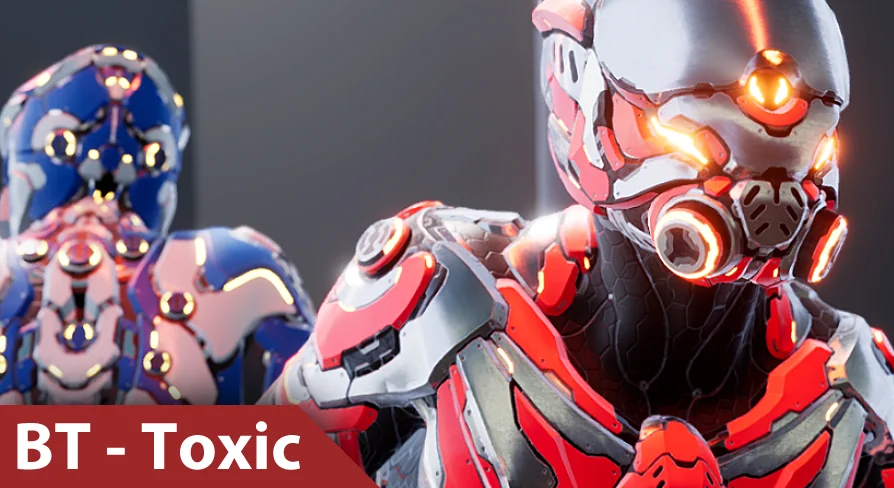
Visual customization is managed through a layered shading framework focused on a single core material and five distinct material instances. The base material does not lock surface properties into flattened, unchangeable diffuse textures; instead, it utilizes mask textures that segregate specific zones of the robotic suit.
Through these mask channels, individual geometric regions can be modified directly within material instance parameters:
Color: Target specific armor plates, chassis sections, or mechanical under-layers to establish unique faction or team identities.
Roughness: Alter surfaces from matte, weathered mechanical framing to glossy, polished composite plating.
Metalness: Adjust non-conductive synthetic materials against bare, raw metallic alloys.
Illumination across the chassis is split into two completely separate emissive masks: one assigned to the Visor and another assigned to the Main lights. Separating these lighting zones allows developers to dial in distinct colors and color intensities across different parts of the head and torso. A project can drive a piercing, high-intensity color across the helmet visor while keeping subtle, low-intensity running lights along the mechanical torso joints, or dynamically strobe the emissive values in engine during active combat states.
Production Roles Across Sci-Fi Scenarios
Because the technical foundation pairs an open mask-based shading system with standard skeletal hierarchies, Biotech - Toxic adapts cleanly across diverse project roles. Its realistic, robotic proportions suit high-fidelity space stations, alien installations, and industrial corridors. When used as a primary character or an android adversary, the five provided material instances supply ready-made color palettes that differentiate squad leaders from grunt combatants or security units.
When placed in background settings, static or idling variations serve as decorative factory droids, maintenance androids, or stationary set pieces, eliminating the need to create separate prop assets. The combination of pre-wired Character and Game Mode Blueprints, standard UE4 mannequin compatibility, dedicated first-person hand geometry, and segregated emissive lighting channels gives technical artists and gameplay developers an efficient asset configured for rapid deployment across Unreal Engine pipelines.
 Characters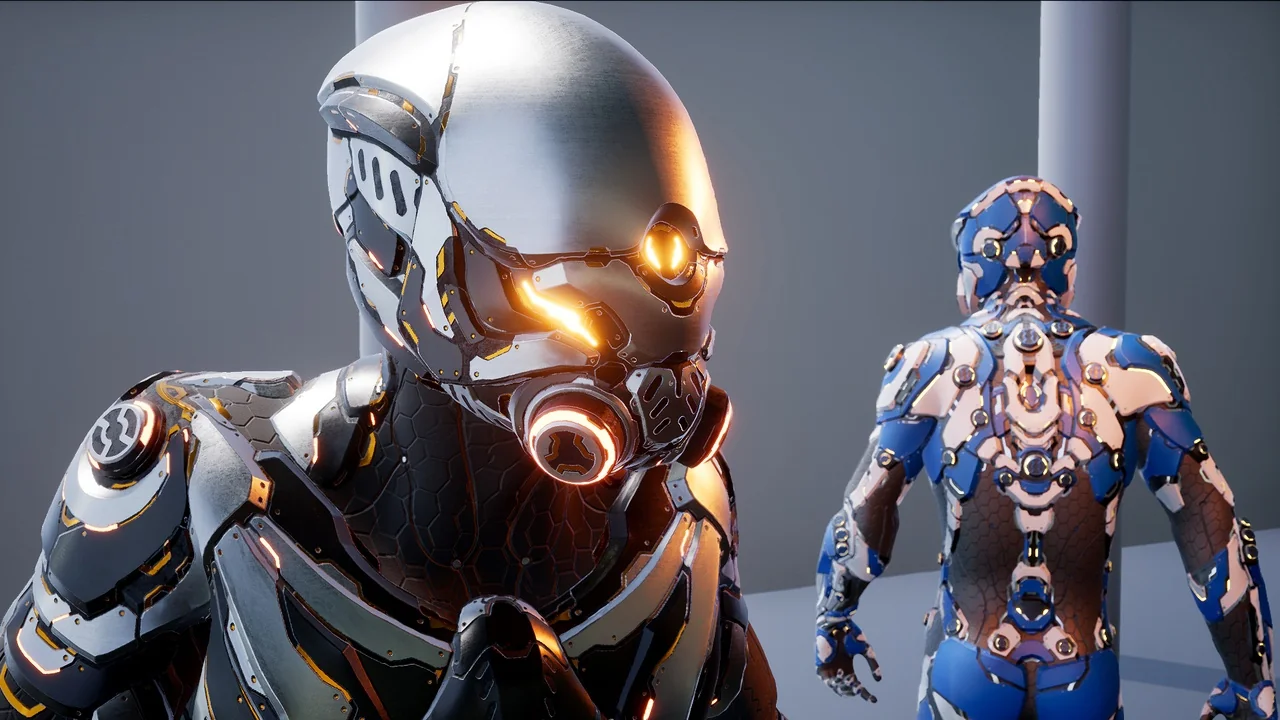
 Characters
 Characters
 Characters