"4481da9c895ef786"{"id":"1000979","slug":"barricades-pack","title":"Barricades Pack","category":"Trashyard","engine":"4.26+,5.0+","assetVersion":"","engineVersion":"Engine Version: 4.26+,5.0+","tag":"Trashyard","accent":"blue","visual":"mech","summary":"A versatile set of customizable low-poly barricades for game environments. Combine parts to create unique defensive setups suited to survival, zombie, and apoca","platform":"Unreal Engine","publishedAt":"2026-08-18T05:55:25.363Z","updatedAt":"2026-08-18T05:55:25.363Z","sourceNotes":[],"fileContents":[],"compatibility":["Unreal Engine","Engine Version: 4.26+,5.0+"],"featuredImage":{"alt":"Barricades Pack","src":"/wp-content/uploads/published/2026/08/198b66993d70-6c1071b0-47e4-4e3e-ac5a-22e36d8cd366-061749439b.webp"},"hasDownloadLink":true,"downloads":0,"terms":[{"taxonomy":"category","slug":"trashyard","name":"Trashyard"}],"galleryImages":[{"src":"/wp-content/uploads/published/2026/08/3d6609c91de8-7d6b8e44-78f6-4ba9-a916-db2dd4ea43f2-7d7261f895.webp","alt":"Barricades Pack"},{"src":"/wp-content/uploads/published/2026/08/bc7063c620d6-682283f8-9f72-4005-b3a0-8228a17202e8-761e0d8204.webp","alt":"Barricades Pack"},{"src":"/wp-content/uploads/published/2026/08/f38eb3b6b259-06ebba30-b125-4142-8e99-4153d0ea06c4-8e9f5061f2.webp","alt":"Barricades Pack"},{"src":"/wp-content/uploads/published/2026/08/377a10abd999-ce857904-6eb6-40ce-8cd0-a289184e9ba4-329c0badae.webp","alt":"Barricades Pack"},{"src":"/wp-content/uploads/published/2026/08/2a562e6d2fb8-fe41cf09-4464-4a9d-89c1-a907f00aeabe-2c9dbf64eb.webp","alt":"Barricades Pack"},{"src":"/wp-content/uploads/published/2026/08/fc85d283c21a-1021dbcf-7230-4206-8fbc-57bdb75d00cd-f6d2749f33.webp","alt":"Barricades Pack"},{"src":"/wp-content/uploads/published/2026/08/d24054d0a79d-29667702-560e-4caf-ad25-13351c4e02f8-44dbbf7fa4.webp","alt":"Barricades Pack"}],"accessPanel":{"kind":"resource","title":"Download this resource","eyebrow":"Free Download","message":"Log in or create a free account to start your download.","fileName":"Content.7z","safetyNote":"Resources are manually reviewed before listing to improve quality and reduce obvious risks.","actionLabel":"Download Free","resourceType":"Resource archive"},"contentHtml":"\u003cp\u003ePicking up the \u003cstrong\u003eBarricades Pack\u003c/strong\u003e Means starting with a group of parts instead of a single fixed object. The pieces are meant to be mixed and matched, so the first step is sorting out which combination fits the space you are blocking. You might place fencing across a gap, stack fortification against a wall, or set up an obstacle as a choke point. Everything connects through an easy assembly system, letting each new arrangement feel like a different prop.\u003c/p\u003e \u003ch2\u003eCombining Parts into Custom Setups\u003c/h2\u003e\n\u003cp\u003eThe pack sells itself on versatility. Rather than dropping one pre-built barrier into a level, you build it from the component pieces. This is what makes it work across many scenes: a single wall segment can become part of a longer blockade, or stand alone as a barrier in a doorway. Since the parts are designed to combine, variations come from the player or level designer rather than from a library of fixed meshes. The process is straightforward to describe even before you open the editor: take several pieces, rotate them, snap them together, and you get a custom setup without any extra modeling work.\u003c/p\u003e \u003ch2\u003eReading the Tags: Outpost, Zombie, Survival, and Defense\u003c/h2\u003e\n\u003cp\u003eThe asset's tag list is practically a brief for an apocalyptic game. Words like \u003cem\u003eOutpost\u003c/em\u003e, \u003cem\u003eSurvival\u003c/em\u003e, \u003cem\u003eProtection\u003c/em\u003e, \u003cem\u003eZombie\u003c/em\u003e, \u003cem\u003eObstacle\u003c/em\u003e, \u003cem\u003eBlockade\u003c/em\u003e, \u003cem\u003eDefense\u003c/em\u003e, \u003cem\u003eBarrier\u003c/em\u003e, \u003cem\u003eWall\u003c/em\u003e, \u003cem\u003eFence\u003c/em\u003e, \u003cem\u003eFortification\u003c/em\u003e All point to the same kind of use. These are not decorative fences meant to look pretty; they are functional props meant to suggest a team or a survivor has barricaded an area against a threat. The low-poly look fits the same tone, keeping the props readable without overwhelming the scene. When you place these barricades around an outpost or in a slum-like alley, they immediately communicate that this is a protected, fortified location.\u003c/p\u003e \u003ch2\u003eLow Poly Props Against Abandoned Buildings\u003c/h2\u003e\n\u003cp\u003eCompatibility with abandoned buildings is part of the asset's practical value. The editor note mentions abandoned buildings as the direct environment type, and that makes sense with the tag list. A slum or a post-apocalyptic building often has doors, windows, and corridors that need blocking. The low-poly style keeps the props in tune with similar architectural assets, so they don't stick out as higher-detail or more realistic meshes. This is not a photorealistic pack; it is a low-poly kit, but the source still calls the props realistic in a game-environment sense. That balance is useful when you want believable silhouettes without breaking the art direction of a stylized project.\u003c/p\u003e \u003ch2\u003eInspecting the Asset in More Detail on Sketchfab\u003c/h2\u003e\n\u003cp\u003eFor a closer look at how these parts fit and read from different angles, the asset is available for inspection on Sketchfab. That gives you a chance to spin the camera around, check the proportions, and see the surface details before committing to the pack in your own engine. It is a practical step if you are weighing how the barricades will look in a specific scene. ArtStation and Instagram for further examples, but the Sketchfab embed is the most direct way to view the geometry interactively.\u003c/p\u003e \u003ch2\u003eWho Gets the Most Out of This Pack\u003c/h2\u003e\n\u003cp\u003eThe \u003cstrong\u003eBarricades Pack\u003c/strong\u003e Is most valuable for developers working on survival, zombie, post-apocalyptic, or defensive tower-style levels. Because the parts combine into different layouts, one pack can cover multiple choke points: the alley behind a wall, the garage entrance of an abandoned building, or the perimeter of an outpost. The customizable nature also means you can create bespoke defensive lines without custom modeling. For a level designer, that flexibility shortens iteration time. For an indie team, it removes the need to block out every barrier by hand. The pack's production-ready approach comes from doing the simple thing well: providing modular parts that snap into many shapes, which is exactly what a defensive prop set should do.\u003c/p\u003e\n\n\u003ch2\u003eMore From The Same Workflow\u003c/h2\u003e\n\u003cul\u003e\n\u003cli\u003e\u003ca href=\"https://3dcghub.com/trash-set-2/\" title=\"Trash Set.2\"\u003eTrash Set.2\u003c/a\u003e\u003c/li\u003e\n\u003cli\u003e\u003ca href=\"https://3dcghub.com/industry-props-pack-5/\" title=\"Industry Props Pack 5\"\u003eIndustry Props Pack 5\u003c/a\u003e\u003c/li\u003e\n\u003cli\u003e\u003ca href=\"https://3dcghub.com/fishing-village/\" title=\"Fishing Village\"\u003eFishing Village\u003c/a\u003e\u003c/li\u003e\n\u003cli\u003e\u003ca href=\"https://3dcghub.com/brushify-country-roads-pack/\" title=\"Brushify - Country Roads Pack\"\u003eBrushify - Country Roads Pack\u003c/a\u003e\u003c/li\u003e\n\u003cli\u003e\u003ca href=\"https://3dcghub.com/hero-for-rpg-modular-pbr/\" title=\"Hero for RPG : Modular PBR\"\u003eHero for RPG : Modular PBR\u003c/a\u003e\u003c/li\u003e\n\u003c/ul\u003e","contentTextLength":3991,"navigation":{"current":403,"total":3269,"previous":{"id":"1000980","slug":"basic-locomotion-system-replicated","title":"Basic Locomotion System (REPLICATED)","category":"Gameplay Features","platform":"Unreal Engine","updatedAt":"2026-08-18T05:57:51.717Z"},"next":{"id":"1000978","slug":"ballistics-fx","title":"Ballistics FX","category":"Fire \u0026 Explosions","platform":"Unreal Engine","updatedAt":"2026-08-18T05:53:13.264Z"}},"relatedResources":[{"id":"1000700","slug":"trash-set-2","title":"Trash Set.2","category":"Trashyard","engine":"4.26+,5.0+","assetVersion":"","engineVersion":"Engine Version: 4.26+,5.0+","tag":"Trashyard","accent":"blue","visual":"mech","summary":"PBR low-poly trash and garbage collection for game engines and renderers. Includes dumpsters, bins, bottles, and food fragments for realistic scenes.","platform":"Unreal Engine","publishedAt":"2026-07-24T00:01:13.253Z","updatedAt":"2026-07-24T00:01:13.253Z","sourceNotes":[],"fileContents":[],"compatibility":["Unreal Engine","Engine Version: 4.26+,5.0+"],"featuredImage":{"alt":"Trash Set.2","src":"/wp-content/uploads/published/2026/07/bc5acc044324-61ec9d30-38c0-45dc-8f2d-d3bb6afeeb34-6cb4298d88.webp"},"hasDownloadLink":true,"downloads":0},{"id":"4843","slug":"industry-props-pack-5","title":"Industry Props Pack 5","category":"Trashyard","engine":"4.26+,5.0+","assetVersion":"Engine version: 4.26+,5.0+","engineVersion":"","tag":"Trashyard","accent":"blue","visual":"luts","summary":"Enhance your industrial scenes with the Industry Props Pack 5. Featuring realistic generators, vending machines, and wire blueprints for game developers.","platform":"Unreal Engine","publishedAt":"2026-02-13T10:04:05.000Z","updatedAt":"2026-04-19T15:57:04.000Z","sourceNotes":[],"fileContents":[],"compatibility":["Unreal Engine","Engine version: 4.26+,5.0+"],"featuredImage":{"alt":"Industry Props Pack 5","src":"https://3dcghub.com/wp-content/uploads/2026/02/cd4d8d2c-7bf7-471f-afa4-bb3fecf78863.webp"},"hasDownloadLink":true,"downloads":0},{"id":"4827","slug":"fishing-village","title":"Fishing Village","category":"Trashyard","engine":"5.5+","assetVersion":"Engine version: 5.5+","engineVersion":"","tag":"Trashyard","accent":"blue","visual":"animation","summary":"Enhance your game with this realistic Fishing Village asset. Featuring AAA textures and modular designs, it is perfect for coastal environments and ports.","platform":"Unreal Engine","publishedAt":"2026-02-13T09:59:46.000Z","updatedAt":"2026-04-19T15:57:04.000Z","sourceNotes":[],"fileContents":[],"compatibility":["Unreal Engine","Engine version: 5.5+"],"featuredImage":{"alt":"Fishing Village","src":"https://3dcghub.com/wp-content/uploads/2026/02/2471b0e8-264d-4202-8dc2-e6acc54c594c.webp"},"hasDownloadLink":true,"downloads":0}]}
Trashyard
Barricades Pack
A versatile set of customizable low-poly barricades for game environments. Combine parts to create unique defensive setups suited to survival, zombie, and apoca
Category:Unreal Engine,TrashyardPlatform: Unreal EngineEngine Version: 4.26+,5.0+Published: Aug 18, 2026
Trashyard
Resource overview
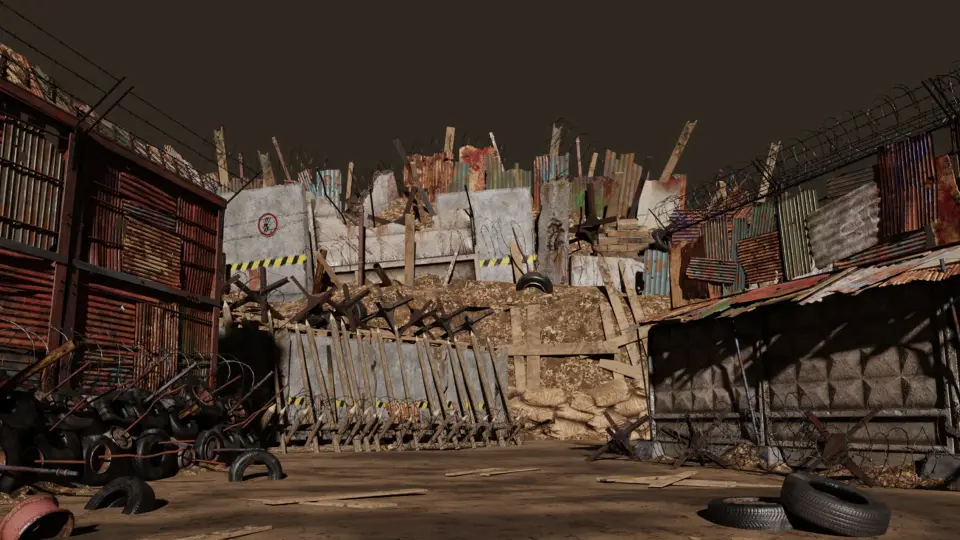
Picking up the Barricades Pack Means starting with a group of parts instead of a single fixed object. The pieces are meant to be mixed and matched, so the first step is sorting out which combination fits the space you are blocking. You might place fencing across a gap, stack fortification against a wall, or set up an obstacle as a choke point. Everything connects through an easy assembly system, letting each new arrangement feel like a different prop.
Combining Parts into Custom Setups
The pack sells itself on versatility. Rather than dropping one pre-built barrier into a level, you build it from the component pieces. This is what makes it work across many scenes: a single wall segment can become part of a longer blockade, or stand alone as a barrier in a doorway. Since the parts are designed to combine, variations come from the player or level designer rather than from a library of fixed meshes. The process is straightforward to describe even before you open the editor: take several pieces, rotate them, snap them together, and you get a custom setup without any extra modeling work.
Reading the Tags: Outpost, Zombie, Survival, and Defense
The asset's tag list is practically a brief for an apocalyptic game. Words like Outpost, Survival, Protection, Zombie, Obstacle, Blockade, Defense, Barrier, Wall, Fence, Fortification All point to the same kind of use. These are not decorative fences meant to look pretty; they are functional props meant to suggest a team or a survivor has barricaded an area against a threat. The low-poly look fits the same tone, keeping the props readable without overwhelming the scene. When you place these barricades around an outpost or in a slum-like alley, they immediately communicate that this is a protected, fortified location.
Low Poly Props Against Abandoned Buildings
Compatibility with abandoned buildings is part of the asset's practical value. The editor note mentions abandoned buildings as the direct environment type, and that makes sense with the tag list. A slum or a post-apocalyptic building often has doors, windows, and corridors that need blocking. The low-poly style keeps the props in tune with similar architectural assets, so they don't stick out as higher-detail or more realistic meshes. This is not a photorealistic pack; it is a low-poly kit, but the source still calls the props realistic in a game-environment sense. That balance is useful when you want believable silhouettes without breaking the art direction of a stylized project.
Inspecting the Asset in More Detail on Sketchfab
For a closer look at how these parts fit and read from different angles, the asset is available for inspection on Sketchfab. That gives you a chance to spin the camera around, check the proportions, and see the surface details before committing to the pack in your own engine. It is a practical step if you are weighing how the barricades will look in a specific scene. ArtStation and Instagram for further examples, but the Sketchfab embed is the most direct way to view the geometry interactively.
Who Gets the Most Out of This Pack
The Barricades Pack Is most valuable for developers working on survival, zombie, post-apocalyptic, or defensive tower-style levels. Because the parts combine into different layouts, one pack can cover multiple choke points: the alley behind a wall, the garage entrance of an abandoned building, or the perimeter of an outpost. The customizable nature also means you can create bespoke defensive lines without custom modeling. For a level designer, that flexibility shortens iteration time. For an indie team, it removes the need to block out every barrier by hand. The pack's production-ready approach comes from doing the simple thing well: providing modular parts that snap into many shapes, which is exactly what a defensive prop set should do.
 Trashyard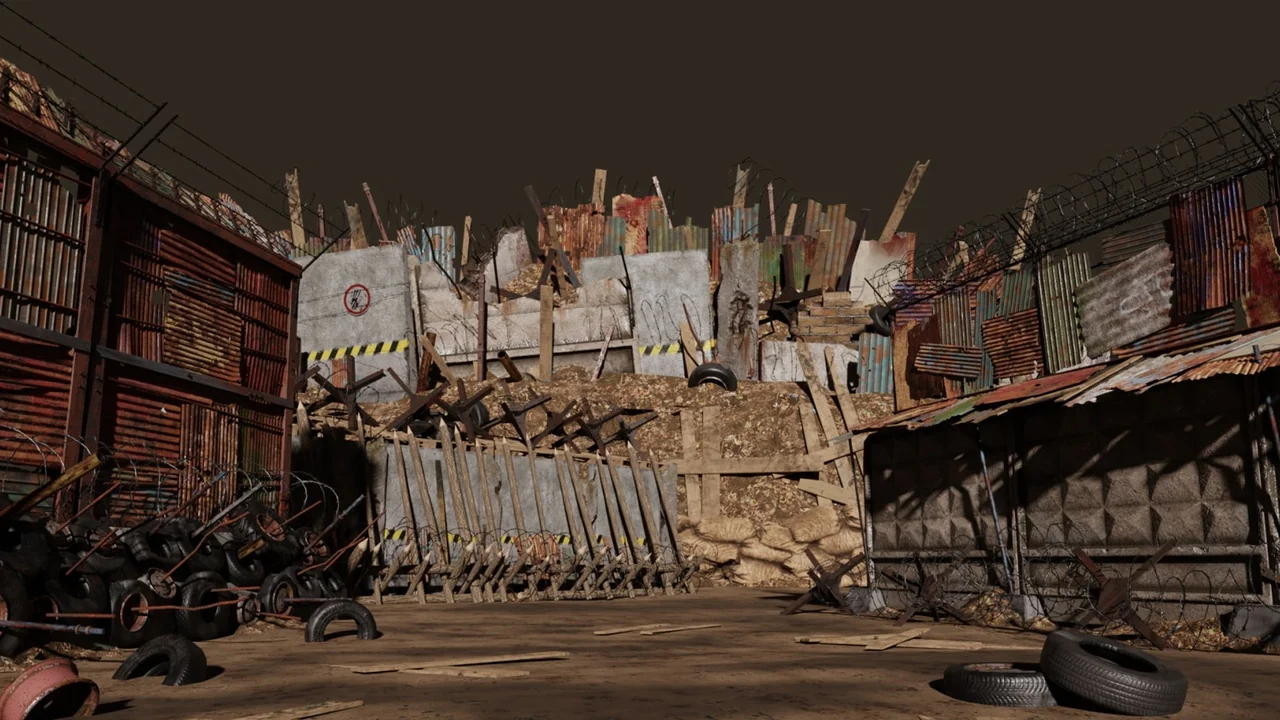
 Trashyard
 Trashyard
 Trashyard