"177e4e4394b9ce1f"{"id":"1001573","slug":"ariana-character-p2","title":"Ariana Character P2","category":"Characters \u0026 Creatures","engine":"4.26+,5.0+","assetVersion":"","engineVersion":"Engine Version: 4.26+,5.0+","tag":"Characters","accent":"blue","visual":"character","summary":"Ariana Character P2 brings humanoid 3D character implementation across both Unreal Engine 4 and Unity development environments.","platform":"Unreal Engine","publishedAt":"2026-10-10T05:08:30.467Z","updatedAt":"2026-10-10T05:08:30.467Z","sourceNotes":[],"fileContents":[],"compatibility":["Unreal Engine","Engine Version: 4.26+,5.0+"],"featuredImage":{"alt":"Ariana Character P2","src":"/wp-content/uploads/published/2026/10/c62d3d96aee1-quang-phan-promote-01-f235fb9d80.webp"},"hasDownloadLink":true,"downloads":1,"terms":[{"taxonomy":"category","slug":"characters-and-creatures","name":"Characters \u0026 Creatures"}],"galleryImages":[{"src":"/wp-content/uploads/published/2026/10/9c13dc916652-quang-phan-promote-02-a38de4e4c2.webp","alt":"Ariana Character P2"},{"src":"/wp-content/uploads/published/2026/10/95254e08e754-quang-phan-promote-16-4df42506c9.webp","alt":"Ariana Character P2"},{"src":"/wp-content/uploads/published/2026/10/7b9891ecaab0-quang-phan-promote-03-6eb5dae93f.webp","alt":"Ariana Character P2"},{"src":"/wp-content/uploads/published/2026/10/69e5bff098d3-quang-phan-promote-17-4707b51370.webp","alt":"Ariana Character P2"},{"src":"/wp-content/uploads/published/2026/10/2bd0386a5792-quang-phan-promote-12-cd95d50c62.webp","alt":"Ariana Character P2"},{"src":"/wp-content/uploads/published/2026/10/b9251d854bee-quang-phan-promote-14-e2d97e8521.webp","alt":"Ariana Character P2"},{"src":"/wp-content/uploads/published/2026/10/d5e9a61b60d9-quang-phan-promote-13-37e6715f7d.webp","alt":"Ariana Character P2"},{"src":"/wp-content/uploads/published/2026/10/58f0a06ebe76-quang-phan-promote-19-4139d1b16a.webp","alt":"Ariana Character P2"},{"src":"/wp-content/uploads/published/2026/10/e28fa99bdc7a-quang-phan-promote-04-ecbc45c5ed.webp","alt":"Ariana Character P2"},{"src":"/wp-content/uploads/published/2026/10/5aa29ed24313-quang-phan-promote-18-fa98288d8b.webp","alt":"Ariana Character P2"}],"accessPanel":{"kind":"resource","title":"Download this resource","eyebrow":"Free Download","message":"Log in or create a free account to start your download.","fileName":"Ariana Character P2.7z","safetyNote":"Resources are manually reviewed before listing to improve quality and reduce obvious risks.","actionLabel":"Download Free","resourceType":"Resource archive"},"contentHtml":"\u003cp\u003eDeploying a humanoid model into real-time environments requires a clean match between character structure and engine-level animation systems. Ariana Character P2 targets two primary real-time game engines simultaneously, providing a humanoid character asset built for deployment within Unreal Engine 4 and Unity. When a model operates across these two distinct environments, character setup centers on how skeletal definitions, deformations, and humanoid classifications align with engine requirements.\u003c/p\u003e \u003ch2\u003eAriana Character P2 in Unity Humanoid Pipelines\u003c/h2\u003e \u003cp\u003eWithin the Unity ecosystem, Ariana Character P2 is classified under 3D humanoid characters. Unity handles humanoid models through a dedicated Mecanim avatar definition system. When a character asset sits in the humanoid category, Unity maps bone hierarchies to an internal humanoid avatar schema. This abstraction allows character animation clips created for other humanoid rigs to transfer across models without requiring custom bone retargeting passes for every animation state.\u003c/p\u003e \u003cp\u003eWorking with humanoid characters inside Unity demands precise alignment between the underlying skeletal hierarchy and the engine-defined standard bone joints. Pelvis, spine, limbs, hands, and head transforms must match expected rotation axes and rest poses to prevent joint twisting or unnatural mesh distortion during motion playback. For Ariana Character P2, presence in the Unity humanoid character catalog indicates that the asset functions directly within this established Mecanim avatar workflow, enabling character controllers, third-person movement trees, and state machines to drive the mesh through universal humanoid animation inputs.\u003c/p\u003e \u003cp\u003eScene placement within Unity typically involves dropping the humanoid prefab or mesh into a staging scene, attaching an Animator component, and configuring the active Avatar reference. Because the humanoid system abstracts the underlying skeleton, blend trees for walking, running, crouching, and directional strafing can link to the character without manual weight recalculations. This structural predictability simplifies character prototyping and production rigging when integrating third-person gameplay frameworks.\u003c/p\u003e \u003ch2\u003eUE4 Integration and Skeletal Workflows for Ariana Character P2\u003c/h2\u003e \u003cp\u003eUnreal Engine 4 handles skeletal mesh assets through its own dedicated animation pipeline, centered around the Unreal Skeletal Mesh and Skeleton asset structures. In UE4, character assets interface with Animation Blueprints, state machines, and the native Character Movement Component. Implementing Ariana Character P2 in Unreal Engine 4 requires loading the skeletal mesh alongside its corresponding physics asset and skeleton definition.\u003c/p\u003e \u003cp\u003eUnreal Engine 4 character setups generally rely on standard skeletal hierarchies to share motion data through UE4 retargeting systems. If a character asset utilizes the standard mannequin hierarchy or maps cleanly to the UE4 Humanoid retargeting rig, animation sequences and blend spaces can be shared across multiple assets inside the engine. Within UE4, the physics asset handles ragdoll collisions, hit registration, and kinematic physical reactions, while the animation graph evaluates locomotion blend spaces and layered bone blends per frame.\u003c/p\u003e \u003cp\u003eImporting and assigning Ariana Character P2 inside Unreal Engine 4 follows standard character component assembly. A base character blueprint combines a capsule collision component, the skeletal mesh component pointing to the character, and the character movement component. The blueprint references a designated Animation Blueprint to evaluate idle, walk, run, and transition states driven by movement speed, acceleration vectors, and fall states. This direct architectural fit enables developers working inside UE4 to bypass complex rigging rebuilds during gameplay integration.\u003c/p\u003e \u003ch2\u003eDual-Engine Considerations Across Unreal Engine 4 and Unity\u003c/h2\u003e \u003cp\u003eMaintaining a single character release across both Unreal Engine 4 and Unity addresses development teams working in multi-engine pipelines or those porting interactive titles between platforms. While both engines manage 3D meshes, coordinate systems and bone rotation orientations differ significantly between them. Unreal Engine operates on a left-handed, Z-up coordinate system, whereas Unity utilizes a left-handed, Y-up coordinate convention. Character assets structured for both ecosystems require root orientations and joint axes that accommodate these differing conventions without introducing flipped normals, inverted joint rotations, or unaligned bone chains.\u003c/p\u003e \u003cp\u003eMaterial and shading architectures also diverge between the two platforms. Unity historically processes character surfaces through its standard rendering pipeline or scriptable render pipelines, relying on specific metallic-smoothness texture channel packs. Unreal Engine 4 evaluates materials using a distinct roughness-metallic-ambient occlusion workflow, often packing these grayscale maps into separate red, green, and blue texture channels. Having Ariana Character P2 configured specifically for both markets ensures surface setups, material instances, and shader inputs conform directly to the native rendering expectations of each engine without extensive manual texture channel repackaging.\u003c/p\u003e \u003ch2\u003eHumanoids Implementation and Asset Iteration\u003c/h2\u003e \u003cp\u003eThe designation of Ariana Character P2 marks the asset as a distinct character entry within the humanoid category. In character asset development, iterative designations typically indicate specialized costume variants, upgraded visual fidelity, altered styling, or dedicated functional configurations distinct from prior releases. Maintaining clear designations allows developers to assemble consistent character casts while preserving visual continuity across related character models.\u003c/p\u003e \u003cp\u003eFor production teams evaluating humanoid assets, having verified compatibility across both Unity and Unreal Engine 4 ensures flexibility during technology prototyping. A character model that interfaces cleanly with Unity Mecanim avatars and UE4 skeletal mesh frameworks minimizes technical friction, allowing technical artists and gameplay programmers to focus directly on animation tuning, locomotion behavior, and scene interaction.\u003c/p\u003e\n\n\u003ch2\u003eExplore Similar Assets\u003c/h2\u003e\n\u003cul\u003e\n\u003cli\u003e\u003ca href=\"https://3dcghub.com/infinite-characters-collection-over-230-characters-extra-stigma-studios/\" title=\"Infinite Characters Collection – Over 230 Characters + Extra | STIGMA STUDIOS\"\u003eInfinite Characters Collection – Over 230 Characters + Extra | STIGMA STUDIOS\u003c/a\u003e\u003c/li\u003e\n\u003cli\u003e\u003ca href=\"https://3dcghub.com/primitive-characters-pack/\" title=\"Primitive Characters (Pack)\"\u003ePrimitive Characters (Pack)\u003c/a\u003e\u003c/li\u003e\n\u003cli\u003e\u003ca href=\"https://3dcghub.com/stylized-male-and-female-characters-assets-only/\" title=\"Stylized Male and Female characters (assets only)\"\u003eStylized Male and Female characters (assets only)\u003c/a\u003e\u003c/li\u003e\n\u003cli\u003e\u003ca href=\"https://3dcghub.com/unlit-stylized-military-characters/\" title=\"Unlit Stylized Military Characters\"\u003eUnlit Stylized Military Characters\u003c/a\u003e\u003c/li\u003e\n\u003cli\u003e\u003ca href=\"https://3dcghub.com/adventure-characters-pack/\" title=\"Adventure Characters (Pack)\"\u003eAdventure Characters (Pack)\u003c/a\u003e\u003c/li\u003e\n\u003c/ul\u003e","contentTextLength":6467,"navigation":{"current":41,"total":3551,"previous":{"id":"1001574","slug":"advanced-landscape-material-ed-1","title":"Advanced Landscape Material Ed.1","category":"Nature \u0026 Terrain","platform":"Unreal Engine","updatedAt":"2026-10-10T08:48:01.807Z"},"next":{"id":"1001572","slug":"space-creator-pro","title":"Space Creator Pro","category":"Sky \u0026 Space","platform":"Unreal Engine","updatedAt":"2026-10-10T04:06:11.432Z"}},"relatedResources":[{"id":"1000184","slug":"infinite-characters-collection-over-230-characters-extra-stigma-studios","title":"Infinite Characters Collection – Over 230 Characters + Extra | STIGMA STUDIOS","category":"Characters \u0026 Creatures","engine":"4.27,5.0+","assetVersion":"","engineVersion":"Engine Version: 4.27,5.0+","tag":"Characters","accent":"blue","visual":"character","summary":"A massive Unreal Engine character collection with over 230 characters, armor, weapons, material variants, and ongoing future updates.","platform":"Unreal Engine","publishedAt":"2026-06-21T17:34:28.433Z","updatedAt":"2026-08-23T13:14:17.209Z","sourceNotes":[],"fileContents":[],"compatibility":["Unreal Engine","Engine Version: 4.27,5.0+"],"featuredImage":{"alt":"Infinite Characters Collection – Over 230 Characters + Extra | STIGMA STUDIOS","src":"/wp-content/uploads/published/2026/06/26476fb360bb-f2bcdade-6b80-4803-903a-68e84d350b6b-f00df84586.webp"},"hasDownloadLink":true,"downloads":15},{"id":"1001061","slug":"primitive-characters-pack","title":"Primitive Characters (Pack)","category":"Characters \u0026 Creatures","engine":"4.26+,5.0+","assetVersion":"","engineVersion":"Engine Version: 4.26+,5.0+","tag":"Characters","accent":"blue","visual":"character","summary":"A five-character primitive survival pack for UE4 and UE5, featuring dual rigs, facial morphs, weapons, and creature animation compatibility.","platform":"Unreal Engine","publishedAt":"2026-08-30T15:21:04.948Z","updatedAt":"2026-08-30T15:21:04.948Z","sourceNotes":[],"fileContents":[],"compatibility":["Unreal Engine","Engine Version: 4.26+,5.0+"],"featuredImage":{"alt":"Primitive Characters (Pack)","src":"/wp-content/uploads/published/2026/08/934d3635756b-88428e14-2353-46db-93bb-469d965424c6-d696e0ffc4.webp"},"hasDownloadLink":true,"downloads":3},{"id":"1000689","slug":"stylized-male-and-female-characters-assets-only","title":"Stylized Male and Female characters (assets only)","category":"Characters \u0026 Creatures","engine":"4.26+,5.0+","assetVersion":"","engineVersion":"Engine Version: 4.26+,5.0+","tag":"Characters","accent":"blue","visual":"character","summary":"Modular stylized character bundle for Unreal Engine with ethnic heads, clothing, hair, and accessories across 9 skeleton variants including MetaHuman and Lyra.","platform":"Unreal Engine","publishedAt":"2026-07-23T08:13:25.624Z","updatedAt":"2026-07-23T08:13:25.624Z","sourceNotes":[],"fileContents":[],"compatibility":["Unreal Engine","Engine Version: 4.26+,5.0+"],"featuredImage":{"alt":"Stylized Male and Female characters (assets only)","src":"/wp-content/uploads/published/2026/07/93efe5652ae8-968589b3-b5d7-4626-b43c-0b74970fe905-b28ff1fc25.webp"},"hasDownloadLink":true,"downloads":1}]}
Characters
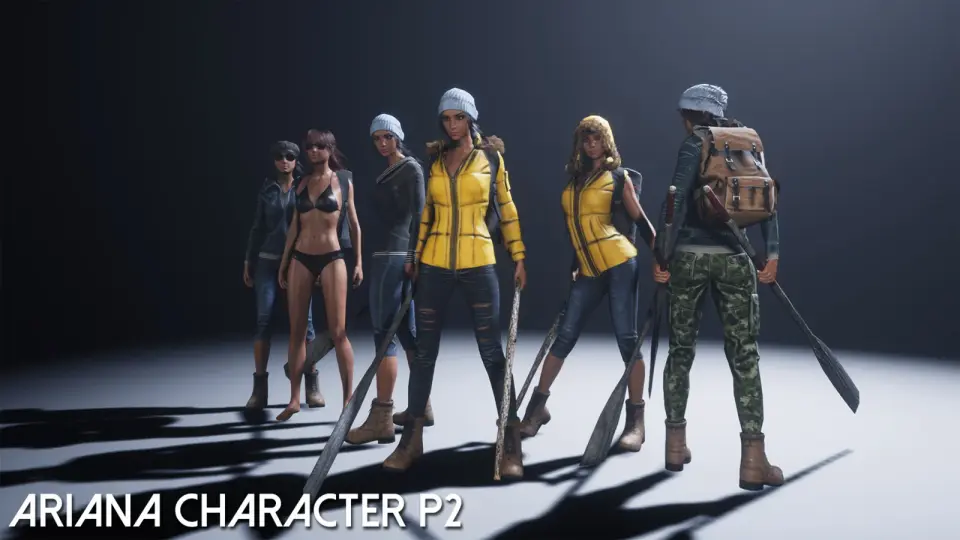
Ariana Character P2
Ariana Character P2 brings humanoid 3D character implementation across both Unreal Engine 4 and Unity development environments.
Deploying a humanoid model into real-time environments requires a clean match between character structure and engine-level animation systems. Ariana Character P2 targets two primary real-time game engines simultaneously, providing a humanoid character asset built for deployment within Unreal Engine 4 and Unity. When a model operates across these two distinct environments, character setup centers on how skeletal definitions, deformations, and humanoid classifications align with engine requirements.
Ariana Character P2 in Unity Humanoid Pipelines
Within the Unity ecosystem, Ariana Character P2 is classified under 3D humanoid characters. Unity handles humanoid models through a dedicated Mecanim avatar definition system. When a character asset sits in the humanoid category, Unity maps bone hierarchies to an internal humanoid avatar schema. This abstraction allows character animation clips created for other humanoid rigs to transfer across models without requiring custom bone retargeting passes for every animation state.
Working with humanoid characters inside Unity demands precise alignment between the underlying skeletal hierarchy and the engine-defined standard bone joints. Pelvis, spine, limbs, hands, and head transforms must match expected rotation axes and rest poses to prevent joint twisting or unnatural mesh distortion during motion playback. For Ariana Character P2, presence in the Unity humanoid character catalog indicates that the asset functions directly within this established Mecanim avatar workflow, enabling character controllers, third-person movement trees, and state machines to drive the mesh through universal humanoid animation inputs.
Scene placement within Unity typically involves dropping the humanoid prefab or mesh into a staging scene, attaching an Animator component, and configuring the active Avatar reference. Because the humanoid system abstracts the underlying skeleton, blend trees for walking, running, crouching, and directional strafing can link to the character without manual weight recalculations. This structural predictability simplifies character prototyping and production rigging when integrating third-person gameplay frameworks.
UE4 Integration and Skeletal Workflows for Ariana Character P2
Unreal Engine 4 handles skeletal mesh assets through its own dedicated animation pipeline, centered around the Unreal Skeletal Mesh and Skeleton asset structures. In UE4, character assets interface with Animation Blueprints, state machines, and the native Character Movement Component. Implementing Ariana Character P2 in Unreal Engine 4 requires loading the skeletal mesh alongside its corresponding physics asset and skeleton definition.
Unreal Engine 4 character setups generally rely on standard skeletal hierarchies to share motion data through UE4 retargeting systems. If a character asset utilizes the standard mannequin hierarchy or maps cleanly to the UE4 Humanoid retargeting rig, animation sequences and blend spaces can be shared across multiple assets inside the engine. Within UE4, the physics asset handles ragdoll collisions, hit registration, and kinematic physical reactions, while the animation graph evaluates locomotion blend spaces and layered bone blends per frame.
Importing and assigning Ariana Character P2 inside Unreal Engine 4 follows standard character component assembly. A base character blueprint combines a capsule collision component, the skeletal mesh component pointing to the character, and the character movement component. The blueprint references a designated Animation Blueprint to evaluate idle, walk, run, and transition states driven by movement speed, acceleration vectors, and fall states. This direct architectural fit enables developers working inside UE4 to bypass complex rigging rebuilds during gameplay integration.
Dual-Engine Considerations Across Unreal Engine 4 and Unity
Maintaining a single character release across both Unreal Engine 4 and Unity addresses development teams working in multi-engine pipelines or those porting interactive titles between platforms. While both engines manage 3D meshes, coordinate systems and bone rotation orientations differ significantly between them. Unreal Engine operates on a left-handed, Z-up coordinate system, whereas Unity utilizes a left-handed, Y-up coordinate convention. Character assets structured for both ecosystems require root orientations and joint axes that accommodate these differing conventions without introducing flipped normals, inverted joint rotations, or unaligned bone chains.
Material and shading architectures also diverge between the two platforms. Unity historically processes character surfaces through its standard rendering pipeline or scriptable render pipelines, relying on specific metallic-smoothness texture channel packs. Unreal Engine 4 evaluates materials using a distinct roughness-metallic-ambient occlusion workflow, often packing these grayscale maps into separate red, green, and blue texture channels. Having Ariana Character P2 configured specifically for both markets ensures surface setups, material instances, and shader inputs conform directly to the native rendering expectations of each engine without extensive manual texture channel repackaging.
Humanoids Implementation and Asset Iteration
The designation of Ariana Character P2 marks the asset as a distinct character entry within the humanoid category. In character asset development, iterative designations typically indicate specialized costume variants, upgraded visual fidelity, altered styling, or dedicated functional configurations distinct from prior releases. Maintaining clear designations allows developers to assemble consistent character casts while preserving visual continuity across related character models.
For production teams evaluating humanoid assets, having verified compatibility across both Unity and Unreal Engine 4 ensures flexibility during technology prototyping. A character model that interfaces cleanly with Unity Mecanim avatars and UE4 skeletal mesh frameworks minimizes technical friction, allowing technical artists and gameplay programmers to focus directly on animation tuning, locomotion behavior, and scene interaction.
 Characters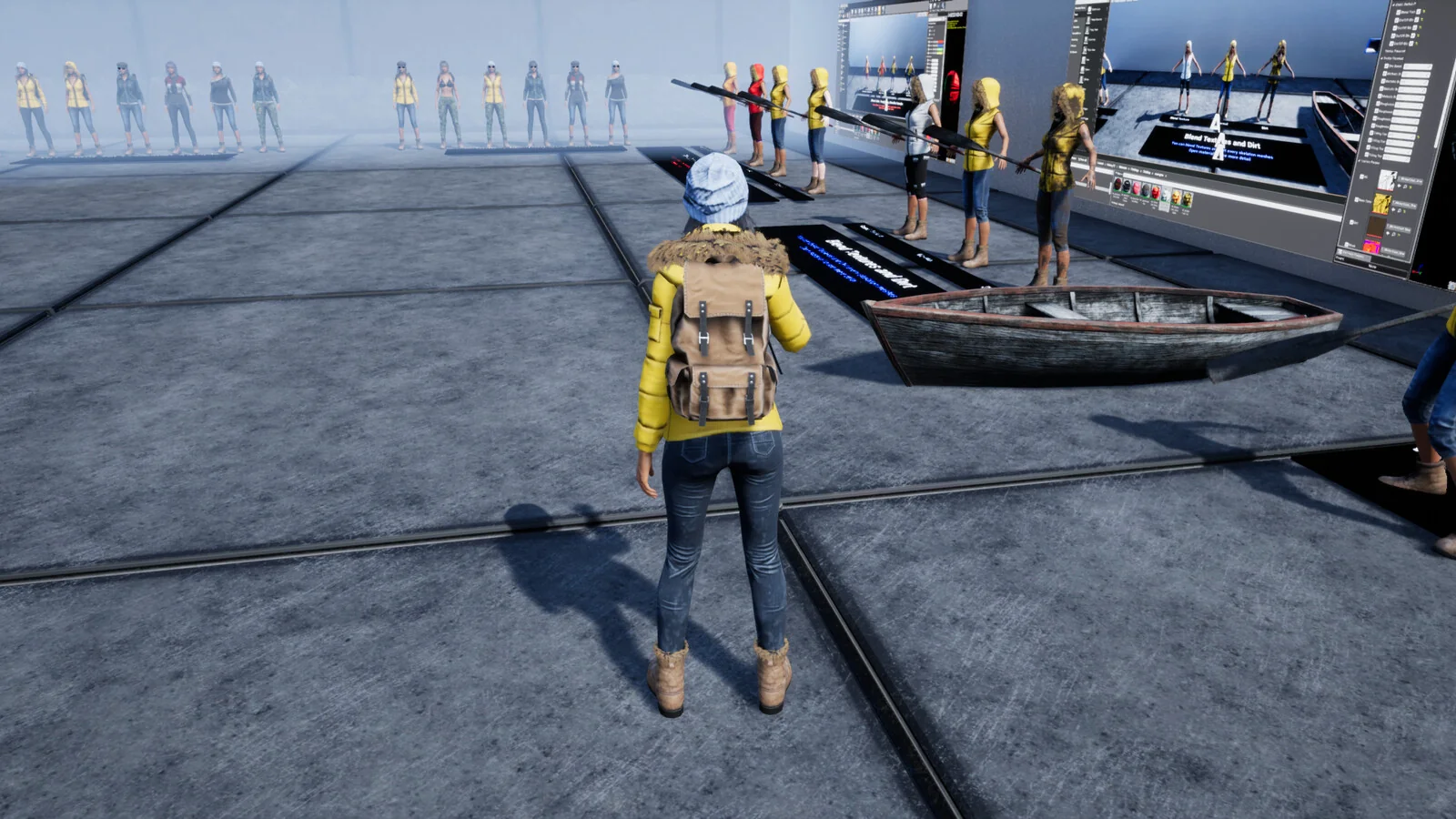
 Characters
 Characters
 Characters