"177e4e4394b9ce1f"{"id":"1001588","slug":"animated-humpback-whale","title":"Animated Humpback Whale","category":"Characters \u0026 Creatures","engine":"5.3+","assetVersion":"","engineVersion":"Engine Version: 5.3+","tag":"Characters","accent":"blue","visual":"character","summary":"Review the Animated Humpback Whale featuring playable WASD controls, a 12-animation library, spline pathing, Niagara water VFX, and fantasy materials.","platform":"Unreal Engine","publishedAt":"2026-10-10T16:05:44.835Z","updatedAt":"2026-10-10T16:05:44.835Z","sourceNotes":[],"fileContents":[],"compatibility":["Unreal Engine","Engine Version: 5.3+"],"featuredImage":{"alt":"Animated Humpback Whale","src":"/wp-content/uploads/published/2026/10/fe5fd96ccf49-8f50d1d1-1dcb-4a06-9697-6da0aecf47e1-2aca190cc1.webp"},"hasDownloadLink":true,"downloads":0,"terms":[{"taxonomy":"category","slug":"characters-and-creatures","name":"Characters \u0026 Creatures"}],"galleryImages":[{"src":"/wp-content/uploads/published/2026/10/11d9b7cbeac9-494765bd-0612-43dd-a115-0f1e9b5eaf2c-40765e26bf.webp","alt":"Animated Humpback Whale"},{"src":"/wp-content/uploads/published/2026/10/cd88340d6175-f3cdc8b0-6983-456c-b0d7-189f7c8652e0-920451f784.webp","alt":"Animated Humpback Whale"},{"src":"/wp-content/uploads/published/2026/10/bc645546991f-66ae0581-25c3-4dd9-af4b-bba2a78aea92-f3640fc466.webp","alt":"Animated Humpback Whale"},{"src":"/wp-content/uploads/published/2026/10/52194fde972f-f4a9cffe-b536-49dd-bb3c-a39a4acb4c8b-ca2ed2ee8a.webp","alt":"Animated Humpback Whale"},{"src":"/wp-content/uploads/published/2026/10/a9829f0d5109-ed3a9eb0-375d-4c49-934f-54d86b2731bd-0fa8880215.webp","alt":"Animated Humpback Whale"},{"src":"/wp-content/uploads/published/2026/10/9fc31b7cddda-44e282f8-defc-429f-8b09-684d0f76728f-f3bfd237c3.webp","alt":"Animated Humpback Whale"},{"src":"/wp-content/uploads/published/2026/10/1c495d092430-0ba4877c-c8d3-406e-8373-d1282d9a4694-e47c7e0ddd.webp","alt":"Animated Humpback Whale"},{"src":"/wp-content/uploads/published/2026/10/17e8ccbfbc5a-932c2af0-83b8-45e6-b2dc-6001701a592c-48370036c4.webp","alt":"Animated Humpback Whale"}],"accessPanel":{"kind":"resource","title":"Download this resource","eyebrow":"Free Download","message":"Log in or create a free account to start your download.","fileName":"Content.7z","safetyNote":"Resources are manually reviewed before listing to improve quality and reduce obvious risks.","actionLabel":"Download Free","resourceType":"Resource archive"},"contentHtml":"\u003ch2\u003eDirect Character Navigation and Swimming Controls\u003c/h2\u003e\n\u003cp\u003eNavigating an aquatic scene with the Animated Humpback Whale begins immediately through pre-configured character input logic. Rather than requiring developers to construct movement Blueprints, collision volumes, and input bindings from the ground up, the asset includes playable character control setups that work straight out of the box. Level designers can drop the actor into a project, hit play, and pilot the creature directly through the water.\u003c/p\u003e\n\u003cp\u003eThe control scheme follows standard desktop navigation conventions, making testing and interactive integration immediate. Directional propulsion relies on WASD input to steer the whale through the water column. Holding Shift triggers speed acceleration, allowing the model to transition smoothly from an unhurried drift into rapid forward swimming. Dedicated action keys drive specialized physical maneuvers: pressing F initiates a rotational spin along the body's longitudinal axis, while the Space key executes a jump to propel the whale upward toward and through the surface. These interactive bindings let teams quickly assess swimming cadence, turning radii, and responsiveness directly within active ocean environments.\u003c/p\u003e \u003ch2\u003eSpline Pathing and Blueprint Trajectory Setup\u003c/h2\u003e\n\u003cp\u003eFor cinematic sequences, background ocean life, or scripted ambient encounters where player-controlled input is not desired, the package provides a streamlined spline system. Establishing an autonomous humpback whale along a swimming route requires minimal manual setup in the level viewport. The workflow follows a clear, four-step setup sequence:\u003c/p\u003e\n\u003cul\u003e\n\u003cli\u003eDraw the spline curve through the designated underwater area.\u003c/li\u003e\n\u003cli\u003eSelect the specific animations intended to play along the trajectory.\u003c/li\u003e\n\u003cli\u003eDefine the target animation time to control pacing.\u003c/li\u003e\n\u003cli\u003eSet the animation playback speed to match the scale of the route.\u003c/li\u003e\n\u003c/ul\u003e\n\u003cp\u003eOnce those parameters are configured, the accompanying Blueprints execute the rest of the movement sequence. The system handles position tracking, rotational alignment along the path curves, and continuous playback without requiring custom track scripting or hand-keyed timeline work. Developers working through the implementation process can reference a dedicated spline setup tutorial along with a demonstration project to see the pathing logic operating in context.\u003c/p\u003e \u003ch2\u003eThe Twelve-Animation Movement Suite\u003c/h2\u003e\n\u003cp\u003eAt the center of the package is a highly detailed, realistic 3D model of a humpback whale supported by an animation library of twelve distinct clips. Aquatic vertebrates demand continuous anatomical micro-movements to avoid appearing rigid underwater, and the animation suite provides the necessary motion states for both interactive play and automated path following.\u003c/p\u003e\n\u003cp\u003eThe collection incorporates essential navigation and behavioral states, specifically including idle routines, rotational spin actions, high-energy jump sequences, and diving motions. The idle state maintains natural body sway and fin adjustments while the creature hovers in open water, preventing unnatural stillness when movement input drops to zero. Diving clips articulate the downward arch of the spine and the rhythmic oscillation of the tail flukes as the whale angles down into deeper water layers. Spin animations supply the rotational agility seen in playful or defensive behaviors, while the jump cycle supplies the kinetic force needed to breach the water's surface. Because these motion clips match the direct control bindings and the spline selection menus, switching between passive cruising and dynamic surface maneuvers occurs without jarring animation pops.\u003c/p\u003e \u003ch2\u003eNiagara Effects and Water Plugin Integration\u003c/h2\u003e\n\u003cp\u003eA believable marine mammal requires visual interaction at the air-water boundary. To capture the signature visual landmarks of a humpback whale surfacing, the asset includes two dedicated Niagara effects: a blowhole spray effect and a surface splash effect.\u003c/p\u003e\n\u003cp\u003eThe spray effect delivers the vertical plume of vaporized water and air released when the whale reaches the surface to breathe, establishing clear visual feedback during upward swimming arcs. The splash emitter complements this by generating displaced water particles and foaming turbulence when the heavy body breaches during jump animations or settles back beneath the surface. To ensure these visual systems render and behave correctly inside the engine, the native Water plugin must be enabled in the host project. Activating this plugin provides the underlying water framework needed for the Niagara splash and spray components to function as intended during dynamic scene interactions.\u003c/p\u003e \u003ch2\u003eVisual Styles and Fantasy Material Variants\u003c/h2\u003e\n\u003cp\u003eWhile the core asset emphasizes anatomical realism through its base texture maps and detailed surface geometry, production requirements often extend beyond conventional wildlife visualization. To support alternate creative directions, the package includes five distinct fantasy materials alongside the standard realistic look.\u003c/p\u003e\n\u003cp\u003eThese supplementary material setups modify the exterior appearance of the humpback whale, letting creators repurpose the same underlying mesh, skeleton, and animation blueprint across non-traditional settings. Whether a project features magical deep-sea leviathans, bioluminescent creatures, or stylized otherworldly fauna, the alternate surface treatments apply directly over the existing asset framework. The inclusion of these variations means technical setups—such as spline configurations, Niagara particle attachments, and keyboard-driven character movement—remain completely intact regardless of whether the whale is styled for a photorealistic marine documentary scene or a stylized fantasy universe.\u003c/p\u003e \u003ch2\u003eWorkflow Considerations for Aquatic Levels\u003c/h2\u003e\n\u003cp\u003eThe Animated Humpback Whale serves as a dual-purpose asset that bridges interactive creature gameplay and automated environmental dressing. Teams building playable marine experiences can map the character controller immediately to player inputs or test scenarios, while cinematic and environment artists can rapidly populate expansive oceanic vistas using simple drawn splines. With twelve core movement animations, twin Niagara surface effects, native compatibility considerations for the Modular Menu System, and five fantasy material alternatives, the package provides a versatile, self-contained aquatic asset ready for immediate deployment in water-enabled projects.\u003c/p\u003e\n\n\u003ch2\u003eRelated Resources Worth Checking\u003c/h2\u003e\n\u003cul\u003e\n\u003cli\u003e\u003ca href=\"https://3dcghub.com/animated-farm-animals-and-farmer-3d-box/\" title=\"Animated Farm Animals \u0026amp; Farmer- 3D BOX\"\u003eAnimated Farm Animals \u0026amp; Farmer- 3D BOX\u003c/a\u003e\u003c/li\u003e\n\u003cli\u003e\u003ca href=\"https://3dcghub.com/stylized-tentacles-animated/\" title=\"Stylized Tentacles (Animated)\"\u003eStylized Tentacles (Animated)\u003c/a\u003e\u003c/li\u003e\n\u003cli\u003e\u003ca href=\"https://3dcghub.com/man-military-outfit-5-modular-rigged-animated/\" title=\"Man - Military Outfit 5 - Modular - Rigged - Animated\"\u003eMan - Military Outfit 5 - Modular - Rigged - Animated\u003c/a\u003e\u003c/li\u003e\n\u003cli\u003e\u003ca href=\"https://3dcghub.com/urbanzombie3/\" title=\"UrbanZombie3\"\u003eUrbanZombie3\u003c/a\u003e\u003c/li\u003e\n\u003cli\u003e\u003ca href=\"https://3dcghub.com/common-pipistrelle-bat/\" title=\"Common Pipistrelle Bat\"\u003eCommon Pipistrelle Bat\u003c/a\u003e\u003c/li\u003e\n\u003c/ul\u003e","contentTextLength":6607,"navigation":{"current":26,"total":3551,"previous":{"id":"1001589","slug":"anime-hair","title":"Anime Hair","category":"Clothing \u0026 Accessories","platform":"Unreal Engine","updatedAt":"2026-10-10T16:06:27.339Z"},"next":{"id":"1001587","slug":"94-wizard-mocap-animations","title":"94 Wizard Mocap Animations","category":"Combat","platform":"Unreal Engine","updatedAt":"2026-10-10T16:04:43.680Z"}},"relatedResources":[{"id":"1000792","slug":"animated-farm-animals-and-farmer-3d-box","title":"Animated Farm Animals \u0026 Farmer- 3D BOX","category":"Characters \u0026 Creatures","engine":"5.3+","assetVersion":"","engineVersion":"Engine Version: 5.3+","tag":"Characters","accent":"blue","visual":"character","summary":"Rigged and animated farm animals and farmer with shared skeletons, 24-28 animations per animal, 32 farmer animations, and one texture across the full set.","platform":"Unreal Engine","publishedAt":"2026-07-30T14:05:03.752Z","updatedAt":"2026-07-30T14:05:03.752Z","sourceNotes":[],"fileContents":[],"compatibility":["Unreal Engine","Engine Version: 5.3+"],"featuredImage":{"alt":"Animated Farm Animals \u0026 Farmer- 3D BOX","src":"/wp-content/uploads/published/2026/07/53ae199d9dd0-fa80dbe3-aa44-4c2f-baf4-7ca81d8e6d7e-ca77859e91.webp"},"hasDownloadLink":true,"downloads":0},{"id":"1000482","slug":"stylized-tentacles-animated","title":"Stylized Tentacles (Animated)","category":"Characters \u0026 Creatures","engine":"5.0+","assetVersion":"","engineVersion":"Engine Version: 5.0+","tag":"Characters","accent":"blue","visual":"character","summary":"Animated stylized tentacles with 8 motion sets across idle, attack, and death states. Includes 2k PBR textures and 7k vertices for Unreal Engine projects.","platform":"Unreal Engine","publishedAt":"2026-07-12T06:14:31.044Z","updatedAt":"2026-07-12T06:14:31.044Z","sourceNotes":[],"fileContents":[],"compatibility":["Unreal Engine","Engine Version: 5.0+"],"featuredImage":{"alt":"Stylized Tentacles (Animated)","src":"/wp-content/uploads/published/2026/07/fb8b8d56562a-a4001d3d-0a08-4efe-bca6-4464bf560e65-2d5235e859.webp"},"hasDownloadLink":true,"downloads":0},{"id":"2944","slug":"man-military-outfit-5-modular-rigged-animated","title":"Man - Military Outfit 5 - Modular - Rigged - Animated","category":"Characters \u0026 Creatures","engine":"5.0+","assetVersion":"Engine version: 5.0+","engineVersion":"5.0","tag":"Characters","accent":"blue","visual":"character","summary":"Enhance your tactical games with this modular military outfit. Rigged for UE5 Manny and MetaHuman, featuring 8K PBR textures and full animation support.","platform":"Unreal Engine","publishedAt":"2026-02-07T16:08:57.000Z","updatedAt":"2026-04-19T15:57:44.000Z","sourceNotes":[],"fileContents":[],"compatibility":["Unreal Engine","Engine version: 5.0+"],"featuredImage":{"alt":"Man - Military Outfit 5 - Modular - Rigged - Animated","src":"https://3dcghub.com/wp-content/uploads/2026/02/ef76c021-a719-4bca-9c4c-023cd14c2c1d.webp"},"hasDownloadLink":true,"downloads":2}]}
Characters
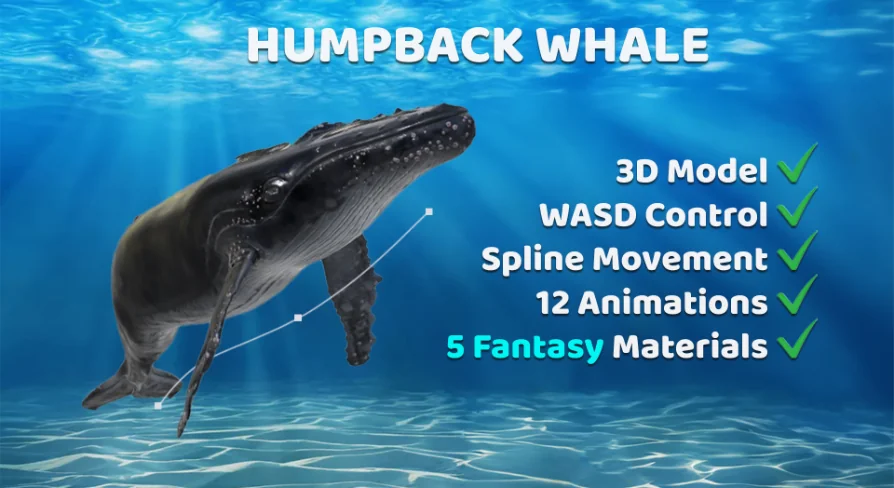
Animated Humpback Whale
Review the Animated Humpback Whale featuring playable WASD controls, a 12-animation library, spline pathing, Niagara water VFX, and fantasy materials.
Navigating an aquatic scene with the Animated Humpback Whale begins immediately through pre-configured character input logic. Rather than requiring developers to construct movement Blueprints, collision volumes, and input bindings from the ground up, the asset includes playable character control setups that work straight out of the box. Level designers can drop the actor into a project, hit play, and pilot the creature directly through the water.
The control scheme follows standard desktop navigation conventions, making testing and interactive integration immediate. Directional propulsion relies on WASD input to steer the whale through the water column. Holding Shift triggers speed acceleration, allowing the model to transition smoothly from an unhurried drift into rapid forward swimming. Dedicated action keys drive specialized physical maneuvers: pressing F initiates a rotational spin along the body's longitudinal axis, while the Space key executes a jump to propel the whale upward toward and through the surface. These interactive bindings let teams quickly assess swimming cadence, turning radii, and responsiveness directly within active ocean environments.
Spline Pathing and Blueprint Trajectory Setup
For cinematic sequences, background ocean life, or scripted ambient encounters where player-controlled input is not desired, the package provides a streamlined spline system. Establishing an autonomous humpback whale along a swimming route requires minimal manual setup in the level viewport. The workflow follows a clear, four-step setup sequence:
Draw the spline curve through the designated underwater area.
Select the specific animations intended to play along the trajectory.
Define the target animation time to control pacing.
Set the animation playback speed to match the scale of the route.
Once those parameters are configured, the accompanying Blueprints execute the rest of the movement sequence. The system handles position tracking, rotational alignment along the path curves, and continuous playback without requiring custom track scripting or hand-keyed timeline work. Developers working through the implementation process can reference a dedicated spline setup tutorial along with a demonstration project to see the pathing logic operating in context.
The Twelve-Animation Movement Suite
At the center of the package is a highly detailed, realistic 3D model of a humpback whale supported by an animation library of twelve distinct clips. Aquatic vertebrates demand continuous anatomical micro-movements to avoid appearing rigid underwater, and the animation suite provides the necessary motion states for both interactive play and automated path following.
The collection incorporates essential navigation and behavioral states, specifically including idle routines, rotational spin actions, high-energy jump sequences, and diving motions. The idle state maintains natural body sway and fin adjustments while the creature hovers in open water, preventing unnatural stillness when movement input drops to zero. Diving clips articulate the downward arch of the spine and the rhythmic oscillation of the tail flukes as the whale angles down into deeper water layers. Spin animations supply the rotational agility seen in playful or defensive behaviors, while the jump cycle supplies the kinetic force needed to breach the water's surface. Because these motion clips match the direct control bindings and the spline selection menus, switching between passive cruising and dynamic surface maneuvers occurs without jarring animation pops.
Niagara Effects and Water Plugin Integration
A believable marine mammal requires visual interaction at the air-water boundary. To capture the signature visual landmarks of a humpback whale surfacing, the asset includes two dedicated Niagara effects: a blowhole spray effect and a surface splash effect.
The spray effect delivers the vertical plume of vaporized water and air released when the whale reaches the surface to breathe, establishing clear visual feedback during upward swimming arcs. The splash emitter complements this by generating displaced water particles and foaming turbulence when the heavy body breaches during jump animations or settles back beneath the surface. To ensure these visual systems render and behave correctly inside the engine, the native Water plugin must be enabled in the host project. Activating this plugin provides the underlying water framework needed for the Niagara splash and spray components to function as intended during dynamic scene interactions.
Visual Styles and Fantasy Material Variants
While the core asset emphasizes anatomical realism through its base texture maps and detailed surface geometry, production requirements often extend beyond conventional wildlife visualization. To support alternate creative directions, the package includes five distinct fantasy materials alongside the standard realistic look.
These supplementary material setups modify the exterior appearance of the humpback whale, letting creators repurpose the same underlying mesh, skeleton, and animation blueprint across non-traditional settings. Whether a project features magical deep-sea leviathans, bioluminescent creatures, or stylized otherworldly fauna, the alternate surface treatments apply directly over the existing asset framework. The inclusion of these variations means technical setups—such as spline configurations, Niagara particle attachments, and keyboard-driven character movement—remain completely intact regardless of whether the whale is styled for a photorealistic marine documentary scene or a stylized fantasy universe.
Workflow Considerations for Aquatic Levels
The Animated Humpback Whale serves as a dual-purpose asset that bridges interactive creature gameplay and automated environmental dressing. Teams building playable marine experiences can map the character controller immediately to player inputs or test scenarios, while cinematic and environment artists can rapidly populate expansive oceanic vistas using simple drawn splines. With twelve core movement animations, twin Niagara surface effects, native compatibility considerations for the Modular Menu System, and five fantasy material alternatives, the package provides a versatile, self-contained aquatic asset ready for immediate deployment in water-enabled projects.
 Characters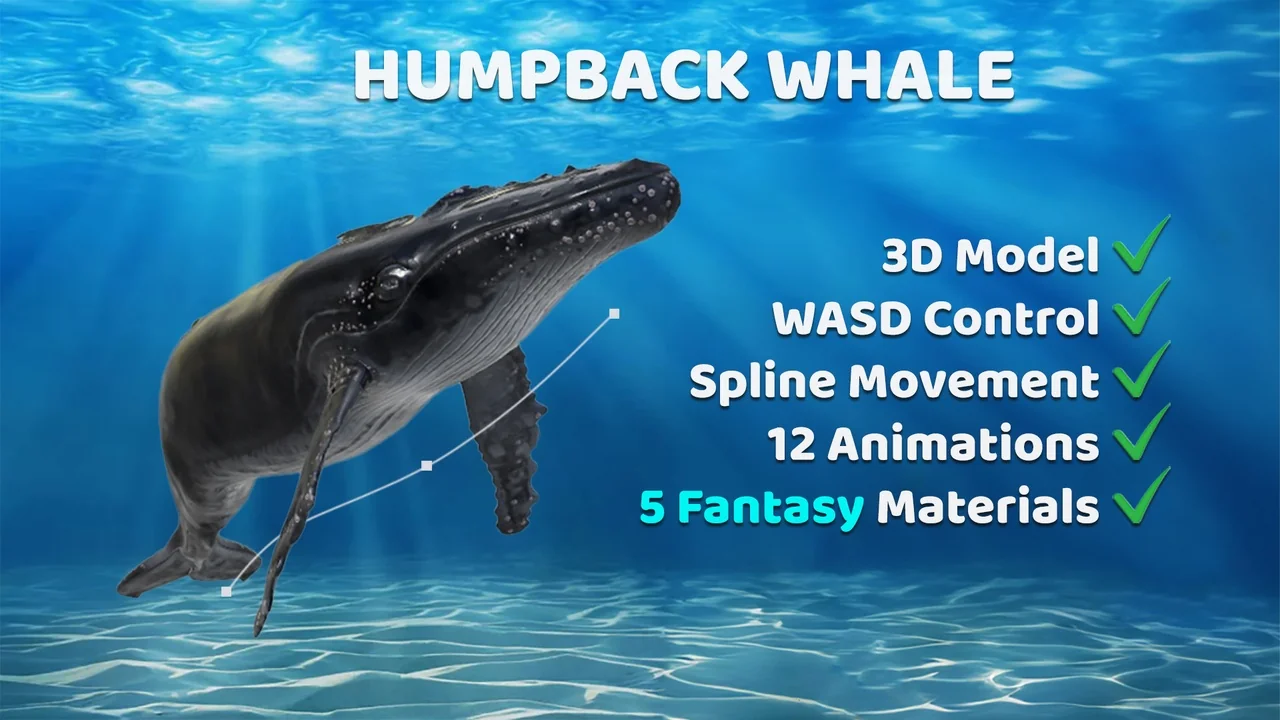
 Characters
 Characters
 Characters