"6f9bd6df1f44a86f"{"id":"1002289","slug":"advanced-cel-shader-essentials","title":"Advanced Cel Shader Essentials","category":"Art \u0026 Traditional","engine":"4.26+,5.0+","assetVersion":"","engineVersion":"Engine Version: 4.26+,5.0+","tag":"Art \u0026 Traditional","accent":"blue","visual":"mech","summary":"Advanced Cel Shader Essentials provides per-material cel shading, color ramp LUTs, multi-light handling, and custom lighting for Unreal Engine characters.","platform":"Unreal Engine","indexPolicy":"index","publishedAt":"2026-11-04T05:19:07.844Z","updatedAt":"2026-11-04T05:19:07.844Z","sourceNotes":[],"fileContents":[],"compatibility":["Unreal Engine","Engine Version: 4.26+,5.0+"],"featuredImage":{"alt":"Advanced Cel Shader Essentials","src":"/wp-content/uploads/published/2026/11/0a5c58f24a26-c7585b0a-832f-4f9f-8893-afff9cc9abdd-9b45aaa02f.webp"},"hasDownloadLink":true,"downloads":0,"terms":[{"taxonomy":"category","slug":"art-and-traditional","name":"Art \u0026 Traditional"}],"galleryImages":[{"src":"/wp-content/uploads/published/2026/11/419ac49df59d-452f8831-9867-4a3a-b3e9-6b583d01fab0-cc6753cd75.webp","alt":"Advanced Cel Shader Essentials"},{"src":"/wp-content/uploads/published/2026/11/7fb6bd64c1ed-25c56153-632d-4140-a5bd-15df8436c94a-f1ee36b3d3.webp","alt":"Advanced Cel Shader Essentials"}],"accessPanel":{"kind":"resource","title":"Download this resource","eyebrow":"Free Download","message":"Log in or create a free account to start your download.","fileName":"Content.7z","safetyNote":"Resources are manually reviewed before listing to improve quality and reduce obvious risks.","actionLabel":"Download Free","resourceType":"Resource archive"},"contentHtml":"\u003cp\u003eCharacters and objects in Unreal Engine take on a controlled, illustrative response to light with Advanced Cel Shader Essentials. The shading can move away from smooth, realistic gradients and toward the deliberate unreality of anime and cel rendering. The asset is a companion to Advanced Cel Shader Lite, but it handles a different part of the job: finely tuned shading for individual characters and objects through materials and a custom lighting system. Its control set is compact on purpose—a handful of precise controls rather than a broad stack of unrelated settings—so the work stays focused on lighting and drawing the character in a cel-shaded style.\u003c/p\u003e \u003ch2\u003ePer-character shading instead of a full-scene pass\u003c/h2\u003e\n\u003cp\u003eAdvanced Cel Shader Lite works as a full-scene, post-process-based shader. Advanced Cel Shader Essentials moves the control closer to the subject being rendered: individual character shading is handled through materials and a custom lighting system. That changes the practical setup. A scene-wide treatment is not the only way to establish a cel look; character materials can carry their own shading response while the custom lighting system supports the result. For a cast that needs its own treatment, the material-level route provides a more granular place to work. The asset does not replace the Lite version's full-scene approach—it sits alongside it as a companion.\u003c/p\u003e \u003ch2\u003eColor ramp LUTs and multi-light handling\u003c/h2\u003e\n\u003cp\u003eTwo controls carry much of the visual character here: color ramp LUTs and multi-light handling. The LUTs shape the color ramp used for the cel response, giving the artist a way to define how the tones move across the ramp. Multi-light handling keeps that response coherent when several lights contribute to the same character or object. The combination is what lets the shader move between styles instead of locking into one fixed response. With these controls, the asset can recreate almost any anime or cel shaded look, provided the ramp and the lighting response are tuned to the intended result. Seamlessness is the relevant quality on the multi-light side: the shading needs to hold together across light contributions rather than break into separate treatments as lights are added.\u003c/p\u003e \u003ch2\u003eMaterials and a custom lighting system\u003c/h2\u003e\n\u003cp\u003eThe material route is the part that gives this version its finely tuned character. Instead of applying a post-process look over the whole frame, the shading controls sit with the materials assigned to characters and objects. A custom lighting system accompanies those material controls. The pairing is what lets the asset address individual subjects while still producing a cel-shaded result. A material-driven setup also gives the artist a place to refine the look without changing the treatment of every object in the scene. That is the practical distinction between this asset and a full-scene shader: the shading is authored at the level of the subject that needs it.\u003c/p\u003e \u003ch2\u003eWhere Advanced Cel Shader Essentials differs from the Lite version\u003c/h2\u003e\n\u003cp\u003eAdvanced Cel Shader Lite provides a full-scene, post-process-based shader. Advanced Cel Shader Essentials is the companion asset for individual character shading through materials and a custom lighting system. The two are not interchangeable descriptions of the same workflow. One works across the scene; the other provides finer controls at the character and object level. Compatibility with Advanced Cel Shader Lite is therefore part of the asset's intended role. Teams already using the Lite version can treat Essentials as the character-focused companion, while projects that need per-subject control have a reason to look at Essentials directly. The emphasis is on finely tuned controls for individual subjects, not on replacing the full-scene shader.\u003c/p\u003e \u003ch2\u003eAnime, cartoon, manga, handpainted, and outline territory\u003c/h2\u003e\n\u003cp\u003eThe look the asset targets is broad within stylized rendering. Its category range includes Art and Mobile as well as anime, cartoon, manga, handpainted, cel, and outline. Those labels point to the range of results the controls are meant to support: a clean anime read, a softer handpainted feel, a manga-like treatment, or an outlined character look. The color ramp LUTs and multi-light handling are the levers that let the same material-based system move across those directions. For a character artist, the shader is less about accepting one preset look and more about adjusting the ramp and lighting response until the intended style appears.\u003c/p\u003e \u003ch2\u003eThe decision point: full-scene versus character-level shading\u003c/h2\u003e\n\u003cp\u003eThe strongest reason to reach for Advanced Cel Shader Essentials is the level at which it operates. When a project needs a cel-shaded response attached to individual characters and objects, the material controls and custom lighting system provide that focus. When the requirement is a full-scene post-process treatment, Advanced Cel Shader Lite is the relevant baseline. The two can coexist as companion assets, with Essentials adding finely tuned character shading rather than duplicating the Lite shader's whole-frame role. For teams evaluating the asset, the practical check is simple: identify whether the cel look must live in the character materials or across the entire scene. Advanced Cel Shader Essentials is aimed at the first case, with color ramp LUTs and seamless multi-light handling doing the visible work.\u003c/p\u003e\n\n\u003ch2\u003eContinue Browsing Similar Packs\u003c/h2\u003e\n\u003cul\u003e\n\u003cli\u003e\u003ca href=\"https://3dcghub.com/advanced-cel-shader-lite/\" rel=\"noopener noreferrer\"\u003eAdvanced Cel Shader Lite\u003c/a\u003e\u003c/li\u003e\n\u003cli\u003e\u003ca href=\"https://3dcghub.com/cartoon-cel-shader/\" rel=\"noopener noreferrer\"\u003eCartoon Cel Shader\u003c/a\u003e\u003c/li\u003e\n\u003cli\u003e\u003ca href=\"https://3dcghub.com/stylized-rendering-system-cel-shader/\" rel=\"noopener noreferrer\"\u003eStylized Rendering System (Cel-Shader)\u003c/a\u003e\u003c/li\u003e\n\u003cli\u003e\u003ca href=\"https://3dcghub.com/post-process-toolkit/\" rel=\"noopener noreferrer\"\u003ePost Process Toolkit\u003c/a\u003e\u003c/li\u003e\n\u003cli\u003e\u003ca href=\"https://3dcghub.com/parallax-card-material/\" rel=\"noopener noreferrer\"\u003eParallax Card Material\u003c/a\u003e\u003c/li\u003e\n\u003c/ul\u003e","contentTextLength":5494,"navigation":{"current":7,"total":4218,"previous":{"id":"1002290","slug":"advanced-uav-pack","title":"Advanced UAV Pack","category":"Weapons \u0026 Combat","platform":"Unreal Engine","updatedAt":"2026-11-04T05:19:38.870Z"},"next":{"id":"1002288","slug":"advanced-attachment-bundle","title":"Advanced Attachment Bundle","category":"Weapons \u0026 Combat","platform":"Unreal Engine","updatedAt":"2026-11-04T05:18:09.932Z"}},"relatedResources":[{"id":"1001198","slug":"advanced-cel-shader-lite","title":"Advanced Cel Shader Lite","category":"Art \u0026 Traditional","engine":"5.0+","assetVersion":"","engineVersion":"Engine Version: 5.0+","tag":"Art \u0026 Traditional","accent":"blue","visual":"mech","summary":"Examine Advanced Cel Shader Lite for Unreal Engine 5.4, covering its rewritten architecture, inline and outline controls, and stylized shading workflows.","platform":"Unreal Engine","indexPolicy":"index","publishedAt":"2026-09-19T08:13:24.211Z","updatedAt":"2026-09-19T08:13:24.211Z","sourceNotes":[],"fileContents":[],"compatibility":["Unreal Engine","Engine Version: 5.0+"],"featuredImage":{"alt":"Advanced Cel Shader Lite","src":"/wp-content/uploads/published/2026/09/789eb25f95c0-b9bf7dfb-f510-4957-adca-58857fbb4dd2-63ab63bcdf.webp"},"hasDownloadLink":true,"downloads":1},{"id":"12238","slug":"cartoon-cel-shader","title":"Cartoon Cel Shader","category":"Art \u0026 Traditional","engine":"5.2+","assetVersion":"Engine version: 5.2+","engineVersion":"4.23","tag":"Art \u0026 Traditional","accent":"blue","visual":"luts","summary":"Enhance your project with the Cartoon Cel Shader, a unique material solution that avoids post-process overhead. This package includes mesh outlines and detailed environment assets like a forest and mermaid.","platform":"Unreal Engine","indexPolicy":"index","publishedAt":"2026-03-07T12:02:30.000Z","updatedAt":"2026-04-19T15:48:01.000Z","sourceNotes":[],"fileContents":[],"compatibility":["Unreal Engine","Engine version: 5.2+"],"featuredImage":{"alt":"Cartoon Cel Shader","src":"https://3dcghub.com/wp-content/uploads/2026/03/54ca1402-ef4f-4a96-a176-fe0373f0c0ae.webp"},"hasDownloadLink":true,"downloads":4},{"id":"15951","slug":"stylized-rendering-system-cel-shader","title":"Stylized Rendering System (Cel-Shader)","category":"Shaders","engine":"5.0+","assetVersion":"Engine version: 5.0+","engineVersion":"4.26","tag":"Shaders","accent":"blue","visual":"city","summary":"Transform your project with the Stylized Rendering System (Cel-Shader), featuring 25 outline styles and easy drag-and-drop setup for anime and manga aesthetics.","platform":"Unreal Engine","indexPolicy":"index","publishedAt":"2026-03-12T13:33:25.000Z","updatedAt":"2026-04-19T15:44:38.000Z","sourceNotes":[],"fileContents":[],"compatibility":["Unreal Engine","Engine version: 5.0+"],"featuredImage":{"alt":"Stylized Rendering System (Cel-Shader)","src":"https://3dcghub.com/wp-content/uploads/2026/03/e9e51600-f665-4ee5-95a5-93a70a539615.webp"},"hasDownloadLink":true,"downloads":5}]}
Art & Traditional
Advanced Cel Shader Essentials
Advanced Cel Shader Essentials provides per-material cel shading, color ramp LUTs, multi-light handling, and custom lighting for Unreal Engine characters.
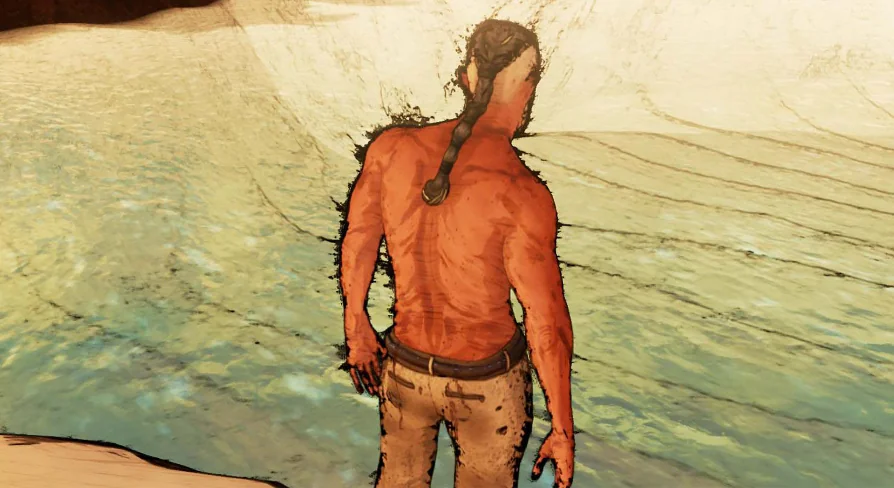
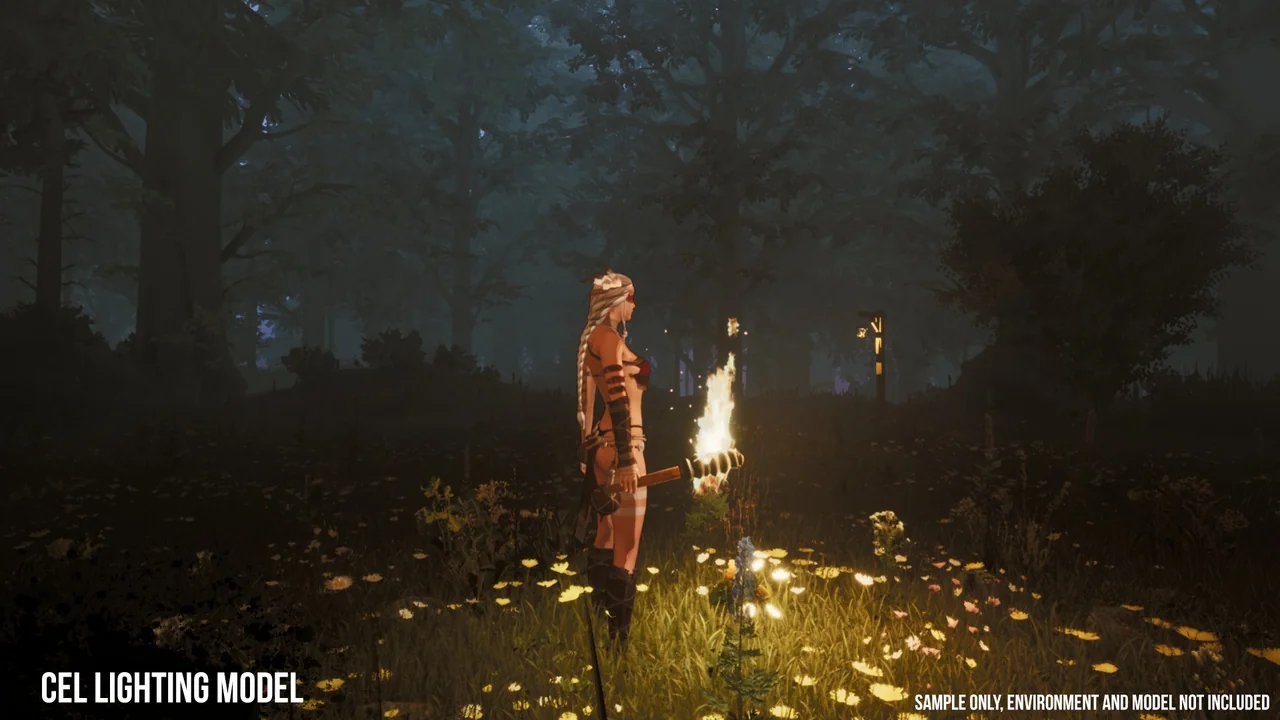
Characters and objects in Unreal Engine take on a controlled, illustrative response to light with Advanced Cel Shader Essentials. The shading can move away from smooth, realistic gradients and toward the deliberate unreality of anime and cel rendering. The asset is a companion to Advanced Cel Shader Lite, but it handles a different part of the job: finely tuned shading for individual characters and objects through materials and a custom lighting system. Its control set is compact on purpose—a handful of precise controls rather than a broad stack of unrelated settings—so the work stays focused on lighting and drawing the character in a cel-shaded style.
Per-character shading instead of a full-scene pass
Advanced Cel Shader Lite works as a full-scene, post-process-based shader. Advanced Cel Shader Essentials moves the control closer to the subject being rendered: individual character shading is handled through materials and a custom lighting system. That changes the practical setup. A scene-wide treatment is not the only way to establish a cel look; character materials can carry their own shading response while the custom lighting system supports the result. For a cast that needs its own treatment, the material-level route provides a more granular place to work. The asset does not replace the Lite version's full-scene approach—it sits alongside it as a companion.
Color ramp LUTs and multi-light handling
Two controls carry much of the visual character here: color ramp LUTs and multi-light handling. The LUTs shape the color ramp used for the cel response, giving the artist a way to define how the tones move across the ramp. Multi-light handling keeps that response coherent when several lights contribute to the same character or object. The combination is what lets the shader move between styles instead of locking into one fixed response. With these controls, the asset can recreate almost any anime or cel shaded look, provided the ramp and the lighting response are tuned to the intended result. Seamlessness is the relevant quality on the multi-light side: the shading needs to hold together across light contributions rather than break into separate treatments as lights are added.
Materials and a custom lighting system
The material route is the part that gives this version its finely tuned character. Instead of applying a post-process look over the whole frame, the shading controls sit with the materials assigned to characters and objects. A custom lighting system accompanies those material controls. The pairing is what lets the asset address individual subjects while still producing a cel-shaded result. A material-driven setup also gives the artist a place to refine the look without changing the treatment of every object in the scene. That is the practical distinction between this asset and a full-scene shader: the shading is authored at the level of the subject that needs it.
Where Advanced Cel Shader Essentials differs from the Lite version
Advanced Cel Shader Lite provides a full-scene, post-process-based shader. Advanced Cel Shader Essentials is the companion asset for individual character shading through materials and a custom lighting system. The two are not interchangeable descriptions of the same workflow. One works across the scene; the other provides finer controls at the character and object level. Compatibility with Advanced Cel Shader Lite is therefore part of the asset's intended role. Teams already using the Lite version can treat Essentials as the character-focused companion, while projects that need per-subject control have a reason to look at Essentials directly. The emphasis is on finely tuned controls for individual subjects, not on replacing the full-scene shader.
Anime, cartoon, manga, handpainted, and outline territory
The look the asset targets is broad within stylized rendering. Its category range includes Art and Mobile as well as anime, cartoon, manga, handpainted, cel, and outline. Those labels point to the range of results the controls are meant to support: a clean anime read, a softer handpainted feel, a manga-like treatment, or an outlined character look. The color ramp LUTs and multi-light handling are the levers that let the same material-based system move across those directions. For a character artist, the shader is less about accepting one preset look and more about adjusting the ramp and lighting response until the intended style appears.
The decision point: full-scene versus character-level shading
The strongest reason to reach for Advanced Cel Shader Essentials is the level at which it operates. When a project needs a cel-shaded response attached to individual characters and objects, the material controls and custom lighting system provide that focus. When the requirement is a full-scene post-process treatment, Advanced Cel Shader Lite is the relevant baseline. The two can coexist as companion assets, with Essentials adding finely tuned character shading rather than duplicating the Lite shader's whole-frame role. For teams evaluating the asset, the practical check is simple: identify whether the cel look must live in the character materials or across the entire scene. Advanced Cel Shader Essentials is aimed at the first case, with color ramp LUTs and seamless multi-light handling doing the visible work.
 Art & Traditional
 Art & Traditional
 Art & Traditional
 Shaders