"059e11fbf316ed56"{"id":"1001284","slug":"advanced-ai-spawn-system","title":"Advanced AI Spawn System","category":"Game Systems","engine":"5.0+","assetVersion":"","engineVersion":"Engine Version: 5.0+","tag":"Game Systems","accent":"blue","visual":"mech","summary":"Explore the Advanced AI Spawn System for Unreal Engine, featuring Construction Script previews, distance optimization steps, and network replication.","platform":"Unreal Engine","publishedAt":"2026-10-01T12:53:04.062Z","updatedAt":"2026-10-01T12:53:04.062Z","sourceNotes":[],"fileContents":[],"compatibility":["Unreal Engine","Engine Version: 5.0+"],"featuredImage":{"alt":"Advanced AI Spawn System","src":"/wp-content/uploads/published/2026/10/b9784fd5dd6b-99df2aa7-dfb0-493d-87d4-ae04f6d13330-83aba9a5cb.webp"},"hasDownloadLink":true,"downloads":0,"terms":[{"taxonomy":"category","slug":"game-systems","name":"Game Systems"}],"galleryImages":[{"src":"/wp-content/uploads/published/2026/10/3926e2bf575b-07682272-ba00-49b6-9ef5-61aac7910c0c-a34073a70a.webp","alt":"Advanced AI Spawn System"},{"src":"/wp-content/uploads/published/2026/10/3e3e1ec31d59-4d735928-c1fe-4783-8772-01eb28ca370b-c9ce514b3c.webp","alt":"Advanced AI Spawn System"},{"src":"/wp-content/uploads/published/2026/10/445cca13105e-9c494688-46b2-4b77-9076-c8a1e0236f51-f6aedcb7bc.webp","alt":"Advanced AI Spawn System"},{"src":"/wp-content/uploads/published/2026/10/562f3abf8758-19737059-d763-4731-a0b0-663e1801ffa0-f2595ea6b0.webp","alt":"Advanced AI Spawn System"},{"src":"/wp-content/uploads/published/2026/10/ef55c0c4d648-fb407940-5aeb-45b7-a9b7-649389aadd4c-1c9fd3305d.webp","alt":"Advanced AI Spawn System"},{"src":"/wp-content/uploads/published/2026/10/1cf4cf9002e5-79e244b2-b4aa-4be1-890e-30fc05d0e484-8fc31af389.webp","alt":"Advanced AI Spawn System"},{"src":"/wp-content/uploads/published/2026/10/1580257763a5-1828f8bd-2585-441c-aecd-c193aa7a3ca2-e7883e6ff5.webp","alt":"Advanced AI Spawn System"},{"src":"/wp-content/uploads/published/2026/10/caf17b5e6730-62311265-7399-413a-ace7-707dcff7050c-f3e3857bcf.webp","alt":"Advanced AI Spawn System"},{"src":"/wp-content/uploads/published/2026/10/0e5e6d36fb5d-7d5935a8-60e7-4d4e-91cc-a7065efb6851-4a54327efc.webp","alt":"Advanced AI Spawn System"},{"src":"/wp-content/uploads/published/2026/10/8a02ea8134f3-2895ac44-ed94-4259-83e3-55f61162c9b7-6ebf380b9a.webp","alt":"Advanced AI Spawn System"}],"accessPanel":{"kind":"resource","title":"Download this resource","eyebrow":"Free Download","message":"Log in or create a free account to start your download.","fileName":"Content.7z","safetyNote":"Resources are manually reviewed before listing to improve quality and reduce obvious risks.","actionLabel":"Download Free","resourceType":"Resource archive"},"contentHtml":"\u003ch2\u003ePopulating Worlds Through a Single Construction Script Blueprint\u003c/h2\u003e\u003cp\u003ePopulating game levels with non-player characters often requires balancing editor performance, runtime overhead, and layout speed. The Advanced AI Spawn System approaches world population by consolidating setup into a single blueprint designed to handle an entire level. Because its generation logic executes within the Unreal Engine Construction Script, placement results appear immediately in the editor viewport during level assembly. Level designers can evaluate character densities, verify placements, and adjust coverage on the fly without repeatedly launching Play In Editor sessions.\u003c/p\u003e\u003cp\u003eThe system is flexible enough to handle vast open-world maps as well as cramped interiors. Designers can add any number of individual spawn areas across a scene, each maintaining its own distinct rules, pawn assignments, and density settings. To manage large projects with heavy volume counts, the tool lets users individually toggle the visibility of spawn boundary boxes per zone, preventing visual clutter while inspecting large-scale layouts.\u003c/p\u003e\u003ch2\u003eArea Boundaries, Multiple Levels Spawn, and Confined Spaces\u003c/h2\u003e\u003cp\u003eSpawning zones can be established using either Box or Sphere collision shapes, with full control over the dimensional extents and exact world location of each volume. Inside each zone, designers choose the specific pawn classes and target counts independently. The system also supports custom visual naming conventions directly inside the viewport. Users can display zone names alongside real-time data showing the quantity of AI characters assigned to that volume, adjusting editor label text size and color to maintain clear project organization.\u003c/p\u003e\u003cp\u003eVertical level geometry presents distinct challenges for automated spawning. To address this, the system includes a Multiple Levels Spawn mode designed specifically to distribute entities in horizontal layers within a single assigned boundary. This makes it straightforward to distribute non-player characters across separate floors of a building or multi-tiered architectural interiors without having to stack dozens of independent blueprint actors. For projects that do not require ground-hugging characters, a Space Mode Spawn setting provides three-dimensional floating distribution suitable for zero-gravity or airborne environments.\u003c/p\u003e\u003ch2\u003ePlacement Streams, Rotation Controls, and Surface Angles\u003c/h2\u003e\u003cp\u003eDistribution within each zone can be completely randomized or locked to a deterministic pattern. By utilizing a random stream, the spawner generates a fixed placement result that remains consistent across editor reloads and level recomputations. Alternatively, disabling the fixed stream instructs the system to re-roll entity positions whenever a parameter updates.\u003c/p\u003e\u003cp\u003eSurfaces in natural terrain or complex architecture rarely present flat ground. The system features a maximum spawn angle parameter, preventing pawns from appearing on steep cliffs, slanted roofs, or unintended inclines. To prevent characters from spawning inside world geometry or colliding with gameplay-critical props, the spawner incorporates an ignore list, allowing specific objects to be excluded during placement collision checks. Rotational alignment is similarly flexible: while characters can be given fully randomized yaw orientations, developers can also enforce custom, uniform rotation angles depending on the requirements of the encounter. Collision evaluation also supports custom collision channels to cleanly separate trace checks from gameplay logic.\u003c/p\u003e\u003ch2\u003eThree-Step Distance Optimization Pipeline\u003c/h2\u003e\u003cp\u003eMaintaining high frame rates when managing dozens or hundreds of AI agents requires aggressive performance conservation. The Advanced AI Spawn System applies a tiered optimization model that reduces computational overhead in direct correlation to the player's physical distance from the entity:\u003c/p\u003e\u003cul\u003e\u003cli\u003e\u003cstrong\u003eStep 1 (Invisibility):\u003c/strong\u003e When the player moves beyond an initial designated radius, the pawn's rendering turns off, eliminating draw calls while keeping the underlying actor logic active.\u003c/li\u003e\u003cli\u003e\u003cstrong\u003eStep 2 (Pawn Destruction with Simulated Movement):\u003c/strong\u003e As the player retreats farther, the physical Pawn actor is destroyed to relieve memory and physics processing. However, virtual random movement calculations continue within the bounds of the spawn area, ensuring the entity still shifts positions logically in the background.\u003c/li\u003e\u003cli\u003e\u003cstrong\u003eStep 3 (Dormancy):\u003c/strong\u003e At the farthest threshold, all movement processing turns off entirely. The system enters a low-cost waiting mode until the player crosses back into range, triggering an orderly reload sequence that reconstructs the pawn based on saved state data.\u003c/li\u003e\u003c/ul\u003e\u003ch2\u003eNetwork Replicated Logic and Behavior Tree Integration\u003c/h2\u003e\u003cp\u003eBeyond passive ambient placement, the system supports active game loops in both single-player and multiplayer environments. The framework is fully network replicated, ensuring synchronized AI states across connected clients and servers. When standard automated spawning on map load is insufficient, developers can switch to Custom Spawn Mode. This mode links spawner execution to specific Blueprint events, allowing encounters to trigger when a player walks into an ambush trigger, completes an objective, or activates a scripted cutscene.\u003c/p\u003e\u003cp\u003eAI decision-making can be hooked directly into Unreal Engine's native systems. The spawner operates smoothly whether agents rely on simple scripts or full Behavior Trees, featuring dedicated settings to assign specific Behavior Trees to distinct AI pawn types within the same zone. To manage sustained encounters, the system includes an automated respawn engine governed by startup timers and customizable respawn limits. Zones can replenish fallen enemies up to a set threshold, after which all respawning halts automatically.\u003c/p\u003e\u003ch2\u003eProduction Workflows and Architectural Compatibility\u003c/h2\u003e\u003cp\u003eLarge-scale projects leveraging World Composition can integrate the spawner without disrupting streaming cell setups. By managing everything from a unified blueprint, the system avoids actor sprawl in the world outliner while delivering the deep control needed for combat arenas, ambient wildlife, multi-story urban combat, and dynamic event encounters. Teams building networked action games, role-playing titles, or open-world simulations can rely on its Construction Script tools and layered optimization stages to populate levels efficiently while protecting runtime frame budgets.\u003c/p\u003e\n\n\u003ch2\u003eMore From The Same Workflow\u003c/h2\u003e\n\u003cul\u003e\n\u003cli\u003e\u003ca href=\"https://3dcghub.com/universal-ai-spawner/\" title=\"Universal AI Spawner\"\u003eUniversal AI Spawner\u003c/a\u003e\u003c/li\u003e\n\u003cli\u003e\u003ca href=\"https://3dcghub.com/open-world-ai-multiplayer-spawn-system/\" title=\"Open World AI Multiplayer Spawn System\"\u003eOpen World AI Multiplayer Spawn System\u003c/a\u003e\u003c/li\u003e\n\u003cli\u003e\u003ca href=\"https://3dcghub.com/open-world-ai-spawn-system/\" title=\"Open World AI Spawn System\"\u003eOpen World AI Spawn System\u003c/a\u003e\u003c/li\u003e\n\u003cli\u003e\u003ca href=\"https://3dcghub.com/multiplayer-shooter-template-with-ai/\" title=\"Multiplayer Shooter Template With AI\"\u003eMultiplayer Shooter Template With AI\u003c/a\u003e\u003c/li\u003e\n\u003cli\u003e\u003ca href=\"https://3dcghub.com/dynamic-ai-system/\" title=\"Dynamic AI System\"\u003eDynamic AI System\u003c/a\u003e\u003c/li\u003e\n\u003c/ul\u003e","contentTextLength":6592,"navigation":{"current":13,"total":3238,"previous":{"id":"1001285","slug":"creating-portal-to-another-reality","title":"Creating Portal To Another Reality","category":"Game Systems","platform":"Unreal Engine","updatedAt":"2026-10-01T12:53:49.247Z"},"next":{"id":"1001283","slug":"dunpix-ultimate-weapon-customization-system-stylized-futuristic-set","title":"Dunpix Ultimate Weapon Customization System + Stylized Futuristic Set","category":"Game Systems","platform":"Unreal Engine","updatedAt":"2026-10-01T12:00:12.740Z"}},"relatedResources":[{"id":"1000970","slug":"universal-ai-spawner","title":"Universal AI Spawner","category":"Procedural Systems","engine":"5.0+","assetVersion":"","engineVersion":"Engine Version: 5.0+","tag":"Procedural Systems","accent":"blue","visual":"mech","summary":"A Blueprint-powered AI spawner for filling levels, building wave systems, and handling multiplayer spawns with timer, trigger, or event control.","platform":"Unreal Engine","publishedAt":"2026-08-15T14:24:21.623Z","updatedAt":"2026-08-15T14:24:21.623Z","sourceNotes":[],"fileContents":[],"compatibility":["Unreal Engine","Engine Version: 5.0+"],"featuredImage":{"alt":"Universal AI Spawner","src":"/wp-content/uploads/published/2026/08/7a777539e89f-047f2364-7ec5-4d9f-9e39-e55ab144c4b4-7f50aa5520.webp"},"hasDownloadLink":true,"downloads":1},{"id":"1000922","slug":"open-world-ai-multiplayer-spawn-system","title":"Open World AI Multiplayer Spawn System","category":"Gameplay Features","engine":"4.26+,5.0+","assetVersion":"","engineVersion":"Engine Version: 4.26+,5.0+","tag":"Gameplay Features","accent":"blue","visual":"mech","summary":"A server-side Blueprint spawn system for open-world multiplayer games, with roaming, stationary, and path AI, friendly or zombie variants.","platform":"Unreal Engine","publishedAt":"2026-08-08T05:05:40.195Z","updatedAt":"2026-08-08T05:05:40.195Z","sourceNotes":[],"fileContents":[],"compatibility":["Unreal Engine","Engine Version: 4.26+,5.0+"],"featuredImage":{"alt":"Open World AI Multiplayer Spawn System","src":"/wp-content/uploads/published/2026/08/c4917032d21c-cb7e3ead-ba0b-445c-8608-4fe8a4722c7e-d50d7d81fc.webp"},"hasDownloadLink":true,"downloads":1},{"id":"11034","slug":"open-world-ai-spawn-system","title":"Open World AI Spawn System","category":"Gameplay Features","engine":"5.0+","assetVersion":"Engine version: 5.0+","engineVersion":"4.17","tag":"Gameplay Features","accent":"blue","visual":"luts","summary":"Manage large-scale environments efficiently with this distance-based spawning solution. This system replaces complex trigger box setups with a streamlined Blueprint approach.","platform":"Unreal Engine","publishedAt":"2026-03-03T16:45:30.000Z","updatedAt":"2026-04-19T15:49:51.000Z","sourceNotes":[],"fileContents":[],"compatibility":["Unreal Engine","Engine version: 5.0+"],"featuredImage":{"alt":"Open World AI Spawn System","src":"https://3dcghub.com/wp-content/uploads/2026/03/0420256b-a6c6-42f9-9432-86d4eb46c9ac.webp"},"hasDownloadLink":true,"downloads":0}]}
Game Systems
Advanced AI Spawn System
Explore the Advanced AI Spawn System for Unreal Engine, featuring Construction Script previews, distance optimization steps, and network replication.
Category:Unreal Engine,Game SystemsPlatform: Unreal EngineEngine Version: 5.0+Published: Oct 1, 2026
Game Systems
Resource overview
Populating Worlds Through a Single Construction Script Blueprint
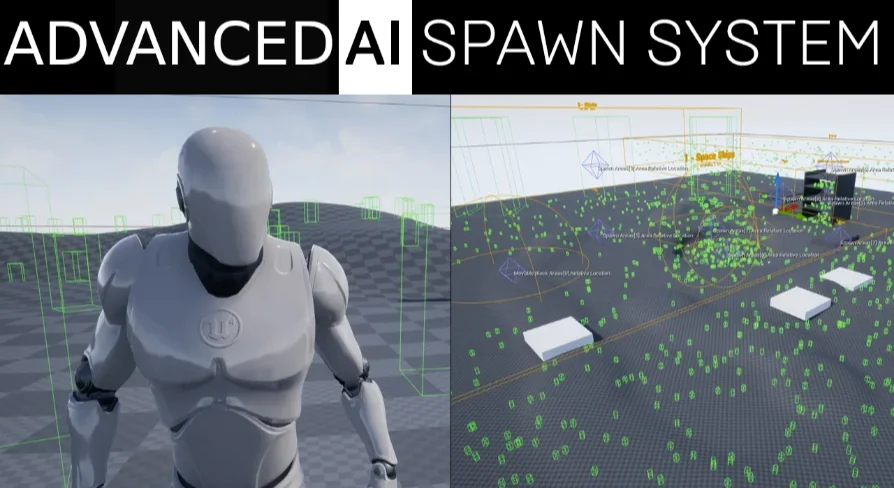
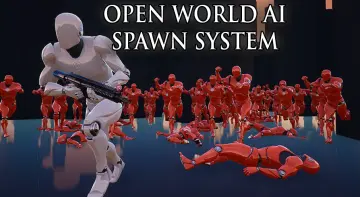
Populating game levels with non-player characters often requires balancing editor performance, runtime overhead, and layout speed. The Advanced AI Spawn System approaches world population by consolidating setup into a single blueprint designed to handle an entire level. Because its generation logic executes within the Unreal Engine Construction Script, placement results appear immediately in the editor viewport during level assembly. Level designers can evaluate character densities, verify placements, and adjust coverage on the fly without repeatedly launching Play In Editor sessions.
The system is flexible enough to handle vast open-world maps as well as cramped interiors. Designers can add any number of individual spawn areas across a scene, each maintaining its own distinct rules, pawn assignments, and density settings. To manage large projects with heavy volume counts, the tool lets users individually toggle the visibility of spawn boundary boxes per zone, preventing visual clutter while inspecting large-scale layouts.
Area Boundaries, Multiple Levels Spawn, and Confined Spaces
Spawning zones can be established using either Box or Sphere collision shapes, with full control over the dimensional extents and exact world location of each volume. Inside each zone, designers choose the specific pawn classes and target counts independently. The system also supports custom visual naming conventions directly inside the viewport. Users can display zone names alongside real-time data showing the quantity of AI characters assigned to that volume, adjusting editor label text size and color to maintain clear project organization.
Vertical level geometry presents distinct challenges for automated spawning. To address this, the system includes a Multiple Levels Spawn mode designed specifically to distribute entities in horizontal layers within a single assigned boundary. This makes it straightforward to distribute non-player characters across separate floors of a building or multi-tiered architectural interiors without having to stack dozens of independent blueprint actors. For projects that do not require ground-hugging characters, a Space Mode Spawn setting provides three-dimensional floating distribution suitable for zero-gravity or airborne environments.
Placement Streams, Rotation Controls, and Surface Angles
Distribution within each zone can be completely randomized or locked to a deterministic pattern. By utilizing a random stream, the spawner generates a fixed placement result that remains consistent across editor reloads and level recomputations. Alternatively, disabling the fixed stream instructs the system to re-roll entity positions whenever a parameter updates.
Surfaces in natural terrain or complex architecture rarely present flat ground. The system features a maximum spawn angle parameter, preventing pawns from appearing on steep cliffs, slanted roofs, or unintended inclines. To prevent characters from spawning inside world geometry or colliding with gameplay-critical props, the spawner incorporates an ignore list, allowing specific objects to be excluded during placement collision checks. Rotational alignment is similarly flexible: while characters can be given fully randomized yaw orientations, developers can also enforce custom, uniform rotation angles depending on the requirements of the encounter. Collision evaluation also supports custom collision channels to cleanly separate trace checks from gameplay logic.
Three-Step Distance Optimization Pipeline
Maintaining high frame rates when managing dozens or hundreds of AI agents requires aggressive performance conservation. The Advanced AI Spawn System applies a tiered optimization model that reduces computational overhead in direct correlation to the player's physical distance from the entity:
Step 1 (Invisibility): When the player moves beyond an initial designated radius, the pawn's rendering turns off, eliminating draw calls while keeping the underlying actor logic active.
Step 2 (Pawn Destruction with Simulated Movement): As the player retreats farther, the physical Pawn actor is destroyed to relieve memory and physics processing. However, virtual random movement calculations continue within the bounds of the spawn area, ensuring the entity still shifts positions logically in the background.
Step 3 (Dormancy): At the farthest threshold, all movement processing turns off entirely. The system enters a low-cost waiting mode until the player crosses back into range, triggering an orderly reload sequence that reconstructs the pawn based on saved state data.
Network Replicated Logic and Behavior Tree Integration
Beyond passive ambient placement, the system supports active game loops in both single-player and multiplayer environments. The framework is fully network replicated, ensuring synchronized AI states across connected clients and servers. When standard automated spawning on map load is insufficient, developers can switch to Custom Spawn Mode. This mode links spawner execution to specific Blueprint events, allowing encounters to trigger when a player walks into an ambush trigger, completes an objective, or activates a scripted cutscene.
AI decision-making can be hooked directly into Unreal Engine's native systems. The spawner operates smoothly whether agents rely on simple scripts or full Behavior Trees, featuring dedicated settings to assign specific Behavior Trees to distinct AI pawn types within the same zone. To manage sustained encounters, the system includes an automated respawn engine governed by startup timers and customizable respawn limits. Zones can replenish fallen enemies up to a set threshold, after which all respawning halts automatically.
Production Workflows and Architectural Compatibility
Large-scale projects leveraging World Composition can integrate the spawner without disrupting streaming cell setups. By managing everything from a unified blueprint, the system avoids actor sprawl in the world outliner while delivering the deep control needed for combat arenas, ambient wildlife, multi-story urban combat, and dynamic event encounters. Teams building networked action games, role-playing titles, or open-world simulations can rely on its Construction Script tools and layered optimization stages to populate levels efficiently while protecting runtime frame budgets.
 Game Systems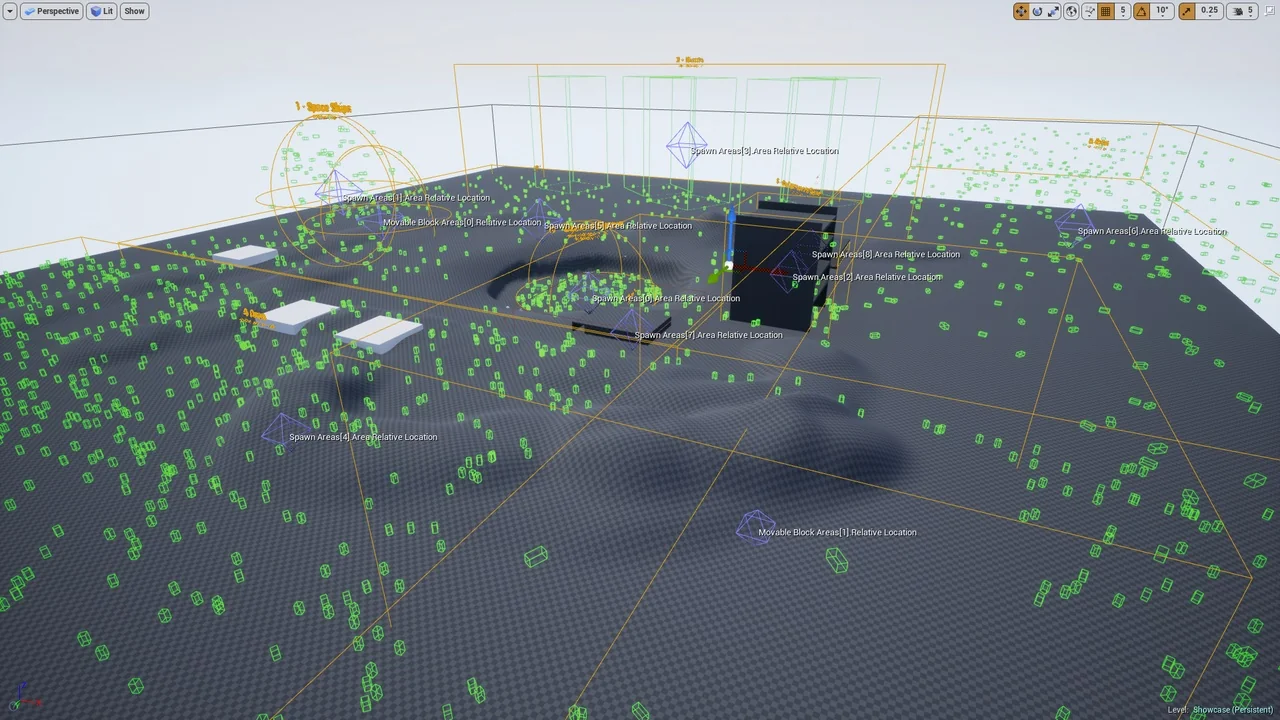
 Procedural Systems
 Gameplay Features
 Gameplay Features