"b00678cacce53329"{"id":"1002874","slug":"ynnk-voice-lipsync","title":"Ynnk Voice Lipsync","category":"Animations","engine":"4.26 - 5.4","assetVersion":"Asset Version: 1.0","engineVersion":"Engine Version: 4.26 - 5.4","tag":"Animations","accent":"blue","visual":"animation","summary":"Generate facial animation curves from SoundWave and PCM audio using Ynnk Voice Lipsync without relying on subtitles or text-based pipelines.","platform":"Unreal Engine","indexPolicy":"index","publishedAt":"2026-11-20T18:07:59.515Z","updatedAt":"2026-11-20T18:07:59.515Z","sourceNotes":[],"fileContents":[],"compatibility":["Unreal Engine","Asset Version: 1.0","Engine Version: 4.26 - 5.4"],"featuredImage":{"alt":"Ynnk Voice Lipsync","src":"/wp-content/uploads/published/2026/11/813190f402f4-a32a0599-b5ed-4c15-8edb-6d01ee23f499-77246e886f.webp"},"fileSizeBytes":2947344459,"hasDownloadLink":true,"downloads":0,"terms":[{"taxonomy":"category","slug":"animations-tools-and-plugins","name":"Animations"}],"galleryImages":[{"src":"/wp-content/uploads/published/2026/11/7d56a8968ae3-33173964-f01f-4e96-9103-afdadf31eb46-f10e328e5c.webp","alt":"Ynnk Voice Lipsync"},{"src":"/wp-content/uploads/published/2026/11/2de3ab287dcd-a4153a30-33db-4bdf-a591-7565bd3743af-346cd3aa17.webp","alt":"Ynnk Voice Lipsync"},{"src":"/wp-content/uploads/published/2026/11/c864d300e241-37fd7a26-b1a2-42fd-ba13-545fe4f7884d-203899f58b.webp","alt":"Ynnk Voice Lipsync"},{"src":"/wp-content/uploads/published/2026/11/1e35fe50e418-a7b5d52d-3f8d-4454-8562-45f1db212c13-febfe42bd8.webp","alt":"Ynnk Voice Lipsync"},{"src":"/wp-content/uploads/published/2026/11/efe24a8ebed8-5cb5cb08-1561-41e1-8086-d48a4816ecee-23b0d6d575.webp","alt":"Ynnk Voice Lipsync"}],"accessPanel":{"kind":"resource","title":"Get this resource","safetyNote":"Resources are manually reviewed before listing to improve quality and reduce obvious risks.","fileName":"Ynnk Voice Lipsync.7z","resourceType":"Resource archive","versions":[]},"contentHtml":"\u003ch2\u003eDynamic Character Speech Driven by Ynnk Voice Lipsync\u003c/h2\u003e\u003cp\u003ePopulating a digital world with speaking characters demands precise coordination between voice tracks and facial geometry. When dialogue feels disconnected from mouth movement, conversational scenes lose impact immediately. Ynnk Voice Lipsync approaches character animation from an acoustic angle, relying on an internal voice recognition engine rather than written dialogue scripts to calculate mouth shapes. By reading the actual recorded performance directly from audio assets, it translates vocal inflections and pacing into facial movement designed specifically for expressive character setups.\u003c/p\u003e\u003cp\u003eBecause the plugin is driven by facial animation and character performance, the generated data targets the subtle mechanical shifts of speech. Whether a scene involves narrative exposition between non-player characters or intense cinematic exchanges, the visual result reflects what was spoken instead of an approximate estimate derived from text files. Characters animate in alignment with the natural rhythm, pauses, and cadences present in the recorded voice data.\u003c/p\u003e\u003ch2\u003eProcessing SoundWave and PCM Audio into Data Asset Curves\u003c/h2\u003e\u003cp\u003eThe technical foundation of the system rests on how audio data is ingested and translated. Ynnk Voice Lipsync processes standard SoundWave assets as well as raw PCM audio data. When passed through the voice recognition engine, the acoustic details are converted into facial animation curves. These curves are stored permanently inside data assets, organizing the performance into a lightweight, inspectable format that integrates cleanly with character rigs.\u003c/p\u003e\u003cp\u003eStoring the results as curves in dedicated data assets provides significant flexibility during project construction. Because the mouth movements exist as structured animation curves, they can be evaluated, blended, and played back in runtime directly alongside the accompanying audio track. When the SoundWave plays, the corresponding curve data asset drives the character's facial targets in lockstep. This setup keeps the final playback performant and dependable, preserving facial synchronization without requiring custom manual keyframing passes across hours of dialogue.\u003c/p\u003e\u003ch2\u003eTrue Voice-to-Lipsync Versus Subtitle Dependencies\u003c/h2\u003e\u003cp\u003eTraditional facial dialogue setups frequently depend on text-to-lipsync workflows. In those conventional pipelines, timing markers, transcriptions, or subtitle tracks dictate when phonetic targets activate. This frequently introduces drift, especially when voice actors alter phrasing, stretch vowels, or deliver lines at varied tempos that do not match the raw text. Because this tool is a true voice-to-lipsync plugin, it analyzes the spoken waveforms directly rather than parsing textual approximations.\u003c/p\u003e\u003cp\u003eBypassing subtitles changes production overhead considerably. Developers and technical animators do not need to generate, synchronize, or import subtitle files just to get a character's lips moving. More importantly, the resulting animation tracks speech far more accurately than subtitle-based methods. Slight hesitations, rapid speech bursts, and specific vocal dynamics are captured because the recognition engine tracks the acoustic reality of the voice track rather than an idealized script timing block.\u003c/p\u003e\u003ch2\u003eRuntime Generation Boundaries and Microphone Speech Recognition\u003c/h2\u003e\u003cp\u003eUnderstanding where and when computation takes place is essential for planning dialogue systems. The plugin is capable of generating lip-sync curves in runtime, but it does not function in real time. This technical distinction means the tool can run its generation routines inside an active project build to process stored voice files, but it cannot instantaneously drive mouth animation from a live incoming audio stream or an active microphone feed.\u003c/p\u003e\u003cp\u003eLive streaming limitations do not restrict interactive gameplay features entirely. The plugin includes a separate, dedicated runtime capability: microphone input recognition for speech-to-text. While live microphone input will not generate immediate lip-sync curves on the fly, developers can capture microphone audio in runtime to extract transcribed text. This provides a bridge for speech-driven player interactions and voice commands while reserving curve generation for pre-recorded or non-streaming audio files.\u003c/p\u003e\u003ch2\u003eLanguage Support Across Vosk and the Ynnk Whisper Integration\u003c/h2\u003e\u003cp\u003eAcoustic recognition models must account for varied linguistic structures, phonemes, and accents. Ynnk Voice Lipsync provides comprehensive native coverage across several major global languages. Fully supported languages include English, Chinese, Korean, and Japanese. Projects working across European and South American markets can also utilize supported language sets covering Russian, Italian, German, French, Spanish, Portuguese, and Polish.\u003c/p\u003e\u003cp\u003eUnder the hood, the standard recognition architecture runs on Vosk. For pipelines that require alternative machine learning models, an official add-on exists in the form of YnnkWhisperRecognizer. This component allows developers to swap the underlying recognition base to OpenAI Whisper instead of Vosk, granting access to Whisper's speech models when evaluating SoundWave assets. The choice between Vosk and Whisper gives teams the ability to tailor their speech recognition pipeline around their project's linguistic needs and precision requirements.\u003c/p\u003e\u003ch2\u003ePackaging Pipelines and Practical Implementation\u003c/h2\u003e\u003cp\u003eMoving an automated speech system from an editor prototype to a shipping build requires clear organization. The plugin accommodates standard packaging pipelines through specific language setup configurations. Dedicated video materials cover these steps, detailing the precise packaging pipeline steps needed to bundle recognition models cleanly into standalone project builds without missing language data or runtime dependencies.\u003c/p\u003e\u003cp\u003eTutorial materials also outline how to organize data assets when scaling up dialogue across multiple characters. Because curves reside in standalone data assets, they can be referenced inside modular playback functions, dialogue managers, and cinematic sequences. Teams building character-driven experiences benefit from keeping audio files and curve assets structured systematically, allowing the voice recognition engine to handle the mechanical heavy lifting of mouth animation while character artists focus on scene lighting, staging, and body performance.\u003c/p\u003e\n\n\u003ch2\u003eRelated Resources Worth Checking\u003c/h2\u003e\n\u003cul\u003e\n\u003cli\u003e\u003ca href=\"https://3dcghub.com/elf-female-voice-pack/\" rel=\"noopener noreferrer\"\u003eElf Female Voice Pack\u003c/a\u003e\u003c/li\u003e\n\u003cli\u003e\u003ca href=\"https://3dcghub.com/runtime-speech-recognizer-real-time-offline-ai/\" rel=\"noopener noreferrer\"\u003eRuntime Speech Recognizer (Real-Time, Offline, AI)\u003c/a\u003e\u003c/li\u003e\n\u003cli\u003e\u003ca href=\"https://3dcghub.com/hero-character-voices-warrior-voice-pack/\" rel=\"noopener noreferrer\"\u003eHero Character Voices: Warrior Voice Pack\u003c/a\u003e\u003c/li\u003e\n\u003cli\u003e\u003ca href=\"https://3dcghub.com/female-zombie-voice-sound-effects/\" rel=\"noopener noreferrer\"\u003eFemale Zombie - Voice Sound Effects\u003c/a\u003e\u003c/li\u003e\n\u003cli\u003e\u003ca href=\"https://3dcghub.com/offline-speech-recognition/\" rel=\"noopener noreferrer\"\u003eOffline Speech Recognition\u003c/a\u003e\u003c/li\u003e\n\u003c/ul\u003e","contentTextLength":6629,"navigation":{"current":5,"total":4797,"previous":{"id":"1002875","slug":"tempest-combat-framework-v2-0-action-combat-system","title":"Tempest Combat Framework - V2.0 Action Combat System","category":"Gameplay Features","platform":"Unreal Engine","updatedAt":"2026-11-20T18:10:17.970Z"},"next":{"id":"1002873","slug":"tycoon-template","title":"Tycoon Template","category":"City Builder","platform":"Unreal Engine","updatedAt":"2026-11-20T18:07:20.448Z"}},"relatedResources":[{"id":"1002008","slug":"elf-female-voice-pack","title":"Elf Female Voice Pack","category":"Sound Effects","engine":"4.25+,5.0+","assetVersion":"","engineVersion":"Engine Version: 4.25+,5.0+","tag":"Sound Effects","accent":"blue","visual":"mech","summary":"Integrate 897 fantasy audio assets featuring English and Elvish voice lines, combat exclamations, and spell incantations with and without FX.","platform":"Unreal Engine","indexPolicy":"index","publishedAt":"2026-10-26T12:29:47.587Z","updatedAt":"2026-10-26T12:29:47.587Z","sourceNotes":[],"fileContents":[],"compatibility":["Unreal Engine","Engine Version: 4.25+,5.0+"],"featuredImage":{"alt":"Elf Female Voice Pack","src":"/wp-content/uploads/published/2026/10/c2d4ed4c7536-a27e49ba-2231-47ce-b6a9-c444fd1e724c-d1d8abf763.webp"},"fileSizeBytes":72730997,"hasDownloadLink":true,"downloads":0},{"id":"14519","slug":"runtime-speech-recognizer-real-time-offline-ai","title":"Runtime Speech Recognizer (Real-Time, Offline, AI)","category":"Engine Tools","engine":"4.27 - 5.8","assetVersion":"Asset Version:1.0","engineVersion":"Engine version: 4.27 - 5.8","tag":"Engine Tools","accent":"blue","visual":"city","summary":"Enhance your project with Runtime Speech Recognizer (Real-Time, Offline, AI), a plugin that enables high-performance voice commands and speech-to-text without an internet connection. Powered by OpenAI Whisper, it supports over 95 languages and features GPU...","platform":"Unreal Engine","indexPolicy":"noindex","publishedAt":"2026-03-11T18:21:42.000Z","updatedAt":"2026-09-30T02:57:30.475Z","sourceNotes":[],"fileContents":[],"compatibility":["Unreal Engine","Asset Version:1.0","Engine version: 4.27 - 5.8"],"featuredImage":{"alt":"Runtime Speech Recognizer (Real-Time, Offline, AI)","src":"https://3dcghub.com/wp-content/uploads/2026/03/865b5e7a-61c2-4de8-83da-c2cc3aa6c0a4.webp"},"fileSizeBytes":581289047,"hasDownloadLink":true,"downloads":1},{"id":"1000618","slug":"hero-character-voices-warrior-voice-pack","title":"Hero Character Voices: Warrior Voice Pack","category":"Dialogue","engine":"4.26+,5.0+","assetVersion":"","engineVersion":"Engine Version: 4.26+,5.0+","tag":"Dialogue","accent":"blue","visual":"character","summary":"A human-crafted warrior voice pack with two brave hero variations, a bonus Merchant character, and cross-pack lines suited for fantasy RPG and medieval battle s","platform":"Unreal Engine","indexPolicy":"index","publishedAt":"2026-07-20T23:31:16.995Z","updatedAt":"2026-07-20T23:31:16.995Z","sourceNotes":[],"fileContents":[],"compatibility":["Audio","Engine Version: 4.26+,5.0+"],"featuredImage":{"alt":"Hero Character Voices: Warrior Voice Pack","src":"/wp-content/uploads/published/2026/07/74da95cd9f0d-52584136-09bf-4e75-983d-acd212e8a1fc-480c84fb6d.webp"},"fileSizeBytes":9640093,"hasDownloadLink":true,"downloads":0}]}
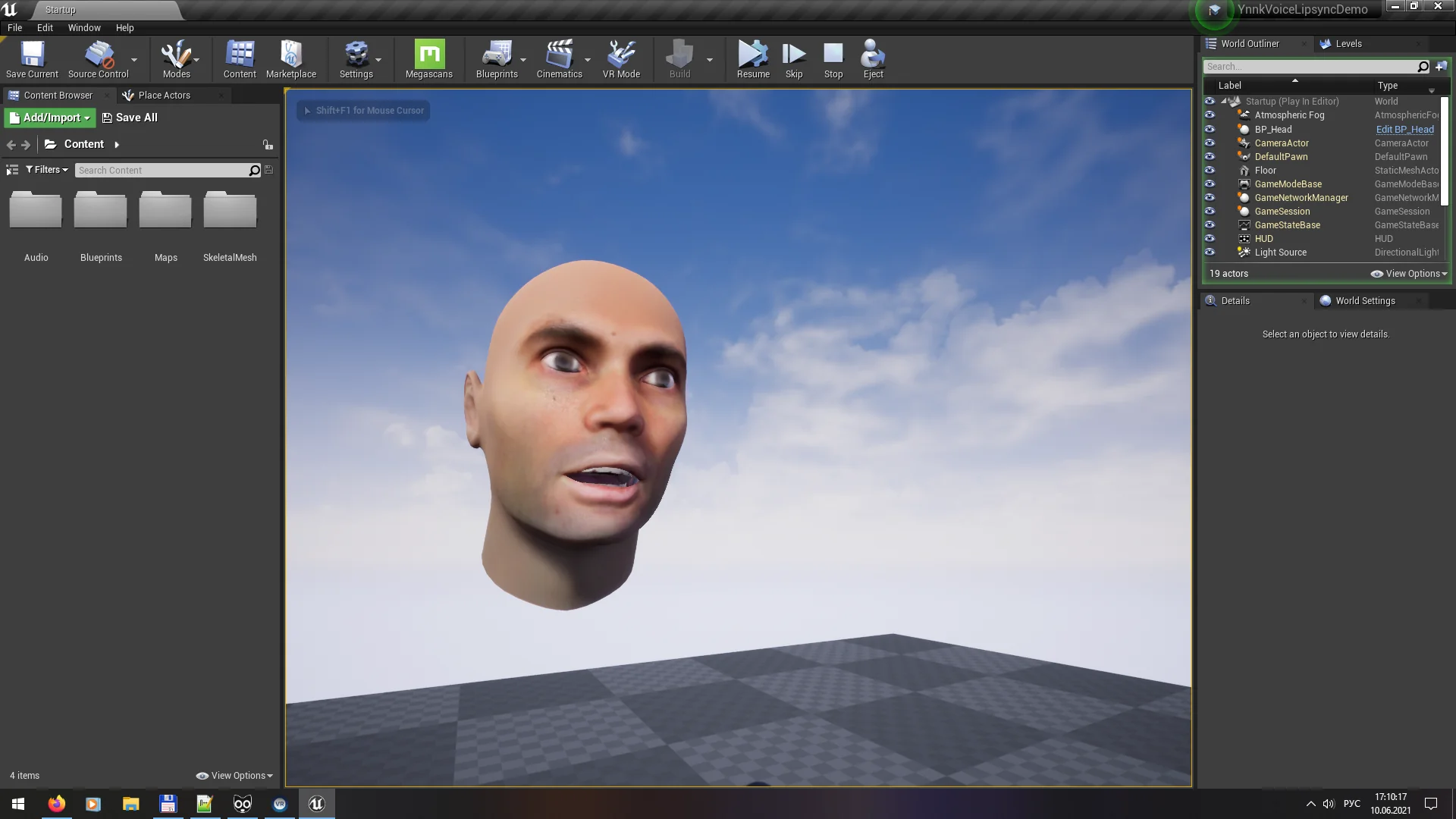
Resource screenshots
1 / 5
Join our channel
Follow 3DCGHUB on Telegram for new resource drops, migration updates, and community notices.
Dynamic Character Speech Driven by Ynnk Voice Lipsync
Populating a digital world with speaking characters demands precise coordination between voice tracks and facial geometry. When dialogue feels disconnected from mouth movement, conversational scenes lose impact immediately. Ynnk Voice Lipsync approaches character animation from an acoustic angle, relying on an internal voice recognition engine rather than written dialogue scripts to calculate mouth shapes. By reading the actual recorded performance directly from audio assets, it translates vocal inflections and pacing into facial movement designed specifically for expressive character setups.
Because the plugin is driven by facial animation and character performance, the generated data targets the subtle mechanical shifts of speech. Whether a scene involves narrative exposition between non-player characters or intense cinematic exchanges, the visual result reflects what was spoken instead of an approximate estimate derived from text files. Characters animate in alignment with the natural rhythm, pauses, and cadences present in the recorded voice data.
Processing SoundWave and PCM Audio into Data Asset Curves
The technical foundation of the system rests on how audio data is ingested and translated. Ynnk Voice Lipsync processes standard SoundWave assets as well as raw PCM audio data. When passed through the voice recognition engine, the acoustic details are converted into facial animation curves. These curves are stored permanently inside data assets, organizing the performance into a lightweight, inspectable format that integrates cleanly with character rigs.
Storing the results as curves in dedicated data assets provides significant flexibility during project construction. Because the mouth movements exist as structured animation curves, they can be evaluated, blended, and played back in runtime directly alongside the accompanying audio track. When the SoundWave plays, the corresponding curve data asset drives the character's facial targets in lockstep. This setup keeps the final playback performant and dependable, preserving facial synchronization without requiring custom manual keyframing passes across hours of dialogue.
True Voice-to-Lipsync Versus Subtitle Dependencies
Traditional facial dialogue setups frequently depend on text-to-lipsync workflows. In those conventional pipelines, timing markers, transcriptions, or subtitle tracks dictate when phonetic targets activate. This frequently introduces drift, especially when voice actors alter phrasing, stretch vowels, or deliver lines at varied tempos that do not match the raw text. Because this tool is a true voice-to-lipsync plugin, it analyzes the spoken waveforms directly rather than parsing textual approximations.
Bypassing subtitles changes production overhead considerably. Developers and technical animators do not need to generate, synchronize, or import subtitle files just to get a character's lips moving. More importantly, the resulting animation tracks speech far more accurately than subtitle-based methods. Slight hesitations, rapid speech bursts, and specific vocal dynamics are captured because the recognition engine tracks the acoustic reality of the voice track rather than an idealized script timing block.
Runtime Generation Boundaries and Microphone Speech Recognition
Understanding where and when computation takes place is essential for planning dialogue systems. The plugin is capable of generating lip-sync curves in runtime, but it does not function in real time. This technical distinction means the tool can run its generation routines inside an active project build to process stored voice files, but it cannot instantaneously drive mouth animation from a live incoming audio stream or an active microphone feed.
Live streaming limitations do not restrict interactive gameplay features entirely. The plugin includes a separate, dedicated runtime capability: microphone input recognition for speech-to-text. While live microphone input will not generate immediate lip-sync curves on the fly, developers can capture microphone audio in runtime to extract transcribed text. This provides a bridge for speech-driven player interactions and voice commands while reserving curve generation for pre-recorded or non-streaming audio files.
Language Support Across Vosk and the Ynnk Whisper Integration
Acoustic recognition models must account for varied linguistic structures, phonemes, and accents. Ynnk Voice Lipsync provides comprehensive native coverage across several major global languages. Fully supported languages include English, Chinese, Korean, and Japanese. Projects working across European and South American markets can also utilize supported language sets covering Russian, Italian, German, French, Spanish, Portuguese, and Polish.
Under the hood, the standard recognition architecture runs on Vosk. For pipelines that require alternative machine learning models, an official add-on exists in the form of YnnkWhisperRecognizer. This component allows developers to swap the underlying recognition base to OpenAI Whisper instead of Vosk, granting access to Whisper's speech models when evaluating SoundWave assets. The choice between Vosk and Whisper gives teams the ability to tailor their speech recognition pipeline around their project's linguistic needs and precision requirements.
Packaging Pipelines and Practical Implementation
Moving an automated speech system from an editor prototype to a shipping build requires clear organization. The plugin accommodates standard packaging pipelines through specific language setup configurations. Dedicated video materials cover these steps, detailing the precise packaging pipeline steps needed to bundle recognition models cleanly into standalone project builds without missing language data or runtime dependencies.
Tutorial materials also outline how to organize data assets when scaling up dialogue across multiple characters. Because curves reside in standalone data assets, they can be referenced inside modular playback functions, dialogue managers, and cinematic sequences. Teams building character-driven experiences benefit from keeping audio files and curve assets structured systematically, allowing the voice recognition engine to handle the mechanical heavy lifting of mouth animation while character artists focus on scene lighting, staging, and body performance.
 Sound Effects
 Engine Tools
 Dialogue