Login / Register
Current Article:

Web Socket Client

Categories Engine Tools

Web Socket Client

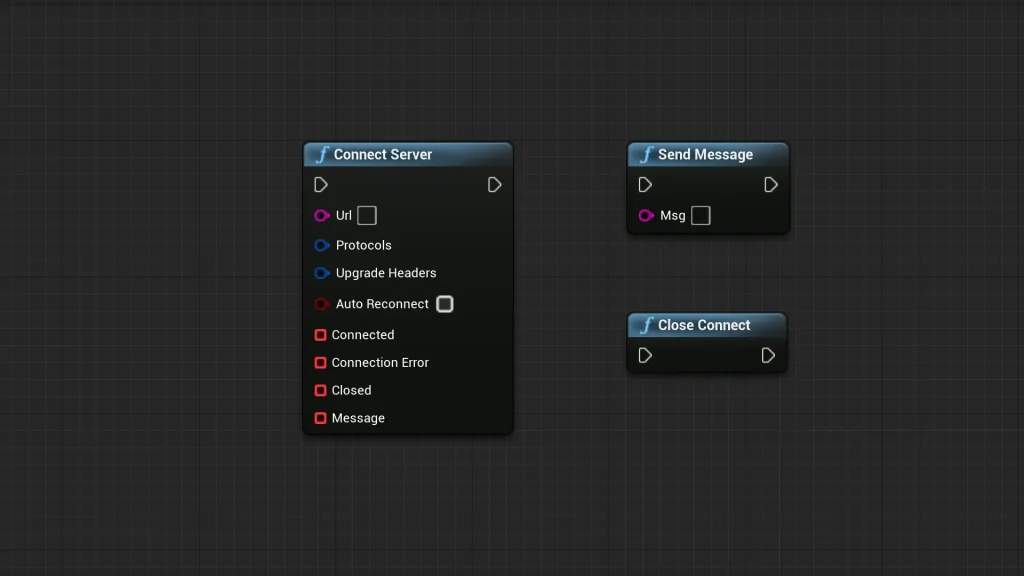
The Web Socket Client is a specialized tool designed to facilitate real-time communication within a development environment. This resource allows for direct integration through Blueprints, which simplifies the networking process for creators. By utilizing the Web Socket Client, developers can manage complex data transfers without leaving the visual scripting interface.

Streamlined Blueprint Integration

The developer focused on making the tool as accessible as possible. Because it is designed for Blueprints, it fits naturally into standard development workflows. Users do not need to write extensive custom code to begin communicating with a server. Instead, they can use the provided nodes to manage their web socket needs. This approach saves time and reduces the potential for errors during the setup phase.

Comprehensive Connection Monitoring

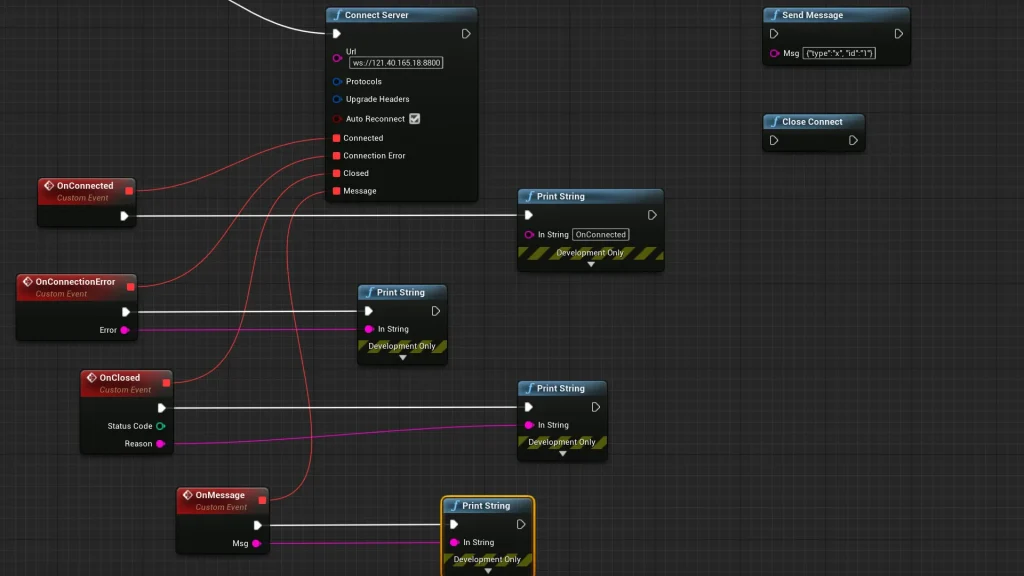
One of the standout features of this tool is its ability to monitor various connection states. Specifically, the client can detect when a connection success occurs. This allows the system to trigger subsequent actions immediately after a link is established. Moreover, the tool also monitors for connection failure. This is critical for implementing robust error-handling routines in any project.

Furthermore, the Web Socket Client tracks server disconnections. Understanding when a server drops a connection is essential for maintaining a smooth user experience. Therefore, developers can use this information to attempt reconnections or notify the user of a status change. These monitoring capabilities provide a high level of control over the networking lifecycle.

Efficient Message Handling

Communication is a two-way street, and this tool handles both incoming and outgoing data. The client can listen for server messages, allowing the project to process data as soon as it arrives. Consequently, this real-time feedback loop is vital for applications that require instant updates.

Additionally, the tool provides the functionality to send messages back to the server. Because this is accessible via Blueprints, it can be tied to any logic within the project. For example, a developer might send a message when a specific event is triggered. This direct communication path ensures that the server remains synchronized with the client state at all times.

Multilingual Support and Documentation

To assist with the implementation process, the creator has included detailed documentation. This documentation is available in both English and Chinese. Having access to clear instructions in multiple languages helps bridge the gap for global development teams. It ensures that the technical nuances of the tool are understood by a broad audience. Moreover, it allows users to troubleshoot connection issues or message handling with ease.

Conclusion

In conclusion, the Web Socket Client is a practical solution for Blueprint-based networking. It provides essential monitoring for connection success, failure, and server messages. By focusing on these core functionalities, the tool helps developers build more connected and responsive projects without manual coding. Consequently, it is a valuable asset for any project requiring real-time web socket communication.

Screenshots & Gallery


Web Socket Client Prev Web Browser For Video
Web Socket Client Next WorldScape Plugin – Making real planets and Endless worlds

Leave a Reply