"efaa631e936fd3ee"{"id":"1002264","slug":"vr-gravity-grab","title":"VR Gravity Grab","category":"Weapons \u0026 Combat","engine":"4.25+,5.0+","assetVersion":"","engineVersion":"Engine Version: 4.25+,5.0+","tag":"Weapons \u0026 Combat","accent":"blue","visual":"mech","summary":"Implement remote item attraction and finger-level precision hand physics in Unreal Engine with the VR Gravity Grab blueprint framework.","platform":"Unreal Engine","publishedAt":"2026-10-29T16:26:53.660Z","updatedAt":"2026-10-29T16:26:53.660Z","sourceNotes":[],"fileContents":[],"compatibility":["Unreal Engine","Engine Version: 4.25+,5.0+"],"featuredImage":{"alt":"VR Gravity Grab","src":"/wp-content/uploads/published/2026/10/76abe3e7cba6-e9bec974-8bf2-4cd3-bd75-4e34ce22f1cc-7e8d9a5d06.webp"},"hasDownloadLink":true,"downloads":0,"terms":[{"taxonomy":"category","slug":"weapons-and-combat","name":"Weapons \u0026 Combat"}],"galleryImages":[{"src":"/wp-content/uploads/published/2026/10/585a749239cb-09c94fae-7dfc-4bf0-a670-6f0044e4ec21-1b91dcee63.webp","alt":"VR Gravity Grab"},{"src":"/wp-content/uploads/published/2026/10/f208c88be94d-3bd13c23-ba79-4e7b-aaf1-ff29e8193f41-1aa3eed652.webp","alt":"VR Gravity Grab"},{"src":"/wp-content/uploads/published/2026/10/acd307a4d21a-436b76fb-bf92-4f05-8d69-3e79ba5f2c88-19e82e4286.webp","alt":"VR Gravity Grab"},{"src":"/wp-content/uploads/published/2026/10/686562a4bc6d-d43ba7e8-faef-4717-918d-0320f5509c95-1bc4b7a361.webp","alt":"VR Gravity Grab"},{"src":"/wp-content/uploads/published/2026/10/e061029ab105-5e006a65-d7fb-4ba8-842a-51c806a02827-994d0a717e.webp","alt":"VR Gravity Grab"},{"src":"/wp-content/uploads/published/2026/10/ae3c4082ebe2-61bd5c29-2a12-4e4e-b0bc-5b61dd6c5b97-e9222fad65.webp","alt":"VR Gravity Grab"}],"accessPanel":{"kind":"resource","title":"Download this resource","eyebrow":"Free Download","message":"Log in or create a free account to start your download.","fileName":"VR Gravity Grab.7z","safetyNote":"Resources are manually reviewed before listing to improve quality and reduce obvious risks.","actionLabel":"Download Free","resourceType":"Resource archive"},"contentHtml":"\u003cp\u003eStandard physical interaction in virtual reality often breaks down when interactive items fall just out of reach. Forcing players to walk, teleport, or bend down to pick up scattered props breaks immersion and slows down player momentum. VR Gravity Grab resolves this interaction friction by enabling remote retrieval mechanics directly through dedicated blueprint assets, allowing players to target distant objects and draw them toward their hands before securing them manually.\u003c/p\u003e \u003ch2\u003eTargeting and Attracting Objects with Gravity Grab\u003c/h2\u003e\n\u003cp\u003eThe core interaction cycle of VR Gravity Grab relies on deliberate user intent rather than simple magnetic snapping. By default, the player aims their index finger directly at a pickable item within the virtual world. Once targeted, pressing the controller trigger initiates the pull mechanic, causing the item to jump from its resting spot and fly directly toward the player's hand.\u003c/p\u003e\n\u003cp\u003eA critical operational detail defines how this mechanic functions in practice: Gravity Grab brings items toward the hand, but it does not execute the final grab automatically. When the projectile item flies into close proximity, the player must grab the item like usual to secure it. This two-phase flow—remote attraction followed by a manual physical grip—mirrors remote interaction mechanics seen in AAA virtual reality productions. It preserves the tactile satisfaction of catching an object in motion rather than simply placing an item directly into an inventory slot or snapping it instantly to the controller socket.\u003c/p\u003e \u003ch2\u003eBlueprint Structure with MotionControllerPawn_GravityGrab\u003c/h2\u003e\n\u003cp\u003eImplementation centers on two core Blueprint assets that handle input routing, aiming logic, and controller attachment. Projects can implement \u003ccode\u003eMotionControllerPawn_GravityGrab\u003c/code\u003e And \u003ccode\u003eBP_MotionController_GravityGrab\u003c/code\u003e Directly out of the box, or developers can create custom child blueprints inherited from them to tailor specific project behaviors.\u003c/p\u003e\n\u003cp\u003eUsing an inheritance workflow allows teams to preserve existing gameplay systems while layering the remote pull functionality on top of custom player pawns. The default blueprint logic takes care of mapping the index finger aiming vector, reading trigger inputs for target selection, and applying the impulse or trajectory required to launch the targeted item toward the incoming hand. Developers who maintain specialized controller logic can subclass \u003ccode\u003eBP_MotionController_GravityGrab\u003c/code\u003e To retain their project-specific collision, mesh setups, or custom grip behaviors without having to recreate the targeting and pull calculations from scratch.\u003c/p\u003e \u003ch2\u003eFinger-Level Precision Hand Physics Out of the Box\u003c/h2\u003e\n\u003cp\u003eBeyond the remote grabbing capabilities, the package delivers finger-level precision hand physics implemented directly inside \u003ccode\u003eBP_MotionController_GravityGrab\u003c/code\u003e. This bonus system gives hands physical collision and responsiveness down to the individual fingers without requiring extensive secondary configuration.\u003c/p\u003e\n\u003cp\u003eIntegrating articulate hand physics often demands significant setup time spent tuning physical assets, collision capsules, and joint constraints for each finger bone. Because this precision physics system is embedded directly into the controller blueprint, hands interact with environment geometry and dynamic props realistically as soon as the blueprint is loaded. When catching an attracted object mid-air, the presence of individual finger physics reinforces the tactile response of the interaction, preventing props from unnaturally penetrating hand meshes during high-speed catches.\u003c/p\u003e \u003ch2\u003ePlugin Architecture Across Unreal Engine Versions and Steam Link\u003c/h2\u003e\n\u003cp\u003eEngine version requirements govern which underlying XR plugin handles controller tracking and input translation within the framework. For Unreal Engine 5.2 and higher, VR Gravity Grab operates on the modern OpenXR plugin. In versions below UE5.2, the system relies on the SteamVR plugin to manage controller inputs and tracking data.\u003c/p\u003e\n\u003cp\u003eHardware support extends directly to Meta Quest devices connected through Steam Link. This setup provides flexibility for teams developing or testing wireless desktop VR pipelines on standalone hardware. Creators targeting native Oculus setups can also consider the companion variant, VR Gravity Grab Oculus, which is tailored specifically around native Oculus development pipelines rather than the open desktop tracking layers.\u003c/p\u003e \u003ch2\u003eWorkflow Integration Alongside the VR Power Suit Toolkit\u003c/h2\u003e\n\u003cp\u003eVR Gravity Grab integrates cleanly into broader movement and interaction frameworks, notably sharing compatibility with the VR Power Suit Toolkit and its counterpart VR Power Suit Oculus. When combined with advanced player pawn abilities like power suit flying and weapon control, remote grabbing changes how players navigate spaces during fast-paced play.\u003c/p\u003e\n\u003cp\u003eIn high-mobility environments where the player might be hovering, flying, or managing weapons, picking up dropped items or essential equipment off the ground manually can disrupt flight trajectories or disorient the user. Adding remote attraction lets players retrieve ammunition, keys, or physics props on the fly while staying in motion. Because the mechanic requires aiming the index finger and pulling the trigger to initiate flight, it layers cleanly alongside flying inputs and weapon handling without accidental triggers.\u003c/p\u003e \u003ch2\u003eDeploying the System in Active VR Production\u003c/h2\u003e\n\u003cp\u003eDeploying VR Gravity Grab into an active project comes down to choosing between direct blueprint usage and class inheritance. For quick prototyping or straightforward VR interaction sandboxes, dropping \u003ccode\u003eMotionControllerPawn_GravityGrab\u003c/code\u003e Straight into the level gives immediate access to index finger targeting, physical item flight, manual catches, and precision finger physics.\u003c/p\u003e\n\u003cp\u003eFor more mature productions with established pawn hierarchies, inheriting from \u003ccode\u003eBP_MotionController_GravityGrab\u003c/code\u003e Provides the cleanest path forward. This approach injects AAA-style remote pulling and individual finger collisions straight into the project's existing controller framework, keeping the player fully grounded in the virtual environment without sacrificing the physical satisfaction of catching objects by hand.\u003c/p\u003e\n\n\u003ch2\u003eRelated Resources Worth Checking\u003c/h2\u003e\n\u003cul\u003e\n\u003cli\u003e\u003ca href=\"https://3dcghub.com/vr-hands-grab-system-legacy-version/\" title=\"VR Hands Grab System (Legacy version)\"\u003eVR Hands Grab System (Legacy version)\u003c/a\u003e\u003c/li\u003e\n\u003cli\u003e\u003ca href=\"https://3dcghub.com/tactical-grenades/\" title=\"Tactical Grenades\"\u003eTactical Grenades\u003c/a\u003e\u003c/li\u003e\n\u003cli\u003e\u003ca href=\"https://3dcghub.com/steampunk-assault-rifle/\" title=\"SteamPunk Assault Rifle\"\u003eSteamPunk Assault Rifle\u003c/a\u003e\u003c/li\u003e\n\u003cli\u003e\u003ca href=\"https://3dcghub.com/weapon-kit/\" title=\"Weapon Kit\"\u003eWeapon Kit\u003c/a\u003e\u003c/li\u003e\n\u003cli\u003e\u003ca href=\"https://3dcghub.com/medieval-weapons-bundle-medieval-weapons-melee-weapons-fantasy-weapons/\" title=\"Medieval Weapons Bundle (Medieval Weapons, Melee Weapons, Fantasy Weapons)\"\u003eMedieval Weapons Bundle (Medieval Weapons, Melee Weapons, Fantasy Weapons)\u003c/a\u003e\u003c/li\u003e\n\u003c/ul\u003e","contentTextLength":6347,"navigation":{"current":21,"total":4209,"previous":{"id":"1002265","slug":"warrior-hero","title":"Warrior Hero","category":"Characters \u0026 Creatures","platform":"Unreal Engine","updatedAt":"2026-10-29T16:27:35.145Z"},"next":{"id":"1002263","slug":"volumetric-spotlight-with-shadow","title":"Volumetric Spotlight with Shadow","category":"Variety","platform":"Unreal Engine","updatedAt":"2026-10-29T16:24:43.164Z"}},"relatedResources":[{"id":"1001491","slug":"vr-hands-grab-system-legacy-version","title":"VR Hands Grab System (Legacy version)","category":"Weapons \u0026 Combat","engine":"5.1+","assetVersion":"","engineVersion":"Engine Version: 5.1+","tag":"Weapons \u0026 Combat","accent":"blue","visual":"mech","summary":"Explore the VR Hands Grab System for Unreal Engine, featuring procedural finger position prediction, throwable items, and template migration workflows.","platform":"Unreal Engine","publishedAt":"2026-10-08T10:07:52.665Z","updatedAt":"2026-10-08T10:07:52.665Z","sourceNotes":[],"fileContents":[],"compatibility":["Unreal Engine","Engine Version: 5.1+"],"featuredImage":{"alt":"VR Hands Grab System (Legacy version)","src":"/wp-content/uploads/published/2026/10/cff0c5141d78-3c74e371-3ed1-4a16-92dd-508b486ee9c9-afb9ea9b79.webp"},"hasDownloadLink":true,"downloads":0},{"id":"1001709","slug":"tactical-grenades","title":"Tactical Grenades","category":"Weapons \u0026 Combat","engine":"4.26+,5.0+","assetVersion":"","engineVersion":"Engine Version: 4.26+,5.0+","tag":"Weapons \u0026 Combat","accent":"blue","visual":"mech","summary":"AAA tactical grenades featuring 4K PBR textures, custom animations, visual effects, and audio for PC, console, and VR combat projects.","platform":"Unreal Engine","publishedAt":"2026-10-14T17:14:02.022Z","updatedAt":"2026-10-14T17:14:02.022Z","sourceNotes":[],"fileContents":[],"compatibility":["Unreal Engine","Engine Version: 4.26+,5.0+"],"featuredImage":{"alt":"Tactical Grenades","src":"/wp-content/uploads/published/2026/10/3b1d353a273c-01b18f81-7f25-4166-92a9-31ee2818a19d-3e669dc0f6.webp"},"hasDownloadLink":true,"downloads":5},{"id":"1002212","slug":"steampunk-assault-rifle","title":"SteamPunk Assault Rifle","category":"Weapons \u0026 Combat","engine":"4.26+,5.0+","assetVersion":"","engineVersion":"Engine Version: 4.26+,5.0+","tag":"Weapons \u0026 Combat","accent":"blue","visual":"mech","summary":"Explore technical implementation, 4K PBR textures, animations, VFX, and SFX for the SteamPunk Assault Rifle across VR, PC, and console projects.","platform":"Unreal Engine","publishedAt":"2026-10-29T14:57:19.839Z","updatedAt":"2026-10-29T14:57:19.839Z","sourceNotes":[],"fileContents":[],"compatibility":["Unreal Engine","Engine Version: 4.26+,5.0+"],"featuredImage":{"alt":"SteamPunk Assault Rifle","src":"/wp-content/uploads/published/2026/10/d7d35599bb92-6bb44a5d-bad9-4052-aee0-9407dcd26a6d-46504d3d7a.webp"},"hasDownloadLink":true,"downloads":0}]}
Weapons & Combat
VR Gravity Grab
Implement remote item attraction and finger-level precision hand physics in Unreal Engine with the VR Gravity Grab blueprint framework.
Standard physical interaction in virtual reality often breaks down when interactive items fall just out of reach. Forcing players to walk, teleport, or bend down to pick up scattered props breaks immersion and slows down player momentum. VR Gravity Grab resolves this interaction friction by enabling remote retrieval mechanics directly through dedicated blueprint assets, allowing players to target distant objects and draw them toward their hands before securing them manually.
Targeting and Attracting Objects with Gravity Grab
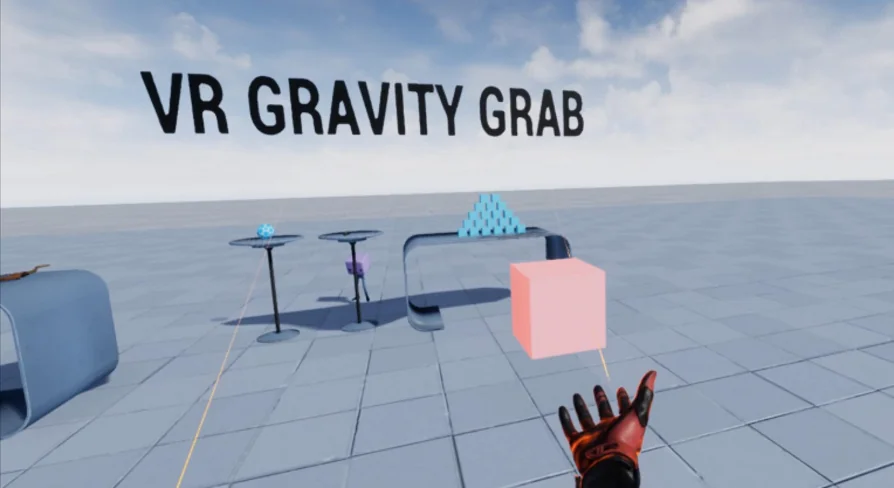
The core interaction cycle of VR Gravity Grab relies on deliberate user intent rather than simple magnetic snapping. By default, the player aims their index finger directly at a pickable item within the virtual world. Once targeted, pressing the controller trigger initiates the pull mechanic, causing the item to jump from its resting spot and fly directly toward the player's hand.
A critical operational detail defines how this mechanic functions in practice: Gravity Grab brings items toward the hand, but it does not execute the final grab automatically. When the projectile item flies into close proximity, the player must grab the item like usual to secure it. This two-phase flow—remote attraction followed by a manual physical grip—mirrors remote interaction mechanics seen in AAA virtual reality productions. It preserves the tactile satisfaction of catching an object in motion rather than simply placing an item directly into an inventory slot or snapping it instantly to the controller socket.
Blueprint Structure with MotionControllerPawn_GravityGrab
Implementation centers on two core Blueprint assets that handle input routing, aiming logic, and controller attachment. Projects can implement MotionControllerPawn_GravityGrab And BP_MotionController_GravityGrab Directly out of the box, or developers can create custom child blueprints inherited from them to tailor specific project behaviors.
Using an inheritance workflow allows teams to preserve existing gameplay systems while layering the remote pull functionality on top of custom player pawns. The default blueprint logic takes care of mapping the index finger aiming vector, reading trigger inputs for target selection, and applying the impulse or trajectory required to launch the targeted item toward the incoming hand. Developers who maintain specialized controller logic can subclass BP_MotionController_GravityGrab To retain their project-specific collision, mesh setups, or custom grip behaviors without having to recreate the targeting and pull calculations from scratch.
Finger-Level Precision Hand Physics Out of the Box
Beyond the remote grabbing capabilities, the package delivers finger-level precision hand physics implemented directly inside BP_MotionController_GravityGrab. This bonus system gives hands physical collision and responsiveness down to the individual fingers without requiring extensive secondary configuration.
Integrating articulate hand physics often demands significant setup time spent tuning physical assets, collision capsules, and joint constraints for each finger bone. Because this precision physics system is embedded directly into the controller blueprint, hands interact with environment geometry and dynamic props realistically as soon as the blueprint is loaded. When catching an attracted object mid-air, the presence of individual finger physics reinforces the tactile response of the interaction, preventing props from unnaturally penetrating hand meshes during high-speed catches.
Plugin Architecture Across Unreal Engine Versions and Steam Link
Engine version requirements govern which underlying XR plugin handles controller tracking and input translation within the framework. For Unreal Engine 5.2 and higher, VR Gravity Grab operates on the modern OpenXR plugin. In versions below UE5.2, the system relies on the SteamVR plugin to manage controller inputs and tracking data.
Hardware support extends directly to Meta Quest devices connected through Steam Link. This setup provides flexibility for teams developing or testing wireless desktop VR pipelines on standalone hardware. Creators targeting native Oculus setups can also consider the companion variant, VR Gravity Grab Oculus, which is tailored specifically around native Oculus development pipelines rather than the open desktop tracking layers.
Workflow Integration Alongside the VR Power Suit Toolkit
VR Gravity Grab integrates cleanly into broader movement and interaction frameworks, notably sharing compatibility with the VR Power Suit Toolkit and its counterpart VR Power Suit Oculus. When combined with advanced player pawn abilities like power suit flying and weapon control, remote grabbing changes how players navigate spaces during fast-paced play.
In high-mobility environments where the player might be hovering, flying, or managing weapons, picking up dropped items or essential equipment off the ground manually can disrupt flight trajectories or disorient the user. Adding remote attraction lets players retrieve ammunition, keys, or physics props on the fly while staying in motion. Because the mechanic requires aiming the index finger and pulling the trigger to initiate flight, it layers cleanly alongside flying inputs and weapon handling without accidental triggers.
Deploying the System in Active VR Production
Deploying VR Gravity Grab into an active project comes down to choosing between direct blueprint usage and class inheritance. For quick prototyping or straightforward VR interaction sandboxes, dropping MotionControllerPawn_GravityGrab Straight into the level gives immediate access to index finger targeting, physical item flight, manual catches, and precision finger physics.
For more mature productions with established pawn hierarchies, inheriting from BP_MotionController_GravityGrab Provides the cleanest path forward. This approach injects AAA-style remote pulling and individual finger collisions straight into the project's existing controller framework, keeping the player fully grounded in the virtual environment without sacrificing the physical satisfaction of catching objects by hand.
 Weapons & Combat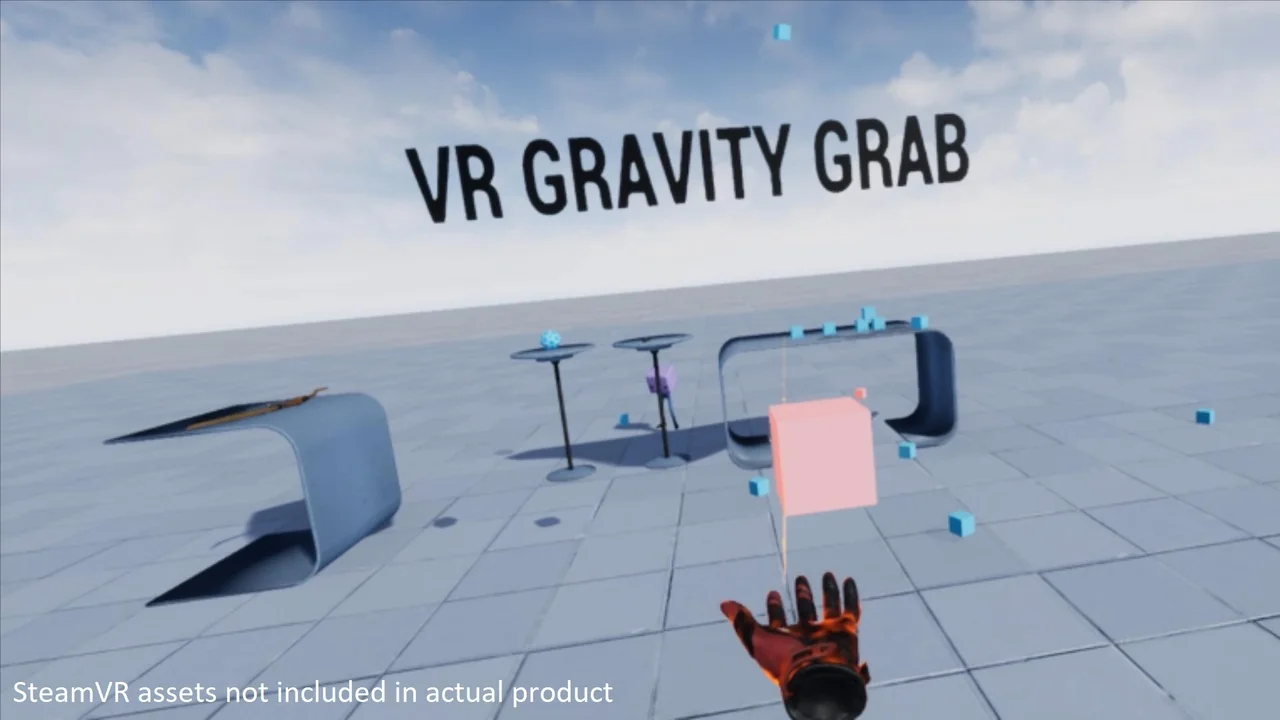
 Weapons & Combat
 Weapons & Combat
 Weapons & Combat