"0341a2901a4ae9aa"{"id":"14556","slug":"screen-space-fog-scattering","title":"Screen Space Fog Scattering","category":"Engine Tools","engine":"5.1 - 5.2,5.5 - 5.7","assetVersion":"Engine version: 5.1 - 5.2,5.5 - 5.7","engineVersion":"Asset Version:1.02 - 1.31","tag":"Engine Tools","accent":"blue","visual":"audio","summary":"Enhance your scene's atmosphere with Screen Space Fog Scattering. This lightweight shader adds realistic light scattering to Exponential Height Fog for a more natural look.","platform":"Unreal Engine","publishedAt":"2026-03-11T18:27:05.000Z","updatedAt":"2026-04-19T15:45:44.000Z","sourceNotes":[],"fileContents":[],"compatibility":["Unreal Engine","Engine version: 5.1 - 5.2,5.5 - 5.7","Asset Version: 1.02 - 1.31"],"featuredImage":{"alt":"Screen Space Fog Scattering","src":"https://3dcghub.com/wp-content/uploads/2026/03/ad28875a-16a1-44e6-9aca-345ecc1ec0e5.webp"},"hasDownloadLink":true,"downloads":1,"terms":[{"taxonomy":"category","slug":"engine-tools-tools-and-plugins","name":"Engine Tools"},{"taxonomy":"post_tag","slug":"blueprint","name":"Blueprint"},{"taxonomy":"post_tag","slug":"environment","name":"Environment"},{"taxonomy":"post_tag","slug":"materials","name":"Materials"},{"taxonomy":"post_tag","slug":"plugins","name":"Plugins"},{"taxonomy":"post_tag","slug":"screen-space-fog-scattering","name":"Screen Space Fog Scattering"},{"taxonomy":"post_tag","slug":"vfx","name":"VFX"}],"galleryImages":[{"src":"https://3dcghub.com/wp-content/uploads/2026/03/438d9d5dff65_23a11034-abe8-433c-a0f4-e1eef8754f49.webp","alt":"Screen Space Fog Scattering"},{"src":"https://3dcghub.com/wp-content/uploads/2026/03/e3e9f26f25cb_ac585575-5502-4fa2-a8f7-e88b24644317.webp","alt":"Screen Space Fog Scattering"},{"src":"https://3dcghub.com/wp-content/uploads/2026/03/f2fac1029350_cfd665a9-5bc0-43a7-a6a6-170ce79e2c0e.webp","alt":"Screen Space Fog Scattering"},{"src":"https://3dcghub.com/wp-content/uploads/2026/03/b16f7e12f4a2_b2bd1e84-e3fd-4989-a690-58c0ed915a7e.webp","alt":"Screen Space Fog Scattering"},{"src":"https://3dcghub.com/wp-content/uploads/2026/03/4e49b7458d2f_2215f762-8b46-4038-8ee6-eddf1fc2ec6d.webp","alt":"Screen Space Fog Scattering"},{"src":"https://3dcghub.com/wp-content/uploads/2026/03/00c929acaa47_7b74b3a6-93a0-4bff-b31b-ce193bf568d7.webp","alt":"Screen Space Fog Scattering"},{"src":"https://3dcghub.com/wp-content/uploads/2026/03/a769e7c5158e_6bda4cdd-e464-4a28-895a-ab907e658af5.webp","alt":"Screen Space Fog Scattering"},{"src":"https://3dcghub.com/wp-content/uploads/2026/03/73ff3d8dae33_2f1cad82-52d1-4947-ab61-629e2890ec28.webp","alt":"Screen Space Fog Scattering"}],"accessPanel":{"kind":"resource","title":"Access this resource","eyebrow":"Free Download","message":"Log in or create a free account to start your download.","fileName":"Screen Space Fog Scattering 5.1 - 5.2,5.5 - 5.7;V1.02 - 1.31.7z","safetyNote":"All resources are 100% manually reviewed to eliminate all risks.","actionLabel":"Download Free","resourceType":"Resource archive"},"contentHtml":"\u003cp\u003eScreen Space Fog Scattering is a powerful post-process shader designed to enhance the visual quality of your digital environments. By adding a realistic simulation of light scattering, this tool improves the standard Exponential Height Fog. Consequently, the result appears much more natural and provides a dense, atmospheric feel to any scene.\u003c/p\u003e\n\n\u003cp\u003eThe developer created this plugin to act as a final touch for environmental mood. It safely injects the shader into the rendering pipeline using standard engine classes. Therefore, it remains fully compatible with all other default post-process effects. This ensures that your existing visual workflow remains intact while benefiting from improved fog aesthetics.\u003c/p\u003e\n\n\u003ch2\u003eKey Features and Benefits\u003c/h2\u003e\n\u003cp\u003eOne of the primary advantages of Screen Space Fog Scattering is its ease of use. It applies automatically to any scene or blueprint that currently utilizes Exponential Height Fog. Furthermore, the intensity of the scattering effect is directly tied to your existing fog settings. This means you can control the look without learning entirely new systems.\u003c/p\u003e\n\n\u003cp\u003eThe shader is also highly versatile in terms of feature support. It works seamlessly with several advanced engine components, including:\u003c/p\u003e\n\u003cul\u003e\n \u003cli\u003eVolumetric Fog\u003c/li\u003e\n \u003cli\u003eSky Atmosphere\u003c/li\u003e\n \u003cli\u003eHeterogeneous Volumes\u003c/li\u003e\n \u003cli\u003ePC VR and Split-Screen modes\u003c/li\u003e\n\u003c/ul\u003e\n\n\u003ch2\u003ePerformance and Integration\u003c/h2\u003e\n\u003cp\u003eEfficiency is a core focus of this resource. The creator describes the shader as lightweight, ensuring it has a small performance cost on your hardware. Because of this optimization, it is suitable for projects where maintaining a high frame rate is essential. However, it still delivers the visual depth required for high-end rendering.\u003c/p\u003e\n\n\u003cp\u003eBeyond that, no additional setup is required beyond the initial installation of the plugin. This plug-and-play functionality allows artists to focus on their creative vision rather than technical troubleshooting. Whether you are building a misty forest or a dense urban environment, this tool provides the necessary depth. Therefore, it is an ideal solution for developers who need quality results quickly.\u003c/p\u003e\n\n\u003ch2\u003eFinal Take\u003c/h2\u003e\n\u003cp\u003eThe clearest takeaway is that Screen Space Fog Scattering offers a streamlined way to upgrade scene atmosphere. By simulating light scattering, it transforms standard fog into a more immersive visual element. Its compatibility with VR and various atmosphere systems makes it a flexible choice for developers seeking high-quality results with minimal overhead.\u003c/p\u003e\n\n\u003ch2\u003eExplore Similar Assets\u003c/h2\u003e\n\u003cul\u003e\n\u003cli\u003e\u003ca href=\"https://3dcghub.com/physically-based-earth/\" title=\"Physically Based Earth\"\u003ePhysically Based Earth\u003c/a\u003e\u003c/li\u003e\n\u003cli\u003e\u003ca href=\"https://3dcghub.com/yughues-metal-materials/\" title=\"Yughues Metal Materials\"\u003eYughues Metal Materials\u003c/a\u003e\u003c/li\u003e\n\u003cli\u003e\u003ca href=\"https://3dcghub.com/stylized-250-materials-bundle/\" title=\"Stylized 250 Materials Bundle\"\u003eStylized 250 Materials Bundle\u003c/a\u003e\u003c/li\u003e\n\u003cli\u003e\u003ca href=\"https://3dcghub.com/preload-materials/\" title=\"Preload materials\"\u003ePreload materials\u003c/a\u003e\u003c/li\u003e\n\u003cli\u003e\u003ca href=\"https://3dcghub.com/terrain-materials-vol-2/\" title=\"Terrain Materials VOL.2\"\u003eTerrain Materials VOL.2\u003c/a\u003e\u003c/li\u003e\n\u003c/ul\u003e","contentTextLength":2627,"navigation":{"current":3398,"total":4017,"previous":{"id":"14579","slug":"shader-world-plugin-procedural-terrain-oceans-foliage-gpu-accelerated","title":"Shader World Plugin : Procedural Terrain, Oceans, Foliage, GPU-accelerated","category":"Engine Tools","platform":"Unreal Engine","updatedAt":"2026-04-19T15:45:44.000Z"},"next":{"id":"14545","slug":"runtime-vertex-paint-detection-plugin","title":"Runtime Vertex Paint \u0026 Detection Plugin","category":"Engine Tools","platform":"Unreal Engine","updatedAt":"2026-04-19T15:45:44.000Z"}},"relatedResources":[{"id":"13806","slug":"clouds-lighting-system","title":"Clouds Lighting System","category":"Engine Tools","engine":"4.26 - 5.8","assetVersion":"Asset Version: 0.3.3.1","engineVersion":"Engine version: 4.26 - 5.8","tag":"Engine Tools","accent":"blue","visual":"animation","summary":"The Clouds Lighting System is a specialized tool designed to add realistic illumination to 2D clouds, volumetric clouds, and various particle systems like smoke and fog.","platform":"Unreal Engine","publishedAt":"2026-03-11T10:07:32.000Z","updatedAt":"2026-09-29T08:34:46.190Z","sourceNotes":[],"fileContents":[],"compatibility":["Unreal Engine","Asset Version: 0.3.3.1","Engine version: 4.26 - 5.8"],"featuredImage":{"alt":"Clouds Lighting System","src":"https://3dcghub.com/wp-content/uploads/2026/03/5915be78-e14d-4e90-8a8e-9eff04991bc6.webp"},"hasDownloadLink":true,"downloads":1},{"id":"25019","slug":"shader-compilation-screen-remove-shader-stutters","title":"Shader Compilation Screen - remove shader stutters","category":"Engine Tools","engine":"5.7","assetVersion":"Asset Version: 1.0","engineVersion":"Engine version: 5.7","tag":"Engine Tools","accent":"blue","visual":"city","summary":"Shader and Niagara compilation can interrupt the first moments of a game with visible stutters. This Unreal Engine plugin focuses on that problem in packaged builds, where the engine behaves more predictably.","platform":"Unreal Engine","publishedAt":"2026-04-18T15:56:03.000Z","updatedAt":"2026-08-05T15:22:48.242Z","sourceNotes":[],"fileContents":[],"compatibility":["Unreal Engine","Asset Version: 1.0","Engine version: 5.7"],"featuredImage":{"alt":"Shader Compilation Screen - remove shader stutters","src":"https://3dcghub.com/wp-content/uploads/2026/04/83a31d9564f4_8d067fcd-1c16-4e07-a9bd-253ab026f986.webp"},"hasDownloadLink":true,"downloads":0},{"id":"13883","slug":"dynamic-real-water","title":"Dynamic Real Water","category":"Engine Tools","engine":"5.8","assetVersion":"Asset Version: 2.0","engineVersion":"Engine Version: 5.8","tag":"Engine Tools","accent":"blue","visual":"mech","summary":"Enhance your Unreal Engine 5 environments with Dynamic Real Water, a high-performance FFT simulation plugin. It offers realistic wave dynamics, advanced buoyancy physics, and seamless replication for multiplayer projects.","platform":"Unreal Engine","publishedAt":"2026-03-11T10:30:53.000Z","updatedAt":"2026-10-07T10:02:19.555Z","sourceNotes":[],"fileContents":[],"compatibility":["Unreal Engine","Asset Version: 2.0","Engine Version: 5.8"],"featuredImage":{"alt":"Dynamic Real Water","src":"https://3dcghub.com/wp-content/uploads/2026/03/8532c421-bf8f-4903-bbfc-9e94a063892e.webp"},"hasDownloadLink":true,"downloads":4}]}
Engine Tools
Screen Space Fog Scattering
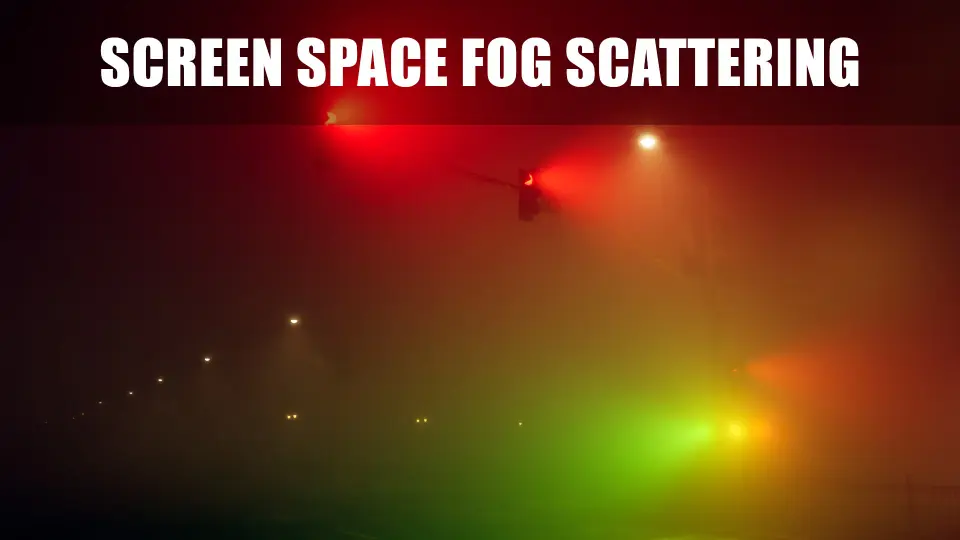
Enhance your scene's atmosphere with Screen Space Fog Scattering. This lightweight shader adds realistic light scattering to Exponential Height Fog for a more natural look.
Screen Space Fog Scattering is a powerful post-process shader designed to enhance the visual quality of your digital environments. By adding a realistic simulation of light scattering, this tool improves the standard Exponential Height Fog. Consequently, the result appears much more natural and provides a dense, atmospheric feel to any scene.
The developer created this plugin to act as a final touch for environmental mood. It safely injects the shader into the rendering pipeline using standard engine classes. Therefore, it remains fully compatible with all other default post-process effects. This ensures that your existing visual workflow remains intact while benefiting from improved fog aesthetics.
Key Features and Benefits
One of the primary advantages of Screen Space Fog Scattering is its ease of use. It applies automatically to any scene or blueprint that currently utilizes Exponential Height Fog. Furthermore, the intensity of the scattering effect is directly tied to your existing fog settings. This means you can control the look without learning entirely new systems.
The shader is also highly versatile in terms of feature support. It works seamlessly with several advanced engine components, including:
Volumetric Fog
Sky Atmosphere
Heterogeneous Volumes
PC VR and Split-Screen modes
Performance and Integration
Efficiency is a core focus of this resource. The creator describes the shader as lightweight, ensuring it has a small performance cost on your hardware. Because of this optimization, it is suitable for projects where maintaining a high frame rate is essential. However, it still delivers the visual depth required for high-end rendering.
Beyond that, no additional setup is required beyond the initial installation of the plugin. This plug-and-play functionality allows artists to focus on their creative vision rather than technical troubleshooting. Whether you are building a misty forest or a dense urban environment, this tool provides the necessary depth. Therefore, it is an ideal solution for developers who need quality results quickly.
Final Take
The clearest takeaway is that Screen Space Fog Scattering offers a streamlined way to upgrade scene atmosphere. By simulating light scattering, it transforms standard fog into a more immersive visual element. Its compatibility with VR and various atmosphere systems makes it a flexible choice for developers seeking high-quality results with minimal overhead.
 Engine Tools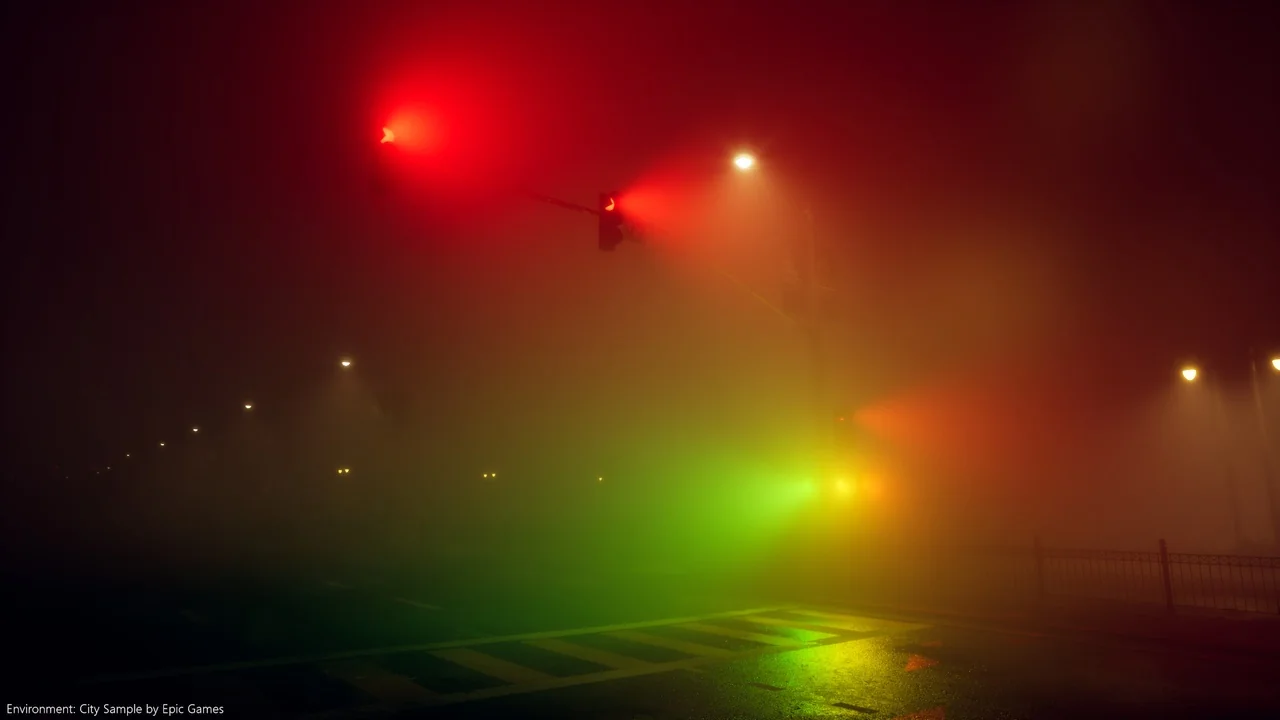
 Engine Tools
 Engine Tools
 Engine Tools