"216a1d817ec3ca8a"{"id":"1001168","slug":"realistic-decomposition","title":"Realistic Decomposition","category":"Material \u0026 Textures","engine":"5.0+","assetVersion":"","engineVersion":"Engine Version: 5.0+","tag":"Material","accent":"blue","visual":"luts","summary":"Add realistic, non-destructive character decay with an eight-layer material system, three-layer Niagara FX, and the BP_Decay component in Unreal Engine.","platform":"Unreal Engine","indexPolicy":"index","publishedAt":"2026-09-17T02:09:33.963Z","updatedAt":"2026-09-17T02:09:33.963Z","sourceNotes":[],"fileContents":[],"compatibility":["Unreal Engine","Engine Version: 5.0+"],"featuredImage":{"alt":"Realistic Decomposition","src":"/wp-content/uploads/published/2026/09/76d3b0fc9981-ee54375a-ab35-4ed2-8383-1095d07e449f-b7c5ef1a7a.webp"},"hasDownloadLink":true,"downloads":0,"terms":[{"taxonomy":"category","slug":"material-and-textures","name":"Material \u0026 Textures"}],"galleryImages":[{"src":"/wp-content/uploads/published/2026/09/b13bd0a30509-4d053999-7299-42f8-9155-44c3e7342b42-875eac7c1d.webp","alt":"Realistic Decomposition"},{"src":"/wp-content/uploads/published/2026/09/27e6e2bcf967-caa337f0-4253-4c21-8470-4411fde35b13-ebc1af0cb3.webp","alt":"Realistic Decomposition"},{"src":"/wp-content/uploads/published/2026/09/bd6c3d23cb3d-ac0daec2-e741-41cb-9c6d-a5384a341bab-edc79085ac.webp","alt":"Realistic Decomposition"},{"src":"/wp-content/uploads/published/2026/09/06622bd180a2-e777db5e-80a7-4487-a03c-64baabba6ccd-7504df2147.webp","alt":"Realistic Decomposition"},{"src":"/wp-content/uploads/published/2026/09/cee39b895005-8e38e0cd-a797-4da8-9e2d-c62393327249-0d4282f4df.webp","alt":"Realistic Decomposition"},{"src":"/wp-content/uploads/published/2026/09/917c6db5bc66-a807f2ec-0214-49fa-92a1-200439fad420-d4b28e8067.webp","alt":"Realistic Decomposition"},{"src":"/wp-content/uploads/published/2026/09/6d16bb214a08-86f58661-1d13-4f89-89e0-001e8225be6e-5700440aad.webp","alt":"Realistic Decomposition"},{"src":"/wp-content/uploads/published/2026/09/63d9a3c1fdf2-545eedf7-a10c-4395-b791-40147d58f920-8cb811ff08.webp","alt":"Realistic Decomposition"},{"src":"/wp-content/uploads/published/2026/09/b0eb41cad7f7-e603b04d-0146-4c0b-b6f9-9b65cadebd0b-639ed82afa.webp","alt":"Realistic Decomposition"},{"src":"/wp-content/uploads/published/2026/09/526e641d53c0-fc4d35c2-be4a-4966-86e6-65bb7fc5b1fe-1f5c76a8b6.webp","alt":"Realistic Decomposition"}],"accessPanel":{"kind":"resource","title":"Get this resource","eyebrow":"Free resource","message":"3DCGHUB is the service provider for this listing. Access is fulfilled through the official publisher channel.","fileName":"Content.7z","safetyNote":"Resources are manually reviewed before listing to improve quality and reduce obvious risks.","actionLabel":"Get this resource","resourceType":"Resource archive","versions":[]},"contentHtml":"\u003ch2\u003eDynamic Rot Through Material Functions and Niagara Particles\u003c/h2\u003e\u003cp\u003eRealistic Decomposition combines a master blueprint component, custom material functions, and a multi-tiered Niagara particle system to replace instant character despawns with progressive organic rot. When a character perishes, the system runs through a physical breakdown process: dead tissue darkens, clothes absorb fluids from underneath, wounds split open, flies gather, and maggots crawl through deteriorating skin before the remains dissolve into ash.\u003c/p\u003e\u003cp\u003eThe package maintains a compact footprint under 45MB with all example content included. Because it operates through an actor component and material logic rather than hardcoded character structures, it can be applied to any skeletal mesh without destroying existing rigs or animation setups. The system functions on human characters, monsters, animals, and alien creatures, applying changes across varying surface types including flesh, clothing, eyes, and hair or fur. Demonstration character models shown in previews are strictly illustrative and not packaged within the tool, though the system maintains verified compatibility with character assets such as the Zombies - Modular Four Pack.\u003c/p\u003e\u003ch2\u003eThe Eight-Layer Decomposition System and Fabric Interaction\u003c/h2\u003e\u003cp\u003eAt the center of the surface deterioration is an eight-layer material function with built-in fabric awareness. Rather than treating an entire model as homogeneous flesh, the system calculates how underlying decomposition interacts with worn garments. As tissue breaks down, moisture and staining seep outward into clothing, saturating the textile weave before drying and crumbling alongside the body.\u003c/p\u003e\u003cp\u003eThe material architecture executes through eight distinct visual stages:\u003c/p\u003e\u003cul\u003e\u003cli\u003e\u003cstrong\u003eDarkening and Decay:\u003c/strong\u003e Subdued tonal shifts mark the cessation of life and early tissue oxidation.\u003c/li\u003e\u003cli\u003e\u003cstrong\u003ePre-Wound Staining:\u003c/strong\u003e Bodily fluids collect beneath the surface and soak through adjacent fabrics, darkening base textures with wet edges.\u003c/li\u003e\u003cli\u003e\u003cstrong\u003eWound Growth:\u003c/strong\u003e Core necrotic zones expand outward across the surface of the mesh.\u003c/li\u003e\u003cli\u003e\u003cstrong\u003eWound Edge Growth:\u003c/strong\u003e Ragged borders form around opening cavities, creating distinct visual borders between fresh rot and surrounding areas.\u003c/li\u003e\u003cli\u003e\u003cstrong\u003eWrinkling and Creasing:\u003c/strong\u003e Skin pulls taut and wrinkles while clothing creases deeply to simulate fluid loss and tissue shrinkage.\u003c/li\u003e\u003cli\u003e\u003cstrong\u003eRoughness Changes:\u003c/strong\u003e Specular values continuously update according to moisture levels, contrasting slick wet wounds with dry, leathery skin and stiffened cloth.\u003c/li\u003e\u003cli\u003e\u003cstrong\u003eHue and Discolouration:\u003c/strong\u003e Unhealthy shifts in surface color simulate biological decay across skin and organic materials.\u003c/li\u003e\u003cli\u003e\u003cstrong\u003eOpacity Fade Out:\u003c/strong\u003e The final stage dissolves the collapsed corpse toward ash, leaving behind only the scavenging insect layer.\u003c/li\u003e\u003c/ul\u003e\u003cp\u003eArtists have direct control over these interactions through 40 exposed material parameters, allowing precise adjustments to wound spread, wrinkle intensity, fluid absorption speed, and base-layer discoloration.\u003c/p\u003e\u003ch2\u003eThree-Layer Niagara Particle System for Environmental Infestation\u003c/h2\u003e\u003cp\u003eAccompanying the material changes is a three-layer Niagara effect system that introduces biological activity directly onto the decaying model. The particle setup incorporates sculpted, vertex-animated mesh maggots alongside atmospheric sprites and dissolution effects, bringing motion to static corpses.\u003c/p\u003e\u003cp\u003eThe maggot layer uses dedicated high-resolution meshes optimized across a range of 400 down to 12 triangles. Because the wriggling motion is calculated via vertex animation rather than costly skeletal bone chains, scenes can host dense clusters of squirming larvae without overburdening the render thread. As wounds open across the host, these maggots spawn directly within the peeling flesh and pool underneath the collapsing model.\u003c/p\u003e\u003cp\u003eSurrounding the mesh, a high-quality fly sprite system generates pests that circle the carcass and settle on putrefying surfaces. A special decay effect layer manages the final dissolution phase as the withered corpse breaks into scattered ash. All three particle stages are managed through seven exposed parameters that calibrate spawn density, activation timings, and particle spread directly from the main controller.\u003c/p\u003e\u003ch2\u003eIntegration and Customization with the BP_Decay Component\u003c/h2\u003e\u003cp\u003eImplementation relies on the master \u003ccode\u003eBP_Decay\u003c/code\u003e Actor component. Setting up a character requires dropping the component into the target character blueprint, referencing the decomposition material function within the character's active master materials, and firing the \u003ccode\u003eBegin Decay\u003c/code\u003e Event when health depletes or the death state triggers.\u003c/p\u003e\u003cp\u003eThe component centralizes 47 exposed parameters, granting control over timing thresholds, visual progression speeds, and particle delays from a single panel. Because all communication between the material functions and the Niagara particle emitters passes through this component, developers do not need to write custom timeline code, manual dynamic material instance bindings, or bespoke tick events. The execution is entirely non-destructive to existing game logic, preserving original character states until the death event initializes the rot cycle.\u003c/p\u003e\u003ch2\u003eMesh Flexibility and Workflow Performance\u003c/h2\u003e\u003cp\u003eBecause the logic maps across UV coordinates and material attributes, the tool adapts across heterogeneous creature designs. Quadruped animals, multi-limbed extraterrestrials, and heavily clothed humanoids utilize the same material logic. Fabric layers read the decay data from the parent surface to ensure blood and fluid seepage occurs realistically beneath jackets, pants, or bandages, while exposed organic patches like eyes and exposed muscles rot according to their own surface properties.\u003c/p\u003e\u003cp\u003eThe complete workflow handles the entire post-mortem sequence: beginning with subtle staining on clothing, escalating through open tissue decay and insect colonization, and concluding as the remains fade away, leaving only a lingering cluster of writhing maggots on the ground.\u003c/p\u003e\n\n\u003ch2\u003eContinue Browsing Similar Packs\u003c/h2\u003e\n\u003cul\u003e\n\u003cli\u003e\u003ca href=\"https://3dcghub.com/realistic-blood-vfx-niagara-blood-effects-blood-vfx-blood-blood-vfx/\" rel=\"noopener noreferrer\"\u003eRealistic Blood VFX (Niagara Blood Effects, Blood VFX, Blood, Blood VFX)\u003c/a\u003e\u003c/li\u003e\n\u003cli\u003e\u003ca href=\"https://3dcghub.com/realistic-horse-with-animations/\" rel=\"noopener noreferrer\"\u003eRealistic Horse with Animations\u003c/a\u003e\u003c/li\u003e\n\u003cli\u003e\u003ca href=\"https://3dcghub.com/realistic-rabbit/\" rel=\"noopener noreferrer\"\u003eRealistic Rabbit\u003c/a\u003e\u003c/li\u003e\n\u003cli\u003e\u003ca href=\"https://3dcghub.com/mouse/\" rel=\"noopener noreferrer\"\u003eMouse\u003c/a\u003e\u003c/li\u003e\n\u003cli\u003e\u003ca href=\"https://3dcghub.com/realistic-base-skeleton/\" rel=\"noopener noreferrer\"\u003eRealistic Base Skeleton\u003c/a\u003e\u003c/li\u003e\n\u003c/ul\u003e","contentTextLength":6109,"navigation":{"current":1190,"total":4230,"previous":{"id":"1001169","slug":"safe-pawn","title":"Safe Pawn","category":"Engine Tools","platform":"Unreal Engine","updatedAt":"2026-09-17T02:11:00.909Z"},"next":{"id":"1001167","slug":"modular-soldier-opb-full","title":"Modular Soldier OPB Full","category":"Characters \u0026 Creatures","platform":"Unreal Engine","updatedAt":"2026-09-16T15:17:15.509Z"}},"relatedResources":[{"id":"16636","slug":"realistic-blood-vfx-niagara-blood-effects-blood-vfx-blood-blood-vfx","title":"Realistic Blood VFX (Niagara Blood Effects, Blood VFX, Blood, Blood VFX)","category":"Spells \u0026 Combat","engine":"5.2+","assetVersion":"Engine version: 5.2+","engineVersion":"5.0","tag":"Spells \u0026 Combat","accent":"blue","visual":"luts","summary":"Enhance your project with Realistic Blood VFX, a comprehensive Niagara-based system featuring dynamic splatters, arterial bleeding, and PBR-compatible decals for high-fidelity results.","platform":"Unreal Engine","indexPolicy":"index","publishedAt":"2026-03-12T17:37:05.000Z","updatedAt":"2026-04-19T15:43:44.000Z","sourceNotes":[],"fileContents":[],"compatibility":["Unreal Engine","Engine version: 5.2+"],"featuredImage":{"alt":"Realistic Blood VFX (Niagara Blood Effects, Blood VFX, Blood, Blood VFX)","src":"https://3dcghub.com/wp-content/uploads/2026/03/436dc969-0b81-4830-9180-0a4919a2a247.webp"},"hasDownloadLink":true,"downloads":14},{"id":"3284","slug":"realistic-horse-with-animations","title":"Realistic Horse with Animations","category":"Characters \u0026 Creatures","engine":"5.0+","assetVersion":"Engine version: 5.0+","engineVersion":"5.4","tag":"Characters","accent":"blue","visual":"animation","summary":"Enhance your game with this high-quality Realistic Horse asset. Featuring 20 animations, customizable shaders, and muscle shaking effects for maximum realism.","platform":"Unreal Engine","indexPolicy":"index","publishedAt":"2026-02-09T06:09:54.000Z","updatedAt":"2026-04-19T15:57:40.000Z","sourceNotes":[],"fileContents":[],"compatibility":["Unreal Engine","Engine version: 5.0+"],"featuredImage":{"alt":"Realistic Horse with Animations","src":"https://3dcghub.com/wp-content/uploads/2026/02/34363d28-a5d5-411a-84f6-36caa5d096af.webp"},"hasDownloadLink":true,"downloads":2},{"id":"1000397","slug":"realistic-rabbit","title":"Realistic Rabbit","category":"Characters \u0026 Creatures","engine":"4.26+,5.0+","assetVersion":"","engineVersion":"Engine Version: 4.26+,5.0+","tag":"Characters","accent":"blue","visual":"character","summary":"A lowpoly, animated 3D rabbit model featuring 29 distinct animations, three skin variations, and adjustable eye materials for mobile RPGs and hunting games.","platform":"Unreal Engine","indexPolicy":"index","publishedAt":"2026-07-07T15:27:45.915Z","updatedAt":"2026-07-07T15:27:45.915Z","sourceNotes":[],"fileContents":[],"compatibility":["Unreal Engine","Engine Version: 4.26+,5.0+"],"featuredImage":{"alt":"Realistic Rabbit","src":"/wp-content/uploads/published/2026/07/bf0acf43e34a-2c1ca981-d43a-4251-b6f7-d30b5d1b85de-14d1909f40.webp"},"hasDownloadLink":true,"downloads":0}]}
Material
Realistic Decomposition
Add realistic, non-destructive character decay with an eight-layer material system, three-layer Niagara FX, and the BP_Decay component in Unreal Engine.
Dynamic Rot Through Material Functions and Niagara Particles
Realistic Decomposition combines a master blueprint component, custom material functions, and a multi-tiered Niagara particle system to replace instant character despawns with progressive organic rot. When a character perishes, the system runs through a physical breakdown process: dead tissue darkens, clothes absorb fluids from underneath, wounds split open, flies gather, and maggots crawl through deteriorating skin before the remains dissolve into ash.
The package maintains a compact footprint under 45MB with all example content included. Because it operates through an actor component and material logic rather than hardcoded character structures, it can be applied to any skeletal mesh without destroying existing rigs or animation setups. The system functions on human characters, monsters, animals, and alien creatures, applying changes across varying surface types including flesh, clothing, eyes, and hair or fur. Demonstration character models shown in previews are strictly illustrative and not packaged within the tool, though the system maintains verified compatibility with character assets such as the Zombies - Modular Four Pack.
The Eight-Layer Decomposition System and Fabric Interaction
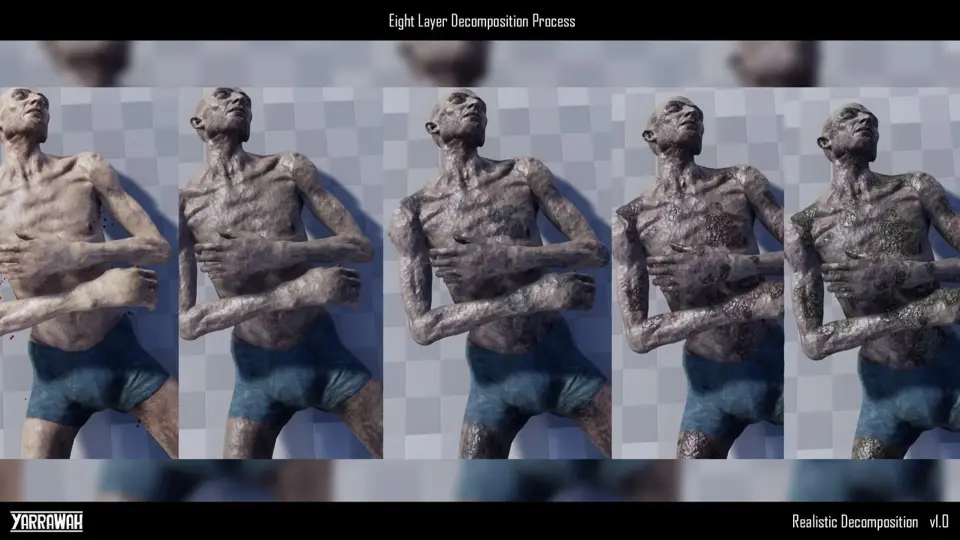
At the center of the surface deterioration is an eight-layer material function with built-in fabric awareness. Rather than treating an entire model as homogeneous flesh, the system calculates how underlying decomposition interacts with worn garments. As tissue breaks down, moisture and staining seep outward into clothing, saturating the textile weave before drying and crumbling alongside the body.
The material architecture executes through eight distinct visual stages:
Darkening and Decay: Subdued tonal shifts mark the cessation of life and early tissue oxidation.
Pre-Wound Staining: Bodily fluids collect beneath the surface and soak through adjacent fabrics, darkening base textures with wet edges.
Wound Growth: Core necrotic zones expand outward across the surface of the mesh.
Wound Edge Growth: Ragged borders form around opening cavities, creating distinct visual borders between fresh rot and surrounding areas.
Wrinkling and Creasing: Skin pulls taut and wrinkles while clothing creases deeply to simulate fluid loss and tissue shrinkage.
Roughness Changes: Specular values continuously update according to moisture levels, contrasting slick wet wounds with dry, leathery skin and stiffened cloth.
Hue and Discolouration: Unhealthy shifts in surface color simulate biological decay across skin and organic materials.
Opacity Fade Out: The final stage dissolves the collapsed corpse toward ash, leaving behind only the scavenging insect layer.
Artists have direct control over these interactions through 40 exposed material parameters, allowing precise adjustments to wound spread, wrinkle intensity, fluid absorption speed, and base-layer discoloration.
Three-Layer Niagara Particle System for Environmental Infestation
Accompanying the material changes is a three-layer Niagara effect system that introduces biological activity directly onto the decaying model. The particle setup incorporates sculpted, vertex-animated mesh maggots alongside atmospheric sprites and dissolution effects, bringing motion to static corpses.
The maggot layer uses dedicated high-resolution meshes optimized across a range of 400 down to 12 triangles. Because the wriggling motion is calculated via vertex animation rather than costly skeletal bone chains, scenes can host dense clusters of squirming larvae without overburdening the render thread. As wounds open across the host, these maggots spawn directly within the peeling flesh and pool underneath the collapsing model.
Surrounding the mesh, a high-quality fly sprite system generates pests that circle the carcass and settle on putrefying surfaces. A special decay effect layer manages the final dissolution phase as the withered corpse breaks into scattered ash. All three particle stages are managed through seven exposed parameters that calibrate spawn density, activation timings, and particle spread directly from the main controller.
Integration and Customization with the BP_Decay Component
Implementation relies on the master BP_Decay Actor component. Setting up a character requires dropping the component into the target character blueprint, referencing the decomposition material function within the character's active master materials, and firing the Begin Decay Event when health depletes or the death state triggers.
The component centralizes 47 exposed parameters, granting control over timing thresholds, visual progression speeds, and particle delays from a single panel. Because all communication between the material functions and the Niagara particle emitters passes through this component, developers do not need to write custom timeline code, manual dynamic material instance bindings, or bespoke tick events. The execution is entirely non-destructive to existing game logic, preserving original character states until the death event initializes the rot cycle.
Mesh Flexibility and Workflow Performance
Because the logic maps across UV coordinates and material attributes, the tool adapts across heterogeneous creature designs. Quadruped animals, multi-limbed extraterrestrials, and heavily clothed humanoids utilize the same material logic. Fabric layers read the decay data from the parent surface to ensure blood and fluid seepage occurs realistically beneath jackets, pants, or bandages, while exposed organic patches like eyes and exposed muscles rot according to their own surface properties.
The complete workflow handles the entire post-mortem sequence: beginning with subtle staining on clothing, escalating through open tissue decay and insect colonization, and concluding as the remains fade away, leaving only a lingering cluster of writhing maggots on the ground.
 Material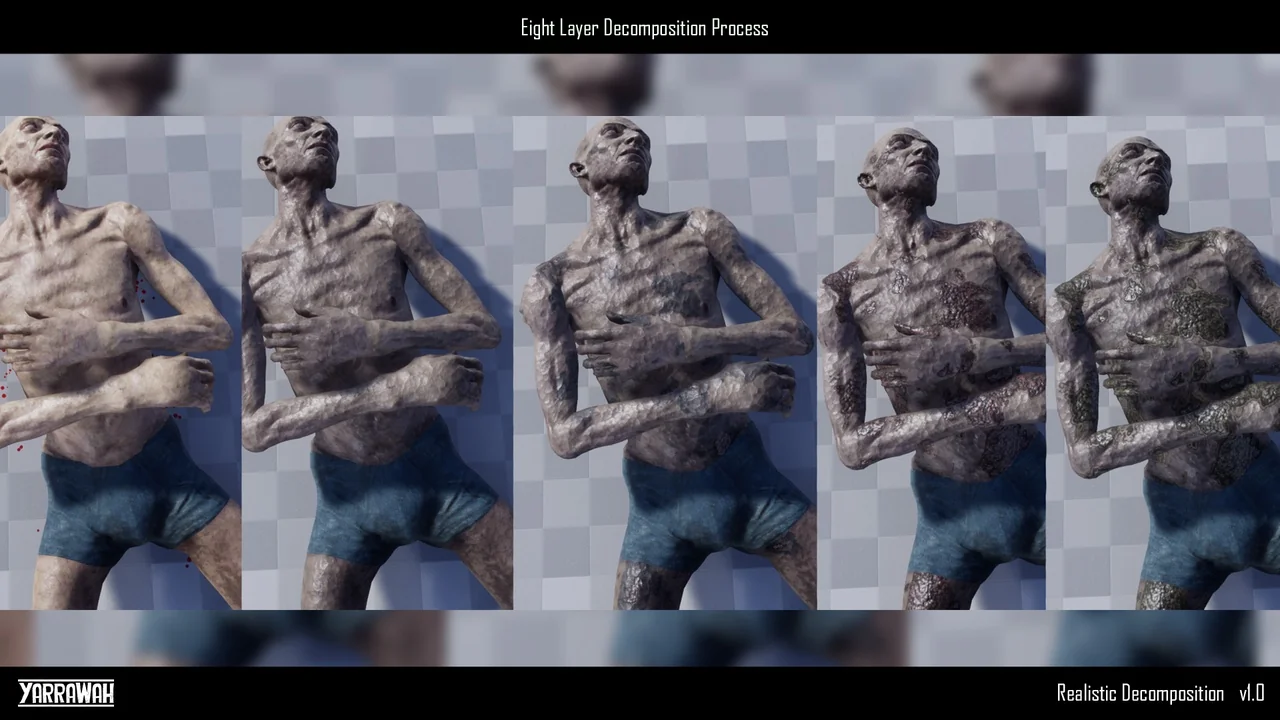
 Spells & Combat
 Characters
 Characters