"c68a05d5e51405b3"{"id":"1001899","slug":"modular-drums-pack","title":"Modular Drums Pack","category":"Musical","engine":"4.22+,5.0+","assetVersion":"","engineVersion":"Engine Version: 4.22+,5.0+","tag":"Musical","accent":"blue","visual":"audio","summary":"Configure realistic drum setups using Modular Drums Pack, featuring over 100 meshes, 19 modular blueprints, swappable lugs, mounts, and PBR color options.","platform":"Unreal Engine","publishedAt":"2026-10-22T11:38:03.294Z","updatedAt":"2026-10-22T11:38:03.294Z","sourceNotes":[],"fileContents":[],"compatibility":["Unreal Engine","Engine Version: 4.22+,5.0+"],"featuredImage":{"alt":"Modular Drums Pack","src":"/wp-content/uploads/published/2026/10/64b97935447d-32f5b97e-ab66-4d2a-84cf-9a32c1b633fe-9b449bcdd0.webp"},"hasDownloadLink":true,"downloads":0,"terms":[{"taxonomy":"category","slug":"musical","name":"Musical"}],"galleryImages":[{"src":"/wp-content/uploads/published/2026/10/1b302ecfba66-276f483a-8403-4fa2-8927-edea4093809d-f7560aeb36.webp","alt":"Modular Drums Pack"},{"src":"/wp-content/uploads/published/2026/10/ddf66bd30cc1-64080472-39a3-4a92-9860-146505b26066-014da3c6e6.webp","alt":"Modular Drums Pack"},{"src":"/wp-content/uploads/published/2026/10/b3ae1decec5b-b4320d7e-b464-4bce-a750-6ca7c01f7d2f-262a516501.webp","alt":"Modular Drums Pack"},{"src":"/wp-content/uploads/published/2026/10/0b60fd353968-e0c53dba-2103-479a-8232-72dfb1850b43-0094d38dd3.webp","alt":"Modular Drums Pack"},{"src":"/wp-content/uploads/published/2026/10/fc268b320820-b59ddcf6-6f95-4692-a4fe-9cd68adc13bd-aab0572e60.webp","alt":"Modular Drums Pack"},{"src":"/wp-content/uploads/published/2026/10/691e0e3c0e65-f721c376-6ce7-4041-bd4e-828efb731352-049a5319af.webp","alt":"Modular Drums Pack"},{"src":"/wp-content/uploads/published/2026/10/d7efeabd05ba-6e572c0d-6164-413e-98ae-41147761cf0e-0d86c54250.webp","alt":"Modular Drums Pack"},{"src":"/wp-content/uploads/published/2026/10/8c053ba11dc2-983f0123-6b7c-494e-b613-355454fa4d1c-ab66a0a6d0.webp","alt":"Modular Drums Pack"},{"src":"/wp-content/uploads/published/2026/10/419481c76e71-0e12f97f-3b12-47bb-b2d9-906887d2ede5-fd44436ba2.webp","alt":"Modular Drums Pack"}],"accessPanel":{"kind":"resource","title":"Download this resource","eyebrow":"Free Download","message":"Log in or create a free account to start your download.","fileName":"Content.7z","safetyNote":"Resources are manually reviewed before listing to improve quality and reduce obvious risks.","actionLabel":"Download Free","resourceType":"Resource archive"},"contentHtml":"\u003ch2\u003eBlueprint Implementation and Assembling the Modular Drums Pack\u003c/h2\u003e\u003cp\u003eIntegrating acoustic percussion into a 3D environment begins with choosing between instant composition and granular part-by-part assembly. Modular Drums Pack structures this workflow through an array of 19 specialized blueprints. When an environment requires immediate dressing, four pre-assembled drum kits allow instant placement into a level, establishing standard drum positions, stands, and hardware balance without manual alignment.\u003c/p\u003e\u003cp\u003eFor bespoke setups, production workflows shift toward the 15 isolated element blueprints. Placing these blueprints individually into an environment allows level designers to construct irregular, genre-specific, or scene-tailored kit layouts. Whether staging a minimalist three-piece jazz setup, an expansive heavy-metal rack, or a rehearsal space with scattered percussion elements, the isolated blueprints maintain identical configuration flexibility to the pre-built counterparts. You drag the desired drum or cymbal blueprint directly into the viewport, position it against existing hardware or stands, and access component parameters immediately.\u003c/p\u003e\u003ch2\u003eCustomizing Lugs, Mounts, and Colors in the Details Panel\u003c/h2\u003e\u003cp\u003eParameter control is unified directly within the details panel of each placed blueprint. Rather than opening static mesh assets individually or editing base materials across multiple folders, visual changes take place at the instance level. Selecting any drum blueprint in the viewport reveals properties dedicated to hardware variations and shell aesthetics.\u003c/p\u003e\u003cp\u003eHardware customization centers on swappable lugs and mounts. Different drum shells utilize distinct lug profiles to change the mechanical look of the rim assembly. By selecting alternative designs directly inside the details panel dropdowns, the blueprint automatically updates the corresponding sub-meshes across the shell perimeter. Mount selections operate on the same logic, swapping the attachment hardware that connects toms, cymbals, or auxiliary shells to stands. This setup allows artists to differentiate multiple drum sets within a single project, preventing recurring kits from sharing identical mechanical hardware.\u003c/p\u003e\u003cp\u003eShell finishes follow this same streamlined workflow. Multiple color variations exist per drum, allowing rapid shifts between neutral studio tones, vibrant performance finishes, or understated hardware treatments. Because these color switches are handled within the blueprint instance, individual kit pieces can either match a uniform kit aesthetic or carry mismatched shells to reflect improvised, gig-worn setups.\u003c/p\u003e\u003ch2\u003eMesh Library Architecture Across 100 Meshes and 19 Blueprints\u003c/h2\u003e\u003cp\u003eUnderpinning the blueprint framework is an asset library containing over 100 meshes. This extensive mesh pool breaks down drum hardware into its fundamental components: shells, hoops, tension rods, mounting brackets, cymbals, stands, and base feet. Rather than baking drums and supporting hardware into single unchangeable meshes, the division into discrete assets provides the foundation for the modular system.\u003c/p\u003e\u003cp\u003eThe 19 blueprints assemble these meshes into practical units:\u003c/p\u003e\u003cul\u003e\u003cli\u003e4 pre-built drum kit blueprints configured for immediate drag-and-drop placement\u003c/li\u003e\u003cli\u003e15 isolated element blueprints isolating individual drums, cymbals, and hardware units\u003c/li\u003e\u003cli\u003eOver 100 individual static meshes providing the building blocks for alternate hardware setups\u003c/li\u003e\u003cli\u003eInterchangeable lug meshes selectable through blueprint parameters\u003c/li\u003e\u003cli\u003eInterchangeable mount meshes for varied mounting arm and stand connections\u003c/li\u003e\u003c/ul\u003e\u003cp\u003eBy separating the structural metalwork from the resonating shells and cymbals, the mesh library prevents duplicate visual artifacts. A snare drum blueprint utilizes dedicated shell and lug combinations, while rack toms, floor toms, and kick drums tap into appropriately scaled variations of hardware pieces. Cymbals function as separate modular entities, enabling realistic stacking, height adjustments, and angle positioning relative to drum thrones and kick pedals.\u003c/p\u003e\u003ch2\u003ePBR Material Finishes and Scene Staging\u003c/h2\u003e\u003cp\u003eSurfaces throughout Modular Drums Pack utilize a realistic PBR workflow. Percussion sets inherently present complex material challenges, combining polished chrome or painted metals on lugs and stands, semi-translucent or coated synthetic drumheads, hammered bronze alloys on cymbals, and lacquered wood or synthetic wraps across the main shells. The PBR texturing responds accurately to directional lights, stage spotlights, and local reflections within real-time rendering environments.\u003c/p\u003e\u003cp\u003eReflective metals on hoops, tension lugs, and cymbal surfaces respond naturally to environmental lighting shifts. A stage scene lit with high-intensity colored spotlights produces crisp specular highlights across the cymbal ridges and chrome stands, while a dimly lit basement rehearsal room captures diffuse, muted responses across the painted shells. The included color options maintain balanced roughness and metallic values across all variants, ensuring that a dark shell finish preserves the same surface realism as a brighter coating.\u003c/p\u003e\u003ch2\u003eWorkflow Integration and Production Staging\u003c/h2\u003e\u003cp\u003eBecause the pack functions on modular blueprints, integration into complex scene frameworks remains straightforward. For projects utilizing specific game systems or interactive world setups, such as the Basic Horror Template, staging musical instruments often requires dependable performance and quick mesh adjustments. Abandoned concert halls, dilapidated residential basements, and eerie performance spaces frequently rely on environmental storytelling where instrument sets must look authentic yet weathered or customized.\u003c/p\u003e\u003cp\u003eThe ability to deploy isolated element blueprints allows level creators to scatter broken kit pieces, overturned stands, or lone cymbals across a floor without needing to break apart a complex monolithic mesh. Alternatively, using the pre-built blueprints lets developers populate functional music spaces in seconds. Fine-tuning the kit via the details panel ensures that scene dressers, level artists, and environment creators spend less time managing pivot points and mesh hierarchies, leaving more time to focus on atmospheric lighting, framing, and level composition.\u003c/p\u003e\n\n\u003ch2\u003eRelated Resources Worth Checking\u003c/h2\u003e\n\u003cul\u003e\n\u003cli\u003e\u003ca href=\"https://3dcghub.com/101-everyday-props/\" title=\"101+ Everyday Props\"\u003e101+ Everyday Props\u003c/a\u003e\u003c/li\u003e\n\u003cli\u003e\u003ca href=\"https://3dcghub.com/modular-concert-stage/\" title=\"Modular Concert Stage\"\u003eModular Concert Stage\u003c/a\u003e\u003c/li\u003e\n\u003cli\u003e\u003ca href=\"https://3dcghub.com/modular-synth-presets-1-edm-pop-drums/\" title=\"Modular Synth Presets 1 EDM POP Drums\"\u003eModular Synth Presets 1 EDM POP Drums\u003c/a\u003e\u003c/li\u003e\n\u003cli\u003e\u003ca href=\"https://3dcghub.com/musical-instruments-vol-1-nanite-and-low-poly/\" title=\"Musical Instruments VOL.1 (Nanite and Low Poly)\"\u003eMusical Instruments VOL.1 (Nanite and Low Poly)\u003c/a\u003e\u003c/li\u003e\n\u003cli\u003e\u003ca href=\"https://3dcghub.com/decay-oil-drums-district-rusty-industrial-slum/\" title=\"Decay: Oil Drums District - [Rusty Industrial Slum]\"\u003eDecay: Oil Drums District - [Rusty Industrial Slum]\u003c/a\u003e\u003c/li\u003e\n\u003c/ul\u003e","contentTextLength":6448,"navigation":{"current":26,"total":3860,"previous":{"id":"1001900","slug":"necropolis-graveyard-kit","title":"Necropolis - Graveyard Kit","category":"Horror","platform":"Unreal Engine","updatedAt":"2026-10-22T11:38:47.226Z"},"next":{"id":"1001898","slug":"modern-survival-horror-framework","title":"Modern Survival Horror Framework","category":"Action-Adventure","platform":"Unreal Engine","updatedAt":"2026-10-22T11:37:21.304Z"}},"relatedResources":[{"id":"1001497","slug":"101-everyday-props","title":"101+ Everyday Props","category":"Musical","engine":"4.27+,5.0+","assetVersion":"","engineVersion":"Engine Version: 4.27+,5.0+","tag":"Musical","accent":"blue","visual":"audio","summary":"101+ Everyday Props delivers over a hundred categorized AAA meshes covering dining, office, domestic, entertainment, and lighting assets for games and ArchViz.","platform":"Unreal Engine","publishedAt":"2026-10-09T07:25:07.885Z","updatedAt":"2026-10-09T07:25:07.885Z","sourceNotes":[],"fileContents":[],"compatibility":["Unreal Engine","Engine Version: 4.27+,5.0+"],"featuredImage":{"alt":"101+ Everyday Props","src":"/wp-content/uploads/published/2026/10/34ae1a738aac-a6906659-94e8-494f-bc2a-9c4a8d3fd5d3-808405a7e9.webp"},"hasDownloadLink":true,"downloads":0},{"id":"4725","slug":"modular-concert-stage","title":"Modular Concert Stage","category":"Musical","engine":"4.26+,5.0+","assetVersion":"Engine version: 4.26+,5.0+","engineVersion":"4.18","tag":"Musical","accent":"blue","visual":"audio","summary":"Build realistic live event environments in Unreal Engine. This modular concert stage kit features DMX support, animated lighting, and over 80 high-quality asset","platform":"Unreal Engine","publishedAt":"2026-02-13T09:27:41.000Z","updatedAt":"2026-04-19T15:57:05.000Z","sourceNotes":[],"fileContents":[],"compatibility":["Audio","Engine version: 4.26+,5.0+"],"featuredImage":{"alt":"Modular Concert Stage","src":"https://3dcghub.com/wp-content/uploads/2026/02/c4f9da14-8ecc-408c-b35b-de9b1ce8d4e4.webp"},"hasDownloadLink":true,"downloads":1},{"id":"1000314","slug":"modular-synth-presets-1-edm-pop-drums","title":"Modular Synth Presets 1 EDM POP Drums","category":"Procedural Systems","engine":"4.26+,5.0+","assetVersion":"","engineVersion":"Engine Version: 4.26+,5.0+","tag":"Procedural Systems","accent":"blue","visual":"mech","summary":"A collection of 25 modular synth presets designed for generating procedural, interactive electronic and pop music directly within your game engine.","platform":"Unreal Engine","publishedAt":"2026-07-04T16:14:58.414Z","updatedAt":"2026-07-04T16:14:58.414Z","sourceNotes":[],"fileContents":[],"compatibility":["Unreal Engine","Engine Version: 4.26+,5.0+"],"featuredImage":{"alt":"Modular Synth Presets 1 EDM POP Drums","src":"/wp-content/uploads/published/2026/07/5b33f0e65535-534acf73-a0da-488a-84a9-c3b8cf865893-c2adef4518.webp"},"hasDownloadLink":true,"downloads":0}]}
Musical
Modular Drums Pack
Configure realistic drum setups using Modular Drums Pack, featuring over 100 meshes, 19 modular blueprints, swappable lugs, mounts, and PBR color options.
Category:Unreal Engine,MusicalPlatform: Unreal EngineEngine Version: 4.22+,5.0+Published: Oct 22, 2026
Musical
Resource overview
Blueprint Implementation and Assembling the Modular Drums Pack
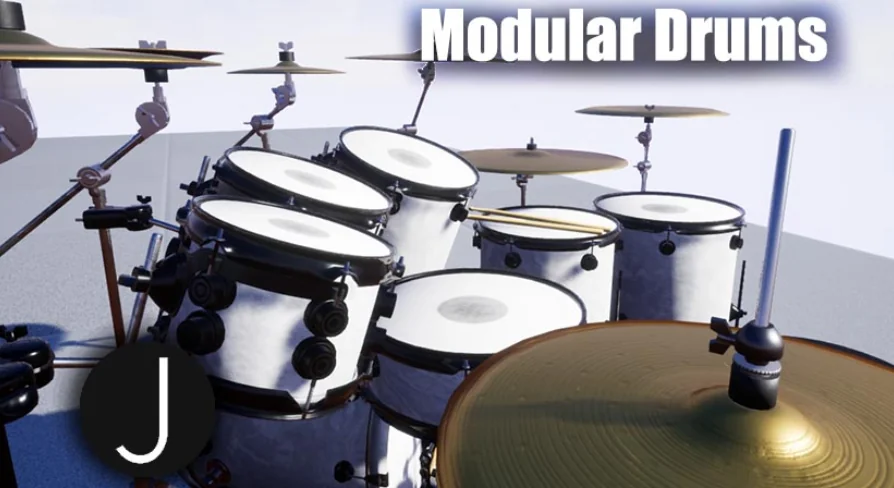
Integrating acoustic percussion into a 3D environment begins with choosing between instant composition and granular part-by-part assembly. Modular Drums Pack structures this workflow through an array of 19 specialized blueprints. When an environment requires immediate dressing, four pre-assembled drum kits allow instant placement into a level, establishing standard drum positions, stands, and hardware balance without manual alignment.
For bespoke setups, production workflows shift toward the 15 isolated element blueprints. Placing these blueprints individually into an environment allows level designers to construct irregular, genre-specific, or scene-tailored kit layouts. Whether staging a minimalist three-piece jazz setup, an expansive heavy-metal rack, or a rehearsal space with scattered percussion elements, the isolated blueprints maintain identical configuration flexibility to the pre-built counterparts. You drag the desired drum or cymbal blueprint directly into the viewport, position it against existing hardware or stands, and access component parameters immediately.
Customizing Lugs, Mounts, and Colors in the Details Panel
Parameter control is unified directly within the details panel of each placed blueprint. Rather than opening static mesh assets individually or editing base materials across multiple folders, visual changes take place at the instance level. Selecting any drum blueprint in the viewport reveals properties dedicated to hardware variations and shell aesthetics.
Hardware customization centers on swappable lugs and mounts. Different drum shells utilize distinct lug profiles to change the mechanical look of the rim assembly. By selecting alternative designs directly inside the details panel dropdowns, the blueprint automatically updates the corresponding sub-meshes across the shell perimeter. Mount selections operate on the same logic, swapping the attachment hardware that connects toms, cymbals, or auxiliary shells to stands. This setup allows artists to differentiate multiple drum sets within a single project, preventing recurring kits from sharing identical mechanical hardware.
Shell finishes follow this same streamlined workflow. Multiple color variations exist per drum, allowing rapid shifts between neutral studio tones, vibrant performance finishes, or understated hardware treatments. Because these color switches are handled within the blueprint instance, individual kit pieces can either match a uniform kit aesthetic or carry mismatched shells to reflect improvised, gig-worn setups.
Mesh Library Architecture Across 100 Meshes and 19 Blueprints
Underpinning the blueprint framework is an asset library containing over 100 meshes. This extensive mesh pool breaks down drum hardware into its fundamental components: shells, hoops, tension rods, mounting brackets, cymbals, stands, and base feet. Rather than baking drums and supporting hardware into single unchangeable meshes, the division into discrete assets provides the foundation for the modular system.
The 19 blueprints assemble these meshes into practical units:
4 pre-built drum kit blueprints configured for immediate drag-and-drop placement
15 isolated element blueprints isolating individual drums, cymbals, and hardware units
Over 100 individual static meshes providing the building blocks for alternate hardware setups
Interchangeable lug meshes selectable through blueprint parameters
Interchangeable mount meshes for varied mounting arm and stand connections
By separating the structural metalwork from the resonating shells and cymbals, the mesh library prevents duplicate visual artifacts. A snare drum blueprint utilizes dedicated shell and lug combinations, while rack toms, floor toms, and kick drums tap into appropriately scaled variations of hardware pieces. Cymbals function as separate modular entities, enabling realistic stacking, height adjustments, and angle positioning relative to drum thrones and kick pedals.
PBR Material Finishes and Scene Staging
Surfaces throughout Modular Drums Pack utilize a realistic PBR workflow. Percussion sets inherently present complex material challenges, combining polished chrome or painted metals on lugs and stands, semi-translucent or coated synthetic drumheads, hammered bronze alloys on cymbals, and lacquered wood or synthetic wraps across the main shells. The PBR texturing responds accurately to directional lights, stage spotlights, and local reflections within real-time rendering environments.
Reflective metals on hoops, tension lugs, and cymbal surfaces respond naturally to environmental lighting shifts. A stage scene lit with high-intensity colored spotlights produces crisp specular highlights across the cymbal ridges and chrome stands, while a dimly lit basement rehearsal room captures diffuse, muted responses across the painted shells. The included color options maintain balanced roughness and metallic values across all variants, ensuring that a dark shell finish preserves the same surface realism as a brighter coating.
Workflow Integration and Production Staging
Because the pack functions on modular blueprints, integration into complex scene frameworks remains straightforward. For projects utilizing specific game systems or interactive world setups, such as the Basic Horror Template, staging musical instruments often requires dependable performance and quick mesh adjustments. Abandoned concert halls, dilapidated residential basements, and eerie performance spaces frequently rely on environmental storytelling where instrument sets must look authentic yet weathered or customized.
The ability to deploy isolated element blueprints allows level creators to scatter broken kit pieces, overturned stands, or lone cymbals across a floor without needing to break apart a complex monolithic mesh. Alternatively, using the pre-built blueprints lets developers populate functional music spaces in seconds. Fine-tuning the kit via the details panel ensures that scene dressers, level artists, and environment creators spend less time managing pivot points and mesh hierarchies, leaving more time to focus on atmospheric lighting, framing, and level composition.
 Musical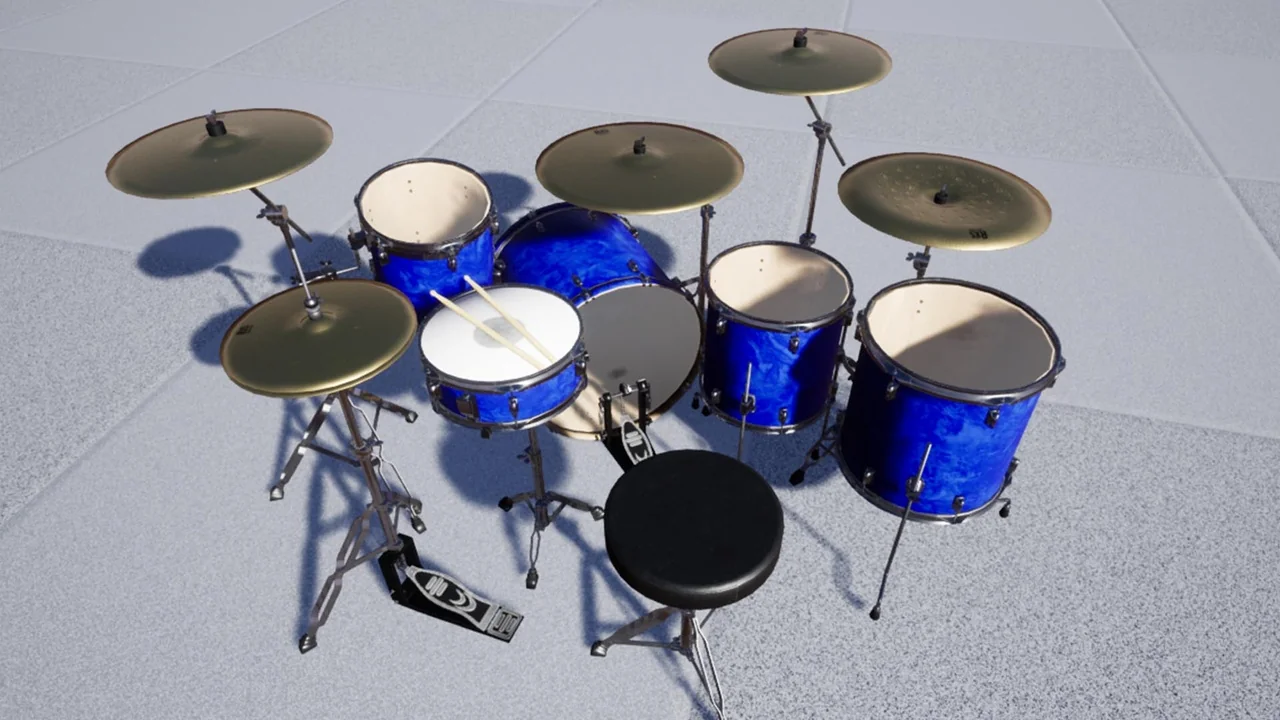
 Musical
 Musical
 Procedural Systems