"031373f479d9561a"{"id":"1000231","slug":"landscape-procedural-desert-sandstorm","title":"Landscape Procedural Desert - Sandstorm","category":"Desert","engine":"5.0+","assetVersion":"","engineVersion":"Engine Version: 5.0+","tag":"Desert","accent":"blue","visual":"city","summary":"Generate massive open-world desert landscapes in under 10 minutes using a 12-layer auto-material, procedural foliage spawners, and player-attached sandstorm VFX","platform":"Unreal Engine","publishedAt":"2026-06-28T07:21:47.532Z","updatedAt":"2026-06-28T07:21:47.532Z","sourceNotes":[],"fileContents":[],"compatibility":["Unreal Engine","Engine Version: 5.0+"],"featuredImage":{"alt":"Landscape Procedural Desert - Sandstorm","src":"/wp-content/uploads/published/2026/06/a73f7d583dbc-1031ec2f-55e0-4db1-b4d5-a7a312b642f3-e5533e3ac9.webp"},"hasDownloadLink":true,"downloads":1,"terms":[{"taxonomy":"category","slug":"desert","name":"Desert"}],"galleryImages":[{"src":"/wp-content/uploads/published/2026/06/4fa8d77395e5-b2cc2f3d-8594-4092-9916-7003e75a5849-af66562cd5.webp","alt":"Landscape Procedural Desert - Sandstorm"},{"src":"/wp-content/uploads/published/2026/06/9669c08774a7-54eb1dfd-32a9-43f5-b3a0-b5778b58cd6a-194a2fd4a4.webp","alt":"Landscape Procedural Desert - Sandstorm"},{"src":"/wp-content/uploads/published/2026/06/eb75292a9d7d-c4cb482d-e736-482d-9315-82e6aceed7e7-1f93918591.webp","alt":"Landscape Procedural Desert - Sandstorm"},{"src":"/wp-content/uploads/published/2026/06/4d91b9b94e1c-92bf2893-dbd9-4b94-aace-dec9e057c0b3-c96ac200d6.webp","alt":"Landscape Procedural Desert - Sandstorm"},{"src":"/wp-content/uploads/published/2026/06/be9daa675797-6aa9fcf1-497b-484d-98ed-0009b3938178-8203d695ac.webp","alt":"Landscape Procedural Desert - Sandstorm"},{"src":"/wp-content/uploads/published/2026/06/451dbb7ec42b-278c9617-71fb-4115-9a37-194fac886d5f-941aed6159.webp","alt":"Landscape Procedural Desert - Sandstorm"},{"src":"/wp-content/uploads/published/2026/06/c6d221cb650a-f66a3a6e-955e-4b9e-842f-a3ba3548c7bb-68510e526f.webp","alt":"Landscape Procedural Desert - Sandstorm"},{"src":"/wp-content/uploads/published/2026/06/49426f14b220-6f684473-78a0-4b1a-91db-37a3a7853044-ed56e4f080.webp","alt":"Landscape Procedural Desert - Sandstorm"},{"src":"/wp-content/uploads/published/2026/06/49610bdaa208-ac6f8029-44eb-4246-b180-df316ade84cd-74e434d6e7.webp","alt":"Landscape Procedural Desert - Sandstorm"},{"src":"/wp-content/uploads/published/2026/06/804ac8e53186-ea58d23b-4382-49c9-9f82-e39fbf4372a9-d02c843446.webp","alt":"Landscape Procedural Desert - Sandstorm"}],"accessPanel":{"kind":"resource","title":"Download this resource","eyebrow":"Free Download","message":"Log in or create a free account to start your download.","fileName":"Content.7z","safetyNote":"Resources are manually reviewed before listing to improve quality and reduce obvious risks.","actionLabel":"Download Free","resourceType":"Resource archive"},"contentHtml":"\u003ch2\u003eGenerating 64-Square-Kilometer Open-World Landscapes\u003c/h2\u003e\n\u003cp\u003eBuilding massive, convincing arid environments manually requires placing thousands of individual rocks and plants across miles of terrain, which quickly becomes an impossible bottleneck for small teams. This procedural generation workflow directly addresses that limitation, allowing developers to fully texture and populate a sprawling open-world scene in less than ten minutes.\u003c/p\u003e\n\u003cp\u003eThe framework relies on a highly adaptable workflow that responds directly to the terrain mesh itself, regardless of the initial creation method. Whether a developer imports a high-resolution real-world heightmap, utilizes custom alpha brushes to stamp dunes, or shapes the topography using the classic sculpting tools inside Unreal Engine 5, the environment automatically updates its layout to match the new elevation and slope data. To handle this immense scale, the included 64-square-kilometer rocky desert example map, which renders at an 8k resolution, utilizes the engine's World Partition system. Because of this memory management approach, the landscape regions remain unloaded upon initially opening the demo map to save overhead. Developers simply navigate to the World Partition tab, select all the grid regions, right-click the selection, and press \"Load Regions from Selection\" to reveal the full environment inside the editor, a step only required once per project.\u003c/p\u003e\n\u003ch2\u003eDriving Biomes with the 12-Layer Auto-Material\u003c/h2\u003e\n\u003cp\u003eAt the core of the environment generation sits a deeply customizable 12-layer auto-material designed specifically for dry, sandy biomes. This material handles the heavy lifting of blending sand, sandstone, and dry dirt across the sprawling topography without requiring manual painting for every biome transition or elevation change.\u003c/p\u003e\n\u003cp\u003eBy exposing over 100 distinct parameters, the material provides extensive control over the final aesthetic and atmospheric conditions of the desert. Developers can fine-tune specific visual elements such as foliage color and color variation multipliers to achieve a distinct art direction, ensuring the procedural output matches the intended tone of the game. Beyond projecting textures onto the ground, this auto-material is actively responsible for the automatic, localized spawning of 3D foliage. Assets like desert grass and low-lying ground plants are generated dynamically around the player character as they move through the world. For the most realistic visual results, pairing this automated texturing and spawning system with a high-quality, real-world landscape heightmap provides the ideal natural foundation for the procedural generation to build upon.\u003c/p\u003e\n\u003ch2\u003eOptimizing Procedural Desert Foliage and Nanite Rocks\u003c/h2\u003e\n\u003cp\u003ePopulating a massive dry biome with specialized vegetation like cacti, baobabs, acacias, and palms requires aggressive optimization to maintain stable frame rates during gameplay. Procedural foliage spawners are included alongside the auto-material to quickly distribute these larger, distinct assets across the world with just a few clicks, bypassing manual placement entirely.\u003c/p\u003e\n\u003cp\u003eTo ensure the environment remains performant across vast distances, every piece of vegetation incorporates carefully structured Level of Detail (LOD) transitions. The distant tree models rely on extremely lightweight billboards, consisting of just two triangles per tree, drastically reducing the rendering overhead for distant palm oases or sparse acacia scrubland on the horizon. Meanwhile, the included sandstone and desert rocks are fully Nanite-enabled out of the box, allowing the engine to handle incredibly dense geometric detail up close without traditional polygon count bottlenecks. While the rocks currently leverage this virtualized geometry, the system anticipates future engine updates; once foliage becomes fully Nanite-enabled within Unreal Engine, remaining rendering bottlenecks tied to traditional LODs will naturally disappear.\u003c/p\u003e\n\u003ch2\u003eImplementing Player-Attached Sandstorm and Heat-Haze Effects\u003c/h2\u003e\n\u003cp\u003eSimulating complex, volumetric weather systems like blinding sandstorms and intense thermal distortion across a 64-square-kilometer map can easily overwhelm a graphics card. To circumvent this massive resource drain, the environmental weather effects rely on a clever optical illusion utilizing specialized materials applied directly to flat planes.\u003c/p\u003e\n\u003cp\u003eThis localized rendering approach keeps GPU resource consumption exceptionally low, ensuring the weather effects can be deployed on massive maps without incurring a performance penalty proportional to the landscape's overall size. To configure this setup with a custom character, developers simply add a plane component for each desired effect, ensuring the \"cast shadows\" setting is disabled for the planes. The sandstorm material plane must be positioned roughly 40 to 80 units in front of the player camera, while the heat-haze plane sits much further back at 500 to 700 units. To ensure the implementation is handled correctly, developers can reference the included character model as a structural template. If a specific camera setup requires different plane distances, the materials feature highly tweakable parameters—such as wind strength, sandstorm intensity, wind speed, storm seed, and heat haze tiling—to recalibrate the visual output and maintain a convincing storm illusion.\u003c/p\u003e\n\u003ch2\u003eBalancing Lumen Lighting and Performance Settings\u003c/h2\u003e\n\u003cp\u003eThe procedural desert is built to support Unreal Engine 5.0 and above, fully optimized to take advantage of Lumen’s real-time global illumination systems. When utilizing the assets at their maximum visual potential, projects should be configured with both Dynamic Global Illumination and Reflection Methods explicitly set to Lumen, alongside Virtual Shadow Maps for highly detailed self-shadowing.\u003c/p\u003e\n\u003cp\u003ePushing real-time global illumination across heavily foliaged open worlds can introduce performance issues on lower-end hardware, requiring strategic adjustments within the project's rendering settings. Developers needing to reclaim frame rates can implement a reliable fallback strategy by disabling Lumen entirely and shifting the reflection method from Lumen to Screen Space. Reverting from Virtual Shadow Maps to standard Shadow Maps provides a massive performance boost; this single adjustment alone yields an immediate gain of at least 10 to 15 frames per second. These scalable optimization paths ensure that while the generation tools are suited to huge open-world games, the resulting landscapes can easily be tailored for smaller environments or hardware-constrained target platforms.\u003c/p\u003e\n\n\u003ch2\u003eExplore Similar Assets\u003c/h2\u003e\n\u003cul\u003e\n\u003cli\u003e\u003ca href=\"https://3dcghub.com/lidar-desert-landscape/\" title=\"LiDAR DESERT LANDSCAPE\"\u003eLiDAR DESERT LANDSCAPE\u003c/a\u003e\u003c/li\u003e\n\u003cli\u003e\u003ca href=\"https://3dcghub.com/mw-shrubs-bushes-biome/\" title=\"MW Shrubs \u0026amp; Bushes Biome\"\u003eMW Shrubs \u0026amp; Bushes Biome\u003c/a\u003e\u003c/li\u003e\n\u003cli\u003e\u003ca href=\"https://3dcghub.com/mw-dune-desert-biome/\" title=\"MW Dune Desert Biome\"\u003eMW Dune Desert Biome\u003c/a\u003e\u003c/li\u003e\n\u003cli\u003e\u003ca href=\"https://3dcghub.com/sand-dunes-landscape/\" title=\"Sand Dunes Landscape\"\u003eSand Dunes Landscape\u003c/a\u003e\u003c/li\u003e\n\u003cli\u003e\u003ca href=\"https://3dcghub.com/brushify-dunes-pack/\" title=\"Brushify - Dunes Pack\"\u003eBrushify - Dunes Pack\u003c/a\u003e\u003c/li\u003e\n\u003c/ul\u003e","contentTextLength":6723,"navigation":{"current":1118,"total":3223,"previous":{"id":"1000232","slug":"martian-surface","title":"Martian Surface","category":"Nature \u0026 Terrain","platform":"Unreal Engine","updatedAt":"2026-06-28T09:00:52.193Z"},"next":{"id":"1000230","slug":"knight-rocks","title":"Knight Rocks","category":"Mountain","platform":"Unreal Engine","updatedAt":"2026-06-27T20:46:00.053Z"}},"relatedResources":[{"id":"7737","slug":"lidar-desert-landscape","title":"LiDAR DESERT LANDSCAPE","category":"Desert","engine":"5.3+","assetVersion":"Engine version: 5.3+","engineVersion":"5.3","tag":"Desert","accent":"blue","visual":"city","summary":"Discover a massive 64-square-kilometer desert environment built from real-world LiDAR data. This pack features full Nanite and Lumen support, procedural mesh distribution, and highly customizable materials.","platform":"Unreal Engine","publishedAt":"2026-02-21T17:36:17.000Z","updatedAt":"2026-04-19T15:55:55.000Z","sourceNotes":[],"fileContents":[],"compatibility":["Unreal Engine","Engine version: 5.3+"],"featuredImage":{"alt":"LiDAR DESERT LANDSCAPE","src":"https://3dcghub.com/wp-content/uploads/2026/02/72f114e0-8d25-4525-a8ed-5ad9efaca8ef.webp"},"hasDownloadLink":true,"downloads":0},{"id":"7764","slug":"mw-shrubs-bushes-biome","title":"MW Shrubs \u0026 Bushes Biome","category":"Desert","engine":"5.0+","assetVersion":"Engine version: 5.0+","engineVersion":"5.2","tag":"Desert","accent":"blue","visual":"city","summary":"Transform your digital landscapes with the MW Shrubs \u0026 Bushes Biome. This asset pack uses photogrammetry and procedural generation to create stunningly realistic nature scenes in Unreal Engine 5.","platform":"Unreal Engine","publishedAt":"2026-02-21T17:43:08.000Z","updatedAt":"2026-04-19T15:55:55.000Z","sourceNotes":[],"fileContents":[],"compatibility":["Unreal Engine","Engine version: 5.0+"],"featuredImage":{"alt":"MW Shrubs \u0026 Bushes Biome","src":"https://3dcghub.com/wp-content/uploads/2026/02/2f2ac02a-265f-40ab-a253-918320657f4d.webp"},"hasDownloadLink":true,"downloads":0},{"id":"1000934","slug":"brushify-canyons-pack","title":"Brushify - Canyons Pack","category":"Desert","engine":"4.26+,5.0+","assetVersion":"","engineVersion":"Engine Version: 4.26+,5.0+","tag":"Desert","accent":"blue","visual":"mech","summary":"Canyon environment toolkit for Unreal Engine 5 with a playable level, alpha brushes, distance meshes, procedural spawners, and a biome-based landscape material.","platform":"Unreal Engine","publishedAt":"2026-08-10T02:36:50.580Z","updatedAt":"2026-08-10T02:36:50.580Z","sourceNotes":[],"fileContents":[],"compatibility":["Unreal Engine","Engine Version: 4.26+,5.0+"],"featuredImage":{"alt":"Brushify - Canyons Pack","src":"/wp-content/uploads/published/2026/08/b5fc4aed03c2-4a924bfd-4d43-473d-8806-44ebc7da6204-f15c281bbf.webp"},"hasDownloadLink":true,"downloads":2}]}
Desert
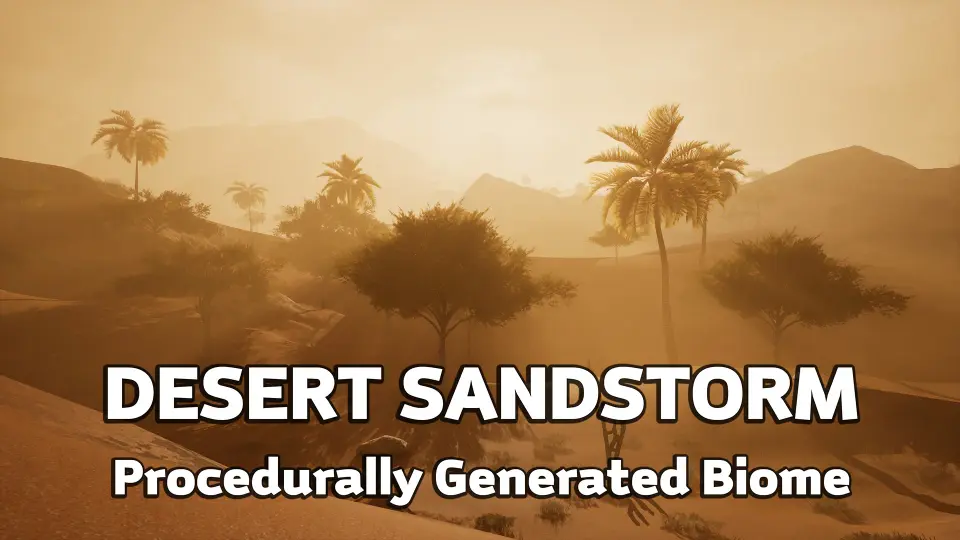
Landscape Procedural Desert - Sandstorm
Generate massive open-world desert landscapes in under 10 minutes using a 12-layer auto-material, procedural foliage spawners, and player-attached sandstorm VFX
Category:Unreal Engine,DesertPlatform: Unreal EngineEngine Version: 5.0+Published: Jun 28, 2026
Building massive, convincing arid environments manually requires placing thousands of individual rocks and plants across miles of terrain, which quickly becomes an impossible bottleneck for small teams. This procedural generation workflow directly addresses that limitation, allowing developers to fully texture and populate a sprawling open-world scene in less than ten minutes.
The framework relies on a highly adaptable workflow that responds directly to the terrain mesh itself, regardless of the initial creation method. Whether a developer imports a high-resolution real-world heightmap, utilizes custom alpha brushes to stamp dunes, or shapes the topography using the classic sculpting tools inside Unreal Engine 5, the environment automatically updates its layout to match the new elevation and slope data. To handle this immense scale, the included 64-square-kilometer rocky desert example map, which renders at an 8k resolution, utilizes the engine's World Partition system. Because of this memory management approach, the landscape regions remain unloaded upon initially opening the demo map to save overhead. Developers simply navigate to the World Partition tab, select all the grid regions, right-click the selection, and press "Load Regions from Selection" to reveal the full environment inside the editor, a step only required once per project.
Driving Biomes with the 12-Layer Auto-Material
At the core of the environment generation sits a deeply customizable 12-layer auto-material designed specifically for dry, sandy biomes. This material handles the heavy lifting of blending sand, sandstone, and dry dirt across the sprawling topography without requiring manual painting for every biome transition or elevation change.
By exposing over 100 distinct parameters, the material provides extensive control over the final aesthetic and atmospheric conditions of the desert. Developers can fine-tune specific visual elements such as foliage color and color variation multipliers to achieve a distinct art direction, ensuring the procedural output matches the intended tone of the game. Beyond projecting textures onto the ground, this auto-material is actively responsible for the automatic, localized spawning of 3D foliage. Assets like desert grass and low-lying ground plants are generated dynamically around the player character as they move through the world. For the most realistic visual results, pairing this automated texturing and spawning system with a high-quality, real-world landscape heightmap provides the ideal natural foundation for the procedural generation to build upon.
Optimizing Procedural Desert Foliage and Nanite Rocks
Populating a massive dry biome with specialized vegetation like cacti, baobabs, acacias, and palms requires aggressive optimization to maintain stable frame rates during gameplay. Procedural foliage spawners are included alongside the auto-material to quickly distribute these larger, distinct assets across the world with just a few clicks, bypassing manual placement entirely.
To ensure the environment remains performant across vast distances, every piece of vegetation incorporates carefully structured Level of Detail (LOD) transitions. The distant tree models rely on extremely lightweight billboards, consisting of just two triangles per tree, drastically reducing the rendering overhead for distant palm oases or sparse acacia scrubland on the horizon. Meanwhile, the included sandstone and desert rocks are fully Nanite-enabled out of the box, allowing the engine to handle incredibly dense geometric detail up close without traditional polygon count bottlenecks. While the rocks currently leverage this virtualized geometry, the system anticipates future engine updates; once foliage becomes fully Nanite-enabled within Unreal Engine, remaining rendering bottlenecks tied to traditional LODs will naturally disappear.
Implementing Player-Attached Sandstorm and Heat-Haze Effects
Simulating complex, volumetric weather systems like blinding sandstorms and intense thermal distortion across a 64-square-kilometer map can easily overwhelm a graphics card. To circumvent this massive resource drain, the environmental weather effects rely on a clever optical illusion utilizing specialized materials applied directly to flat planes.
This localized rendering approach keeps GPU resource consumption exceptionally low, ensuring the weather effects can be deployed on massive maps without incurring a performance penalty proportional to the landscape's overall size. To configure this setup with a custom character, developers simply add a plane component for each desired effect, ensuring the "cast shadows" setting is disabled for the planes. The sandstorm material plane must be positioned roughly 40 to 80 units in front of the player camera, while the heat-haze plane sits much further back at 500 to 700 units. To ensure the implementation is handled correctly, developers can reference the included character model as a structural template. If a specific camera setup requires different plane distances, the materials feature highly tweakable parameters—such as wind strength, sandstorm intensity, wind speed, storm seed, and heat haze tiling—to recalibrate the visual output and maintain a convincing storm illusion.
Balancing Lumen Lighting and Performance Settings
The procedural desert is built to support Unreal Engine 5.0 and above, fully optimized to take advantage of Lumen’s real-time global illumination systems. When utilizing the assets at their maximum visual potential, projects should be configured with both Dynamic Global Illumination and Reflection Methods explicitly set to Lumen, alongside Virtual Shadow Maps for highly detailed self-shadowing.
Pushing real-time global illumination across heavily foliaged open worlds can introduce performance issues on lower-end hardware, requiring strategic adjustments within the project's rendering settings. Developers needing to reclaim frame rates can implement a reliable fallback strategy by disabling Lumen entirely and shifting the reflection method from Lumen to Screen Space. Reverting from Virtual Shadow Maps to standard Shadow Maps provides a massive performance boost; this single adjustment alone yields an immediate gain of at least 10 to 15 frames per second. These scalable optimization paths ensure that while the generation tools are suited to huge open-world games, the resulting landscapes can easily be tailored for smaller environments or hardware-constrained target platforms.
 Desert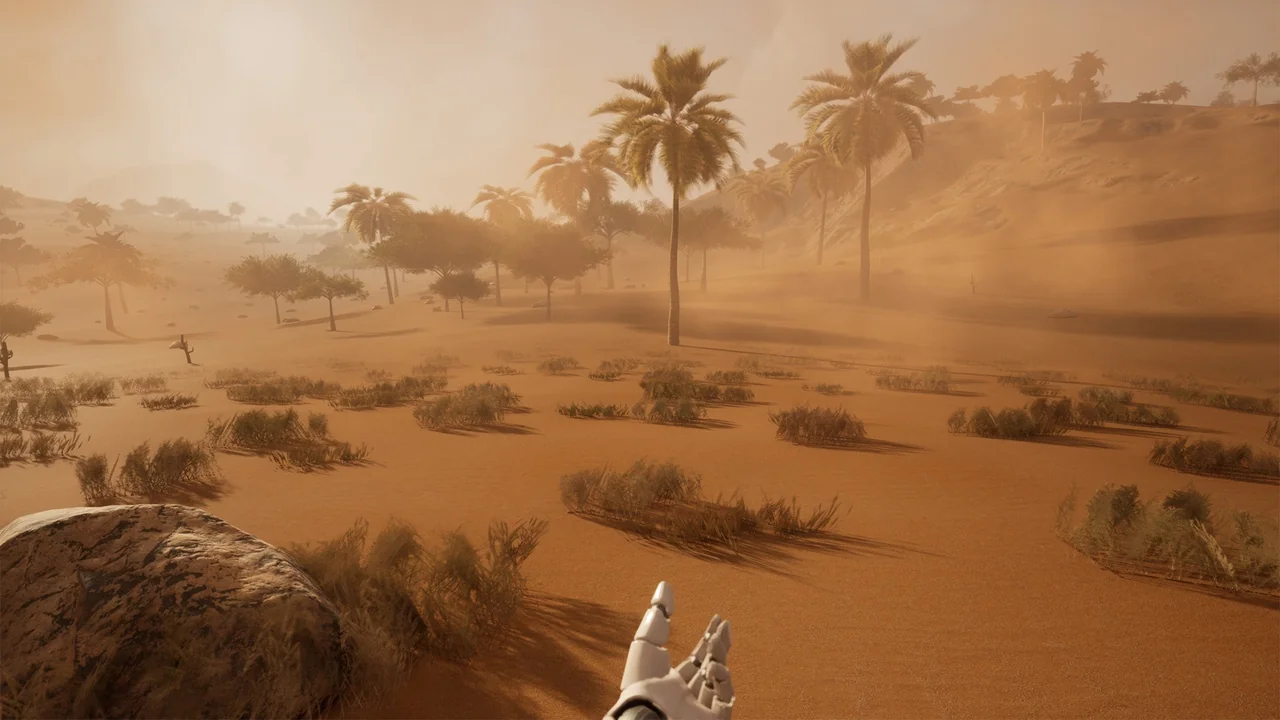
 Desert
 Desert
 Desert