"0341a2901a4ae9aa"{"id":"8614","slug":"highway-environment","title":"Highway - Environment","category":"Industrial","engine":"4.26+,5.0+","assetVersion":"Engine version: 4.26+,5.0+","engineVersion":"4.18","tag":"Industrial","accent":"blue","visual":"city","summary":"Create realistic transit scenes with the Highway - Environment asset pack. This collection features optimized models, modular roads, and Pivot Painter foliage for Unreal Engine.","platform":"Unreal Engine","publishedAt":"2026-02-23T18:09:10.000Z","updatedAt":"2026-04-19T15:55:23.000Z","sourceNotes":[],"fileContents":[],"compatibility":["Unreal Engine","Engine version: 4.26+,5.0+"],"featuredImage":{"alt":"Highway - Environment","src":"https://3dcghub.com/wp-content/uploads/2026/02/2f425726-1b22-4cef-ac57-5bacf8136ce9.webp"},"hasDownloadLink":true,"downloads":1,"terms":[{"taxonomy":"category","slug":"industrial-environments","name":"Industrial"},{"taxonomy":"post_tag","slug":"3d-environment-assets","name":"3D environment assets"},{"taxonomy":"post_tag","slug":"game-ready-models","name":"game-ready models"},{"taxonomy":"post_tag","slug":"highway-environment","name":"Highway - Environment"},{"taxonomy":"post_tag","slug":"pivot-painter-foliage","name":"Pivot Painter Foliage"}],"galleryImages":[{"src":"https://3dcghub.com/wp-content/uploads/2026/02/0a9d32f82a12_4be8dc74-f759-41ab-ab46-a90b46aa487b.webp","alt":"Highway - Environment"},{"src":"https://3dcghub.com/wp-content/uploads/2026/02/9bbe877cb813_484b1e8f-8ca5-4b33-aa99-41966aebc895.webp","alt":"Highway - Environment"},{"src":"https://3dcghub.com/wp-content/uploads/2026/02/d67481876485_a074c0c3-43c0-4758-975e-0ca5afe65878.webp","alt":"Highway - Environment"},{"src":"https://3dcghub.com/wp-content/uploads/2026/02/80cdd2b8d90d_e2987ce4-a081-4d92-9a4c-a28886c37ced.webp","alt":"Highway - Environment"},{"src":"https://3dcghub.com/wp-content/uploads/2026/02/99a0b2b5c202_b7502d72-8fe8-4cf6-b5cd-6b92247486d8.webp","alt":"Highway - Environment"},{"src":"https://3dcghub.com/wp-content/uploads/2026/02/f001ad8a55df_64872f9b-262a-4e7f-919f-7ea06fea6a32.webp","alt":"Highway - Environment"}],"accessPanel":{"kind":"resource","title":"Access this resource","eyebrow":"Free Download","message":"Log in or create a free account to start your download.","fileName":"Content.7z","safetyNote":"All resources are 100% manually reviewed to eliminate all risks.","actionLabel":"Download Free","resourceType":"Resource archive"},"contentHtml":"\u003ch2\u003eIntroduction to the Realistic Highway Assets\u003c/h2\u003e\n\u003cp\u003eHighway - Environment is a versatile asset pack designed for developers who need realistic roadside scenery in Unreal Engine. This collection offers a professional set of tools for building believable industrial and transit zones. Therefore, it is an ideal choice for racing games, open-world adventures, or cinematic projects. The package includes a detailed demo map to help you get started immediately.\u003c/p\u003e\n\n\u003ch2\u003ePerformance and Optimization\u003c/h2\u003e\n\u003cp\u003eOptimization is a primary focus for these assets. Every model is game-ready and carefully constructed to maintain high performance. For instance, small assets maintain a texel density of around 1k per square meter. Larger structures utilize layered materials with 2k tiling textures to ensure visual fidelity. Consequently, your scenes will look sharp without sacrificing frame rates. Furthermore, the tiling texture scale is easily customizable through Material Instances.\u003c/p\u003e\n\n\u003ch3\u003eKey Technical Features\u003c/h3\u003e\n\u003cul\u003e\n \u003cli\u003eOptimized 3D models ready for game integration.\u003c/li\u003e\n \u003cli\u003eHigh-quality texel density for consistent visual quality.\u003c/li\u003e\n \u003cli\u003eLayered materials with customizable tiling textures.\u003c/li\u003e\n \u003cli\u003eIncluded demo map showcasing realistic world elements.\u003c/li\u003e\n\u003c/ul\u003e\n\n\u003ch2\u003eAdvanced Foliage and Vegetation\u003c/h2\u003e\n\u003cp\u003eThe foliage system is a significant highlight of the Highway - Environment pack. The creator has integrated Pivot Painter features into the vegetation set. This technology allows for complex, realistic wind movements and interactions. Furthermore, the pack includes a specialized demo map to showcase these advanced foliage effects. This ensures that your Highway - Environment feels alive and dynamic rather than static.\u003c/p\u003e\n\n\u003ch2\u003eModularity and Construction\u003c/h2\u003e\n\u003cp\u003eBuilding a world requires flexible components. The package provides a modular road set consisting of various static meshes. However, please note that these meshes are not configured for Landscape Splines. Instead, they are designed for manual placement to ensure specific architectural looks. Meanwhile, the buildings in this set are unique, non-modular structures that add character to the landscape. Additionally, the set includes realistic props like industrial fences and traffic signs to complete the environment.\u003c/p\u003e\n\n\u003ch2\u003eUnreal Engine 5 Compatibility\u003c/h2\u003e\n\u003cp\u003eUsers working in Unreal Engine 5 may need to adjust their project settings for the best results. By default, the engine uses Dynamic Global Illumination and Virtual Shadow Maps. To match the intended aesthetic of the Highway - Environment, you can change the Dynamic GI to 'None' in the rendering settings. In addition, switching the Shadow Map method to 'Shadow Maps' is recommended. Alternatively, you can still use Virtual Shadow Maps if you set the Dynamic Shadow Distance of the Directional Light to zero.\u003c/p\u003e\n\n\u003ch3\u003eRecommended Settings for UE5\u003c/h3\u003e\n\u003col\u003e\n \u003cli\u003eNavigate to Project Settings \u003e Engine \u003e Rendering.\u003c/li\u003e\n \u003cli\u003eSet Dynamic Global Illumination Method to None.\u003c/li\u003e\n \u003cli\u003eSet Shadow Map Method to Shadow Maps.\u003c/li\u003e\n \u003cli\u003eAdjust Directional Light settings for custom shadow distances.\u003c/li\u003e\n\u003c/ol\u003e\n\n\u003ch2\u003eBest Fit\u003c/h2\u003e\n\u003cp\u003eFor teams considering it, the Highway - Environment provides a robust foundation for modern level design. It combines technical optimization with high-quality visual assets. Whether you are building a vast highway or a small industrial corner, these resources deliver professional results. Finally, the included demo maps serve as an excellent reference for lighting and layout.\u003c/p\u003e\n\n\u003ch2\u003eRelated Resources Worth Checking\u003c/h2\u003e\n\u003cul\u003e\n\u003cli\u003e\u003ca href=\"https://3dcghub.com/post-apocalyptic-city/\" title=\"Post Apocalyptic City\"\u003ePost Apocalyptic City\u003c/a\u003e\u003c/li\u003e\n\u003cli\u003e\u003ca href=\"https://3dcghub.com/postapo-car-wrecks-vol-01/\" title=\"PostApo Car Wrecks vol. 01\"\u003ePostApo Car Wrecks vol. 01\u003c/a\u003e\u003c/li\u003e\n\u003cli\u003e\u003ca href=\"https://3dcghub.com/street-creator-set/\" title=\"Street Creator Set\"\u003eStreet Creator Set\u003c/a\u003e\u003c/li\u003e\n\u003cli\u003e\u003ca href=\"https://3dcghub.com/bridges/\" title=\"Bridges\"\u003eBridges\u003c/a\u003e\u003c/li\u003e\n\u003cli\u003e\u003ca href=\"https://3dcghub.com/modular-tunnel-collection-vol-1/\" title=\"Modular Tunnel Collection – Vol. 1\"\u003eModular Tunnel Collection – Vol. 1\u003c/a\u003e\u003c/li\u003e\n\u003c/ul\u003e","contentTextLength":3529,"navigation":{"current":2975,"total":4017,"previous":{"id":"8623","slug":"industrial-area-hangar","title":"Industrial Area Hangar","category":"Industrial","platform":"Unreal Engine","updatedAt":"2026-04-19T15:55:23.000Z"},"next":{"id":"8704","slug":"sci-fi-port-environment","title":"Sci-fi Port Environment","category":"Industrial","platform":"Unreal Engine","updatedAt":"2026-04-19T15:55:22.000Z"}},"relatedResources":[{"id":"27159","slug":"junkyard-environment-14-assets","title":"Junkyard Environment / 14 Assets","category":"Industrial","engine":"4.26+,5.0+","assetVersion":"Engine version: 4.26+,5.0+","engineVersion":"","tag":"Industrial","accent":"blue","visual":"city","summary":"Junkyard Environment / 14 Assets gathers rusty vehicles, a crane, trucks, a pickup, and other junkyard pieces into a focused prop package. Its PBR workflow and optimized, modular direction make it useful for exterior scenes that need visual weight without l...","platform":"Unreal Engine","publishedAt":"2026-04-21T13:49:45.000Z","updatedAt":"2026-04-21T13:49:46.000Z","sourceNotes":[],"fileContents":[],"compatibility":["Unreal Engine","Engine version: 4.26+,5.0+"],"featuredImage":{"alt":"Junkyard Environment / 14 Assets","src":"https://3dcghub.com/wp-content/uploads/2026/04/ba5b2081c43f_7994d52c-7990-4428-84b6-ce1157a852f2.webp"},"hasDownloadLink":true,"downloads":0},{"id":"1000546","slug":"procedural-road-and-highway-tool-with-simple-vehicle-traffic","title":"Procedural Road And Highway Tool With Simple Vehicle Traffic","category":"Procedural Systems","engine":"4.26+,5.0+","assetVersion":"","engineVersion":"Engine Version: 4.26+,5.0+","tag":"Procedural Systems","accent":"blue","visual":"mech","summary":"Unreal Engine Blueprint tool for procedural roads, highways, bridges, and train tracks with spline-based generation, landscape deformation, and traffic spawner.","platform":"Unreal Engine","publishedAt":"2026-07-15T04:13:04.435Z","updatedAt":"2026-07-15T04:13:04.435Z","sourceNotes":[],"fileContents":[],"compatibility":["Unreal Engine","Engine Version: 4.26+,5.0+"],"featuredImage":{"alt":"Procedural Road And Highway Tool With Simple Vehicle Traffic","src":"/wp-content/uploads/published/2026/07/6e7951f23e2f-2fe34f13-8299-4e88-821d-c7764035437a-ded20f5dd1.webp"},"hasDownloadLink":true,"downloads":0},{"id":"8560","slug":"container-yard-environment-set","title":"Container Yard Environment Set","category":"Industrial","engine":"4.26+,5.0+","assetVersion":"Engine version: 4.26+,5.0+","engineVersion":"4.16","tag":"Industrial","accent":"blue","visual":"city","summary":"Build detailed industrial landscapes with this comprehensive set of shipping containers and port assets. It features customizable materials and background elements for maximum realism.","platform":"Unreal Engine","publishedAt":"2026-02-23T17:50:40.000Z","updatedAt":"2026-04-19T15:55:24.000Z","sourceNotes":[],"fileContents":[],"compatibility":["Unreal Engine","Engine version: 4.26+,5.0+"],"featuredImage":{"alt":"Container Yard Environment Set","src":"https://3dcghub.com/wp-content/uploads/2026/02/f5c20195-e95e-4c0f-8b29-40e11412677d.webp"},"hasDownloadLink":true,"downloads":0}]}
Industrial
Highway - Environment
Create realistic transit scenes with the Highway - Environment asset pack. This collection features optimized models, modular roads, and Pivot Painter foliage for Unreal Engine.
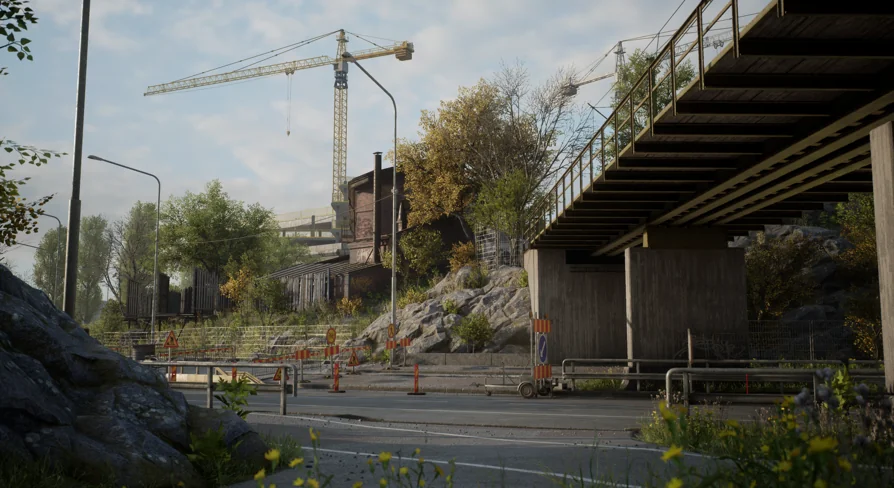
Highway - Environment is a versatile asset pack designed for developers who need realistic roadside scenery in Unreal Engine. This collection offers a professional set of tools for building believable industrial and transit zones. Therefore, it is an ideal choice for racing games, open-world adventures, or cinematic projects. The package includes a detailed demo map to help you get started immediately.
Performance and Optimization
Optimization is a primary focus for these assets. Every model is game-ready and carefully constructed to maintain high performance. For instance, small assets maintain a texel density of around 1k per square meter. Larger structures utilize layered materials with 2k tiling textures to ensure visual fidelity. Consequently, your scenes will look sharp without sacrificing frame rates. Furthermore, the tiling texture scale is easily customizable through Material Instances.
Key Technical Features
Optimized 3D models ready for game integration.
High-quality texel density for consistent visual quality.
Layered materials with customizable tiling textures.
Included demo map showcasing realistic world elements.
Advanced Foliage and Vegetation
The foliage system is a significant highlight of the Highway - Environment pack. The creator has integrated Pivot Painter features into the vegetation set. This technology allows for complex, realistic wind movements and interactions. Furthermore, the pack includes a specialized demo map to showcase these advanced foliage effects. This ensures that your Highway - Environment feels alive and dynamic rather than static.
Modularity and Construction
Building a world requires flexible components. The package provides a modular road set consisting of various static meshes. However, please note that these meshes are not configured for Landscape Splines. Instead, they are designed for manual placement to ensure specific architectural looks. Meanwhile, the buildings in this set are unique, non-modular structures that add character to the landscape. Additionally, the set includes realistic props like industrial fences and traffic signs to complete the environment.
Unreal Engine 5 Compatibility
Users working in Unreal Engine 5 may need to adjust their project settings for the best results. By default, the engine uses Dynamic Global Illumination and Virtual Shadow Maps. To match the intended aesthetic of the Highway - Environment, you can change the Dynamic GI to 'None' in the rendering settings. In addition, switching the Shadow Map method to 'Shadow Maps' is recommended. Alternatively, you can still use Virtual Shadow Maps if you set the Dynamic Shadow Distance of the Directional Light to zero.
Recommended Settings for UE5
Navigate to Project Settings > Engine > Rendering.
Set Dynamic Global Illumination Method to None.
Set Shadow Map Method to Shadow Maps.
Adjust Directional Light settings for custom shadow distances.
Best Fit
For teams considering it, the Highway - Environment provides a robust foundation for modern level design. It combines technical optimization with high-quality visual assets. Whether you are building a vast highway or a small industrial corner, these resources deliver professional results. Finally, the included demo maps serve as an excellent reference for lighting and layout.
 Industrial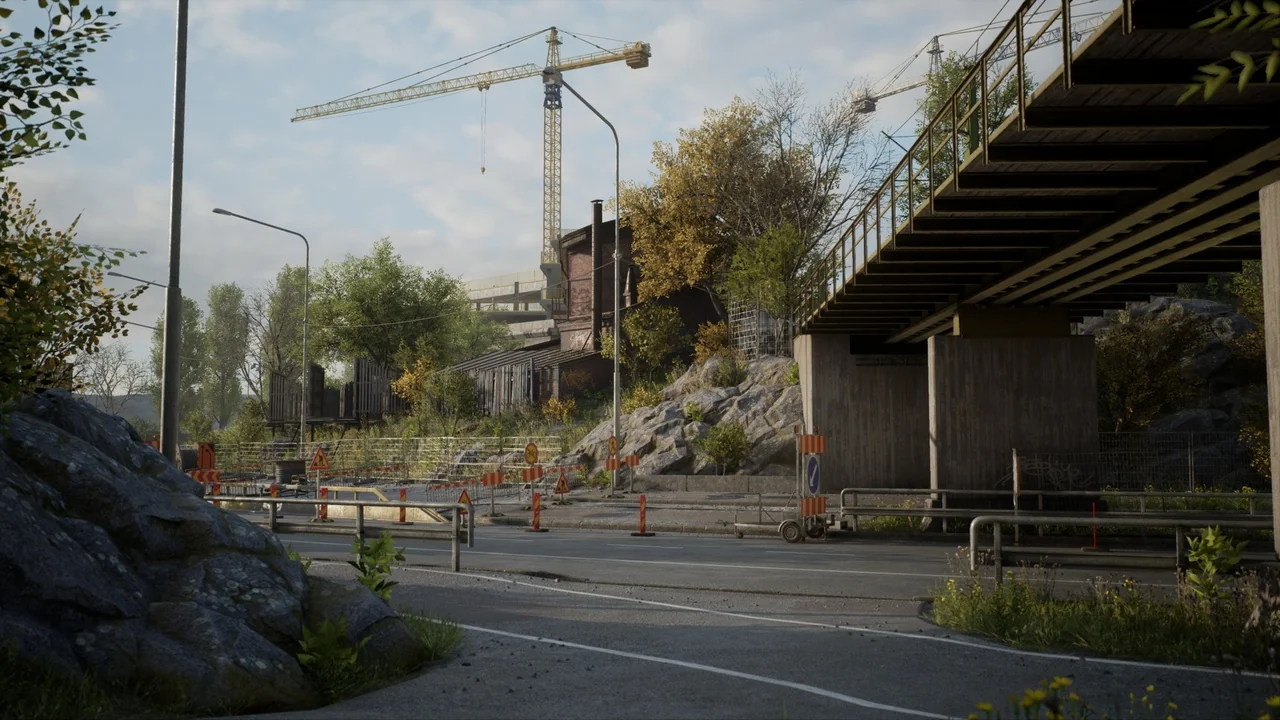
 Industrial
 Procedural Systems
 Industrial