"a19e0535960bd083"{"id":"1002051","slug":"heavy-hammer","title":"Heavy Hammer","category":"Combat","engine":"4.26+,5.0+","assetVersion":"","engineVersion":"Engine Version: 4.26+,5.0+","tag":"Combat","accent":"blue","visual":"mech","summary":"Detailed breakdown of the Heavy Hammer animation library, featuring 72 stylized handcrafted clips for combat, locomotion, and Spear\u0026Glaive compatibility.","platform":"Unreal Engine","publishedAt":"2026-10-26T15:08:02.290Z","updatedAt":"2026-10-26T15:08:02.290Z","sourceNotes":[],"fileContents":[],"compatibility":["Unreal Engine","Engine Version: 4.26+,5.0+"],"featuredImage":{"alt":"Heavy Hammer","src":"/wp-content/uploads/published/2026/10/cd2a5d87f425-1e6a3473-0a77-40a5-87b6-9a1c4d54b256-ab7bf8c436.webp"},"hasDownloadLink":true,"downloads":0,"terms":[{"taxonomy":"category","slug":"combat","name":"Combat"}],"galleryImages":[{"src":"/wp-content/uploads/published/2026/10/ccef929c8abe-cb0d4033-c144-4408-befb-9144939bf065-7f3848f792.webp","alt":"Heavy Hammer"},{"src":"/wp-content/uploads/published/2026/10/5083fab7e2c6-53b3b1ec-c398-4bd6-abb3-5cf187936008-9b69eb15ce.webp","alt":"Heavy Hammer"},{"src":"/wp-content/uploads/published/2026/10/fd0984c4f1c1-810dbefd-d22b-4c37-8646-d8885a466238-4d5ff55066.webp","alt":"Heavy Hammer"},{"src":"/wp-content/uploads/published/2026/10/f5e40a750c62-3d4838dc-e76b-49b2-9e3d-c0b809e7273a-b80bc2c922.webp","alt":"Heavy Hammer"},{"src":"/wp-content/uploads/published/2026/10/3625edb4fdb9-bb7bc320-ab11-4550-8323-28085cba4d71-d16ca95098.webp","alt":"Heavy Hammer"},{"src":"/wp-content/uploads/published/2026/10/b35a8e3f59e6-1eee2adc-1f8d-4e07-9cb3-e224f54321f3-9096bfe2be.webp","alt":"Heavy Hammer"},{"src":"/wp-content/uploads/published/2026/10/a640bbe38e2b-dfa04703-35d5-4daf-bdd9-aa313f363b9c-3d3b0022e6.webp","alt":"Heavy Hammer"},{"src":"/wp-content/uploads/published/2026/10/6ce8b9428c3a-440b4040-c64f-4f20-ab0c-939a521791e3-63108a9270.webp","alt":"Heavy Hammer"},{"src":"/wp-content/uploads/published/2026/10/f109053218a8-66129935-de47-403a-85ac-5ade7e4e38c3-a2ba44fbd7.webp","alt":"Heavy Hammer"}],"accessPanel":{"kind":"resource","title":"Download this resource","eyebrow":"Free Download","message":"Log in or create a free account to start your download.","fileName":"Content.7z","safetyNote":"Resources are manually reviewed before listing to improve quality and reduce obvious risks.","actionLabel":"Download Free","resourceType":"Resource archive"},"contentHtml":"\u003ch2\u003eConfiguring the Heavy Hammer Locomotion Pipeline\u003c/h2\u003e\n\u003cp\u003eIntegrating a large two-handed bludgeoning weapon into a character controller requires precise handling of character momentum, footing, and recovery. The Heavy Hammer animation set is focused on a substantial movement set, providing 32 distinct move animations alongside a dedicated idle pose, 3 turn sequences, and 3 jump animations. Establishing this locomotion framework begins with setting up directional movement trees capable of blending seamlessly between deliberate pacing, active exploration, and aggressive combat stances.\u003c/p\u003e\n\u003cp\u003eWith 32 movement clips available, characters can be configured with complex locomotion coverage. When building multi-directional blend spaces, these clips supply the necessary transitions for forward advances, lateral strafes, backwards steps, and acceleration changes while bearing the substantial mass of a heavy weapon. Implementing the base idle animation serves as the primary resting state, defining the character's posture, grip width, and center of gravity when holding the weapon at rest. Branching directly out of this resting position, the 3 turn animations allow the character to pivot smoothly in place without unnatural sliding across the ground surface, preserving foot planting when acquiring new targets.\u003c/p\u003e\n\u003cp\u003eVertical traversal is managed through the 3 jump animations. These provide dedicated assets for the launch phase, mid-air apex suspension, and the final impact landing. Because heavy weaponry carries pronounced kinetic energy downward, blending the jump landing directly back into either the base idle or one of the 32 directional movement cycles ensures that landing impacts feel grounded. Hooking the jump states into existing physics-driven velocity checks guarantees reliable ground detection across varied terrain elevations.\u003c/p\u003e \u003ch2\u003eSequencing Combos Across Twenty Attack Animations\u003c/h2\u003e\n\u003cp\u003eOffensive gameplay relies on the library of 20 attack animations, offering extensive options for structuring combo branches, power attacks, and momentum-driven strikes. Weapons in the hammer and axe categories demand distinct visual pacing: long windups, sudden forceful accelerations, and controlled recovery frames where the character wrestles with the physical momentum of the weapon head. Distributing these 20 attacks across distinct combat inputs enables developers to construct dynamic action systems.\u003c/p\u003e\n\u003cp\u003eA standard attack tree can be organized into tiered combinations. Light strike chains can draw from quicker sweeping or diagonal swings within the pool, keeping animation commit times relatively short to allow timely input reactions. Heavier strikes—such as descending overhead smashes, wide double-handed horizontal cleaves, and ground-shattering downward strikes—can be reserved for charged heavy attacks or combination finishers. The quantity of 20 unique attacks prevents combat encounters from devolving into repetitive visual loops, granting sufficient asset volume to designate specialized moves for sprinting attacks, dodges into counter-attacks, or directional command normals.\u003c/p\u003e\n\u003cp\u003eRoot motion or in-place translation setups can be tuned depending on the underlying character movement architecture. When utilizing root motion, the forward displacement contained within these 20 attack animations drives character advancement naturally during swings, closing distance against opponents without manual velocity nudges. For setups using purely code-driven character displacement, blending attack animations through upper-body layered state machines allows character feet to adjust while maintaining strike integrity above the waist.\u003c/p\u003e \u003ch2\u003eHit Reactions, Evasion Dodges, and Defeat States\u003c/h2\u003e\n\u003cp\u003eDefensive interactions and damage feedback are governed by 8 hit animations, 4 dodge variations, and 1 dead animation. Responsive combat mechanics require immediate visual cues whenever an entity receives an incoming blow. The 8 hit clips provide the necessary breadth to map distinct directional flinches and impact severities, such as front impacts, rear staggers, and side deflections. Separating hit reactions across these 8 variations ensures the combatant visually reacts according to the incoming angle and force of opponent strikes.\u003c/p\u003e\n\u003cp\u003eEvasive maneuvers are handled by 4 dedicated dodge animations. These allow four-way directional evasion, letting the character roll, slip, or step clear of incoming hazards to the front, back, left, or right. Because dodges carry specific invulnerability windows in many combat systems, pairing these 4 animations with state-machine cancels gives players reliable evasive tools that interrupt long recovery frames following an attack or heavy strike. The animations capture the shifting balance required to move quickly while wielding a hefty weapon, avoiding floaty or weightless evasive transitions.\u003c/p\u003e\n\u003cp\u003eConcluding the reactive state system is the single dead animation. Designed as the ultimate state transition, it transitions cleanly out of any active hit reaction or failed dodge. The death sequence commits fully to ground impact, providing an unambiguous terminal state that simplifies ragdoll blending or static corpse state handling upon the exhaustion of character health.\u003c/p\u003e \u003ch2\u003eStylized Handcrafted Artistry and Axe-Hammer Proportions\u003c/h2\u003e\n\u003cp\u003eThe Heavy Hammer collection is built with a handcrafted, stylized aesthetic tailored for fantasy weapon environments. Handcrafted keyframing emphasizes clear silhouettes, pronounced arcs, dynamic posing, and exaggerated anticipation frames that readable gameplay requires. Stylized visual pipelines benefit greatly from this deliberate approach to animation timing, where snappy execution curves make combat decisive and legible even amidst intense visual effects and busy environments.\u003c/p\u003e\n\u003cp\u003eAlthough named around the hammer archetype, the tagging and stylistic movement envelope explicitly support both hammer and axe combat conventions. Both weapon typologies share mechanical requirements: significant top-heavy weight distribution, broad rotational swinging planes, and aggressive follow-through phases. Whether the character model is rigged with a stylized stone warhammer, an ornate fantasy maul, or a broad two-handed battle axe, the kinetic delivery built into the striking poses matches the bludgeoning and cleaving behaviors common to heavy medieval and fantasy arms.\u003c/p\u003e \u003ch2\u003eAnimation State Blending with Spear\u0026Glaive Systems\u003c/h2\u003e\n\u003cp\u003eIn projects featuring varied weapon arsenals, asset interoperability streamlines character animation trees. The Heavy Hammer set is built with structural compatibility alongside Spear\u0026Glaive Animation assets. This design harmony makes it practical to construct a unified character controller that switches between long-reach polearms and heavy blunt weapons without requiring distinct base skeleton structures or completely conflicting state logic.\u003c/p\u003e\n\u003cp\u003eBecause the state flow mirrors companion polearm animations, developers can reuse core state machine transitions between weapon modes. The logic governing locomotion transitions, jumping phases, turn-in-place thresholds, and dodge timing can share identical variable inputs and conditional triggers. Swapping the active weapon mesh from a spear or glaive to a heavy hammer or axe simply requires pointing the animation state machine toward the corresponding Heavy Hammer animation blend spaces and montage tables, minimizing the setup overhead needed to expand character weapon rosters.\u003c/p\u003e\n\n\u003ch2\u003eMore From The Same Workflow\u003c/h2\u003e\n\u003cul\u003e\n\u003cli\u003e\u003ca href=\"https://3dcghub.com/hammer-animation-set/\" title=\"Hammer Animation Set\"\u003eHammer Animation Set\u003c/a\u003e\u003c/li\u003e\n\u003cli\u003e\u003ca href=\"https://3dcghub.com/2handed-hammer-animset/\" title=\"2Handed Hammer AnimSet\"\u003e2Handed Hammer AnimSet\u003c/a\u003e\u003c/li\u003e\n\u003cli\u003e\u003ca href=\"https://3dcghub.com/first-person-hammer/\" title=\"First Person Hammer\"\u003eFirst Person Hammer\u003c/a\u003e\u003c/li\u003e\n\u003cli\u003e\u003ca href=\"https://3dcghub.com/bossy-enemy-animation-pack/\" title=\"Bossy Enemy Animation Pack\"\u003eBossy Enemy Animation Pack\u003c/a\u003e\u003c/li\u003e\n\u003cli\u003e\u003ca href=\"https://3dcghub.com/92-animations-for-warrior/\" title=\"92 Animations For Warrior\"\u003e92 Animations For Warrior\u003c/a\u003e\u003c/li\u003e\n\u003c/ul\u003e","contentTextLength":7560,"navigation":{"current":40,"total":4026,"previous":{"id":"1002052","slug":"heavy-lancer-animset","title":"Heavy Lancer AnimSet","category":"Combat","platform":"Unreal Engine","updatedAt":"2026-10-26T15:09:11.486Z"},"next":{"id":"1002050","slug":"healing-spells-sounds","title":"Healing Spells Sounds","category":"Sound Effects","platform":"Unreal Engine","updatedAt":"2026-10-26T15:06:57.263Z"}},"relatedResources":[{"id":"1002046","slug":"hammer-animation-set","title":"Hammer Animation Set","category":"Combat","engine":"4.26+,5.0+","assetVersion":"","engineVersion":"Engine Version: 4.26+,5.0+","tag":"Combat","accent":"blue","visual":"animation","summary":"Explore the Hammer Animation Set, offering 49 hand-crafted third-person animations with root motion and in-place variations for heavy two-handed combat.","platform":"Unreal Engine","publishedAt":"2026-10-26T14:57:48.907Z","updatedAt":"2026-10-26T14:57:48.907Z","sourceNotes":[],"fileContents":[],"compatibility":["Unreal Engine","Engine Version: 4.26+,5.0+"],"featuredImage":{"alt":"Hammer Animation Set","src":"/wp-content/uploads/published/2026/10/b788d012ba99-a32dc10b-a1bb-42ab-b614-a6075ef87397-3a3774f110.webp"},"hasDownloadLink":true,"downloads":0},{"id":"27226","slug":"2handed-hammer-animset","title":"2Handed Hammer AnimSet","category":"Combat","engine":"4.26+,5.0+","assetVersion":"Engine version: 4.26+,5.0+","engineVersion":"","tag":"Combat","accent":"blue","visual":"animation","summary":"2Handed Hammer AnimSet focuses on heavy combat motion for action RPG warriors, barbarians, boss monsters, and giant monsters. It includes 81 animations and 9 poses, with movement, attack, reaction, and equipment states that support a full melee encounter.","platform":"Unreal Engine","publishedAt":"2026-04-22T14:10:33.000Z","updatedAt":"2026-04-22T14:10:35.000Z","sourceNotes":[],"fileContents":[],"compatibility":["Unreal Engine","Engine version: 4.26+,5.0+"],"featuredImage":{"alt":"2Handed Hammer AnimSet","src":"https://3dcghub.com/wp-content/uploads/2026/04/84840b81921d_de01ea22-c1a3-4726-8f47-8760cef1f727.webp"},"hasDownloadLink":true,"downloads":10},{"id":"1002052","slug":"heavy-lancer-animset","title":"Heavy Lancer AnimSet","category":"Combat","engine":"4.18+,5.0+","assetVersion":"","engineVersion":"Engine Version: 4.18+,5.0+","tag":"Combat","accent":"blue","visual":"mech","summary":"Explore the Heavy Lancer AnimSet featuring over 123 animations and 9 poses for heavy knight combat, monster hunting, locomotion, and defense systems.","platform":"Unreal Engine","publishedAt":"2026-10-26T15:09:11.486Z","updatedAt":"2026-10-26T15:09:11.486Z","sourceNotes":[],"fileContents":[],"compatibility":["Unreal Engine","Engine Version: 4.18+,5.0+"],"featuredImage":{"alt":"Heavy Lancer AnimSet","src":"/wp-content/uploads/published/2026/10/04f64a4d95ab-647eaf9b-f17d-4fb3-93d7-03e354d13072-78cb5b0068.webp"},"hasDownloadLink":true,"downloads":0}]}
Combat
Heavy Hammer
Detailed breakdown of the Heavy Hammer animation library, featuring 72 stylized handcrafted clips for combat, locomotion, and Spear&Glaive compatibility.
Category:Unreal Engine,CombatPlatform: Unreal EngineEngine Version: 4.26+,5.0+Published: Oct 26, 2026
Combat
Resource overview
Configuring the Heavy Hammer Locomotion Pipeline
Integrating a large two-handed bludgeoning weapon into a character controller requires precise handling of character momentum, footing, and recovery. The Heavy Hammer animation set is focused on a substantial movement set, providing 32 distinct move animations alongside a dedicated idle pose, 3 turn sequences, and 3 jump animations. Establishing this locomotion framework begins with setting up directional movement trees capable of blending seamlessly between deliberate pacing, active exploration, and aggressive combat stances.
With 32 movement clips available, characters can be configured with complex locomotion coverage. When building multi-directional blend spaces, these clips supply the necessary transitions for forward advances, lateral strafes, backwards steps, and acceleration changes while bearing the substantial mass of a heavy weapon. Implementing the base idle animation serves as the primary resting state, defining the character's posture, grip width, and center of gravity when holding the weapon at rest. Branching directly out of this resting position, the 3 turn animations allow the character to pivot smoothly in place without unnatural sliding across the ground surface, preserving foot planting when acquiring new targets.
Vertical traversal is managed through the 3 jump animations. These provide dedicated assets for the launch phase, mid-air apex suspension, and the final impact landing. Because heavy weaponry carries pronounced kinetic energy downward, blending the jump landing directly back into either the base idle or one of the 32 directional movement cycles ensures that landing impacts feel grounded. Hooking the jump states into existing physics-driven velocity checks guarantees reliable ground detection across varied terrain elevations.
Sequencing Combos Across Twenty Attack Animations
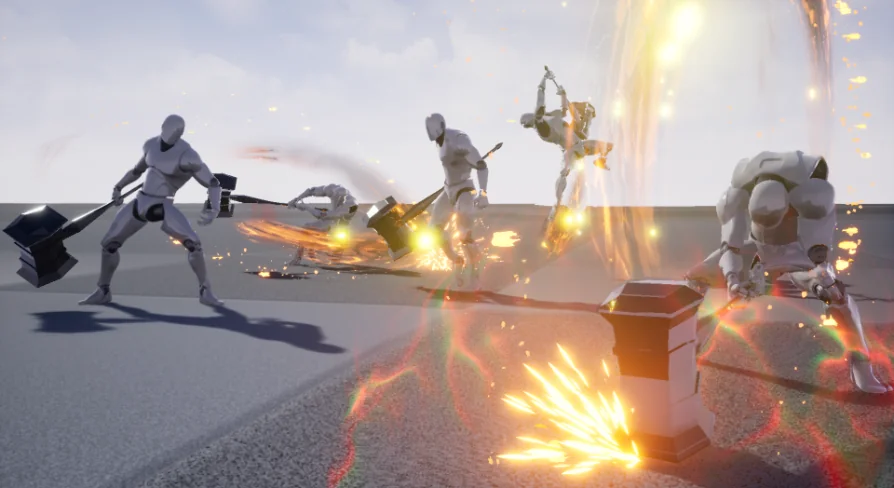
Offensive gameplay relies on the library of 20 attack animations, offering extensive options for structuring combo branches, power attacks, and momentum-driven strikes. Weapons in the hammer and axe categories demand distinct visual pacing: long windups, sudden forceful accelerations, and controlled recovery frames where the character wrestles with the physical momentum of the weapon head. Distributing these 20 attacks across distinct combat inputs enables developers to construct dynamic action systems.
A standard attack tree can be organized into tiered combinations. Light strike chains can draw from quicker sweeping or diagonal swings within the pool, keeping animation commit times relatively short to allow timely input reactions. Heavier strikes—such as descending overhead smashes, wide double-handed horizontal cleaves, and ground-shattering downward strikes—can be reserved for charged heavy attacks or combination finishers. The quantity of 20 unique attacks prevents combat encounters from devolving into repetitive visual loops, granting sufficient asset volume to designate specialized moves for sprinting attacks, dodges into counter-attacks, or directional command normals.
Root motion or in-place translation setups can be tuned depending on the underlying character movement architecture. When utilizing root motion, the forward displacement contained within these 20 attack animations drives character advancement naturally during swings, closing distance against opponents without manual velocity nudges. For setups using purely code-driven character displacement, blending attack animations through upper-body layered state machines allows character feet to adjust while maintaining strike integrity above the waist.
Hit Reactions, Evasion Dodges, and Defeat States
Defensive interactions and damage feedback are governed by 8 hit animations, 4 dodge variations, and 1 dead animation. Responsive combat mechanics require immediate visual cues whenever an entity receives an incoming blow. The 8 hit clips provide the necessary breadth to map distinct directional flinches and impact severities, such as front impacts, rear staggers, and side deflections. Separating hit reactions across these 8 variations ensures the combatant visually reacts according to the incoming angle and force of opponent strikes.
Evasive maneuvers are handled by 4 dedicated dodge animations. These allow four-way directional evasion, letting the character roll, slip, or step clear of incoming hazards to the front, back, left, or right. Because dodges carry specific invulnerability windows in many combat systems, pairing these 4 animations with state-machine cancels gives players reliable evasive tools that interrupt long recovery frames following an attack or heavy strike. The animations capture the shifting balance required to move quickly while wielding a hefty weapon, avoiding floaty or weightless evasive transitions.
Concluding the reactive state system is the single dead animation. Designed as the ultimate state transition, it transitions cleanly out of any active hit reaction or failed dodge. The death sequence commits fully to ground impact, providing an unambiguous terminal state that simplifies ragdoll blending or static corpse state handling upon the exhaustion of character health.
Stylized Handcrafted Artistry and Axe-Hammer Proportions
The Heavy Hammer collection is built with a handcrafted, stylized aesthetic tailored for fantasy weapon environments. Handcrafted keyframing emphasizes clear silhouettes, pronounced arcs, dynamic posing, and exaggerated anticipation frames that readable gameplay requires. Stylized visual pipelines benefit greatly from this deliberate approach to animation timing, where snappy execution curves make combat decisive and legible even amidst intense visual effects and busy environments.
Although named around the hammer archetype, the tagging and stylistic movement envelope explicitly support both hammer and axe combat conventions. Both weapon typologies share mechanical requirements: significant top-heavy weight distribution, broad rotational swinging planes, and aggressive follow-through phases. Whether the character model is rigged with a stylized stone warhammer, an ornate fantasy maul, or a broad two-handed battle axe, the kinetic delivery built into the striking poses matches the bludgeoning and cleaving behaviors common to heavy medieval and fantasy arms.
Animation State Blending with Spear&Glaive Systems
In projects featuring varied weapon arsenals, asset interoperability streamlines character animation trees. The Heavy Hammer set is built with structural compatibility alongside Spear&Glaive Animation assets. This design harmony makes it practical to construct a unified character controller that switches between long-reach polearms and heavy blunt weapons without requiring distinct base skeleton structures or completely conflicting state logic.
Because the state flow mirrors companion polearm animations, developers can reuse core state machine transitions between weapon modes. The logic governing locomotion transitions, jumping phases, turn-in-place thresholds, and dodge timing can share identical variable inputs and conditional triggers. Swapping the active weapon mesh from a spear or glaive to a heavy hammer or axe simply requires pointing the animation state machine toward the corresponding Heavy Hammer animation blend spaces and montage tables, minimizing the setup overhead needed to expand character weapon rosters.
 Combat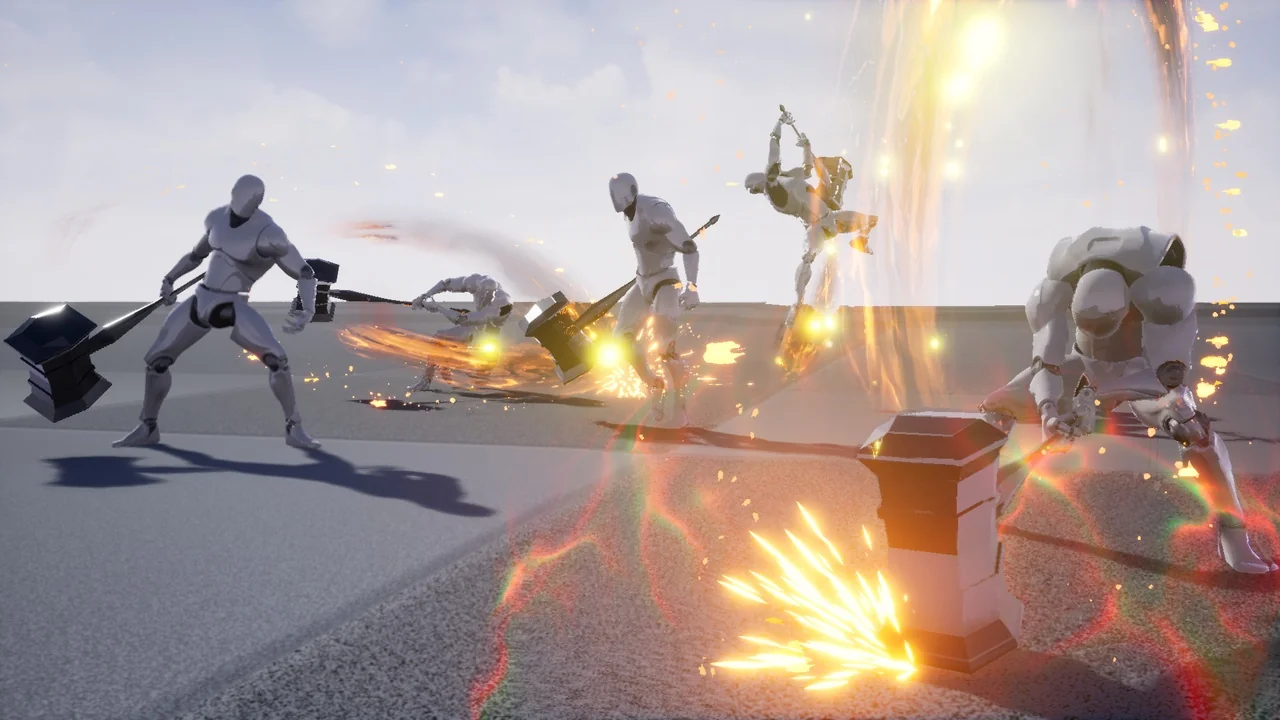
 Combat
 Combat
 Combat