"1f00f67f9253451b"{"id":"1000947","slug":"full-realtime-industrial-environment","title":"Full Realtime Industrial Environment","category":"Industrial","engine":"4.26+,5.0+","assetVersion":"Asset Version: v3","engineVersion":"Engine Version: 4.26+,5.0+","tag":"Industrial","accent":"blue","visual":"city","summary":"A real-time industrial environment with modules, decorators, instancing blueprints, day/night lighting, Pivot Painter wind, and building generation.","platform":"Unreal Engine","publishedAt":"2026-08-13T04:26:15.177Z","updatedAt":"2026-08-13T04:26:15.177Z","sourceNotes":[],"fileContents":[],"compatibility":["Unreal Engine","Asset Version: v3","Engine Version: 4.26+,5.0+"],"featuredImage":{"alt":"Full Realtime Industrial Environment","src":"/wp-content/uploads/published/2026/08/44a51096ed5c-ce2072b0-5139-40ba-b69b-146c752038bf-5c0d0bfa7c.webp"},"hasDownloadLink":true,"downloads":1,"terms":[{"taxonomy":"category","slug":"industrial-environments","name":"Industrial"}],"galleryImages":[{"src":"/wp-content/uploads/published/2026/08/db467c957942-acd667aa-b4cf-4d87-89e0-f39f9220fbe7-d277e4eb5f.webp","alt":"Full Realtime Industrial Environment"},{"src":"/wp-content/uploads/published/2026/08/f94aed8d6112-e9e9e904-66f8-4afb-ba15-5445dcb070c6-d7f594110b.webp","alt":"Full Realtime Industrial Environment"},{"src":"/wp-content/uploads/published/2026/08/05d7677451db-02fd1829-dbcd-4366-9a37-31accdb64b6b-f4e71c11bb.webp","alt":"Full Realtime Industrial Environment"},{"src":"/wp-content/uploads/published/2026/08/5c1ebb17e452-4e5a9f6b-0118-4b0e-8932-980369e43da5-dc4b45d778.webp","alt":"Full Realtime Industrial Environment"},{"src":"/wp-content/uploads/published/2026/08/91ed26836833-4ad92417-65fd-42ca-9ffd-0e4869a75e4f-431b16cf3d.webp","alt":"Full Realtime Industrial Environment"},{"src":"/wp-content/uploads/published/2026/08/3367ebf0f4ec-414e2b21-2467-47d5-b74f-dd89f0e8b9db-a9899cbf22.webp","alt":"Full Realtime Industrial Environment"},{"src":"/wp-content/uploads/published/2026/08/4cf37b953958-5a8c1ac5-a437-4387-8858-c9efbfd40113-e7008d03dc.webp","alt":"Full Realtime Industrial Environment"},{"src":"/wp-content/uploads/published/2026/08/eab0d0226f2e-d43a5037-272c-46b7-9eb2-843cf3aa86fb-9a7fa751ee.webp","alt":"Full Realtime Industrial Environment"},{"src":"/wp-content/uploads/published/2026/08/fa721d437c57-09e4c380-c863-49f6-aecb-e797e4e27321-a072f9168b.webp","alt":"Full Realtime Industrial Environment"},{"src":"/wp-content/uploads/published/2026/08/84338fa12d32-6b0bafc7-693b-4faf-8227-93b2e74e0bcd-1594603ee6.webp","alt":"Full Realtime Industrial Environment"}],"accessPanel":{"kind":"resource","title":"Download this resource","eyebrow":"Free Download","message":"Log in or create a free account to start your download.","fileName":"FullRealtimeIndustrialEnv.7z","safetyNote":"Resources are manually reviewed before listing to improve quality and reduce obvious risks.","actionLabel":"Download Free","resourceType":"Resource archive"},"contentHtml":"\u003ch2\u003eWhy Full Real-Time and No Scans\u003c/h2\u003e\n\n\u003cp\u003eIndustrial scenes are often lit by a mix of artificial sources, so a fully Real-Time setup is a practical choice. This environment skips Baked Lighting entirely and uses no scanned data, meaning every surface is built from clean geometry and reacts to light dynamically. Moving a wall, swapping a door, or changing a light source does not require a new Bake. The lack of scanned data keeps the geometry predictable, so the pieces are ready to place without cleanup. The project is positioned as a Starter Kit for industrial spaces, and that is exactly how it feels in practice: the pieces are meant to be rearranged.\u003c/p\u003e\n\n\u003ch2\u003eModules and Decorators for the Base Layer\u003c/h2\u003e\n\n\u003cp\u003eThe architectural shell is covered by modules: walls, doors, windows, and vents. These are the structural elements that define the footprint and flow of an interior or exterior industrial space. Walls close off the space, doors and windows provide the necessary openings, and vents add the mechanical detailing that fits a factory or substation setting. Around them sit many decorators: concrete blocks, electrical parts, Decals, and loose Props. Concrete blocks and electrical parts add the visual grit that makes an industrial area read as functional; Decals supply surface wear, and Props fill the Level with small objects that make it feel occupied. Together, the modules and decorators allow a Level to move from bare structure to populated environment without relying on external models. Because the contents are modular and not from scans, the Art Direction stays consistent, and you can treat the collection as the base layer for your own warehouse, factory, or substation.\u003c/p\u003e\n\n\u003ch2\u003eSample Map and Instancing \u003ccode\u003eBlueprint\u003c/code\u003e for Repeated Geometry\u003c/h2\u003e\n\n\u003cp\u003eThe Sample Map demonstrates a practical workflow for placing repeated elements. A simple \u003ccode\u003eBlueprint\u003c/code\u003e handles repeatable objects such as fences, curbs, and building parts, using \u003ccode\u003eMesh Instancing\u003c/code\u003e to keep \u003ccode\u003eDraw Calls\u003c/code\u003e under control. Industrial environments are full of structural repetition; fences are usually composed of many identical posts, curbs run along long stretches, and building parts repeat along a wall. Instead of placing each instance manually, the \u003ccode\u003eBlueprint\u003c/code\u003e spreads these objects with a consistent setup and relies on \u003ccode\u003eInstancing\u003c/code\u003e to maintain performance when dozens of copies are visible at once. The Map itself shows the pieces placed in context, making it easier to see how the modules and decorators combine into a complete scene.\u003c/p\u003e\n\n\u003ch2\u003eDay/Night Switch and Lighting Scenarios\u003c/h2\u003e\n\n\u003cp\u003eThe same Sample Map includes a day/night switch with lighting scenarios. With fully Dynamic Lighting, flipping between the 2 states is immediate and does not require a Lightmap rebuild. The provided scenarios cover both conditions, so you get a reference for how the Materials and Decals behave under daylight and artificial night lighting. If you plan to use the environment in a larger project, this gives you a starting point for your own time-of-day setup rather than having to build the lighting conditions from nothing.\u003c/p\u003e\n\n\u003ch2\u003e\u003ccode\u003ePivot Painter\u003c/code\u003e Wind and the Global Wind Controller\u003c/h2\u003e\n\n\u003cp\u003eLater updates added motion to the environment's organic elements. Foliage Meshes and trees are set up for \u003ccode\u003ePivot Painter\u003c/code\u003e, with example Materials for \u003ccode\u003ePivot Painter\u003c/code\u003e Wind. \u003ccode\u003ePivot Painter\u003c/code\u003e stores per-vertex information that a Material \u003ccode\u003eShader\u003c/code\u003e can use to animate Meshes, which is a lightweight way to drive wind on vegetation. A subsequent update made \u003ccode\u003ePivot Painter\u003c/code\u003e Wind the default for foliage and trees, and added a \u003ccode\u003eGlobal Wind Controller\u003c/code\u003e \u003ccode\u003eActor\u003c/code\u003e. That \u003ccode\u003eActor\u003c/code\u003e does not just influence vegetation; it also affects cables, so 1 controller can drive a coherent sense of wind across the entire scene. For scenes with foliage, trees, and cables, this unifies 2 types of motion that might otherwise require separate wind solutions.\u003c/p\u003e\n\n\u003ch2\u003eBuilding Generation \u003ccode\u003eBlueprint\u003c/code\u003e and the Takeaway\u003c/h2\u003e\n\n\u003cp\u003eAnother update introduced a \u003ccode\u003eBlueprint\u003c/code\u003e for basic building generation and a Map with examples. This expands the Starter Kit from manual placement into a more automated layout workflow. Instead of pulling each wall or building part from the \u003ccode\u003eContent Browser\u003c/code\u003e 1 by 1, the \u003ccode\u003eBlueprint\u003c/code\u003e can generate the core structure, and you can then add the decorators and Props. The Example Map shows how the generated building looks, so you can decide how much to generate versus how much to place by hand. This moves the kit further from a fixed demo and closer to a toolset you can adapt.\u003c/p\u003e\n\n\u003cp\u003eThe combination of Real-Time Lighting, modular pieces, \u003ccode\u003eInstancing\u003c/code\u003e support, wind control, and a building generation \u003ccode\u003eBlueprint\u003c/code\u003e makes the environment suitable as a foundation for industrial Levels. The updates are practical: they add motion, automation, and Example Maps that make the kit easier to drop into an existing project.\u003c/p\u003e\n\n\u003ch2\u003eContinue Browsing Similar Packs\u003c/h2\u003e\n\u003cul\u003e\n\u003cli\u003e\u003ca href=\"https://3dcghub.com/sci-fi-port-environment/\" title=\"Sci-fi Port Environment\"\u003eSci-fi Port Environment\u003c/a\u003e\u003c/li\u003e\n\u003cli\u003e\u003ca href=\"https://3dcghub.com/bike-repairing/\" title=\"Bike Repairing\"\u003eBike Repairing\u003c/a\u003e\u003c/li\u003e\n\u003cli\u003e\u003ca href=\"https://3dcghub.com/industrial-kitbash-and-coal-mine-set/\" title=\"Industrial Kitbash and Coal Mine Set\"\u003eIndustrial Kitbash and Coal Mine Set\u003c/a\u003e\u003c/li\u003e\n\u003cli\u003e\u003ca href=\"https://3dcghub.com/industrial-area-hangar/\" title=\"Industrial Area Hangar\"\u003eIndustrial Area Hangar\u003c/a\u003e\u003c/li\u003e\n\u003cli\u003e\u003ca href=\"https://3dcghub.com/quarry-environment-industrial-factory-area-quarry-factory-factory-area/\" title=\"Quarry Environment ( Industrial Factory Area , Quarry Factory , Factory area )\"\u003eQuarry Environment ( Industrial Factory Area , Quarry Factory , Factory area )\u003c/a\u003e\u003c/li\u003e\n\u003c/ul\u003e","contentTextLength":4957,"navigation":{"current":381,"total":3222,"previous":{"id":"1000948","slug":"japanese-onsen","title":"Japanese Onsen","category":"Farm","platform":"Unreal Engine","updatedAt":"2026-08-13T04:30:17.472Z"},"next":{"id":"1000946","slug":"drivable-news-van-replicated-blueprint","title":"Drivable News Van (Replicated Blueprint)","category":"Service \u0026 Commercial Vehicles","platform":"Unreal Engine","updatedAt":"2026-08-13T04:09:40.693Z"}},"relatedResources":[{"id":"8704","slug":"sci-fi-port-environment","title":"Sci-fi Port Environment","category":"Industrial","engine":"4.26+,5.0+","assetVersion":"Engine version: 4.26+,5.0+","engineVersion":"4.26","tag":"Industrial","accent":"blue","visual":"city","summary":"Transform your digital projects with this extra-detailed Sci-fi Port Environment. Designed for both games and films, it offers modular assets and full Unreal Engine 5 compatibility.","platform":"Unreal Engine","publishedAt":"2026-02-23T18:42:51.000Z","updatedAt":"2026-04-19T15:55:22.000Z","sourceNotes":[],"fileContents":[],"compatibility":["Unreal Engine","Engine version: 4.26+,5.0+"],"featuredImage":{"alt":"Sci-fi Port Environment","src":"https://3dcghub.com/wp-content/uploads/2026/02/1efc373d-9125-4981-8c32-27c06e653a37.webp"},"hasDownloadLink":true,"downloads":1},{"id":"8542","slug":"bike-repairing","title":"Bike Repairing","category":"Industrial","engine":"5.3+","assetVersion":"Engine version: 5.3+","engineVersion":"5.3","tag":"Industrial","accent":"blue","visual":"city","summary":"Create a realistic workshop setting with this detailed environment kit. Designed for Unreal Engine 5, it features Nanite-optimized objects and full Lumen support for stunning visual fidelity.","platform":"Unreal Engine","publishedAt":"2026-02-23T17:44:00.000Z","updatedAt":"2026-06-18T21:23:12.653Z","sourceNotes":[],"fileContents":[],"compatibility":["Unreal Engine","Engine version: 5.3+"],"featuredImage":{"alt":"Bike Repairing","src":"https://3dcghub.com/wp-content/uploads/2026/02/66c230fe-f301-4099-b2bc-8e884a0aecf5.webp"},"hasDownloadLink":true,"downloads":1},{"id":"8632","slug":"industrial-city-mega-pack-jan-16-2022-update","title":"Industrial City Mega Pack / Jan 16, 2022 Update","category":"Industrial","engine":"4.26+,5.0+","assetVersion":"","engineVersion":"Engine version: 4.26+,5.0+","tag":"Industrial","accent":"blue","visual":"city","summary":"Build expansive urban and industrial landscapes with the Industrial City Mega Pack. This collection features over 710 unique models, modular buildings, and industrial vehicles for high-quality level design.","platform":"Unreal Engine","publishedAt":"2026-02-23T18:14:27.000Z","updatedAt":"2026-08-30T14:16:31.333Z","sourceNotes":[],"fileContents":[],"compatibility":["Unreal Engine","Engine version: 4.26+,5.0+"],"featuredImage":{"alt":"Industrial City Mega Pack / Jan 16, 2022 Update","src":"https://3dcghub.com/wp-content/uploads/2026/02/4e5e14a2-7590-427a-9151-2f6b74e6d848.webp"},"hasDownloadLink":true,"downloads":1}]}
Industrial
Full Realtime Industrial Environment
A real-time industrial environment with modules, decorators, instancing blueprints, day/night lighting, Pivot Painter wind, and building generation.
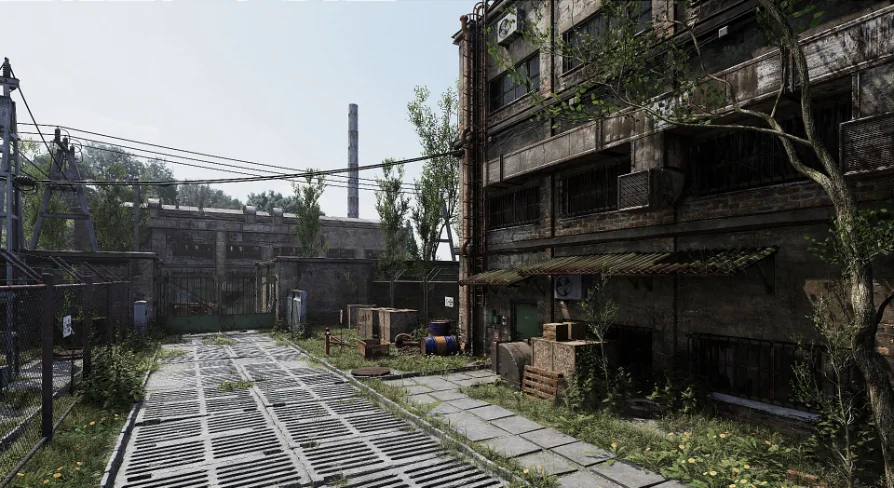
Industrial scenes are often lit by a mix of artificial sources, so a fully Real-Time setup is a practical choice. This environment skips Baked Lighting entirely and uses no scanned data, meaning every surface is built from clean geometry and reacts to light dynamically. Moving a wall, swapping a door, or changing a light source does not require a new Bake. The lack of scanned data keeps the geometry predictable, so the pieces are ready to place without cleanup. The project is positioned as a Starter Kit for industrial spaces, and that is exactly how it feels in practice: the pieces are meant to be rearranged.
Modules and Decorators for the Base Layer
The architectural shell is covered by modules: walls, doors, windows, and vents. These are the structural elements that define the footprint and flow of an interior or exterior industrial space. Walls close off the space, doors and windows provide the necessary openings, and vents add the mechanical detailing that fits a factory or substation setting. Around them sit many decorators: concrete blocks, electrical parts, Decals, and loose Props. Concrete blocks and electrical parts add the visual grit that makes an industrial area read as functional; Decals supply surface wear, and Props fill the Level with small objects that make it feel occupied. Together, the modules and decorators allow a Level to move from bare structure to populated environment without relying on external models. Because the contents are modular and not from scans, the Art Direction stays consistent, and you can treat the collection as the base layer for your own warehouse, factory, or substation.
Sample Map and Instancing Blueprint for Repeated Geometry
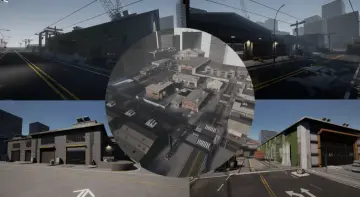
The Sample Map demonstrates a practical workflow for placing repeated elements. A simple Blueprint handles repeatable objects such as fences, curbs, and building parts, using Mesh Instancing to keep Draw Calls under control. Industrial environments are full of structural repetition; fences are usually composed of many identical posts, curbs run along long stretches, and building parts repeat along a wall. Instead of placing each instance manually, the Blueprint spreads these objects with a consistent setup and relies on Instancing to maintain performance when dozens of copies are visible at once. The Map itself shows the pieces placed in context, making it easier to see how the modules and decorators combine into a complete scene.
Day/Night Switch and Lighting Scenarios
The same Sample Map includes a day/night switch with lighting scenarios. With fully Dynamic Lighting, flipping between the 2 states is immediate and does not require a Lightmap rebuild. The provided scenarios cover both conditions, so you get a reference for how the Materials and Decals behave under daylight and artificial night lighting. If you plan to use the environment in a larger project, this gives you a starting point for your own time-of-day setup rather than having to build the lighting conditions from nothing.
Pivot Painter Wind and the Global Wind Controller
Later updates added motion to the environment's organic elements. Foliage Meshes and trees are set up for Pivot Painter, with example Materials for Pivot Painter Wind. Pivot Painter stores per-vertex information that a Material Shader can use to animate Meshes, which is a lightweight way to drive wind on vegetation. A subsequent update made Pivot Painter Wind the default for foliage and trees, and added a Global Wind ControllerActor. That Actor does not just influence vegetation; it also affects cables, so 1 controller can drive a coherent sense of wind across the entire scene. For scenes with foliage, trees, and cables, this unifies 2 types of motion that might otherwise require separate wind solutions.
Building Generation Blueprint and the Takeaway
Another update introduced a Blueprint for basic building generation and a Map with examples. This expands the Starter Kit from manual placement into a more automated layout workflow. Instead of pulling each wall or building part from the Content Browser 1 by 1, the Blueprint can generate the core structure, and you can then add the decorators and Props. The Example Map shows how the generated building looks, so you can decide how much to generate versus how much to place by hand. This moves the kit further from a fixed demo and closer to a toolset you can adapt.
The combination of Real-Time Lighting, modular pieces, Instancing support, wind control, and a building generation Blueprint makes the environment suitable as a foundation for industrial Levels. The updates are practical: they add motion, automation, and Example Maps that make the kit easier to drop into an existing project.
 Industrial
 Industrial
 Industrial
 Industrial