"fa182e0cd0a6ea73"{"id":"1001090","slug":"floxy-flock-anything","title":"Floxy - Flock Anything!","category":"Characters \u0026 Creatures","engine":"5.1+","assetVersion":"","engineVersion":"Engine Version: 5.1+","tag":"Characters","accent":"blue","visual":"character","summary":"Floxy is an Emergent Vector Generator for UE5.5+ that simulates small flocks with CPU-driven attraction and repulsion in one Blueprint, plus 198 presets, 15 tem","platform":"Unreal Engine","publishedAt":"2026-09-05T16:25:43.591Z","updatedAt":"2026-09-05T16:25:43.591Z","sourceNotes":[],"fileContents":[],"compatibility":["Unreal Engine","Engine Version: 5.1+"],"featuredImage":{"alt":"Floxy - Flock Anything!","src":"/wp-content/uploads/published/2026/09/095afe7ae3d6-cf063ce8-f1e3-4c33-b55a-0c165b53d019-bb9b771f77.webp"},"hasDownloadLink":true,"downloads":0,"terms":[{"taxonomy":"category","slug":"characters-and-creatures","name":"Characters \u0026 Creatures"}],"galleryImages":[{"src":"/wp-content/uploads/published/2026/09/abf5c1231143-18507bf8-1be3-4234-92d3-b81f7a5b5344-d9c27ea115.webp","alt":"Floxy - Flock Anything!"},{"src":"/wp-content/uploads/published/2026/09/b151816b992b-f25ea139-f936-49c5-83e1-cac6519469f0-a346ee7a31.webp","alt":"Floxy - Flock Anything!"},{"src":"/wp-content/uploads/published/2026/09/26fcdb0538be-3f9a783d-0fab-4f9e-ae01-7e7d34fe8803-3bb9e25106.webp","alt":"Floxy - Flock Anything!"},{"src":"/wp-content/uploads/published/2026/09/c826e8f175b5-7f590993-ef7d-4a8c-9c25-56fc9f27d76b-bfc34d9e34.webp","alt":"Floxy - Flock Anything!"},{"src":"/wp-content/uploads/published/2026/09/3d0a4df998cc-a3894724-a2c5-4e70-8cff-9e288b7ffaa1-35b21bf761.webp","alt":"Floxy - Flock Anything!"},{"src":"/wp-content/uploads/published/2026/09/bcf53e1d6d8e-a8a860e4-edd3-48e4-bb67-70c781aac9e5-7088e9f6b8.webp","alt":"Floxy - Flock Anything!"},{"src":"/wp-content/uploads/published/2026/09/6bf79e91222b-8e4d2727-2020-4f5e-868d-432f1aa1c9c8-e7211879a8.webp","alt":"Floxy - Flock Anything!"},{"src":"/wp-content/uploads/published/2026/09/e1416ba77b69-1a0030e2-516c-4d7f-b878-d695457e073b-fa67bbf4de.webp","alt":"Floxy - Flock Anything!"},{"src":"/wp-content/uploads/published/2026/09/9b2ff82bedca-ac1edd15-28ab-496e-93ef-a83d2583bcf9-9beb557eff.webp","alt":"Floxy - Flock Anything!"},{"src":"/wp-content/uploads/published/2026/09/370ba8561dcf-9c776f87-3bb7-482a-96a2-63536261662c-07a086e1e2.webp","alt":"Floxy - Flock Anything!"}],"accessPanel":{"kind":"resource","title":"Download this resource","eyebrow":"Free Download","message":"Log in or create a free account to start your download.","fileName":"FLOXY.7z","safetyNote":"Resources are manually reviewed before listing to improve quality and reduce obvious risks.","actionLabel":"Download Free","resourceType":"Resource archive"},"contentHtml":"\u003cp\u003eFloxy approaches flocking as an emergent outcome rather than a keyframed path. It is an Emergent Vector Generator that uses CPU-calculated attraction and repulsion forces to move a group of scene actors. Attraction pulls the flock together; repulsion keeps the actors from collapsing into one spot. The current version, V1.06, was released on 11 Mar 2025 and is built for UE5.5 and later. The asset is positioned for general-purpose work that only requires small flocks of scene actors, and the tag set — Simulation, System, Swarm, Flying, Fish, Crowd, Animal, Movement, and Animation Blueprint — shows the range of flock-related setups it can cover.\u003c/p\u003e\u003ch2\u003eSingle Blueprint at the center of the flock\u003c/h2\u003e\u003cp\u003eThe most useful implementation detail in Floxy is the 100% single Blueprint architecture. The flocking behavior is not split across a family of helper actors, a set of behavior trees, or several plug-and-play modules. One Blueprint holds the work. When a flock moves incorrectly or needs a different feel, there is one graph to open and one asset that owns the relevant behavior.\u003c/p\u003e\u003cp\u003eThat concentrated structure pairs well with the way the simulation actually runs. Because the attraction and repulsion forces are calculated on the CPU, the Blueprint remains the core loop of the system rather than a thin wrapper around an external simulation. The release text calls out highly configurable flocking behaviors and effects, which is exactly what you need when the same single Blueprint is expected to drive birds, fish, swarms, or small groups of other creatures. Most of the tuning effort goes into the values behind those two forces, and the visual result is a flock that appears to respond to its own members instead of following one fixed spline.\u003c/p\u003e\u003ch2\u003ePresets, templates, and starting points\u003c/h2\u003e\u003cp\u003eFloxy builds on a system of saved configurations rather than forcing you to start from an empty Blueprint every time. The load/save feature offers up to 198 preset slots. That is enough room to keep several different flock behaviors ready for different scenes or levels. A preset can be saved, loaded, and iterated on, so once a particular combination of attraction and repulsion values feels right, it does not need to be rebuilt from memory later.\u003c/p\u003e\u003cp\u003eThe included 15 example templates are separate from the empty preset slots. These templates exist to get you started quickly. Instead of guessing at a first set of values, you can open a template, study the configuration embedded in the single Blueprint, and then reshape it for the needs of your own project. The templates make the tool approachable for users who are new to emergent vector behavior as well as users who just want a working flock in the scene fast.\u003c/p\u003e\u003ch2\u003eReplication and networked agents\u003c/h2\u003e\u003cp\u003eFloxy also appears in the replication conversation. Agent replication is supported in V1.06. That matters for Unreal projects where multiple clients need to see the same flocked actors. Replicated agents let a networked session treat floxies as actual gameplay actors rather than purely cosmetic movement. The small-flock focus keeps this practical, since the simulation only needs to keep a modest number of agents synchronized instead of handling replication for a crowd that scales into the hundreds on every connected machine.\u003c/p\u003e\u003ch2\u003eSample maps and the Drone Strike example\u003c/h2\u003e\u003cp\u003eOne of the strongest calls to confidence in the package is the amount of sample content included. The asset ships with all of the maps and assets used in its promotional video. Beyond that, there is a complete “Drone Strike” example game map and its assets. The video lineup lists a dedicated “Drone Strike — Example Game (Using Floxy)” walkthrough, which makes it clear that this is not just a single test level. It is a full game example structured through the flocking Blueprint, complete enough to open and inspect as a reference for how the simulation connects to a visible gameplay context.\u003c/p\u003e\u003cp\u003eHaving the actual maps from the promotional material is helpful for users who want to compare what happens on screen with the assets and settings that produced it. Because every map and asset from the promo is present, the learning path can move from watching a video to opening the same environment and manipulating the forces that drive it.\u003c/p\u003e\u003ch2\u003eVideo walkthroughs, release notes, and FAQ files\u003c/h2\u003e\u003cp\u003eSupport material backs up the technical release. Floxy includes two introductory videos: “Welcome To Floxy — Promo” and “What is Floxy? — Getting Started.” A third video, “Drone Strike — Example Game,” demonstrates the system inside a real level. Tutorial support is gathered in a Floxy playlist on YouTube, so users can move from the short introduction into longer explanations without hunting through unrelated content.\u003c/p\u003e\u003cp\u003eThe written documentation is just as direct. Floxy V1.06 ships with a release note PDF, an FAQ PDF, and an archive PDF for UE Marketplace questions and answers. The release note is a straightforward place to confirm what changed in the current version. The FAQ and the Q\u0026A archive cover common setup questions and community concerns. That collection of files matters for a simulation tool where the observable behavior depends on intangible forces; when you need to understand why a flock is moving a certain way, the documentation is there before you have to reverse-engineer the Blueprint.\u003c/p\u003e\u003cp\u003eFloxy V1.06 keeps the entire emergent flocking system inside a single Blueprint, adds enough presets and templates to make experimentation fast, and joins that with sample content and documentation that support real production use. For UE5.5+ projects that need small groups of actors to move like something alive, the asset offers a contained way to reach that behavior without assembling a custom flocking framework.\u003c/p\u003e\n\n\u003ch2\u003eExplore Similar Assets\u003c/h2\u003e\n\u003cul\u003e\n\u003cli\u003e\u003ca href=\"https://3dcghub.com/dissolve-anything/\" title=\"Dissolve Anything\"\u003eDissolve Anything\u003c/a\u003e\u003c/li\u003e\n\u003cli\u003e\u003ca href=\"https://3dcghub.com/forest-guardian/\" title=\"Forest Guardian\"\u003eForest Guardian\u003c/a\u003e\u003c/li\u003e\n\u003cli\u003e\u003ca href=\"https://3dcghub.com/ue5-rigged-npc-creator/\" title=\"UE5 Rigged NPC Creator\"\u003eUE5 Rigged NPC Creator\u003c/a\u003e\u003c/li\u003e\n\u003cli\u003e\u003ca href=\"https://3dcghub.com/shooterstarter-fps-arm-a/\" title=\"ShooterStarter FPS Arm A\"\u003eShooterStarter FPS Arm A\u003c/a\u003e\u003c/li\u003e\n\u003cli\u003e\u003ca href=\"https://3dcghub.com/the-sabertooth/\" title=\"The Sabertooth\"\u003eThe Sabertooth\u003c/a\u003e\u003c/li\u003e\n\u003c/ul\u003e","contentTextLength":5845,"navigation":{"current":814,"total":3789,"previous":{"id":"1001091","slug":"fps-multiplayer-shooter-v3","title":"FPS Multiplayer shooter v3","category":"Shooter","platform":"Unreal Engine","updatedAt":"2026-09-05T18:08:15.901Z"},"next":{"id":"1001089","slug":"fireworks-vol-1-niagara","title":"Fireworks Vol. 1 - Niagara","category":"Fire \u0026 Explosions","platform":"Unreal Engine","updatedAt":"2026-09-05T16:13:49.290Z"}},"relatedResources":[{"id":"10302","slug":"dissolve-anything","title":"Dissolve Anything","category":"Automations","engine":"5.1+","assetVersion":"Engine version: 5.1+","engineVersion":"4.26","tag":"Automations","accent":"blue","visual":"animation","summary":"Streamline your development process with Dissolve Anything, a versatile Blueprint system designed for rapid implementation of disintegration effects across various mesh types.","platform":"Unreal Engine","publishedAt":"2026-03-03T14:59:59.000Z","updatedAt":"2026-04-19T15:50:04.000Z","sourceNotes":[],"fileContents":[],"compatibility":["Unreal Engine","Engine version: 5.1+"],"featuredImage":{"alt":"Dissolve Anything","src":"https://3dcghub.com/wp-content/uploads/2026/03/07d888fd-a172-4d2d-8101-310c51fbc146.webp"},"hasDownloadLink":true,"downloads":0},{"id":"14974","slug":"advanced-flock-system-multithreaded-fish-ai-and-reactive-school-behavior","title":"Advanced Flock System – Multithreaded Fish AI and Reactive School Behavior","category":"Gameplay Features","engine":"4.25 - 5.8","assetVersion":"Asset Version:1.3 - 1.3.8","engineVersion":"Engine version: 4.25 - 5.8","tag":"Gameplay Features","accent":"blue","visual":"character","summary":"Create realistic aquatic ecosystems with the Advanced Flock System. This multithreaded tool supports thousands of fish with reactive AI and obstacle avoidance.","platform":"Unreal Engine","publishedAt":"2026-03-12T07:12:35.000Z","updatedAt":"2026-09-30T03:55:08.761Z","sourceNotes":[],"fileContents":[],"compatibility":["Unreal Engine","Asset Version:1.3 - 1.3.8","Engine version: 4.25 - 5.8"],"featuredImage":{"alt":"Advanced Flock System – Multithreaded Fish AI and Reactive School Behavior","src":"https://3dcghub.com/wp-content/uploads/2026/03/9e2ee2df-b190-425e-bfdd-816e1f1cb4f1.webp"},"hasDownloadLink":true,"downloads":0},{"id":"1001800","slug":"cyberpunk-goth-nun-raven","title":"Cyberpunk Goth Nun - Raven","category":"Characters \u0026 Creatures","engine":"5.1+","assetVersion":"","engineVersion":"Engine Version: 5.1+","tag":"Characters","accent":"blue","visual":"character","summary":"Explore Cyberpunk Goth Nun - Raven for Unreal Engine 5, featuring over 200 ARKit morphs, dynamic physics blueprints, and full Control Rig support.","platform":"Unreal Engine","publishedAt":"2026-10-21T07:52:45.839Z","updatedAt":"2026-10-21T07:52:45.839Z","sourceNotes":[],"fileContents":[],"compatibility":["Unreal Engine","Engine Version: 5.1+"],"featuredImage":{"alt":"Cyberpunk Goth Nun - Raven","src":"/wp-content/uploads/published/2026/10/a4e89e597aec-3340779f-a2e9-424e-b229-809bb83f351b-62d0f9d877.webp"},"hasDownloadLink":true,"downloads":0}]}
Characters
Floxy - Flock Anything!
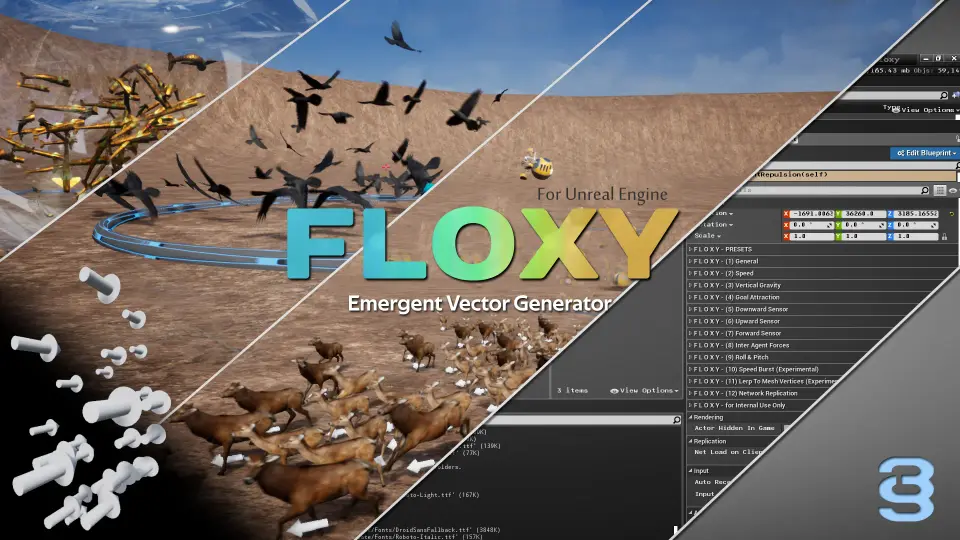
Floxy is an Emergent Vector Generator for UE5.5+ that simulates small flocks with CPU-driven attraction and repulsion in one Blueprint, plus 198 presets, 15 tem
Floxy approaches flocking as an emergent outcome rather than a keyframed path. It is an Emergent Vector Generator that uses CPU-calculated attraction and repulsion forces to move a group of scene actors. Attraction pulls the flock together; repulsion keeps the actors from collapsing into one spot. The current version, V1.06, was released on 11 Mar 2025 and is built for UE5.5 and later. The asset is positioned for general-purpose work that only requires small flocks of scene actors, and the tag set — Simulation, System, Swarm, Flying, Fish, Crowd, Animal, Movement, and Animation Blueprint — shows the range of flock-related setups it can cover.
Single Blueprint at the center of the flock
The most useful implementation detail in Floxy is the 100% single Blueprint architecture. The flocking behavior is not split across a family of helper actors, a set of behavior trees, or several plug-and-play modules. One Blueprint holds the work. When a flock moves incorrectly or needs a different feel, there is one graph to open and one asset that owns the relevant behavior.
That concentrated structure pairs well with the way the simulation actually runs. Because the attraction and repulsion forces are calculated on the CPU, the Blueprint remains the core loop of the system rather than a thin wrapper around an external simulation. The release text calls out highly configurable flocking behaviors and effects, which is exactly what you need when the same single Blueprint is expected to drive birds, fish, swarms, or small groups of other creatures. Most of the tuning effort goes into the values behind those two forces, and the visual result is a flock that appears to respond to its own members instead of following one fixed spline.
Presets, templates, and starting points
Floxy builds on a system of saved configurations rather than forcing you to start from an empty Blueprint every time. The load/save feature offers up to 198 preset slots. That is enough room to keep several different flock behaviors ready for different scenes or levels. A preset can be saved, loaded, and iterated on, so once a particular combination of attraction and repulsion values feels right, it does not need to be rebuilt from memory later.
The included 15 example templates are separate from the empty preset slots. These templates exist to get you started quickly. Instead of guessing at a first set of values, you can open a template, study the configuration embedded in the single Blueprint, and then reshape it for the needs of your own project. The templates make the tool approachable for users who are new to emergent vector behavior as well as users who just want a working flock in the scene fast.
Replication and networked agents
Floxy also appears in the replication conversation. Agent replication is supported in V1.06. That matters for Unreal projects where multiple clients need to see the same flocked actors. Replicated agents let a networked session treat floxies as actual gameplay actors rather than purely cosmetic movement. The small-flock focus keeps this practical, since the simulation only needs to keep a modest number of agents synchronized instead of handling replication for a crowd that scales into the hundreds on every connected machine.
Sample maps and the Drone Strike example
One of the strongest calls to confidence in the package is the amount of sample content included. The asset ships with all of the maps and assets used in its promotional video. Beyond that, there is a complete “Drone Strike” example game map and its assets. The video lineup lists a dedicated “Drone Strike — Example Game (Using Floxy)” walkthrough, which makes it clear that this is not just a single test level. It is a full game example structured through the flocking Blueprint, complete enough to open and inspect as a reference for how the simulation connects to a visible gameplay context.
Having the actual maps from the promotional material is helpful for users who want to compare what happens on screen with the assets and settings that produced it. Because every map and asset from the promo is present, the learning path can move from watching a video to opening the same environment and manipulating the forces that drive it.
Video walkthroughs, release notes, and FAQ files
Support material backs up the technical release. Floxy includes two introductory videos: “Welcome To Floxy — Promo” and “What is Floxy? — Getting Started.” A third video, “Drone Strike — Example Game,” demonstrates the system inside a real level. Tutorial support is gathered in a Floxy playlist on YouTube, so users can move from the short introduction into longer explanations without hunting through unrelated content.
The written documentation is just as direct. Floxy V1.06 ships with a release note PDF, an FAQ PDF, and an archive PDF for UE Marketplace questions and answers. The release note is a straightforward place to confirm what changed in the current version. The FAQ and the Q&A archive cover common setup questions and community concerns. That collection of files matters for a simulation tool where the observable behavior depends on intangible forces; when you need to understand why a flock is moving a certain way, the documentation is there before you have to reverse-engineer the Blueprint.
Floxy V1.06 keeps the entire emergent flocking system inside a single Blueprint, adds enough presets and templates to make experimentation fast, and joins that with sample content and documentation that support real production use. For UE5.5+ projects that need small groups of actors to move like something alive, the asset offers a contained way to reach that behavior without assembling a custom flocking framework.
 Characters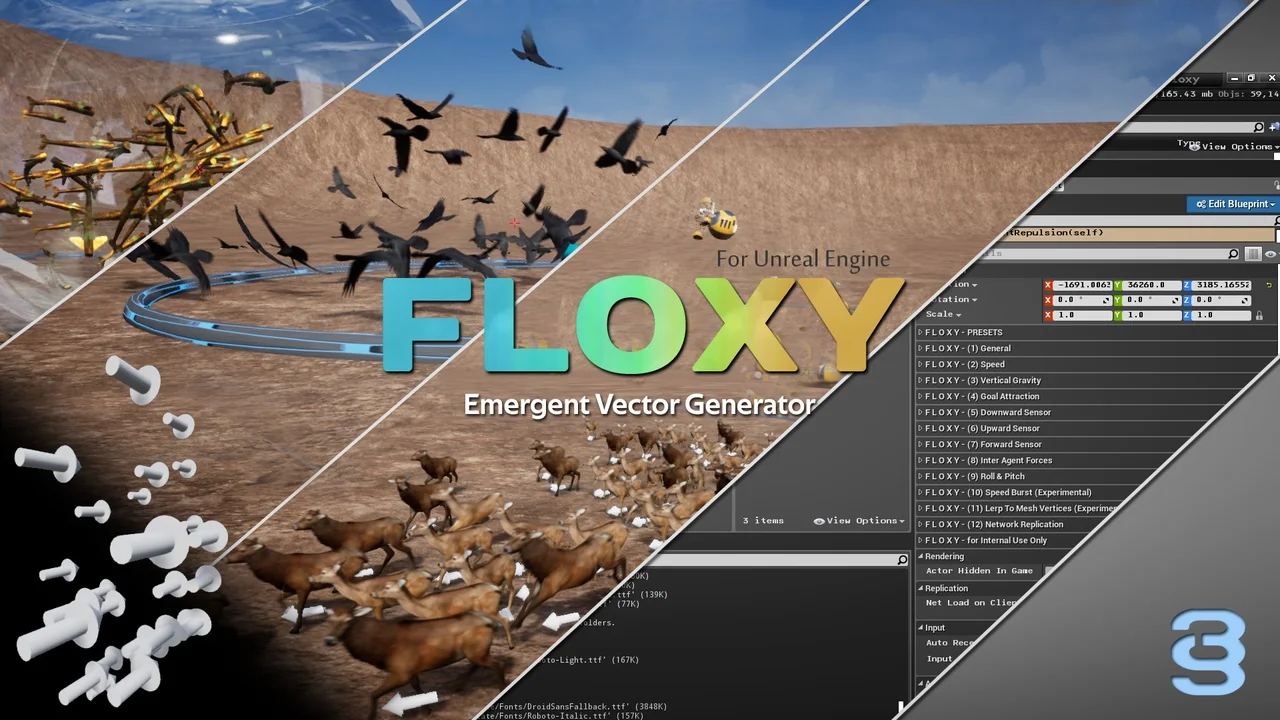
 Automations
 Gameplay Features
 Characters