"a19e0535960bd083"{"id":"1002014","slug":"event-icons","title":"Event Icons","category":"Variety","engine":"4.26+,5.0+","assetVersion":"","engineVersion":"Engine Version: 4.26+,5.0+","tag":"Variety","accent":"blue","visual":"mech","summary":"A set of 118 hand drawn event icons with transparent backgrounds, compatible with Fantasy Icons Megapack for menus, boxes, and holiday items.","platform":"Unreal Engine","publishedAt":"2026-10-26T12:53:44.824Z","updatedAt":"2026-10-26T12:53:44.824Z","sourceNotes":[],"fileContents":[],"compatibility":["Unreal Engine","Engine Version: 4.26+,5.0+"],"featuredImage":{"alt":"Event Icons","src":"/wp-content/uploads/published/2026/10/43bf6323cf11-eb2a4b5d-f231-42b8-a3d8-e307a0191118-cec56342a4.webp"},"hasDownloadLink":true,"downloads":0,"terms":[{"taxonomy":"category","slug":"variety","name":"Variety"}],"galleryImages":[{"src":"/wp-content/uploads/published/2026/10/c603052cf798-bd7155e1-1f2e-45f6-a22e-fe12708b2398-cb58c0164e.webp","alt":"Event Icons"}],"accessPanel":{"kind":"resource","title":"Download this resource","eyebrow":"Free Download","message":"Log in or create a free account to start your download.","fileName":"Content.7z","safetyNote":"Resources are manually reviewed before listing to improve quality and reduce obvious risks.","actionLabel":"Download Free","resourceType":"Resource archive"},"contentHtml":"\u003ch2\u003eLayering 118 Hand Drawn Event Icons Across Interface Surfaces\u003c/h2\u003e\n\u003cp\u003eInterface composition relies heavily on how cleanly graphic assets merge with background framing, textures, and canvas colors. Event Icons delivers a collection of 118 hand drawn event icons constructed to sit directly on existing interface layouts. Because every graphic in the 118-piece set features a transparent background, the assets can be placed on any surface required by the project without requiring tedious masking or background cleanup.\u003c/p\u003e\n\u003cp\u003eHand drawn artwork brings an organic, crafted visual character to production environments that sterile, purely geometric vectors often fail to deliver. The tactile quality of hand-rendered linework and shading gives these 118 assets an expressive weight suited for prominent onscreen display. Whether a screen requires a solitary icon inside an elaborate reward modal or a dense matrix of visuals across an event tracking calendar, the transparent backing ensures each graphic adapts instantly to the underlying backdrop material, from parchment textures to stone panels and metallic borders.\u003c/p\u003e \u003ch2\u003eVisual Themes: Boxes, Items, and Holiday Features\u003c/h2\u003e\n\u003cp\u003eCategorizing dynamic activities inside game loops demands distinct icon representations that communicate purpose at a glance. The asset collection covers multiple functional classifications including icon displays, boxes, events, general items, and holiday motifs. These thematic anchors allow interface designers to build unified visual systems for recurring in-game festivities, seasonal quests, and limited-time reward tracks.\u003c/p\u003e\n\u003cp\u003eThe box and item elements serve routine interface duties like container unboxing, milestone crates, and inventory allocation. When seasonal or promotional schedules activate, the holiday and event classifications step in to differentiate standard play routines from temporary festival milestones. Because all 118 hand drawn assets share consistent rendering conventions, mixing a standard item icon alongside a specialized holiday container maintains visual coherence throughout the active interface.\u003c/p\u003e \u003ch2\u003eTransparent Background Handling on Custom UI Canvases\u003c/h2\u003e\n\u003cp\u003ePlacing icons across varying screen states often introduces visual conflicts when graphics include pre-baked or hard-coded backing colors. The inclusion of isolated transparent backgrounds across the entire Event Icons pack eliminates edge artifacting and palette mismatching. UI artists can freely drag an asset onto patterned backgrounds, dark modal overlays, bright inventory slots, or dynamic canvas surfaces with shifting light values.\u003c/p\u003e\n\u003cp\u003eThis layout freedom alters how menus are constructed. When prototyping an event overview tab:\u003c/p\u003e\n\u003cul\u003e \u003cli\u003eIcons can be layered on top of textured buttons, reward badges, and progress tracks without visual clash.\u003c/li\u003e \u003cli\u003eBox graphics can rest inside multi-tiered container displays without clipping or awkward boundary borders.\u003c/li\u003e \u003cli\u003eHoliday and event assets can be scaled and positioned directly against ornate frame elements or simple solid-color backplates.\u003c/li\u003e\n\u003c/ul\u003e\n\u003cp\u003eBy bypassing the need to hand-cut icons or color-match backdrops, implementation cycles remain fast. The transparency handles the heavy lifting of canvas integration, letting teams focus on interface clarity and screen hierarchy.\u003c/p\u003e \u003ch2\u003ePairing with the Fantasy Icons Megapack\u003c/h2\u003e\n\u003cp\u003eExpanding an established visual library requires stylistic harmony so new additions do not look out of place against pre-existing UI screens. Event Icons is built with direct compatibility for the Fantasy Icons Megapack. This ensures that projects utilizing the broader fantasy collection can deploy these 118 hand drawn event icons alongside existing equipment, ability, and consumable icons without stylistic divergence.\u003c/p\u003e\n\u003cp\u003eIn practice, this compatibility allows developers to maintain uniform visual standards between the core game progression and live event systems. Standard inventory panels populated by the Fantasy Icons Megapack can cross-reference reward boxes, holiday items, and event tokens from this set while preserving consistent line weight, shading logic, and overall aesthetic tone. The cohesion simplifies project scaling, enabling teams to supplement extensive fantasy inventories with designated event visuals whenever new seasonal calendars or celebratory gameplay modes are introduced.\u003c/p\u003e \u003ch2\u003eFunctional Placement Across Game Loops\u003c/h2\u003e\n\u003cp\u003eThe primary utility of the 118 hand drawn event icons lies in their adaptability across distinct display locations within a game client. HUD alerts tracking daily achievements can show active item and box graphics without occluding viewport action. Full-screen event screens can deploy larger holiday icons to emphasize seasonal participation, while nested store menus can use the box visuals to denote bundled deliverables.\u003c/p\u003e\n\u003cp\u003eBecause the set focuses specifically on event, item, box, and holiday themes, teams gain a concentrated pool of purpose-built artwork. Each asset functions both as an isolated reward notification and as part of a collective UI panel, giving production teams a cohesive visual toolkit that integrates directly onto any game canvas.\u003c/p\u003e\n\n\u003ch2\u003eMore From The Same Workflow\u003c/h2\u003e\n\u003cul\u003e\n\u003cli\u003e\u003ca href=\"https://3dcghub.com/pro-icon-pack-survival/\" title=\"Pro Icon Pack: Survival\"\u003ePro Icon Pack: Survival\u003c/a\u003e\u003c/li\u003e\n\u003cli\u003e\u003ca href=\"https://3dcghub.com/pro-icon-pack/\" title=\"Pro Icon Pack\"\u003ePro Icon Pack\u003c/a\u003e\u003c/li\u003e\n\u003cli\u003e\u003ca href=\"https://3dcghub.com/hand-painted-weapon-equipment-icons-weapon-icons-equipment-icons-rpg-icons/\" title=\"Hand Painted Weapon \u0026amp; Equipment Icons (Weapon Icons, Equipment Icons, RPG Icons)\"\u003eHand Painted Weapon \u0026amp; Equipment Icons (Weapon Icons, Equipment Icons, RPG Icons)\u003c/a\u003e\u003c/li\u003e\n\u003cli\u003e\u003ca href=\"https://3dcghub.com/sundries-icon-pack/\" title=\"Sundries - Icon Pack\"\u003eSundries - Icon Pack\u003c/a\u003e\u003c/li\u003e\n\u003cli\u003e\u003ca href=\"https://3dcghub.com/fantasy-rpg-icons-500-fantasy-fantasy-rpg-icon-icon-symbol-symbol-rpg/\" title=\"Fantasy RPG Icons (500+) ( Fantasy Fantasy Rpg Icon Icon Symbol Symbol Rpg )\"\u003eFantasy RPG Icons (500+) ( Fantasy Fantasy Rpg Icon Icon Symbol Symbol Rpg )\u003c/a\u003e\u003c/li\u003e\n\u003c/ul\u003e","contentTextLength":5333,"navigation":{"current":77,"total":4026,"previous":{"id":"1002015","slug":"exland","title":"EXLAND","category":"Variety","platform":"Unreal Engine","updatedAt":"2026-10-26T12:54:33.246Z"},"next":{"id":"1002013","slug":"etasphera58","title":"Etasphera58","category":"Mechanical \u0026 Robots","platform":"Unreal Engine","updatedAt":"2026-10-26T12:51:36.872Z"}},"relatedResources":[{"id":"1000928","slug":"pro-icon-pack-survival","title":"Pro Icon Pack: Survival","category":"Icons","engine":"4.26+,5.0+","assetVersion":"","engineVersion":"Engine Version: 4.26+,5.0+","tag":"Icons","accent":"blue","visual":"mech","summary":"Survival-themed UI icons for inventories, HUDs, and main menu screens. Use them as a flexible base to build or extend your own icon set.","platform":"Unreal Engine","publishedAt":"2026-08-09T15:24:13.690Z","updatedAt":"2026-08-09T15:24:13.690Z","sourceNotes":[],"fileContents":[],"compatibility":["Unreal Engine","Engine Version: 4.26+,5.0+"],"featuredImage":{"alt":"Pro Icon Pack: Survival","src":"/wp-content/uploads/published/2026/08/7e0743a954f7-6d6e5f76-7b2b-4777-843b-53d39752210c-4cedfa33f3.webp"},"hasDownloadLink":true,"downloads":1},{"id":"1001924","slug":"pro-icon-pack","title":"Pro Icon Pack","category":"Widgets \u0026 Controls","engine":"4.26+,5.0+","assetVersion":"","engineVersion":"Engine Version: 4.26+,5.0+","tag":"Widgets \u0026 Controls","accent":"blue","visual":"mech","summary":"Explore the implementation and structural utility of Pro Icon Pack across HUD, inventory, and main menu systems in Unreal Engine interface design.","platform":"Unreal Engine","publishedAt":"2026-10-22T12:00:19.598Z","updatedAt":"2026-10-22T12:00:19.598Z","sourceNotes":[],"fileContents":[],"compatibility":["Unreal Engine","Engine Version: 4.26+,5.0+"],"featuredImage":{"alt":"Pro Icon Pack","src":"/wp-content/uploads/published/2026/10/eaeb4b76f65b-75923046-733b-4bd8-ba53-e45ddc9e2a36-ea737c91b8.webp"},"hasDownloadLink":true,"downloads":0},{"id":"13434","slug":"hand-painted-weapon-equipment-icons-weapon-icons-equipment-icons-rpg-icons","title":"Hand Painted Weapon \u0026 Equipment Icons (Weapon Icons, Equipment Icons, RPG Icons)","category":"Weapons \u0026 Combat","engine":"4.26+,5.0+","assetVersion":"Engine version: 4.26+,5.0+","engineVersion":"4.15","tag":"Weapons \u0026 Combat","accent":"blue","visual":"animation","summary":"Enhance your game's UI with this collection of 90 hand-painted weapon and equipment icons. Each asset is crafted at 256x256 resolution and includes transparent variants for easy integration.","platform":"Unreal Engine","publishedAt":"2026-03-10T17:05:49.000Z","updatedAt":"2026-04-19T15:46:27.000Z","sourceNotes":[],"fileContents":[],"compatibility":["Unreal Engine","Engine version: 4.26+,5.0+"],"featuredImage":{"alt":"Hand Painted Weapon \u0026 Equipment Icons (Weapon Icons, Equipment Icons, RPG Icons)","src":"https://3dcghub.com/wp-content/uploads/2026/03/fd4ef8c6-32c1-4766-ba8e-150a7267476e.webp"},"hasDownloadLink":true,"downloads":0}]}
Variety
Event Icons
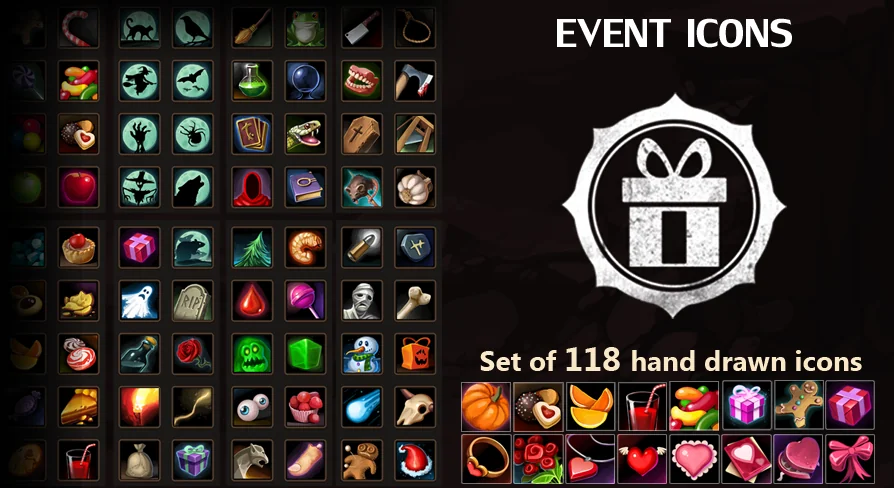
A set of 118 hand drawn event icons with transparent backgrounds, compatible with Fantasy Icons Megapack for menus, boxes, and holiday items.
Category:Unreal Engine,VarietyPlatform: Unreal EngineEngine Version: 4.26+,5.0+Published: Oct 26, 2026
Variety
Resource overview
Layering 118 Hand Drawn Event Icons Across Interface Surfaces
Interface composition relies heavily on how cleanly graphic assets merge with background framing, textures, and canvas colors. Event Icons delivers a collection of 118 hand drawn event icons constructed to sit directly on existing interface layouts. Because every graphic in the 118-piece set features a transparent background, the assets can be placed on any surface required by the project without requiring tedious masking or background cleanup.
Hand drawn artwork brings an organic, crafted visual character to production environments that sterile, purely geometric vectors often fail to deliver. The tactile quality of hand-rendered linework and shading gives these 118 assets an expressive weight suited for prominent onscreen display. Whether a screen requires a solitary icon inside an elaborate reward modal or a dense matrix of visuals across an event tracking calendar, the transparent backing ensures each graphic adapts instantly to the underlying backdrop material, from parchment textures to stone panels and metallic borders.
Visual Themes: Boxes, Items, and Holiday Features
Categorizing dynamic activities inside game loops demands distinct icon representations that communicate purpose at a glance. The asset collection covers multiple functional classifications including icon displays, boxes, events, general items, and holiday motifs. These thematic anchors allow interface designers to build unified visual systems for recurring in-game festivities, seasonal quests, and limited-time reward tracks.
The box and item elements serve routine interface duties like container unboxing, milestone crates, and inventory allocation. When seasonal or promotional schedules activate, the holiday and event classifications step in to differentiate standard play routines from temporary festival milestones. Because all 118 hand drawn assets share consistent rendering conventions, mixing a standard item icon alongside a specialized holiday container maintains visual coherence throughout the active interface.
Transparent Background Handling on Custom UI Canvases
Placing icons across varying screen states often introduces visual conflicts when graphics include pre-baked or hard-coded backing colors. The inclusion of isolated transparent backgrounds across the entire Event Icons pack eliminates edge artifacting and palette mismatching. UI artists can freely drag an asset onto patterned backgrounds, dark modal overlays, bright inventory slots, or dynamic canvas surfaces with shifting light values.
This layout freedom alters how menus are constructed. When prototyping an event overview tab:
Icons can be layered on top of textured buttons, reward badges, and progress tracks without visual clash.
Box graphics can rest inside multi-tiered container displays without clipping or awkward boundary borders.
Holiday and event assets can be scaled and positioned directly against ornate frame elements or simple solid-color backplates.
By bypassing the need to hand-cut icons or color-match backdrops, implementation cycles remain fast. The transparency handles the heavy lifting of canvas integration, letting teams focus on interface clarity and screen hierarchy.
Pairing with the Fantasy Icons Megapack
Expanding an established visual library requires stylistic harmony so new additions do not look out of place against pre-existing UI screens. Event Icons is built with direct compatibility for the Fantasy Icons Megapack. This ensures that projects utilizing the broader fantasy collection can deploy these 118 hand drawn event icons alongside existing equipment, ability, and consumable icons without stylistic divergence.
In practice, this compatibility allows developers to maintain uniform visual standards between the core game progression and live event systems. Standard inventory panels populated by the Fantasy Icons Megapack can cross-reference reward boxes, holiday items, and event tokens from this set while preserving consistent line weight, shading logic, and overall aesthetic tone. The cohesion simplifies project scaling, enabling teams to supplement extensive fantasy inventories with designated event visuals whenever new seasonal calendars or celebratory gameplay modes are introduced.
Functional Placement Across Game Loops
The primary utility of the 118 hand drawn event icons lies in their adaptability across distinct display locations within a game client. HUD alerts tracking daily achievements can show active item and box graphics without occluding viewport action. Full-screen event screens can deploy larger holiday icons to emphasize seasonal participation, while nested store menus can use the box visuals to denote bundled deliverables.
Because the set focuses specifically on event, item, box, and holiday themes, teams gain a concentrated pool of purpose-built artwork. Each asset functions both as an isolated reward notification and as part of a collective UI panel, giving production teams a cohesive visual toolkit that integrates directly onto any game canvas.
 Variety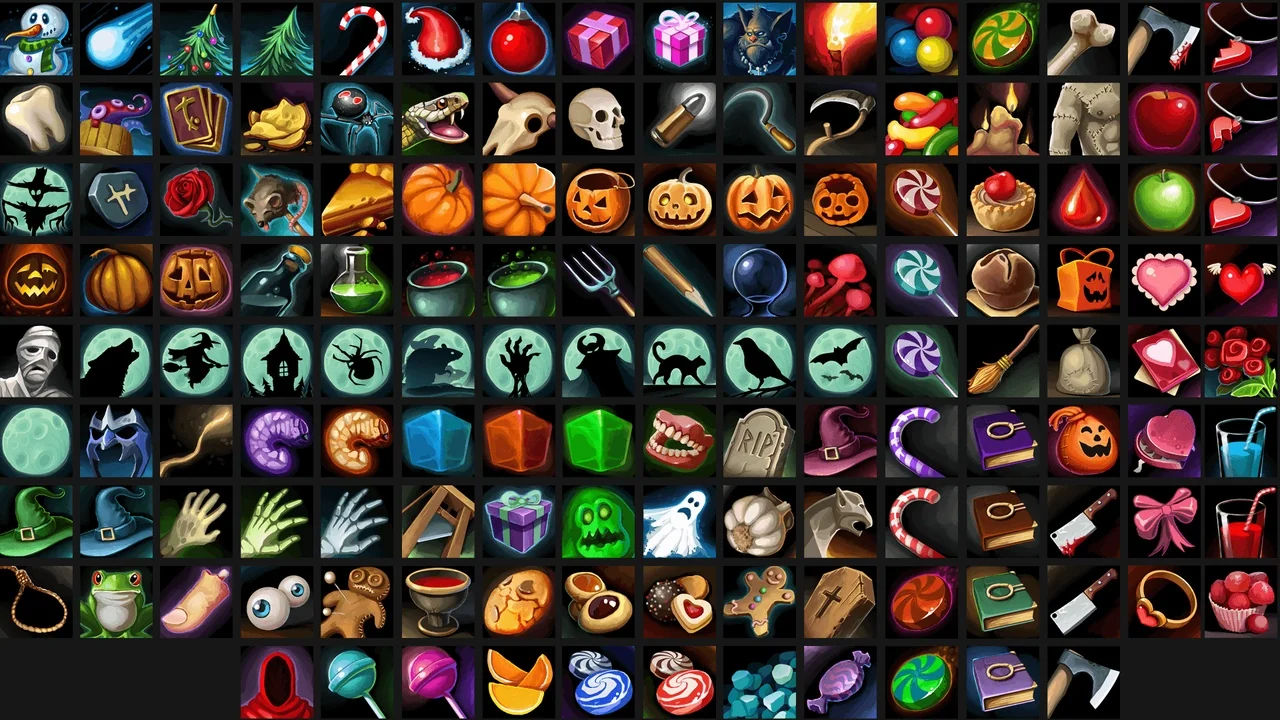
 Icons
Icons Widgets & Controls
 Weapons & Combat