"a19e0535960bd083"{"id":"1002086","slug":"dragon-portal","title":"Dragon Portal","category":"Tools, Objects \u0026 Decor","engine":"5.1+","assetVersion":"","engineVersion":"Engine Version: 5.1+","tag":"Tools","accent":"blue","visual":"mech","summary":"Dragon Portal is a stylized low-poly fantasy asset featuring five modular meshes, animated materials, subtle FX lighting, and Actor Blueprint control.","platform":"Unreal Engine","publishedAt":"2026-10-26T15:55:41.873Z","updatedAt":"2026-10-26T15:55:41.873Z","sourceNotes":[],"fileContents":[],"compatibility":["Unreal Engine","Engine Version: 5.1+"],"featuredImage":{"alt":"Dragon Portal","src":"/wp-content/uploads/published/2026/10/9fa51ea71e56-846788fe-d927-45a5-9aff-070579ba8509-dd08c66a88.webp"},"hasDownloadLink":true,"downloads":0,"terms":[{"taxonomy":"category","slug":"tools-objects-and-decor","name":"Tools, Objects \u0026 Decor"}],"galleryImages":[{"src":"/wp-content/uploads/published/2026/10/50dbce8c337a-f1395297-ac81-412b-a022-0aa365c923eb-f69e5eb93e.webp","alt":"Dragon Portal"},{"src":"/wp-content/uploads/published/2026/10/df1d8c1f945f-8cebcefb-4c2d-4c1c-a469-743d58fa7025-8ce8f2cce1.webp","alt":"Dragon Portal"},{"src":"/wp-content/uploads/published/2026/10/5a1aa974c152-3a724c35-fd48-40fc-8955-287d7e16237f-256768526d.webp","alt":"Dragon Portal"},{"src":"/wp-content/uploads/published/2026/10/ad0853df490a-d35f20a8-7213-4778-a637-399c4c380397-e9e188a551.webp","alt":"Dragon Portal"},{"src":"/wp-content/uploads/published/2026/10/ed22c5aad390-4a057f83-41c3-43f8-a8a4-e53d6ada26eb-92e649ed86.webp","alt":"Dragon Portal"},{"src":"/wp-content/uploads/published/2026/10/2d22e8ee451e-bde93c3f-ff48-43d8-8a5b-7c16cdb12c27-9b428868c7.webp","alt":"Dragon Portal"},{"src":"/wp-content/uploads/published/2026/10/573c4d616960-d9d3ecc4-1088-4a80-b003-6e291557b58e-64c32222ea.webp","alt":"Dragon Portal"},{"src":"/wp-content/uploads/published/2026/10/db770ab4810e-0f800663-6e86-4968-b9b3-530b2cefccf9-3512043984.webp","alt":"Dragon Portal"},{"src":"/wp-content/uploads/published/2026/10/76ac264008b4-168e6da1-9c77-4f51-b586-f3b9b2365c76-5595bad42e.webp","alt":"Dragon Portal"},{"src":"/wp-content/uploads/published/2026/10/4b5be3b24801-5e676752-dece-45d6-91ea-64ae1c52b1cc-eb1d72ad2f.webp","alt":"Dragon Portal"}],"accessPanel":{"kind":"resource","title":"Download this resource","eyebrow":"Free Download","message":"Log in or create a free account to start your download.","fileName":"Dragon Portal.7z","safetyNote":"Resources are manually reviewed before listing to improve quality and reduce obvious risks.","actionLabel":"Download Free","resourceType":"Resource archive"},"contentHtml":"\u003ch2\u003eFive Core Assets in the Dragon Portal Setup\u003c/h2\u003e\n\u003cp\u003eFive distinct architectural pieces form the physical structure of Dragon Portal: one platform, one banner, one portal frame, one altar, and one pillar. Each piece is modeled in a low-poly stylized fantasy aesthetic, prioritizing clean geometry and readable silhouettes over high-frequency surface detail. Rather than functioning purely as a static monolithic mesh, the modular breakdown lets level designers treat the gateway as a complete architectural composition or scatter individual elements across an environment.\u003c/p\u003e\n\u003cp\u003eThe platform provides a raised circular or geometric foundation that separates the portal zone from surrounding terrain, giving the player a clear physical boundary for teleportation mechanics. At the center or rear of this staging area sits the main portal frame, which establishes the focal height of the installation. Flanking pieces such as the pillar and the altar offer secondary spatial anchors. Placing the altar in front of the portal frame immediately creates an interactive focal point where characters might cast spells, place quest items, or channel energy to open a passage. The vertical pillar reinforces the fantasy temple aesthetic, serving as an architectural buttress or runic monument that balances the scene.\u003c/p\u003e \u003ch2\u003eBanner Customization with Three Blazons\u003c/h2\u003e\n\u003cp\u003eCloth dressing plays an important visual role in identifying factions, magic schools, or territorial control within fantasy games. The package provides a dedicated banner asset equipped with three interchangeable blazons. This variation allows environmental artists to adjust the heraldry of the installation without needing separate geometry or external texture modifications.\u003c/p\u003e\n\u003cp\u003eSwitching between the three blazons alters the narrative context of the gateway. A dragon-themed realm might display a specific insignia during peacetime, while alternative blazons allow the same structural assets to represent rival clans, conquered outposts, or different elemental affiliations across a game map. Because the banner matches the stylized, low-poly language of the surrounding stones and timbers, it integrates naturally against the pillar or altar steps, softening the rigid architectural lines with heraldic fabric.\u003c/p\u003e \u003ch2\u003eActor Blueprint Control and Animated Materials\u003c/h2\u003e\n\u003cp\u003eInteractivity within the Dragon Portal is handled through an integrated Actor Blueprint. This Blueprint links the static mesh components to animated materials, light effects, and morph behaviors, turning an otherwise inert collection of props into an active game mechanic. Instead of relying solely on complex external skeletal rigs, visual movement and state changes are driven directly through material parameters and morph targets inside the actor.\u003c/p\u003e\n\u003cp\u003eThe system uses animated materials to simulate shifting mystical energies across the portal surface. Through Blueprint logic, these materials shift their visual state, allowing the gateway to display idle pulses, active activation sequences, or dormant phases. Morph targets driven by the Actor Blueprint introduce geometric shifts or expanding vortex motions, giving the portal threshold tangible depth when engaged. The setup also launches basic FX lighting, casting dynamic illumination over the platform, altar, and surrounding terrain to signal when the teleportation threshold is open and traversable.\u003c/p\u003e \u003ch2\u003eAltar, Pillar, and Platform Staging\u003c/h2\u003e\n\u003cp\u003eBecause the five assets are separated into modular components, level creators can assemble multiple spatial layouts to suit gameplay pacing. In a confined dungeon chamber, the portal frame and altar can be mounted directly against a cavern wall, eliminating the platform to fit tight interior collisions. In wide-open overland zones, duplicating the pillar creates a grand processional avenue leading up to the raised platform, turning the gate into a landmark visible from a distance.\u003c/p\u003e\n\u003cp\u003eThe altar functions naturally as the player interaction trigger. Designers can tie proximity triggers or interaction volumes directly to the altar mesh, linking player input to the Actor Blueprint that launches the animated material morphs and FX light. Meanwhile, the pillar provides height variation, enabling developers to frame player camera angles during approach sequences or cutscenes without blocking the central portal event horizon.\u003c/p\u003e \u003ch2\u003eTeleport Systems Alongside Dark Portal and Angel Portal\u003c/h2\u003e\n\u003cp\u003eDragon Portal continues the stylized lineage established by earlier gateway designs, specifically Dark Portal and Angel Portal. Sharing an underlying low-poly philosophy and Blueprint-driven architecture, these thematic counterparts allow developers to build distinct transit networks across different biomes or narrative domains.\u003c/p\u003e\n\u003cp\u003eA fantasy RPG project can leverage these stylistic pairings to differentiate distinct gameplay realms. The dragon-themed visual motif can govern volcanic or martial dragon-worshiping zones, while Dark Portal anchors underworld or necromantic territories, and Angel Portal designates celestial or sanctuary hubs. Because the technical implementation relies on consistent low-poly art principles and Blueprint-driven material animations, the gates feel cohesive across an entire production while still signaling distinct fast-travel destinations to the player.\u003c/p\u003e\n\n\u003ch2\u003eMore From The Same Workflow\u003c/h2\u003e\n\u003cul\u003e\n\u003cli\u003e\u003ca href=\"https://3dcghub.com/suburbs-vol-9-kitchen-appliances-nanite-and-low-poly/\" title=\"Suburbs VOL.9 - Kitchen Appliances (Nanite and Low Poly)\"\u003eSuburbs VOL.9 - Kitchen Appliances (Nanite and Low Poly)\u003c/a\u003e\u003c/li\u003e\n\u003cli\u003e\u003ca href=\"https://3dcghub.com/suburbs-vol-1-wall-decor-nanite-and-low-poly/\" title=\"Suburbs VOL.1 - Wall Decor (Nanite and Low Poly)\"\u003eSuburbs VOL.1 - Wall Decor (Nanite and Low Poly)\u003c/a\u003e\u003c/li\u003e\n\u003cli\u003e\u003ca href=\"https://3dcghub.com/holidays-vol-2-halloween-decor-nanite-and-low-poly/\" title=\"Holidays VOL.2 - Halloween Decor (Nanite and Low Poly)\"\u003eHolidays VOL.2 - Halloween Decor (Nanite and Low Poly)\u003c/a\u003e\u003c/li\u003e\n\u003cli\u003e\u003ca href=\"https://3dcghub.com/boatyard-vol-7-fishing-nanite-and-low-poly/\" title=\"Boatyard VOL.7 - Fishing (Nanite and Low Poly)\"\u003eBoatyard VOL.7 - Fishing (Nanite and Low Poly)\u003c/a\u003e\u003c/li\u003e\n\u003cli\u003e\u003ca href=\"https://3dcghub.com/suburbs-vol-20-vending-and-service-nanite-and-low-poly/\" title=\"Suburbs VOL.20 - Vending and Service (Nanite and Low Poly)\"\u003eSuburbs VOL.20 - Vending and Service (Nanite and Low Poly)\u003c/a\u003e\u003c/li\u003e\n\u003c/ul\u003e","contentTextLength":5558,"navigation":{"current":5,"total":4026,"previous":{"id":"1002087","slug":"dragon-s-lair-dragon-cave-dragon-dragon-cave-stylized-cave-dragons","title":"Dragon's Lair - Dragon Cave (Dragon, Dragon Cave, Stylized Cave, Dragons)","category":"Dungeon","platform":"Unreal Engine","updatedAt":"2026-10-26T15:56:42.683Z"},"next":{"id":"1002085","slug":"cyberpunk-street-girl","title":"Cyberpunk Street Girl","category":"Humans","platform":"Unreal Engine","updatedAt":"2026-10-26T15:54:43.180Z"}},"relatedResources":[{"id":"1001494","slug":"suburbs-vol-9-kitchen-appliances-nanite-and-low-poly","title":"Suburbs VOL.9 - Kitchen Appliances (Nanite and Low Poly)","category":"Tools, Objects \u0026 Decor","engine":"5.1+","assetVersion":"","engineVersion":"Engine Version: 5.1+","tag":"Tools","accent":"blue","visual":"mech","summary":"Explore Suburbs VOL.9 - Kitchen Appliances featuring 100 Nanite and low-poly meshes, 4K channel-packed textures, master materials, and Lumen support in UE5.","platform":"Unreal Engine","publishedAt":"2026-10-08T12:59:10.109Z","updatedAt":"2026-10-08T12:59:10.109Z","sourceNotes":[],"fileContents":[],"compatibility":["Unreal Engine","Engine Version: 5.1+"],"featuredImage":{"alt":"Suburbs VOL.9 - Kitchen Appliances (Nanite and Low Poly)","src":"/wp-content/uploads/published/2026/10/3979285da268-cfab6cc0-906e-4d64-b5c0-261f887167a6-7b5e04d362.webp"},"hasDownloadLink":true,"downloads":1},{"id":"1001457","slug":"suburbs-vol-1-wall-decor-nanite-and-low-poly","title":"Suburbs VOL.1 - Wall Decor (Nanite and Low Poly)","category":"Tools, Objects \u0026 Decor","engine":"5.1+","assetVersion":"","engineVersion":"Engine Version: 5.1+","tag":"Tools","accent":"blue","visual":"mech","summary":"Suburbs VOL.1 - Wall Decor provides 130 Unreal Engine meshes split between Nanite and low-poly versions with 4K textures and full Lumen support.","platform":"Unreal Engine","publishedAt":"2026-10-08T00:59:33.447Z","updatedAt":"2026-10-08T00:59:33.447Z","sourceNotes":[],"fileContents":[],"compatibility":["Unreal Engine","Engine Version: 5.1+"],"featuredImage":{"alt":"Suburbs VOL.1 - Wall Decor (Nanite and Low Poly)","src":"/wp-content/uploads/published/2026/10/74ebc1534289-9813391a-2ad8-44af-9171-1001780b8321-c5e3107822.webp"},"hasDownloadLink":true,"downloads":1},{"id":"1001634","slug":"holidays-vol-2-halloween-decor-nanite-and-low-poly","title":"Holidays VOL.2 - Halloween Decor (Nanite and Low Poly)","category":"Tools, Objects \u0026 Decor","engine":"5.1+","assetVersion":"","engineVersion":"Engine Version: 5.1+","tag":"Tools","accent":"blue","visual":"mech","summary":"Explore the Nanite and low-poly Halloween decor asset pack for Unreal Engine, featuring 84 meshes, 4K channel-packed textures, and full Lumen support.","platform":"Unreal Engine","publishedAt":"2026-10-13T02:12:12.386Z","updatedAt":"2026-10-13T02:12:12.386Z","sourceNotes":[],"fileContents":[],"compatibility":["Unreal Engine","Engine Version: 5.1+"],"featuredImage":{"alt":"Holidays VOL.2 - Halloween Decor (Nanite and Low Poly)","src":"/wp-content/uploads/published/2026/10/a94b92ac2c16-cd992b69-20d6-440f-8720-4b74f488cc2f-d4084d924e.webp"},"hasDownloadLink":true,"downloads":0}]}
Tools
Dragon Portal
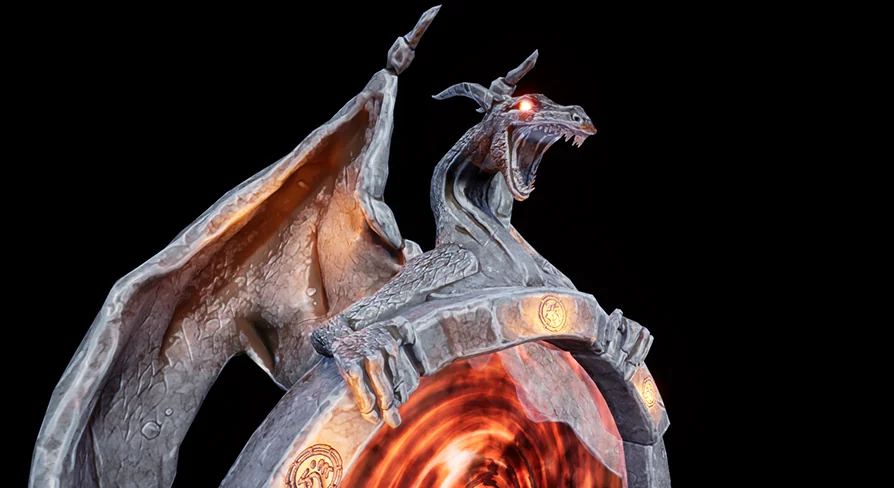
Dragon Portal is a stylized low-poly fantasy asset featuring five modular meshes, animated materials, subtle FX lighting, and Actor Blueprint control.
Five distinct architectural pieces form the physical structure of Dragon Portal: one platform, one banner, one portal frame, one altar, and one pillar. Each piece is modeled in a low-poly stylized fantasy aesthetic, prioritizing clean geometry and readable silhouettes over high-frequency surface detail. Rather than functioning purely as a static monolithic mesh, the modular breakdown lets level designers treat the gateway as a complete architectural composition or scatter individual elements across an environment.
The platform provides a raised circular or geometric foundation that separates the portal zone from surrounding terrain, giving the player a clear physical boundary for teleportation mechanics. At the center or rear of this staging area sits the main portal frame, which establishes the focal height of the installation. Flanking pieces such as the pillar and the altar offer secondary spatial anchors. Placing the altar in front of the portal frame immediately creates an interactive focal point where characters might cast spells, place quest items, or channel energy to open a passage. The vertical pillar reinforces the fantasy temple aesthetic, serving as an architectural buttress or runic monument that balances the scene.
Banner Customization with Three Blazons
Cloth dressing plays an important visual role in identifying factions, magic schools, or territorial control within fantasy games. The package provides a dedicated banner asset equipped with three interchangeable blazons. This variation allows environmental artists to adjust the heraldry of the installation without needing separate geometry or external texture modifications.
Switching between the three blazons alters the narrative context of the gateway. A dragon-themed realm might display a specific insignia during peacetime, while alternative blazons allow the same structural assets to represent rival clans, conquered outposts, or different elemental affiliations across a game map. Because the banner matches the stylized, low-poly language of the surrounding stones and timbers, it integrates naturally against the pillar or altar steps, softening the rigid architectural lines with heraldic fabric.
Actor Blueprint Control and Animated Materials
Interactivity within the Dragon Portal is handled through an integrated Actor Blueprint. This Blueprint links the static mesh components to animated materials, light effects, and morph behaviors, turning an otherwise inert collection of props into an active game mechanic. Instead of relying solely on complex external skeletal rigs, visual movement and state changes are driven directly through material parameters and morph targets inside the actor.
The system uses animated materials to simulate shifting mystical energies across the portal surface. Through Blueprint logic, these materials shift their visual state, allowing the gateway to display idle pulses, active activation sequences, or dormant phases. Morph targets driven by the Actor Blueprint introduce geometric shifts or expanding vortex motions, giving the portal threshold tangible depth when engaged. The setup also launches basic FX lighting, casting dynamic illumination over the platform, altar, and surrounding terrain to signal when the teleportation threshold is open and traversable.
Altar, Pillar, and Platform Staging
Because the five assets are separated into modular components, level creators can assemble multiple spatial layouts to suit gameplay pacing. In a confined dungeon chamber, the portal frame and altar can be mounted directly against a cavern wall, eliminating the platform to fit tight interior collisions. In wide-open overland zones, duplicating the pillar creates a grand processional avenue leading up to the raised platform, turning the gate into a landmark visible from a distance.
The altar functions naturally as the player interaction trigger. Designers can tie proximity triggers or interaction volumes directly to the altar mesh, linking player input to the Actor Blueprint that launches the animated material morphs and FX light. Meanwhile, the pillar provides height variation, enabling developers to frame player camera angles during approach sequences or cutscenes without blocking the central portal event horizon.
Teleport Systems Alongside Dark Portal and Angel Portal
Dragon Portal continues the stylized lineage established by earlier gateway designs, specifically Dark Portal and Angel Portal. Sharing an underlying low-poly philosophy and Blueprint-driven architecture, these thematic counterparts allow developers to build distinct transit networks across different biomes or narrative domains.
A fantasy RPG project can leverage these stylistic pairings to differentiate distinct gameplay realms. The dragon-themed visual motif can govern volcanic or martial dragon-worshiping zones, while Dark Portal anchors underworld or necromantic territories, and Angel Portal designates celestial or sanctuary hubs. Because the technical implementation relies on consistent low-poly art principles and Blueprint-driven material animations, the gates feel cohesive across an entire production while still signaling distinct fast-travel destinations to the player.
 Tools
Tools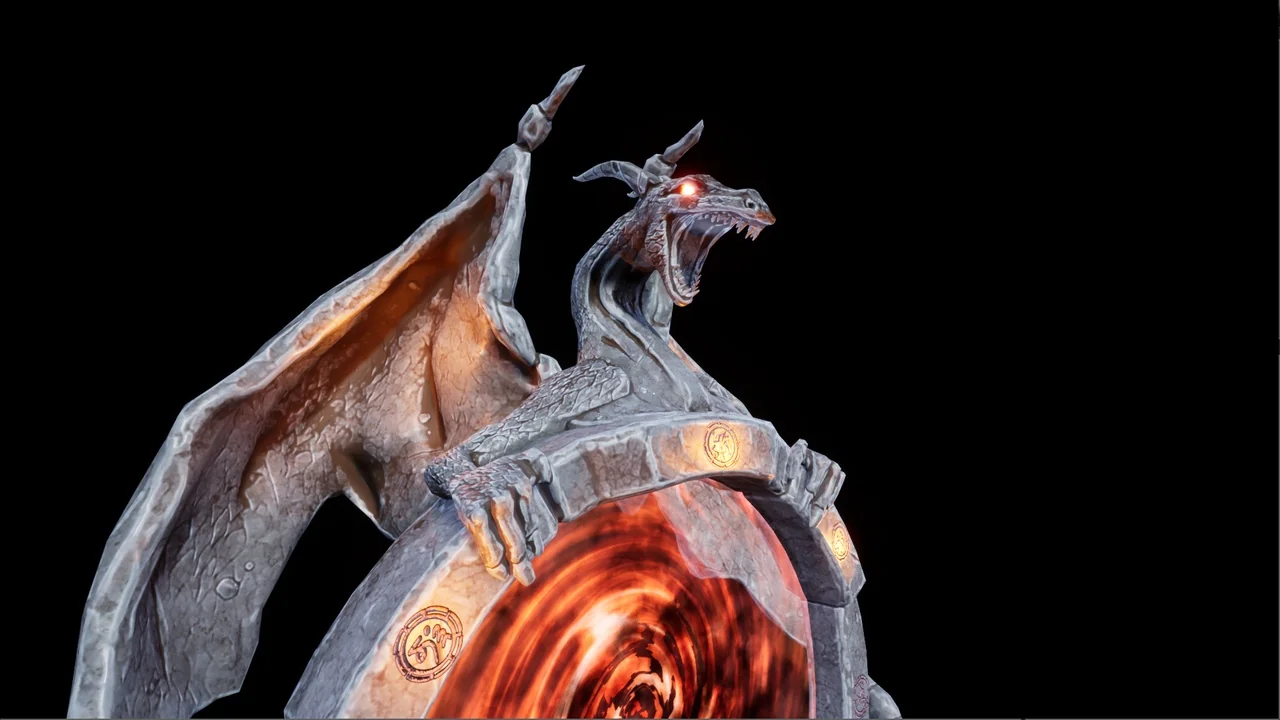
 Tools
Tools Tools
Tools Tools
Tools