"07a32e720bd988c8"{"id":"1002472","slug":"cyberpunk-female-characters","title":"Cyberpunk female characters","category":"Characters \u0026 Creatures","engine":"4.26+,5.0+","assetVersion":"","engineVersion":"Engine Version: 4.26+,5.0+","tag":"Characters","accent":"blue","visual":"character","summary":"Technical integration, Animationblueprint setup, PBR materials, and compatibility notes for the Cyberpunk female characters package.","platform":"Unreal Engine","indexPolicy":"index","publishedAt":"2026-11-12T03:19:32.975Z","updatedAt":"2026-11-12T03:19:32.975Z","sourceNotes":[],"fileContents":[],"compatibility":["Unreal Engine","Engine Version: 4.26+,5.0+"],"featuredImage":{"alt":"Cyberpunk female characters","src":"/wp-content/uploads/published/2026/11/8c3482821467-d28945c9-49a5-4f5f-b074-579568b0c955-50b09877e6.webp"},"hasDownloadLink":true,"downloads":0,"terms":[{"taxonomy":"category","slug":"characters-and-creatures","name":"Characters \u0026 Creatures"}],"galleryImages":[{"src":"/wp-content/uploads/published/2026/11/c73691c3f695-6a250418-ebb4-456e-9feb-b7b3e5369c3f-2e5ba61a5c.webp","alt":"Cyberpunk female characters"},{"src":"/wp-content/uploads/published/2026/11/5f03b37c4e0e-4e6c272f-5f07-4602-8598-67d1cbabf7b1-08ecabbbfa.webp","alt":"Cyberpunk female characters"}],"accessPanel":{"kind":"resource","title":"Get this resource","eyebrow":"Free resource","message":"Download this resource in your browser.","fileName":"Content.7z","safetyNote":"Resources are manually reviewed before listing to improve quality and reduce obvious risks.","actionLabel":"Get this resource","resourceType":"Resource archive","versions":[]},"contentHtml":"\u003ch2\u003eDeploying Animationblueprint Logic for Cyberpunk Female Characters\u003c/h2\u003e\n\u003cp\u003eGetting real-time skeletal assets into an active gameplay environment starts directly in the animation graph. Working with the Cyberpunk female characters involves initializing the included Animationblueprint to drive locomotion states, blend spaces, and procedural skeleton adjustments. The integration path requires assigning the character mesh to the Animationblueprint instance, ensuring that the bone hierarchy registers directional inputs and state changes seamlessly. Because script functionality is incorporated alongside the character setup, developers can bind movement variables, transition rules, and pose caches directly to character controller events without constructing an entire logic graph from scratch.\u003c/p\u003e\n\u003cp\u003eRealistic character movement depends heavily on clean state transitions. The Animationblueprint manages transitions between idle stances, accelerated movement cycles, and contextual stops. By maintaining separated tracks for upper-body actions and lower-body locomotion within the animation graph, the character can perform isolated tasks—such as interacting with equipment or adjusting gear—while continuing to execute baseline movement loops. This separation prevents visual sliding and maintains kinematic fidelity when traversing complex, uneven game environments.\u003c/p\u003e\n\u003cp\u003eThe companion script handles communication between player inputs and skeletal updates. Rather than relying on disparate components, the script links gameplay logic directly to the character data. This setup ensures that parameter changes, such as shifting movement speed or entering a distinct tactical stance, feed directly into the Animationblueprint state machine. The resulting execution pipeline minimizes processing overhead by updating only the relevant animation nodes during active gameplay frames.\u003c/p\u003e \u003ch2\u003eBackpack Mesh Integration and Script Components\u003c/h2\u003e\n\u003cp\u003eThe package includes a dedicated backpack accessory designed to complement the realistic aesthetic of the model. Attaching modular accessories to a dynamic skeletal mesh requires precise socket placement to prevent clipping during extreme motion ranges. Integrating the backpack involves binding the accessory mesh to dedicated attachment sockets situated along the upper spine and shoulder regions of the skeletal structure.\u003c/p\u003e\n\u003cp\u003eWhen the character executes intense movement profiles, such as sprinting, crouching, or turning abruptly, accessory meshes must track the torso naturally. The script framework provides the necessary hooks to initialize and parent the backpack to the correct skeletal nodes at runtime. By managing accessory attachments through the underlying script, teams can toggle the mesh visibility or swap equipment configurations programmatically without altering the base character model.\u003c/p\u003e\n\u003cp\u003eMaintaining realistic movement with attached gear also requires careful coordination with the Animationblueprint. The added mass and profile of the backpack must align with spine rotations and lean angles. Ensuring that the socket maintains stable local transform values relative to the spine bones guarantees that the backpack remains securely anchored throughout all locomotion sequences, avoiding floating or disjointed movement during complex animations.\u003c/p\u003e \u003ch2\u003eCyberpunk Female Characters PBR Material and HQ Texture Standards\u003c/h2\u003e\n\u003cp\u003eVisual fidelity across the character mesh and accompanying backpack relies on a physically based rendering (PBR) material workflow. The PBR material architecture utilizes high-quality (HQ) texture maps to reproduce authentic surface properties under varying real-time lighting conditions. This includes accurate separation of dielectric and metallic surfaces, precise roughness grading, and detailed surface normals that capture micro-level material variations across fabric, synthetic panels, skin, and tactical equipment.\u003c/p\u003e\n\u003cp\u003eHQ texture authoring ensures that high-frequency surface details remain sharp even during extreme close-up camera angles, making the character suitable for both gameplay cameras and cinematic cutscenes. The PBR material setup processes realistic light interactions, ensuring that environmental lighting—such as harsh daylight, interior point sources, or colorful synthetic ambient light typical of urban environments—reflects accurately across all surfaces. Matte textiles on the character outfit scatter light diffusely, while polished composite surfaces and metal buckles catch defined specular highlights.\u003c/p\u003e\n\u003cp\u003eThe efficiency of the PBR material network lies in how the texture maps are structured within the rendering pipeline. By consolidating material properties into defined channel layouts, the character achieves dense surface detail while preserving memory bandwidth. These high-resolution textures prevent blurring or loss of definition when the camera frames the model up close, providing a grounded, realistic representation that withstands technical inspection across different rendering environments.\u003c/p\u003e \u003ch2\u003eCross-Asset Compatibility with Rome Empire Character Pack\u003c/h2\u003e\n\u003cp\u003eA notable technical aspect of the package is its cross-compatibility with the Rome Empire Character Pack. In character production pipelines, cross-pack compatibility typically centers on shared skeletal proportions, standardized bone naming conventions, and consistent socket configurations. This compatibility allows animations, poses, and structural logic authored for the historical pack to function cleanly with these modern character meshes.\u003c/p\u003e\n\u003cp\u003eUtilizing a shared skeletal baseline simplifies retargeting workflows. Developers managing diverse asset libraries can share core animation cycles, combat maneuvers, and scripted interaction logic across different character types without having to rebuild individual skeleton assets. The unified bone mapping reduces technical friction when porting locomotion systems or interaction scripts across projects that use both packages as foundational assets.\u003c/p\u003e\n\u003cp\u003eThis structural alignment also aids in maintaining a standardized project architecture. By adhering to the same hierarchy as the Rome Empire Character Pack, animation states, montage triggers, and attachment logic remain predictable. Technical artists can set up global character classes that handle data parsing, socket indexing, and animation dispatching uniformly across both thematic sets, keeping project codebases organized and modular.\u003c/p\u003e \u003ch2\u003eTechnical Production Readiness and Asset Maintenance\u003c/h2\u003e\n\u003cp\u003eThe combination of realistic character modeling, functional script logic, an integrated Animationblueprint, and standardized PBR materials positions this package as a ready-to-implement resource for production pipelines. Integrating the asset into an existing project requires minimal configuration: assign the character mesh, verify socket attachments for the backpack, and point the game controller toward the integrated script and animation graph.\u003c/p\u003e\n\u003cp\u003eMaintaining the asset over extended development cycles is straightforward due to the modular separation of textures, materials, animations, and gameplay logic. High-quality textures and robust material setups ensure longevity across engine updates, while the standardized script architecture allows technical artists to extend gameplay mechanics without breaking the underlying animation pipelines.\u003c/p\u003e\n\n\u003ch2\u003eRelated Resources Worth Checking\u003c/h2\u003e\n\u003cul\u003e\n\u003cli\u003e\u003ca href=\"https://3dcghub.com/f2-cyber-girl-davina/\" rel=\"noopener noreferrer\"\u003eF2 Cyber Girl Davina\u003c/a\u003e\u003c/li\u003e\n\u003cli\u003e\u003ca href=\"https://3dcghub.com/cyberpunk-girl/\" rel=\"noopener noreferrer\"\u003eCyberpunk Girl\u003c/a\u003e\u003c/li\u003e\n\u003cli\u003e\u003ca href=\"https://3dcghub.com/cyberpunk-street-boy/\" rel=\"noopener noreferrer\"\u003eCyberpunk Street Boy\u003c/a\u003e\u003c/li\u003e\n\u003cli\u003e\u003ca href=\"https://3dcghub.com/sci-fi-space-soldier-female/\" rel=\"noopener noreferrer\"\u003eSci Fi Space Soldier Female\u003c/a\u003e\u003c/li\u003e\n\u003cli\u003e\u003ca href=\"https://3dcghub.com/cyberpunk-sniper-girl/\" rel=\"noopener noreferrer\"\u003eCyberpunk Sniper Girl\u003c/a\u003e\u003c/li\u003e\n\u003c/ul\u003e","contentTextLength":7424,"navigation":{"current":27,"total":4421,"previous":{"id":"1002473","slug":"defender-girl","title":"Defender Girl","category":"Characters \u0026 Creatures","platform":"Unreal Engine","updatedAt":"2026-11-12T03:21:41.247Z"},"next":{"id":"1002471","slug":"chibi-characters","title":"Chibi Characters","category":"Characters \u0026 Creatures","platform":"Unreal Engine","updatedAt":"2026-11-12T03:18:15.757Z"}},"relatedResources":[{"id":"2307","slug":"f2-cyber-girl-davina","title":"F2 Cyber Girl Davina","category":"Characters \u0026 Creatures","engine":"4.27,5.0+","assetVersion":"Engine version: 4.27,5.0+","engineVersion":"4.27","tag":"Characters","accent":"blue","visual":"character","summary":"Enhance your game with F2 Cyber Girl Davina. This modular Unreal Engine character features ARkit blendshapes, Epic Skeleton rigging, and full customization.","platform":"Unreal Engine","indexPolicy":"noindex","publishedAt":"2026-02-07T09:01:16.000Z","updatedAt":"2026-04-19T15:58:03.000Z","sourceNotes":[],"fileContents":[],"compatibility":["Unreal Engine","Engine version: 4.27,5.0+"],"featuredImage":{"alt":"F2 Cyber Girl Davina","src":"https://3dcghub.com/wp-content/uploads/2026/02/fce4b9a4-5695-4f8c-a9f1-ded481db34f6.webp"},"hasDownloadLink":true,"downloads":0},{"id":"2149","slug":"cyberpunk-girl","title":"Cyberpunk Girl","category":"Characters \u0026 Creatures","engine":"5.1+","assetVersion":"","engineVersion":"Engine Version: 5.1+","tag":"Characters","accent":"blue","visual":"character","summary":"Boost your sci-fi project with this realistic Cyberpunk Girl character. Features high-quality battle armor and a professional animation blueprint for games.","platform":"Unreal Engine","indexPolicy":"noindex","publishedAt":"2026-02-07T08:02:10.000Z","updatedAt":"2026-11-10T13:41:41.350Z","sourceNotes":[],"fileContents":[],"compatibility":["Unreal Engine","Engine Version: 5.1+"],"featuredImage":{"alt":"Cyberpunk Girl","src":"https://3dcghub.com/wp-content/uploads/2026/02/5d65630f-717f-480e-9b12-e4804c87c017.webp"},"hasDownloadLink":true,"downloads":0},{"id":"1001777","slug":"cyberpunk-street-boy","title":"Cyberpunk Street Boy","category":"Characters \u0026 Creatures","engine":"4.25+,5.0+","assetVersion":"","engineVersion":"Engine Version: 4.25+,5.0+","tag":"Characters","accent":"blue","visual":"character","summary":"Examine Cyberpunk Street Boy, featuring modular cybernetic design, PBR materials, facial morph targets, sword combat, and Animation Blueprint support.","platform":"Unreal Engine","indexPolicy":"index","publishedAt":"2026-10-20T03:25:10.457Z","updatedAt":"2026-10-20T03:25:10.457Z","sourceNotes":[],"fileContents":[],"compatibility":["Unreal Engine","Engine Version: 4.25+,5.0+"],"featuredImage":{"alt":"Cyberpunk Street Boy","src":"/wp-content/uploads/published/2026/10/52f458aff286-02fd65ac-9315-4dbb-b5bb-521bead39c80-4b9bde6c52.webp"},"hasDownloadLink":true,"downloads":1}]}
Characters
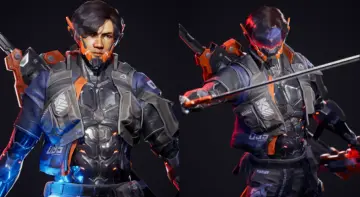
Cyberpunk female characters
Technical integration, Animationblueprint setup, PBR materials, and compatibility notes for the Cyberpunk female characters package.
Deploying Animationblueprint Logic for Cyberpunk Female Characters
Getting real-time skeletal assets into an active gameplay environment starts directly in the animation graph. Working with the Cyberpunk female characters involves initializing the included Animationblueprint to drive locomotion states, blend spaces, and procedural skeleton adjustments. The integration path requires assigning the character mesh to the Animationblueprint instance, ensuring that the bone hierarchy registers directional inputs and state changes seamlessly. Because script functionality is incorporated alongside the character setup, developers can bind movement variables, transition rules, and pose caches directly to character controller events without constructing an entire logic graph from scratch.
Realistic character movement depends heavily on clean state transitions. The Animationblueprint manages transitions between idle stances, accelerated movement cycles, and contextual stops. By maintaining separated tracks for upper-body actions and lower-body locomotion within the animation graph, the character can perform isolated tasks—such as interacting with equipment or adjusting gear—while continuing to execute baseline movement loops. This separation prevents visual sliding and maintains kinematic fidelity when traversing complex, uneven game environments.
The companion script handles communication between player inputs and skeletal updates. Rather than relying on disparate components, the script links gameplay logic directly to the character data. This setup ensures that parameter changes, such as shifting movement speed or entering a distinct tactical stance, feed directly into the Animationblueprint state machine. The resulting execution pipeline minimizes processing overhead by updating only the relevant animation nodes during active gameplay frames.
Backpack Mesh Integration and Script Components
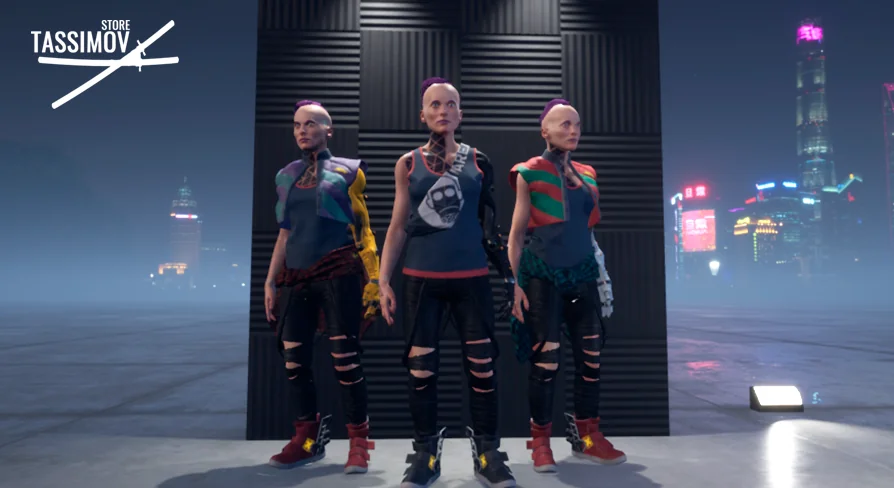
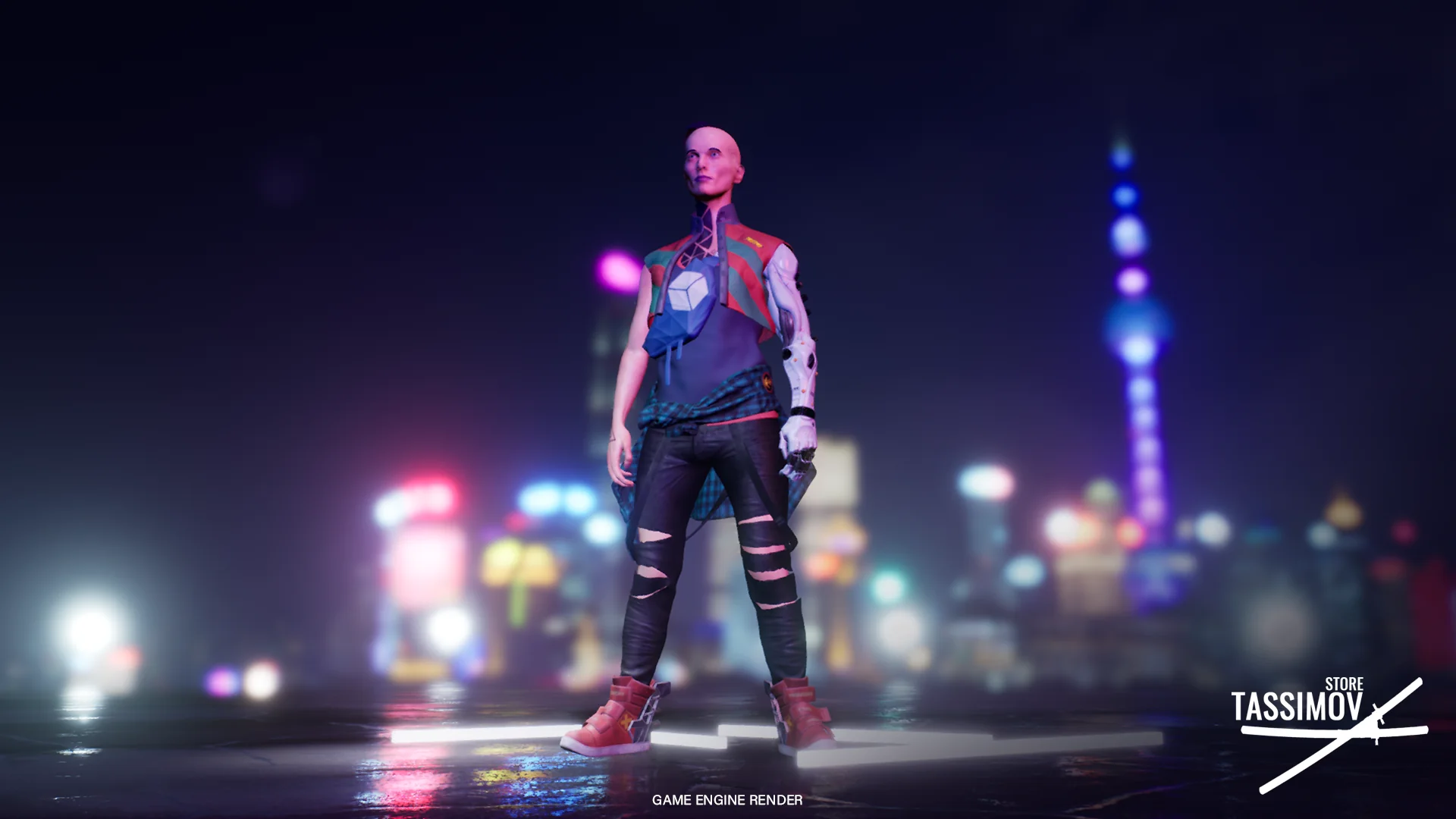
The package includes a dedicated backpack accessory designed to complement the realistic aesthetic of the model. Attaching modular accessories to a dynamic skeletal mesh requires precise socket placement to prevent clipping during extreme motion ranges. Integrating the backpack involves binding the accessory mesh to dedicated attachment sockets situated along the upper spine and shoulder regions of the skeletal structure.
When the character executes intense movement profiles, such as sprinting, crouching, or turning abruptly, accessory meshes must track the torso naturally. The script framework provides the necessary hooks to initialize and parent the backpack to the correct skeletal nodes at runtime. By managing accessory attachments through the underlying script, teams can toggle the mesh visibility or swap equipment configurations programmatically without altering the base character model.
Maintaining realistic movement with attached gear also requires careful coordination with the Animationblueprint. The added mass and profile of the backpack must align with spine rotations and lean angles. Ensuring that the socket maintains stable local transform values relative to the spine bones guarantees that the backpack remains securely anchored throughout all locomotion sequences, avoiding floating or disjointed movement during complex animations.
Cyberpunk Female Characters PBR Material and HQ Texture Standards
Visual fidelity across the character mesh and accompanying backpack relies on a physically based rendering (PBR) material workflow. The PBR material architecture utilizes high-quality (HQ) texture maps to reproduce authentic surface properties under varying real-time lighting conditions. This includes accurate separation of dielectric and metallic surfaces, precise roughness grading, and detailed surface normals that capture micro-level material variations across fabric, synthetic panels, skin, and tactical equipment.
HQ texture authoring ensures that high-frequency surface details remain sharp even during extreme close-up camera angles, making the character suitable for both gameplay cameras and cinematic cutscenes. The PBR material setup processes realistic light interactions, ensuring that environmental lighting—such as harsh daylight, interior point sources, or colorful synthetic ambient light typical of urban environments—reflects accurately across all surfaces. Matte textiles on the character outfit scatter light diffusely, while polished composite surfaces and metal buckles catch defined specular highlights.
The efficiency of the PBR material network lies in how the texture maps are structured within the rendering pipeline. By consolidating material properties into defined channel layouts, the character achieves dense surface detail while preserving memory bandwidth. These high-resolution textures prevent blurring or loss of definition when the camera frames the model up close, providing a grounded, realistic representation that withstands technical inspection across different rendering environments.
Cross-Asset Compatibility with Rome Empire Character Pack
A notable technical aspect of the package is its cross-compatibility with the Rome Empire Character Pack. In character production pipelines, cross-pack compatibility typically centers on shared skeletal proportions, standardized bone naming conventions, and consistent socket configurations. This compatibility allows animations, poses, and structural logic authored for the historical pack to function cleanly with these modern character meshes.
Utilizing a shared skeletal baseline simplifies retargeting workflows. Developers managing diverse asset libraries can share core animation cycles, combat maneuvers, and scripted interaction logic across different character types without having to rebuild individual skeleton assets. The unified bone mapping reduces technical friction when porting locomotion systems or interaction scripts across projects that use both packages as foundational assets.
This structural alignment also aids in maintaining a standardized project architecture. By adhering to the same hierarchy as the Rome Empire Character Pack, animation states, montage triggers, and attachment logic remain predictable. Technical artists can set up global character classes that handle data parsing, socket indexing, and animation dispatching uniformly across both thematic sets, keeping project codebases organized and modular.
Technical Production Readiness and Asset Maintenance
The combination of realistic character modeling, functional script logic, an integrated Animationblueprint, and standardized PBR materials positions this package as a ready-to-implement resource for production pipelines. Integrating the asset into an existing project requires minimal configuration: assign the character mesh, verify socket attachments for the backpack, and point the game controller toward the integrated script and animation graph.
Maintaining the asset over extended development cycles is straightforward due to the modular separation of textures, materials, animations, and gameplay logic. High-quality textures and robust material setups ensure longevity across engine updates, while the standardized script architecture allows technical artists to extend gameplay mechanics without breaking the underlying animation pipelines.
 Characters
 Characters
 Characters
 Characters