"a19e0535960bd083"{"id":"1001990","slug":"cooperative-horror","title":"Cooperative Horror","category":"Action-Adventure","engine":"5.1+","assetVersion":"","engineVersion":"Engine Version: 5.1+","tag":"Action-Adventure","accent":"blue","visual":"mech","summary":"Examine the Cooperative Horror multiplayer Unreal Engine template, featuring 1-4 player co-op, AI ghosts, altar objectives, and dedicated server support.","platform":"Unreal Engine","publishedAt":"2026-10-26T12:09:35.259Z","updatedAt":"2026-10-26T12:09:35.259Z","sourceNotes":[],"fileContents":[],"compatibility":["Unreal Engine","Engine Version: 5.1+"],"featuredImage":{"alt":"Cooperative Horror","src":"/wp-content/uploads/published/2026/10/55ed249c0436-4e0f0b5d-36eb-4ab0-864f-fb33ff943e2b-dbe793dbb1.webp"},"hasDownloadLink":true,"downloads":0,"terms":[{"taxonomy":"category","slug":"action-adventure","name":"Action-Adventure"}],"galleryImages":[{"src":"/wp-content/uploads/published/2026/10/995aec531020-0ec7b8bf-3fec-42d1-a106-6e35ccc934e6-cf79361d87.webp","alt":"Cooperative Horror"},{"src":"/wp-content/uploads/published/2026/10/987b1e27a5ca-a57ed480-a4a2-4d0f-95e1-592cdb8dfc1d-8abada9aa0.webp","alt":"Cooperative Horror"},{"src":"/wp-content/uploads/published/2026/10/286eedf91b9b-29dc3605-90df-47aa-90f9-b123aa9570dd-962bed0839.webp","alt":"Cooperative Horror"},{"src":"/wp-content/uploads/published/2026/10/d102671740c5-5af367a3-9b02-4f08-8b8c-b2ec7b646386-f54ac7528c.webp","alt":"Cooperative Horror"},{"src":"/wp-content/uploads/published/2026/10/52ac07e79aa7-af10dd3c-d5d4-4304-b854-3bf0bd52ad2b-668e9308e1.webp","alt":"Cooperative Horror"},{"src":"/wp-content/uploads/published/2026/10/cfc86ec498e9-25a83f3b-ebad-4c46-8369-ce13c4a89300-33936dc4ea.webp","alt":"Cooperative Horror"},{"src":"/wp-content/uploads/published/2026/10/17fb3d04102f-030b3434-7645-40f2-b37b-fec5818a64ca-00f62e0a35.webp","alt":"Cooperative Horror"},{"src":"/wp-content/uploads/published/2026/10/aeeed85dae37-50bbc221-cb7d-4fba-8d7f-0631a7c9b28e-b8d832af24.webp","alt":"Cooperative Horror"},{"src":"/wp-content/uploads/published/2026/10/9cecd1cb5f3a-70213e36-728e-4d13-a525-ebd3f6af9609-01a5fb0eed.webp","alt":"Cooperative Horror"},{"src":"/wp-content/uploads/published/2026/10/be3f7c3f9d45-8d5cdf09-58b5-4540-af89-80b8c20d14b9-6a0d80ab15.webp","alt":"Cooperative Horror"}],"accessPanel":{"kind":"resource","title":"Download this resource","eyebrow":"Free Download","message":"Log in or create a free account to start your download.","fileName":"Cooperative Horror.7z","safetyNote":"Resources are manually reviewed before listing to improve quality and reduce obvious risks.","actionLabel":"Download Free","resourceType":"Resource archive"},"contentHtml":"\u003cp\u003eA player steps through darkness with a flashlight raised, scanning the ground for dropped matches while listening for approaching footsteps. A roaming AI ghost picks up the trail, shifting from patrol behavior into an aggressive pursuit that forces the team to scatter or retaliate with salt. Cooperative Horror establishes this survival scenario through a modular, Blueprint-driven framework constructed for multiplayer sessions, solo trials, and dedicated server environments.\u003c/p\u003e \u003ch2\u003eAI Ghost Encounters and the Altar Objective\u003c/h2\u003e\n\u003cp\u003eThe primary gameplay loop in Cooperative Horror centers on an objective-based survival encounter scaled for one to four players. Rather than relying on simple evasion alone, sessions require players to actively track down items scattered throughout the environment to secure a victory. The main win condition requires locating matches and using them to set fire to all altars positioned across the map.\u003c/p\u003e\n\u003cp\u003eOpposing the players are fully replicated AI ghosts. These hostile entities navigate the map independently, searching corridors and open clearings. When an AI ghost spots a human target, it switches from passive roaming to active chasing, closing the distance to execute physical attacks. Players caught without defensive measures must quickly break line of sight or rely on team coordination to survive.\u003c/p\u003e\n\u003cp\u003eTo defend themselves, players can equip and throw salt directly at the ghosts. Landing a salt throw banishes the entity, interrupting the assault and granting the group a brief window to regroup, revive, or search for remaining altars. This creates a push-and-pull rhythm between scouring dark corners for matches, managing limited defensive consumables, and committing to the vulnerable animation of igniting an altar.\u003c/p\u003e \u003ch2\u003eDedicated Server Architecture and Lobby Controls\u003c/h2\u003e\n\u003cp\u003eMultiplayer networking runs across both listen servers and dedicated servers, giving projects the flexibility to support peer-to-peer matchmaking or centralized game hosting. Every critical action—including inventory pickup, ghost banishment, and altar state changes—is handled through full network replication so that clients remain synchronized during high-stress encounters.\u003c/p\u003e\n\u003cp\u003eSession onboarding begins in the main menu, where players interface with a dedicated menu widget, adjust game settings, or browse available servers through an integrated server browser. Once connected, participants enter a pre-game lobby that handles the operational setup before a match begins:\u003c/p\u003e\n\u003cul\u003e\n\u003cli\u003e\u003cstrong\u003eCharacter Selection:\u003c/strong\u003e Players lock in specific survivor models prior to loading into the level.\u003c/li\u003e\n\u003cli\u003e\u003cstrong\u003eHost Controls:\u003c/strong\u003e The hosting player maintains authority over session configuration, including the ability to kick players from the lobby.\u003c/li\u003e\n\u003cli\u003e\u003cstrong\u003eLobby Chat:\u003c/strong\u003e Text communication allows participants to coordinate roles, strategies, or server rules prior to launch.\u003c/li\u003e\n\u003c/ul\u003e \u003ch2\u003eTrue First Person, Third Person, and Spectator Camera Perspectives\u003c/h2\u003e\n\u003cp\u003eVisual presentation is configured to support both true first-person and third-person camera views. The true first-person perspective aligns the camera directly with the player character mesh, ensuring that hand movements, held items, and body motions remain physically grounded in the world. Looking down reveals the character's limbs, anchoring the sense of vulnerability during ghost chases. For projects seeking an action or adventure horror presentation, the third-person camera offers broader peripheral visibility and an unobstructed view of survivor animations.\u003c/p\u003e\n\u003cp\u003eWhen an investigator falls during an encounter, the template does not force a hard disconnect or static screen. A built-in spectator mode activates, allowing downed participants to cycle through surviving teammates. This keeps eliminated players engaged in the outcome of the match while monitoring remaining altar counts and teammate positions.\u003c/p\u003e \u003ch2\u003eIn-Game Widgets, Flashlights, and Audio Notes\u003c/h2\u003e\n\u003cp\u003eOnce inside a match, information is delivered through an integrated user interface and contextual environmental tools. A specialized teammates widget stays visible on screen, showing player statuses so teammates can monitor who is actively working on objectives, who is wandering alone, and who requires immediate assistance. Text chat continues during active gameplay, enabling silent communication when voice options are not in use.\u003c/p\u003e\n\u003cp\u003eExploration tools include a functional flashlight system, serving as the primary visual aid in dark interior and exterior spaces. Item interaction logic covers pickups for consumable defenses like salt pouches and matches needed for the altars.\u003c/p\u003e\n\u003cp\u003eEnvironmental storytelling is supported through two native item types:\u003c/p\u003e\n\u003cul\u003e\n\u003cli\u003e\u003cstrong\u003eText Notes:\u003c/strong\u003e Readable pages that open in-game, allowing developers to communicate map lore, instructions, or codes.\u003c/li\u003e\n\u003cli\u003e\u003cstrong\u003eAudio Notes:\u003c/strong\u003e Recorded audio logs that trigger playback upon pickup or interaction, delivering spoken narrative or ambient warnings.\u003c/li\u003e\n\u003c/ul\u003e \u003ch2\u003eCursed Forest Map and Blueprint Layout\u003c/h2\u003e\n\u003cp\u003eThe framework supplies two distinct environments out of the box: a clean test level and the Cursed Forest demo level. The test level acts as a sterile staging ground where developers can isolate mechanics, test AI navigation bounds, check item respawns, and verify replication behavior without dense environmental props. The Cursed Forest level demonstrates a complete production environment, placing altars, roaming ghost paths, note placements, and item pickups into an atmospheric woodland setting.\u003c/p\u003e\n\u003cp\u003eUnder the hood, the entire logic is built in clean, commented Blueprints. Node networks are grouped and annotated so creators can trace execution paths for matchmaking, player damage, ghost states, and inventory handling. This makes it straightforward to modify ghost speed, altar ignition times, or consumable drop rates without untangling complex logic dependencies.\u003c/p\u003e\n\u003cp\u003eThe template also holds compatibility with Plug and Play Shooter AI, opening a path for creators who wish to expand beyond ghost banishing mechanics into combative horror or hybrid shooter frameworks.\u003c/p\u003e \u003ch2\u003eProduction Utility\u003c/h2\u003e\n\u003cp\u003eCooperative Horror serves teams seeking an immediate, fully functional cooperative loop without spending months establishing server browsers, character selection screens, and ghost replication systems. Because the objective flow, spectator views, AI patrols, and item pickups are fully interconnected in Blueprints, developers can treat the package as an operational production base, swapping in custom survivor meshes, audio files, and monster models to bring a unique survival horror vision to life.\u003c/p\u003e\n\n\u003ch2\u003eMore From The Same Workflow\u003c/h2\u003e\n\u003cul\u003e\n\u003cli\u003e\u003ca href=\"https://3dcghub.com/asymmetric-multiplayer-horror/\" title=\"Asymmetric Multiplayer Horror\"\u003eAsymmetric Multiplayer Horror\u003c/a\u003e\u003c/li\u003e\n\u003cli\u003e\u003ca href=\"https://3dcghub.com/thief-simulator-starter-kit/\" title=\"Thief Simulator Starter Kit\"\u003eThief Simulator Starter Kit\u003c/a\u003e\u003c/li\u003e\n\u003cli\u003e\u003ca href=\"https://3dcghub.com/modern-survival-horror-framework/\" title=\"Modern Survival Horror Framework\"\u003eModern Survival Horror Framework\u003c/a\u003e\u003c/li\u003e\n\u003cli\u003e\u003ca href=\"https://3dcghub.com/advanced-survival-horror/\" title=\"Advanced Survival Horror\"\u003eAdvanced Survival Horror\u003c/a\u003e\u003c/li\u003e\n\u003cli\u003e\u003ca href=\"https://3dcghub.com/classic-survival-horror-framework-v2/\" title=\"Classic Survival Horror Framework V2\"\u003eClassic Survival Horror Framework V2\u003c/a\u003e\u003c/li\u003e\n\u003c/ul\u003e","contentTextLength":6660,"navigation":{"current":101,"total":4026,"previous":{"id":"1001991","slug":"cover-animset-pro","title":"Cover Animset Pro","category":"Combat","platform":"Unreal Engine","updatedAt":"2026-10-26T12:09:55.717Z"},"next":{"id":"1001989","slug":"cooking-game-sound-effects","title":"Cooking Game Sound Effects","category":"Game Development Resource","platform":"Unreal Engine","updatedAt":"2026-10-24T15:51:55.005Z"}},"relatedResources":[{"id":"1000977","slug":"asymmetric-multiplayer-horror","title":"Asymmetric Multiplayer Horror","category":"Action-Adventure","engine":"5.0+","assetVersion":"","engineVersion":"Engine Version: 5.0+","tag":"Action-Adventure","accent":"blue","visual":"mech","summary":"Blueprint template for asymmetric multiplayer horror with 4 vs 1 play, AI or player monsters, first/third person views, and a Cursed Forest demo.","platform":"Unreal Engine","publishedAt":"2026-08-17T17:19:51.833Z","updatedAt":"2026-08-17T17:19:51.833Z","sourceNotes":[],"fileContents":[],"compatibility":["Unreal Engine","Engine Version: 5.0+"],"featuredImage":{"alt":"Asymmetric Multiplayer Horror","src":"/wp-content/uploads/published/2026/08/d3e8d4559426-f968b340-50b9-4a59-9fa7-7cdea14f055c-e0904bd06f.webp"},"hasDownloadLink":true,"downloads":1},{"id":"11678","slug":"thief-simulator-starter-kit","title":"Thief Simulator Starter Kit","category":"Action-Adventure","engine":"5.6+","assetVersion":"Engine version: 5.6+","engineVersion":"5.5","tag":"Action-Adventure","accent":"blue","visual":"luts","summary":"The Thief Simulator Starter Kit provides a fundamental framework for building immersive stealth and simulation games. It includes support for multiplayer, first-person perspectives, and cooperative gameplay.","platform":"Unreal Engine","publishedAt":"2026-03-05T18:14:02.000Z","updatedAt":"2026-04-19T15:48:08.000Z","sourceNotes":[],"fileContents":[],"compatibility":["Unreal Engine","Engine version: 5.6+"],"featuredImage":{"alt":"Thief Simulator Starter Kit","src":"https://3dcghub.com/wp-content/uploads/2026/03/cc4d8d18-0c62-4639-ac9a-c32d8ee52c4b.webp"},"hasDownloadLink":true,"downloads":0},{"id":"1001898","slug":"modern-survival-horror-framework","title":"Modern Survival Horror Framework","category":"Action-Adventure","engine":"5.8+","assetVersion":"","engineVersion":"Engine Version: 5.8+","tag":"Action-Adventure","accent":"blue","visual":"mech","summary":"An Unreal Engine framework featuring Motion Matching locomotion, grid inventory, enemy AI, and modular systems for third-person survival horror games.","platform":"Unreal Engine","publishedAt":"2026-10-22T11:37:21.304Z","updatedAt":"2026-10-22T11:37:21.304Z","sourceNotes":[],"fileContents":[],"compatibility":["Unreal Engine","Engine Version: 5.8+"],"featuredImage":{"alt":"Modern Survival Horror Framework","src":"/wp-content/uploads/published/2026/10/77d0793bac37-ebd2bece-1fbf-4d5a-b1a7-cc8dd57631eb-fcf413f24e.webp"},"hasDownloadLink":true,"downloads":2}]}
Action-Adventure
Cooperative Horror
Examine the Cooperative Horror multiplayer Unreal Engine template, featuring 1-4 player co-op, AI ghosts, altar objectives, and dedicated server support.
A player steps through darkness with a flashlight raised, scanning the ground for dropped matches while listening for approaching footsteps. A roaming AI ghost picks up the trail, shifting from patrol behavior into an aggressive pursuit that forces the team to scatter or retaliate with salt. Cooperative Horror establishes this survival scenario through a modular, Blueprint-driven framework constructed for multiplayer sessions, solo trials, and dedicated server environments.
AI Ghost Encounters and the Altar Objective
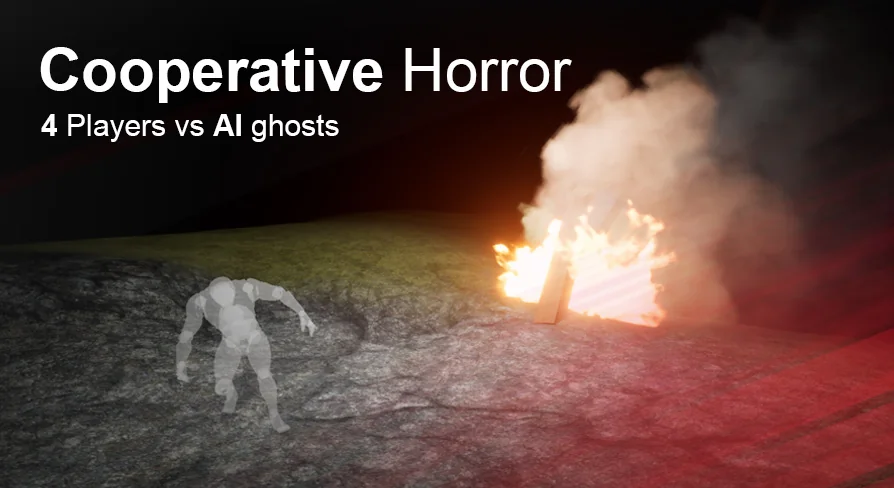
The primary gameplay loop in Cooperative Horror centers on an objective-based survival encounter scaled for one to four players. Rather than relying on simple evasion alone, sessions require players to actively track down items scattered throughout the environment to secure a victory. The main win condition requires locating matches and using them to set fire to all altars positioned across the map.
Opposing the players are fully replicated AI ghosts. These hostile entities navigate the map independently, searching corridors and open clearings. When an AI ghost spots a human target, it switches from passive roaming to active chasing, closing the distance to execute physical attacks. Players caught without defensive measures must quickly break line of sight or rely on team coordination to survive.
To defend themselves, players can equip and throw salt directly at the ghosts. Landing a salt throw banishes the entity, interrupting the assault and granting the group a brief window to regroup, revive, or search for remaining altars. This creates a push-and-pull rhythm between scouring dark corners for matches, managing limited defensive consumables, and committing to the vulnerable animation of igniting an altar.
Dedicated Server Architecture and Lobby Controls
Multiplayer networking runs across both listen servers and dedicated servers, giving projects the flexibility to support peer-to-peer matchmaking or centralized game hosting. Every critical action—including inventory pickup, ghost banishment, and altar state changes—is handled through full network replication so that clients remain synchronized during high-stress encounters.
Session onboarding begins in the main menu, where players interface with a dedicated menu widget, adjust game settings, or browse available servers through an integrated server browser. Once connected, participants enter a pre-game lobby that handles the operational setup before a match begins:
Character Selection: Players lock in specific survivor models prior to loading into the level.
Host Controls: The hosting player maintains authority over session configuration, including the ability to kick players from the lobby.
Lobby Chat: Text communication allows participants to coordinate roles, strategies, or server rules prior to launch.
True First Person, Third Person, and Spectator Camera Perspectives
Visual presentation is configured to support both true first-person and third-person camera views. The true first-person perspective aligns the camera directly with the player character mesh, ensuring that hand movements, held items, and body motions remain physically grounded in the world. Looking down reveals the character's limbs, anchoring the sense of vulnerability during ghost chases. For projects seeking an action or adventure horror presentation, the third-person camera offers broader peripheral visibility and an unobstructed view of survivor animations.
When an investigator falls during an encounter, the template does not force a hard disconnect or static screen. A built-in spectator mode activates, allowing downed participants to cycle through surviving teammates. This keeps eliminated players engaged in the outcome of the match while monitoring remaining altar counts and teammate positions.
In-Game Widgets, Flashlights, and Audio Notes
Once inside a match, information is delivered through an integrated user interface and contextual environmental tools. A specialized teammates widget stays visible on screen, showing player statuses so teammates can monitor who is actively working on objectives, who is wandering alone, and who requires immediate assistance. Text chat continues during active gameplay, enabling silent communication when voice options are not in use.
Exploration tools include a functional flashlight system, serving as the primary visual aid in dark interior and exterior spaces. Item interaction logic covers pickups for consumable defenses like salt pouches and matches needed for the altars.
Environmental storytelling is supported through two native item types:
Text Notes: Readable pages that open in-game, allowing developers to communicate map lore, instructions, or codes.
Audio Notes: Recorded audio logs that trigger playback upon pickup or interaction, delivering spoken narrative or ambient warnings.
Cursed Forest Map and Blueprint Layout
The framework supplies two distinct environments out of the box: a clean test level and the Cursed Forest demo level. The test level acts as a sterile staging ground where developers can isolate mechanics, test AI navigation bounds, check item respawns, and verify replication behavior without dense environmental props. The Cursed Forest level demonstrates a complete production environment, placing altars, roaming ghost paths, note placements, and item pickups into an atmospheric woodland setting.
Under the hood, the entire logic is built in clean, commented Blueprints. Node networks are grouped and annotated so creators can trace execution paths for matchmaking, player damage, ghost states, and inventory handling. This makes it straightforward to modify ghost speed, altar ignition times, or consumable drop rates without untangling complex logic dependencies.
The template also holds compatibility with Plug and Play Shooter AI, opening a path for creators who wish to expand beyond ghost banishing mechanics into combative horror or hybrid shooter frameworks.
Production Utility
Cooperative Horror serves teams seeking an immediate, fully functional cooperative loop without spending months establishing server browsers, character selection screens, and ghost replication systems. Because the objective flow, spectator views, AI patrols, and item pickups are fully interconnected in Blueprints, developers can treat the package as an operational production base, swapping in custom survivor meshes, audio files, and monster models to bring a unique survival horror vision to life.
 Action-Adventure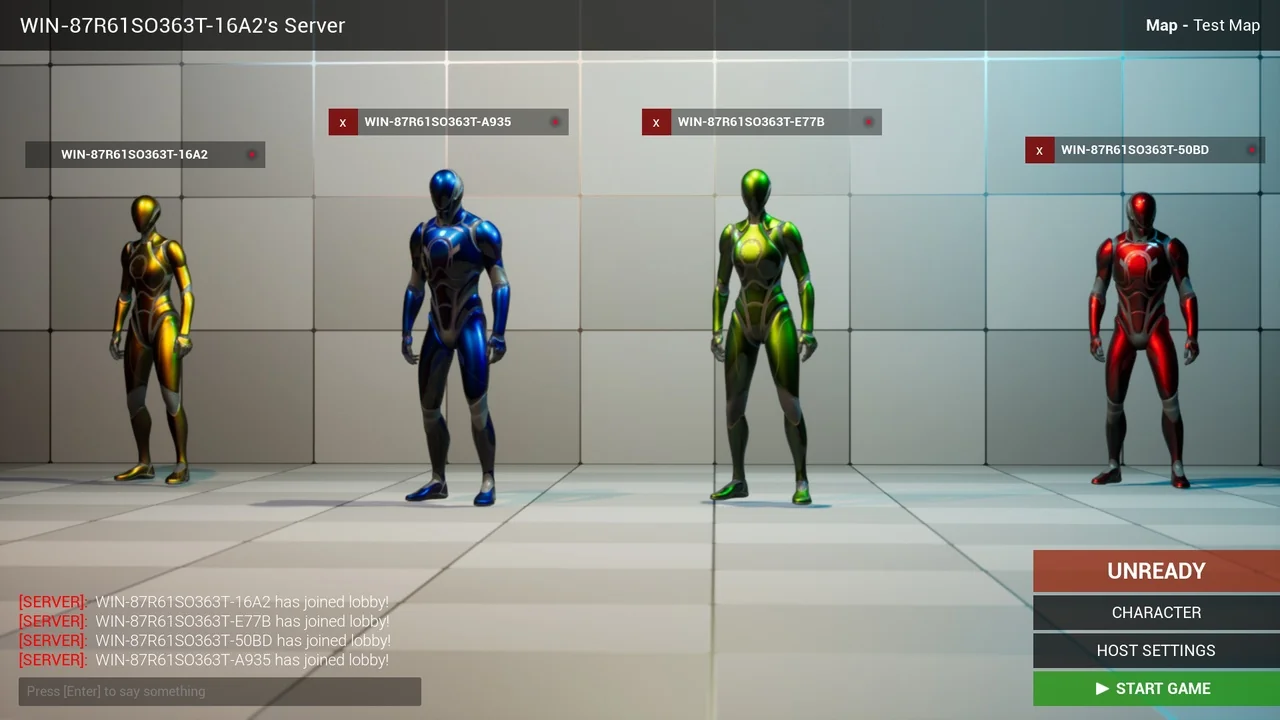
 Action-Adventure
 Action-Adventure
 Action-Adventure