"7aa4acc705f0d80b"{"id":"1001983","slug":"cobra-wall-material-pack","title":"Cobra Wall Material Pack","category":"Game Development Resource","engine":"5.1+","assetVersion":"","engineVersion":"Engine Version: 5.1+","tag":"Game Development R","accent":"blue","visual":"luts","summary":"Explore the Cobra Wall Material Pack featuring 37 wall materials, 23 ready-to-use instances, and master material authoring for PBR pipelines.","platform":"Unreal Engine","publishedAt":"2026-10-24T14:28:55.356Z","updatedAt":"2026-10-24T14:28:55.356Z","sourceNotes":[],"fileContents":[],"compatibility":["Unreal Engine","Engine Version: 5.1+"],"featuredImage":{"alt":"Cobra Wall Material Pack","src":"/wp-content/uploads/published/2026/10/d739086314c8-27f4b2bc-7a54-4f5e-92b6-0d56f20a54e5-d713c3cb41.webp"},"hasDownloadLink":true,"downloads":0,"terms":[],"galleryImages":[{"src":"/wp-content/uploads/published/2026/10/4044894bc553-a84ba56e-741d-46e2-9acf-78a0c5d325c9-d8acef37c3.webp","alt":"Cobra Wall Material Pack"},{"src":"/wp-content/uploads/published/2026/10/ecfe0e3367ef-4db7f1b3-cba8-4400-9a68-2e1c747dc6eb-c6ab9fba75.webp","alt":"Cobra Wall Material Pack"},{"src":"/wp-content/uploads/published/2026/10/682963bb3108-723be107-9482-4b47-a907-9f74fa8e861a-f46e5ae4eb.webp","alt":"Cobra Wall Material Pack"},{"src":"/wp-content/uploads/published/2026/10/f0e8675ffb43-a59c5e5d-7e46-4a50-b9db-1051f9f40e3f-3bf1f6c993.webp","alt":"Cobra Wall Material Pack"},{"src":"/wp-content/uploads/published/2026/10/fc02b91ac569-60a7e75f-0630-4d39-8f2d-9bfebf97f30d-41fb7299c4.webp","alt":"Cobra Wall Material Pack"},{"src":"/wp-content/uploads/published/2026/10/d51c426a9bda-ef3677eb-f912-4c99-84ea-4b66e9519097-44d182d831.webp","alt":"Cobra Wall Material Pack"},{"src":"/wp-content/uploads/published/2026/10/c9ae9804f1e0-c406b626-14ea-4cbb-bbdf-23e2930ec483-f0512e217b.webp","alt":"Cobra Wall Material Pack"},{"src":"/wp-content/uploads/published/2026/10/8ba72cfc6f8f-e905f09f-76aa-4583-88b7-a5e9ef510c87-e686c15170.webp","alt":"Cobra Wall Material Pack"},{"src":"/wp-content/uploads/published/2026/10/e81bb0f984d9-2824376d-f148-42f1-8648-31e4a9dad457-a5f5168ca5.webp","alt":"Cobra Wall Material Pack"},{"src":"/wp-content/uploads/published/2026/10/e2ae6de5615f-3e091e5c-3491-4073-93c6-83fab7d83c9c-b56363372b.webp","alt":"Cobra Wall Material Pack"}],"accessPanel":{"kind":"resource","title":"Download this resource","eyebrow":"Free Download","message":"Log in or create a free account to start your download.","fileName":"Cobra Wall Material Pack.7z","safetyNote":"Resources are manually reviewed before listing to improve quality and reduce obvious risks.","actionLabel":"Download Free","resourceType":"Resource archive"},"contentHtml":"\u003ch2\u003eIntegrating the 37 Wall Materials into a Shading Pipeline\u003c/h2\u003e\n\u003cp\u003eImplementing surface shaders across architectural environments requires balance between visual distinction and technical efficiency. The Cobra Wall Material Pack addresses this through an organized framework containing 37 distinct wall materials. Rather than delivering rigid, unchangeable textures, the collection relies on a core physically based rendering (PBR) foundation that prioritizes adaptability across flat, vertical surfaces and complex structural geometries.\u003c/p\u003e\n\u003cp\u003eEach of the 37 wall materials serves as an individual surface type, establishing a base response to light, roughness, and surface relief. Deploying these materials into a scene involves assigning the core graph or its child variations directly to static meshes, modular wall panels, or interior environment props. Because wall surfaces occupy the majority of visual real estate in architectural and interior environments, having 37 distinct core setups ensures that structural assets avoid repetitive patterning and visual fatigue.\u003c/p\u003e \u003ch2\u003eWorking with the 23 Preconfigured Material Instances and Master Setups\u003c/h2\u003e\n\u003cp\u003eDirectly compiling a separate master graph for every single surface permutation is computationally heavy and inefficient for real-time rendering. To establish a clean working baseline, the pack ships with 23 pre-built material instances linked directly to the parent master graphs. These preconfigured instances provide immediate, performant access to specific looks without requiring technical artists to construct parameter hierarchies from scratch.\u003c/p\u003e\n\u003cp\u003eThe decision to include 23 material instances alongside 37 base materials stems directly from practical surface commonalities. Many wall finishes share structural qualities, differing only by tone, surface polish, or micro-level variation. The 23 pre-assembled instances showcase the immediate range possible from the masters, targeting the most distinct visual outcomes while avoiding redundant duplicate files where visual profiles overlap closely.\u003c/p\u003e \u003ch2\u003eGenerating Custom Instances from Master Wall Surfaces\u003c/h2\u003e\n\u003cp\u003eA central strength of the pack lies in its authoring flow: users can easily create their own instances directly using the included master materials. Master materials hold the foundational logic, exposing critical mathematical networks and texture inputs so that downstream instances can be configured in real time without triggering shader recompilations.\u003c/p\u003e\n\u003cp\u003eWhen an environment requires a modified wall appearance, the production path begins by deriving a new child instance from the relevant master graph. Modifying exposed values within the child allows for quick iteration on tint, reflectivity, and tiling rates. This child-instance approach keeps memory usage low across large levels, as dozens of unique surface variations can share a single underlying instruction set in memory.\u003c/p\u003e\n\u003cp\u003eWhile future iterations of the collection may expand the instance count to 37 or more to provide a direct 1:1 match for every single master, the existing architecture already permits comprehensive variety. The ability to spawn unlimited custom instances means project teams are never restricted to the presets, turning the master materials into a dynamic workshop for custom surface design.\u003c/p\u003e \u003ch2\u003eCohesion Across the Cobra Material Ecosystem\u003c/h2\u003e\n\u003cp\u003eEnvironment art rarely relies on wall finishes alone. Vertical architecture must visually coordinate with surrounding elements, including flooring, structural framing, exterior masonry, and technical fixtures. The Cobra Wall Material Pack is designed to sit alongside a broader family of specialized surface collections that share the same architectural and technical conventions:\u003c/p\u003e\n\u003cul\u003e\n\u003cli\u003e\u003cstrong\u003eCobra Concrete Materials Pack:\u003c/strong\u003e Supplies heavy, industrial, and structural stone surfaces that pair directly under wall footings and foundation slabs.\u003c/li\u003e\n\u003cli\u003e\u003cstrong\u003eCobra Floors Materials Pack:\u003c/strong\u003e Offers dedicated horizontal surfacing to match indoor and outdoor vertical boundaries.\u003c/li\u003e\n\u003cli\u003e\u003cstrong\u003eCobra Metals Materials Pack:\u003c/strong\u003e Provides reflective, structural, and hardware-oriented materials for trims, framing, and panel accents.\u003c/li\u003e\n\u003cli\u003e\u003cstrong\u003eCobra Rocks Materials Pack:\u003c/strong\u003e Delivers natural geology and rough-hewn elements suitable for lower retaining walls or outdoor environmental transitions.\u003c/li\u003e\n\u003cli\u003e\u003cstrong\u003eCobra Fabrics Materials Pack:\u003c/strong\u003e Covers acoustic wall panels, upholstered partitions, and interior soft finishes.\u003c/li\u003e\n\u003cli\u003e\u003cstrong\u003eCobra SciFi Materials Pack:\u003c/strong\u003e Focuses on futuristic, hard-surface, and panelized technical textures for specialized corridor construction.\u003c/li\u003e\n\u003cli\u003e\u003cstrong\u003eCobra Synthetic Materials Pack:\u003c/strong\u003e Contains engineered polymers, plastics, and modern manufactured finishes that complement smooth architectural wall styles.\u003c/li\u003e\n\u003c/ul\u003e\n\u003cp\u003eBecause these packs emerge from the same design methodology, pairing the Cobra Wall Material Pack with adjacent packs ensures consistent surface response under uniform scene lighting.\u003c/p\u003e \u003ch2\u003eLibrary Integration within the 400+ Material System\u003c/h2\u003e\n\u003cp\u003eFor large-scale productions requiring an all-in-one shading solution, the Cobra Wall Material Pack maintains full compatibility with the Cobra Ultimate Material Library 400+ Materials collection. Integrating wall materials into this larger framework allows teams to unify their asset browser, referencing wall assets alongside hundreds of cross-category shaders without experiencing naming collisions or conflicting shader logic.\u003c/p\u003e\n\u003cp\u003eUsing the pack within this unified 400+ surface pipeline ensures that environment teams can populate entire districts, multi-story interiors, and hybrid architectural settings from an interconnected material library. Whether deployed as a standalone pack of 37 wall master networks or mapped into a sprawling multi-category project, the assets provide a structured, instance-driven pipeline for realistic surface construction.\u003c/p\u003e\n\n\u003ch2\u003eMore From The Same Workflow\u003c/h2\u003e\n\u003cul\u003e\n\u003cli\u003e\u003ca href=\"https://3dcghub.com/suburbs-vol-1-wall-decor-nanite-and-low-poly/\" title=\"Suburbs VOL.1 - Wall Decor (Nanite and Low Poly)\"\u003eSuburbs VOL.1 - Wall Decor (Nanite and Low Poly)\u003c/a\u003e\u003c/li\u003e\n\u003cli\u003e\u003ca href=\"https://3dcghub.com/palisade-walls-and-barriers-v1/\" title=\"Palisade Walls and Barriers - v1\"\u003ePalisade Walls and Barriers - v1\u003c/a\u003e\u003c/li\u003e\n\u003cli\u003e\u003ca href=\"https://3dcghub.com/fences-and-gates-vol-2/\" title=\"Fences and Gates - VOL.2\"\u003eFences and Gates - VOL.2\u003c/a\u003e\u003c/li\u003e\n\u003cli\u003e\u003ca href=\"https://3dcghub.com/stone-wall-bricks/\" title=\"Stone Wall Bricks\"\u003eStone Wall Bricks\u003c/a\u003e\u003c/li\u003e\n\u003cli\u003e\u003ca href=\"https://3dcghub.com/wall-fx-pack/\" title=\"Wall FX pack\"\u003eWall FX pack\u003c/a\u003e\u003c/li\u003e\n\u003c/ul\u003e","contentTextLength":5901,"navigation":{"current":7,"total":3925,"previous":{"id":"1001984","slug":"combat-missile-pack","title":"Combat Missile Pack","category":"Weapons \u0026 Combat","platform":"Unreal Engine","updatedAt":"2026-10-24T14:29:24.437Z"},"next":{"id":"1001982","slug":"coala-map-plugin-with-real-world-integration","title":"COALA - Map Plugin With Real World Integration","category":"Engine Tools","platform":"Unreal Engine","updatedAt":"2026-10-24T14:27:56.281Z"}},"relatedResources":[{"id":"1001457","slug":"suburbs-vol-1-wall-decor-nanite-and-low-poly","title":"Suburbs VOL.1 - Wall Decor (Nanite and Low Poly)","category":"Tools, Objects \u0026 Decor","engine":"5.1+","assetVersion":"","engineVersion":"Engine Version: 5.1+","tag":"Tools","accent":"blue","visual":"mech","summary":"Suburbs VOL.1 - Wall Decor provides 130 Unreal Engine meshes split between Nanite and low-poly versions with 4K textures and full Lumen support.","platform":"Unreal Engine","publishedAt":"2026-10-08T00:59:33.447Z","updatedAt":"2026-10-08T00:59:33.447Z","sourceNotes":[],"fileContents":[],"compatibility":["Unreal Engine","Engine Version: 5.1+"],"featuredImage":{"alt":"Suburbs VOL.1 - Wall Decor (Nanite and Low Poly)","src":"/wp-content/uploads/published/2026/10/74ebc1534289-9813391a-2ad8-44af-9171-1001780b8321-c5e3107822.webp"},"hasDownloadLink":true,"downloads":1},{"id":"4463","slug":"palisade-walls-and-barriers-v1","title":"Palisade Walls and Barriers - v1","category":"Towns \u0026 Villages","engine":"5.0+","assetVersion":"Engine version: 5.0+","engineVersion":"4.22","tag":"Towns \u0026 Villages","accent":"blue","visual":"character","summary":"Enhance your fantasy RPG with 12 AAA-quality palisade walls and barriers. Fully optimized for Unreal Engine 5 with Nanite, Lumen, and tiled material support.","platform":"Unreal Engine","publishedAt":"2026-02-13T08:09:44.000Z","updatedAt":"2026-04-19T15:57:08.000Z","sourceNotes":[],"fileContents":[],"compatibility":["Unreal Engine","Engine version: 5.0+"],"featuredImage":{"alt":"Palisade Walls and Barriers - v1","src":"https://3dcghub.com/wp-content/uploads/2026/02/14a8c609-4a10-4984-993b-9c5d2b3fc6b1.webp"},"hasDownloadLink":true,"downloads":0},{"id":"1000824","slug":"fences-and-gates-vol-2","title":"Fences and Gates - VOL.2","category":"Walls","engine":"4.26+,5.0+","assetVersion":"","engineVersion":"Engine Version: 4.26+,5.0+","tag":"Walls","accent":"blue","visual":"mech","summary":"Unreal Engine modular fence and gate asset pack with AAA textures, custom master materials, and full per-side geometry for medieval, fantasy, and horror scenes.","platform":"Unreal Engine","publishedAt":"2026-08-01T13:22:40.513Z","updatedAt":"2026-08-01T13:22:40.513Z","sourceNotes":[],"fileContents":[],"compatibility":["Unreal Engine","Engine Version: 4.26+,5.0+"],"featuredImage":{"alt":"Fences and Gates - VOL.2","src":"/wp-content/uploads/published/2026/08/d67614113098-269b6947-447c-45e5-b838-a46f7ca7d765-04b9349c62.webp"},"hasDownloadLink":true,"downloads":1}]}
Game Development R
Cobra Wall Material Pack
Explore the Cobra Wall Material Pack featuring 37 wall materials, 23 ready-to-use instances, and master material authoring for PBR pipelines.
Category:Unreal EnginePlatform: Unreal EngineEngine Version: 5.1+Published: Oct 24, 2026
Game Development R
Resource overview
Integrating the 37 Wall Materials into a Shading Pipeline
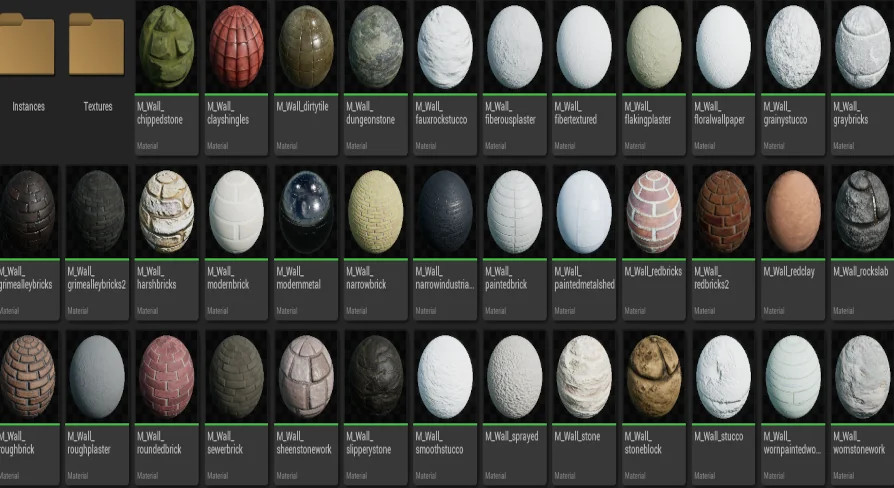
Implementing surface shaders across architectural environments requires balance between visual distinction and technical efficiency. The Cobra Wall Material Pack addresses this through an organized framework containing 37 distinct wall materials. Rather than delivering rigid, unchangeable textures, the collection relies on a core physically based rendering (PBR) foundation that prioritizes adaptability across flat, vertical surfaces and complex structural geometries.
Each of the 37 wall materials serves as an individual surface type, establishing a base response to light, roughness, and surface relief. Deploying these materials into a scene involves assigning the core graph or its child variations directly to static meshes, modular wall panels, or interior environment props. Because wall surfaces occupy the majority of visual real estate in architectural and interior environments, having 37 distinct core setups ensures that structural assets avoid repetitive patterning and visual fatigue.
Working with the 23 Preconfigured Material Instances and Master Setups
Directly compiling a separate master graph for every single surface permutation is computationally heavy and inefficient for real-time rendering. To establish a clean working baseline, the pack ships with 23 pre-built material instances linked directly to the parent master graphs. These preconfigured instances provide immediate, performant access to specific looks without requiring technical artists to construct parameter hierarchies from scratch.
The decision to include 23 material instances alongside 37 base materials stems directly from practical surface commonalities. Many wall finishes share structural qualities, differing only by tone, surface polish, or micro-level variation. The 23 pre-assembled instances showcase the immediate range possible from the masters, targeting the most distinct visual outcomes while avoiding redundant duplicate files where visual profiles overlap closely.
Generating Custom Instances from Master Wall Surfaces
A central strength of the pack lies in its authoring flow: users can easily create their own instances directly using the included master materials. Master materials hold the foundational logic, exposing critical mathematical networks and texture inputs so that downstream instances can be configured in real time without triggering shader recompilations.
When an environment requires a modified wall appearance, the production path begins by deriving a new child instance from the relevant master graph. Modifying exposed values within the child allows for quick iteration on tint, reflectivity, and tiling rates. This child-instance approach keeps memory usage low across large levels, as dozens of unique surface variations can share a single underlying instruction set in memory.
While future iterations of the collection may expand the instance count to 37 or more to provide a direct 1:1 match for every single master, the existing architecture already permits comprehensive variety. The ability to spawn unlimited custom instances means project teams are never restricted to the presets, turning the master materials into a dynamic workshop for custom surface design.
Cohesion Across the Cobra Material Ecosystem
Environment art rarely relies on wall finishes alone. Vertical architecture must visually coordinate with surrounding elements, including flooring, structural framing, exterior masonry, and technical fixtures. The Cobra Wall Material Pack is designed to sit alongside a broader family of specialized surface collections that share the same architectural and technical conventions:
Cobra Concrete Materials Pack: Supplies heavy, industrial, and structural stone surfaces that pair directly under wall footings and foundation slabs.
Cobra Floors Materials Pack: Offers dedicated horizontal surfacing to match indoor and outdoor vertical boundaries.
Cobra Metals Materials Pack: Provides reflective, structural, and hardware-oriented materials for trims, framing, and panel accents.
Cobra Rocks Materials Pack: Delivers natural geology and rough-hewn elements suitable for lower retaining walls or outdoor environmental transitions.
Cobra SciFi Materials Pack: Focuses on futuristic, hard-surface, and panelized technical textures for specialized corridor construction.
Cobra Synthetic Materials Pack: Contains engineered polymers, plastics, and modern manufactured finishes that complement smooth architectural wall styles.
Because these packs emerge from the same design methodology, pairing the Cobra Wall Material Pack with adjacent packs ensures consistent surface response under uniform scene lighting.
Library Integration within the 400+ Material System
For large-scale productions requiring an all-in-one shading solution, the Cobra Wall Material Pack maintains full compatibility with the Cobra Ultimate Material Library 400+ Materials collection. Integrating wall materials into this larger framework allows teams to unify their asset browser, referencing wall assets alongside hundreds of cross-category shaders without experiencing naming collisions or conflicting shader logic.
Using the pack within this unified 400+ surface pipeline ensures that environment teams can populate entire districts, multi-story interiors, and hybrid architectural settings from an interconnected material library. Whether deployed as a standalone pack of 37 wall master networks or mapped into a sprawling multi-category project, the assets provide a structured, instance-driven pipeline for realistic surface construction.
 Game Development R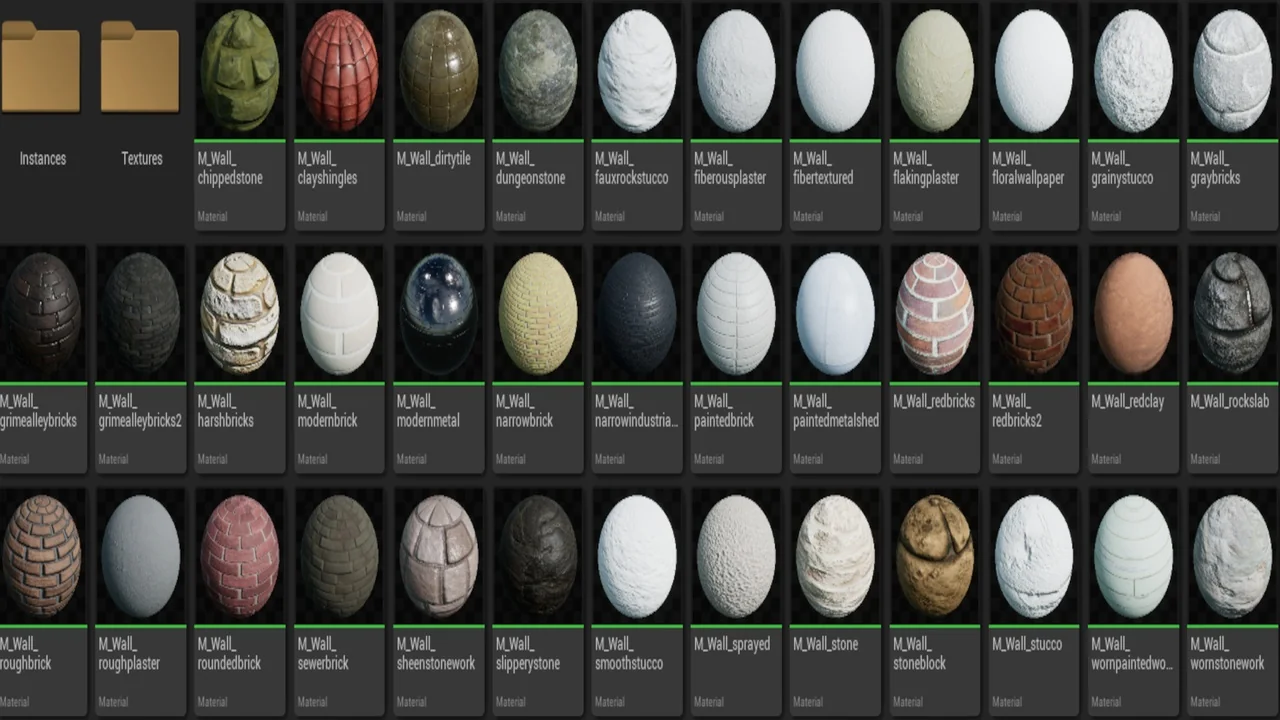
 Tools
Tools Towns & Villages
 Walls
Walls