"4481da9c895ef786"{"id":"1000983","slug":"classic-motorbike-driveable-functional-classic-motorbike-vehicle-3d-model","title":"Classic MotorBike / Driveable / Functional (Classic MotorBike Vehicle 3D Model)","category":"Bicycles \u0026 Motorcycles","engine":"5.1+","assetVersion":"","engineVersion":"Engine Version: 5.1+","tag":"Bicycles","accent":"blue","visual":"mech","summary":"A driveable, animated, realistic classic motorbike with one blueprint, three separate meshes, customizable material instances, and a built-in radio system for g","platform":"Unreal Engine","publishedAt":"2026-08-18T06:09:19.637Z","updatedAt":"2026-08-18T06:09:19.637Z","sourceNotes":[],"fileContents":[],"compatibility":["Unreal Engine","Engine Version: 5.1+"],"featuredImage":{"alt":"Classic MotorBike / Driveable / Functional (Classic MotorBike Vehicle 3D Model)","src":"/wp-content/uploads/published/2026/08/a7593c6d9122-96fbb296-3646-4810-a19b-c04a829c0f39-9604688afe.webp"},"hasDownloadLink":true,"downloads":1,"terms":[{"taxonomy":"category","slug":"bicycles-and-motorcycles","name":"Bicycles \u0026 Motorcycles"}],"galleryImages":[{"src":"/wp-content/uploads/published/2026/08/66c016cf39c0-59f9f5fc-9994-4efc-8e57-a7992f633864-46630011a7.webp","alt":"Classic MotorBike / Driveable / Functional (Classic MotorBike Vehicle 3D Model)"},{"src":"/wp-content/uploads/published/2026/08/fb1a241cd6b2-37dd84aa-c9f2-4d78-b56e-f012c6acb5e5-f700215ecc.webp","alt":"Classic MotorBike / Driveable / Functional (Classic MotorBike Vehicle 3D Model)"},{"src":"/wp-content/uploads/published/2026/08/3569e563ec49-efd4812e-d6d3-4e33-a931-928ecf77e40c-fc8f20e3dd.webp","alt":"Classic MotorBike / Driveable / Functional (Classic MotorBike Vehicle 3D Model)"},{"src":"/wp-content/uploads/published/2026/08/3874fea00164-52cd120f-34ba-4b39-a36a-913fab4e5b5e-bd2d522ee4.webp","alt":"Classic MotorBike / Driveable / Functional (Classic MotorBike Vehicle 3D Model)"},{"src":"/wp-content/uploads/published/2026/08/ef5b11b3e7b8-6a7fd4cb-d7bb-4c1e-9952-54fdc40ac49d-4a53f6e57d.webp","alt":"Classic MotorBike / Driveable / Functional (Classic MotorBike Vehicle 3D Model)"},{"src":"/wp-content/uploads/published/2026/08/6fb186a02fa1-d490b38e-5c19-4acd-a9a4-41d8f46dba81-01a5aee87e.webp","alt":"Classic MotorBike / Driveable / Functional (Classic MotorBike Vehicle 3D Model)"},{"src":"/wp-content/uploads/published/2026/08/940064ea4a9f-7d6ac188-58b2-454f-a8a3-dcd4ec9e784c-df2c576412.webp","alt":"Classic MotorBike / Driveable / Functional (Classic MotorBike Vehicle 3D Model)"},{"src":"/wp-content/uploads/published/2026/08/42697488ca92-a1c91764-3b51-4eab-944b-9215ba3b889c-91dcd73ab4.webp","alt":"Classic MotorBike / Driveable / Functional (Classic MotorBike Vehicle 3D Model)"}],"accessPanel":{"kind":"resource","title":"Download this resource","eyebrow":"Free Download","message":"Log in or create a free account to start your download.","fileName":"ClassicMotorBikeDriveabl.7z","safetyNote":"Resources are manually reviewed before listing to improve quality and reduce obvious risks.","actionLabel":"Download Free","resourceType":"Resource archive"},"contentHtml":"\u003cp\u003eA classic bike that actually drives? This one is built to be functional first. The Classic MotorBike is not a static collection of polygons — it is a driveable, animated, realistic vehicle that you can drop into a level, hand to a character, or set up for an automotive presentation without reworking it from scratch.\u003c/p\u003e\u003cp\u003eWhat makes this model stand apart from a simple showpiece is the combination of a clean blueprint setup, material-level customization, and an unexpected radio system. All of that stays wrapped in a retro two-wheeler that fits games, ArchViz, and presentation work equally well.\u003c/p\u003e\u003ch2\u003eOne Blueprint, Three Separate Meshes\u003c/h2\u003e\u003cp\u003eThe vehicle arrives in two flavors at once. You get one blueprint that contains the full functional motorbike, and you also get three separate meshes. That setup gives you a clean choice for each project phase.\u003c/p\u003e\u003cp\u003eWhen you need the bike to move, you use the blueprint. When you need it to sit in a scene as a prop, you can pull in the individual meshes without loading the blueprint’s logic. The three separate meshes allow you to place the bike on a street corner, inside a garage, or anywhere that needs a realistic classic bike, without the overhead of a drivable vehicle.\u003c/p\u003e\u003cp\u003eIt also means you can use the same asset in two different ways across a project. A cinematic camera can frame the bike as a prop, then the gameplay sequence can swap in the blueprint and drive away. That flexibility is built into the delivery structure itself.\u003c/p\u003e\u003ch2\u003eMaterial Instances with Roughness, Metallic, and Color Controls\u003c/h2\u003e\u003cp\u003eCustomization starts at the material level. The motorbike uses material instances that expose roughness, metallic, and color parameters. You can adjust these values to change the paint finish, the shine on the chrome, or the wear on the leather without opening a texture editor.\u003c/p\u003e\u003cp\u003eBecause the asset includes separate parts, you do not have to apply one global material to everything. You can treat the fuel tank differently from the exhaust pipe, the seat differently from the fenders, and tune each component’s reflectivity and color response. The package then offers a bike that can be restyled to match a specific era, a color palette, or an art direction.\u003c/p\u003e\u003cp\u003eFor ArchViz, this kind of parameter control is useful when you want the bike to blend into a particular lighting environment. For games, it lets you create variants of the same model for different purposes — a clean showroom version, a weathered street version, or a custom paint job for a character.\u003c/p\u003e\u003ch2\u003eA Radio System That Plays Your Own Playlist\u003c/h2\u003e\u003cp\u003eDriving a classic bike is one thing, but this asset takes it further with a radio system. The motorbike has a radio system added, so you can add your own music playlist to play and switch music on the car radio while you are driving it.\u003c/p\u003e\u003cp\u003eThat means you are not stuck with a preset audio loop. You can load in your own tracks, cycle through them while riding, and match the audio to the mood of the scene. A radio system tutorial and a separate tutorial video walk you through the setup, so the feature does not sit buried in blueprint nodes.\u003c/p\u003e\u003cp\u003eFor game developers, this adds atmosphere for free. For automotive presentations, it lets you choreograph the reveal with its own soundtrack. For ArchViz, it creates a small but noticeable layer of life when the camera is moving through the scene.\u003c/p\u003e\u003ch2\u003eWhere This Motorbike Fits in a Production\u003c/h2\u003e\u003cp\u003eThe bike as a good fit for levels, games, automotive presentations, and ArchViz. Those use cases share a common need: a vehicle that looks right and can be active in a scene.\u003c/p\u003e\u003cp\u003eIn a game level, the motorbike can function as a drivable vehicle for a character, or it can be parked as a static prop that reacts to the environment. In an automotive presentation, you can place it on a turntable, drive it along a path, or let the camera orbit it while the materials catch the light. In ArchViz, the bike adds personality to a garage, a courtyard, or a roadside.\u003c/p\u003e\u003cp\u003eThe three separate meshes make it easy to switch between prop and functional mode, so the same asset can carry a project from blockout to final scene.\u003c/p\u003e\u003ch2\u003ePart of a Larger Classic Bundle\u003c/h2\u003e\u003cp\u003eThis vehicle is also included in the Classic Cars Bundle. If you are building a period-correct environment, the bike can sit alongside other classic vehicles from the same developer. Documentation about how to use the car is provided, along with tutorial videos for the radio system and the overall driving setup.\u003c/p\u003e\u003cp\u003eThat documentation reduces the time spent reverse-engineering the blueprint. The radio system, in particular, benefits from a clear walkthrough, since it involves wiring your own music playlist into the vehicle’s audio system. The developer also offers live support and a Discord channel for direct questions, though the exact contact paths are outside the scope of this page.\u003c/p\u003e\u003cp\u003eFor a team that needs a classic two-wheeler that does not behave like a static prop, this asset gives you driving functionality, material control, and playlist integration in one package. It is a practical tool for anyone who wants a retro bike to be part of the action, not just a decoration.\u003c/p\u003e\n\n\u003ch2\u003eContinue Browsing Similar Packs\u003c/h2\u003e\n\u003cul\u003e\n\u003cli\u003e\u003ca href=\"https://3dcghub.com/classic-vehicles-bundle-driveable-functional-classic-vehicles-car-cars-3d/\" title=\"Classic Vehicles Bundle / Driveable / Functional (Classic Vehicles Car Cars 3D)\"\u003eClassic Vehicles Bundle / Driveable / Functional (Classic Vehicles Car Cars 3D)\u003c/a\u003e\u003c/li\u003e\n\u003cli\u003e\u003ca href=\"https://3dcghub.com/classic-sport-car-01-classic-sport-car-cars-vintage-vehicle-vehicles/\" title=\"Classic Sport Car 01 ( Classic Sport Car Cars Vintage Vehicle Vehicles )\"\u003eClassic Sport Car 01 ( Classic Sport Car Cars Vintage Vehicle Vehicles )\u003c/a\u003e\u003c/li\u003e\n\u003cli\u003e\u003ca href=\"https://3dcghub.com/classic-limousine-driveable-functional-classic-limousine-car-drivable/\" title=\"Classic Limousine / Driveable / Functional ( Classic Limousine Car Drivable )\"\u003eClassic Limousine / Driveable / Functional ( Classic Limousine Car Drivable )\u003c/a\u003e\u003c/li\u003e\n\u003cli\u003e\u003ca href=\"https://3dcghub.com/driveable-steampunk-car-vehicle-steampunk-car-retro-futuristic-victorian/\" title=\"Driveable SteamPunk Car / Vehicle ( SteamPunk Car Retro Futuristic Victorian)\"\u003eDriveable SteamPunk Car / Vehicle ( SteamPunk Car Retro Futuristic Victorian)\u003c/a\u003e\u003c/li\u003e\n\u003cli\u003e\u003ca href=\"https://3dcghub.com/driveable-animated-construction-truck-02-driveable-construction-truck-truckk/\" title=\"Driveable / Animated Construction Truck 02 (Driveable Construction Truck Truckk)\"\u003eDriveable / Animated Construction Truck 02 (Driveable Construction Truck Truckk)\u003c/a\u003e\u003c/li\u003e\n\u003c/ul\u003e","contentTextLength":5511,"navigation":{"current":399,"total":3269,"previous":{"id":"1000984","slug":"complete-dark-rpg-template","title":"Complete Dark RPG Template","category":"Characters \u0026 Creatures","platform":"Unreal Engine","updatedAt":"2026-08-18T06:13:01.313Z"},"next":{"id":"1000982","slug":"ciber-girl","title":"Ciber Girl","category":"Characters \u0026 Creatures","platform":"Unreal Engine","updatedAt":"2026-08-18T06:05:02.961Z"}},"relatedResources":[{"id":"1000944","slug":"classic-vehicles-bundle-driveable-functional-classic-vehicles-car-cars-3d","title":"Classic Vehicles Bundle / Driveable / Functional (Classic Vehicles Car Cars 3D)","category":"Trains","engine":"5.1+","assetVersion":"","engineVersion":"Engine Version: 5.1+","tag":"Trains","accent":"blue","visual":"mech","summary":"Eight classic vehicles from F1 to limousine, tram, motorbike, and pickup truck, all driveable with Blueprints, 90 separate meshes, material instances, and a rad","platform":"Unreal Engine","publishedAt":"2026-08-13T03:59:50.178Z","updatedAt":"2026-08-13T03:59:50.178Z","sourceNotes":[],"fileContents":[],"compatibility":["Unreal Engine","Engine Version: 5.1+"],"featuredImage":{"alt":"Classic Vehicles Bundle / Driveable / Functional (Classic Vehicles Car Cars 3D)","src":"/wp-content/uploads/published/2026/08/b1c461098829-a87ea7eb-e855-4435-b6a2-43d684dafb6a-bafcd850cc.webp"},"hasDownloadLink":true,"downloads":0},{"id":"4970","slug":"classic-limousine-driveable-functional-classic-limousine-car-drivable","title":"Classic Limousine / Driveable / Functional ( Classic Limousine Car Drivable )","category":"Cars \u0026 Trucks","engine":"5.0+","assetVersion":"Engine version: 5.0+","engineVersion":"4.22","tag":"Cars \u0026 Trucks","accent":"blue","visual":"character","summary":"Enhance your project with a realistic, driveable classic limousine. Features interactive doors, a radio system, and fully customizable materials for Unreal Engi","platform":"Unreal Engine","publishedAt":"2026-02-14T17:13:04.000Z","updatedAt":"2026-04-19T15:57:02.000Z","sourceNotes":[],"fileContents":[],"compatibility":["Unreal Engine","Engine version: 5.0+"],"featuredImage":{"alt":"Classic Limousine / Driveable / Functional ( Classic Limousine Car Drivable )","src":"https://3dcghub.com/wp-content/uploads/2026/02/8ea3ba45-7619-4fc2-878e-c971c5834b84.webp"},"hasDownloadLink":true,"downloads":1},{"id":"27497","slug":"classic-sport-car-01-classic-sport-car-cars-vintage-vehicle-vehicles","title":"Classic Sport Car 01 ( Classic Sport Car Cars Vintage Vehicle Vehicles )","category":"Cars \u0026 Trucks","engine":"5.0+","assetVersion":"Engine version: 5.0+","engineVersion":"","tag":"Cars \u0026 Trucks","accent":"blue","visual":"audio","summary":"Classic Sport Car 01 is built around a driveable classic vehicle setup with animated doors, separate meshes, and editable material instances. It fits levels, games, automotive presentations, and ArchViz scenes that need a realistic car with direct interaction.","platform":"Unreal Engine","publishedAt":"2026-04-26T06:12:02.000Z","updatedAt":"2026-04-26T06:12:03.000Z","sourceNotes":[],"fileContents":[],"compatibility":["Unreal Engine","Engine version: 5.0+"],"featuredImage":{"alt":"Classic Sport Car 01 ( Classic Sport Car Cars Vintage Vehicle Vehicles )","src":"https://3dcghub.com/wp-content/uploads/2026/04/f54c1386f4cd_6a7584be-ec42-4f48-96a0-9bcf33410019.webp"},"hasDownloadLink":true,"downloads":0}]}
A driveable, animated, realistic classic motorbike with one blueprint, three separate meshes, customizable material instances, and a built-in radio system for g
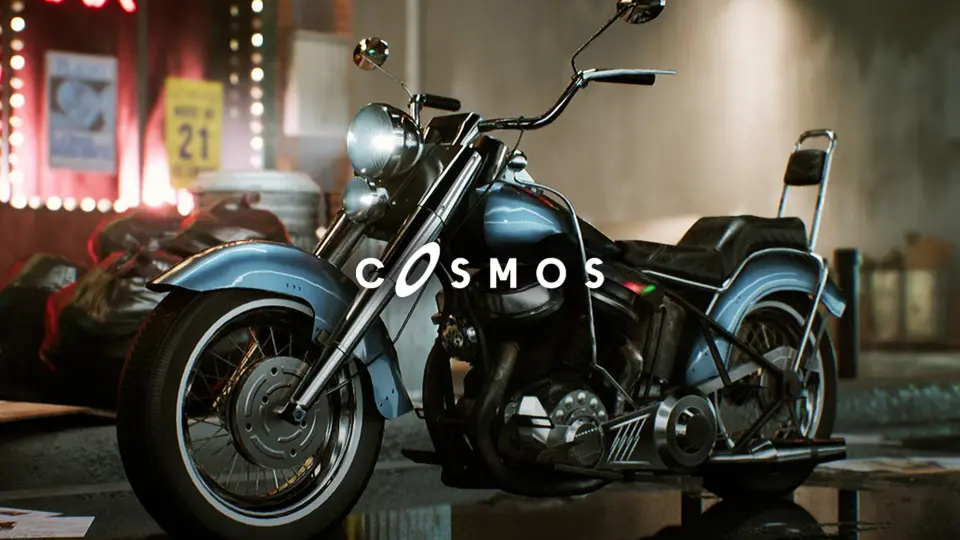
A classic bike that actually drives? This one is built to be functional first. The Classic MotorBike is not a static collection of polygons — it is a driveable, animated, realistic vehicle that you can drop into a level, hand to a character, or set up for an automotive presentation without reworking it from scratch.
What makes this model stand apart from a simple showpiece is the combination of a clean blueprint setup, material-level customization, and an unexpected radio system. All of that stays wrapped in a retro two-wheeler that fits games, ArchViz, and presentation work equally well.
One Blueprint, Three Separate Meshes
The vehicle arrives in two flavors at once. You get one blueprint that contains the full functional motorbike, and you also get three separate meshes. That setup gives you a clean choice for each project phase.
When you need the bike to move, you use the blueprint. When you need it to sit in a scene as a prop, you can pull in the individual meshes without loading the blueprint’s logic. The three separate meshes allow you to place the bike on a street corner, inside a garage, or anywhere that needs a realistic classic bike, without the overhead of a drivable vehicle.
It also means you can use the same asset in two different ways across a project. A cinematic camera can frame the bike as a prop, then the gameplay sequence can swap in the blueprint and drive away. That flexibility is built into the delivery structure itself.
Material Instances with Roughness, Metallic, and Color Controls
Customization starts at the material level. The motorbike uses material instances that expose roughness, metallic, and color parameters. You can adjust these values to change the paint finish, the shine on the chrome, or the wear on the leather without opening a texture editor.
Because the asset includes separate parts, you do not have to apply one global material to everything. You can treat the fuel tank differently from the exhaust pipe, the seat differently from the fenders, and tune each component’s reflectivity and color response. The package then offers a bike that can be restyled to match a specific era, a color palette, or an art direction.
For ArchViz, this kind of parameter control is useful when you want the bike to blend into a particular lighting environment. For games, it lets you create variants of the same model for different purposes — a clean showroom version, a weathered street version, or a custom paint job for a character.
A Radio System That Plays Your Own Playlist
Driving a classic bike is one thing, but this asset takes it further with a radio system. The motorbike has a radio system added, so you can add your own music playlist to play and switch music on the car radio while you are driving it.
That means you are not stuck with a preset audio loop. You can load in your own tracks, cycle through them while riding, and match the audio to the mood of the scene. A radio system tutorial and a separate tutorial video walk you through the setup, so the feature does not sit buried in blueprint nodes.
For game developers, this adds atmosphere for free. For automotive presentations, it lets you choreograph the reveal with its own soundtrack. For ArchViz, it creates a small but noticeable layer of life when the camera is moving through the scene.
Where This Motorbike Fits in a Production
The bike as a good fit for levels, games, automotive presentations, and ArchViz. Those use cases share a common need: a vehicle that looks right and can be active in a scene.
In a game level, the motorbike can function as a drivable vehicle for a character, or it can be parked as a static prop that reacts to the environment. In an automotive presentation, you can place it on a turntable, drive it along a path, or let the camera orbit it while the materials catch the light. In ArchViz, the bike adds personality to a garage, a courtyard, or a roadside.
The three separate meshes make it easy to switch between prop and functional mode, so the same asset can carry a project from blockout to final scene.
Part of a Larger Classic Bundle
This vehicle is also included in the Classic Cars Bundle. If you are building a period-correct environment, the bike can sit alongside other classic vehicles from the same developer. Documentation about how to use the car is provided, along with tutorial videos for the radio system and the overall driving setup.
That documentation reduces the time spent reverse-engineering the blueprint. The radio system, in particular, benefits from a clear walkthrough, since it involves wiring your own music playlist into the vehicle’s audio system. The developer also offers live support and a Discord channel for direct questions, though the exact contact paths are outside the scope of this page.
For a team that needs a classic two-wheeler that does not behave like a static prop, this asset gives you driving functionality, material control, and playlist integration in one package. It is a practical tool for anyone who wants a retro bike to be part of the action, not just a decoration.
 Bicycles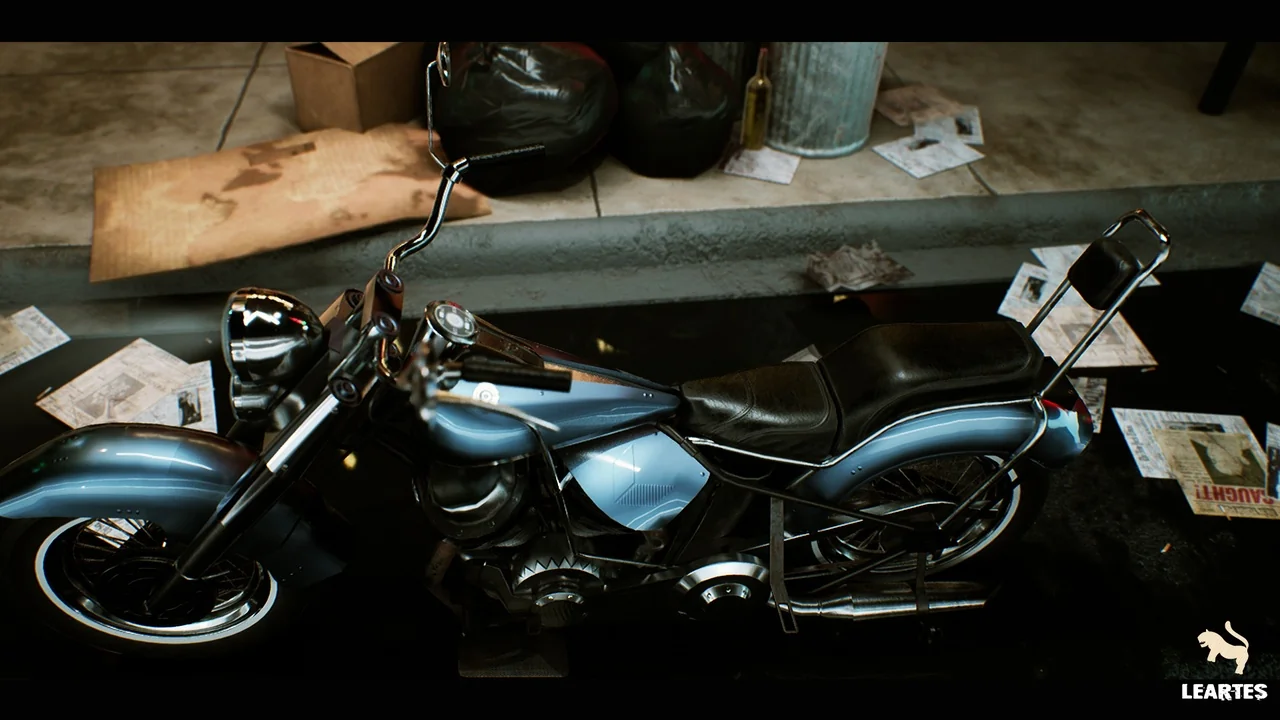
 Trains
 Cars & Trucks
 Cars & Trucks