"7b46a695175d8694"{"id":"1000042","slug":"cinematic-fire-3d-vdb-pack-loop","title":"Cinematic Fire 3D VDB Pack loop","category":"Fire \u0026 Explosions","engine":"5.3+","assetVersion":"","engineVersion":"5.3+","tag":"Fire \u0026 Explosions","accent":"blue","visual":"mech","summary":"A closer look at a 10-loop cinematic fire VDB pack for Unreal Engine, including scene controls, path tracing setup, and where it fits in production.","platform":"Unreal Engine","publishedAt":"2026-05-22T08:25:52.982Z","updatedAt":"2026-05-22T08:25:52.982Z","sourceNotes":[],"fileContents":[],"compatibility":["Unreal Engine","Engine version: 5.3+"],"featuredImage":{"alt":"Cinematic Fire 3D VDB Pack loop","src":"/wp-content/uploads/published/2026/05/bc34be2adc82-0935183b-0505-48f7-9d7c-0f6a3ce4337f-c430de0bb6.webp"},"hasDownloadLink":true,"downloads":2,"terms":[{"taxonomy":"category","slug":"fire-and-explosions","name":"Fire \u0026 Explosions"}],"galleryImages":[{"src":"/wp-content/uploads/published/2026/05/f7dfe4da6984-69e767dc-9902-46b3-a7b5-8f9bbc701570-94798a1672.webp","alt":"Cinematic Fire 3D VDB Pack loop"},{"src":"/wp-content/uploads/published/2026/05/84d62dd4e35f-b0da858f-e533-402a-9860-8cba98bbbbe3-21aaaa3856.webp","alt":"Cinematic Fire 3D VDB Pack loop"},{"src":"/wp-content/uploads/published/2026/05/37c79d6e3d76-a2a0c59c-621b-491e-a1eb-3f5b8419adf2-6d53ced6ee.webp","alt":"Cinematic Fire 3D VDB Pack loop"},{"src":"/wp-content/uploads/published/2026/05/c0c19227cf96-244342f1-0431-47dd-bbb0-716ed08bed0e-3bbedbb4ff.webp","alt":"Cinematic Fire 3D VDB Pack loop"},{"src":"/wp-content/uploads/published/2026/05/2e66c8fd8fcc-274b1115-ecfa-4448-a882-1469a444af8a-33e052dff0.webp","alt":"Cinematic Fire 3D VDB Pack loop"},{"src":"/wp-content/uploads/published/2026/05/97bc5be19ff7-f31cbbd2-9b85-418d-b759-fdd61de927b2-569972d1a8.webp","alt":"Cinematic Fire 3D VDB Pack loop"},{"src":"/wp-content/uploads/published/2026/05/54ffb05bcedb-cd63c449-3907-4029-93dd-9d93a933d984-9c4b3bba7a.webp","alt":"Cinematic Fire 3D VDB Pack loop"},{"src":"/wp-content/uploads/published/2026/05/8848f1b32976-17897215-422b-4334-9326-163668e62312-150f82ff47.webp","alt":"Cinematic Fire 3D VDB Pack loop"}],"accessPanel":{"kind":"resource","title":"Access this resource","eyebrow":"Free Download","message":"Log in or create a free account to start your download.","fileName":"Content.7z","safetyNote":"Resources are manually reviewed before listing to improve quality and reduce obvious risks.","actionLabel":"Download Free","resourceType":"Resource archive"},"contentHtml":"\u003cp\u003eWhen a scene needs fire that feels more substantial than a flat sprite or a simple particle pass, volumetric loops can fill that gap quickly. \u003cstrong\u003eCinematic Fire 3D VDB Pack loop\u003c/strong\u003e Is a collection of high-quality cinematic fire effects loops for Unreal Engine, focused on giving artists a set of ready fire elements that can be adjusted inside the scene rather than treated as fixed footage.\u003c/p\u003e\n\u003cp\u003eThe pack centers on 10 cinematic fire VDB loops. That number matters in day-to-day production because it gives a scene more than a single repeated flame shape, while still keeping the pack clearly focused on one job: adding volumetric fire and smoke effects to a shot or environment where the flame itself needs to carry visual weight.\u003c/p\u003e \u003ch2\u003eGetting cinematic fire into an Unreal Engine scene\u003c/h2\u003e\n\u003cp\u003eThis pack fits the point in the workflow where a project already has a location, mood, or shot plan, but still needs the fire element that sells danger, destruction, heat, or atmosphere. Instead of building every flame effect from scratch, the artist can start from one of the included VDB loops and then tune it with the controls provided.\u003c/p\u003e\n\u003cp\u003eBecause the pack is specifically for Unreal Engine, its place is straightforward: it sits inside the engine pipeline as a scene effect resource. That makes it useful for cinematic setups, dramatic environment work, and other real-time or rendered sequences where the fire needs to read as a three-dimensional volume rather than a flat overlay. The fire is not presented as a one-off hero asset with a single look. It is a pack of loops, which makes it more practical for repeated use across multiple shots or across different areas of a single environment.\u003c/p\u003e \u003ch2\u003e10 Cinematic Fire VDB loop variations\u003c/h2\u003e\n\u003cp\u003eThe core content is a set of 10 cinematic fire VDB loops. Even without extra technical breakdowns, that tells you the pack is meant to provide choice within a consistent style instead of scattering across unrelated effect types.\u003c/p\u003e\n\u003cp\u003eIn production terms, a looped fire effect is valuable because it can continue running in a scene without requiring a bespoke simulation for every second on screen. That makes these effects suitable for sustained burns, background flames, set dressing fire elements, and shots where the camera lingers long enough that a static burst would not hold up. Since the pack is identified as cinematic fire, the emphasis is on presentation quality and visual presence. The included loops can support scenes that need flames to remain a visible, defining part of the frame rather than a minor accent.\u003c/p\u003e\n\u003cp\u003eThe tags tied to the pack reinforce that role. It sits in the space between volumetric effects, smoke, flame, fire, burn, and broader visual effect work. That combination points to a pack that is not only about bright flame shapes, but also about the fuller fire event: flame volume, smoke behavior, and the look of a burning element within a scene.\u003c/p\u003e \u003ch2\u003eDensity, Fire color, Smoke color, and Speed control\u003c/h2\u003e\n\u003cp\u003eThe most useful part of the pack for shot work is not just that it includes fire loops, but that those loops come with controls. The listed controls are density, fire color, smoke color, emissive power, color control, and speed control.\u003c/p\u003e\n\u003cp\u003e\u003cstrong\u003eDensity control\u003c/strong\u003e Affects how heavy or light the volumetric effect feels in a scene. That matters when a fire needs to read differently depending on scale, distance, or mood. A denser result can make the effect feel thicker and more forceful, while a lighter one can help it sit back into the composition.\u003c/p\u003e\n\u003cp\u003e\u003cstrong\u003eFire color control\u003c/strong\u003e And \u003cstrong\u003eSmoke color control\u003c/strong\u003e Separate two parts of the effect that often need different treatment. Flame may need to shift toward a specific art direction, while smoke may need to match colder, darker, or dirtier surroundings. Keeping those controls distinct is useful when integrating fire into scenes that are not all lit or graded the same way.\u003c/p\u003e\n\u003cp\u003e\u003cstrong\u003eEmissive power control\u003c/strong\u003e Is especially relevant for cinematic work because fire often functions as both an effect and a light source presence in the frame. Adjusting the emissive strength gives the artist another way to shape how aggressive, restrained, or dramatic the fire appears on screen.\u003c/p\u003e\n\u003cp\u003eThe separate mention of \u003cstrong\u003eColor control\u003c/strong\u003e Broadens that tuning range. Alongside the specific fire and smoke color settings, it suggests that the effect is intended to be adjusted rather than accepted as locked. \u003cstrong\u003eSpeed control\u003c/strong\u003e Completes that set by letting the motion pace change. In practice, speed becomes one of the fastest ways to alter perceived intensity. A slower burn can suit tension or aftermath, while faster motion can push the effect toward urgency and active destruction.\u003c/p\u003e \u003ch2\u003ePath tracing and the VDB console command\u003c/h2\u003e\n\u003cp\u003eThere is one explicit implementation note attached to the pack: to make the VDB run on path tracing, use the console command \u003ccode\u003eR.PathTracing.HeterogeneousVolumes 1.0\u003c/code\u003e.\u003c/p\u003e\n\u003cp\u003eThat small instruction gives the pack a clear place in a more render-focused Unreal Engine workflow. It is not only aimed at dropping fire into a scene and leaving it there. It also acknowledges a path tracing context, where artists may be preparing higher-end rendered output and need the volumetric effect to function correctly in that setup. The command is concise, but it is the kind of practical detail that helps avoid confusion at the point where lighting and rendering choices begin to matter.\u003c/p\u003e\n\u003cp\u003eFor artists moving between real-time look development and path-traced output, this note makes the pack easier to place in a pipeline. The VDB effect is not treated as separate from final rendering concerns. It is part of the same workflow, from scene assembly to the rendered result.\u003c/p\u003e \u003ch2\u003eWhere Cinematic Fire 3D VDB Pack loop fits best\u003c/h2\u003e\n\u003cp\u003eThis pack is most at home in scenes where fire is meant to be visible as a volumetric event, not just implied by sparks or a glow. The tags around flame, smoke, burn, volumetric work, and visual effects all point in that direction.\u003c/p\u003e\n\u003cp\u003eThat makes it a practical addition for burning set pieces, environmental fire pockets, dramatic atmosphere, and other shots where smoke and flame need to share the frame as connected elements. Since the pack includes multiple loops and several artistic controls, it can support a range of staging needs inside that same category. One scene may call for brighter, more emissive fire with stronger motion. Another may need a darker smoke read with adjusted density and a calmer pace. The pack’s value in workflow terms comes from letting those changes happen through exposed controls rather than requiring a different effect source for each variation.\u003c/p\u003e\n\u003cp\u003eThere is also one limitation worth keeping in view: the environment shown in the preview is not included in the pack. That keeps expectations clear. The pack provides the cinematic fire VDB loops and their related controls, while the surrounding scene setup remains a separate part of production.\u003c/p\u003e\n\u003cp\u003eIn a real Unreal Engine pipeline, that makes this resource easiest to think of as a focused effects layer. It is the fire and smoke component you bring into an existing shot, level, or cinematic setup when the scene needs volumetric burning elements with adjustable look and motion, plus a direct path tracing setup note for VDB use.\u003c/p\u003e\n\n\u003ch2\u003eContinue Browsing Similar Packs\u003c/h2\u003e\n\u003cul\u003e\n\u003cli\u003e\u003ca href=\"https://3dcghub.com/fire-bursts-vdb/\" title=\"Fire Bursts VDB\"\u003eFire Bursts VDB\u003c/a\u003e\u003c/li\u003e\n\u003cli\u003e\u003ca href=\"https://3dcghub.com/fire-fx-vdb/\" title=\"Fire FX VDB\"\u003eFire FX VDB\u003c/a\u003e\u003c/li\u003e\n\u003cli\u003e\u003ca href=\"https://3dcghub.com/ultimate-fire-pack-vol-1-by-actionvfx-and-undertone-fx-inc/\" title=\"Ultimate Fire Pack Vol 1. by ActionVFX and Undertone FX, Inc.\"\u003eUltimate Fire Pack Vol 1. by ActionVFX and Undertone FX, Inc.\u003c/a\u003e\u003c/li\u003e\n\u003cli\u003e\u003ca href=\"https://3dcghub.com/explosion-vfx-2/\" title=\"Explosion VFX 2\"\u003eExplosion VFX 2\u003c/a\u003e\u003c/li\u003e\n\u003cli\u003e\u003ca href=\"https://3dcghub.com/dragon-flame-fx/\" title=\"Dragon Flame FX\"\u003eDragon Flame FX\u003c/a\u003e\u003c/li\u003e\n\u003c/ul\u003e","contentTextLength":7313,"navigation":{"current":1583,"total":3481,"previous":{"id":"1000044","slug":"clean-horror-school-environment","title":"Clean/Horror School Environment","category":"Interior","platform":"Unreal Engine","updatedAt":"2026-05-22T09:27:13.248Z"},"next":{"id":"1000041","slug":"chinese-alley-environment-chinese-alley-alley-alley-chinese-alley-chinese-3d","title":"Chinese Alley Environment ( Chinese Alley Alley Alley Chinese Alley Chinese 3D )","category":"Streets \u0026 Construction","platform":"Unreal Engine","updatedAt":"2026-05-22T07:46:25.262Z"}},"relatedResources":[{"id":"1001524","slug":"cinematic-fire","title":"Cinematic Fire","category":"Fire \u0026 Explosions","engine":"5.1+","assetVersion":"","engineVersion":"Engine Version: 5.1+","tag":"Fire \u0026 Explosions","accent":"blue","visual":"mech","summary":"Explore the systems inside Cinematic Fire for Unreal Engine 5, from portable flame Blueprints and flipbook shading to spline and mask scattering.","platform":"Unreal Engine","publishedAt":"2026-10-09T13:36:16.112Z","updatedAt":"2026-10-09T13:36:16.112Z","sourceNotes":[],"fileContents":[],"compatibility":["Unreal Engine","Engine Version: 5.1+"],"featuredImage":{"alt":"Cinematic Fire","src":"/wp-content/uploads/published/2026/10/937791fe4fd6-5365d593-6d5c-4e8e-ac09-97febf89af83-7edd6bc77d.webp"},"hasDownloadLink":true,"downloads":1},{"id":"1001474","slug":"volcano-3d-vdb-pack","title":"Volcano 3D VDB Pack","category":"Fire \u0026 Explosions","engine":"5.3+","assetVersion":"","engineVersion":"Engine Version: 5.3+","tag":"Fire \u0026 Explosions","accent":"blue","visual":"mech","summary":"Add realistic volcanic eruptions to Unreal Engine with 10 VDB effects, custom smoke density, fire, color, and 5.3 path tracing controls.","platform":"Unreal Engine","publishedAt":"2026-10-08T08:25:41.080Z","updatedAt":"2026-10-08T08:25:41.080Z","sourceNotes":[],"fileContents":[],"compatibility":["Unreal Engine","Engine Version: 5.3+"],"featuredImage":{"alt":"Volcano 3D VDB Pack","src":"/wp-content/uploads/published/2026/10/3f9974a16b94-a14d688f-72b9-402b-bfbd-a55c93521d49-df464207fd.webp"},"hasDownloadLink":true,"downloads":0},{"id":"15603","slug":"fire-bursts-vdb","title":"Fire Bursts VDB","category":"Fire \u0026 Explosions","engine":"5.4+","assetVersion":"Engine version: 5.4+","engineVersion":"5.3","tag":"Fire \u0026 Explosions","accent":"blue","visual":"mech","summary":"Fire Bursts VDB is a comprehensive visual system featuring 12 unique fire burst effects. These assets are wrapped in Blueprints and offer deep customization for realistic flame and ember behavior.","platform":"Unreal Engine","publishedAt":"2026-03-12T12:12:28.000Z","updatedAt":"2026-04-19T15:44:43.000Z","sourceNotes":[],"fileContents":[],"compatibility":["Unreal Engine","Engine version: 5.4+"],"featuredImage":{"alt":"Fire Bursts VDB","src":"https://3dcghub.com/wp-content/uploads/2026/03/467fe09e-b695-4302-8d0a-0d08f234ec3c.webp"},"hasDownloadLink":true,"downloads":1}]}
Fire & Explosions
Cinematic Fire 3D VDB Pack loop
A closer look at a 10-loop cinematic fire VDB pack for Unreal Engine, including scene controls, path tracing setup, and where it fits in production.
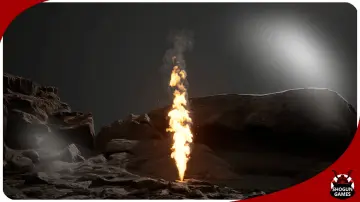
When a scene needs fire that feels more substantial than a flat sprite or a simple particle pass, volumetric loops can fill that gap quickly. Cinematic Fire 3D VDB Pack loop Is a collection of high-quality cinematic fire effects loops for Unreal Engine, focused on giving artists a set of ready fire elements that can be adjusted inside the scene rather than treated as fixed footage.
The pack centers on 10 cinematic fire VDB loops. That number matters in day-to-day production because it gives a scene more than a single repeated flame shape, while still keeping the pack clearly focused on one job: adding volumetric fire and smoke effects to a shot or environment where the flame itself needs to carry visual weight.
Getting cinematic fire into an Unreal Engine scene
This pack fits the point in the workflow where a project already has a location, mood, or shot plan, but still needs the fire element that sells danger, destruction, heat, or atmosphere. Instead of building every flame effect from scratch, the artist can start from one of the included VDB loops and then tune it with the controls provided.
Because the pack is specifically for Unreal Engine, its place is straightforward: it sits inside the engine pipeline as a scene effect resource. That makes it useful for cinematic setups, dramatic environment work, and other real-time or rendered sequences where the fire needs to read as a three-dimensional volume rather than a flat overlay. The fire is not presented as a one-off hero asset with a single look. It is a pack of loops, which makes it more practical for repeated use across multiple shots or across different areas of a single environment.
10 Cinematic Fire VDB loop variations
The core content is a set of 10 cinematic fire VDB loops. Even without extra technical breakdowns, that tells you the pack is meant to provide choice within a consistent style instead of scattering across unrelated effect types.
In production terms, a looped fire effect is valuable because it can continue running in a scene without requiring a bespoke simulation for every second on screen. That makes these effects suitable for sustained burns, background flames, set dressing fire elements, and shots where the camera lingers long enough that a static burst would not hold up. Since the pack is identified as cinematic fire, the emphasis is on presentation quality and visual presence. The included loops can support scenes that need flames to remain a visible, defining part of the frame rather than a minor accent.
The tags tied to the pack reinforce that role. It sits in the space between volumetric effects, smoke, flame, fire, burn, and broader visual effect work. That combination points to a pack that is not only about bright flame shapes, but also about the fuller fire event: flame volume, smoke behavior, and the look of a burning element within a scene.
Density, Fire color, Smoke color, and Speed control
The most useful part of the pack for shot work is not just that it includes fire loops, but that those loops come with controls. The listed controls are density, fire color, smoke color, emissive power, color control, and speed control.
Density control Affects how heavy or light the volumetric effect feels in a scene. That matters when a fire needs to read differently depending on scale, distance, or mood. A denser result can make the effect feel thicker and more forceful, while a lighter one can help it sit back into the composition.
Fire color control And Smoke color control Separate two parts of the effect that often need different treatment. Flame may need to shift toward a specific art direction, while smoke may need to match colder, darker, or dirtier surroundings. Keeping those controls distinct is useful when integrating fire into scenes that are not all lit or graded the same way.
Emissive power control Is especially relevant for cinematic work because fire often functions as both an effect and a light source presence in the frame. Adjusting the emissive strength gives the artist another way to shape how aggressive, restrained, or dramatic the fire appears on screen.
The separate mention of Color control Broadens that tuning range. Alongside the specific fire and smoke color settings, it suggests that the effect is intended to be adjusted rather than accepted as locked. Speed control Completes that set by letting the motion pace change. In practice, speed becomes one of the fastest ways to alter perceived intensity. A slower burn can suit tension or aftermath, while faster motion can push the effect toward urgency and active destruction.
Path tracing and the VDB console command
There is one explicit implementation note attached to the pack: to make the VDB run on path tracing, use the console command R.PathTracing.HeterogeneousVolumes 1.0.
That small instruction gives the pack a clear place in a more render-focused Unreal Engine workflow. It is not only aimed at dropping fire into a scene and leaving it there. It also acknowledges a path tracing context, where artists may be preparing higher-end rendered output and need the volumetric effect to function correctly in that setup. The command is concise, but it is the kind of practical detail that helps avoid confusion at the point where lighting and rendering choices begin to matter.
For artists moving between real-time look development and path-traced output, this note makes the pack easier to place in a pipeline. The VDB effect is not treated as separate from final rendering concerns. It is part of the same workflow, from scene assembly to the rendered result.
Where Cinematic Fire 3D VDB Pack loop fits best
This pack is most at home in scenes where fire is meant to be visible as a volumetric event, not just implied by sparks or a glow. The tags around flame, smoke, burn, volumetric work, and visual effects all point in that direction.
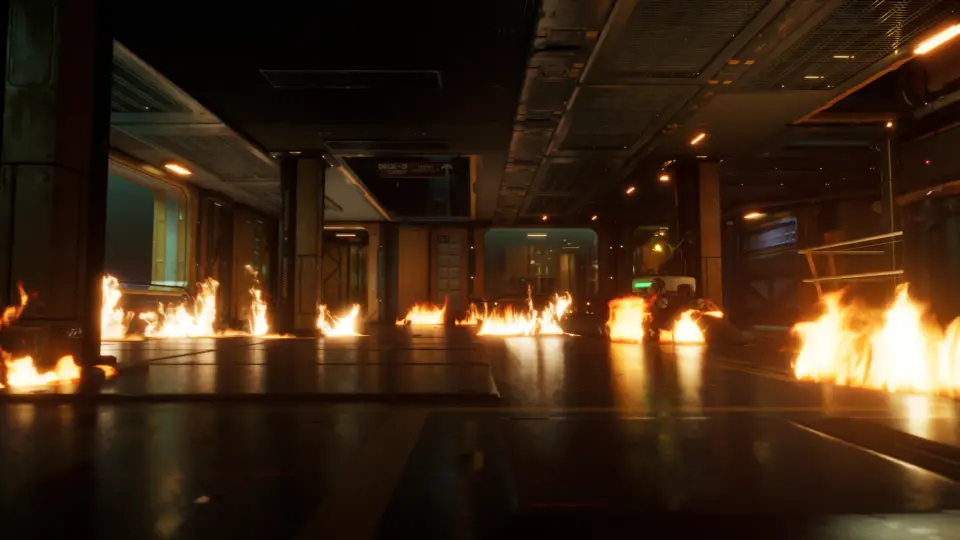
That makes it a practical addition for burning set pieces, environmental fire pockets, dramatic atmosphere, and other shots where smoke and flame need to share the frame as connected elements. Since the pack includes multiple loops and several artistic controls, it can support a range of staging needs inside that same category. One scene may call for brighter, more emissive fire with stronger motion. Another may need a darker smoke read with adjusted density and a calmer pace. The pack’s value in workflow terms comes from letting those changes happen through exposed controls rather than requiring a different effect source for each variation.
There is also one limitation worth keeping in view: the environment shown in the preview is not included in the pack. That keeps expectations clear. The pack provides the cinematic fire VDB loops and their related controls, while the surrounding scene setup remains a separate part of production.
In a real Unreal Engine pipeline, that makes this resource easiest to think of as a focused effects layer. It is the fire and smoke component you bring into an existing shot, level, or cinematic setup when the scene needs volumetric burning elements with adjustable look and motion, plus a direct path tracing setup note for VDB use.
 Fire & Explosions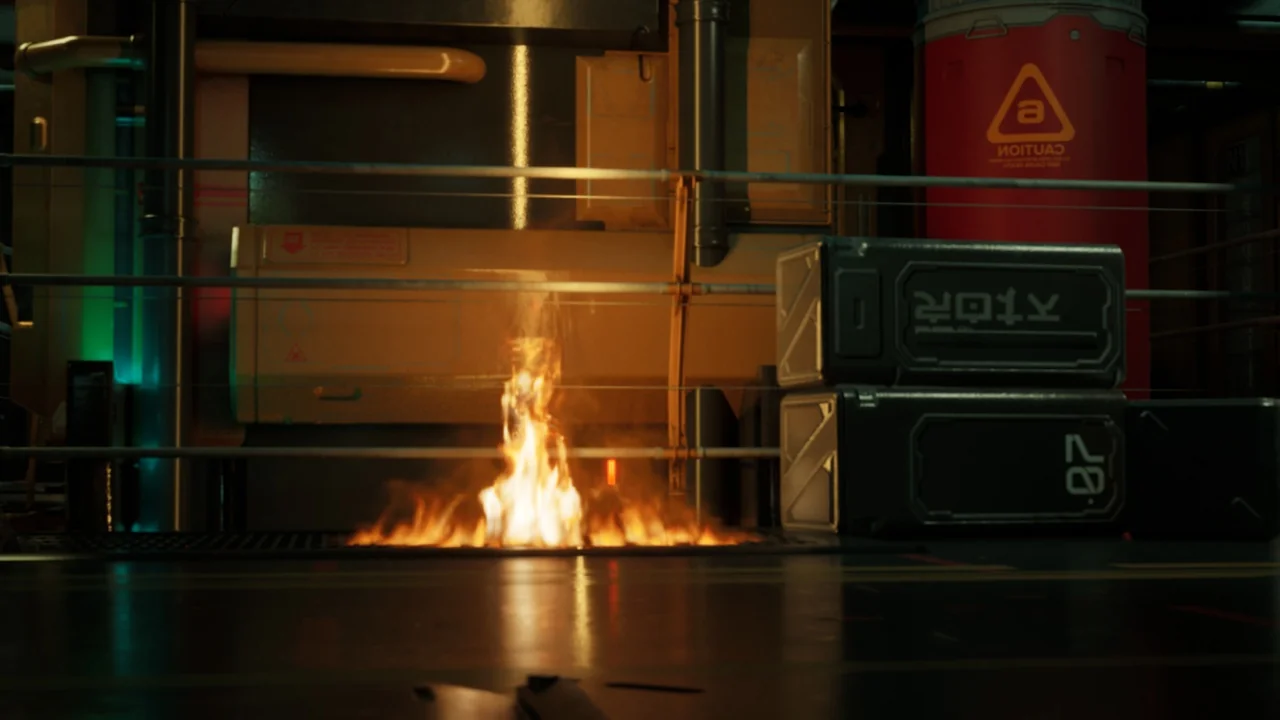
 Fire & Explosions
 Fire & Explosions
 Fire & Explosions