"7e6fc58c410f2894"{"id":"23897","slug":"character-auras","title":"Character Auras","category":"Spells","engine":"Original Unity version: 2021.3.15","assetVersion":"Original Unity version: 2021.3.15","engineVersion":"Asset Version:1.3","tag":"Spells","accent":"cyan","visual":"character","summary":"Character Auras collects 15 looped aura prefabs for Unity, covering looks such as water, lightning, healing, gold, freeze, fire, darkness, blood, and acid. The effects are particle-based rather than mesh-based, with support for Built-in, URP, and HDRP workf...","platform":"Unity","publishedAt":"2026-04-12T09:04:12.000Z","updatedAt":"2026-04-19T15:35:04.000Z","sourceNotes":[],"fileContents":[],"compatibility":["Unity","Original Unity version: 2021.3.15","Asset Version: 1.3"],"featuredImage":{"alt":"Character Auras","src":"https://3dcghub.com/wp-content/uploads/2026/04/6f78004cec62_75f88b70-1d2c-4d37-a12c-d35ed92380f1_1280x720_stretch.webp"},"hasDownloadLink":true,"downloads":2,"terms":[{"taxonomy":"category","slug":"unity-vfx-particles-spells","name":"Spells"},{"taxonomy":"post_tag","slug":"characters","name":"Characters"},{"taxonomy":"post_tag","slug":"unity","name":"Unity"},{"taxonomy":"post_tag","slug":"vfx","name":"VFX"}],"galleryImages":[{"src":"https://3dcghub.com/wp-content/uploads/2026/04/da05dd6e028b_2d21dad0-67ae-4b9c-8bfa-90bb869c1f73_scaled.webp","alt":"Character Auras"},{"src":"https://3dcghub.com/wp-content/uploads/2026/04/319367a6f4e4_aa832633-9286-4585-9d4c-ef2bf6bdf2da_scaled.webp","alt":"Character Auras"},{"src":"https://3dcghub.com/wp-content/uploads/2026/04/a8759949ac78_27c5d840-1269-4b8f-97b6-1cf61864286d_scaled.webp","alt":"Character Auras"},{"src":"https://3dcghub.com/wp-content/uploads/2026/04/e40dc8ba6f85_9570b709-6239-4efd-8dae-4609836c7317_scaled.webp","alt":"Character Auras"},{"src":"https://3dcghub.com/wp-content/uploads/2026/04/6457984b0553_8960c4ac-4d9a-4dd4-aea5-3d3d2e3e3ee6_scaled.webp","alt":"Character Auras"}],"accessPanel":{"kind":"resource","title":"Access this resource","eyebrow":"Free Download","message":"Log in or create a free account to start your download.","fileName":"Character Auras v1.3 (22 Dec 2024).7z","safetyNote":"All resources are 100% manually reviewed to eliminate all risks.","actionLabel":"Download Free","resourceType":"Resource archive"},"contentHtml":"\u003ch2\u003eDrop-in aura prefabs for character states\u003c/h2\u003e\n\u003cp\u003eCharacter Auras solves a very specific workflow problem: adding a visible aura around a character without building the effect from scratch. The pack contains 15 aura prefabs that are already set up as game-ready assets, so the setup is intended to stay simple. Place them in a scene, attach them where needed, and the aura effect is ready to sit on top of the character or spell moment.\u003c/p\u003e\n\u003cp\u003eThe range of names gives the pack a clear visual direction. Water, white, soap, smoke, sleep, shine, meteor, lightning, healing, gold, freeze, fire, darkness, blood, and acid are all represented, which means the same pack can cover calm, bright, elemental, magical, or harsher-looking states without changing the basic workflow.\u003c/p\u003e \u003ch3\u003eIncluded aura styles\u003c/h3\u003e\n\u003cul\u003e \u003cli\u003eWater aura\u003c/li\u003e \u003cli\u003eWhite aura\u003c/li\u003e \u003cli\u003eSoap aura\u003c/li\u003e \u003cli\u003eSmoke aura\u003c/li\u003e \u003cli\u003eSleep aura\u003c/li\u003e \u003cli\u003eShine aura\u003c/li\u003e \u003cli\u003eMeteor aura\u003c/li\u003e \u003cli\u003eLightning aura\u003c/li\u003e \u003cli\u003eHealing aura\u003c/li\u003e \u003cli\u003eGold aura\u003c/li\u003e \u003cli\u003eFreeze aura\u003c/li\u003e \u003cli\u003eFire aura\u003c/li\u003e \u003cli\u003eDarkness aura\u003c/li\u003e \u003cli\u003eBlood aura\u003c/li\u003e \u003cli\u003eAcid aura\u003c/li\u003e\n\u003c/ul\u003e \u003ch2\u003eUse the names as visual cues inside gameplay\u003c/h2\u003e\n\u003cp\u003eBecause the effects are clearly separated by mood and element, the pack can support fast visual communication in a scene. Healing and gold lean toward cleaner, more supportive looks. Lightning, meteor, fire, freeze, and acid push the effect into stronger elemental territory. Darkness and blood shift the tone in the opposite direction, making the set useful when a character needs an aura that feels more dangerous or corrupted. White, shine, and smoke offer additional visual variety without changing the idea of a character-centered aura.\u003c/p\u003e\n\u003cp\u003eThat kind of variety is useful when a project needs quick feedback for states, powers, or special moments. Auras can carry a lot of visual weight even when the underlying character remains the same, and this pack gives several ready-made looks that can be swapped to match the scene. The effect names also suggest different levels of energy and intensity, from soft or restorative to aggressive and hostile, which helps a developer choose the right one without needing a custom build for every case.\u003c/p\u003e \u003ch2\u003eLooped particles instead of mesh effects\u003c/h2\u003e\n\u003cp\u003eThese are not mesh effects. Each aura is a simple looped particle system, which keeps the focus on the effect itself rather than on a modeled shell or geometry-driven form. That makes the pack easy to think about as a visual layer: the aura sits around the character and stays active for as long as the scene calls for it.\u003c/p\u003e\n\u003cp\u003eIn the preview visuals, the glow is pushed further with Bloom from the Volume component. That is a useful note when matching the look in a project, since the final impression is tied not only to the particles themselves but also to the post process used around them. The particle-based setup keeps the effect straightforward, while Bloom adds the extra brightness seen in the promotional presentation.\u003c/p\u003e \u003ch2\u003eFit it into Built-in, URP, or HDRP projects\u003c/h2\u003e\n\u003cp\u003eThe pack supports all platforms and works with BiRP, URP, and HDRP. For BiRP, Shader Graph is required, and it is installed together with the asset. That makes the pipeline note very direct: Built-in projects are supported, but they also rely on the Shader Graph requirement when using BiRP. The compatibility list also covers Unity 2021.3.15, 2022.3.12, and 6000.0.67.\u003c/p\u003e\n\u003cp\u003eThe latest version is 2.0, and the release notes point to updated shaders and optimized effects in that version. Earlier updates added the acid aura, restored older BiRP shaders, and included a Unity 2022+ update related to depth handling for Deferred render path or orthographic camera use. The original Unity version is 2021.3.15, which gives the pack a clear technical starting point inside the broader compatibility range.\u003c/p\u003e \u003ch2\u003eTexture sizes and package footprint\u003c/h2\u003e\n\u003cp\u003eThe texture set comes in 2048x2048, 1024x1024, 512x512, and 256x256 sizes. The package is a unitypackage, includes 87 assets, and has a file size of 29.6 MB. Those details help define how the pack sits inside a project: there is enough texture variation to support different presentation needs, while the overall package remains organized as a focused set of aura resources.\u003c/p\u003e\n\u003cp\u003eIn production terms, that makes the asset fit neatly into fantasy scenes, spell-heavy gameplay, and character-driven visual states where a clean aura layer is more practical than constructing a new effect for each moment. The combination of game-ready prefabs, looped particles, multiple aura themes, and broad pipeline support keeps the pack centered on one job: giving characters a readable, ready-to-use aura visual that can be dropped into a Unity scene and used as part of the final effect stack.\u003c/p\u003e\n\n\u003ch2\u003eRelated Resources Worth Checking\u003c/h2\u003e\n\u003cul\u003e\n\u003cli\u003e\u003ca href=\"https://3dcghub.com/toolkit-for-unity-physics-2026/\" title=\"Toolkit for Unity Physics 2026\"\u003eToolkit for Unity Physics 2026\u003c/a\u003e\u003c/li\u003e\n\u003cli\u003e\u003ca href=\"https://3dcghub.com/opencv-for-unity/\" title=\"OpenCV for Unity\"\u003eOpenCV for Unity\u003c/a\u003e\u003c/li\u003e\n\u003cli\u003e\u003ca href=\"https://3dcghub.com/exporter-for-unreal-to-for-unity-2026/\" title=\"Exporter for Unreal to/for Unity 2026\"\u003eExporter for Unreal to/for Unity 2026\u003c/a\u003e\u003c/li\u003e\n\u003cli\u003e\u003ca href=\"https://3dcghub.com/dialogue-system-for-unity/\" title=\"Dialogue System for Unity\"\u003eDialogue System for Unity\u003c/a\u003e\u003c/li\u003e\n\u003cli\u003e\u003ca href=\"https://3dcghub.com/ambient-sounds-interactive-soundscapes-for-unity-6/\" title=\"Ambient Sounds – Interactive Soundscapes for Unity 6\"\u003eAmbient Sounds – Interactive Soundscapes for Unity 6\u003c/a\u003e\u003c/li\u003e\n\u003c/ul\u003e","contentTextLength":4794,"navigation":{"current":3584,"total":3618,"previous":{"id":"23943","slug":"rpg-vfx-bundle","title":"RPG VFX Bundle","category":"Spells","platform":"Unity","updatedAt":"2026-04-19T15:35:04.000Z"},"next":{"id":"23993","slug":"sword-slashes-pro","title":"Sword slashes PRO","category":"Particles","platform":"Unity","updatedAt":"2026-04-19T15:35:03.000Z"}},"relatedResources":[{"id":"23889","slug":"character-auras-3","title":"Character Auras 3","category":"Spells","engine":"Original Unity version: 2022.3.12","assetVersion":"Original Unity version: 2022.3.12","engineVersion":"Asset Version:1.1","tag":"Spells","accent":"cyan","visual":"character","summary":"Character Auras 3 is a Unity aura pack built from looped particle systems rather than mesh effects. It includes 12 game-ready prefabs for fire, ice, healing, poison, wind, and other aura styles.","platform":"Unity","publishedAt":"2026-04-12T09:03:27.000Z","updatedAt":"2026-04-19T15:35:07.000Z","sourceNotes":[],"fileContents":[],"compatibility":["Unity","Original Unity version: 2022.3.12","Asset Version: 1.1"],"featuredImage":{"alt":"Character Auras 3","src":"https://3dcghub.com/wp-content/uploads/2026/04/0f3d5dd2e8a1_15687687-1b99-4c63-af53-2505ef676a15_1280x720_stretch.webp"},"hasDownloadLink":true,"downloads":0},{"id":"23954","slug":"slash-barrage-wave-vfx","title":"Slash Barrage Wave VFX","category":"Spells","engine":"Original Unity version: 2021.3.27","assetVersion":"Original Unity version: 2021.3.27","engineVersion":"Asset Version:1.0","tag":"Spells","accent":"cyan","visual":"city","summary":"Slash Barrage Wave VFX centers on elemental sword-slash projectiles with matching charge and impact effects. The package bundles 57 unique VFX and is set up for use across HDRP, URP, and Built-in rendering pipelines. It also includes a single shader for the...","platform":"Unity","publishedAt":"2026-04-12T09:12:27.000Z","updatedAt":"2026-04-19T15:35:03.000Z","sourceNotes":[],"fileContents":[],"compatibility":["Unity","Original Unity version: 2021.3.27","Asset Version: 1.0"],"featuredImage":{"alt":"Slash Barrage Wave VFX","src":"https://3dcghub.com/wp-content/uploads/2026/04/63f4343beb68_b843934a-7632-43f1-82d0-013b40650d6b_1280x720_stretch.webp"},"hasDownloadLink":true,"downloads":2},{"id":"23910","slug":"epic-toon-vfx-2","title":"Epic Toon VFX 2","category":"Spells","engine":"Original Unity version: 2020.3.18","assetVersion":"Original Unity version: 2020.3.18","engineVersion":"Asset Version:1.3","tag":"Spells","accent":"cyan","visual":"city","summary":"Epic Toon VFX 2 brings together 10 toon effects with SFX, prefab-based setup, and support for BiRP, URP, and HDRP. The package also includes adjustable timing, scale, and color, with a note that the effects may be too heavy for mobile use.","platform":"Unity","publishedAt":"2026-04-12T09:04:05.000Z","updatedAt":"2026-04-19T15:35:05.000Z","sourceNotes":[],"fileContents":[],"compatibility":["Unity","Original Unity version: 2020.3.18","Asset Version: 1.3"],"featuredImage":{"alt":"Epic Toon VFX 2","src":"https://3dcghub.com/wp-content/uploads/2026/04/01ad3897b30f_72ea6e93-8935-4f31-a8d3-92ff78420091_1280x720_stretch.webp"},"hasDownloadLink":true,"downloads":6}]}
Spells
Character Auras
Character Auras collects 15 looped aura prefabs for Unity, covering looks such as water, lightning, healing, gold, freeze, fire, darkness, blood, and acid. The effects are particle-based rather than mesh-based, with support for Built-in, URP, and HDRP workf...
Character Auras solves a very specific workflow problem: adding a visible aura around a character without building the effect from scratch. The pack contains 15 aura prefabs that are already set up as game-ready assets, so the setup is intended to stay simple. Place them in a scene, attach them where needed, and the aura effect is ready to sit on top of the character or spell moment.
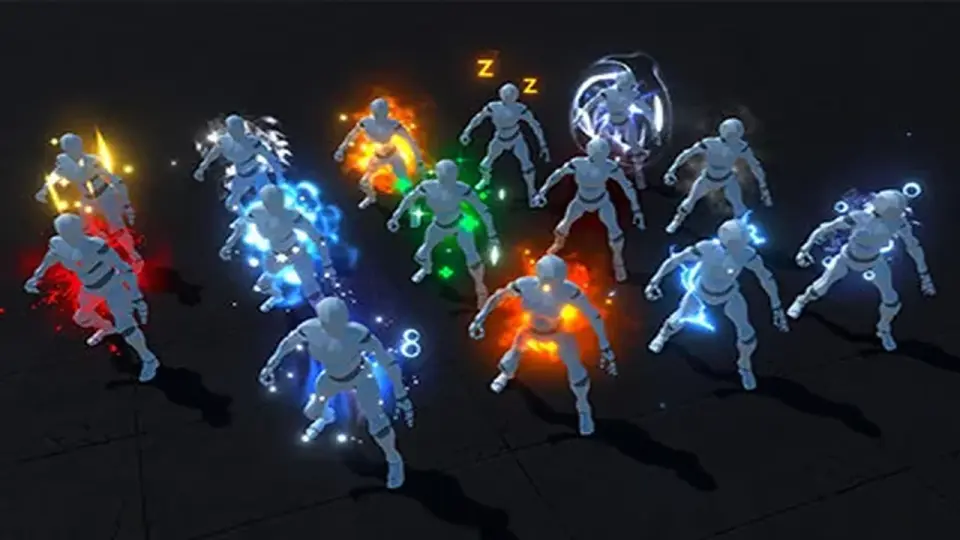
The range of names gives the pack a clear visual direction. Water, white, soap, smoke, sleep, shine, meteor, lightning, healing, gold, freeze, fire, darkness, blood, and acid are all represented, which means the same pack can cover calm, bright, elemental, magical, or harsher-looking states without changing the basic workflow.
Included aura styles
Water aura
White aura
Soap aura
Smoke aura
Sleep aura
Shine aura
Meteor aura
Lightning aura
Healing aura
Gold aura
Freeze aura
Fire aura
Darkness aura
Blood aura
Acid aura
Use the names as visual cues inside gameplay
Because the effects are clearly separated by mood and element, the pack can support fast visual communication in a scene. Healing and gold lean toward cleaner, more supportive looks. Lightning, meteor, fire, freeze, and acid push the effect into stronger elemental territory. Darkness and blood shift the tone in the opposite direction, making the set useful when a character needs an aura that feels more dangerous or corrupted. White, shine, and smoke offer additional visual variety without changing the idea of a character-centered aura.
That kind of variety is useful when a project needs quick feedback for states, powers, or special moments. Auras can carry a lot of visual weight even when the underlying character remains the same, and this pack gives several ready-made looks that can be swapped to match the scene. The effect names also suggest different levels of energy and intensity, from soft or restorative to aggressive and hostile, which helps a developer choose the right one without needing a custom build for every case.
Looped particles instead of mesh effects
These are not mesh effects. Each aura is a simple looped particle system, which keeps the focus on the effect itself rather than on a modeled shell or geometry-driven form. That makes the pack easy to think about as a visual layer: the aura sits around the character and stays active for as long as the scene calls for it.
In the preview visuals, the glow is pushed further with Bloom from the Volume component. That is a useful note when matching the look in a project, since the final impression is tied not only to the particles themselves but also to the post process used around them. The particle-based setup keeps the effect straightforward, while Bloom adds the extra brightness seen in the promotional presentation.
Fit it into Built-in, URP, or HDRP projects
The pack supports all platforms and works with BiRP, URP, and HDRP. For BiRP, Shader Graph is required, and it is installed together with the asset. That makes the pipeline note very direct: Built-in projects are supported, but they also rely on the Shader Graph requirement when using BiRP. The compatibility list also covers Unity 2021.3.15, 2022.3.12, and 6000.0.67.
The latest version is 2.0, and the release notes point to updated shaders and optimized effects in that version. Earlier updates added the acid aura, restored older BiRP shaders, and included a Unity 2022+ update related to depth handling for Deferred render path or orthographic camera use. The original Unity version is 2021.3.15, which gives the pack a clear technical starting point inside the broader compatibility range.
Texture sizes and package footprint
The texture set comes in 2048x2048, 1024x1024, 512x512, and 256x256 sizes. The package is a unitypackage, includes 87 assets, and has a file size of 29.6 MB. Those details help define how the pack sits inside a project: there is enough texture variation to support different presentation needs, while the overall package remains organized as a focused set of aura resources.
In production terms, that makes the asset fit neatly into fantasy scenes, spell-heavy gameplay, and character-driven visual states where a clean aura layer is more practical than constructing a new effect for each moment. The combination of game-ready prefabs, looped particles, multiple aura themes, and broad pipeline support keeps the pack centered on one job: giving characters a readable, ready-to-use aura visual that can be dropped into a Unity scene and used as part of the final effect stack.
 Spells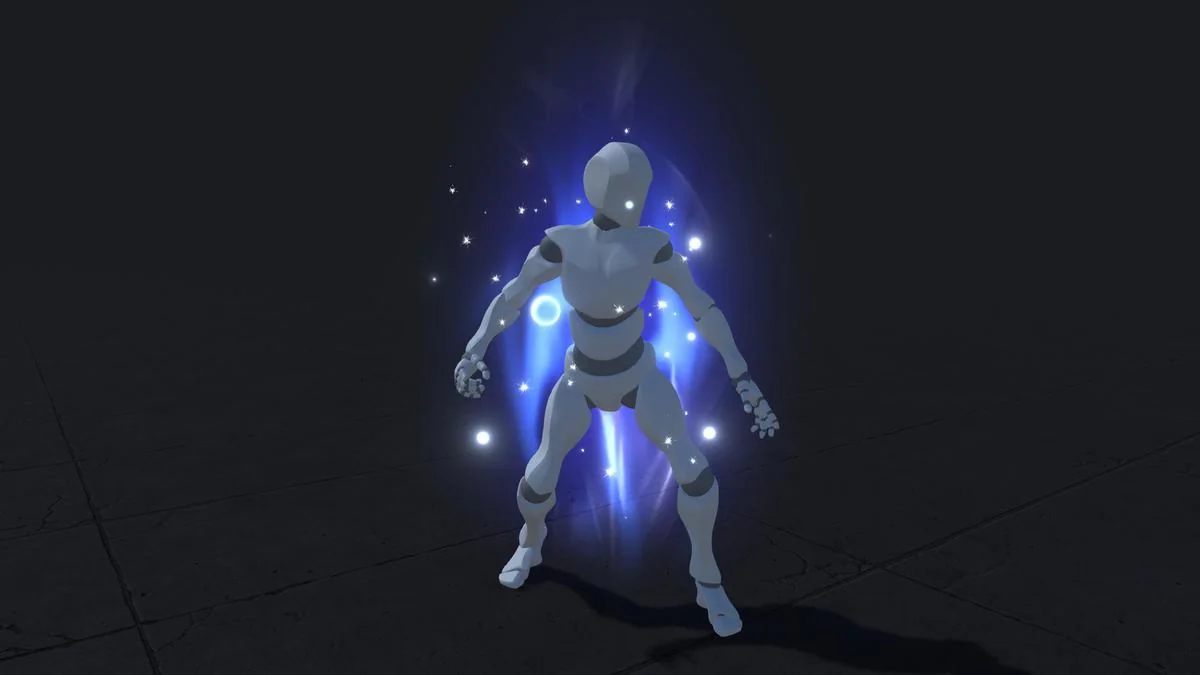
 Spells
 Spells
 Spells