"c68a05d5e51405b3"{"id":"1000068","slug":"atmospheric-house-modular-2","title":"Atmospheric House (Modular)","category":"Urban","engine":"Asset Version: 1.1.0","assetVersion":"Original Unity version: 2019.4.30","engineVersion":"Asset Version: 1.1.0","tag":"Urban","accent":"cyan","visual":"mech","summary":"A highly detailed modular house environment for Unity featuring dynamic material swapping, interactive interior props, and comprehensive pipeline support.","platform":"Unity","publishedAt":"2026-05-30T05:14:59.550Z","updatedAt":"2026-08-23T13:12:26.539Z","sourceNotes":[],"fileContents":[],"compatibility":["Unity","Original Unity version: 2019.4.30","Asset Version: 1.1.0"],"featuredImage":{"alt":"Atmospheric House (Modular)","src":"/wp-content/uploads/published/2026/05/2e625545c790-37501c06-ffbf-452d-9231-76a25e5a1556-1280x720-stretch-3a05015a30.webp"},"hasDownloadLink":true,"downloads":20,"terms":[{"taxonomy":"category","slug":"unity-3d-environments-urban","name":"Urban"}],"galleryImages":[{"src":"/wp-content/uploads/published/2026/05/931b4925d69d-a8221b10-c6ff-41c4-9824-d2de70d724f3-scaled-d9fa0d85ba.webp","alt":"Atmospheric House (Modular)"},{"src":"/wp-content/uploads/published/2026/05/62c8541bfa16-2e29844c-9d6d-48d9-96d7-f93e4f546348-scaled-c053b69440.webp","alt":"Atmospheric House (Modular)"},{"src":"/wp-content/uploads/published/2026/05/55f535c160dd-64fd40d4-5f42-43c0-8a4d-883b831ff6f9-scaled-04a320e594.webp","alt":"Atmospheric House (Modular)"},{"src":"/wp-content/uploads/published/2026/05/77f56e639c5b-5550a9b9-0eb0-4e63-ad34-e9a3b593fa53-scaled-150a16e9ff.webp","alt":"Atmospheric House (Modular)"},{"src":"/wp-content/uploads/published/2026/05/86fa2c25c27f-341547e8-caeb-4047-8683-eea984be72b6-scaled-093279d80a.webp","alt":"Atmospheric House (Modular)"},{"src":"/wp-content/uploads/published/2026/05/0e95f208beae-7a9039db-cf8d-4d49-997b-879bfc3ebc32-scaled-856628e6d1.webp","alt":"Atmospheric House (Modular)"},{"src":"/wp-content/uploads/published/2026/05/d44289231f3b-fd139987-300b-48a7-b144-37c420ba7f06-scaled-53e12d17d5.webp","alt":"Atmospheric House (Modular)"},{"src":"/wp-content/uploads/published/2026/05/f19c3b636d96-e0343cd4-b838-42c7-9574-bc78686d82d9-scaled-57ffabe0b0.webp","alt":"Atmospheric House (Modular)"},{"src":"/wp-content/uploads/published/2026/05/05291635bbd7-cd7919d2-d3e5-4cd7-a0a2-53ec719fcee2-scaled-85c27c3fe6.webp","alt":"Atmospheric House (Modular)"},{"src":"/wp-content/uploads/published/2026/05/9ac7bc148094-475d2f9a-737b-4f42-a5be-8baab80cc945-scaled-d6d264566b.webp","alt":"Atmospheric House (Modular)"}],"accessPanel":{"kind":"resource","title":"Download this resource","eyebrow":"Free Download","message":"Log in or create a free account to start your download.","fileName":"Atmospheric House Modular [1.1.0].unitypackage","safetyNote":"Resources are manually reviewed before listing to improve quality and reduce obvious risks.","actionLabel":"Download Free","resourceType":"Resource archive"},"contentHtml":"\u003ch2\u003eImporting and Configuring the Modular Environment\u003c/h2\u003e\n\u003cp\u003eEstablishing the Atmospheric House (Modular) inside a Unity project requires a specific import sequence, particularly for developers utilizing modern rendering pipelines. The environment arrives as a substantial 5.8 GB package containing 2090 individual assets. To ensure the materials and custom shaders compile correctly, the initial setup must match the project's active pipeline.\u003c/p\u003e\n\u003cp\u003eAfter importing the base package into the desired project, developers using the High Definition Render Pipeline (HDRP) or Universal Render Pipeline (URP) must navigate to the respective HDRP or URP folder within the directory. From there, a secondary, pipeline-specific.unitypackage file must be unpacked into the project. A critical requirement across all pipelines is the use of Linear Color Space; failing to configure the project to Linear Color Space will result in shaders rendering improperly. The package includes a dedicated readme file within the HDRP/URP folders to guide users through these specific configuration steps.\u003c/p\u003e\n\u003cp\u003eThe asset maintains broad compatibility across multiple Unity iterations. It was originally built on Unity 2019.4.30 and actively supports versions 2019.4.30, 2022.3.10, and 6000.0.16. All three major render pipelines—Built-in, HDRP, and URP—are supported across these versions, though specific shader capabilities vary depending on the chosen pipeline.\u003c/p\u003e\n\u003ch2\u003eConstructing Architecture Using the Prefab Swapper\u003c/h2\u003e\n\u003cp\u003eBuilding residential structures is handled through a grid-snapping modular system designed to bypass the traditional, time-consuming method of searching through folders and manually dragging individual prefabs into the scene. The architectural components include modular walls, floors, ceilings, roofs, porches, and kitchen cabinets.\u003c/p\u003e\n\u003cp\u003eTo streamline the assembly process, Finward Studios implemented a custom Prefab Swapper script. This tool allows level designers to quickly cycle through different modular prefabs directly within the scene view. By combining the Prefab Swapper with strict grid snapping, developers can rapidly prototype layouts, swap out structural variations, and finalize the building footprint without constantly navigating back to the project window.\u003c/p\u003e\n\u003ch2\u003eTransitioning Materials Between Clean and Worn States\u003c/h2\u003e\n\u003cp\u003eThe environment features a dynamic material system shaped by a dedicated Material Swapper tool. This tool enables developers to change the entire house from a pristine, newly built state to an old, worn, and abandoned aesthetic with a single click. The asset relies on a comprehensive texture suite to achieve this transition, utilizing BaseColor, MaskMap, Normal, and Emissive textures for the majority of the assets.\u003c/p\u003e\n\u003cp\u003eMost textures in the package are authored at 2K resolution, though they scale from 512 to 4K depending on the physical size and importance of the specific object. Clean and worn texture variants are provided for all objects. For tileable materials, the package utilizes additional Multimask textures driven by a custom shader.\u003c/p\u003e\n\u003cp\u003eThis multimask system provides extensive material control, but these advanced features are exclusive to HDRP and URP. In those pipelines, the main house materials are fully tweakable, allowing developers to dial in the exact amount of wear and tear. Furthermore, the paint color of the main house materials can be altered directly within the shader. The version 1.1.0 update expanded on this functionality by adding two entirely new shaders specifically for tweaking main house material colors, alongside updated MaskMap textures for HDRP and URP.\u003c/p\u003e\n\u003cp\u003eUsers operating on the Built-in render pipeline face specific visual limitations regarding this system. Because the Built-in pipeline does not support the multimask shader, the tileable house materials will not appear as distinctly worn as they do in HDRP or URP. Consequently, some of the clean and worn material variations will look identical when rendered using the Built-in pipeline.\u003c/p\u003e\n\u003ch2\u003ePopulating the Interior with Interactive Props\u003c/h2\u003e\n\u003cp\u003eBeyond the architectural shell, the package includes over 600 individual objects to populate the living spaces. These interior props cover everything from structural fixtures to everyday household items, ensuring the rooms feel lived-in. The kitchen area specifically benefits from modular cabinets that align with the rest of the architectural grid.\u003c/p\u003e\n\u003cp\u003eTo support gameplay mechanics and interactive exploration, many of these interior elements are built with moving parts. The drawers, cabinets, doors, and windows are all configured to be openable. Recent technical updates to the package include specific adjustments to the UV mapping for the L-shaped doors, ensuring the textures align correctly when these interactive elements are manipulated in-game.\u003c/p\u003e\n\u003ch2\u003eLighting Optimization and Scene Performance\u003c/h2\u003e\n\u003cp\u003eThe package includes two distinct demo scenes that showcase the extreme ends of the asset's aesthetic range. The Day demo scene is configured to highlight the new and clean look, utilizing bright, natural lighting. Conversely, the Night demo scene is shaped by the old and worn look, serving as an example of an abandoned, atmospheric environment.\u003c/p\u003e\n\u003cp\u003eThese demo scenes provide a baseline for performance expectations. When loaded with realtime lights disabled and no occlusion culling applied, the demo scene renders at approximately 1.1 million triangles. To help manage performance in actual gameplay scenarios, the package includes a custom Light Optimization script designed to streamline how the game handles interior and exterior illumination.\u003c/p\u003e\n\u003cp\u003eWith an active update history stretching from its initial release in May 2021 through its 1.1.0 update in August 2024, the Atmospheric House (Modular) provides a stable, highly configurable foundation for urban and suburban residential environments, provided the project is configured to leverage the advanced shader features available in modern rendering pipelines.\u003c/p\u003e\n\n\u003ch2\u003eRelated Resources Worth Checking\u003c/h2\u003e\n\u003cul\u003e\n\u003cli\u003e\u003ca href=\"https://3dcghub.com/futuristic-city/\" title=\"Futuristic City\"\u003eFuturistic City\u003c/a\u003e\u003c/li\u003e\n\u003cli\u003e\u003ca href=\"https://3dcghub.com/urban-city-package/\" title=\"Urban City Package\"\u003eUrban City Package\u003c/a\u003e\u003c/li\u003e\n\u003cli\u003e\u003ca href=\"https://3dcghub.com/stylized-town/\" title=\"Stylized Town\"\u003eStylized Town\u003c/a\u003e\u003c/li\u003e\n\u003cli\u003e\u003ca href=\"https://3dcghub.com/japanese-city/\" title=\"Japanese City\"\u003eJapanese City\u003c/a\u003e\u003c/li\u003e\n\u003cli\u003e\u003ca href=\"https://3dcghub.com/city-builder-urban/\" title=\"City Builder: Urban\"\u003eCity Builder: Urban\u003c/a\u003e\u003c/li\u003e\n\u003c/ul\u003e","contentTextLength":6055,"navigation":{"current":957,"total":3860,"previous":{"id":"1000184","slug":"infinite-characters-collection-over-230-characters-extra-stigma-studios","title":"Infinite Characters Collection – Over 230 Characters + Extra | STIGMA STUDIOS","category":"Characters \u0026 Creatures","platform":"Unreal Engine","updatedAt":"2026-08-23T13:14:17.209Z"},"next":{"id":"1000020","slug":"swim-component-150-animations-blueprints","title":"Swim Component : 150 Animations + Blueprints","category":"Locomotion / Gaits","platform":"Unreal Engine","updatedAt":"2026-08-23T13:10:29.178Z"}},"relatedResources":[{"id":"20908","slug":"city-builder-urban","title":"City Builder: Urban","category":"Urban","engine":"Original Unity version: 2019.4.3","assetVersion":"Original Unity version: 2019.4.3","engineVersion":"Asset Version:2.1.1","tag":"Urban","accent":"cyan","visual":"city","summary":"This bundle combines two specialized packages to provide 178 high-quality assets designed for rapid urban environment construction. It includes stackable building components, specialized shaders, and a wide variety of street-level props.","platform":"Unity","publishedAt":"2026-03-26T10:03:26.000Z","updatedAt":"2026-04-19T15:42:51.000Z","sourceNotes":[],"fileContents":[],"compatibility":["Unity","Original Unity version: 2019.4.3","Asset Version: 2.1.1"],"featuredImage":{"alt":"City Builder: Urban","src":"https://3dcghub.com/wp-content/uploads/2026/03/497bd5c40eb1_367d69a6-399f-4501-9fe3-1f73fe1278ae_1280x720_stretch.webp"},"hasDownloadLink":true,"downloads":3},{"id":"21543","slug":"japanese-city","title":"Japanese City","category":"Urban","engine":"Original Unity version: 2021.3.30","assetVersion":"Original Unity version: 2021.3.30","engineVersion":"Asset Version:1.1","tag":"Urban","accent":"cyan","visual":"city","summary":"This resource provides a comprehensive collection of 3D art for building Japanese-themed downtown areas, offering optimized building meshes and multi-map textures for high-fidelity rendering.","platform":"Unity","publishedAt":"2026-03-27T06:30:54.000Z","updatedAt":"2026-04-19T15:42:23.000Z","sourceNotes":[],"fileContents":[],"compatibility":["Unity","Original Unity version: 2021.3.30","Asset Version: 1.1"],"featuredImage":{"alt":"Japanese City","src":"https://3dcghub.com/wp-content/uploads/2026/03/15b8d7a5fc4d_96d63a21-f9ce-4e7f-bfa7-71a58a2ad1c1_1280x720_stretch.webp"},"hasDownloadLink":true,"downloads":9},{"id":"21530","slug":"futuristic-city","title":"Futuristic City","category":"Urban","engine":"Original Unity version: 2020.3.1","assetVersion":"Original Unity version: 2020.3.1","engineVersion":"Asset Version:1.0","tag":"Urban","accent":"cyan","visual":"city","summary":"A collection of buildings and neon panels optimized for night-time urban environments in Unity. The package supports all major render pipelines and includes raw FBX files for external software modification.","platform":"Unity","publishedAt":"2026-03-27T06:27:32.000Z","updatedAt":"2026-04-19T15:42:23.000Z","sourceNotes":[],"fileContents":[],"compatibility":["Unity","Original Unity version: 2020.3.1","Asset Version: 1.0"],"featuredImage":{"alt":"Futuristic City","src":"https://3dcghub.com/wp-content/uploads/2026/03/a612f4444500_3ae3504f-8cb6-44f3-b4a1-75c7dd44ec33_1280x720_stretch.webp"},"hasDownloadLink":true,"downloads":0}]}
Urban
Atmospheric House (Modular)
A highly detailed modular house environment for Unity featuring dynamic material swapping, interactive interior props, and comprehensive pipeline support.
Category:Unity,UrbanPlatform: UnityOriginal Unity version: 2019.4.30Asset Version: 1.1.0Published: May 30, 2026Updated: Aug 23, 2026
Urban
Resource overview
Importing and Configuring the Modular Environment
Establishing the Atmospheric House (Modular) inside a Unity project requires a specific import sequence, particularly for developers utilizing modern rendering pipelines. The environment arrives as a substantial 5.8 GB package containing 2090 individual assets. To ensure the materials and custom shaders compile correctly, the initial setup must match the project's active pipeline.
After importing the base package into the desired project, developers using the High Definition Render Pipeline (HDRP) or Universal Render Pipeline (URP) must navigate to the respective HDRP or URP folder within the directory. From there, a secondary, pipeline-specific.unitypackage file must be unpacked into the project. A critical requirement across all pipelines is the use of Linear Color Space; failing to configure the project to Linear Color Space will result in shaders rendering improperly. The package includes a dedicated readme file within the HDRP/URP folders to guide users through these specific configuration steps.
The asset maintains broad compatibility across multiple Unity iterations. It was originally built on Unity 2019.4.30 and actively supports versions 2019.4.30, 2022.3.10, and 6000.0.16. All three major render pipelines—Built-in, HDRP, and URP—are supported across these versions, though specific shader capabilities vary depending on the chosen pipeline.
Constructing Architecture Using the Prefab Swapper
Building residential structures is handled through a grid-snapping modular system designed to bypass the traditional, time-consuming method of searching through folders and manually dragging individual prefabs into the scene. The architectural components include modular walls, floors, ceilings, roofs, porches, and kitchen cabinets.
To streamline the assembly process, Finward Studios implemented a custom Prefab Swapper script. This tool allows level designers to quickly cycle through different modular prefabs directly within the scene view. By combining the Prefab Swapper with strict grid snapping, developers can rapidly prototype layouts, swap out structural variations, and finalize the building footprint without constantly navigating back to the project window.
Transitioning Materials Between Clean and Worn States
The environment features a dynamic material system shaped by a dedicated Material Swapper tool. This tool enables developers to change the entire house from a pristine, newly built state to an old, worn, and abandoned aesthetic with a single click. The asset relies on a comprehensive texture suite to achieve this transition, utilizing BaseColor, MaskMap, Normal, and Emissive textures for the majority of the assets.
Most textures in the package are authored at 2K resolution, though they scale from 512 to 4K depending on the physical size and importance of the specific object. Clean and worn texture variants are provided for all objects. For tileable materials, the package utilizes additional Multimask textures driven by a custom shader.
This multimask system provides extensive material control, but these advanced features are exclusive to HDRP and URP. In those pipelines, the main house materials are fully tweakable, allowing developers to dial in the exact amount of wear and tear. Furthermore, the paint color of the main house materials can be altered directly within the shader. The version 1.1.0 update expanded on this functionality by adding two entirely new shaders specifically for tweaking main house material colors, alongside updated MaskMap textures for HDRP and URP.
Users operating on the Built-in render pipeline face specific visual limitations regarding this system. Because the Built-in pipeline does not support the multimask shader, the tileable house materials will not appear as distinctly worn as they do in HDRP or URP. Consequently, some of the clean and worn material variations will look identical when rendered using the Built-in pipeline.
Populating the Interior with Interactive Props
Beyond the architectural shell, the package includes over 600 individual objects to populate the living spaces. These interior props cover everything from structural fixtures to everyday household items, ensuring the rooms feel lived-in. The kitchen area specifically benefits from modular cabinets that align with the rest of the architectural grid.
To support gameplay mechanics and interactive exploration, many of these interior elements are built with moving parts. The drawers, cabinets, doors, and windows are all configured to be openable. Recent technical updates to the package include specific adjustments to the UV mapping for the L-shaped doors, ensuring the textures align correctly when these interactive elements are manipulated in-game.
Lighting Optimization and Scene Performance
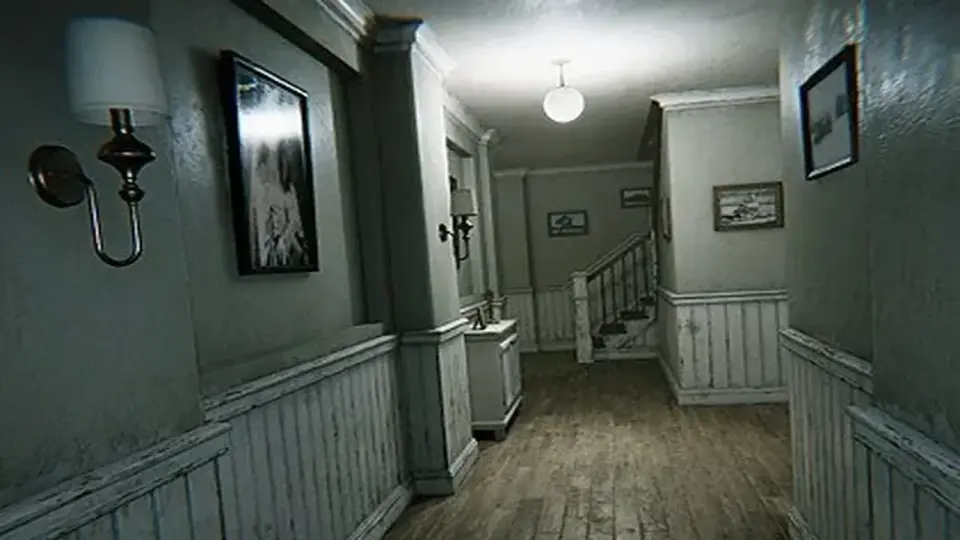
The package includes two distinct demo scenes that showcase the extreme ends of the asset's aesthetic range. The Day demo scene is configured to highlight the new and clean look, utilizing bright, natural lighting. Conversely, the Night demo scene is shaped by the old and worn look, serving as an example of an abandoned, atmospheric environment.
These demo scenes provide a baseline for performance expectations. When loaded with realtime lights disabled and no occlusion culling applied, the demo scene renders at approximately 1.1 million triangles. To help manage performance in actual gameplay scenarios, the package includes a custom Light Optimization script designed to streamline how the game handles interior and exterior illumination.
With an active update history stretching from its initial release in May 2021 through its 1.1.0 update in August 2024, the Atmospheric House (Modular) provides a stable, highly configurable foundation for urban and suburban residential environments, provided the project is configured to leverage the advanced shader features available in modern rendering pipelines.
 Urban
Urban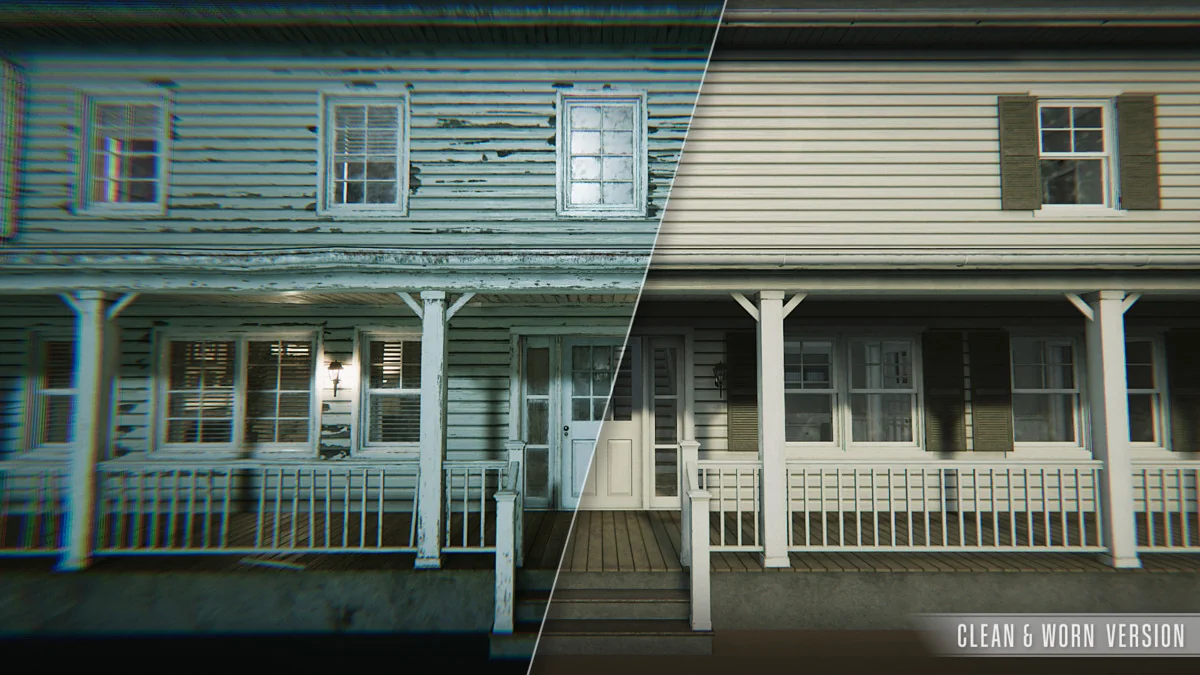
 Urban
Urban Urban
Urban Urban
Urban