"6f9bd6df1f44a86f"{"id":"1000786","slug":"advanced-game-logging-gls","title":"Advanced Game Logging (GLS)","category":"Engine Tools","engine":"5.7","assetVersion":"Asset Version: 0.51.1","engineVersion":"Engine Version: 5.7","tag":"Engine Tools","accent":"blue","visual":"mech","summary":"UE5 plugin that brings real-time in-game log viewing to Shipping builds across PC, mobile, VR, and consoles, with smart filtering, multiplayer isolation, and Bl","platform":"Unreal Engine","indexPolicy":"index","publishedAt":"2026-07-30T12:01:20.707Z","updatedAt":"2026-07-30T12:01:20.707Z","sourceNotes":[],"fileContents":[],"compatibility":["Unreal Engine","Asset Version: 0.51.1","Engine Version: 5.7"],"featuredImage":{"alt":"Advanced Game Logging (GLS)","src":"/wp-content/uploads/published/2026/07/e11e4c712bbb-006b3d80-57a5-4471-9974-94ce8f3f1e82-ef1319cba4.webp"},"hasDownloadLink":true,"downloads":0,"terms":[{"taxonomy":"category","slug":"engine-tools-tools-and-plugins","name":"Engine Tools"}],"galleryImages":[{"src":"/wp-content/uploads/published/2026/07/93cf5d559076-e432378a-6231-4854-9903-e21cc0fe1848-de967a9fdc.webp","alt":"Advanced Game Logging (GLS)"},{"src":"/wp-content/uploads/published/2026/07/d40ffdb1c458-13a9bb33-8d47-4096-990c-e023e9663cc0-97c9fec627.webp","alt":"Advanced Game Logging (GLS)"},{"src":"/wp-content/uploads/published/2026/07/a62223c0111e-07821e72-d11e-43ee-8a27-908a05543b74-1c5b48732b.webp","alt":"Advanced Game Logging (GLS)"},{"src":"/wp-content/uploads/published/2026/07/1f891b18c7cf-a6fe34ef-b5f8-4fad-ac30-22a00eb8aa6c-fc510de66c.webp","alt":"Advanced Game Logging (GLS)"},{"src":"/wp-content/uploads/published/2026/07/3f2c9a59f141-0f18e5c2-9781-411c-b2c2-68a3a29cfb4a-10a97d9525.webp","alt":"Advanced Game Logging (GLS)"},{"src":"/wp-content/uploads/published/2026/07/b6304de8fe20-ab4f11ac-e900-4940-801a-e949ed006112-984cd9c125.webp","alt":"Advanced Game Logging (GLS)"},{"src":"/wp-content/uploads/published/2026/07/737492411f5d-a237822d-9e0f-4b49-ba25-e1dca307daac-11bd676681.webp","alt":"Advanced Game Logging (GLS)"},{"src":"/wp-content/uploads/published/2026/07/57a39a3e0a0c-40cb2ad9-01fe-49ef-9043-ca96fea70ee6-70fa868835.webp","alt":"Advanced Game Logging (GLS)"},{"src":"/wp-content/uploads/published/2026/07/2f434eba462d-883eb8cf-6790-42ab-a525-fcc97c9f7c81-95b36d05b9.webp","alt":"Advanced Game Logging (GLS)"},{"src":"/wp-content/uploads/published/2026/07/323cfb273eb6-0abb79a1-08c3-4dfc-9ec7-2608d3461690-c0298d1245.webp","alt":"Advanced Game Logging (GLS)"}],"accessPanel":{"kind":"resource","title":"Download this resource","eyebrow":"Free Download","message":"Log in or create a free account to start your download.","fileName":"5.7.7z","safetyNote":"Resources are manually reviewed before listing to improve quality and reduce obvious risks.","actionLabel":"Download Free","resourceType":"Resource archive"},"contentHtml":"\u003cp\u003eThe moment a project leaves the editor and lands on a device, the debugging vocabulary changes. Output Log disappears. The console is gone. Players or QA testers report that something broke, and the developer is left connecting ADB, pulling log files by hand, or littering the codebase with print strings just to narrow down the failure. \u003cem\u003eAdvanced Game Logging (GLS)\u003c/em\u003e is built for that exact gap: bugs that only surface in packaged builds, on real hardware, where standard Unreal Engine tooling no longer reaches.\u003c/p\u003e\n\n\u003ch2\u003eFrom PIE Comfort to Shipping Build Reality\u003c/h2\u003e\n\u003cp\u003e\u003cem\u003eGLS\u003c/em\u003e installs a real-time log viewer directly inside the running game. The shortcut Alt + Shift + G opens the overlay during gameplay or during Play-In-Editor (PIE) sessions, without switching windows or attaching external tools. The viewer works in Development, Test, and Shipping configurations, which matters because the hardest-to-find bugs tend to appear only once the build is packaged and the usual editor safety net is gone. The plugin turns what used to be a manual, guesswork-heavy process into something visible on the device itself, whether that device is a phone strapped to a headset or a console across the room.\u003c/p\u003e\n\n\u003ch2\u003eOn-Device Logging Without Cables or Consoles\u003c/h2\u003e\n\u003cp\u003eOn-device logs are the core promise. A developer or tester can view logs directly inside the game on a phone, VR headset, or console with no PC connection. Shipping build support means the viewer operates in real time without ADB, console commands, or any external tooling. This is where the plugin replaces the typical mobile and VR debugging loop, which often involves a cable, a terminal, and a log file that tells you what happened after the fact rather than while it is happening. The in-game overlay also opens during PIE, so a developer can check behavior in the editor and in a packaged build using the same interface, without context-switching between separate tools.\u003c/p\u003e\n\n\u003ch2\u003eFiltering and Per-Object Isolation in Gameplay\u003c/h2\u003e\n\u003cp\u003eSmart filtering lets a developer isolate logs by category, verbosity, class, object, function, tags, network role, or PIE instance. Per-object isolation makes it possible to focus on logs from a specific Actor or object during gameplay, which is useful when tracking runtime state, flags, or edge cases that only trigger under certain conditions. Custom Named Tabs let the developer save separate views for distinct systems such as AI, UI, networking, and gameplay. Those tabs, along with filters and layout sizes, persist between sessions through the Persistent UI system, so a debugging setup does not have to be rebuilt every time the game is reopened.\u003c/p\u003e\n\n\u003ch2\u003eLogging Implementation: \u003ccode\u003eGLS_LOG\u003c/code\u003e and \u003ccode\u003ePrintStringToGLS\u003c/code\u003e\u003c/h2\u003e\n\u003cp\u003eOn the code side, the plugin provides \u003ccode\u003eGLS_LOG\u003c/code\u003e macros for structured C++ logging with tags and context, and these macros remain available in Shipping builds. For Blueprint users, \u003ccode\u003ePrintStringToGLS\u003c/code\u003e offers a Blueprint-friendly logging node with custom colors, also fully Shipping-compatible. Both paths feed into the same viewer, so C++ and Blueprint logs appear in one place and can be filtered using the same set of criteria. Session log files are generated automatically with configurable formats, and these files are available even in Shipping builds, giving teams a record of each session beyond the live overlay.\u003c/p\u003e\n\n\u003ch2\u003eMultiplayer-Ready and Cross-Platform\u003c/h2\u003e\n\u003cp\u003eMultiplayer debugging gets specific attention. Logs can be isolated per client, role, PIE instance, or controller, which helps when a bug only appears on one client or when server and client behavior needs to be compared without logs bleeding together. The plugin runs across PC, mobile, consoles, and VR/AR. The developer notes that it is actively used in the development of a large-scale Unreal Engine project with heavy runtime logging, and that the toolset is optimized and production-ready for projects of that scale. There is no setup step required to get started; the plugin works across Development, Test, and Shipping configurations out of the box. A free demo plugin and example builds for Windows, Android, and Linux are available alongside full documentation, FAQ, changelog, forum, dev blog, and video resources.\u003c/p\u003e\n\n\u003ch2\u003eWho Picks This Up and Why\u003c/h2\u003e\n\u003cp\u003eThe plugin is aimed at Unreal Engine developers, mobile, VR, and console teams, QA testers, and any team debugging Shipping builds. The core problem it addresses is that traditional logging tools stop working in the exact situations where debugging becomes most difficult. Packaged builds strip away editor conveniences. Real devices add distance between the developer and the log output. Multiplayer sessions multiply the number of log streams that need to be untangled. \u003cem\u003eGLS\u003c/em\u003e restores runtime visibility in those scenarios, on the device, while the game is running.\u003c/p\u003e\n\n\u003cp\u003eFor a project that has ever hit the wall where something works in the editor but breaks in the build, this plugin is a direct response to that gap. It replaces manual log pulling and guesswork with an in-game viewer that stays accessible from PIE through to Shipping, across the platforms Unreal Engine 5 targets.\u003c/p\u003e\n\n\u003ch2\u003eRelated Resources Worth Checking\u003c/h2\u003e\n\u003cul\u003e\n\u003cli\u003e\u003ca href=\"https://3dcghub.com/dynamic-real-water/\" rel=\"noopener noreferrer\"\u003eDynamic Real Water\u003c/a\u003e\u003c/li\u003e\n\u003cli\u003e\u003ca href=\"https://3dcghub.com/steamcore-pro/\" rel=\"noopener noreferrer\"\u003eSteamCore PRO\u003c/a\u003e\u003c/li\u003e\n\u003cli\u003e\u003ca href=\"https://3dcghub.com/able-ability-system/\" rel=\"noopener noreferrer\"\u003eAble Ability System\u003c/a\u003e\u003c/li\u003e\n\u003cli\u003e\u003ca href=\"https://3dcghub.com/voxel-weaver-advanced-voxel-plugin/\" rel=\"noopener noreferrer\"\u003eVoxel Weaver | Advanced Voxel Plugin\u003c/a\u003e\u003c/li\u003e\n\u003cli\u003e\u003ca href=\"https://3dcghub.com/tick-optimization-toolkit/\" rel=\"noopener noreferrer\"\u003eTick Optimization Toolkit\u003c/a\u003e\u003c/li\u003e\n\u003c/ul\u003e","contentTextLength":5192,"navigation":{"current":1578,"total":4218,"previous":{"id":"1000787","slug":"tempered-glass-destructible-glass-system","title":"Tempered Glass – Destructible Glass System","category":"Gameplay Features","platform":"Unreal Engine","updatedAt":"2026-07-30T12:21:44.631Z"},"next":{"id":"1000785","slug":"advanced-crafting-system-plugin","title":"Advanced Crafting System - Plugin","category":"Network \u0026 Multiplayer","platform":"Unreal Engine","updatedAt":"2026-07-30T11:54:43.085Z"}},"relatedResources":[{"id":"14657","slug":"steamcore-pro","title":"SteamCore PRO","category":"Engine Tools","engine":"5.3,5.5 - 5.7","assetVersion":"Engine version: 5.3,5.5 - 5.7","engineVersion":"Asset Version:1.0.3.2 - 1.0.8","tag":"Engine Tools","accent":"blue","visual":"audio","summary":"SteamCore PRO is a powerful plugin that provides full Blueprint access to Steamworks, allowing developers to integrate multiplayer, achievements, and Workshop features into Unreal Engine projects without modifying source code.","platform":"Unreal Engine","indexPolicy":"index","publishedAt":"2026-03-11T18:51:59.000Z","updatedAt":"2026-04-19T15:45:42.000Z","sourceNotes":[],"fileContents":[],"compatibility":["Unreal Engine","Engine version: 5.3,5.5 - 5.7","Asset Version: 1.0.3.2 - 1.0.8"],"featuredImage":{"alt":"SteamCore PRO","src":"https://3dcghub.com/wp-content/uploads/2026/03/18e663ec-7d69-4b02-a1d5-c9faa0567222.webp"},"hasDownloadLink":true,"downloads":3},{"id":"13883","slug":"dynamic-real-water","title":"Dynamic Real Water","category":"Engine Tools","engine":"5.8","assetVersion":"Asset Version: 2.0","engineVersion":"Engine Version: 5.8","tag":"Engine Tools","accent":"blue","visual":"mech","summary":"Enhance your Unreal Engine 5 environments with Dynamic Real Water, a high-performance FFT simulation plugin. It offers realistic wave dynamics, advanced buoyancy physics, and seamless replication for multiplayer projects.","platform":"Unreal Engine","indexPolicy":"index","publishedAt":"2026-03-11T10:30:53.000Z","updatedAt":"2026-10-07T10:02:19.555Z","sourceNotes":[],"fileContents":[],"compatibility":["Unreal Engine","Asset Version: 2.0","Engine Version: 5.8"],"featuredImage":{"alt":"Dynamic Real Water","src":"https://3dcghub.com/wp-content/uploads/2026/03/8532c421-bf8f-4903-bbfc-9e94a063892e.webp"},"hasDownloadLink":true,"downloads":4},{"id":"13651","slug":"able-ability-system","title":"Able Ability System","category":"Engine Tools","engine":"5.6 - 5.7","assetVersion":"Engine version: 5.6 - 5.7","engineVersion":"Asset Version:3.96","tag":"Engine Tools","accent":"blue","visual":"city","summary":"The Able Ability System provides a robust framework for creating gameplay abilities in Unreal Engine using a task-based editor. It features multi-threaded performance, built-in networking, and support for both Blueprints and C++.","platform":"Unreal Engine","indexPolicy":"index","publishedAt":"2026-03-11T09:28:46.000Z","updatedAt":"2026-04-19T15:46:24.000Z","sourceNotes":[],"fileContents":[],"compatibility":["Unreal Engine","Engine version: 5.6 - 5.7","Asset Version: 3.96"],"featuredImage":{"alt":"Able Ability System","src":"https://3dcghub.com/wp-content/uploads/2026/03/acc5d929-35c2-4554-a2d8-e8d05bc81d7c.webp"},"hasDownloadLink":true,"downloads":0}]}
Engine Tools
Advanced Game Logging (GLS)
UE5 plugin that brings real-time in-game log viewing to Shipping builds across PC, mobile, VR, and consoles, with smart filtering, multiplayer isolation, and Bl
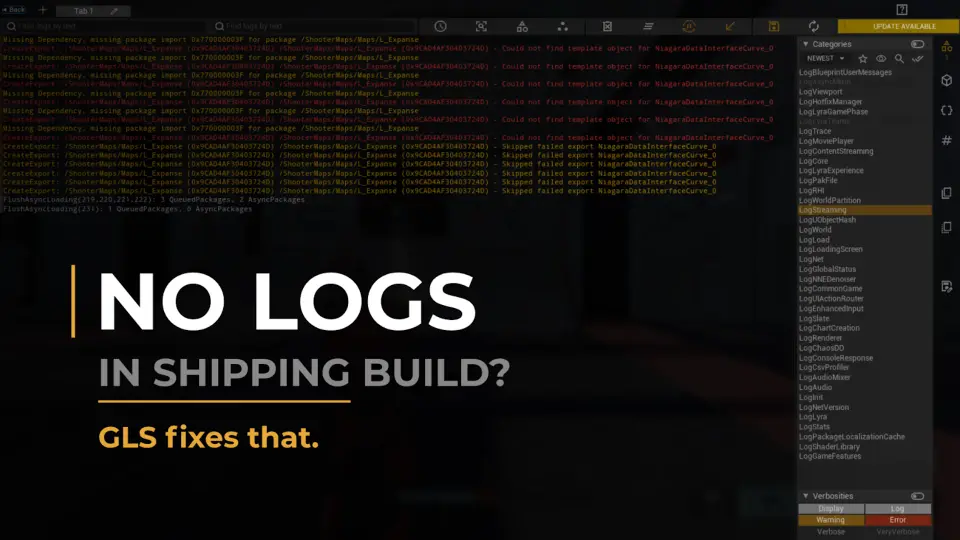
The moment a project leaves the editor and lands on a device, the debugging vocabulary changes. Output Log disappears. The console is gone. Players or QA testers report that something broke, and the developer is left connecting ADB, pulling log files by hand, or littering the codebase with print strings just to narrow down the failure. Advanced Game Logging (GLS) is built for that exact gap: bugs that only surface in packaged builds, on real hardware, where standard Unreal Engine tooling no longer reaches.
From PIE Comfort to Shipping Build Reality
GLS installs a real-time log viewer directly inside the running game. The shortcut Alt + Shift + G opens the overlay during gameplay or during Play-In-Editor (PIE) sessions, without switching windows or attaching external tools. The viewer works in Development, Test, and Shipping configurations, which matters because the hardest-to-find bugs tend to appear only once the build is packaged and the usual editor safety net is gone. The plugin turns what used to be a manual, guesswork-heavy process into something visible on the device itself, whether that device is a phone strapped to a headset or a console across the room.
On-Device Logging Without Cables or Consoles
On-device logs are the core promise. A developer or tester can view logs directly inside the game on a phone, VR headset, or console with no PC connection. Shipping build support means the viewer operates in real time without ADB, console commands, or any external tooling. This is where the plugin replaces the typical mobile and VR debugging loop, which often involves a cable, a terminal, and a log file that tells you what happened after the fact rather than while it is happening. The in-game overlay also opens during PIE, so a developer can check behavior in the editor and in a packaged build using the same interface, without context-switching between separate tools.
Filtering and Per-Object Isolation in Gameplay
Smart filtering lets a developer isolate logs by category, verbosity, class, object, function, tags, network role, or PIE instance. Per-object isolation makes it possible to focus on logs from a specific Actor or object during gameplay, which is useful when tracking runtime state, flags, or edge cases that only trigger under certain conditions. Custom Named Tabs let the developer save separate views for distinct systems such as AI, UI, networking, and gameplay. Those tabs, along with filters and layout sizes, persist between sessions through the Persistent UI system, so a debugging setup does not have to be rebuilt every time the game is reopened.
Logging Implementation: GLS_LOG and PrintStringToGLS
On the code side, the plugin provides GLS_LOG macros for structured C++ logging with tags and context, and these macros remain available in Shipping builds. For Blueprint users, PrintStringToGLS offers a Blueprint-friendly logging node with custom colors, also fully Shipping-compatible. Both paths feed into the same viewer, so C++ and Blueprint logs appear in one place and can be filtered using the same set of criteria. Session log files are generated automatically with configurable formats, and these files are available even in Shipping builds, giving teams a record of each session beyond the live overlay.
Multiplayer-Ready and Cross-Platform
Multiplayer debugging gets specific attention. Logs can be isolated per client, role, PIE instance, or controller, which helps when a bug only appears on one client or when server and client behavior needs to be compared without logs bleeding together. The plugin runs across PC, mobile, consoles, and VR/AR. The developer notes that it is actively used in the development of a large-scale Unreal Engine project with heavy runtime logging, and that the toolset is optimized and production-ready for projects of that scale. There is no setup step required to get started; the plugin works across Development, Test, and Shipping configurations out of the box. A free demo plugin and example builds for Windows, Android, and Linux are available alongside full documentation, FAQ, changelog, forum, dev blog, and video resources.
Who Picks This Up and Why
The plugin is aimed at Unreal Engine developers, mobile, VR, and console teams, QA testers, and any team debugging Shipping builds. The core problem it addresses is that traditional logging tools stop working in the exact situations where debugging becomes most difficult. Packaged builds strip away editor conveniences. Real devices add distance between the developer and the log output. Multiplayer sessions multiply the number of log streams that need to be untangled. GLS restores runtime visibility in those scenarios, on the device, while the game is running.
For a project that has ever hit the wall where something works in the editor but breaks in the build, this plugin is a direct response to that gap. It replaces manual log pulling and guesswork with an in-game viewer that stays accessible from PIE through to Shipping, across the platforms Unreal Engine 5 targets.
 Engine Tools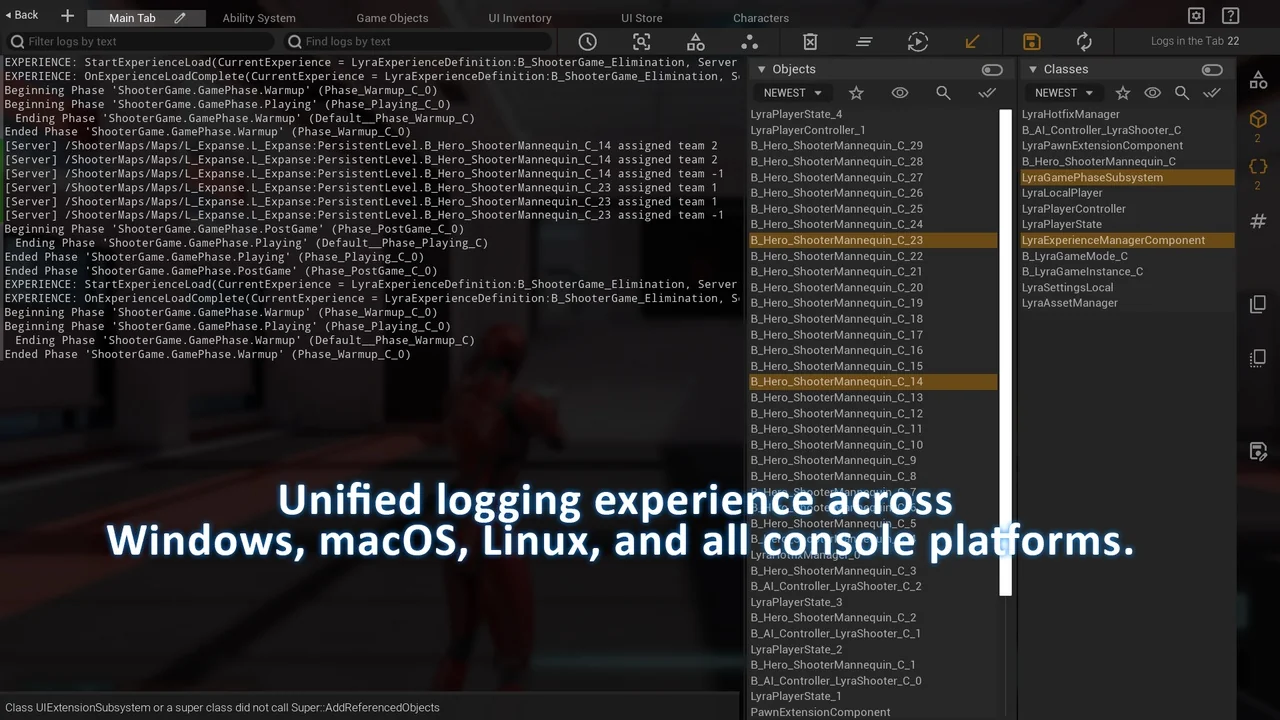
 Engine Tools
 Engine Tools
 Engine Tools