"c68a05d5e51405b3"{"id":"1001912","slug":"survival-cabin-pack","title":"Survival Cabin Pack","category":"Trees","engine":"4.22+,5.0+","assetVersion":"","engineVersion":"Engine Version: 4.22+,5.0+","tag":"Trees","accent":"blue","visual":"mech","summary":"Configure the Survival Cabin Pack with character blueprint adjustments, custom collision setups, animated dead trees, and Variation_Power grime controls.","platform":"Unreal Engine","publishedAt":"2026-10-22T11:50:02.510Z","updatedAt":"2026-10-22T11:50:02.510Z","sourceNotes":[],"fileContents":[],"compatibility":["Unreal Engine","Engine Version: 4.22+,5.0+"],"featuredImage":{"alt":"Survival Cabin Pack","src":"/wp-content/uploads/published/2026/10/498b33d06db7-9f406951-0bf6-4558-85d7-0a7a2c0d41b8-8e72744383.webp"},"hasDownloadLink":true,"downloads":0,"terms":[{"taxonomy":"category","slug":"trees","name":"Trees"}],"galleryImages":[{"src":"/wp-content/uploads/published/2026/10/6d95df2ee002-1093c2be-77b1-4cba-94ac-b11d074420fe-66d33bc4d9.webp","alt":"Survival Cabin Pack"},{"src":"/wp-content/uploads/published/2026/10/32a0b3078fdb-02c91383-c62f-4705-b8f2-571a986ac538-5b31d3f027.webp","alt":"Survival Cabin Pack"},{"src":"/wp-content/uploads/published/2026/10/9a2d5ee1140b-8e69b3e0-5e35-4580-8b03-bfe94b0edb46-eb326afe43.webp","alt":"Survival Cabin Pack"},{"src":"/wp-content/uploads/published/2026/10/8ce4ad630d1f-b8f3bb5e-6fb5-439f-b3b2-73cefbf633ce-d09a75380e.webp","alt":"Survival Cabin Pack"},{"src":"/wp-content/uploads/published/2026/10/6ddcc796653b-57cd7b00-6edb-4408-8c7b-76e51b62691f-66b58be693.webp","alt":"Survival Cabin Pack"},{"src":"/wp-content/uploads/published/2026/10/2c4ea0ba28cf-53a808b9-5e88-403f-ac17-2781cfd8ff41-d9fbc3554b.webp","alt":"Survival Cabin Pack"},{"src":"/wp-content/uploads/published/2026/10/533ed412a9ed-56680295-34f5-457c-81e8-4cb38f9a107d-fbd1a6bd71.webp","alt":"Survival Cabin Pack"},{"src":"/wp-content/uploads/published/2026/10/0157365a5594-13480715-ca7e-4a5e-a2dc-634eb420983b-3622aefc2d.webp","alt":"Survival Cabin Pack"},{"src":"/wp-content/uploads/published/2026/10/9f274f14f601-5270dbb2-ec20-4cbf-ac07-0fc52a44db33-91b0e8dbdf.webp","alt":"Survival Cabin Pack"},{"src":"/wp-content/uploads/published/2026/10/aee3f5000236-e6e7048c-6c75-47d9-b9d4-cfa5e5e082a9-a2bf127aad.webp","alt":"Survival Cabin Pack"}],"accessPanel":{"kind":"resource","title":"Download this resource","eyebrow":"Free Download","message":"Log in or create a free account to start your download.","fileName":"Content.7z","safetyNote":"Resources are manually reviewed before listing to improve quality and reduce obvious risks.","actionLabel":"Download Free","resourceType":"Resource archive"},"contentHtml":"\u003ch2\u003eCharacter Blueprint Configurations for Multi-Story Cabin Movement\u003c/h2\u003e\u003cp\u003eIntegrating multi-story outpost shelters into playable levels frequently causes snagging if character traversal values are not dialed in to handle steep interior steps.\u003c/p\u003e\u003cp\u003eInside the character blueprint, the max walking slope angle and the height step both need to be bumped up above their base settings. The wood cabin contains a dedicated second floor accessible by an interior staircase. Without increasing the walking slope angle and height step in the character movement component, the player character can fail to climb the stairs properly, snagging at the transition or halting entirely before reaching the second story. Adjusting both parameters allows the character to negotiate the steep angle and step increments up to the loft level smoothly without requiring custom invisible ramp geometry.\u003c/p\u003e\u003ch2\u003eManaging Collision Boundaries Across the Asset Library\u003c/h2\u003e\u003cp\u003eCollision meshes that default to primitive bounding shapes can quickly ruin player navigation around tight indoor layouts and exterior camp fencing.\u003c/p\u003e\u003cp\u003eSetting the asset collision to use simple as complex is required across these pieces. If left at standard primitive collision generation, the assets generate huge collision boxes that extend well beyond the visible surfaces of the geometry. These oversized boundaries can block off the cabin doorway, turn the staircase into an invisible barrier, and prevent the player from approaching props like the wood stove, bed, or log fence. Applying simple-as-complex collision ensures that the collision bounds adhere directly to the physical meshes, allowing characters to walk through doorways, traverse the cabin stairs, and step close to interior props without hitting phantom barriers.\u003c/p\u003e\u003ch2\u003eControlling Grime and Surface Tiling with Variation_Power\u003c/h2\u003e\u003cp\u003eEnvironmental props can look overly repetitive when regular texture patterns tile noticeably across large, flat architectural surfaces.\u003c/p\u003e\u003cp\u003eMaterial parameters across the set allow for wide customization to suit specific project aesthetics, led by an adjustable parameter named Variation_Power. This parameter is integrated into the materials for the wood cabin, sofa, dresser, and bed. Its function is twofold: it directly governs the grime amount visible on the asset surface, and it breaks up repetitive tiling patterns. By tweaking the Variation_Power parameter, you can dial in an abandoned, heavily soiled appearance or reduce the grime for a cleaner look. Concurrently, the parameter disrupts regular repeating texture bands on the cabin wood planks and the furniture fabrics, creating organic visual variation across the surfaces.\u003c/p\u003e\u003ch2\u003eAsset Composition Across the 22 Survival Props and Animated Foliage\u003c/h2\u003e\u003cp\u003eThe collection supplies a focused count of 22 total assets intended to construct an outdoor survival staging ground and furnished indoor cabin space.\u003c/p\u003e\u003cp\u003eThe inventory includes 7 animated dead trees, a log fence, a camo camping tent, a sofa, a windmill, a dresser, a chair, a bed, a rope, a campfire, a hand held radio, a hatchet, a backpack, a wood stove, a wood cabin, and a lantern. The seven animated dead trees introduce wind motion into the surrounding environment, keeping the outdoor wilderness active rather than static. When examining the assets, preview displays might show two windmills and two hatchets side by side, but the pack contains only one base model for the windmill and one model for the hatchet. The apparent duplicates represent alternative material variations applied to the same underlying mesh, demonstrating different surface treatments available right out of the material setup.\u003c/p\u003e\u003ch2\u003eDeployment in Auto-Landscape Wilderness Environments\u003c/h2\u003e\u003cp\u003eDeploying standalone structures into open terrain works best when the props adapt cleanly to procedural environmental layouts.\u003c/p\u003e\u003cp\u003eCompatibility with Auto-Landscape asset pack workflows allows the 22 props to slot directly into automated terrain layers. The 7 animated dead trees and log fence components can frame cleared terrain sections around the camp, while the camo camping tent, campfire, lantern, rope, backpack, hand held radio, and hatchet establish immediate survival storytelling outside the main structure. Inside the wood cabin, placing the wood stove, bed, sofa, chair, and dresser completes a functional, lived-in shelter. Because every material features built-in parameters to fine-tune aesthetics and surface wear, developers can integrate the entire survival camp into varying landscape biomes while maintaining coherent grime levels and responsive character navigation throughout the site.\u003c/p\u003e\n\n\u003ch2\u003eRelated Resources Worth Checking\u003c/h2\u003e\n\u003cul\u003e\n\u003cli\u003e\u003ca href=\"https://3dcghub.com/survival-forest-cabin-bundle-survival-environment-forest-house-log-house/\" title=\"Survival Forest Cabin Bundle (Survival Environment, Forest House, Log House )\"\u003eSurvival Forest Cabin Bundle (Survival Environment, Forest House, Log House )\u003c/a\u003e\u003c/li\u003e\n\u003cli\u003e\u003ca href=\"https://3dcghub.com/modular-rural-cabins/\" title=\"Modular Rural Cabins\"\u003eModular Rural Cabins\u003c/a\u003e\u003c/li\u003e\n\u003cli\u003e\u003ca href=\"https://3dcghub.com/log-cabin/\" title=\"Log Cabin\"\u003eLog Cabin\u003c/a\u003e\u003c/li\u003e\n\u003cli\u003e\u003ca href=\"https://3dcghub.com/broken-and-burned-trees-pack/\" title=\"Broken and Burned Trees Pack\"\u003eBroken and Burned Trees Pack\u003c/a\u003e\u003c/li\u003e\n\u003cli\u003e\u003ca href=\"https://3dcghub.com/stylized-log-cabin/\" title=\"Stylized Log Cabin\"\u003eStylized Log Cabin\u003c/a\u003e\u003c/li\u003e\n\u003c/ul\u003e","contentTextLength":4769,"navigation":{"current":13,"total":3860,"previous":{"id":"1001913","slug":"sword-and-shield-first-person-animation-set","title":"Sword and Shield First Person Animation Set","category":"Combat","platform":"Unreal Engine","updatedAt":"2026-10-22T11:50:36.771Z"},"next":{"id":"1001911","slug":"stylized-modular-character","title":"Stylized Modular Character","category":"Characters \u0026 Creatures","platform":"Unreal Engine","updatedAt":"2026-10-22T11:49:16.504Z"}},"relatedResources":[{"id":"10114","slug":"survival-forest-cabin-bundle-survival-environment-forest-house-log-house","title":"Survival Forest Cabin Bundle (Survival Environment, Forest House, Log House )","category":"Towns \u0026 Villages","engine":"4.26+,5.0+","assetVersion":"Engine version: 4.26+,5.0+","engineVersion":"4.26","tag":"Towns \u0026 Villages","accent":"blue","visual":"city","summary":"Create high-fidelity forest environments with the Survival Forest Cabin Bundle, featuring photoscanned structures, seasonal maps, and over 180 unique assets for survival and post-apocalyptic games.","platform":"Unreal Engine","publishedAt":"2026-03-02T17:20:14.000Z","updatedAt":"2026-04-19T15:50:06.000Z","sourceNotes":[],"fileContents":[],"compatibility":["Unreal Engine","Engine version: 4.26+,5.0+"],"featuredImage":{"alt":"Survival Forest Cabin Bundle (Survival Environment, Forest House, Log House )","src":"https://3dcghub.com/wp-content/uploads/2026/03/8d2efc8b-427a-46d6-b70f-2d1bca6b1c30.webp"},"hasDownloadLink":true,"downloads":0},{"id":"1001537","slug":"modular-rural-cabins","title":"Modular Rural Cabins","category":"Rural","engine":"4.22+,5.0+","assetVersion":"","engineVersion":"Engine Version: 4.22+,5.0+","tag":"Rural","accent":"blue","visual":"mech","summary":"Build realistic forest, lake, and horror scenes with Modular Rural Cabins, featuring enterable interiors, updated trees, and full Nanite and Lumen support.","platform":"Unreal Engine","publishedAt":"2026-10-09T17:30:15.417Z","updatedAt":"2026-10-09T17:30:15.417Z","sourceNotes":[],"fileContents":[],"compatibility":["Unreal Engine","Engine Version: 4.22+,5.0+"],"featuredImage":{"alt":"Modular Rural Cabins","src":"/wp-content/uploads/published/2026/10/10301930da21-88f37006-85c0-4d9a-bcea-47cf7f34dd18-53b78f135a.webp"},"hasDownloadLink":true,"downloads":1},{"id":"1001890","slug":"log-cabin","title":"Log Cabin","category":"Forest \u0026 Jungle","engine":"4.26+,5.0+","assetVersion":"","engineVersion":"Engine Version: 4.26+,5.0+","tag":"Forest \u0026 Jungle","accent":"blue","visual":"mech","summary":"Explore the Log Cabin environment piece by Gabro Media, featuring a cozy, fully furnished winter cabin built from the ground up with a dedicated level layout.","platform":"Unreal Engine","publishedAt":"2026-10-22T11:30:29.268Z","updatedAt":"2026-10-22T11:30:29.268Z","sourceNotes":[],"fileContents":[],"compatibility":["Unreal Engine","Engine Version: 4.26+,5.0+"],"featuredImage":{"alt":"Log Cabin","src":"/wp-content/uploads/published/2026/10/8d2ff2104315-291e4c09-e266-475f-94a5-7cd217bb2a21-9247205a4c.webp"},"hasDownloadLink":true,"downloads":0}]}
Trees
Survival Cabin Pack
Configure the Survival Cabin Pack with character blueprint adjustments, custom collision setups, animated dead trees, and Variation_Power grime controls.
Category:Unreal Engine,TreesPlatform: Unreal EngineEngine Version: 4.22+,5.0+Published: Oct 22, 2026
Trees
Resource overview
Character Blueprint Configurations for Multi-Story Cabin Movement
Integrating multi-story outpost shelters into playable levels frequently causes snagging if character traversal values are not dialed in to handle steep interior steps.
Inside the character blueprint, the max walking slope angle and the height step both need to be bumped up above their base settings. The wood cabin contains a dedicated second floor accessible by an interior staircase. Without increasing the walking slope angle and height step in the character movement component, the player character can fail to climb the stairs properly, snagging at the transition or halting entirely before reaching the second story. Adjusting both parameters allows the character to negotiate the steep angle and step increments up to the loft level smoothly without requiring custom invisible ramp geometry.
Managing Collision Boundaries Across the Asset Library
Collision meshes that default to primitive bounding shapes can quickly ruin player navigation around tight indoor layouts and exterior camp fencing.
Setting the asset collision to use simple as complex is required across these pieces. If left at standard primitive collision generation, the assets generate huge collision boxes that extend well beyond the visible surfaces of the geometry. These oversized boundaries can block off the cabin doorway, turn the staircase into an invisible barrier, and prevent the player from approaching props like the wood stove, bed, or log fence. Applying simple-as-complex collision ensures that the collision bounds adhere directly to the physical meshes, allowing characters to walk through doorways, traverse the cabin stairs, and step close to interior props without hitting phantom barriers.
Controlling Grime and Surface Tiling with Variation_Power
Environmental props can look overly repetitive when regular texture patterns tile noticeably across large, flat architectural surfaces.
Material parameters across the set allow for wide customization to suit specific project aesthetics, led by an adjustable parameter named Variation_Power. This parameter is integrated into the materials for the wood cabin, sofa, dresser, and bed. Its function is twofold: it directly governs the grime amount visible on the asset surface, and it breaks up repetitive tiling patterns. By tweaking the Variation_Power parameter, you can dial in an abandoned, heavily soiled appearance or reduce the grime for a cleaner look. Concurrently, the parameter disrupts regular repeating texture bands on the cabin wood planks and the furniture fabrics, creating organic visual variation across the surfaces.
Asset Composition Across the 22 Survival Props and Animated Foliage
The collection supplies a focused count of 22 total assets intended to construct an outdoor survival staging ground and furnished indoor cabin space.
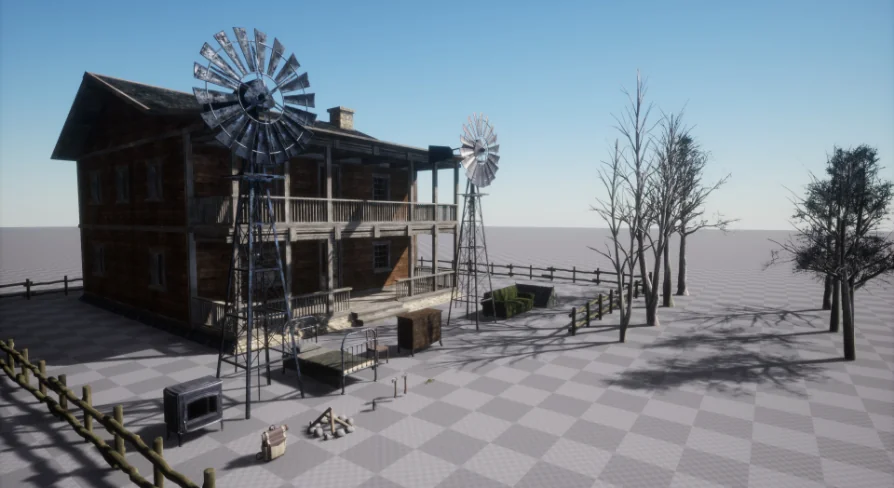
The inventory includes 7 animated dead trees, a log fence, a camo camping tent, a sofa, a windmill, a dresser, a chair, a bed, a rope, a campfire, a hand held radio, a hatchet, a backpack, a wood stove, a wood cabin, and a lantern. The seven animated dead trees introduce wind motion into the surrounding environment, keeping the outdoor wilderness active rather than static. When examining the assets, preview displays might show two windmills and two hatchets side by side, but the pack contains only one base model for the windmill and one model for the hatchet. The apparent duplicates represent alternative material variations applied to the same underlying mesh, demonstrating different surface treatments available right out of the material setup.
Deployment in Auto-Landscape Wilderness Environments
Deploying standalone structures into open terrain works best when the props adapt cleanly to procedural environmental layouts.
Compatibility with Auto-Landscape asset pack workflows allows the 22 props to slot directly into automated terrain layers. The 7 animated dead trees and log fence components can frame cleared terrain sections around the camp, while the camo camping tent, campfire, lantern, rope, backpack, hand held radio, and hatchet establish immediate survival storytelling outside the main structure. Inside the wood cabin, placing the wood stove, bed, sofa, chair, and dresser completes a functional, lived-in shelter. Because every material features built-in parameters to fine-tune aesthetics and surface wear, developers can integrate the entire survival camp into varying landscape biomes while maintaining coherent grime levels and responsive character navigation throughout the site.
 Trees
Trees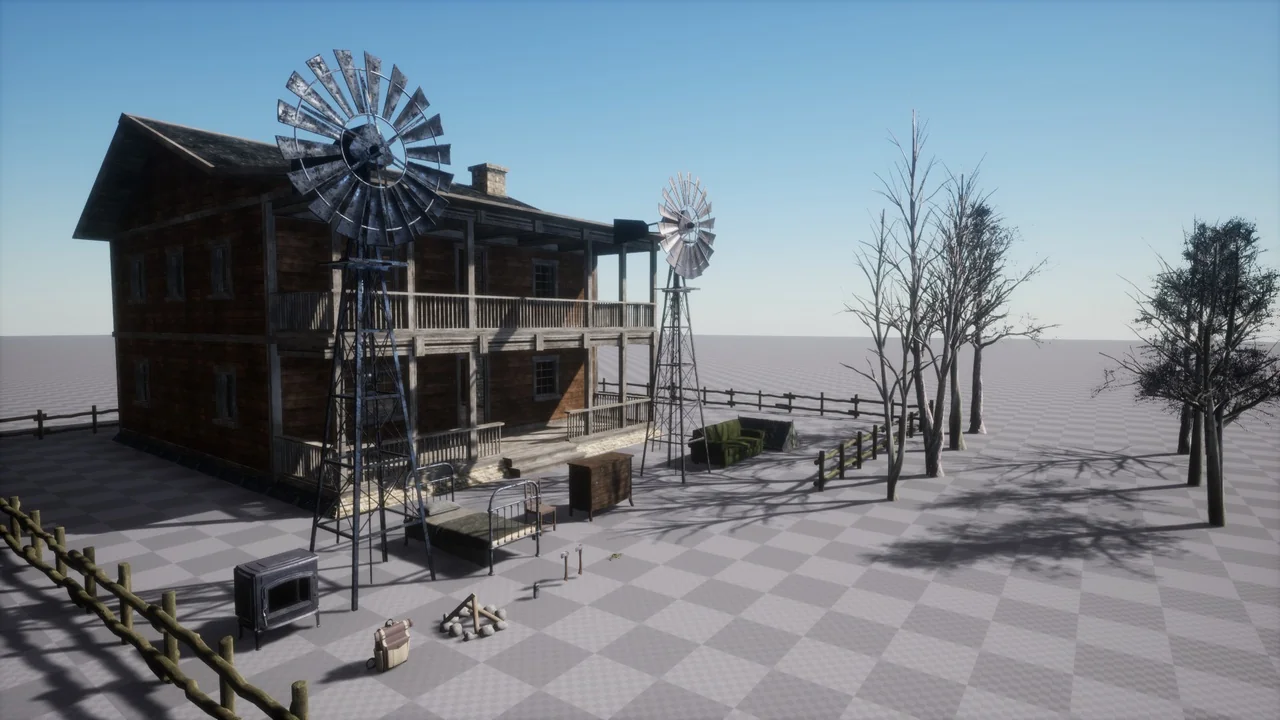
 Towns & Villages
 Rural
Rural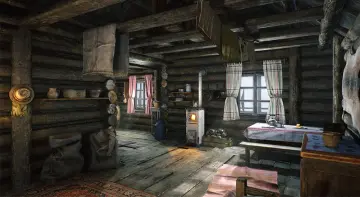 Forest & Jungle