"1c2c8b66743036b4"{"id":"1001694","slug":"rising-and-drifting-steam-vdb-loop-pack","title":"Rising and Drifting Steam VDB Loop Pack","category":"Smoke","engine":"5.4+","assetVersion":"","engineVersion":"Engine Version: 5.4+","tag":"Smoke","accent":"blue","visual":"mech","summary":"Enhance game levels and cinematic shots with 13 seamless looping steam VDBs, featuring dual LODs, SVT caches, and heterogeneous volume support.","platform":"Unreal Engine","publishedAt":"2026-10-14T09:13:52.353Z","updatedAt":"2026-10-14T09:13:52.353Z","sourceNotes":[],"fileContents":[],"compatibility":["Unreal Engine","Engine Version: 5.4+"],"featuredImage":{"alt":"Rising and Drifting Steam VDB Loop Pack","src":"/wp-content/uploads/published/2026/10/ae5c9790dcb8-ae2e7f45-9c74-4131-a01f-0435f9abf514-cb58cfa5e7.webp"},"hasDownloadLink":true,"downloads":0,"terms":[{"taxonomy":"category","slug":"smoke","name":"Smoke"}],"galleryImages":[{"src":"/wp-content/uploads/published/2026/10/f4f8f82398ce-40f7fd38-c65f-4e55-b9ac-ec31819b5863-134c237e07.webp","alt":"Rising and Drifting Steam VDB Loop Pack"},{"src":"/wp-content/uploads/published/2026/10/5dc3cf8f4259-ea1ca4fa-fcfc-4e95-9471-98ff2897ba26-c3ec7b85cc.webp","alt":"Rising and Drifting Steam VDB Loop Pack"},{"src":"/wp-content/uploads/published/2026/10/a910fce3a87d-6704d16d-82b8-411a-a0a1-4180fd71cfd6-bd4bd66b13.webp","alt":"Rising and Drifting Steam VDB Loop Pack"},{"src":"/wp-content/uploads/published/2026/10/c9c1d38baf76-58d4f569-402e-4df8-80af-49f25a4132d2-3af86e8e59.webp","alt":"Rising and Drifting Steam VDB Loop Pack"},{"src":"/wp-content/uploads/published/2026/10/e1796abce4bc-dd14aa1b-7887-41c5-8f6f-b58ae8eda779-c24d649c16.webp","alt":"Rising and Drifting Steam VDB Loop Pack"},{"src":"/wp-content/uploads/published/2026/10/69a1fed025e3-fce95394-ccc4-4fd7-bdbe-203ba8df3915-a5dbaf4538.webp","alt":"Rising and Drifting Steam VDB Loop Pack"},{"src":"/wp-content/uploads/published/2026/10/96cb5465f428-59beca03-76b9-415d-aeff-3e9572392f4f-51dc9e5109.webp","alt":"Rising and Drifting Steam VDB Loop Pack"},{"src":"/wp-content/uploads/published/2026/10/dcdb19048744-1f9ea95b-45b9-4d23-b356-3a777a6ec575-fc16b8cf3e.webp","alt":"Rising and Drifting Steam VDB Loop Pack"},{"src":"/wp-content/uploads/published/2026/10/175af21db585-b8697a5b-1ed5-4bca-89c1-d970a1f7f0f7-14c0686cca.webp","alt":"Rising and Drifting Steam VDB Loop Pack"}],"accessPanel":{"kind":"resource","title":"Download this resource","eyebrow":"Free Download","message":"Log in or create a free account to start your download.","fileName":"Content.7z","safetyNote":"Resources are manually reviewed before listing to improve quality and reduce obvious risks.","actionLabel":"Download Free","resourceType":"Resource archive"},"contentHtml":"\u003ch2\u003eAtmospheric Staging with Rising and Drifting Steam\u003c/h2\u003e\u003cp\u003eDense plumes and subtle vapor trails instantly alter how environment spaces convey temperature, scale, and time. Urban cityscapes often rely on venting pipes to ground industrial architecture, while volcanic fissures or sci-fi corridors need distinct thermal energy to feel active. The Rising and Drifting Steam VDB Loop Pack directly targets these environmental needs with 13 movie-quality heterogeneous volume elements. Created in Houdini by a Senior Hollywood VFX artist, each element brings realistic fluid dynamics to both real-time scenes and high-fidelity rendering sequences.\u003c/p\u003e\u003cp\u003eBecause the simulations loop seamlessly over 200 or 250 frames, they avoid the jarring pop or fade-out cycles typical of basic particle setups. Level artists can drop these volumes above street grates, next to heavy fan exhausts, or along geothermal crevices without having to mask looping artifacts. The elements require minimal setup, functioning out of the box through dedicated actor setups while leaving room for precise look development.\u003c/p\u003e\u003ch2\u003eMotion Profiles: Rising Steam, Drifting Steam, and Small Rising Loops\u003c/h2\u003e\u003cp\u003eVapor behaviors diverge wildly depending on velocity and environmental turbulence. To address these variations, the package divides its 13 volume assets into three distinct motion classes: Drifting Steam, Rising Steam, and Small Rising Steam. Dedicated demo levels are provided for each class to illustrate appropriate placement and lighting behavior.\u003c/p\u003e\u003cp\u003eDrifting Steam simulates low-pressure dispersion, where vapor catches ambient air currents and stretches horizontally. This makes it ideal for misty city streets, wide industrial vent floors, or background ambient haze. Rising Steam models concentrated vertical lift, replicating pressurized bursts escaping from ruptured pipes, volcanic vents, or massive cooling towers. Small Rising Steam captures localized, tighter plumes suitable for subtle prop dressing, such as kitchen vents, rooftop exhaust valves, or vehicle exhausts. Having these separate motion types ensures that visual scale remains consistent across an entire environment rather than stretching a single generic simulation to fit mismatched spaces.\u003c/p\u003e\u003ch2\u003eSparse Volume Textures and 8-Bit Unorm Caching\u003c/h2\u003e\u003cp\u003eVolumetric data can quickly consume immense GPU memory if left uncompressed. To address pipeline overhead, the pack includes 2 levels of detail (LOD) for each of the 13 FX elements, producing a total of 26 separate VDB caches. In Unreal Engine, these are stored and streamed as Sparse Volume Textures (SVT).\u003c/p\u003e\u003cp\u003eEach cache is optimized using an 8-bit unorm data format. This compression drastically reduces memory footprints while preserving the core gradient values needed for natural edge falloff and volumetric shadow evaluation. By pairing 8-bit unorm compression with dual LODs, creators can populate wide exterior districts or multi-room interiors with repeating heterogeneous volume actors without crippling rendering performance.\u003c/p\u003e\u003ch2\u003eMaterial Instance Adjustments for Density and Emission\u003c/h2\u003e\u003cp\u003eEvery element in the collection connects back to an organized Master Material through assigned Material Instances. These instances expose essential controls to adjust how the simulated vapor responds to scene lighting:\u003c/p\u003e\u003cul\u003e\u003cli\u003e\u003cstrong\u003e2 LOD Selection:\u003c/strong\u003e Switch between detail tiers to match camera proximity and performance targets.\u003c/li\u003e\u003cli\u003e\u003cstrong\u003eDensity Multiplier:\u003c/strong\u003e Thicken plumes into heavy industrial exhaust or thin them into faint, wispy drafts.\u003c/li\u003e\u003cli\u003e\u003cstrong\u003eVolume Color:\u003c/strong\u003e Tint the albedo to reflect dirty urban smog, clean pressurized steam, or toxic chemical vapors.\u003c/li\u003e\u003cli\u003e\u003cstrong\u003eEmission Multiplier:\u003c/strong\u003e Amplify self-illumination when staging fantasy magic, molten geothermal bursts, or illuminated sci-fi vents.\u003c/li\u003e\u003cli\u003e\u003cstrong\u003eEmission Color:\u003c/strong\u003e Drive internal fire, heat glow, or radioactive radiance directly through the volume.\u003c/li\u003e\u003c/ul\u003e\u003cp\u003eBy tweaking these exposed properties, environment artists can adapt the same underlying simulation to diverse aesthetics, shifting a cold urban steam grate into an incandescent volcanic fissure or an alien extraction pipe with minimal iteration time.\u003c/p\u003e\u003ch2\u003eCinematic Heterogeneous Volume Configuration and OrthoGrid Settings\u003c/h2\u003e\u003cp\u003eWhile the assets operate effectively in real-time viewports, cinematic offline renders benefit from higher precision settings. For cinematic rendering passes, users should configure their Heterogeneous Actors by enabling the Issue Blocking Requests option. Under the actor's Lighting settings, setting the Lighting Downsample Factor to 1 ensures full-resolution lighting passes across every voxel without downscaled approximation.\u003c/p\u003e\u003cp\u003eConsole variable adjustments further maximize volume resolution during sequencer playback. Running \u003ccode\u003eR.HeterogeneousVolumes.OrthoGrid 1\u003c/code\u003e Activates the specialized orthographic grid evaluation pipeline. To ensure memory allocations match deep cinematic frames, the buffer can be expanded using \u003ccode\u003eR.HeterogeneousVolumes.OrthoGrid.MaxBottomLevelMemoryInMegabytes 512\u003c/code\u003e, quadrupling the standard 128 MB default. Setting \u003ccode\u003eR.HeterogeneousVolumes.OrthoGrid.ShadingRate 1\u003c/code\u003e Lowers the sample step from its default value of 4, producing sharp, artifact-free volume self-shadowing under dynamic directional and spot lights.\u003c/p\u003e\u003ch2\u003eEnabling Volumetric Path Tracing in DirectX 12\u003c/h2\u003e\u003cp\u003eFor cinematic workflows targeting ground-truth lighting, the volume collection fully integrates with path-traced rendering pipelines. Activating this requires specific engine configurations within the project settings:\u003c/p\u003e\u003cul\u003e\u003cli\u003eSet the Default RHI to DirectX 12.\u003c/li\u003e\u003cli\u003eEnable Support Hardware Ray Tracing.\u003c/li\u003e\u003cli\u003eEnable Path Tracing.\u003c/li\u003e\u003c/ul\u003e\u003cp\u003eOnce the project runs under hardware ray tracing, issuing the console command \u003ccode\u003eR.PathTracing.HeterogeneousVolumes 1\u003c/code\u003e Instructs the path tracer to evaluate the SVT steam caches directly within the global illumination bounces. Light scattering through the steam scatters realistically onto surrounding geometry, while internal emission channels contribute real bounce lighting to dark scenes.\u003c/p\u003e\u003ch2\u003eProduction Suitability and Workflow Impact\u003c/h2\u003e\u003cp\u003eThis volume suite primarily serves environment artists, level designers, and cinematics directors building sci-fi installations, historical streetscapes, cyberpunk back alleys, and volcanic environments. Because the simulations are solved in Houdini at Hollywood VFX quality and packaged cleanly as SVTs with dual LODs, production teams bypass the time-consuming process of simulating, exporting, and looping custom volumetric caches. The combination of lightweight 8-bit unorm data for real-time applications and dedicated console variable setups for path-traced offline sequences ensures high visual consistency from viewport layout through final master renders.\u003c/p\u003e\n\n\u003ch2\u003eRelated Resources Worth Checking\u003c/h2\u003e\n\u003cul\u003e\n\u003cli\u003e\u003ca href=\"https://3dcghub.com/smoke-burst-fx-vdb/\" title=\"Smoke Burst FX VDB\"\u003eSmoke Burst FX VDB\u003c/a\u003e\u003c/li\u003e\n\u003cli\u003e\u003ca href=\"https://3dcghub.com/cinematic-fire-3d-vdb-pack-loop/\" title=\"Cinematic Fire 3D VDB Pack loop\"\u003eCinematic Fire 3D VDB Pack loop\u003c/a\u003e\u003c/li\u003e\n\u003cli\u003e\u003ca href=\"https://3dcghub.com/loop-smoke-niagara-02/\" title=\"Loop Smoke Niagara 02\"\u003eLoop Smoke Niagara 02\u003c/a\u003e\u003c/li\u003e\n\u003cli\u003e\u003ca href=\"https://3dcghub.com/stylized-dust-impact/\" title=\"Stylized Dust Impact\"\u003eStylized Dust Impact\u003c/a\u003e\u003c/li\u003e\n\u003cli\u003e\u003ca href=\"https://3dcghub.com/smoke-and-fire-spline-niagara-fluids/\" title=\"Smoke and Fire Spline - Niagara Fluids\"\u003eSmoke and Fire Spline - Niagara Fluids\u003c/a\u003e\u003c/li\u003e\n\u003c/ul\u003e","contentTextLength":6788,"navigation":{"current":21,"total":3651,"previous":{"id":"1001695","slug":"sand-waterfall-3d-vdb-pack","title":"Sand Waterfall 3D VDB Pack","category":"Smoke","platform":"Unreal Engine","updatedAt":"2026-10-14T09:14:31.813Z"},"next":{"id":"1001693","slug":"post-apocalyptic-coffee-shop-post-apocalyptic-coffee-shop-post-shop-coffee","title":"Post Apocalyptic Coffee Shop ( Post Apocalyptic Coffee Shop Post Shop Coffee )","category":"Apocalyptic / Post-apocalyptic","platform":"Unreal Engine","updatedAt":"2026-10-14T09:13:19.729Z"}},"relatedResources":[{"id":"1001695","slug":"sand-waterfall-3d-vdb-pack","title":"Sand Waterfall 3D VDB Pack","category":"Smoke","engine":"5.3+","assetVersion":"","engineVersion":"Engine Version: 5.3+","tag":"Smoke","accent":"blue","visual":"mech","summary":"Add realistic granular cascades to Unreal Engine with the Sand Waterfall 3D VDB Pack, featuring 10 effects, parameter controls, and path tracing support.","platform":"Unreal Engine","publishedAt":"2026-10-14T09:14:31.813Z","updatedAt":"2026-10-14T09:14:31.813Z","sourceNotes":[],"fileContents":[],"compatibility":["Unreal Engine","Engine Version: 5.3+"],"featuredImage":{"alt":"Sand Waterfall 3D VDB Pack","src":"https://media.fab.com/image_previews/gallery_images/3e760aa5-0a19-40d3-beee-b9ede1630a89/f3a5d634-6446-4a13-b15b-f911604933bf.jpg"},"hasDownloadLink":true,"downloads":0},{"id":"16111","slug":"smoke-burst-fx-vdb","title":"Smoke Burst FX VDB","category":"Smoke","engine":"5.4+","assetVersion":"Engine version: 5.4+","engineVersion":"5.3","tag":"Smoke","accent":"blue","visual":"character","summary":"Enhance your digital environments with Smoke Burst FX VDB, a collection of 10 realistic smoke effects. These assets are perfect for simulating pipe bursts in urban or industrial settings.","platform":"Unreal Engine","publishedAt":"2026-03-12T16:13:47.000Z","updatedAt":"2026-04-19T15:44:37.000Z","sourceNotes":[],"fileContents":[],"compatibility":["Unreal Engine","Engine version: 5.4+"],"featuredImage":{"alt":"Smoke Burst FX VDB","src":"https://3dcghub.com/wp-content/uploads/2026/03/2e3387bc-ffe8-48e7-8ba4-744c89badf1b.webp"},"hasDownloadLink":true,"downloads":1},{"id":"1000042","slug":"cinematic-fire-3d-vdb-pack-loop","title":"Cinematic Fire 3D VDB Pack loop","category":"Fire \u0026 Explosions","engine":"5.3+","assetVersion":"","engineVersion":"5.3+","tag":"Fire \u0026 Explosions","accent":"blue","visual":"mech","summary":"A closer look at a 10-loop cinematic fire VDB pack for Unreal Engine, including scene controls, path tracing setup, and where it fits in production.","platform":"Unreal Engine","publishedAt":"2026-05-22T08:25:52.982Z","updatedAt":"2026-05-22T08:25:52.982Z","sourceNotes":[],"fileContents":[],"compatibility":["Unreal Engine","Engine version: 5.3+"],"featuredImage":{"alt":"Cinematic Fire 3D VDB Pack loop","src":"/wp-content/uploads/published/2026/05/bc34be2adc82-0935183b-0505-48f7-9d7c-0f6a3ce4337f-c430de0bb6.webp"},"hasDownloadLink":true,"downloads":2}]}
Smoke
Rising and Drifting Steam VDB Loop Pack
Enhance game levels and cinematic shots with 13 seamless looping steam VDBs, featuring dual LODs, SVT caches, and heterogeneous volume support.
Category:Unreal Engine,SmokePlatform: Unreal EngineEngine Version: 5.4+Published: Oct 14, 2026
Smoke
Resource overview
Atmospheric Staging with Rising and Drifting Steam
Dense plumes and subtle vapor trails instantly alter how environment spaces convey temperature, scale, and time. Urban cityscapes often rely on venting pipes to ground industrial architecture, while volcanic fissures or sci-fi corridors need distinct thermal energy to feel active. The Rising and Drifting Steam VDB Loop Pack directly targets these environmental needs with 13 movie-quality heterogeneous volume elements. Created in Houdini by a Senior Hollywood VFX artist, each element brings realistic fluid dynamics to both real-time scenes and high-fidelity rendering sequences.
Because the simulations loop seamlessly over 200 or 250 frames, they avoid the jarring pop or fade-out cycles typical of basic particle setups. Level artists can drop these volumes above street grates, next to heavy fan exhausts, or along geothermal crevices without having to mask looping artifacts. The elements require minimal setup, functioning out of the box through dedicated actor setups while leaving room for precise look development.
Motion Profiles: Rising Steam, Drifting Steam, and Small Rising Loops
Vapor behaviors diverge wildly depending on velocity and environmental turbulence. To address these variations, the package divides its 13 volume assets into three distinct motion classes: Drifting Steam, Rising Steam, and Small Rising Steam. Dedicated demo levels are provided for each class to illustrate appropriate placement and lighting behavior.
Drifting Steam simulates low-pressure dispersion, where vapor catches ambient air currents and stretches horizontally. This makes it ideal for misty city streets, wide industrial vent floors, or background ambient haze. Rising Steam models concentrated vertical lift, replicating pressurized bursts escaping from ruptured pipes, volcanic vents, or massive cooling towers. Small Rising Steam captures localized, tighter plumes suitable for subtle prop dressing, such as kitchen vents, rooftop exhaust valves, or vehicle exhausts. Having these separate motion types ensures that visual scale remains consistent across an entire environment rather than stretching a single generic simulation to fit mismatched spaces.
Sparse Volume Textures and 8-Bit Unorm Caching
Volumetric data can quickly consume immense GPU memory if left uncompressed. To address pipeline overhead, the pack includes 2 levels of detail (LOD) for each of the 13 FX elements, producing a total of 26 separate VDB caches. In Unreal Engine, these are stored and streamed as Sparse Volume Textures (SVT).
Each cache is optimized using an 8-bit unorm data format. This compression drastically reduces memory footprints while preserving the core gradient values needed for natural edge falloff and volumetric shadow evaluation. By pairing 8-bit unorm compression with dual LODs, creators can populate wide exterior districts or multi-room interiors with repeating heterogeneous volume actors without crippling rendering performance.
Material Instance Adjustments for Density and Emission
Every element in the collection connects back to an organized Master Material through assigned Material Instances. These instances expose essential controls to adjust how the simulated vapor responds to scene lighting:
2 LOD Selection: Switch between detail tiers to match camera proximity and performance targets.
Density Multiplier: Thicken plumes into heavy industrial exhaust or thin them into faint, wispy drafts.
Volume Color: Tint the albedo to reflect dirty urban smog, clean pressurized steam, or toxic chemical vapors.
Emission Multiplier: Amplify self-illumination when staging fantasy magic, molten geothermal bursts, or illuminated sci-fi vents.
Emission Color: Drive internal fire, heat glow, or radioactive radiance directly through the volume.
By tweaking these exposed properties, environment artists can adapt the same underlying simulation to diverse aesthetics, shifting a cold urban steam grate into an incandescent volcanic fissure or an alien extraction pipe with minimal iteration time.
Cinematic Heterogeneous Volume Configuration and OrthoGrid Settings
While the assets operate effectively in real-time viewports, cinematic offline renders benefit from higher precision settings. For cinematic rendering passes, users should configure their Heterogeneous Actors by enabling the Issue Blocking Requests option. Under the actor's Lighting settings, setting the Lighting Downsample Factor to 1 ensures full-resolution lighting passes across every voxel without downscaled approximation.
Console variable adjustments further maximize volume resolution during sequencer playback. Running R.HeterogeneousVolumes.OrthoGrid 1 Activates the specialized orthographic grid evaluation pipeline. To ensure memory allocations match deep cinematic frames, the buffer can be expanded using R.HeterogeneousVolumes.OrthoGrid.MaxBottomLevelMemoryInMegabytes 512, quadrupling the standard 128 MB default. Setting R.HeterogeneousVolumes.OrthoGrid.ShadingRate 1 Lowers the sample step from its default value of 4, producing sharp, artifact-free volume self-shadowing under dynamic directional and spot lights.
Enabling Volumetric Path Tracing in DirectX 12
For cinematic workflows targeting ground-truth lighting, the volume collection fully integrates with path-traced rendering pipelines. Activating this requires specific engine configurations within the project settings:
Set the Default RHI to DirectX 12.
Enable Support Hardware Ray Tracing.
Enable Path Tracing.
Once the project runs under hardware ray tracing, issuing the console command R.PathTracing.HeterogeneousVolumes 1 Instructs the path tracer to evaluate the SVT steam caches directly within the global illumination bounces. Light scattering through the steam scatters realistically onto surrounding geometry, while internal emission channels contribute real bounce lighting to dark scenes.
Production Suitability and Workflow Impact
This volume suite primarily serves environment artists, level designers, and cinematics directors building sci-fi installations, historical streetscapes, cyberpunk back alleys, and volcanic environments. Because the simulations are solved in Houdini at Hollywood VFX quality and packaged cleanly as SVTs with dual LODs, production teams bypass the time-consuming process of simulating, exporting, and looping custom volumetric caches. The combination of lightweight 8-bit unorm data for real-time applications and dedicated console variable setups for path-traced offline sequences ensures high visual consistency from viewport layout through final master renders.
 Smoke
Smoke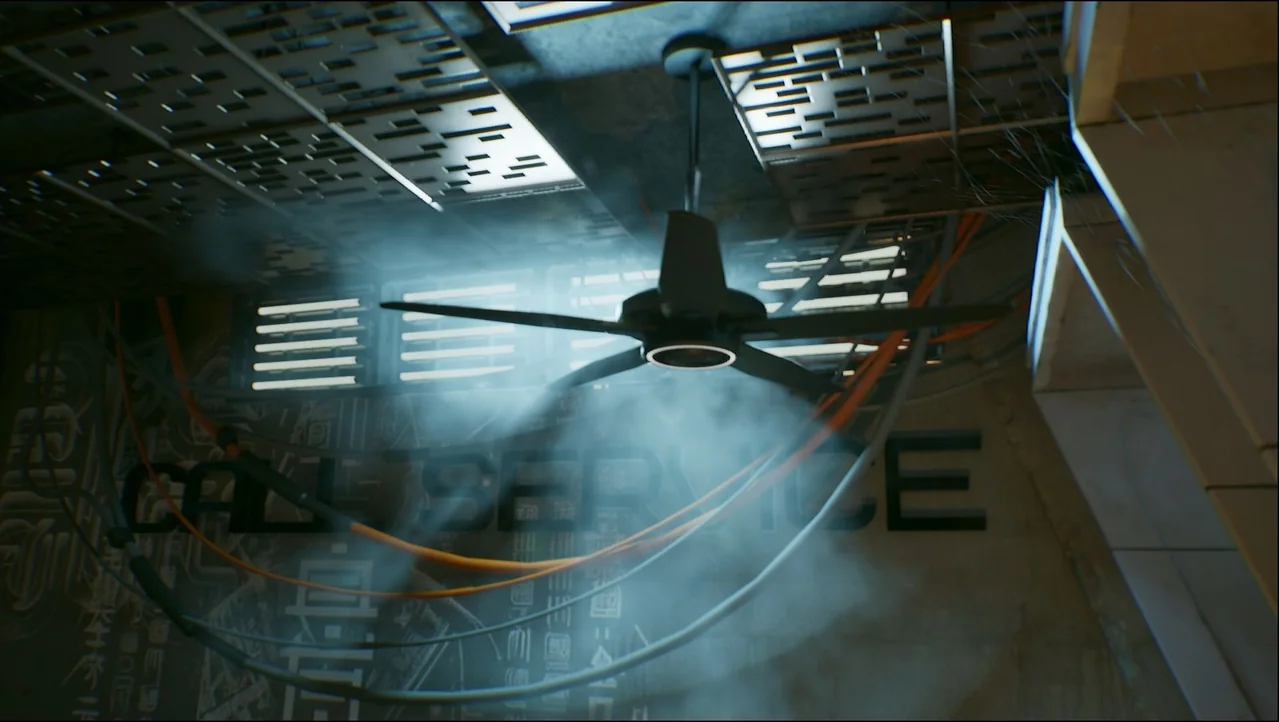
 Smoke
Smoke Smoke
Smoke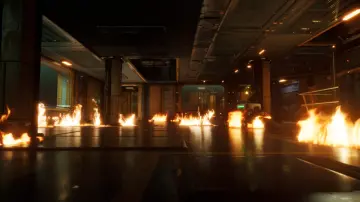 Fire & Explosions