"7b46a695175d8694"{"id":"1000386","slug":"niagaraexplosion01","title":"NiagaraExplosion01","category":"Fire \u0026 Explosions","engine":"5.0+","assetVersion":"","engineVersion":"Engine Version: 5.0+","tag":"Fire \u0026 Explosions","accent":"blue","visual":"mech","summary":"A technical overview of the NiagaraExplosion01 VFX package, detailing its ground and air emitters, mobile optimization, unlit shaders, and size controls.","platform":"Unreal Engine","publishedAt":"2026-07-07T12:37:10.979Z","updatedAt":"2026-07-07T12:37:10.979Z","sourceNotes":[],"fileContents":[],"compatibility":["Unreal Engine","Engine Version: 5.0+"],"featuredImage":{"alt":"NiagaraExplosion01","src":"/wp-content/uploads/published/2026/07/34d07082b965-d282f254-f48b-4b4d-a2c8-7c73e9d673e0-d61d967c07.webp"},"hasDownloadLink":true,"downloads":3,"terms":[{"taxonomy":"category","slug":"fire-and-explosions","name":"Fire \u0026 Explosions"}],"galleryImages":[{"src":"/wp-content/uploads/published/2026/07/52208d6f32e6-d8537995-4905-420d-bf84-b2add62c1199-022f059a73.webp","alt":"NiagaraExplosion01"},{"src":"/wp-content/uploads/published/2026/07/86a82356becc-69120804-c484-4c17-90e4-46cbf3abcf8a-867e33fe54.webp","alt":"NiagaraExplosion01"},{"src":"/wp-content/uploads/published/2026/07/25b7597f366d-ecca3073-cf18-4508-bfb3-bd6829d2c1a4-c2cc82799e.webp","alt":"NiagaraExplosion01"},{"src":"/wp-content/uploads/published/2026/07/a9e79af74fea-41ec3594-bc25-4ee8-b984-e01e9aabaf93-cabf3ebcee.webp","alt":"NiagaraExplosion01"},{"src":"/wp-content/uploads/published/2026/07/59fcd3cc961a-bc87cebc-ad7c-45e3-bb2a-2857697cd76e-a6972e111b.webp","alt":"NiagaraExplosion01"},{"src":"/wp-content/uploads/published/2026/07/636e9e02a809-c52f42b9-c87e-4f00-a62b-70d17dc7ac70-980b26a8c3.webp","alt":"NiagaraExplosion01"},{"src":"/wp-content/uploads/published/2026/07/78cb1b8aa5e5-a7d9d99a-1321-4746-80d7-971b9a9c7196-4791c87871.webp","alt":"NiagaraExplosion01"},{"src":"/wp-content/uploads/published/2026/07/279445f595b7-926ffb05-6201-4701-8e0c-8bd1a0af6b76-bff5f05843.webp","alt":"NiagaraExplosion01"},{"src":"/wp-content/uploads/published/2026/07/9ab6893acf17-c1a62d84-923c-4470-b86a-594ed35051cc-4b09a13abd.webp","alt":"NiagaraExplosion01"},{"src":"/wp-content/uploads/published/2026/07/916ff5f61601-e623ad09-9be4-4955-9a93-a481f0dedac3-2aa442c1ef.webp","alt":"NiagaraExplosion01"}],"accessPanel":{"kind":"resource","title":"Download this resource","eyebrow":"Free Download","message":"Log in or create a free account to start your download.","fileName":"Content.7z","safetyNote":"Resources are manually reviewed before listing to improve quality and reduce obvious risks.","actionLabel":"Download Free","resourceType":"Resource archive"},"contentHtml":"\u003ch2\u003eImplementing Realistic Niagara Explosions\u003c/h2\u003e\n\u003cp\u003eIntegrating explosive visual effects into a project often requires balancing visual density with modular control. NiagaraExplosion01 utilizes the Niagara visual effects system to provide a structured library of realistic explosion assets. Rather than requiring developers to build complex particle emitters from scratch, the package delivers pre-configured systems that can be dropped directly into a scene or spawned via blueprints during gameplay events. The underlying architecture of the effects is shaped by realistic visual parameters, ensuring that the fire, smoke, and debris behave in a physically plausible manner when triggered.\u003c/p\u003e\n\u003cp\u003eThe primary workflow advantage of this asset lies in its diverse structural variety. The collection contains 20 different types and sizes of explosion effects right out of the box. This allows developers to assign specific explosion profiles to different in-game events without repeating the same visual feedback. A small kinetic impact can trigger a minor burst, while a heavy artillery strike can utilize one of the larger, more complex emitters. By categorizing these 20 variations by type and size, developers can quickly prototype damage states and environmental destruction sequences by simply swapping the referenced Niagara system.\u003c/p\u003e\n\u003ch2\u003eGround and Air Emitter Deployment\u003c/h2\u003e\n\u003cp\u003eExplosion effects generally require different structural setups depending on where they occur in 3D space. NiagaraExplosion01 accounts for this spatial requirement by dividing its current effects primarily into ground and air categories. Deploying a ground-based explosion involves specific considerations, as the visual elements must interact convincingly with the surface beneath them. Ground effects in this package are tailored to anchor to a surface, often pushing energy, smoke, and visual debris upward and outward in a hemispherical pattern to simulate the resistance of the floor.\u003c/p\u003e\n\u003cp\u003eConversely, air explosions operate without the restriction of a ground plane. These emitters are intended for mid-air detonations, expanding spherically in all directions. Implementing these air bursts is ideal for anti-aircraft flak, airborne projectile interceptions, or flying vehicle destruction. By separating the effects into ground and air categories, the package eliminates the need for developers to manually adjust the directional velocity and spawn angles of a standard explosion to fit a specific spatial context.\u003c/p\u003e\n\u003ch2\u003eManaging Particle Scale with Custom Size Controls\u003c/h2\u003e\n\u003cp\u003eOne of the most common challenges when working with complex particle systems is scaling the effect to match the required context. Simply scaling a standard VFX asset in a game engine can often break the internal physics, velocity, and sprite size relationships, leading to unnatural visual results. To address this, Update 2 of the package introduced a dedicated Custom Size Control feature. This implementation allows developers to adjust the overall scale of the explosion directly through exposed parameters rather than digging into individual emitter modules.\u003c/p\u003e\n\u003cp\u003eWith Custom Size Control integrated, the workflow for resizing an explosion becomes significantly more streamlined. If an environment requires a massive structural detonation, the developer can select a preferred explosion type from the 20 available options and scale it up uniformly. The custom control ensures that the proportional relationships between the fire core, the expanding smoke ring, and any lingering particle elements remain intact. This modular approach to scaling maximizes the reusability of the core assets, as a single explosion system can be dynamically resized at runtime to match the explosive yield of different weapons or hazards.\u003c/p\u003e\n\u003ch2\u003eMobile Optimization and Air Explosions\u003c/h2\u003e\n\u003cp\u003eTargeting different hardware platforms requires scalable visual effects, particularly when dealing with the heavy overdraw associated with volumetric smoke and fire. Update 1 of NiagaraExplosion01 specifically addresses cross-platform deployment by introducing 8 dedicated air explosions that are heavily optimized for mobile phones. Mobile GPUs often struggle with the rendering costs of dense, overlapping transparent sprites. These 8 optimized variations provide a streamlined alternative, allowing developers to maintain realistic explosion visuals on lower-end devices without causing significant frame rate drops.\u003c/p\u003e\n\u003cp\u003eImplementing these mobile-optimized air explosions ensures that projects targeting smartphones or standalone VR headsets have access to performant assets out of the box. Developers can set up logic to swap out the standard, heavier air explosions for these 8 mobile variants based on the detected hardware profile, ensuring a consistent gameplay experience across different performance tiers.\u003c/p\u003e\n\u003ch2\u003eUnlit Explosion Shader Pipelines\u003c/h2\u003e\n\u003cp\u003eFurther supporting performance and visual consistency, Update 1 also introduced an Unlit Explosion Shader. In a standard rendering pipeline, lit particles calculate how environmental light sources and shadows interact with the smoke and fire. While this can look highly realistic, it is computationally expensive and can sometimes cause explosions to look artificially dark in unlit or shadowed areas of a level.\u003c/p\u003e\n\u003cp\u003eThe Unlit Explosion Shader bypasses the engine's complex lighting calculations entirely. Instead, the shader relies strictly on its own emissive and color data to determine its appearance on screen. Implementing this unlit shader ensures that the explosions remain bright, vibrant, and highly visible regardless of the surrounding environment's lighting conditions. Furthermore, removing the lighting calculations significantly reduces the rendering cost per frame. When combined with the mobile-optimized air explosions, the unlit shader provides a highly performant rendering path that maintains the realistic style of the package while strictly adhering to tight performance budgets.\u003c/p\u003e\n\n\u003ch2\u003eExplore Similar Assets\u003c/h2\u003e\n\u003cul\u003e\n\u003cli\u003e\u003ca href=\"https://3dcghub.com/fire-bursts-vdb/\" title=\"Fire Bursts VDB\"\u003eFire Bursts VDB\u003c/a\u003e\u003c/li\u003e\n\u003cli\u003e\u003ca href=\"https://3dcghub.com/fire-fx-vdb/\" title=\"Fire FX VDB\"\u003eFire FX VDB\u003c/a\u003e\u003c/li\u003e\n\u003cli\u003e\u003ca href=\"https://3dcghub.com/dragon-flame-fx/\" title=\"Dragon Flame FX\"\u003eDragon Flame FX\u003c/a\u003e\u003c/li\u003e\n\u003cli\u003e\u003ca href=\"https://3dcghub.com/explosion-fx-customizable/\" title=\"Explosion FX Customizable\"\u003eExplosion FX Customizable\u003c/a\u003e\u003c/li\u003e\n\u003cli\u003e\u003ca href=\"https://3dcghub.com/ultimate-fire-pack-vol-1-by-actionvfx-and-undertone-fx-inc/\" title=\"Ultimate Fire Pack Vol 1. by ActionVFX and Undertone FX, Inc.\"\u003eUltimate Fire Pack Vol 1. by ActionVFX and Undertone FX, Inc.\u003c/a\u003e\u003c/li\u003e\n\u003c/ul\u003e","contentTextLength":6081,"navigation":{"current":1234,"total":3481,"previous":{"id":"1000387","slug":"norwegian-winter-island-village-megapack","title":"Norwegian Winter Island Village Megapack","category":"Forest \u0026 Jungle","platform":"Unreal Engine","updatedAt":"2026-07-07T13:18:53.504Z"},"next":{"id":"1000385","slug":"mw-meadow-forest-trees-biome","title":"MW Meadow Forest Trees Biome","category":"Forest \u0026 Jungle","platform":"Unreal Engine","updatedAt":"2026-07-07T09:35:41.862Z"}},"relatedResources":[{"id":"1001499","slug":"advanced-fireworks-system-vfx","title":"Advanced Fireworks System VFX","category":"Fire \u0026 Explosions","engine":"5.0+","assetVersion":"","engineVersion":"Engine Version: 5.0+","tag":"Fire \u0026 Explosions","accent":"blue","visual":"mech","summary":"Explore the Advanced Fireworks System VFX, featuring GPU Niagara performance, 9 explosion effects, customizable launch Blueprints, and rocket trails.","platform":"Unreal Engine","publishedAt":"2026-10-09T07:26:39.722Z","updatedAt":"2026-10-09T07:26:39.722Z","sourceNotes":[],"fileContents":[],"compatibility":["Unreal Engine","Engine Version: 5.0+"],"featuredImage":{"alt":"Advanced Fireworks System VFX","src":"/wp-content/uploads/published/2026/10/5ba884d58060-be9ccfa2-c57b-48df-af4c-5e14015fb623-27b522d621.webp"},"hasDownloadLink":true,"downloads":0},{"id":"1001089","slug":"fireworks-vol-1-niagara","title":"Fireworks Vol. 1 - Niagara","category":"Fire \u0026 Explosions","engine":"5.0+","assetVersion":"","engineVersion":"Engine Version: 5.0+","tag":"Fire \u0026 Explosions","accent":"blue","visual":"mech","summary":"31 unique customizable Niagara fireworks: shells, rockets, spinners, fountains, sparklers, fire and smoke machines, each with 5 color variations and easy scale","platform":"Unreal Engine","publishedAt":"2026-09-05T16:13:49.290Z","updatedAt":"2026-09-05T16:13:49.290Z","sourceNotes":[],"fileContents":[],"compatibility":["Unreal Engine","Engine Version: 5.0+"],"featuredImage":{"alt":"Fireworks Vol. 1 - Niagara","src":"/wp-content/uploads/published/2026/09/1b52e5562e90-f591bf3a-6e5d-42e1-856d-bb0c753b0b4b-ed30bd46ad.webp"},"hasDownloadLink":true,"downloads":1},{"id":"1001183","slug":"m5-vfx-vol2-fire-and-flames-niagara","title":"M5 VFX Vol2. Fire and Flames(Niagara)","category":"Fire \u0026 Explosions","engine":"5.0+","assetVersion":"","engineVersion":"Engine Version: 5.0+","tag":"Fire \u0026 Explosions","accent":"blue","visual":"mech","summary":"M5 VFX Vol2. Fire and Flames delivers scalable Niagara fire effects, preset flame Blueprint props, and image sequence textures for Unreal Engine 5 projects.","platform":"Unreal Engine","publishedAt":"2026-09-17T06:18:36.967Z","updatedAt":"2026-09-17T06:18:36.967Z","sourceNotes":[],"fileContents":[],"compatibility":["Unreal Engine","Engine Version: 5.0+"],"featuredImage":{"alt":"M5 VFX Vol2. Fire and Flames(Niagara)","src":"/wp-content/uploads/published/2026/09/5533604d9350-dfdcba29-c4ae-4d06-8579-6305ce4485bb-68b47cc48a.webp"},"hasDownloadLink":true,"downloads":0}]}
Fire & Explosions
NiagaraExplosion01
A technical overview of the NiagaraExplosion01 VFX package, detailing its ground and air emitters, mobile optimization, unlit shaders, and size controls.
Integrating explosive visual effects into a project often requires balancing visual density with modular control. NiagaraExplosion01 utilizes the Niagara visual effects system to provide a structured library of realistic explosion assets. Rather than requiring developers to build complex particle emitters from scratch, the package delivers pre-configured systems that can be dropped directly into a scene or spawned via blueprints during gameplay events. The underlying architecture of the effects is shaped by realistic visual parameters, ensuring that the fire, smoke, and debris behave in a physically plausible manner when triggered.
The primary workflow advantage of this asset lies in its diverse structural variety. The collection contains 20 different types and sizes of explosion effects right out of the box. This allows developers to assign specific explosion profiles to different in-game events without repeating the same visual feedback. A small kinetic impact can trigger a minor burst, while a heavy artillery strike can utilize one of the larger, more complex emitters. By categorizing these 20 variations by type and size, developers can quickly prototype damage states and environmental destruction sequences by simply swapping the referenced Niagara system.
Ground and Air Emitter Deployment
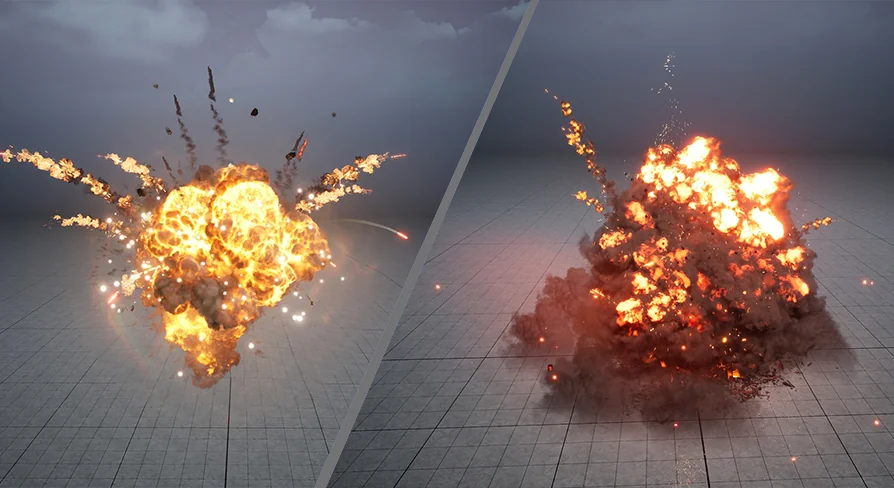
Explosion effects generally require different structural setups depending on where they occur in 3D space. NiagaraExplosion01 accounts for this spatial requirement by dividing its current effects primarily into ground and air categories. Deploying a ground-based explosion involves specific considerations, as the visual elements must interact convincingly with the surface beneath them. Ground effects in this package are tailored to anchor to a surface, often pushing energy, smoke, and visual debris upward and outward in a hemispherical pattern to simulate the resistance of the floor.
Conversely, air explosions operate without the restriction of a ground plane. These emitters are intended for mid-air detonations, expanding spherically in all directions. Implementing these air bursts is ideal for anti-aircraft flak, airborne projectile interceptions, or flying vehicle destruction. By separating the effects into ground and air categories, the package eliminates the need for developers to manually adjust the directional velocity and spawn angles of a standard explosion to fit a specific spatial context.
Managing Particle Scale with Custom Size Controls
One of the most common challenges when working with complex particle systems is scaling the effect to match the required context. Simply scaling a standard VFX asset in a game engine can often break the internal physics, velocity, and sprite size relationships, leading to unnatural visual results. To address this, Update 2 of the package introduced a dedicated Custom Size Control feature. This implementation allows developers to adjust the overall scale of the explosion directly through exposed parameters rather than digging into individual emitter modules.
With Custom Size Control integrated, the workflow for resizing an explosion becomes significantly more streamlined. If an environment requires a massive structural detonation, the developer can select a preferred explosion type from the 20 available options and scale it up uniformly. The custom control ensures that the proportional relationships between the fire core, the expanding smoke ring, and any lingering particle elements remain intact. This modular approach to scaling maximizes the reusability of the core assets, as a single explosion system can be dynamically resized at runtime to match the explosive yield of different weapons or hazards.
Mobile Optimization and Air Explosions
Targeting different hardware platforms requires scalable visual effects, particularly when dealing with the heavy overdraw associated with volumetric smoke and fire. Update 1 of NiagaraExplosion01 specifically addresses cross-platform deployment by introducing 8 dedicated air explosions that are heavily optimized for mobile phones. Mobile GPUs often struggle with the rendering costs of dense, overlapping transparent sprites. These 8 optimized variations provide a streamlined alternative, allowing developers to maintain realistic explosion visuals on lower-end devices without causing significant frame rate drops.
Implementing these mobile-optimized air explosions ensures that projects targeting smartphones or standalone VR headsets have access to performant assets out of the box. Developers can set up logic to swap out the standard, heavier air explosions for these 8 mobile variants based on the detected hardware profile, ensuring a consistent gameplay experience across different performance tiers.
Unlit Explosion Shader Pipelines
Further supporting performance and visual consistency, Update 1 also introduced an Unlit Explosion Shader. In a standard rendering pipeline, lit particles calculate how environmental light sources and shadows interact with the smoke and fire. While this can look highly realistic, it is computationally expensive and can sometimes cause explosions to look artificially dark in unlit or shadowed areas of a level.
The Unlit Explosion Shader bypasses the engine's complex lighting calculations entirely. Instead, the shader relies strictly on its own emissive and color data to determine its appearance on screen. Implementing this unlit shader ensures that the explosions remain bright, vibrant, and highly visible regardless of the surrounding environment's lighting conditions. Furthermore, removing the lighting calculations significantly reduces the rendering cost per frame. When combined with the mobile-optimized air explosions, the unlit shader provides a highly performant rendering path that maintains the realistic style of the package while strictly adhering to tight performance budgets.
 Fire & Explosions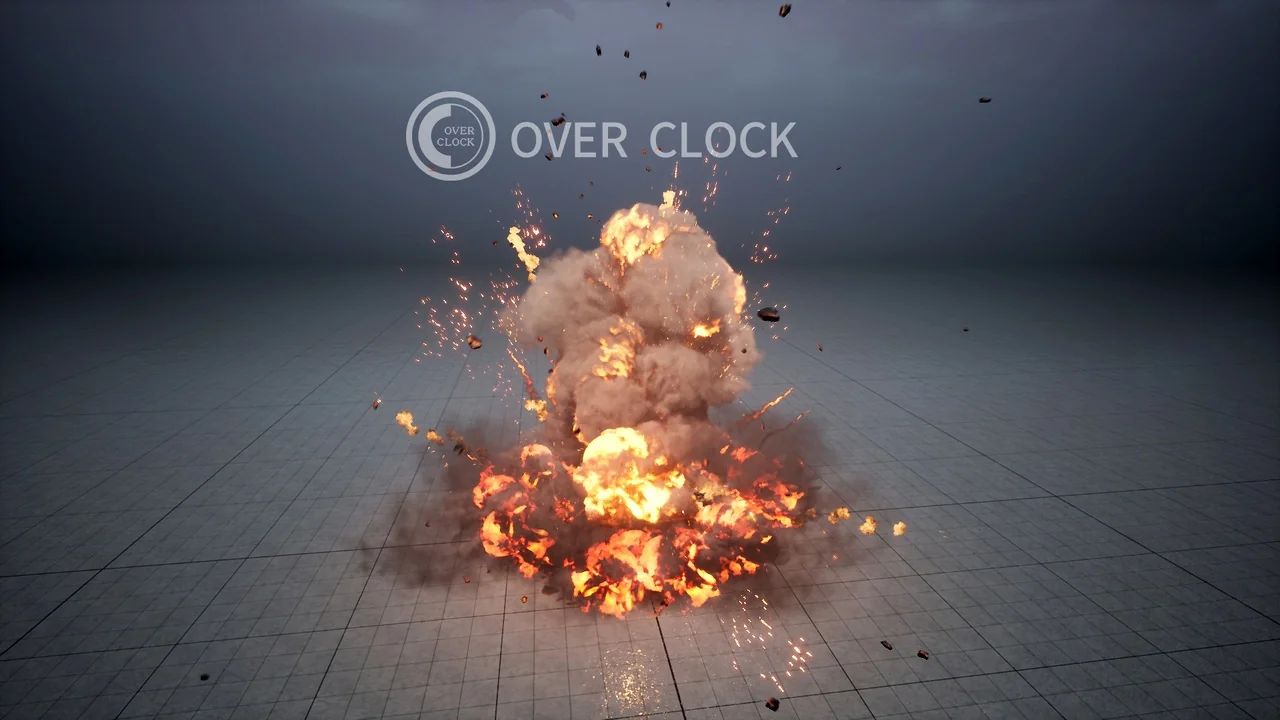
 Fire & Explosions
 Fire & Explosions
 Fire & Explosions