"b00678cacce53329"{"id":"1002865","slug":"niagara-death-effects-vol-1","title":"Niagara Death Effects Vol.1","category":"Spells \u0026 Combat","engine":"4.25+,5.0+","assetVersion":"","engineVersion":"Engine Version: 4.25+,5.0+","tag":"Spells \u0026 Combat","accent":"blue","visual":"mech","summary":"Explore Niagara Death Effects Vol.1, covering character replacement workflows, realistic VFX design, and static mesh support in the Niagara system.","platform":"Unreal Engine","indexPolicy":"index","publishedAt":"2026-11-20T12:49:12.930Z","updatedAt":"2026-11-20T12:49:12.930Z","sourceNotes":[],"fileContents":[],"compatibility":["Unreal Engine","Engine Version: 4.25+,5.0+"],"featuredImage":{"alt":"Niagara Death Effects Vol.1","src":"/wp-content/uploads/published/2026/11/be51aa5a1c79-f9c58b4f-584f-4892-8dcb-79746dfe37af-aa345572ac.webp"},"fileSizeBytes":193356587,"hasDownloadLink":true,"downloads":0,"terms":[{"taxonomy":"category","slug":"spells-and-combat","name":"Spells \u0026 Combat"}],"galleryImages":[{"src":"/wp-content/uploads/published/2026/11/6fe5462e09af-38dc0145-8bb1-4334-8ee4-ebce24a75f31-7c2e646f56.webp","alt":"Niagara Death Effects Vol.1"},{"src":"/wp-content/uploads/published/2026/11/66e5ed4622ca-686be729-99e6-43ce-bf5d-0cb495911604-1e76fb2c5d.webp","alt":"Niagara Death Effects Vol.1"},{"src":"/wp-content/uploads/published/2026/11/73cb7e588455-34ec19be-48c3-4dc8-a412-41c41b5dfc2f-5b86703933.webp","alt":"Niagara Death Effects Vol.1"},{"src":"/wp-content/uploads/published/2026/11/9cf397fafc25-2cf5b71a-0cac-402b-80dd-a9ae233d46ae-3703d594c3.webp","alt":"Niagara Death Effects Vol.1"},{"src":"/wp-content/uploads/published/2026/11/a864497351c8-2526b967-cf72-4eca-a794-cdb78ddbe1b3-c528b8338c.webp","alt":"Niagara Death Effects Vol.1"},{"src":"/wp-content/uploads/published/2026/11/8c8e695077c2-b26deacf-98f4-4f80-906a-af955b862033-6194b888c6.webp","alt":"Niagara Death Effects Vol.1"},{"src":"/wp-content/uploads/published/2026/11/dce230bdd7f4-444f0d28-a87e-4a1b-bdcb-a99b9c24a985-994113555f.webp","alt":"Niagara Death Effects Vol.1"},{"src":"/wp-content/uploads/published/2026/11/ae3afecb3922-c9943d1b-e4c3-46d6-aecc-0cd712683237-df9518b8d9.webp","alt":"Niagara Death Effects Vol.1"},{"src":"/wp-content/uploads/published/2026/11/31e80cfc08c2-8e47460f-3cc3-4048-b2d0-d599d035a9f2-72a8acbc79.webp","alt":"Niagara Death Effects Vol.1"},{"src":"/wp-content/uploads/published/2026/11/0e7c9152f0ee-4681a2d8-cbfe-4d19-8605-b6bc43f85bb9-f63e52b380.webp","alt":"Niagara Death Effects Vol.1"}],"accessPanel":{"kind":"resource","title":"Get this resource","safetyNote":"Resources are manually reviewed before listing to improve quality and reduce obvious risks.","fileName":"Content.7z","resourceType":"Resource archive","versions":[]},"contentHtml":"\u003cp\u003eNiagara Death Effects Vol.1 delivers high-quality visual effects built natively inside the Niagara particle framework, focusing on the visual transition that occurs when an in-game entity meets its demise. The primary function of the collection is to provide a clean visual replacement when a character dies, converting what would otherwise be an abrupt removal or a standard ragdoll collapse into an expressive simulation event. By leveraging the computational capabilities of Niagara, the visual effects manage the sudden shift from an active game actor to a dynamic visual resolution, grounding player actions with definitive aesthetic feedback.\u003c/p\u003e \u003ch2\u003eNiagara Death Systems for Character Elimination\u003c/h2\u003e\n\u003cp\u003eAt the center of Niagara Death Effects Vol.1 is the native Niagara architecture, which controls the emission, vector forces, and dissipation curves of each visual effect. In real-time production, handling an elimination state requires precise synchronization between the character's active mesh and the visual effect that takes its place. When an entity reaches zero health or triggers a defeat condition, the Niagara system executes a configured sequence to disguise or replace the underlying skeletal or actor hierarchy.\u003c/p\u003e\n\u003cp\u003eBecause these death effects are generated entirely within the Niagara system, the visual behavior benefits from the modular logic inherent to Niagara emitters. Velocity fields, particle size transitions, alpha decays, and color temperature curves can be adjusted directly within the emitter stack to fit the physical scale of the dying unit. The high-quality designation reflects a high level of simulation detail, where particle densities, turbulent motion, and decay timing are coordinated to prevent visual artifacts or abrupt popping when the character asset is hidden or removed from the active scene.\u003c/p\u003e \u003ch2\u003eReplacing Actors with Death Effects at Defeat\u003c/h2\u003e\n\u003cp\u003eThe core gameplay implementation suggested by Niagara Death Effects Vol.1 revolves around direct replacement logic. In typical gameplay programming, when an entity's defeat state is confirmed, the game framework hides the active character model, disables character movement, and spawns the Niagara visual effect at the exact spatial coordinates of the actor. This handoff must happen within a single frame to maintain immersion and ensure that the visual burst appears to emerge directly from the fallen character.\u003c/p\u003e\n\u003cp\u003eHandling defeat through visual replacement offers a distinct technical alternative to standard physics ragdolls. While ragdoll simulations depend heavily on physics assets, joint constraints, and collision hulls that can occasionally behave unpredictably in complex geometry, a Niagara-based replacement provides controlled visual art direction. The system generates a visually consistent result regardless of the surrounding collision environment. Developers can trigger the effect at the base transform, root bone, or center of mass of the target actor, ensuring that the visual event aligns seamlessly with the exact posture or orientation of the character at the moment of elimination.\u003c/p\u003e \u003ch2\u003eStatic Mesh Compatibility and Object Elimination\u003c/h2\u003e\n\u003cp\u003eWhile the package was initially conceived for character models, Niagara Death Effects Vol.1 includes expanded support for static meshes. This compatibility changes how the effects can be deployed across a game project, allowing non-skeletal geometry to utilize the same high-quality visual sequences established for living units.\u003c/p\u003e\n\u003cp\u003eStatic mesh support broadens the utility of the visual effects to include destructible environmental props, mechanical targets, turrets, and stationary defenses. Because static meshes lack skeletal hierarchies or skinning data, effects configured for them must evaluate geometric boundaries and surface origins differently. The updated system allows designers to map the death effects onto rigid, non-deforming assets without requiring skeletal rigging or skin-weighted attachment sockets. This makes it possible to maintain visual cohesion across an entire project, ensuring that broken mechanisms, destroyed barricades, and defeated humanoids share a unified visual language during destruction sequences.\u003c/p\u003e \u003ch2\u003eRealistic Simulation Profiles in Niagara VFX\u003c/h2\u003e\n\u003cp\u003eTagged specifically for realistic presentation, Niagara Death Effects Vol.1 focuses on physical visual plausibility. Rather than relying on cartoon exaggeration, bright cel-shaded outlines, or whimsical fantasy shapes, the effects emphasize simulation properties that mimic authentic physical behavior. This realism is reflected in the natural dispersal rates of the particles, the gradual loss of momentum over distance, and the believable interplay between core luminance and fading dissipations.\u003c/p\u003e\n\u003cp\u003eTo support realistic aesthetics, the visual parameters prioritize coherent scale and motion continuity. When an entity dissolves, disintegrates, or bursts under a realistic profile, the visual components do not simply vanish uniformly; they shear, drift, and cool according to calibrated simulation velocities. The realism of the Niagara calculations ensures that the resulting death animations integrate naturally into projects built with photorealistic textures, physically based materials, and advanced world lighting, where stylized or poorly weighted particle behaviors would break visual consistency.\u003c/p\u003e \u003ch2\u003eManaging Death Effect Triggers Across Gameplay States\u003c/h2\u003e\n\u003cp\u003eImplementing Niagara Death Effects Vol.1 successfully requires a structured approach to asset lifecycle management within engine logic. When executing an elimination event, the character blueprint or actor component must coordinate several parallel actions: muting audio components, nullifying collision volumes, stripping incoming damage listeners, and instantiating the Niagara death effect component.\u003c/p\u003e\n\u003cp\u003eBecause the Niagara system handles the entire visual output of the defeat state, cleanup workflows become straightforward. Once the Niagara system finishes playing its particle burst and subsequent dissipation stages, the spawned effect component can automatically destroy itself, freeing memory and processing overhead. Coupling this self-terminating behavior with the initial character replacement workflow keeps scene hierarchies clean during heavy combat encounters where dozens of entities might be eliminated in rapid succession. Niagara Death Effects Vol.1 provides the necessary visual framework to handle these high-frequency defeat moments smoothly across both character rigs and static assets.\u003c/p\u003e\n\n\u003ch2\u003eExplore Similar Assets\u003c/h2\u003e\n\u003cul\u003e\n\u003cli\u003e\u003ca href=\"https://3dcghub.com/magic-aura-vfx/\" rel=\"noopener noreferrer\"\u003eMagic Aura VFX\u003c/a\u003e\u003c/li\u003e\n\u003cli\u003e\u003ca href=\"https://3dcghub.com/niagara-ki-auras/\" rel=\"noopener noreferrer\"\u003eNiagara KI auras\u003c/a\u003e\u003c/li\u003e\n\u003cli\u003e\u003ca href=\"https://3dcghub.com/elemental-auras-vfx-pack/\" rel=\"noopener noreferrer\"\u003eElemental Auras VFX Pack\u003c/a\u003e\u003c/li\u003e\n\u003cli\u003e\u003ca href=\"https://3dcghub.com/shots-vfx/\" rel=\"noopener noreferrer\"\u003eShots VFX\u003c/a\u003e\u003c/li\u003e\n\u003cli\u003e\u003ca href=\"https://3dcghub.com/shield-fx-responsive/\" rel=\"noopener noreferrer\"\u003eShield FX Responsive\u003c/a\u003e\u003c/li\u003e\n\u003c/ul\u003e","contentTextLength":6588,"navigation":{"current":15,"total":4797,"previous":{"id":"1002866","slug":"stylized-fx-6","title":"Stylized FX 6","category":"Variety","platform":"Unreal Engine","updatedAt":"2026-11-20T12:53:23.890Z"},"next":{"id":"1002864","slug":"stylized-vfx-starter-pack","title":"Stylized VFX Starter Pack","category":"Variety","platform":"Unreal Engine","updatedAt":"2026-11-20T12:47:00.035Z"}},"relatedResources":[{"id":"1000639","slug":"magic-aura-vfx","title":"Magic Aura VFX","category":"Spells \u0026 Combat","engine":"4.27,5.0+","assetVersion":"","engineVersion":"Engine Version: 4.27,5.0+","tag":"Spells \u0026 Combat","accent":"blue","visual":"mech","summary":"Ten customizable Unreal Engine Niagara effects covering magic trails, fantasy shields, and character auras with emissive lighting for games and cinematics.","platform":"Unreal Engine","indexPolicy":"index","publishedAt":"2026-07-21T17:15:13.459Z","updatedAt":"2026-07-21T17:15:13.459Z","sourceNotes":[],"fileContents":[],"compatibility":["Unreal Engine","Engine Version: 4.27,5.0+"],"featuredImage":{"alt":"Magic Aura VFX","src":"/wp-content/uploads/published/2026/07/205744193aab-fbdd8542-7a3c-4169-a254-ff27fa089dc5-2361e340a4.webp"},"fileSizeBytes":12324730,"hasDownloadLink":true,"downloads":4},{"id":"16517","slug":"niagara-ki-auras","title":"Niagara KI auras","category":"Spells \u0026 Combat","engine":"4.27,5.0+","assetVersion":"Engine version: 4.27,5.0+","engineVersion":"4.24","tag":"Spells \u0026 Combat","accent":"blue","visual":"animation","summary":"Enhance your project with the Niagara KI auras pack, featuring 10 unique visual effects. This collection includes a dragon character model and various material instances designed for energy and magic themes.","platform":"Unreal Engine","indexPolicy":"noindex","publishedAt":"2026-03-12T17:17:53.000Z","updatedAt":"2026-04-19T15:44:32.000Z","sourceNotes":[],"fileContents":[],"compatibility":["Unreal Engine","Engine version: 4.27,5.0+"],"featuredImage":{"alt":"Niagara KI auras","src":"https://3dcghub.com/wp-content/uploads/2026/03/3fc0f25a-fc50-4235-8729-b13f490a5eff.webp"},"fileSizeBytes":46869852,"hasDownloadLink":true,"downloads":5},{"id":"16274","slug":"elemental-auras-vfx-pack","title":"Elemental Auras VFX Pack","category":"Spells \u0026 Combat","engine":"4.27,5.0+","assetVersion":"Engine version: 4.27,5.0+","engineVersion":"4.27","tag":"Spells \u0026 Combat","accent":"blue","visual":"animation","summary":"Enhance your project with the Elemental Auras VFX Pack, featuring 10 unique magical effects for characters and wizard hats. These game-ready assets include customizable material instances and a realistic wizard hat mesh.","platform":"Unreal Engine","indexPolicy":"noindex","publishedAt":"2026-03-12T16:46:47.000Z","updatedAt":"2026-04-19T15:44:35.000Z","sourceNotes":[],"fileContents":[],"compatibility":["Unreal Engine","Engine version: 4.27,5.0+"],"featuredImage":{"alt":"Elemental Auras VFX Pack","src":"https://3dcghub.com/wp-content/uploads/2026/03/6b6ea723-9028-41b7-b25c-a13aca50d660.webp"},"fileSizeBytes":46666448,"hasDownloadLink":true,"downloads":2}]}
Resource screenshots
1 / 10
Join our channel
Follow 3DCGHUB on Telegram for new resource drops, migration updates, and community notices.
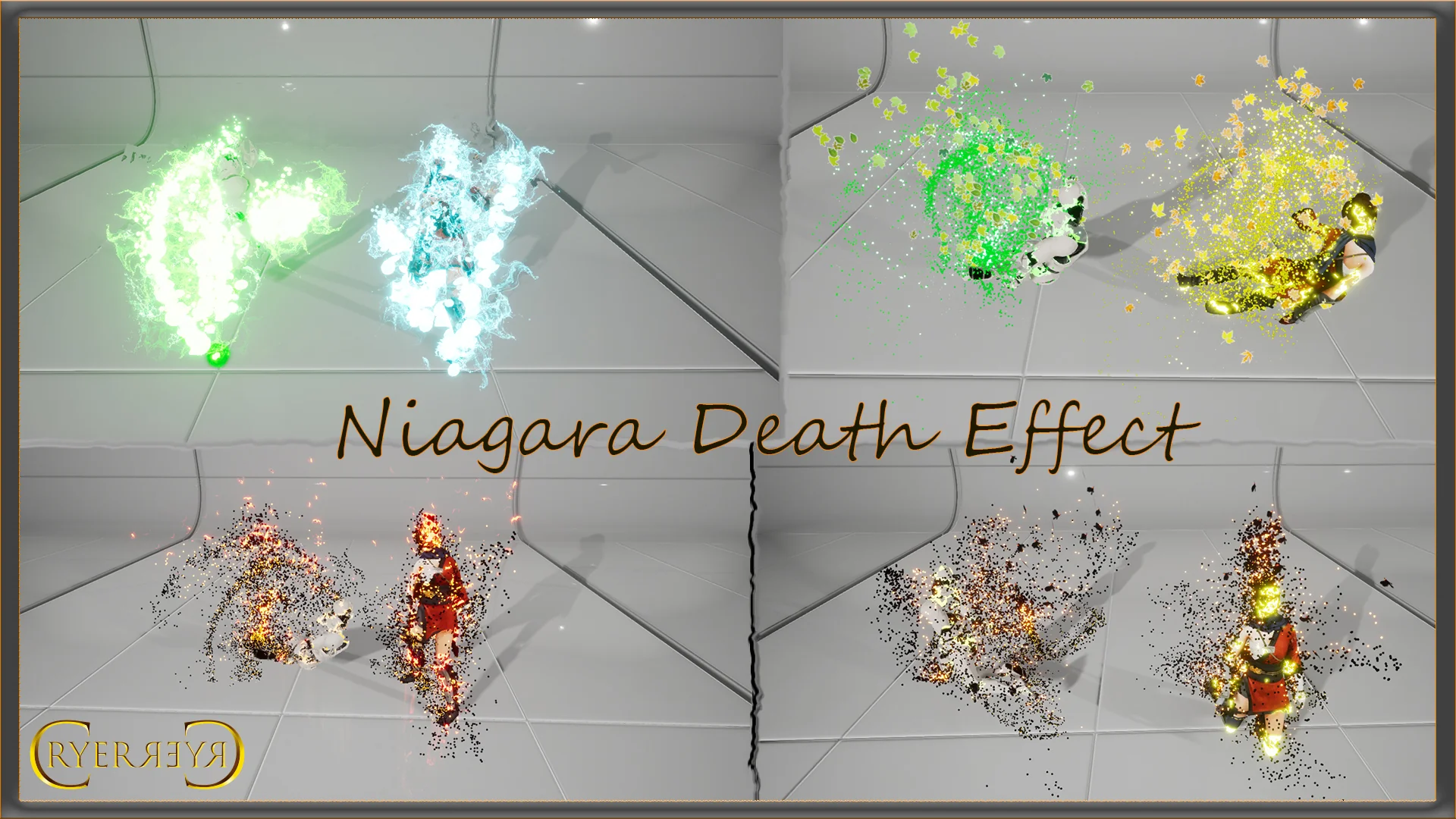
Niagara Death Effects Vol.1 delivers high-quality visual effects built natively inside the Niagara particle framework, focusing on the visual transition that occurs when an in-game entity meets its demise. The primary function of the collection is to provide a clean visual replacement when a character dies, converting what would otherwise be an abrupt removal or a standard ragdoll collapse into an expressive simulation event. By leveraging the computational capabilities of Niagara, the visual effects manage the sudden shift from an active game actor to a dynamic visual resolution, grounding player actions with definitive aesthetic feedback.
Niagara Death Systems for Character Elimination
At the center of Niagara Death Effects Vol.1 is the native Niagara architecture, which controls the emission, vector forces, and dissipation curves of each visual effect. In real-time production, handling an elimination state requires precise synchronization between the character's active mesh and the visual effect that takes its place. When an entity reaches zero health or triggers a defeat condition, the Niagara system executes a configured sequence to disguise or replace the underlying skeletal or actor hierarchy.
Because these death effects are generated entirely within the Niagara system, the visual behavior benefits from the modular logic inherent to Niagara emitters. Velocity fields, particle size transitions, alpha decays, and color temperature curves can be adjusted directly within the emitter stack to fit the physical scale of the dying unit. The high-quality designation reflects a high level of simulation detail, where particle densities, turbulent motion, and decay timing are coordinated to prevent visual artifacts or abrupt popping when the character asset is hidden or removed from the active scene.
Replacing Actors with Death Effects at Defeat
The core gameplay implementation suggested by Niagara Death Effects Vol.1 revolves around direct replacement logic. In typical gameplay programming, when an entity's defeat state is confirmed, the game framework hides the active character model, disables character movement, and spawns the Niagara visual effect at the exact spatial coordinates of the actor. This handoff must happen within a single frame to maintain immersion and ensure that the visual burst appears to emerge directly from the fallen character.
Handling defeat through visual replacement offers a distinct technical alternative to standard physics ragdolls. While ragdoll simulations depend heavily on physics assets, joint constraints, and collision hulls that can occasionally behave unpredictably in complex geometry, a Niagara-based replacement provides controlled visual art direction. The system generates a visually consistent result regardless of the surrounding collision environment. Developers can trigger the effect at the base transform, root bone, or center of mass of the target actor, ensuring that the visual event aligns seamlessly with the exact posture or orientation of the character at the moment of elimination.
Static Mesh Compatibility and Object Elimination
While the package was initially conceived for character models, Niagara Death Effects Vol.1 includes expanded support for static meshes. This compatibility changes how the effects can be deployed across a game project, allowing non-skeletal geometry to utilize the same high-quality visual sequences established for living units.
Static mesh support broadens the utility of the visual effects to include destructible environmental props, mechanical targets, turrets, and stationary defenses. Because static meshes lack skeletal hierarchies or skinning data, effects configured for them must evaluate geometric boundaries and surface origins differently. The updated system allows designers to map the death effects onto rigid, non-deforming assets without requiring skeletal rigging or skin-weighted attachment sockets. This makes it possible to maintain visual cohesion across an entire project, ensuring that broken mechanisms, destroyed barricades, and defeated humanoids share a unified visual language during destruction sequences.
Realistic Simulation Profiles in Niagara VFX
Tagged specifically for realistic presentation, Niagara Death Effects Vol.1 focuses on physical visual plausibility. Rather than relying on cartoon exaggeration, bright cel-shaded outlines, or whimsical fantasy shapes, the effects emphasize simulation properties that mimic authentic physical behavior. This realism is reflected in the natural dispersal rates of the particles, the gradual loss of momentum over distance, and the believable interplay between core luminance and fading dissipations.
To support realistic aesthetics, the visual parameters prioritize coherent scale and motion continuity. When an entity dissolves, disintegrates, or bursts under a realistic profile, the visual components do not simply vanish uniformly; they shear, drift, and cool according to calibrated simulation velocities. The realism of the Niagara calculations ensures that the resulting death animations integrate naturally into projects built with photorealistic textures, physically based materials, and advanced world lighting, where stylized or poorly weighted particle behaviors would break visual consistency.
Managing Death Effect Triggers Across Gameplay States
Implementing Niagara Death Effects Vol.1 successfully requires a structured approach to asset lifecycle management within engine logic. When executing an elimination event, the character blueprint or actor component must coordinate several parallel actions: muting audio components, nullifying collision volumes, stripping incoming damage listeners, and instantiating the Niagara death effect component.
Because the Niagara system handles the entire visual output of the defeat state, cleanup workflows become straightforward. Once the Niagara system finishes playing its particle burst and subsequent dissipation stages, the spawned effect component can automatically destroy itself, freeing memory and processing overhead. Coupling this self-terminating behavior with the initial character replacement workflow keeps scene hierarchies clean during heavy combat encounters where dozens of entities might be eliminated in rapid succession. Niagara Death Effects Vol.1 provides the necessary visual framework to handle these high-frequency defeat moments smoothly across both character rigs and static assets.
 Spells & Combat
 Spells & Combat
 Spells & Combat