"0341a2901a4ae9aa"{"id":"17220","slug":"niagara-audio-visualizer","title":"Niagara Audio Visualizer","category":"Variety","engine":"4.26+,5.0+","assetVersion":"Engine version: 4.26+,5.0+","engineVersion":"4.25","tag":"Variety","accent":"blue","visual":"audio","summary":"A streamlined solution for creating audio-reactive effects directly within the Niagara system. This tool eliminates the need for complex Blueprints or external plug-ins.","platform":"Unreal Engine","publishedAt":"2026-03-13T14:01:14.000Z","updatedAt":"2026-04-19T15:43:35.000Z","sourceNotes":[],"fileContents":[],"compatibility":["Audio","Engine version: 4.26+,5.0+"],"featuredImage":{"alt":"Niagara Audio Visualizer","src":"https://3dcghub.com/wp-content/uploads/2026/03/d531db57-6100-44bf-b41f-d3b9bbb823bc.webp"},"hasDownloadLink":true,"downloads":0,"terms":[{"taxonomy":"category","slug":"variety-vfx","name":"Variety"},{"taxonomy":"post_tag","slug":"audio","name":"Audio"},{"taxonomy":"post_tag","slug":"game-systems","name":"Game Systems"},{"taxonomy":"post_tag","slug":"niagara","name":"Niagara"},{"taxonomy":"post_tag","slug":"procedural","name":"Procedural"},{"taxonomy":"post_tag","slug":"unreal-engine-5","name":"Unreal Engine 5"},{"taxonomy":"post_tag","slug":"vfx","name":"VFX"}],"galleryImages":[{"src":"https://3dcghub.com/wp-content/uploads/2026/03/df94e9d03d0e_666cf964-1dbe-4b5b-807b-29795e5004da.webp","alt":"Niagara Audio Visualizer"},{"src":"https://3dcghub.com/wp-content/uploads/2026/03/177b9f47f4f4_81dba563-58d8-4626-b061-90e9cbb99fc2.webp","alt":"Niagara Audio Visualizer"},{"src":"https://3dcghub.com/wp-content/uploads/2026/03/aa0b3e3f58ba_d3540063-e354-4bd5-8964-398baf4792a8.webp","alt":"Niagara Audio Visualizer"},{"src":"https://3dcghub.com/wp-content/uploads/2026/03/2391ff3a9008_3fd6abbe-ee00-4f48-8a66-dab0fdf17433.webp","alt":"Niagara Audio Visualizer"},{"src":"https://3dcghub.com/wp-content/uploads/2026/03/c9972686e544_de6f37b2-1ada-4f31-acfe-a72471fa7a4c.webp","alt":"Niagara Audio Visualizer"}],"accessPanel":{"kind":"resource","title":"Access this resource","eyebrow":"Free Download","message":"Log in or create a free account to start your download.","fileName":"Content.7z","safetyNote":"All resources are 100% manually reviewed to eliminate all risks.","actionLabel":"Download Free","resourceType":"Resource archive"},"contentHtml":"\u003ch2\u003eEfficient Audio Reactivity with Niagara\u003c/h2\u003e\n\u003cp\u003eThe Niagara Audio Visualizer provides a powerful way to generate reactive visual effects directly within the Niagara system. Consequently, developers can achieve high-quality results without relying on external tools. This asset focuses on simplicity and efficiency for visual effect artists.\u003c/p\u003e\n\n\u003cp\u003eOne of the most significant benefits is that it functions entirely on its own. Therefore, you do not need to install additional plug-ins to make it work. Furthermore, the system operates without the requirement for Blueprint scripting. This streamlined approach allows users to focus purely on the visual output.\u003c/p\u003e\n\n\u003ch2\u003eProcedural Creation and Examples\u003c/h2\u003e\n\u003cp\u003eThe developer has included various examples to help users get started quickly. However, the tool is also highly flexible for custom work. You can use basic emitters to procedurally create unique audio visualizers from scratch. This procedural nature ensures that your effects can adapt to different audio inputs.\u003c/p\u003e\n\n\u003cul\u003e\n \u003cli\u003eRuns natively on the Niagara system.\u003c/li\u003e\n \u003cli\u003eNo external plug-ins required.\u003c/li\u003e\n \u003cli\u003eOperates without Blueprint intervention.\u003c/li\u003e\n \u003cli\u003eIncludes example content for immediate use.\u003c/li\u003e\n \u003cli\u003eSupports procedural creation via basic emitters.\u003c/li\u003e\n\u003c/ul\u003e\n\n\u003ch2\u003eStreamlined Workflow for Visual Effects\u003c/h2\u003e\n\u003cp\u003eBecause the Niagara Audio Visualizer integrates so deeply with the native system, it maintains a clean workflow. Moreover, the lack of Blueprint dependency simplifies the setup process significantly. This makes it an ideal choice for those who prefer working within the Niagara editor exclusively.\u003c/p\u003e\n\n\u003cp\u003eIn practice, this asset offers a robust solution for audio-reactive visuals. By utilizing basic emitters and the native Niagara system, it removes common technical hurdles. It is a dedicated tool for creating impressive visual effects with minimal complexity.\u003c/p\u003e\n\n\u003ch2\u003eRelated Resources Worth Checking\u003c/h2\u003e\n\u003cul\u003e\n\u003cli\u003e\u003ca href=\"https://3dcghub.com/halloween-audio-kit/\" title=\"Halloween Audio Kit\"\u003eHalloween Audio Kit\u003c/a\u003e\u003c/li\u003e\n\u003cli\u003e\u003ca href=\"https://3dcghub.com/fireworks-with-sounds/\" title=\"Fireworks With Sounds\"\u003eFireworks With Sounds\u003c/a\u003e\u003c/li\u003e\n\u003cli\u003e\u003ca href=\"https://3dcghub.com/slash-and-hit-vfx-with-sfx/\" title=\"Slash and Hit VFX (with SFX)\"\u003eSlash and Hit VFX (with SFX)\u003c/a\u003e\u003c/li\u003e\n\u003cli\u003e\u003ca href=\"https://3dcghub.com/shots-vfx/\" title=\"Shots VFX\"\u003eShots VFX\u003c/a\u003e\u003c/li\u003e\n\u003cli\u003e\u003ca href=\"https://3dcghub.com/slime-vfx/\" title=\"Slime VFX\"\u003eSlime VFX\u003c/a\u003e\u003c/li\u003e\n\u003c/ul\u003e","contentTextLength":1949,"navigation":{"current":3559,"total":4017,"previous":{"id":"17233","slug":"niagara-bigvfx-pack","title":"Niagara BigVFX Pack","category":"Variety","platform":"Unreal Engine","updatedAt":"2026-04-19T15:43:35.000Z"},"next":{"id":"17212","slug":"microscopic-organisms","title":"Microscopic Organisms","category":"Variety","platform":"Unreal Engine","updatedAt":"2026-04-19T15:43:35.000Z"}},"relatedResources":[{"id":"17119","slug":"fireworks-with-sounds","title":"Fireworks With Sounds","category":"Variety","engine":"5.0+","assetVersion":"Engine version: 5.0+","engineVersion":"4.27","tag":"Variety","accent":"blue","visual":"animation","summary":"Enhance your projects with Fireworks With Sounds, a versatile asset pack featuring multiple firework types and integrated audio. This resource includes customizable textures and realistic smoke effects for immersive displays.","platform":"Unreal Engine","publishedAt":"2026-03-13T13:42:14.000Z","updatedAt":"2026-04-19T15:43:37.000Z","sourceNotes":[],"fileContents":[],"compatibility":["Unreal Engine","Engine version: 5.0+"],"featuredImage":{"alt":"Fireworks With Sounds","src":"https://3dcghub.com/wp-content/uploads/2026/03/f7b56aff-163e-4013-9d33-8dcf50648082.webp"},"hasDownloadLink":true,"downloads":0},{"id":"17333","slug":"niagara-text-visualizers","title":"Niagara Text Visualizers","category":"Variety","engine":"5.0+","assetVersion":"Engine version: 5.0+","engineVersion":"4.26","tag":"Variety","accent":"blue","visual":"audio","summary":"Discover a specialized method for visualizing text using the Niagara system in Unreal Engine. This project leverages RenderTargets to create dynamic text-based visual effects.","platform":"Unreal Engine","publishedAt":"2026-03-13T14:17:59.000Z","updatedAt":"2026-04-19T15:43:33.000Z","sourceNotes":[],"fileContents":[],"compatibility":["Unreal Engine","Engine version: 5.0+"],"featuredImage":{"alt":"Niagara Text Visualizers","src":"https://3dcghub.com/wp-content/uploads/2026/03/056a2b72-d159-42aa-8a37-4a7bda384385.webp"},"hasDownloadLink":true,"downloads":0},{"id":"17308","slug":"niagara-media-visualizers","title":"Niagara Media Visualizers","category":"Variety","engine":"5.3+","assetVersion":"Engine version: 5.3+","engineVersion":"4.26","tag":"Variety","accent":"blue","visual":"mech","summary":"Discover how to transform standard .mp4 files into dynamic particle experiments using Niagara Media Visualizers. This tool utilizes synchronized media players and Blueprints to create unique visual experiences.","platform":"Unreal Engine","publishedAt":"2026-03-13T14:16:00.000Z","updatedAt":"2026-04-19T15:43:33.000Z","sourceNotes":[],"fileContents":[],"compatibility":["Unreal Engine","Engine version: 5.3+"],"featuredImage":{"alt":"Niagara Media Visualizers","src":"https://3dcghub.com/wp-content/uploads/2026/03/d23f37b4-c22a-4412-8859-9264b0e83fbe.webp"},"hasDownloadLink":true,"downloads":0}]}
Variety
Niagara Audio Visualizer
A streamlined solution for creating audio-reactive effects directly within the Niagara system. This tool eliminates the need for complex Blueprints or external plug-ins.
The Niagara Audio Visualizer provides a powerful way to generate reactive visual effects directly within the Niagara system. Consequently, developers can achieve high-quality results without relying on external tools. This asset focuses on simplicity and efficiency for visual effect artists.
One of the most significant benefits is that it functions entirely on its own. Therefore, you do not need to install additional plug-ins to make it work. Furthermore, the system operates without the requirement for Blueprint scripting. This streamlined approach allows users to focus purely on the visual output.
Procedural Creation and Examples
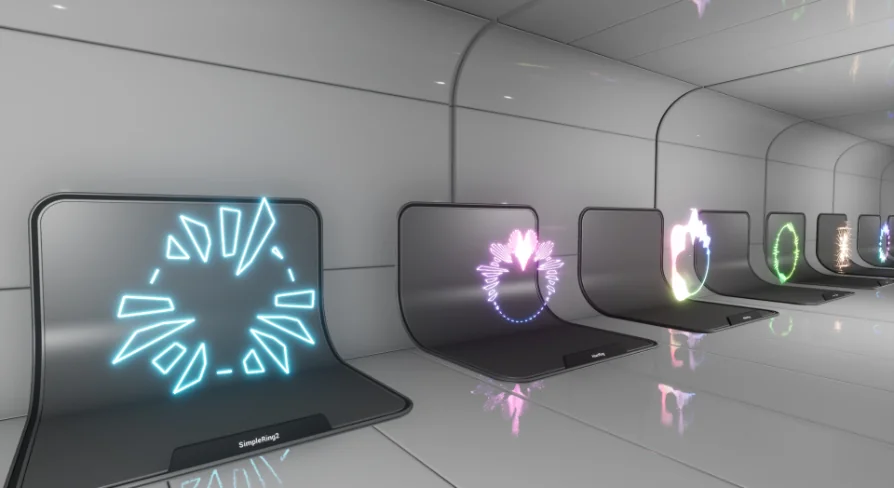
The developer has included various examples to help users get started quickly. However, the tool is also highly flexible for custom work. You can use basic emitters to procedurally create unique audio visualizers from scratch. This procedural nature ensures that your effects can adapt to different audio inputs.
Runs natively on the Niagara system.
No external plug-ins required.
Operates without Blueprint intervention.
Includes example content for immediate use.
Supports procedural creation via basic emitters.
Streamlined Workflow for Visual Effects
Because the Niagara Audio Visualizer integrates so deeply with the native system, it maintains a clean workflow. Moreover, the lack of Blueprint dependency simplifies the setup process significantly. This makes it an ideal choice for those who prefer working within the Niagara editor exclusively.
In practice, this asset offers a robust solution for audio-reactive visuals. By utilizing basic emitters and the native Niagara system, it removes common technical hurdles. It is a dedicated tool for creating impressive visual effects with minimal complexity.
 Variety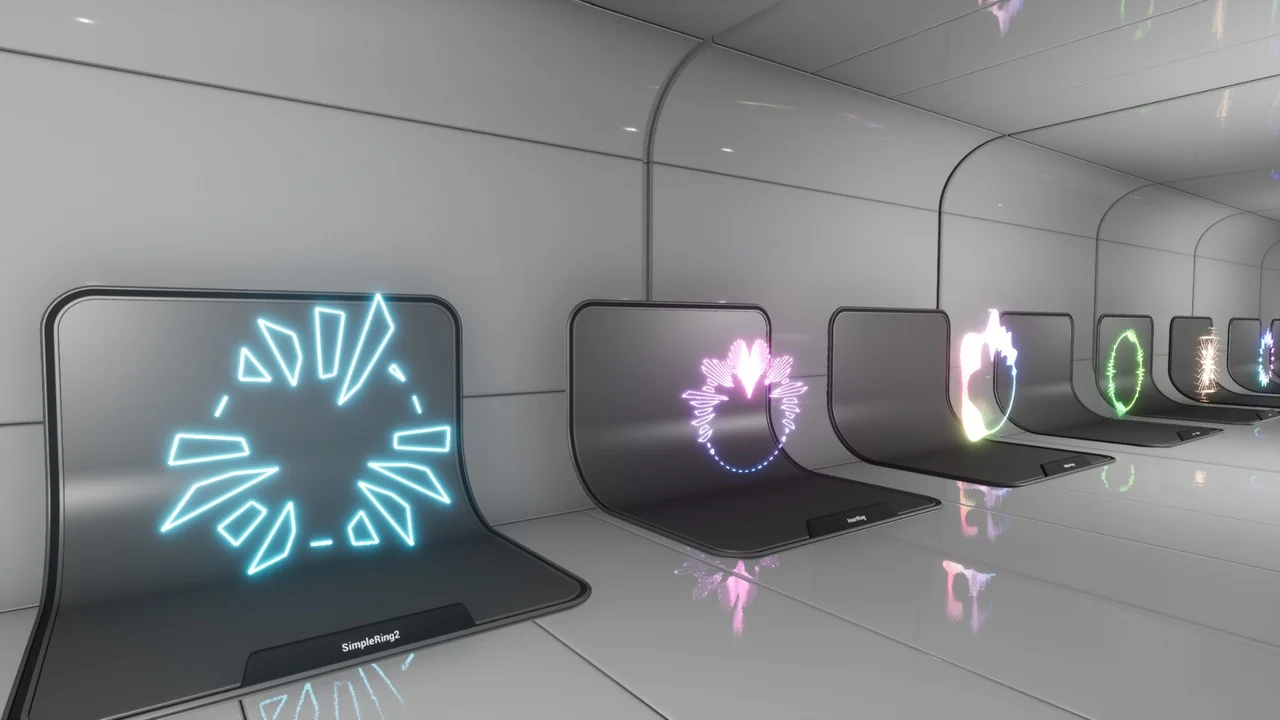
 Variety
 Variety
 Variety