"031373f479d9561a"{"id":"21278","slug":"neurofractals-pack-2","title":"NeuroFractals Pack","category":"Environments","engine":"Original Unity version: 2017.3.0","assetVersion":"Original Unity version: 2017.3.0","engineVersion":"Asset Version:1.0","tag":"Environments","accent":"cyan","visual":"city","summary":"The NeuroFractals Pack offers a specialized approach to environment design by utilizing computer-simulated geometry converted into FBX models. These assets feature unique shader controls for line thickness and color, specifically designed for complex visual...","platform":"Unity","publishedAt":"2026-03-27T05:49:16.000Z","updatedAt":"2026-04-19T15:42:28.000Z","sourceNotes":[],"fileContents":[],"compatibility":["Unity","Original Unity version: 2017.3.0","Asset Version: 1.0"],"featuredImage":{"alt":"NeuroFractals Pack","src":"https://3dcghub.com/wp-content/uploads/2026/03/0e93725f297a_0adafb3f-919f-4b4f-93ea-aa8758e06c21_1280x720_stretch.webp"},"hasDownloadLink":true,"downloads":1,"terms":[{"taxonomy":"category","slug":"environments-3d-unity-2","name":"Environments"},{"taxonomy":"post_tag","slug":"environment","name":"Environment"},{"taxonomy":"post_tag","slug":"materials","name":"Materials"},{"taxonomy":"post_tag","slug":"unity","name":"Unity"}],"galleryImages":[{"src":"https://3dcghub.com/wp-content/uploads/2026/03/2fe6d1e0d12c_6cce2e32-f16a-4f42-9bb5-6d0edd89cfbf_scaled.webp","alt":"NeuroFractals Pack"},{"src":"https://3dcghub.com/wp-content/uploads/2026/03/3453325464f3_209b3571-4605-4dea-bc50-dbb5ec3ab41a_scaled.webp","alt":"NeuroFractals Pack"},{"src":"https://3dcghub.com/wp-content/uploads/2026/03/a8cf6569ef28_c16214c8-b54f-4405-861a-f3ac6390d643_scaled.webp","alt":"NeuroFractals Pack"},{"src":"https://3dcghub.com/wp-content/uploads/2026/03/5e72e8b3e64a_9aae4305-d174-4608-84fc-8ffdc6ea25c6_scaled.webp","alt":"NeuroFractals Pack"},{"src":"https://3dcghub.com/wp-content/uploads/2026/03/de6eacc157aa_63013d4e-63e7-4ea0-9f85-69957c2abf00_scaled.webp","alt":"NeuroFractals Pack"},{"src":"https://3dcghub.com/wp-content/uploads/2026/03/14c504351dd6_ef1dff7a-4e90-4332-9583-5271f49b10a4_scaled.webp","alt":"NeuroFractals Pack"},{"src":"https://3dcghub.com/wp-content/uploads/2026/03/33140434b771_dad6f229-fb97-4cc0-97ab-1e1882a89451_scaled.webp","alt":"NeuroFractals Pack"},{"src":"https://3dcghub.com/wp-content/uploads/2026/03/c56fd1978a5d_efd2025e-181f-4638-b9a4-e3932e399663_scaled.webp","alt":"NeuroFractals Pack"},{"src":"https://3dcghub.com/wp-content/uploads/2026/03/86b153eba92e_bc270bcf-e1f1-4512-b800-db1794fb526e_scaled.webp","alt":"NeuroFractals Pack"}],"accessPanel":{"kind":"resource","title":"Access this resource","eyebrow":"Free Download","message":"Log in or create a free account to start your download.","fileName":"NeuroFractals Pack v1.0.7z","safetyNote":"All resources are 100% manually reviewed to eliminate all risks.","actionLabel":"Download Free","resourceType":"Resource archive"},"contentHtml":"\u003ch2\u003eSimulation-Based Geometry and FBX Integration\u003c/h2\u003e\n\u003cp\u003eThe NeuroFractals Pack is built upon a foundation of computer-simulated data that has been exported directly into FBX files. Unlike traditional hand-sculpted or procedurally generated meshes created at runtime, these models are the static results of external simulations. This approach allows for complex, intricate geometric patterns that would be difficult to replicate through standard modeling techniques. Despite their complex appearance, each model functions as a regular transformable object within the Unity hierarchy, allowing for standard movement, rotation, and scaling operations.\u003c/p\u003e\n\u003cp\u003eFrom a technical standpoint, the models maintain a consistent density. The average vertex count per model ranges between 30,000 and 40,000. This level of detail is designed to support the intricate line-work inherent in fractal simulations without overwhelming the rendering pipeline of compatible Unity versions. Because these are FBX-based, they integrate into the standard Unity workflow as traditional 3D assets while carrying the unique visual signatures of the original simulation.\u003c/p\u003e\n\n\u003ch2\u003eShader Parameters and Visual Customization\u003c/h2\u003e\n\u003cp\u003eTo manage the visual output of these simulated lines, the pack includes a specialized shader designed specifically for this geometry. This shader provides direct control over two primary aesthetic elements: thickness and color. These parameters are not uniform across the meshes; instead, the shader allows for varied thickness and color gradients across the individual lines of the models. This ensures that the complex fractal structures can be adjusted to fit the specific lighting or stylistic requirements of a scene.\u003c/p\u003e\n\u003cp\u003eSupporting these visual adjustments are 21 special textures. These textures are intended to vary the parameters of the shader, providing a range of different looks for the same geometric foundations. By swapping textures and adjusting shader settings, the developer can produce a wide variety of visual results from the base simulation models. The interplay between the fixed FBX geometry and the dynamic shader controls allows for significant visual flexibility despite the static nature of the underlying meshes.\u003c/p\u003e\n\n\u003ch2\u003eAsset Organization and Prefab Structure\u003c/h2\u003e\n\u003cp\u003eThe package is organized into a tiered structure to facilitate rapid implementation. It contains 12 distinct model types, each representing a different simulation result. To provide additional variety, the developer has included multiple variations for each of these 12 types. This hierarchy culminates in 59 ready-to-use prefabs, which combine the models, shaders, and textures into pre-configured objects that can be dropped directly into a scene.\u003c/p\u003e\n\u003cp\u003eIn total, the asset count reaches 171 individual items, all contained within a 91.9 MB unitypackage. This includes the models, textures, the specialized shader, and the prefab variants. For those looking to understand the intended implementation of these assets, an example scene is included, demonstrating how the models and shaders interact within a real-time environment.\u003c/p\u003e\n\n\u003ch2\u003eNative Unity Particle System and Implementation\u003c/h2\u003e\n\u003cp\u003eBeyond static environment decoration, these models are designed for integration with the native Unity particle system. The developer suggests using this combination to create \"endless flight\" sequences. In this workflow, the simulated FBX models serve as the structural basis or targets for particle effects, allowing for the creation of long-form, abstract visual journeys through fractal space. This implementation leverages the standard performance of Unity’s built-in tools while utilizing the unique simulated geometry of the pack.\u003c/p\u003e\n\u003cp\u003eThe pack was originally published for Unity 2017.3.0. Compatibility and performance are centered around this version, ensuring that the shader and particle system interactions function as intended within that specific environment. Because the package uses standard FBX files and a specialized shader, the assets remain transformable and manageable within the standard Unity Inspector, regardless of whether they are used as static background elements or as part of a dynamic, particle-driven flight sequence.\u003c/p\u003e\n\n\u003ch2\u003eContinue Browsing Similar Packs\u003c/h2\u003e\n\u003cul\u003e\n\u003cli\u003e\u003ca href=\"https://3dcghub.com/modern-city-pack/\" title=\"Modern City Pack\"\u003eModern City Pack\u003c/a\u003e\u003c/li\u003e\n\u003cli\u003e\u003ca href=\"https://3dcghub.com/megacity-low-poly-city-3d-models-pack/\" title=\"Megacity – Low Poly City 3D Models Pack\"\u003eMegacity – Low Poly City 3D Models Pack\u003c/a\u003e\u003c/li\u003e\n\u003cli\u003e\u003ca href=\"https://3dcghub.com/mapmagic-2-bundle/\" title=\"MapMagic 2 Bundle\"\u003eMapMagic 2 Bundle\u003c/a\u003e\u003c/li\u003e\n\u003cli\u003e\u003ca href=\"https://3dcghub.com/low-poly-nature-bundle/\" title=\"Low Poly Nature Bundle\"\u003eLow Poly Nature Bundle\u003c/a\u003e\u003c/li\u003e\n\u003cli\u003e\u003ca href=\"https://3dcghub.com/low-poly-modular-terrain-pack/\" title=\"Low Poly Modular Terrain Pack\"\u003eLow Poly Modular Terrain Pack\u003c/a\u003e\u003c/li\u003e\n\u003c/ul\u003e","contentTextLength":4360,"navigation":{"current":2933,"total":3223,"previous":{"id":"21291","slug":"openofficebuildings","title":"OpenOfficeBuildings","category":"Environments","platform":"Unity","updatedAt":"2026-04-19T15:42:28.000Z"},"next":{"id":"21388","slug":"neon-buildings","title":"Neon Buildings","category":"Sci-Fi","platform":"Unity","updatedAt":"2026-04-19T15:42:27.000Z"}},"relatedResources":[{"id":"20872","slug":"advanced-rock-pack-2-0","title":"Advanced Rock Pack 2.0","category":"Environments","engine":"Original Unity version: 2020.3.22","assetVersion":"Original Unity version: 2020.3.22","engineVersion":"Asset Version:2.9.6","tag":"Environments","accent":"cyan","visual":"city","summary":"Advanced Rock Pack 2.0 provides a specialized toolset for creating cohesive landscapes in Unity, offering unique shaders that blend 3D models directly with terrain textures and supporting a wide range of render pipelines from Built-in to Unity 6.","platform":"Unity","publishedAt":"2026-03-26T09:57:12.000Z","updatedAt":"2026-04-19T15:42:52.000Z","sourceNotes":[],"fileContents":[],"compatibility":["Unity","Original Unity version: 2020.3.22","Asset Version: 2.9.6"],"featuredImage":{"alt":"Advanced Rock Pack 2.0","src":"https://3dcghub.com/wp-content/uploads/2026/03/403435739cf2_0f89e2c3-2251-47bc-b422-3103e7a028c8_1280x720_stretch.webp"},"hasDownloadLink":true,"downloads":0},{"id":"21201","slug":"low-poly-modular-terrain-pack","title":"Low Poly Modular Terrain Pack","category":"Environments","engine":"Original Unity version: 2020.3.0","assetVersion":"Original Unity version: 2020.3.0","engineVersion":"Asset Version:1.4.1","tag":"Environments","accent":"cyan","visual":"city","summary":"This massive collection features over 3,000 modular prefabs designed for high-performance landscape creation, ranging from tileable terrain blocks to massive 500m island structures.","platform":"Unity","publishedAt":"2026-03-27T05:38:14.000Z","updatedAt":"2026-04-19T15:42:30.000Z","sourceNotes":[],"fileContents":[],"compatibility":["Unity","Original Unity version: 2020.3.0","Asset Version: 1.4.1"],"featuredImage":{"alt":"Low Poly Modular Terrain Pack","src":"https://3dcghub.com/wp-content/uploads/2026/03/80075f9228da_42249dfc-260c-4b6b-b847-5a3690359653_1280x720_stretch.webp"},"hasDownloadLink":true,"downloads":5},{"id":"20859","slug":"advanced-foliage-pack-2-0","title":"Advanced Foliage Pack 2.0","category":"Environments","engine":"Original Unity version: 2020.3.22","assetVersion":"Original Unity version: 2020.3.22","engineVersion":"Asset Version:3.0.8","tag":"Environments","accent":"cyan","visual":"city","summary":"This resource provides developers with a suite of scanned and optimized foliage, ground textures, and trunks designed for high-fidelity environments. It features dynamic snow coverage and wind shading compatible with modern Unity pipelines.","platform":"Unity","publishedAt":"2026-03-26T09:56:41.000Z","updatedAt":"2026-04-19T15:42:52.000Z","sourceNotes":[],"fileContents":[],"compatibility":["Unity","Original Unity version: 2020.3.22","Asset Version: 3.0.8"],"featuredImage":{"alt":"Advanced Foliage Pack 2.0","src":"https://3dcghub.com/wp-content/uploads/2026/03/c371ac6a0dbe_34f9ae7d-96c0-40fa-8d41-afa1e5698d26_1280x720_stretch.webp"},"hasDownloadLink":true,"downloads":3}]}
Environments
NeuroFractals Pack
The NeuroFractals Pack offers a specialized approach to environment design by utilizing computer-simulated geometry converted into FBX models. These assets feature unique shader controls for line thickness and color, specifically designed for complex visual...
The NeuroFractals Pack is built upon a foundation of computer-simulated data that has been exported directly into FBX files. Unlike traditional hand-sculpted or procedurally generated meshes created at runtime, these models are the static results of external simulations. This approach allows for complex, intricate geometric patterns that would be difficult to replicate through standard modeling techniques. Despite their complex appearance, each model functions as a regular transformable object within the Unity hierarchy, allowing for standard movement, rotation, and scaling operations.
From a technical standpoint, the models maintain a consistent density. The average vertex count per model ranges between 30,000 and 40,000. This level of detail is designed to support the intricate line-work inherent in fractal simulations without overwhelming the rendering pipeline of compatible Unity versions. Because these are FBX-based, they integrate into the standard Unity workflow as traditional 3D assets while carrying the unique visual signatures of the original simulation.
Shader Parameters and Visual Customization
To manage the visual output of these simulated lines, the pack includes a specialized shader designed specifically for this geometry. This shader provides direct control over two primary aesthetic elements: thickness and color. These parameters are not uniform across the meshes; instead, the shader allows for varied thickness and color gradients across the individual lines of the models. This ensures that the complex fractal structures can be adjusted to fit the specific lighting or stylistic requirements of a scene.
Supporting these visual adjustments are 21 special textures. These textures are intended to vary the parameters of the shader, providing a range of different looks for the same geometric foundations. By swapping textures and adjusting shader settings, the developer can produce a wide variety of visual results from the base simulation models. The interplay between the fixed FBX geometry and the dynamic shader controls allows for significant visual flexibility despite the static nature of the underlying meshes.
Asset Organization and Prefab Structure
The package is organized into a tiered structure to facilitate rapid implementation. It contains 12 distinct model types, each representing a different simulation result. To provide additional variety, the developer has included multiple variations for each of these 12 types. This hierarchy culminates in 59 ready-to-use prefabs, which combine the models, shaders, and textures into pre-configured objects that can be dropped directly into a scene.
In total, the asset count reaches 171 individual items, all contained within a 91.9 MB unitypackage. This includes the models, textures, the specialized shader, and the prefab variants. For those looking to understand the intended implementation of these assets, an example scene is included, demonstrating how the models and shaders interact within a real-time environment.
Native Unity Particle System and Implementation
Beyond static environment decoration, these models are designed for integration with the native Unity particle system. The developer suggests using this combination to create "endless flight" sequences. In this workflow, the simulated FBX models serve as the structural basis or targets for particle effects, allowing for the creation of long-form, abstract visual journeys through fractal space. This implementation leverages the standard performance of Unity’s built-in tools while utilizing the unique simulated geometry of the pack.
The pack was originally published for Unity 2017.3.0. Compatibility and performance are centered around this version, ensuring that the shader and particle system interactions function as intended within that specific environment. Because the package uses standard FBX files and a specialized shader, the assets remain transformable and manageable within the standard Unity Inspector, regardless of whether they are used as static background elements or as part of a dynamic, particle-driven flight sequence.
 Environments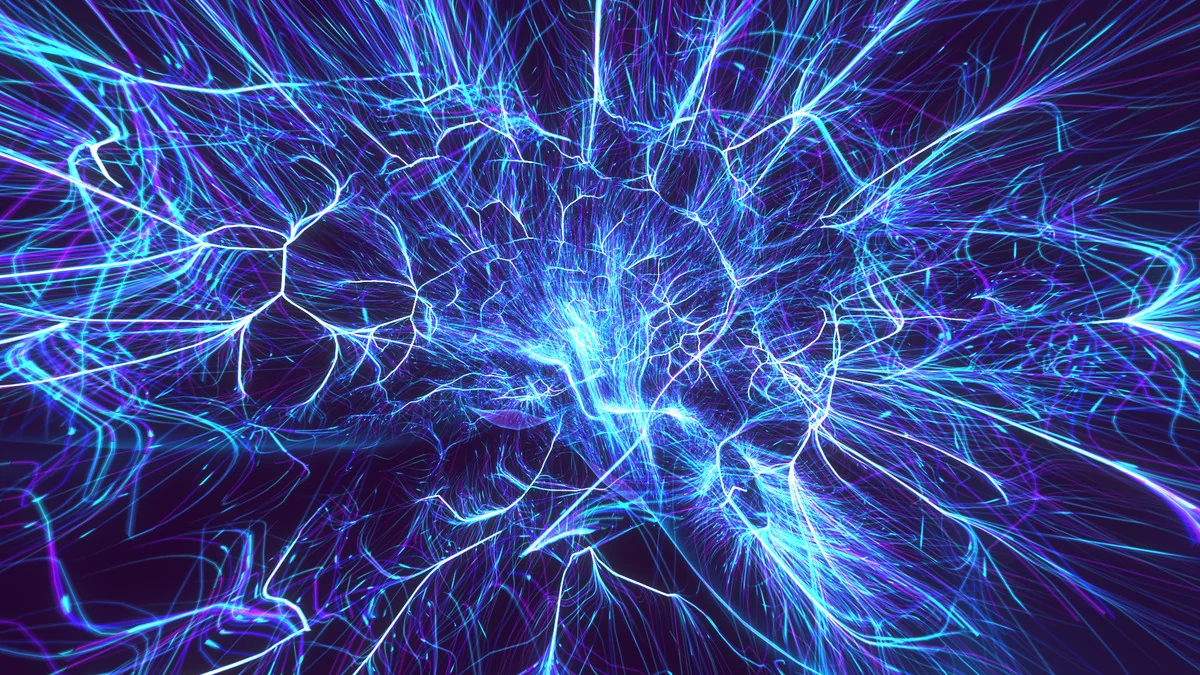
 Environments
 Environments
 Environments