"a338a1d501976271"{"id":"1000301","slug":"modern-city-environment","title":"Modern City Environment","category":"Cities","engine":"5.4+","assetVersion":"","engineVersion":"Engine Version: 5.4+","tag":"Cities","accent":"blue","visual":"city","summary":"Implement a massive, Nanite and Lumen-compatible metropolitan environment in Unreal Engine 5, featuring over 1,000 assets, modular structures, and advanced mate","platform":"Unreal Engine","publishedAt":"2026-07-04T07:39:57.117Z","updatedAt":"2026-07-04T07:39:57.117Z","sourceNotes":[],"fileContents":[],"compatibility":["Unreal Engine","Engine Version: 5.4+"],"featuredImage":{"alt":"Modern City Environment","src":"/wp-content/uploads/published/2026/07/32eb6523f9be-7410dccc-9417-4e14-a6c4-971f379f96b2-aec244717c.webp"},"hasDownloadLink":true,"downloads":2,"terms":[{"taxonomy":"category","slug":"cities","name":"Cities"}],"galleryImages":[{"src":"/wp-content/uploads/published/2026/07/3da9c4213e2c-e221c947-6b93-46a5-a05d-97998260148f-b7848ea73e.webp","alt":"Modern City Environment"},{"src":"/wp-content/uploads/published/2026/07/d54c7281c910-5bec0c30-6202-467c-a579-f2e1277d34e6-1bae760e37.webp","alt":"Modern City Environment"},{"src":"/wp-content/uploads/published/2026/07/f68fa8fee249-6b854655-12c9-4626-bd3f-02d9d1cbff5d-13499da7f2.webp","alt":"Modern City Environment"},{"src":"/wp-content/uploads/published/2026/07/d5cc24a912f5-de85f987-605b-46af-96a7-47ae23146d29-876e842754.webp","alt":"Modern City Environment"},{"src":"/wp-content/uploads/published/2026/07/f7689c4af718-63ce4c9f-fcf1-430a-8a6b-30f330aaffdf-88836c6835.webp","alt":"Modern City Environment"},{"src":"/wp-content/uploads/published/2026/07/711cfa40f707-c8a23f04-fe31-4362-9709-d788589c85d7-a1ca7465be.webp","alt":"Modern City Environment"},{"src":"/wp-content/uploads/published/2026/07/900f042a350d-de91deac-11f9-4f43-a2c7-acf004ea503e-ed987fbeaa.webp","alt":"Modern City Environment"},{"src":"/wp-content/uploads/published/2026/07/0a6f639ab394-353e0c32-7576-4d9b-9277-3651bfb56a06-556bd74691.webp","alt":"Modern City Environment"},{"src":"/wp-content/uploads/published/2026/07/9bac2ca02b4e-a36d6fe2-a6b7-4d96-9ed5-e03cdb7c0fa9-dd230525f4.webp","alt":"Modern City Environment"},{"src":"/wp-content/uploads/published/2026/07/cad33e65fd7c-0b4edcc7-4120-482d-bab2-50f9e73ac348-cd76242ea7.webp","alt":"Modern City Environment"}],"accessPanel":{"kind":"resource","title":"Download this resource","eyebrow":"Free Download","message":"Log in or create a free account to start your download.","fileName":"Content.7z","safetyNote":"Resources are manually reviewed before listing to improve quality and reduce obvious risks.","actionLabel":"Download Free","resourceType":"Resource archive"},"contentHtml":"\u003ch2\u003eDeploying the Modern City Environment in Unreal Engine 5\u003c/h2\u003e\n\u003cp\u003eImplementing a large-scale metropolitan area requires strict adherence to memory management and rendering pipelines. The Modern City Environment is a comprehensive 27GB project built specifically for Unreal Engine 5. Intended primarily for games targeting higher-end systems and consoles, the sheer quality of the assets also allows the environment to be utilized for cinematic production. The package includes a massive demo scene populated with more than 1,000 high-quality unique assets, a count that deliberately excludes simple shapes, booleans, and merges.\u003c/p\u003e\n\u003cp\u003eEverything within the cityscape has been constructed with the Unreal Engine Mannequin scale in mind. Developers can immediately drop standard character controllers into the scene and experience accurate proportions across crosswalks, sidewalks, building entrances, and modern benches. From street-level infrastructure like pavements, poles, and construction zones to towering architecture, the environment provides a dense, believable urban layout. The package also features multiple vehicles, including cars and buses, to populate the road networks and establish realistic traffic routing.\u003c/p\u003e\n\u003ch2\u003eLarge-Scale Mesh Handling and Streaming Levels\u003c/h2\u003e\n\u003cp\u003eThe structural approach to this environment is engineered to balance visual density with runtime performance. Rendering hundreds of thousands of individual architectural and infrastructure assets on a single level is computationally impossible. To solve this, the main level utilizes large static meshes for all primary buildings and road networks. This macro-level optimization ensures that the dense cityscape remains navigable and performant out of the box.\u003c/p\u003e\n\u003cp\u003eDespite this merged geometry in the main level, the underlying construction retains complete modular flexibility. All original roads and buildings were designed as modular pieces, and every modular structural asset is included in the project files. Level designers who need to rebuild specific city blocks, alter intersections, or construct entirely new metropolitan sections can easily replace the large static meshes with these individual components. \u003c/p\u003e\n\u003cp\u003eScene organization is strictly managed using Unreal Engine's Streaming Levels. All standard assets are manually placed into their correct streaming levels to ensure logical memory loading and unloading as the camera moves through the city. For organic elements, trees and foliage are distributed efficiently using the engine's built-in foliage tool, preventing unnecessary draw calls while maintaining a lush urban environment.\u003c/p\u003e\n\u003ch2\u003eAdvanced Master Materials and Fake Interior Shaders\u003c/h2\u003e\n\u003cp\u003eThe texturing pipeline utilizes a standard PBR workflow based on 4K resolution files. To maintain logical texture resolution and overall performance, these 4K textures are downscaled directly within Unreal Engine. For developers requiring extreme close-up fidelity on specific architectural surfaces, some of the tileable materials are provided in 8K resolution. \u003c/p\u003e\n\u003cp\u003eModular assets benefit heavily from the inclusion of Advanced Master Materials. These materials feature parameter controls that allow developers to dictate the visual weathering and variety of the city. Features include World Space (WS) Dust Control to apply consistent grime across different surfaces, alongside comprehensive variation and color controls. Special variation masks allow developers to change the color of assets based on a mask, ensuring that repeating modular pieces look distinct when placed next to one another. All signage and storefronts utilize copyright-free fake branding, removing clearance hurdles for commercial projects.\u003c/p\u003e\n\u003cp\u003eA major highlight of the material setup is the Advanced Fake Interior material, created in partnership with Blox Studio. This shader provides the illusion of depth, offices, and rooms behind building windows without the massive polygon cost of actually modeling interior geometry. For scenarios that do require actual indoor navigation or cinematic staging, bonus interior scenes are also included in the project files.\u003c/p\u003e\n\u003ch2\u003eLumen Integration and Blueprint Lighting Controls\u003c/h2\u003e\n\u003cp\u003eThe Modern City Environment makes full use of Unreal Engine 5's Lumen system for global illumination and reflections. All individual assets have been specifically optimized to work with Lumen and strictly follow the Lumen technical validation documentation. Because the environment relies on this dynamic lighting pipeline, the assets do not come with traditional lightmap UVs. Developers operating on pipelines that require baked lighting can still auto-generate lightmap UVs within the engine if necessary.\u003c/p\u003e\n\u003cp\u003eLighting implementation extends down to the individual fixtures. All lights have been set up using Blueprints, providing developers with straightforward on/off toggles and color controls. This Blueprint approach allows technical artists to easily hook the streetlights, vehicle lights, and building illumination into custom game logic or day/night cycle scripts. To demonstrate the lighting capabilities, the massive demo scene includes both Day and Sunset lighting presets, offering immediate atmospheric starting points.\u003c/p\u003e\n\u003ch2\u003eHardware Baselines and Project Optimization\u003c/h2\u003e\n\u003cp\u003eOperating a cityscape of this magnitude requires careful consideration of hardware targets. The project is performance-heavy due to its sheer size and the high-fidelity default settings of the demo scene. When running the environment on cinematic quality settings, baseline benchmarks show an average of 40 to 60 frames per second using an RTX 3090 graphics card.\u003c/p\u003e\n\u003cp\u003eBecause the intended use spans both high-end gaming and cinematic rendering, developers will need to profile and scale the environment to fit their specific performance budgets. Comprehensive documentation is included directly in the project files to guide developers on how to run a more optimized version of the scene. By following these optimization guidelines, adjusting the streaming level distances, and utilizing the included LOD and Nanite-compatible assets, technical artists can scale the metropolitan environment to maintain steady framerates during active gameplay.\u003c/p\u003e\n\n\u003ch2\u003eRelated Resources Worth Checking\u003c/h2\u003e\n\u003cul\u003e\n\u003cli\u003e\u003ca href=\"https://3dcghub.com/modern-city-downtown-megapack-modern-city-downtown-building-usa-town-street/\" title=\"Modern City Downtown Megapack ( Modern City Downtown Building USA Town Street )\"\u003eModern City Downtown Megapack ( Modern City Downtown Building USA Town Street )\u003c/a\u003e\u003c/li\u003e\n\u003cli\u003e\u003ca href=\"https://3dcghub.com/modern-city-bundle/\" title=\"Modern City Bundle\"\u003eModern City Bundle\u003c/a\u003e\u003c/li\u003e\n\u003cli\u003e\u003ca href=\"https://3dcghub.com/fishing-village-environment/\" title=\"Fishing Village Environment\"\u003eFishing Village Environment\u003c/a\u003e\u003c/li\u003e\n\u003cli\u003e\u003ca href=\"https://3dcghub.com/football-soccer-sports-stadium/\" title=\"Football \u0026amp; Soccer Sports Stadium\"\u003eFootball \u0026amp; Soccer Sports Stadium\u003c/a\u003e\u003c/li\u003e\n\u003cli\u003e\u003ca href=\"https://3dcghub.com/forgotten-alley/\" title=\"Forgotten Alley\"\u003eForgotten Alley\u003c/a\u003e\u003c/li\u003e\n\u003c/ul\u003e","contentTextLength":6364,"navigation":{"current":1175,"total":3338,"previous":{"id":"1000302","slug":"hydra","title":"Hydra","category":"Characters \u0026 Creatures","platform":"Unreal Engine","updatedAt":"2026-07-04T07:49:48.204Z"},"next":{"id":"1000300","slug":"hospital-animations","title":"Hospital Animations","category":"Variety","platform":"Unreal Engine","updatedAt":"2026-07-03T18:16:23.749Z"}},"relatedResources":[{"id":"1000738","slug":"modern-buildings-pack","title":"Modern Buildings Pack","category":"Cities","engine":"5.1+","assetVersion":"","engineVersion":"Engine Version: 5.1+","tag":"Cities","accent":"blue","visual":"mech","summary":"Forty low-poly modular Unreal Engine buildings built from Blueprints, using only six textures and seven UV channels for flexible architectural variation.","platform":"Unreal Engine","publishedAt":"2026-07-27T03:51:02.594Z","updatedAt":"2026-07-27T03:51:02.594Z","sourceNotes":[],"fileContents":[],"compatibility":["Unreal Engine","Engine Version: 5.1+"],"featuredImage":{"alt":"Modern Buildings Pack","src":"/wp-content/uploads/published/2026/07/a22bba4f460a-e55e5dd3-97bb-4f15-a3f7-7c989b9eab20-361f9a7460.webp"},"hasDownloadLink":true,"downloads":1},{"id":"4359","slug":"modern-city-bundle","title":"Modern City Bundle","category":"Cities","engine":"4.26+,5.0+","assetVersion":"Engine version: 4.26+,5.0+","engineVersion":"4.22","tag":"Cities","accent":"blue","visual":"city","summary":"Build stunning urban landscapes with the Modern City Bundle. Featuring modular streets, high-fidelity buildings, and optimized performance for game developers.","platform":"Unreal Engine","publishedAt":"2026-02-13T07:35:02.000Z","updatedAt":"2026-04-19T15:57:10.000Z","sourceNotes":[],"fileContents":[],"compatibility":["Unreal Engine"],"featuredImage":{"alt":"Modern City Bundle","src":"https://3dcghub.com/wp-content/uploads/2026/02/a7d454cd-1b52-4514-9950-d39304d96783.webp"},"hasDownloadLink":true,"downloads":3},{"id":"7224","slug":"modern-city-downtown-megapack-modern-city-downtown-building-usa-town-street","title":"Modern City Downtown Megapack ( Modern City Downtown Building USA Town Street )","category":"Cities","engine":"4.26+,5.0+","assetVersion":"Engine version: 4.26+,5.0+","engineVersion":"4.19","tag":"Cities","accent":"blue","visual":"city","summary":"Create stunning, high-fidelity urban environments with this comprehensive modular megacollection. It features over 350 unique models, detailed interiors, and advanced level design tools for professional creators.","platform":"Unreal Engine","publishedAt":"2026-02-20T18:17:02.000Z","updatedAt":"2026-04-19T15:56:02.000Z","sourceNotes":[],"fileContents":[],"compatibility":["Unreal Engine","Engine version: 4.26+,5.0+"],"featuredImage":{"alt":"Modern City Downtown Megapack ( Modern City Downtown Building USA Town Street )","src":"https://3dcghub.com/wp-content/uploads/2026/02/ed834a7f-d138-4d89-837b-61a72700df67.webp"},"hasDownloadLink":true,"downloads":0}]}
Cities
Modern City Environment
Implement a massive, Nanite and Lumen-compatible metropolitan environment in Unreal Engine 5, featuring over 1,000 assets, modular structures, and advanced mate
Deploying the Modern City Environment in Unreal Engine 5
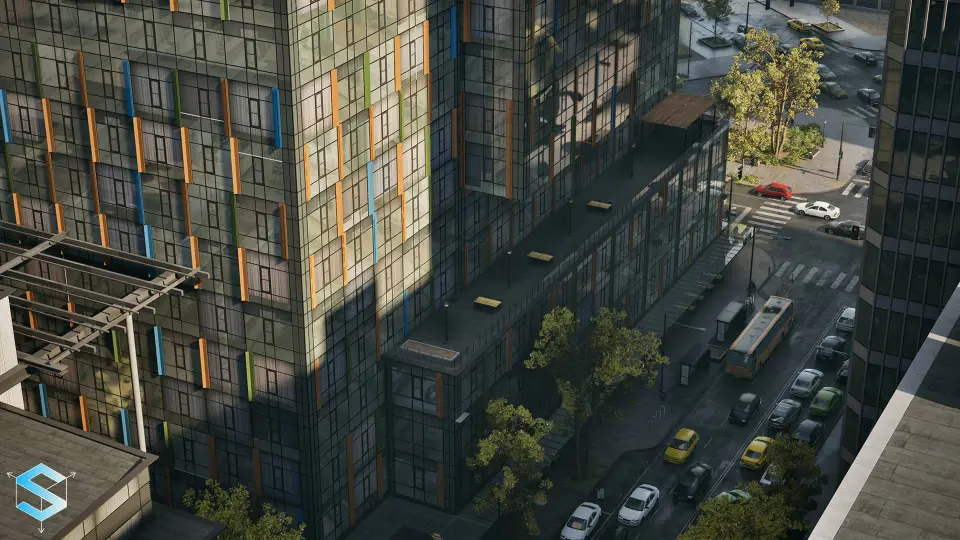
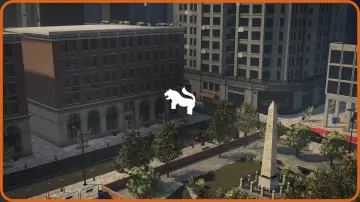
Implementing a large-scale metropolitan area requires strict adherence to memory management and rendering pipelines. The Modern City Environment is a comprehensive 27GB project built specifically for Unreal Engine 5. Intended primarily for games targeting higher-end systems and consoles, the sheer quality of the assets also allows the environment to be utilized for cinematic production. The package includes a massive demo scene populated with more than 1,000 high-quality unique assets, a count that deliberately excludes simple shapes, booleans, and merges.
Everything within the cityscape has been constructed with the Unreal Engine Mannequin scale in mind. Developers can immediately drop standard character controllers into the scene and experience accurate proportions across crosswalks, sidewalks, building entrances, and modern benches. From street-level infrastructure like pavements, poles, and construction zones to towering architecture, the environment provides a dense, believable urban layout. The package also features multiple vehicles, including cars and buses, to populate the road networks and establish realistic traffic routing.
Large-Scale Mesh Handling and Streaming Levels
The structural approach to this environment is engineered to balance visual density with runtime performance. Rendering hundreds of thousands of individual architectural and infrastructure assets on a single level is computationally impossible. To solve this, the main level utilizes large static meshes for all primary buildings and road networks. This macro-level optimization ensures that the dense cityscape remains navigable and performant out of the box.
Despite this merged geometry in the main level, the underlying construction retains complete modular flexibility. All original roads and buildings were designed as modular pieces, and every modular structural asset is included in the project files. Level designers who need to rebuild specific city blocks, alter intersections, or construct entirely new metropolitan sections can easily replace the large static meshes with these individual components.
Scene organization is strictly managed using Unreal Engine's Streaming Levels. All standard assets are manually placed into their correct streaming levels to ensure logical memory loading and unloading as the camera moves through the city. For organic elements, trees and foliage are distributed efficiently using the engine's built-in foliage tool, preventing unnecessary draw calls while maintaining a lush urban environment.
Advanced Master Materials and Fake Interior Shaders
The texturing pipeline utilizes a standard PBR workflow based on 4K resolution files. To maintain logical texture resolution and overall performance, these 4K textures are downscaled directly within Unreal Engine. For developers requiring extreme close-up fidelity on specific architectural surfaces, some of the tileable materials are provided in 8K resolution.
Modular assets benefit heavily from the inclusion of Advanced Master Materials. These materials feature parameter controls that allow developers to dictate the visual weathering and variety of the city. Features include World Space (WS) Dust Control to apply consistent grime across different surfaces, alongside comprehensive variation and color controls. Special variation masks allow developers to change the color of assets based on a mask, ensuring that repeating modular pieces look distinct when placed next to one another. All signage and storefronts utilize copyright-free fake branding, removing clearance hurdles for commercial projects.
A major highlight of the material setup is the Advanced Fake Interior material, created in partnership with Blox Studio. This shader provides the illusion of depth, offices, and rooms behind building windows without the massive polygon cost of actually modeling interior geometry. For scenarios that do require actual indoor navigation or cinematic staging, bonus interior scenes are also included in the project files.
Lumen Integration and Blueprint Lighting Controls
The Modern City Environment makes full use of Unreal Engine 5's Lumen system for global illumination and reflections. All individual assets have been specifically optimized to work with Lumen and strictly follow the Lumen technical validation documentation. Because the environment relies on this dynamic lighting pipeline, the assets do not come with traditional lightmap UVs. Developers operating on pipelines that require baked lighting can still auto-generate lightmap UVs within the engine if necessary.
Lighting implementation extends down to the individual fixtures. All lights have been set up using Blueprints, providing developers with straightforward on/off toggles and color controls. This Blueprint approach allows technical artists to easily hook the streetlights, vehicle lights, and building illumination into custom game logic or day/night cycle scripts. To demonstrate the lighting capabilities, the massive demo scene includes both Day and Sunset lighting presets, offering immediate atmospheric starting points.
Hardware Baselines and Project Optimization
Operating a cityscape of this magnitude requires careful consideration of hardware targets. The project is performance-heavy due to its sheer size and the high-fidelity default settings of the demo scene. When running the environment on cinematic quality settings, baseline benchmarks show an average of 40 to 60 frames per second using an RTX 3090 graphics card.
Because the intended use spans both high-end gaming and cinematic rendering, developers will need to profile and scale the environment to fit their specific performance budgets. Comprehensive documentation is included directly in the project files to guide developers on how to run a more optimized version of the scene. By following these optimization guidelines, adjusting the streaming level distances, and utilizing the included LOD and Nanite-compatible assets, technical artists can scale the metropolitan environment to maintain steady framerates during active gameplay.
 Cities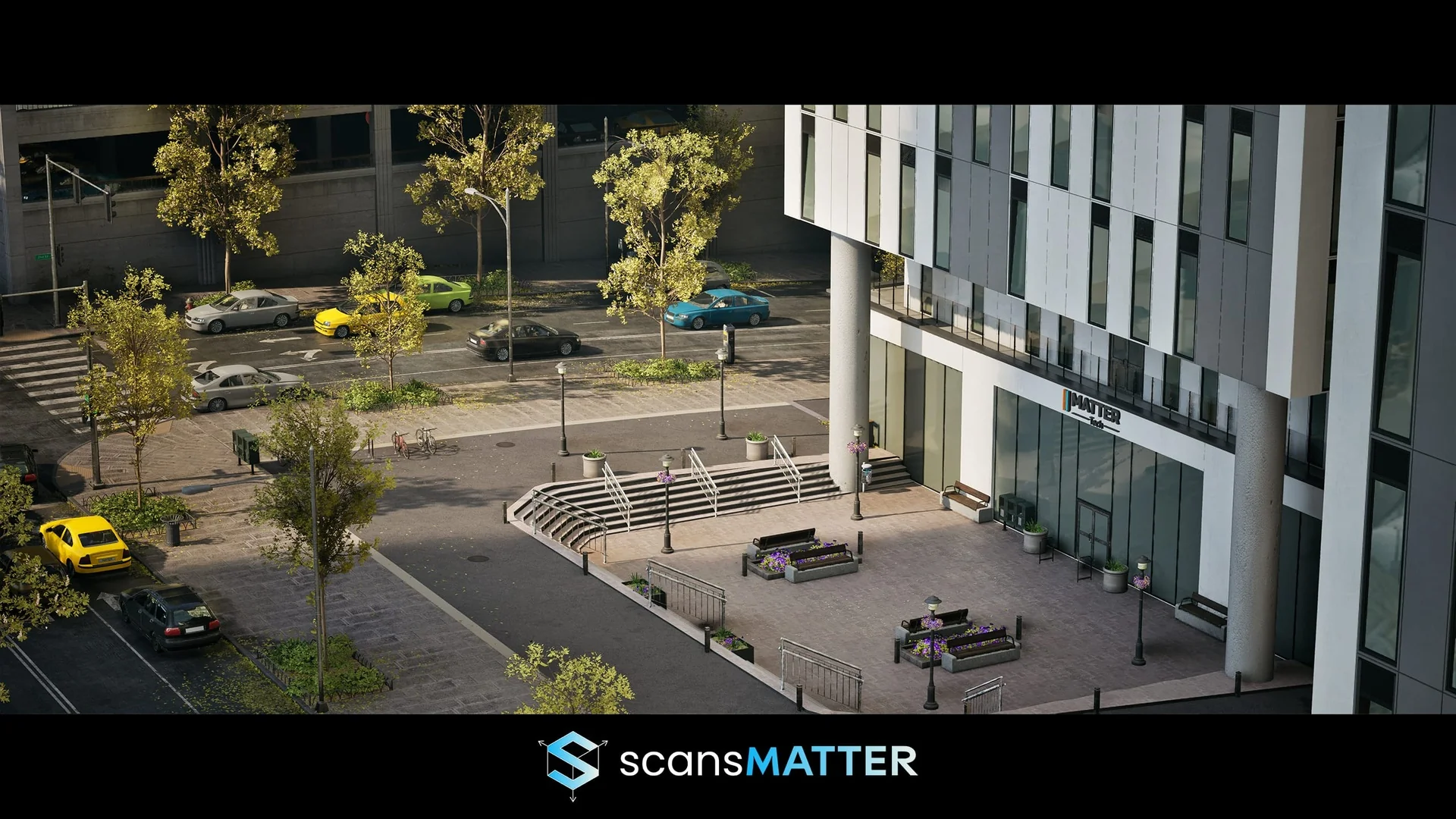
 Cities
 Cities
 Cities