"c68a05d5e51405b3"{"id":"1000644","slug":"medieval-props-vol-3-farm-2","title":"Medieval Props Vol 3 Farm","category":"Tools, Objects \u0026 Decor","engine":"4.26+,5.0+","assetVersion":"","engineVersion":"Engine Version: 4.26+,5.0+","tag":"Tools","accent":"blue","visual":"mech","summary":"A medieval farm props pack with a 12-parameter Master Material, texture atlas workflow, and two overview levels for games, archviz, and cinematics.","platform":"Unreal Engine","publishedAt":"2026-07-21T17:39:05.852Z","updatedAt":"2026-07-21T17:39:05.852Z","sourceNotes":[],"fileContents":[],"compatibility":["Unreal Engine","Engine Version: 4.26+,5.0+"],"featuredImage":{"alt":"Medieval Props Vol 3 Farm","src":"/wp-content/uploads/published/2026/07/c61c175b90c8-5869fb85-99dd-496b-aabd-a9aef69fde58-3752e86692.webp"},"hasDownloadLink":true,"downloads":0,"terms":[{"taxonomy":"category","slug":"tools-objects-and-decor","name":"Tools, Objects \u0026 Decor"}],"galleryImages":[{"src":"/wp-content/uploads/published/2026/07/3a5ffa0a9129-b4d8e2d1-6fc7-40cc-9ecd-ece190de4bd4-99c25d7f87.webp","alt":"Medieval Props Vol 3 Farm"},{"src":"/wp-content/uploads/published/2026/07/1468209df66d-baebc054-a635-4234-ab85-92deeb1f5df6-1b47ce06fc.webp","alt":"Medieval Props Vol 3 Farm"},{"src":"/wp-content/uploads/published/2026/07/5e225b177110-2283fe7a-54e2-4a8b-92b7-c6ed2090744e-90a307ecb6.webp","alt":"Medieval Props Vol 3 Farm"},{"src":"/wp-content/uploads/published/2026/07/1817adc4b340-7e8481b6-5963-4a9e-aa14-20430f962a73-4b83c8899d.webp","alt":"Medieval Props Vol 3 Farm"},{"src":"/wp-content/uploads/published/2026/07/05a5b6f626dd-3ff49d20-11a5-4e3d-98f1-5aa4ef6ac648-750bd71893.webp","alt":"Medieval Props Vol 3 Farm"},{"src":"/wp-content/uploads/published/2026/07/13395e30457d-0a72f7cb-30df-41e2-9f99-b01861e82801-d2af0e4d66.webp","alt":"Medieval Props Vol 3 Farm"},{"src":"/wp-content/uploads/published/2026/07/dc841f28634d-517ad583-736f-411f-929b-2698d3f1c9fd-a42b55e627.webp","alt":"Medieval Props Vol 3 Farm"},{"src":"/wp-content/uploads/published/2026/07/2f5df177e0fd-d0265639-0737-418e-bffb-2d3cdba16bb7-87d98dbfc0.webp","alt":"Medieval Props Vol 3 Farm"},{"src":"/wp-content/uploads/published/2026/07/d2ca29513e16-d5437c5a-baf6-4d41-a82d-71f35c3230c2-d9b75504fc.webp","alt":"Medieval Props Vol 3 Farm"},{"src":"/wp-content/uploads/published/2026/07/1b5309f667e0-521dd72e-ad11-416c-977d-867321a427f4-8e1cee0c2a.webp","alt":"Medieval Props Vol 3 Farm"}],"accessPanel":{"kind":"resource","title":"Download this resource","eyebrow":"Free Download","message":"Log in or create a free account to start your download.","fileName":"Content.7z","safetyNote":"Resources are manually reviewed before listing to improve quality and reduce obvious risks.","actionLabel":"Download Free","resourceType":"Resource archive"},"contentHtml":"\u003cp\u003eFarms, hamlets, and the practical outer workings of a medieval settlement rarely build themselves. \u003cstrong\u003eMedieval Props Vol 3 Farm\u003c/strong\u003e Steps into that gap as a focused prop collection anchored in the everyday objects that define agrarian life during the medieval and fantasy periods. The pack is primarily geared toward farm environments, yet its individual pieces are built to function broadly across any historical or fantasy scene that calls for grounded, realistic dressing.\u003c/p\u003e \u003ch2\u003eBuilding scenes with the Medieval Props Vol 3 Farm set\u003c/h2\u003e \u003cp\u003eThe collection serves several production contexts. Video games, architectural visualization, and cinematic rendering are each called out as suitable targets. Those disciplines share a need for props that hold up under different lighting conditions and camera distances, and the pack addresses that by providing two dedicated overview levels. One overview level uses dynamic lighting, while the other uses static lighting. Having both available gives developers and environment artists a direct way to evaluate how each prop responds to different rendering approaches before committing to a full scene build.\u003c/p\u003e \u003cp\u003eThe pack also carries a compatibility note with \u003cem\u003eMedieval Castle Modular Vol 1\u003c/em\u003e. That relationship matters for artists who are already assembling larger medieval environments. A castle exterior needs surrounding infrastructure to feel lived in, and farm props supply exactly that supporting context. Where the castle module set handles the monumental architecture, this prop set handles the scattered, functional sprawl that makes a settlement feel occupied.\u003c/p\u003e \u003ch2\u003eMaster Material control and Material Instance flexibility\u003c/h2\u003e \u003cp\u003eAt the technical core of the pack is a single Master Material exposing 12 parameters. This setup is designed so that artists can make broad or granular adjustments through Material Instances rather than diving into node graphs or creating new materials from scratch. The 12 parameters offer control over effects and color corrections, giving each instance the ability to shift in ways that match the specific visual direction of a project.\u003c/p\u003e \u003cp\u003eThis approach keeps the workflow lean. An environment artist can populate a farmyard, then tweak the material behavior across multiple props without touching the base material. Because the control is parameter-based, every change remains non-destructive and reversible. If a scene needs warmer tone, different weathering, or a shift in how surfaces respond to light, those adjustments route through the same material instance system.\u003c/p\u003e \u003cp\u003eThe parameter count itself—12—suggests a balance between simplicity and depth. It is enough control to meaningfully differentiate instances and tailor props to varying conditions, without overwhelming the artist with an excessive interface. The goal is keeping iteration fast while preserving visual fidelity across the collection.\u003c/p\u003e \u003ch2\u003eTexture atlas workflow and reducing drawcalls\u003c/h2\u003e \u003cp\u003eBeyond material parameters, the pack relies on a texture atlas system. Texture atlasing works by consolidating multiple textures into a shared layout, which allows several meshes to draw from the same texture resources rather than each requiring dedicated maps. In practice, this means an artist can build prefabs and merge actors while using very few material slots.\u003c/p\u003e \u003cp\u003eThe direct benefit is a reduction in drawcalls, a metric that directly impacts rendering performance. When a scene carries hundreds of individual props—common for farm environments dense with tools, containers, firewood, and structural pieces—each material slot can trigger a separate drawcall. By keeping material slots to a minimum through atlas-based prefabs and actor merging, the pack helps maintain smoother runtime performance even when scenes become heavily populated.\u003c/p\u003e \u003cp\u003eThe atlas workflow pairs with the Master Material system rather than competing with it. Because merged actors point to the same atlas-backed material, parameter adjustments on the Master Material propagate cleanly across the merged set. This means performance optimization does not come at the cost of creative control. An artist can merge a cluster of farm props into a single actor for efficiency, then still adjust the shared material instance to shift the cluster's visual character.\u003c/p\u003e \u003ch2\u003eFarm props and peasant life in focus\u003c/h2\u003e \u003cp\u003eThe tagged contents point to the specific vocabulary of objects the pack brings to a scene. The tags include \u003cstrong\u003eGate, Wheelbarrow, Firewood, Wooden, Wood, Peasant, Farm, Wheel, Fantasy, Medieval, Realistic\u003c/strong\u003e, and \u003cstrong\u003eOptimized\u003c/strong\u003e. Read together, they sketch a picture of a working medieval farm rather than a decorative one.\u003c/p\u003e \u003cp\u003eA gate suggests enclosed areas—animal pens, garden plots, or property boundaries. A wheelbarrow implies labor and the transport of goods, while firewood points to stored fuel and the daily reality of keeping a homestead running. The wood and wooden tags repeatedly reinforce that these are organic, material-driven objects built from timber rather than forged metal or cut stone, which aligns with the peasant and farm focus. A wheel exists as a standalone element, likely tied to the wheelbarrow or other cart-based equipment.\u003c/p\u003e \u003cp\u003eThe presence of both \u003cem\u003eFantasy\u003c/em\u003e And \u003cem\u003eRealistic\u003c/em\u003e Tags indicates a stylistic range. The props are grounded enough to fit historically inspired medieval scenes, yet shaped to function within fantasy contexts without breaking visual coherence. A thatched farmhouse in a realistic archviz render and a peasant's cottage in a fantasy game quest can draw from the same prop set without feeling out of place.\u003c/p\u003e \u003cp\u003eThe \u003cem\u003eOptimized\u003c/em\u003e Tag ties directly back to the technical systems discussed earlier. Optimization here is not an afterthought; it is structural. The texture atlas approach, the single Master Material with parameter-driven instances, and the ability to merge actors with minimal material slots all contribute to a collection built to perform under real production loads.\u003c/p\u003e \u003ch2\u003eWho benefits from integrating this farm prop pack\u003c/h2\u003e \u003cp\u003e\u003cstrong\u003eMedieval Props Vol 3 Farm\u003c/strong\u003e Is most useful for developers and artists working on medieval or fantasy environments who need practical, everyday objects rather than hero pieces. Game developers building explorable villages or farmsteads will find the drawcall reduction and prefab-friendly workflow directly relevant to keeping performance stable as scenes grow. Archviz professionals rendering historical reconstructions benefit from the realistic prop styling and the two lighting overview levels, which let them validate material behavior before final rendering. Cinematic artists working on sequences set in medieval or fantasy periods can use the collection to dress sets quickly while retaining the material flexibility needed for shot-specific color and tone adjustments.\u003c/p\u003e \u003cp\u003eFor teams already using \u003cem\u003eMedieval Castle Modular Vol 1\u003c/em\u003e, this pack functions as a natural extension. The architectural shell provided by the castle set gains a layer of environmental storytelling when surrounded by gates, wheelbarrows, and stacked firewood. The shared medieval fantasy language between the two packs means they can be combined without visual mismatch, letting a single environment scale from fortress walls outward into working farmland and peasant infrastructure.\u003c/p\u003e\n\n\u003ch2\u003eMore From The Same Workflow\u003c/h2\u003e\n\u003cul\u003e\n\u003cli\u003e\u003ca href=\"https://3dcghub.com/medieval-props-vol-3-farm/\" title=\"Medieval Props Vol 3 Farm\"\u003eMedieval Props Vol 3 Farm\u003c/a\u003e\u003c/li\u003e\n\u003cli\u003e\u003ca href=\"https://3dcghub.com/vintage-scifi-pack-vol-1-enigmatic-ancient-stone/\" title=\"Vintage SciFi pack VOL 1 Enigmatic Ancient Stone\"\u003eVintage SciFi pack VOL 1 Enigmatic Ancient Stone\u003c/a\u003e\u003c/li\u003e\n\u003cli\u003e\u003ca href=\"https://3dcghub.com/medieval-props-pack/\" title=\"Medieval Props Pack\"\u003eMedieval Props Pack\u003c/a\u003e\u003c/li\u003e\n\u003cli\u003e\u003ca href=\"https://3dcghub.com/interior-props/\" title=\"Interior Props\"\u003eInterior Props\u003c/a\u003e\u003c/li\u003e\n\u003cli\u003e\u003ca href=\"https://3dcghub.com/big-gates-pack/\" title=\"Big gates pack\"\u003eBig gates pack\u003c/a\u003e\u003c/li\u003e\n\u003c/ul\u003e","contentTextLength":7333,"navigation":{"current":1362,"total":3860,"previous":{"id":"1000645","slug":"medieval-watchtowers-and-platforms-v1","title":"Medieval Watchtowers and Platforms - v1","category":"Buildings \u0026 Architecture","platform":"Unreal Engine","updatedAt":"2026-07-21T17:44:36.382Z"},"next":{"id":"1000643","slug":"medieval-nordic-village-environment-medieval-exterior-interior-modular-pbr","title":"Medieval Nordic Village Environment (Medieval, Exterior, Interior, Modular, PBR)","category":"Medieval","platform":"Unreal Engine","updatedAt":"2026-07-21T17:35:03.057Z"}},"relatedResources":[{"id":"1000953","slug":"medieval-vol-6-food-and-feast","title":"Medieval - VOL 6 - Food and Feast","category":"Tools, Objects \u0026 Decor","engine":"4.26+,5.0+","assetVersion":"","engineVersion":"Engine Version: 4.26+,5.0+","tag":"Tools","accent":"blue","visual":"mech","summary":"46 Unreal Engine meshes with 2k PBR textures, master materials, and a dynamic lighting scene for building medieval dining scenes. AAA quality, game-ready.","platform":"Unreal Engine","publishedAt":"2026-08-14T05:33:17.779Z","updatedAt":"2026-08-14T05:33:17.779Z","sourceNotes":[],"fileContents":[],"compatibility":["Unreal Engine","Engine Version: 4.26+,5.0+"],"featuredImage":{"alt":"Medieval - VOL 6 - Food and Feast","src":"/wp-content/uploads/published/2026/08/fed9f0a5b8fc-c53e33a2-08f8-4641-8dc7-8ee1f59daeee-ce6811f998.webp"},"hasDownloadLink":true,"downloads":0},{"id":"4691","slug":"medieval-props-vol-3-farm","title":"Medieval Props Vol 3 Farm","category":"Tools, Objects \u0026 Decor","engine":"4.26+,5.0+","assetVersion":"Engine version: 4.26+,5.0+","engineVersion":"4.22","tag":"Tools","accent":"blue","visual":"mech","summary":"Enhance your fantasy environment with this optimized medieval farm props pack. Features master materials and texture atlases for high-quality game development.","platform":"Unreal Engine","publishedAt":"2026-02-13T09:18:10.000Z","updatedAt":"2026-04-19T15:57:06.000Z","sourceNotes":[],"fileContents":[],"compatibility":["Unreal Engine","Engine version: 4.26+,5.0+"],"featuredImage":{"alt":"Medieval Props Vol 3 Farm","src":"https://3dcghub.com/wp-content/uploads/2026/02/55a9061a-deab-4722-8e94-d97f39f56a9e.webp"},"hasDownloadLink":true,"downloads":0},{"id":"4867","slug":"vintage-scifi-pack-vol-1-enigmatic-ancient-stone","title":"Vintage SciFi pack VOL 1 Enigmatic Ancient Stone","category":"Tools, Objects \u0026 Decor","engine":"4.26+,5.0+","assetVersion":"Engine version: 4.26+,5.0+","engineVersion":"4.26","tag":"Tools","accent":"blue","visual":"audio","summary":"Enhance your game world with the Vintage Sci-Fi Ancient Stone pack. High-quality 3D models of pagan idols and monuments for immersive environments.","platform":"Unreal Engine","publishedAt":"2026-02-13T10:12:58.000Z","updatedAt":"2026-04-19T15:57:03.000Z","sourceNotes":[],"fileContents":[],"compatibility":["Unreal Engine","Engine version: 4.26+,5.0+"],"featuredImage":{"alt":"Vintage SciFi pack VOL 1 Enigmatic Ancient Stone","src":"https://3dcghub.com/wp-content/uploads/2026/02/27cd1d38-83c1-47db-9d80-9e2a033f1035.webp"},"hasDownloadLink":true,"downloads":0}]}
Tools
Medieval Props Vol 3 Farm
A medieval farm props pack with a 12-parameter Master Material, texture atlas workflow, and two overview levels for games, archviz, and cinematics.
Farms, hamlets, and the practical outer workings of a medieval settlement rarely build themselves. Medieval Props Vol 3 Farm Steps into that gap as a focused prop collection anchored in the everyday objects that define agrarian life during the medieval and fantasy periods. The pack is primarily geared toward farm environments, yet its individual pieces are built to function broadly across any historical or fantasy scene that calls for grounded, realistic dressing.
Building scenes with the Medieval Props Vol 3 Farm set
The collection serves several production contexts. Video games, architectural visualization, and cinematic rendering are each called out as suitable targets. Those disciplines share a need for props that hold up under different lighting conditions and camera distances, and the pack addresses that by providing two dedicated overview levels. One overview level uses dynamic lighting, while the other uses static lighting. Having both available gives developers and environment artists a direct way to evaluate how each prop responds to different rendering approaches before committing to a full scene build.
The pack also carries a compatibility note with Medieval Castle Modular Vol 1. That relationship matters for artists who are already assembling larger medieval environments. A castle exterior needs surrounding infrastructure to feel lived in, and farm props supply exactly that supporting context. Where the castle module set handles the monumental architecture, this prop set handles the scattered, functional sprawl that makes a settlement feel occupied.
Master Material control and Material Instance flexibility
At the technical core of the pack is a single Master Material exposing 12 parameters. This setup is designed so that artists can make broad or granular adjustments through Material Instances rather than diving into node graphs or creating new materials from scratch. The 12 parameters offer control over effects and color corrections, giving each instance the ability to shift in ways that match the specific visual direction of a project.
This approach keeps the workflow lean. An environment artist can populate a farmyard, then tweak the material behavior across multiple props without touching the base material. Because the control is parameter-based, every change remains non-destructive and reversible. If a scene needs warmer tone, different weathering, or a shift in how surfaces respond to light, those adjustments route through the same material instance system.
The parameter count itself—12—suggests a balance between simplicity and depth. It is enough control to meaningfully differentiate instances and tailor props to varying conditions, without overwhelming the artist with an excessive interface. The goal is keeping iteration fast while preserving visual fidelity across the collection.
Texture atlas workflow and reducing drawcalls
Beyond material parameters, the pack relies on a texture atlas system. Texture atlasing works by consolidating multiple textures into a shared layout, which allows several meshes to draw from the same texture resources rather than each requiring dedicated maps. In practice, this means an artist can build prefabs and merge actors while using very few material slots.
The direct benefit is a reduction in drawcalls, a metric that directly impacts rendering performance. When a scene carries hundreds of individual props—common for farm environments dense with tools, containers, firewood, and structural pieces—each material slot can trigger a separate drawcall. By keeping material slots to a minimum through atlas-based prefabs and actor merging, the pack helps maintain smoother runtime performance even when scenes become heavily populated.
The atlas workflow pairs with the Master Material system rather than competing with it. Because merged actors point to the same atlas-backed material, parameter adjustments on the Master Material propagate cleanly across the merged set. This means performance optimization does not come at the cost of creative control. An artist can merge a cluster of farm props into a single actor for efficiency, then still adjust the shared material instance to shift the cluster's visual character.
Farm props and peasant life in focus
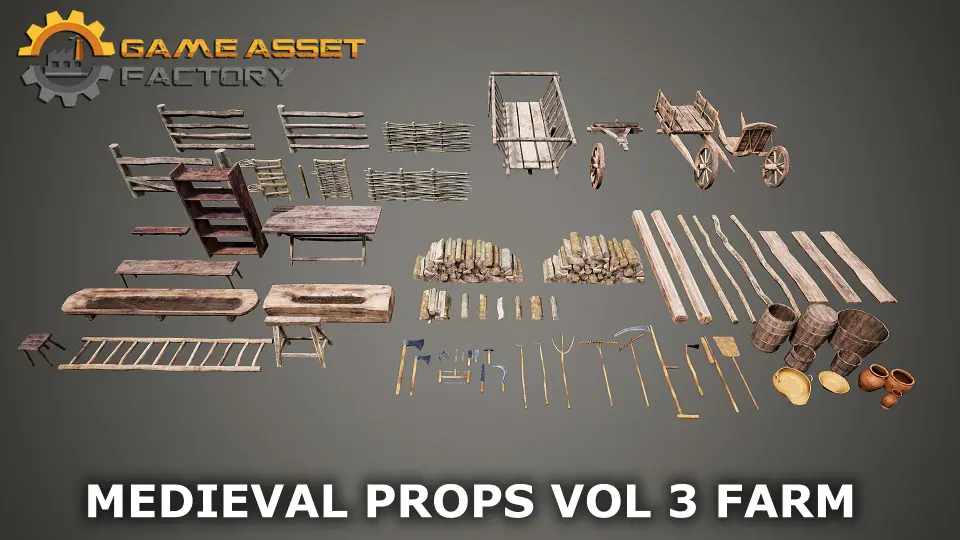
The tagged contents point to the specific vocabulary of objects the pack brings to a scene. The tags include Gate, Wheelbarrow, Firewood, Wooden, Wood, Peasant, Farm, Wheel, Fantasy, Medieval, Realistic, and Optimized. Read together, they sketch a picture of a working medieval farm rather than a decorative one.
A gate suggests enclosed areas—animal pens, garden plots, or property boundaries. A wheelbarrow implies labor and the transport of goods, while firewood points to stored fuel and the daily reality of keeping a homestead running. The wood and wooden tags repeatedly reinforce that these are organic, material-driven objects built from timber rather than forged metal or cut stone, which aligns with the peasant and farm focus. A wheel exists as a standalone element, likely tied to the wheelbarrow or other cart-based equipment.
The presence of both Fantasy And Realistic Tags indicates a stylistic range. The props are grounded enough to fit historically inspired medieval scenes, yet shaped to function within fantasy contexts without breaking visual coherence. A thatched farmhouse in a realistic archviz render and a peasant's cottage in a fantasy game quest can draw from the same prop set without feeling out of place.
The Optimized Tag ties directly back to the technical systems discussed earlier. Optimization here is not an afterthought; it is structural. The texture atlas approach, the single Master Material with parameter-driven instances, and the ability to merge actors with minimal material slots all contribute to a collection built to perform under real production loads.
Who benefits from integrating this farm prop pack
Medieval Props Vol 3 Farm Is most useful for developers and artists working on medieval or fantasy environments who need practical, everyday objects rather than hero pieces. Game developers building explorable villages or farmsteads will find the drawcall reduction and prefab-friendly workflow directly relevant to keeping performance stable as scenes grow. Archviz professionals rendering historical reconstructions benefit from the realistic prop styling and the two lighting overview levels, which let them validate material behavior before final rendering. Cinematic artists working on sequences set in medieval or fantasy periods can use the collection to dress sets quickly while retaining the material flexibility needed for shot-specific color and tone adjustments.
For teams already using Medieval Castle Modular Vol 1, this pack functions as a natural extension. The architectural shell provided by the castle set gains a layer of environmental storytelling when surrounded by gates, wheelbarrows, and stacked firewood. The shared medieval fantasy language between the two packs means they can be combined without visual mismatch, letting a single environment scale from fortress walls outward into working farmland and peasant infrastructure.
 Tools
Tools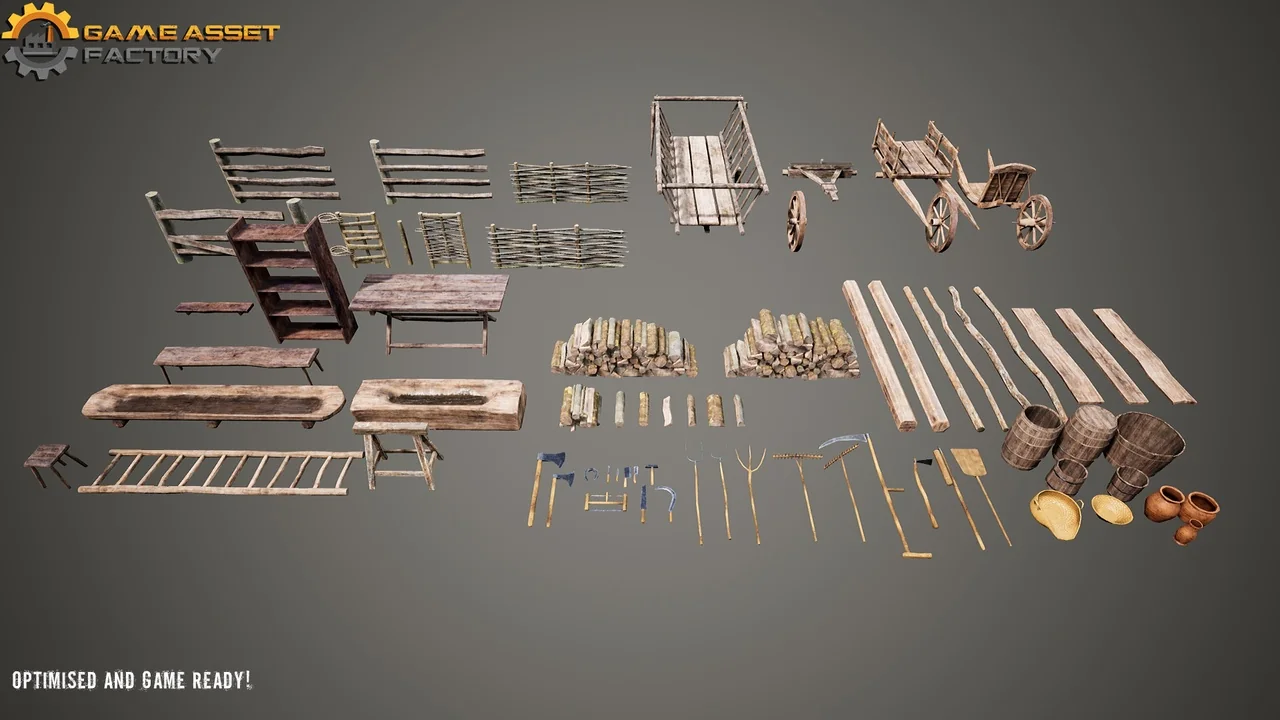
 Tools
Tools Tools
Tools Tools
Tools