"1c2c8b66743036b4"{"id":"1001700","slug":"impact-explosion-fx-vdb","title":"Impact Explosion FX VDB","category":"Fire \u0026 Explosions","engine":"5.4+","assetVersion":"","engineVersion":"Engine Version: 5.4+","tag":"Fire \u0026 Explosions","accent":"blue","visual":"mech","summary":"Explore the Blueprint architecture, material controls, and volumetric simulation parameters of Impact Explosion FX VDB for Unreal Engine VFX pipelines.","platform":"Unreal Engine","publishedAt":"2026-10-14T13:29:19.115Z","updatedAt":"2026-10-14T13:29:19.115Z","sourceNotes":[],"fileContents":[],"compatibility":["Unreal Engine","Engine Version: 5.4+"],"featuredImage":{"alt":"Impact Explosion FX VDB","src":"/wp-content/uploads/published/2026/10/3dbabc117029-617e6367-9f82-441f-ad06-1b6cc66717ca-74272ae37f.webp"},"hasDownloadLink":true,"downloads":0,"terms":[{"taxonomy":"category","slug":"fire-and-explosions","name":"Fire \u0026 Explosions"}],"galleryImages":[{"src":"/wp-content/uploads/published/2026/10/d72ff4d9fb55-184035bb-49b8-4935-94d4-41aee45f22d3-3979f0bd97.webp","alt":"Impact Explosion FX VDB"},{"src":"/wp-content/uploads/published/2026/10/56210112ca34-f5311673-2fd7-4613-807a-49f35d6c8835-d402d22828.webp","alt":"Impact Explosion FX VDB"},{"src":"/wp-content/uploads/published/2026/10/60c14b6276e3-858eaa13-2d95-42ef-83b8-460982e811b1-707737dbb9.webp","alt":"Impact Explosion FX VDB"},{"src":"/wp-content/uploads/published/2026/10/0ff11e55064b-4e7be487-8086-4de6-8910-047283cdeffe-7797a8d4d8.webp","alt":"Impact Explosion FX VDB"},{"src":"/wp-content/uploads/published/2026/10/49b941a8b799-6d4d8cd2-0b53-4b05-8337-aae1000815cb-5a0cbc24f0.webp","alt":"Impact Explosion FX VDB"},{"src":"/wp-content/uploads/published/2026/10/cb0c84d657d1-bddd8fd0-0bdc-4592-8ed4-26193e538e3a-8213f0a3ec.webp","alt":"Impact Explosion FX VDB"},{"src":"/wp-content/uploads/published/2026/10/29c7f4132369-40099cbc-2574-42ae-948c-0b3507188655-5e9170bc38.webp","alt":"Impact Explosion FX VDB"},{"src":"/wp-content/uploads/published/2026/10/ca52d7894b5c-68aa7047-1567-46ae-93f7-1a78a4c453d9-10ca87bfd3.webp","alt":"Impact Explosion FX VDB"},{"src":"/wp-content/uploads/published/2026/10/1829c8a3cd1b-fdffc68a-75f6-48ff-a4c0-b053e25e7d1a-e7f318e523.webp","alt":"Impact Explosion FX VDB"},{"src":"/wp-content/uploads/published/2026/10/107987bcfcb6-e6c065f7-8ed1-45b5-87a6-0a8b67a4275d-1fd048d906.webp","alt":"Impact Explosion FX VDB"}],"accessPanel":{"kind":"resource","title":"Download this resource","eyebrow":"Free Download","message":"Log in or create a free account to start your download.","fileName":"Content.7z","safetyNote":"Resources are manually reviewed before listing to improve quality and reduce obvious risks.","actionLabel":"Download Free","resourceType":"Resource archive"},"contentHtml":"\u003cp\u003eA sudden detonation inside a digital environment requires more than an expanding sphere; it demands a distinct separation between luminous core fire, turbulent volumetric smoke, and outward-flung physical particles. Impact Explosion FX VDB approaches this challenge by supplying ten distinct impact explosion effects structured directly inside Blueprints. By unifying volumetric voxel data with real-time particle simulation, the collection delivers ready-to-trigger explosive events calibrated for projectile strikes, heavy ordnance, and kinetic environment impacts.\u003c/p\u003e \u003ch2\u003eBlast Dynamics and Volumetric Structure in Impact Explosions\u003c/h2\u003e\n\u003cp\u003eVolumetric data brings a level of physical body to explosions that standard two-dimensional billboard sprites struggle to capture. Through voxel-based volumes and VDB structures, the core fireball within each of the ten effects exhibits authentic internal churning, varied thickness, and self-shadowing properties. When an explosion triggers, the volume expansion communicates raw concussive force through rolling smoke fronts and high-pressure fire development.\u003c/p\u003e \u003cp\u003eBecause the collection encompasses ten different variations, it provides distinct silhouettes suitable for a wide range of combat scenarios. A sudden grenade blast close to an actor requires a tight, rapid burst that disperses quickly, whereas an aerial rocket impact or heavy bomb strike calls for a broader fireball with protracted smoke linger. Having ten separate presets allows a project to vary explosion shapes across multiple simultaneous impacts, preventing repetitive visual patterns when multiple targets detonate in quick succession.\u003c/p\u003e \u003ch2\u003eBlueprint Architecture and Component Encapsulation\u003c/h2\u003e\n\u003cp\u003eEach of the ten explosion presets is completely wrapped within a Blueprint. In real-time production, managing an intricate effect often means juggling multiple components simultaneously: the volumetric cache, the primary burst emitter, secondary trailing smoke, flying embers, and falling debris. Encapsulating every element inside a single Blueprint eliminates the need to manually spawn and synchronize disparate systems during gameplay events.\u003c/p\u003e \u003cp\u003eThis containerized approach allows technical artists and level designers to treat each blast as a singular world object. Whether attached to a projectile hit event, triggered via a sequence track in cinematics, or spawned dynamically at line-trace collision coordinates, the Blueprint ensures that every layer of the explosion initializes at the exact correct frame. The underlying structure coordinates the lifecycle of both the volumetric rendering and the particle simulation cleanly from start to finish.\u003c/p\u003e \u003ch2\u003eMaterial Instance Adjustments for Fire Color, Brightness, and Density\u003c/h2\u003e\n\u003cp\u003eVisual cohesion across varied game environments often depends on lighting consistency and artistic direction. Impact Explosion FX VDB addresses this through dedicated Material Instances that expose direct control over the combustion properties of the blast. Rather than requiring modifications to underlying shader networks, artists can fine-tune three fundamental properties directly within the material interface:\u003c/p\u003e \u003cul\u003e \u003cli\u003e\u003cstrong\u003eFire Color:\u003c/strong\u003e Shifting the hue parameters allows for seamless adaptation between visual styles. Standard orange-yellow combustion suits military weaponry, while shifts toward blue, green, or violet can instantly adapt the blast for plasma artillery, sci-fi energy weapons, or arcane explosive spells.\u003c/li\u003e \u003cli\u003e\u003cstrong\u003eBrightness:\u003c/strong\u003e Controlling blast luminosity is essential for balancing effects against dynamic scene exposure and post-processing stacks. Brightness values can be dialed up to blow out camera sensors during close-range detonations or reduced to preserve detailed flame textures in darker nighttime environments.\u003c/li\u003e \u003cli\u003e\u003cstrong\u003eDensity:\u003c/strong\u003e Adjusting density alters the physical presence of both the flame and the trailing smoke volume. A denser volume creates opaque, billowing smoke clouds suitable for industrial explosions, while lower density produces ethereal, fast-dissipating visual events that clear screen space rapidly for competitive play.\u003c/li\u003e\n\u003c/ul\u003e \u003cp\u003eBecause these adjustments occur at the Material Instance level, variations can be generated quickly without recompiling master shaders, enabling distinct visual tiers for different weapon calibers or faction technologies.\u003c/p\u003e \u003ch2\u003eDebris and Embers Parameterization in the Blueprint\u003c/h2\u003e\n\u003cp\u003eA convincing detonation extends beyond the central flame front; it involves the violent displacement of solid material. The embers and debris accompanying these ten explosions are exposed directly via user parameters within the Blueprints. This level of control allows developers to tailor the secondary particle behavior to the physical context of the blast.\u003c/p\u003e \u003cp\u003eThrough these user parameters, the behavior of trailing sparks and scattered rubble can be dialed up or down depending on the intended surface interaction. A bomb detonating on open concrete demands high-velocity fragments with brief lifespans, while an impact in an industrial fuel depot might require prolonged, swirling ember clouds that float through the air after the initial fireball has vanished. Modifying these parameters directly on the Blueprint instances empowers designers to convey the kinetic yield of each weapon without leaving the primary viewport.\u003c/p\u003e \u003ch2\u003eNiagara Volumetric Workflows and Dragon Flame FX Pairing\u003c/h2\u003e\n\u003cp\u003eThe technical structure relies on modern Niagara particle systems paired with volumetric rendering frameworks. By managing voxel data inside Niagara-enabled visual effect pipelines, the system maintains stable performance while processing complex particle counts alongside heavy volumetric density calculations.\u003c/p\u003e \u003cp\u003eFor projects requiring broader combustion systems, Impact Explosion FX VDB demonstrates direct workflow compatibility alongside Dragon Flame FX. Combining continuous flame-throwing streams or dragon-breath emitters with localized impact detonations creates a unified visual vocabulary. Fire color values and brightness levels can be matched across both assets using their corresponding material instances, ensuring that an impact burst matches the exact chromatic signature of the incoming flame attack.\u003c/p\u003e \u003ch2\u003eDeployment Considerations for Interactive Projects\u003c/h2\u003e\n\u003cp\u003eDeploying volumetric visual effects requires careful coordination between visual impact and runtime efficiency. Because Impact Explosion FX VDB organizes its secondary debris via Blueprint user parameters and handles shading within Material Instances, technical teams retain granular control over scene clutter. Projects aiming for rapid-fire combat can prune debris life and soften density to maintain high framerates, while cinematic sequences can maximize density and ember count for maximum screen spectacle. The ten wrapped Blueprints establish a clear, adaptable framework for explosive gameplay mechanics across varied combat environments.\u003c/p\u003e\n\n\u003ch2\u003eMore From The Same Workflow\u003c/h2\u003e\n\u003cul\u003e\n\u003cli\u003e\u003ca href=\"https://3dcghub.com/ballistics-fx/\" title=\"Ballistics FX\"\u003eBallistics FX\u003c/a\u003e\u003c/li\u003e\n\u003cli\u003e\u003ca href=\"https://3dcghub.com/explosions-niagara-explosions-fire-smoke-atom-explosions-explosions-bundle/\" title=\"EXPLOSIONS - Niagara Explosions, Fire, Smoke, Atom Explosions, Explosions Bundle\"\u003eEXPLOSIONS - Niagara Explosions, Fire, Smoke, Atom Explosions, Explosions Bundle\u003c/a\u003e\u003c/li\u003e\n\u003cli\u003e\u003ca href=\"https://3dcghub.com/explosion-fx-customizable/\" title=\"Explosion FX Customizable\"\u003eExplosion FX Customizable\u003c/a\u003e\u003c/li\u003e\n\u003cli\u003e\u003ca href=\"https://3dcghub.com/dragon-flame-fx/\" title=\"Dragon Flame FX\"\u003eDragon Flame FX\u003c/a\u003e\u003c/li\u003e\n\u003cli\u003e\u003ca href=\"https://3dcghub.com/fire-fx-vdb/\" title=\"Fire FX VDB\"\u003eFire FX VDB\u003c/a\u003e\u003c/li\u003e\n\u003c/ul\u003e","contentTextLength":7007,"navigation":{"current":15,"total":3651,"previous":{"id":"1001701","slug":"modular-amsterdam-city-street-with-canal","title":"Modular Amsterdam City Street with Canal","category":"Cities","platform":"Unreal Engine","updatedAt":"2026-10-14T13:30:10.202Z"},"next":{"id":"1001699","slug":"abandoned-industrial-factory-environment-abandoned-industrial-factory-3d","title":"Abandoned Industrial Factory Environment ( Abandoned Industrial Factory 3D )","category":"Industrial","platform":"Unreal Engine","updatedAt":"2026-10-14T13:28:27.773Z"}},"relatedResources":[{"id":"1000978","slug":"ballistics-fx","title":"Ballistics FX","category":"Fire \u0026 Explosions","engine":"5.2+","assetVersion":"","engineVersion":"Engine Version: 5.2+","tag":"Fire \u0026 Explosions","accent":"blue","visual":"mech","summary":"Ballistics FX for Unreal Engine delivers 96 impact particles across 31 materials, plus ricochet, shell casing, and grenade FX. Includes weapon blueprints and a","platform":"Unreal Engine","publishedAt":"2026-08-18T05:53:13.264Z","updatedAt":"2026-08-18T05:53:13.264Z","sourceNotes":[],"fileContents":[],"compatibility":["Unreal Engine","Engine Version: 5.2+"],"featuredImage":{"alt":"Ballistics FX","src":"/wp-content/uploads/published/2026/08/c273f4532082-2438c11a-e908-43c5-97e6-cd1a89c4ca58-89afdb180a.webp"},"hasDownloadLink":true,"downloads":1},{"id":"15588","slug":"explosions-niagara-explosions-fire-smoke-atom-explosions-explosions-bundle","title":"EXPLOSIONS - Niagara Explosions, Fire, Smoke, Atom Explosions, Explosions Bundle","category":"Fire \u0026 Explosions","engine":"5.0+","assetVersion":"Engine version: 5.0+","engineVersion":"4.27","tag":"Fire \u0026 Explosions","accent":"blue","visual":"audio","summary":"Upgrade your project's visual impact with 21 high-quality Niagara particle systems. This bundle includes everything from massive atomic blasts to realistic fire and debris effects.","platform":"Unreal Engine","publishedAt":"2026-03-12T12:10:38.000Z","updatedAt":"2026-04-19T15:44:44.000Z","sourceNotes":[],"fileContents":[],"compatibility":["Unreal Engine","Engine version: 5.0+"],"featuredImage":{"alt":"EXPLOSIONS - Niagara Explosions, Fire, Smoke, Atom Explosions, Explosions Bundle","src":"https://3dcghub.com/wp-content/uploads/2026/03/c7be6eaf-178c-45f8-97c0-05dcf1be23f5.webp"},"hasDownloadLink":true,"downloads":3},{"id":"15572","slug":"explosion-fx-customizable","title":"Explosion FX Customizable","category":"Fire \u0026 Explosions","engine":"5.2+","assetVersion":"Engine version: 5.2+","engineVersion":"5.2","tag":"Fire \u0026 Explosions","accent":"blue","visual":"city","summary":"Enhance your project with the Explosion FX Customizable pack, featuring eight unique explosion types and advanced motion vector technology. Adjust color, size, and velocity to fit your specific game environment.","platform":"Unreal Engine","publishedAt":"2026-03-12T12:08:07.000Z","updatedAt":"2026-04-19T15:44:44.000Z","sourceNotes":[],"fileContents":[],"compatibility":["Unreal Engine","Engine version: 5.2+"],"featuredImage":{"alt":"Explosion FX Customizable","src":"https://3dcghub.com/wp-content/uploads/2026/03/d6bee4e5-bf0f-4f6f-9b75-e040ff6125ad.webp"},"hasDownloadLink":true,"downloads":2}]}
Fire & Explosions
Impact Explosion FX VDB
Explore the Blueprint architecture, material controls, and volumetric simulation parameters of Impact Explosion FX VDB for Unreal Engine VFX pipelines.
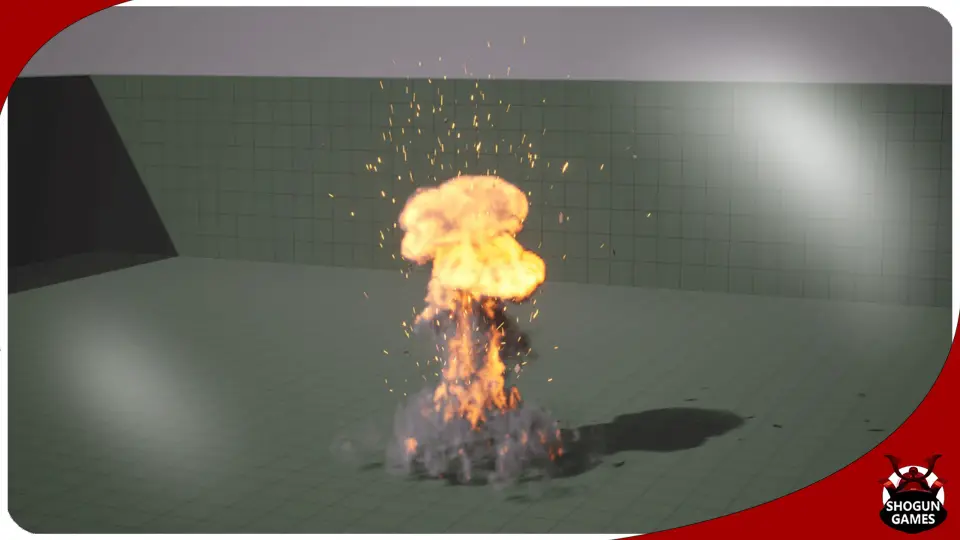
A sudden detonation inside a digital environment requires more than an expanding sphere; it demands a distinct separation between luminous core fire, turbulent volumetric smoke, and outward-flung physical particles. Impact Explosion FX VDB approaches this challenge by supplying ten distinct impact explosion effects structured directly inside Blueprints. By unifying volumetric voxel data with real-time particle simulation, the collection delivers ready-to-trigger explosive events calibrated for projectile strikes, heavy ordnance, and kinetic environment impacts.
Blast Dynamics and Volumetric Structure in Impact Explosions
Volumetric data brings a level of physical body to explosions that standard two-dimensional billboard sprites struggle to capture. Through voxel-based volumes and VDB structures, the core fireball within each of the ten effects exhibits authentic internal churning, varied thickness, and self-shadowing properties. When an explosion triggers, the volume expansion communicates raw concussive force through rolling smoke fronts and high-pressure fire development.
Because the collection encompasses ten different variations, it provides distinct silhouettes suitable for a wide range of combat scenarios. A sudden grenade blast close to an actor requires a tight, rapid burst that disperses quickly, whereas an aerial rocket impact or heavy bomb strike calls for a broader fireball with protracted smoke linger. Having ten separate presets allows a project to vary explosion shapes across multiple simultaneous impacts, preventing repetitive visual patterns when multiple targets detonate in quick succession.
Blueprint Architecture and Component Encapsulation
Each of the ten explosion presets is completely wrapped within a Blueprint. In real-time production, managing an intricate effect often means juggling multiple components simultaneously: the volumetric cache, the primary burst emitter, secondary trailing smoke, flying embers, and falling debris. Encapsulating every element inside a single Blueprint eliminates the need to manually spawn and synchronize disparate systems during gameplay events.
This containerized approach allows technical artists and level designers to treat each blast as a singular world object. Whether attached to a projectile hit event, triggered via a sequence track in cinematics, or spawned dynamically at line-trace collision coordinates, the Blueprint ensures that every layer of the explosion initializes at the exact correct frame. The underlying structure coordinates the lifecycle of both the volumetric rendering and the particle simulation cleanly from start to finish.
Material Instance Adjustments for Fire Color, Brightness, and Density
Visual cohesion across varied game environments often depends on lighting consistency and artistic direction. Impact Explosion FX VDB addresses this through dedicated Material Instances that expose direct control over the combustion properties of the blast. Rather than requiring modifications to underlying shader networks, artists can fine-tune three fundamental properties directly within the material interface:
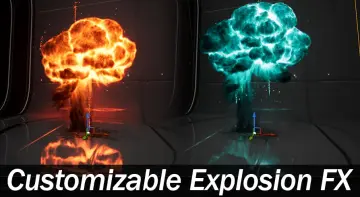
Fire Color: Shifting the hue parameters allows for seamless adaptation between visual styles. Standard orange-yellow combustion suits military weaponry, while shifts toward blue, green, or violet can instantly adapt the blast for plasma artillery, sci-fi energy weapons, or arcane explosive spells.
Brightness: Controlling blast luminosity is essential for balancing effects against dynamic scene exposure and post-processing stacks. Brightness values can be dialed up to blow out camera sensors during close-range detonations or reduced to preserve detailed flame textures in darker nighttime environments.
Density: Adjusting density alters the physical presence of both the flame and the trailing smoke volume. A denser volume creates opaque, billowing smoke clouds suitable for industrial explosions, while lower density produces ethereal, fast-dissipating visual events that clear screen space rapidly for competitive play.
Because these adjustments occur at the Material Instance level, variations can be generated quickly without recompiling master shaders, enabling distinct visual tiers for different weapon calibers or faction technologies.
Debris and Embers Parameterization in the Blueprint
A convincing detonation extends beyond the central flame front; it involves the violent displacement of solid material. The embers and debris accompanying these ten explosions are exposed directly via user parameters within the Blueprints. This level of control allows developers to tailor the secondary particle behavior to the physical context of the blast.
Through these user parameters, the behavior of trailing sparks and scattered rubble can be dialed up or down depending on the intended surface interaction. A bomb detonating on open concrete demands high-velocity fragments with brief lifespans, while an impact in an industrial fuel depot might require prolonged, swirling ember clouds that float through the air after the initial fireball has vanished. Modifying these parameters directly on the Blueprint instances empowers designers to convey the kinetic yield of each weapon without leaving the primary viewport.
Niagara Volumetric Workflows and Dragon Flame FX Pairing
The technical structure relies on modern Niagara particle systems paired with volumetric rendering frameworks. By managing voxel data inside Niagara-enabled visual effect pipelines, the system maintains stable performance while processing complex particle counts alongside heavy volumetric density calculations.
For projects requiring broader combustion systems, Impact Explosion FX VDB demonstrates direct workflow compatibility alongside Dragon Flame FX. Combining continuous flame-throwing streams or dragon-breath emitters with localized impact detonations creates a unified visual vocabulary. Fire color values and brightness levels can be matched across both assets using their corresponding material instances, ensuring that an impact burst matches the exact chromatic signature of the incoming flame attack.
Deployment Considerations for Interactive Projects
Deploying volumetric visual effects requires careful coordination between visual impact and runtime efficiency. Because Impact Explosion FX VDB organizes its secondary debris via Blueprint user parameters and handles shading within Material Instances, technical teams retain granular control over scene clutter. Projects aiming for rapid-fire combat can prune debris life and soften density to maintain high framerates, while cinematic sequences can maximize density and ember count for maximum screen spectacle. The ten wrapped Blueprints establish a clear, adaptable framework for explosive gameplay mechanics across varied combat environments.
 Fire & Explosions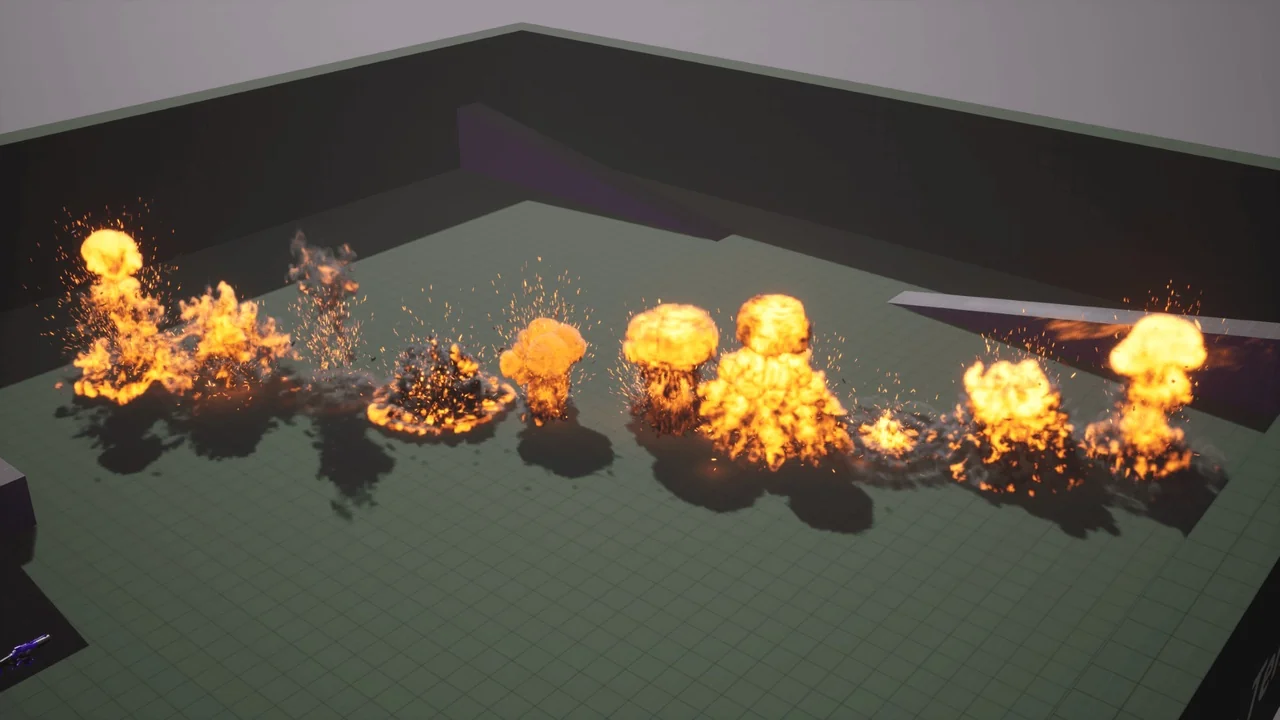
 Fire & Explosions
 Fire & Explosions
 Fire & Explosions