"1c2c8b66743036b4"{"id":"1001054","slug":"gothic-horror-environment","title":"Gothic Horror Environment","category":"Fantasy","engine":"4.26+,5.0+","assetVersion":"","engineVersion":"Engine Version: 4.26+,5.0+","tag":"Fantasy","accent":"blue","visual":"city","summary":"Modular gothic horror environment with walls, floors, pillars, columns, statues, graves, and placement blueprints for curbs, railings, fences, lights, and insta","platform":"Unreal Engine","publishedAt":"2026-08-30T13:58:24.603Z","updatedAt":"2026-08-30T13:58:24.603Z","sourceNotes":[],"fileContents":[],"compatibility":["Unreal Engine","Engine Version: 4.26+,5.0+"],"featuredImage":{"alt":"Gothic Horror Environment","src":"/wp-content/uploads/published/2026/08/9885cb4917be-d32cb63e-d4bf-4b14-a8d2-aa144bf0d3fc-369f03600c.webp"},"hasDownloadLink":true,"downloads":1,"terms":[{"taxonomy":"category","slug":"fantasy","name":"Fantasy"}],"galleryImages":[{"src":"/wp-content/uploads/published/2026/08/8c00ecbc1cf5-92fa3530-709e-40c8-9517-8b526295c914-ec01ca7288.webp","alt":"Gothic Horror Environment"},{"src":"/wp-content/uploads/published/2026/08/808f584ad872-1cd36c94-67fc-4f3a-a19a-194c9e63c608-7f02519026.webp","alt":"Gothic Horror Environment"},{"src":"/wp-content/uploads/published/2026/08/0166ae110317-f4927400-51f6-4092-b8b3-419c49667b9c-0834fef672.webp","alt":"Gothic Horror Environment"},{"src":"/wp-content/uploads/published/2026/08/37ef74a2bef3-78c5bd15-fb32-4a4d-86f9-611fb7a34beb-3de13cf77d.webp","alt":"Gothic Horror Environment"},{"src":"/wp-content/uploads/published/2026/08/c25c807e152c-e2f8de2f-5c1b-4519-b276-c8348895c5fd-bfca6293f1.webp","alt":"Gothic Horror Environment"},{"src":"/wp-content/uploads/published/2026/08/e51aee291112-0662508a-b060-4037-8027-f23dc94e9be5-d2a985aa61.webp","alt":"Gothic Horror Environment"},{"src":"/wp-content/uploads/published/2026/08/2ce0410cf9d2-e2adb80e-95df-4a1f-bb01-ee50d51c3a12-16826205fd.webp","alt":"Gothic Horror Environment"},{"src":"/wp-content/uploads/published/2026/08/4d8835325da5-d9a5de2b-120a-48b2-8431-695b4e23a85d-8195e3474f.webp","alt":"Gothic Horror Environment"},{"src":"/wp-content/uploads/published/2026/08/a253134b25de-8d9673c7-6037-43e0-8613-5e6c0691112f-0d375af640.webp","alt":"Gothic Horror Environment"},{"src":"/wp-content/uploads/published/2026/08/a6e68fbb8672-9f0e03bc-4c33-40a2-88d0-12e85c5d58db-d1c52631a2.webp","alt":"Gothic Horror Environment"}],"accessPanel":{"kind":"resource","title":"Download this resource","eyebrow":"Free Download","message":"Log in or create a free account to start your download.","fileName":"Gothic Horror Environment.7z","safetyNote":"Resources are manually reviewed before listing to improve quality and reduce obvious risks.","actionLabel":"Download Free","resourceType":"Resource archive"},"contentHtml":"\u003cp\u003eThe Gothic Horror Environment is a modular scene package that splits its content into two clear groups: architectural modules and props. The architectural side supplies walls, floors, pillars, and columns. The prop list includes statues, graves, and decorators. Alongside those assets sit several helper blueprints for object placement, covering curbs, railings, fences, switchable lights, and instanced leaves on roots. The package also includes the example level that appears in the screenshots, so the whole set is presented as a working scene rather than a loose collection of meshes.\u003c/p\u003e\u003ch2\u003eArchitecture Modules: Walls, Floors, Pillars, and Columns\u003c/h2\u003e\u003cp\u003eThe core of the package is a set of modular architecture pieces. Walls are provided as straight segments that can be laid out to create corridors, chambers, or defensive perimeter structures. Floors give the build a solid ground plane, while pillars and columns add vertical support and visual rhythm. Because these are modules, they are sized to work together, which makes it straightforward to block out a full gothic interior or exterior before adding detail.\u003c/p\u003e\u003cp\u003eThe choice of pillars and columns is especially important in gothic construction, where tall vertical elements carry the eye upward and break up long spans of wall. In this environment, those pieces let a scene read as a cathedral, crypt, or ruined manor without requiring custom geometry for every bay. The modules are described as environment modules, so they are meant to be combined repeatedly, which accelerates the transition from a plain layout to a dressed level.\u003c/p\u003e\u003ch2\u003eStatues, Graves, and Decorators: The Prop Layer\u003c/h2\u003e\u003cp\u003eOnce the architecture is in place, the prop layer carries the horror atmosphere. Statues are the kind of focal pieces that draw a player into a story; a lone figure in a dim nave can be far more unsettling than a simple block. Graves populate churchyards and catacombs, and decorators offer smaller details that clutter the scene with age and neglect. These props are separate from the modular kit, so they can be dropped in without being slotted into the wall-and-floor structure, which leaves room for organic placement.\u003c/p\u003e\u003cp\u003eThe use of graves and decorators suggests a setting with a lot of accumulated history. A gothic environment usually needs more than just architecture; it needs evidence of use and abuse. The decorators fill that gap by adding the small, broken, or worn items that make a space feel inhabited and cursed.\u003c/p\u003e\u003ch2\u003eHelper Blueprints: Curbs, Railings, Fences, Lights, and Instanced Leaves\u003c/h2\u003e\u003cp\u003eThe helper blueprints are a separate utility layer. Instead of hand-placing every curb, railing, and fence segment, you can use blueprints to align these repetitive elements quickly. Switchable lights give you a direct way to control the mood, letting you turn individual light sources on and off to create pools of darkness and flickering illumination. The instanced leaves on roots are another placement shortcut: rather than scattering leaves by hand or building a single root mesh with all its leaves, the blueprint works with instanced clusters on a root shape, which is a practical way to make overgrown terrain and half-buried structures.\u003c/p\u003e\u003cp\u003eThese blueprints are not presented as a full gameplay system. They are placement tools. Their job is to reduce the time spent on tasks that are simple but tedious, which matters when you are building a large environment and need to iterate on layout and lighting more than on individual leaf clusters.\u003c/p\u003e\u003ch2\u003eThe Example Level: A Fully Assembled Reference Scene\u003c/h2\u003e\u003cp\u003eThe example level is the scene shown in the screenshots. It binds the modules, props, and blueprints together into a coherent whole. For a buyer, this is the fastest way to see how the pieces are meant to be assembled. It also provides a practical starting point: you can open the level, inspect how the curbs and railings were placed, see how the lights are set up, and then start modifying it to fit your own level design.\u003c/p\u003e\u003cp\u003eHaving a reference level is particularly valuable for a horror-themed environment because lighting is such a large part of the mood. The example level shows a fully dressed night-time scene, and because it is included, you are not left to figure out how to combine the modules and props from scratch. The blueprints within the level demonstrate their intended usage in context.\u003c/p\u003e\u003ch2\u003eFitting a Hostile, Night-Time Gothic Build\u003c/h2\u003e\u003cp\u003eThe tags that come with the release—Modular, Gothic, Medieval, Victorian, Night, Horror—point to the range it covers. The architecture can lean toward medieval or Victorian depending on how the pieces are arranged and which props you emphasize. The night-time horror tone is reinforced by the switchable lights and the example level's dark presentation.\u003c/p\u003e\u003cp\u003eIn a production workflow, this environment fits a level designer or world builder who needs to assemble a gothic location quickly and fill it with atmosphere. The modular pieces handle the shell, the props handle the story, and the blueprints handle the tedious parts of dressing the scene. The included example level makes it easy to preview the final look and to understand the intended setup before adapting it to a larger layout.\u003c/p\u003e\u003cp\u003eThe practical takeaway is that the Gothic Horror Environment is set up to let you build and dress a complete gothic horror level without waiting for custom asset creation. The modules give you the structure, the props give you the dread, and the blueprints take care of the repetitive work that would otherwise slow down your level design loop.\u003c/p\u003e\n\n\u003ch2\u003eRelated Resources Worth Checking\u003c/h2\u003e\n\u003cul\u003e\n\u003cli\u003e\u003ca href=\"https://3dcghub.com/fantasy-gothic-pack/\" title=\"Fantasy Gothic Pack\"\u003eFantasy Gothic Pack\u003c/a\u003e\u003c/li\u003e\n\u003cli\u003e\u003ca href=\"https://3dcghub.com/cathedrals-churches/\" title=\"Cathedrals churches\"\u003eCathedrals churches\u003c/a\u003e\u003c/li\u003e\n\u003cli\u003e\u003ca href=\"https://3dcghub.com/gothic-texture-pack/\" title=\"Gothic Texture Pack\"\u003eGothic Texture Pack\u003c/a\u003e\u003c/li\u003e\n\u003cli\u003e\u003ca href=\"https://3dcghub.com/gothic-cathedral/\" title=\"Gothic Cathedral\"\u003eGothic Cathedral\u003c/a\u003e\u003c/li\u003e\n\u003cli\u003e\u003ca href=\"https://3dcghub.com/gothic-clock-tower-modular-asset-pack-for-unreal-engine/\" title=\"ClockTower\"\u003eClockTower\u003c/a\u003e\u003c/li\u003e\n\u003c/ul\u003e","contentTextLength":5630,"navigation":{"current":706,"total":3651,"previous":{"id":"8632","slug":"industrial-city-mega-pack-jan-16-2022-update","title":"Industrial City Mega Pack / Jan 16, 2022 Update","category":"Industrial","platform":"Unreal Engine","updatedAt":"2026-08-30T14:16:31.333Z"},"next":{"id":"1001053","slug":"general-ai-framework","title":"General AI Framework","category":"Gameplay Features","platform":"Unreal Engine","updatedAt":"2026-08-30T13:43:01.611Z"}},"relatedResources":[{"id":"1001454","slug":"school-of-magic-gothic-modular-environment","title":"School of Magic - Gothic Modular Environment","category":"Fantasy","engine":"5.0+","assetVersion":"","engineVersion":"Engine Version: 5.0+","tag":"Fantasy","accent":"blue","visual":"city","summary":"Build dark fairy tale castles and magical academies with the School of Magic modular gothic environment, featuring architectural pieces and props.","platform":"Unreal Engine","publishedAt":"2026-10-08T00:57:08.109Z","updatedAt":"2026-10-08T00:57:08.109Z","sourceNotes":[],"fileContents":[],"compatibility":["Unreal Engine","Engine Version: 5.0+"],"featuredImage":{"alt":"School of Magic - Gothic Modular Environment","src":"/wp-content/uploads/published/2026/10/de5c2c701e76-94fccc9b-712b-43fc-8e9f-1995c2225272-1477fb3602.webp"},"hasDownloadLink":true,"downloads":0},{"id":"7948","slug":"fantasy-gothic-pack","title":"Fantasy Gothic Pack","category":"Fantasy","engine":"5.1+","assetVersion":"Engine version: 5.1+","engineVersion":"","tag":"Fantasy","accent":"blue","visual":"city","summary":"Build breathtaking stylized worlds with this massive collection of over 270 gothic-themed assets. This pack is perfect for creating citadels, ruins, and medieval cities in any modern game engine.","platform":"Unreal Engine","publishedAt":"2026-02-22T16:03:25.000Z","updatedAt":"2026-04-19T15:55:52.000Z","sourceNotes":[],"fileContents":[],"compatibility":["Unreal Engine","Engine version: 5.1+"],"featuredImage":{"alt":"Fantasy Gothic Pack","src":"https://3dcghub.com/wp-content/uploads/2026/02/0aab05ad-c59a-4dd8-acbd-ca22abcce18c.webp"},"hasDownloadLink":true,"downloads":2},{"id":"1000037","slug":"cathedrals-churches","title":"Cathedrals churches","category":"Fantasy","engine":"4.26+,5.0+","assetVersion":"","engineVersion":"4.26+,5.0+","tag":"Fantasy","accent":"blue","visual":"mech","summary":"A modular medieval Gothic church and cathedral pack focused on fast scene assembly, walkable interiors, stairs, dungeons, stained glass, and snow control.","platform":"Unreal Engine","publishedAt":"2026-05-22T07:11:39.968Z","updatedAt":"2026-05-22T07:11:39.968Z","sourceNotes":[],"fileContents":[],"compatibility":["Unreal Engine","Engine version: 4.26+,5.0+"],"featuredImage":{"alt":"Cathedrals churches","src":"/wp-content/uploads/published/2026/05/787ceeb0d2f6-4ddf4ac5-fe84-4141-8fd3-64ca33455164-b3abad2196.webp"},"hasDownloadLink":true,"downloads":2}]}
Fantasy
Gothic Horror Environment
Modular gothic horror environment with walls, floors, pillars, columns, statues, graves, and placement blueprints for curbs, railings, fences, lights, and insta
Category:Unreal Engine,FantasyPlatform: Unreal EngineEngine Version: 4.26+,5.0+Published: Aug 30, 2026
Fantasy
Resource overview
The Gothic Horror Environment is a modular scene package that splits its content into two clear groups: architectural modules and props. The architectural side supplies walls, floors, pillars, and columns. The prop list includes statues, graves, and decorators. Alongside those assets sit several helper blueprints for object placement, covering curbs, railings, fences, switchable lights, and instanced leaves on roots. The package also includes the example level that appears in the screenshots, so the whole set is presented as a working scene rather than a loose collection of meshes.
Architecture Modules: Walls, Floors, Pillars, and Columns
The core of the package is a set of modular architecture pieces. Walls are provided as straight segments that can be laid out to create corridors, chambers, or defensive perimeter structures. Floors give the build a solid ground plane, while pillars and columns add vertical support and visual rhythm. Because these are modules, they are sized to work together, which makes it straightforward to block out a full gothic interior or exterior before adding detail.
The choice of pillars and columns is especially important in gothic construction, where tall vertical elements carry the eye upward and break up long spans of wall. In this environment, those pieces let a scene read as a cathedral, crypt, or ruined manor without requiring custom geometry for every bay. The modules are described as environment modules, so they are meant to be combined repeatedly, which accelerates the transition from a plain layout to a dressed level.
Statues, Graves, and Decorators: The Prop Layer
Once the architecture is in place, the prop layer carries the horror atmosphere. Statues are the kind of focal pieces that draw a player into a story; a lone figure in a dim nave can be far more unsettling than a simple block. Graves populate churchyards and catacombs, and decorators offer smaller details that clutter the scene with age and neglect. These props are separate from the modular kit, so they can be dropped in without being slotted into the wall-and-floor structure, which leaves room for organic placement.
The use of graves and decorators suggests a setting with a lot of accumulated history. A gothic environment usually needs more than just architecture; it needs evidence of use and abuse. The decorators fill that gap by adding the small, broken, or worn items that make a space feel inhabited and cursed.
Helper Blueprints: Curbs, Railings, Fences, Lights, and Instanced Leaves
The helper blueprints are a separate utility layer. Instead of hand-placing every curb, railing, and fence segment, you can use blueprints to align these repetitive elements quickly. Switchable lights give you a direct way to control the mood, letting you turn individual light sources on and off to create pools of darkness and flickering illumination. The instanced leaves on roots are another placement shortcut: rather than scattering leaves by hand or building a single root mesh with all its leaves, the blueprint works with instanced clusters on a root shape, which is a practical way to make overgrown terrain and half-buried structures.
These blueprints are not presented as a full gameplay system. They are placement tools. Their job is to reduce the time spent on tasks that are simple but tedious, which matters when you are building a large environment and need to iterate on layout and lighting more than on individual leaf clusters.
The Example Level: A Fully Assembled Reference Scene
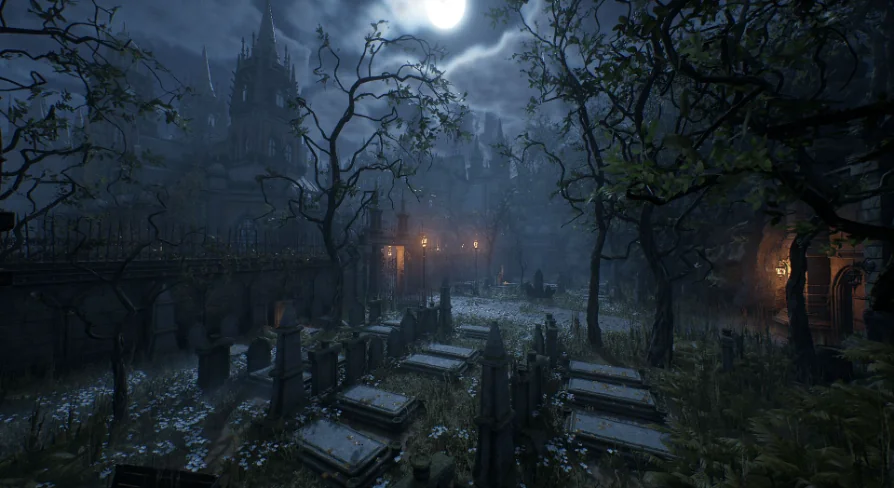
The example level is the scene shown in the screenshots. It binds the modules, props, and blueprints together into a coherent whole. For a buyer, this is the fastest way to see how the pieces are meant to be assembled. It also provides a practical starting point: you can open the level, inspect how the curbs and railings were placed, see how the lights are set up, and then start modifying it to fit your own level design.
Having a reference level is particularly valuable for a horror-themed environment because lighting is such a large part of the mood. The example level shows a fully dressed night-time scene, and because it is included, you are not left to figure out how to combine the modules and props from scratch. The blueprints within the level demonstrate their intended usage in context.
Fitting a Hostile, Night-Time Gothic Build
The tags that come with the release—Modular, Gothic, Medieval, Victorian, Night, Horror—point to the range it covers. The architecture can lean toward medieval or Victorian depending on how the pieces are arranged and which props you emphasize. The night-time horror tone is reinforced by the switchable lights and the example level's dark presentation.
In a production workflow, this environment fits a level designer or world builder who needs to assemble a gothic location quickly and fill it with atmosphere. The modular pieces handle the shell, the props handle the story, and the blueprints handle the tedious parts of dressing the scene. The included example level makes it easy to preview the final look and to understand the intended setup before adapting it to a larger layout.
The practical takeaway is that the Gothic Horror Environment is set up to let you build and dress a complete gothic horror level without waiting for custom asset creation. The modules give you the structure, the props give you the dread, and the blueprints take care of the repetitive work that would otherwise slow down your level design loop.
 Fantasy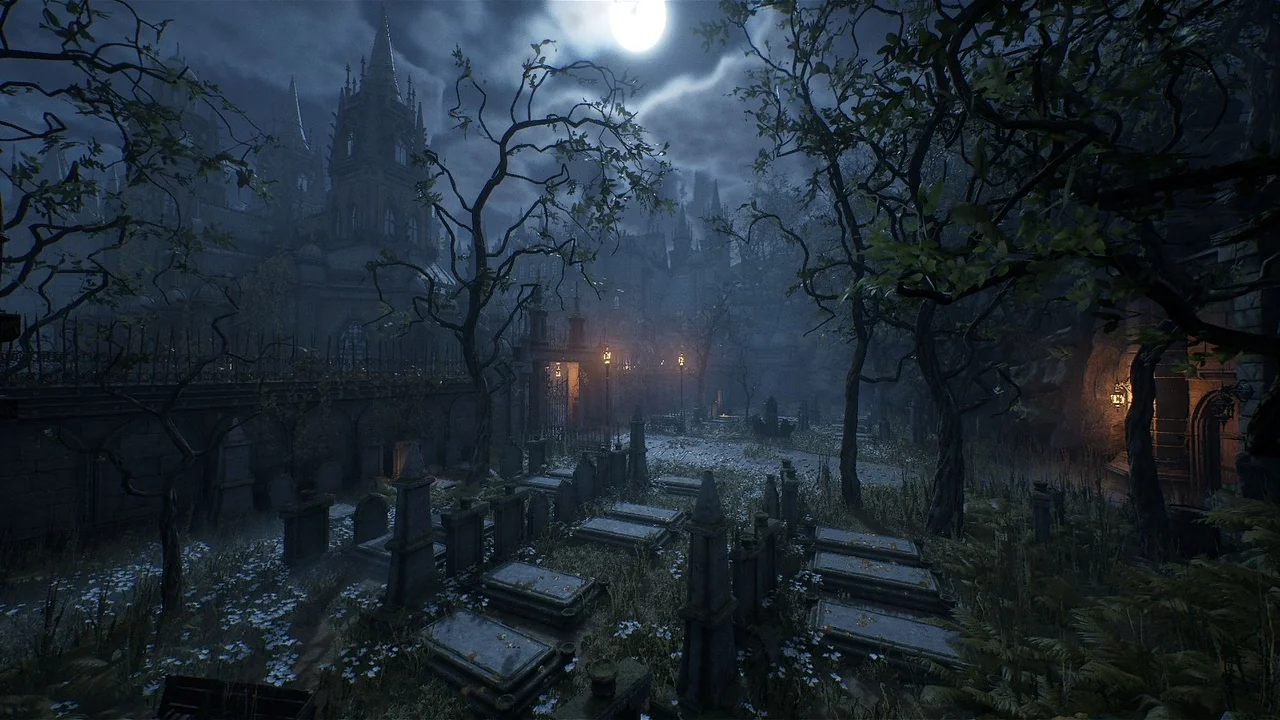
 Fantasy
 Fantasy
 Fantasy